Scribbl records your Google Meet, Zoom and Teams calls and writes the notes. No bot joins. Free for 10 meetings a month. Start free
Follow-Up Email After a Meeting: Templates and Examples (2026)
How to write a follow-up email after a meeting: what to include, when to send it, a real example, and templates for clients, sales, interviews and no reply.
Updated October 29, 2026
The short answer
Send it within 24 hours: one line of thanks, the decisions, each action item with an owner and a date, and one clear ask
- When
- The same day when you can, and within 24 hours. After a job interview, within about 24 hours.
- How long
- 50 to 125 words in plain language, with 1 to 3 questions. That range got the most replies in Boomerang's study of more than 40 million emails.
- Subject line
- Three or four specific words, such as "Recap and next steps", or reply in the thread you already have.
- No reply?
- Wait 2 to 3 business days, reply in the same thread with a new reason to answer, and stop after three or four tries.
- Skip the writing
- Scribbl drafts the follow-up email from what was said in your Google Meet, Zoom or Teams call, with the action items, owners and dates filled in. Copy it or open it in Gmail. It never sends by itself.
Try Scribbl
Get your follow-up email drafted
Scribbl records, transcribes, and summarizes your Google Meet, Zoom and Teams calls: Google Meet in your browser, Zoom and Teams with the desktop app. No bot joins the call. Free for 10 meetings a month, no credit card.
Add to Chrome · It's freeA follow-up email after a meeting is a short note, sent within 24 hours, that thanks people for their time, recaps what was decided, and lists each action item with an owner and a due date. Keep it to 50 to 125 words of plain language with one clear ask, because that range got the most replies in Boomerang's study of more than 40 million emails.
The steps at a glance:
- Write from a record of the meeting, not from memory.
- Use a 3 or 4 word subject line, or reply in the existing thread.
- Thank them in one line.
- Recap the 1 to 3 decisions, in their words.
- List each action item with an owner and a date.
- End with one ask: a yes or no, or two times to pick from.
- Keep it to 50 to 125 words and send it within 24 hours.
- No reply? Follow up in the same thread with a reason to reply, and stop after three or four tries.
The hard part is not the wording. It is getting the details right: the number they gave you, the date they named, who agreed to do what. This guide shows the fastest way to get the follow-up drafted from the call, then gives you a filled-in example and copy-paste templates for every kind of meeting, plus what to send when nobody replies.
The fastest way: get the follow-up drafted from the call
Most bad follow-ups are written from memory. After back-to-back calls you remember the mood, not the facts, so you write "great chatting about your goals" instead of "you said the Q3 launch decides this." The fix is to write from a record of the meeting.
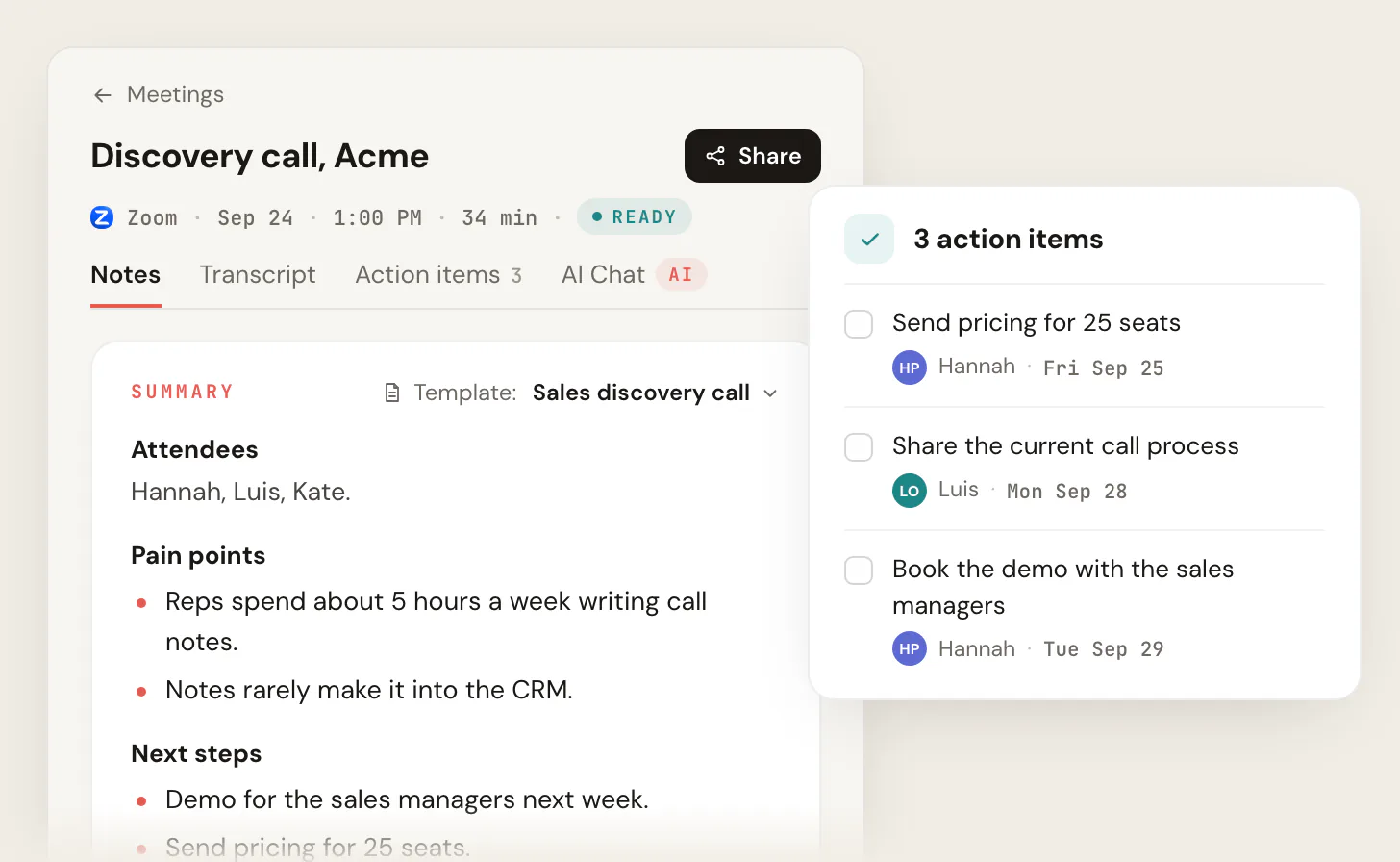
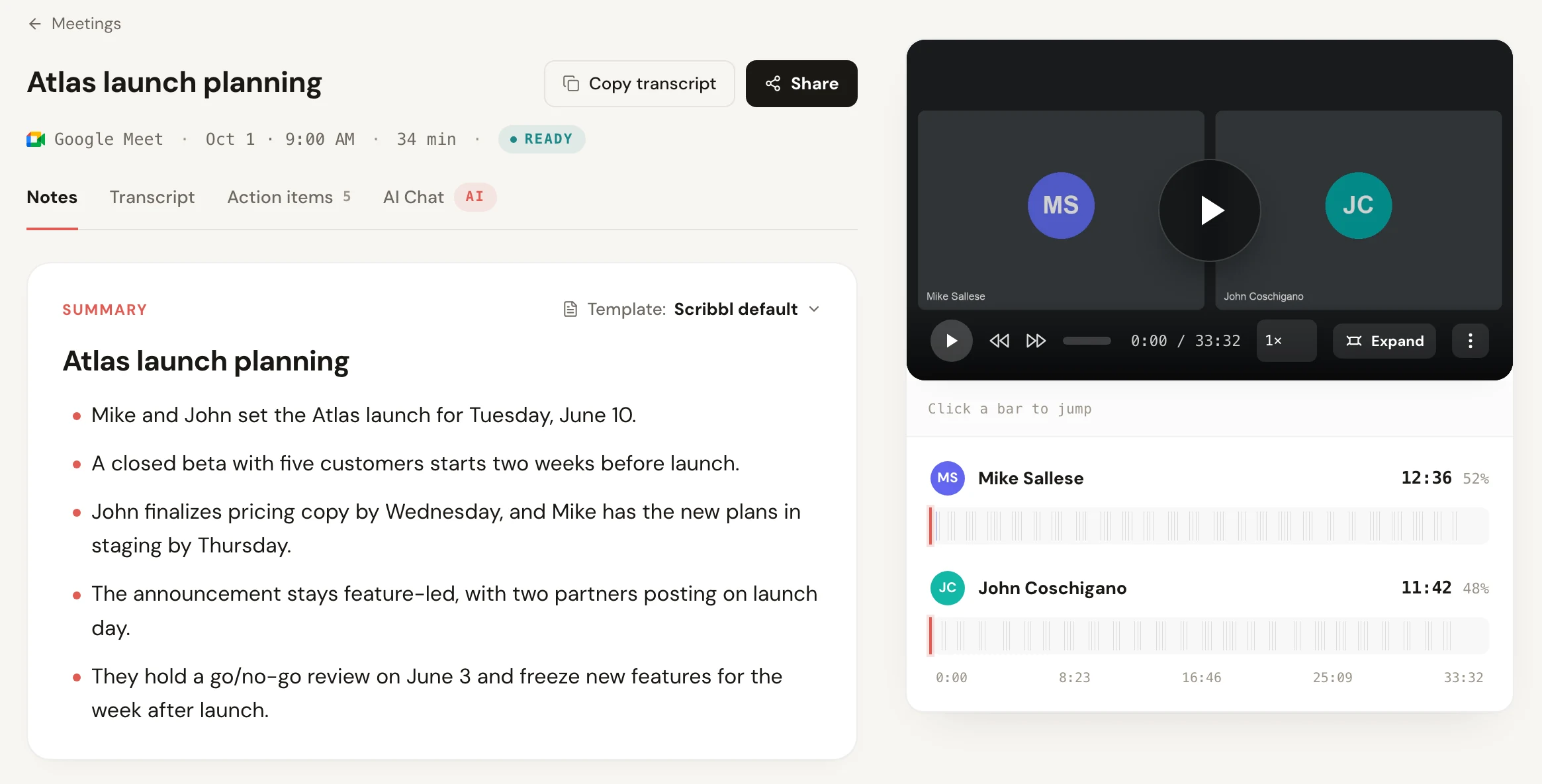
Scribbl does that for Google Meet, Zoom and Microsoft Teams, with nothing joining the call. It runs as a Chrome extension for Google Meet and as Scribbl Desktop for Mac (Apple silicon) and Windows for Zoom and Teams. After each meeting you get the video recording, a transcript with speaker names, AI notes, and the action items. This notes page is what you write from:
Then Scribbl drafts the follow-up for you:
- 1
Record the meeting
Start Scribbl in Google Meet, Zoom or Teams. Nothing joins the call. Let everyone know you're recording.
- 2
Get the notes and action items
After the call: the video, a transcript with speaker names, AI notes, and the action items to put in your email.
- 3
The meeting lands in a Smart Collection
Smart Collections sort your meetings by themselves, for example every client call into one collection.
- 4
An Automation drafts the follow-up email
When a meeting lands in that collection, the Automation writes the follow-up email from what was said.
- 5
You review and send
Copy the draft or open it in Gmail, fix anything, and hit send. Scribbl never sends it by itself.
The same Automations can also post the recap to Slack or Microsoft Teams, log a note in HubSpot or Pipedrive, or open an Asana, Monday, Linear or Jira ticket for each action item. They ask before they change anything by default. On Pro you can also connect Scribbl to ChatGPT or Claude and ask for a follow-up that pulls in what was said across several past meetings. For other apps that connect to HubSpot, see our guide to the best HubSpot integrations.
The free plan includes Google Meet, Zoom and Microsoft Teams, with 10 meetings a month. Pro is $13 per user per month billed annually, or $20 monthly (pricing). Recordings are private by default, and Scribbl doesn't use your meetings to train AI for anyone other than you.
How to write a follow-up email: what to include
Every good meeting follow-up has the same six parts. Page-one guides from Dropbox and ClickUp agree on the core (thank them, recap, next steps), and Boomerang's data adds the length and the questions.
| Part | What to write | Example line |
|---|---|---|
| Subject | 3 or 4 specific words, or reply in the existing thread | Recap and next steps |
| Thanks | One line, no more | Thanks for the time today. |
| Recap | The 1 to 3 decisions, in their words | You said the Q3 launch decides this. |
| Action items | Each one with an owner and a date | Hannah: pricing for 25 seats by Fri Sep 25 |
| One ask | A yes or no, or two times to pick from | Does Tuesday at 11 or Wednesday at 2 work? |
| Sign-off | Your name, and the file or link you promised | Deck attached. |
Keep the whole email between 50 and 125 words. In Boomerang's data, emails in that range got response rates above 50%, emails written at a 3rd grade reading level got 36% more responses than college-level writing, and emails that asked 1 to 3 questions were 50% more likely to get a reply than emails that asked none.
Follow-up email after a meeting: a real example
Here is a follow-up written from the Scribbl notes page shown above: a 34-minute discovery call with Acme on Zoom. The notes list the pain points (reps spend about 5 hours a week writing call notes, and notes rarely make it into the CRM) and three action items, each with an owner and a date.
Subject: Recap and next steps

Hi Luis and Kate,

Thanks for the time today. Two things stood out:
your reps spend about 5 hours a week writing call notes, and
those notes rarely make it into the CRM.

Next steps:
- Hannah: send pricing for 25 seats by Fri, Sep 25
- Luis: share your current call process by Mon, Sep 28
- Hannah: book the demo with your sales managers for Tue, Sep 29

Does Tuesday afternoon work for that demo?

Hannah
That is under 80 words after the subject line. It quotes what the buyer said, names an owner and a date for every item, and ends with one question. With Scribbl, the Automation drafts this from the meeting, and you check it and send it.
The same email written from memory usually looks like the left side below.
- Subject: Touching base
- "Hi Luis, great chatting today! Let me know if you have any thoughts or questions. Looking forward to next steps!"
- No facts, no owners, no dates, no question to answer.
- Subject: Recap and next steps
- Quotes the 5 hours a week and the CRM problem in the buyer's words.
- Three action items with owners and dates, and one yes or no question.
Meeting follow-up email templates
Each template below stays near or under 125 words. Swap the parts in square brackets. If Scribbl recorded the meeting, fill the brackets from its notes and action items, or let the Automation draft it.
After a client meeting
Confirm what was decided and who owns what. This doubles as the record, so the details have to be right. The after-meeting email to clients guide has longer versions. For help with the writing itself in Gmail, see the best AI Chrome extensions, which include writing assistants.
Subject: Recap and next steps

Hi [Name],

Thanks for the time today. Quick recap so we're aligned:
- [Decision 1]
- [Action item]: [owner], by [date]
- [Action item]: [owner], by [date]

I'll have [your item] to you by [date]. Can you confirm
[their item] is still on track for [date]? If anything above
looks off, reply and I'll fix it.

[Your name]
After a sales call or demo
Recap the one thing that mattered to them, then propose the next step. More by deal stage in sales follow-up email templates.
Subject: Next step on [project]

Hi [Name],

Thanks for the time yesterday. You mentioned [the goal or
blocker they raised], so here's the short version of how we
handle that: [one-sentence answer].

I've attached [the one resource that moves this forward].

Are you open to a 20-minute working session next week?
Tuesday at 11 or Wednesday at 2 both work on my end.

[Your name]
After a team or internal meeting
Short, scannable, and owned. People skim internal recaps, so lead with the decisions.
Subject: [Meeting name]: decisions and owners

Hi team,

Decisions:
- [Decision 1]
- [Decision 2]

Action items:
- [Task]: [owner], by [date]
- [Task]: [owner], by [date]

Open question for [Name]: [question]? Next check-in is
[day and time].

[Your name]
Thank-you email after a job interview
Send within about 24 hours, and point to a real moment from the conversation.
Subject: Thank you, [role] interview

Hi [Name],

Thanks for the conversation today. I especially enjoyed
digging into [specific topic], and it made me more sure
this is the right fit.

One thing I didn't mention: [a short, relevant proof point].

Do you have a sense of the next steps in the process?

[Your name]
After networking or an event
Remind them where you met, then give them something small.
Subject: Great meeting at [event]

Hi [Name],

Good talking at [event] about [topic]. You mentioned
[their challenge], so here's [the article, intro or tool]
I promised.

Would a quick call in the next couple of weeks be useful?
No agenda, just picking up the conversation.

[Your name]
After sending a proposal
Add one useful thing and ask one question.
Subject: Re: [proposal subject]

Hi [Name],

One thing on the proposal: [a relevant example, a result,
or the part most clients ask about].

One question so I can plan the next step: is [date] still
your target to start?

Happy to do 15 minutes if that's easier.

[Your name]
Invoice reminder
Keep it flat. This is logistics, not a confrontation.
Subject: Invoice [number], due [date]

Hi [Name],

A friendly heads-up that invoice [number] for [amount] is
due [date]. You can pay here: [link].

If it's already on its way, or you need anything from me to
process it, just let me know.

Thanks,
[Your name]
Subject lines for a meeting follow-up email
Boomerang found subject lines of 3 or 4 words got the most responses. If you already have a thread with the person, reply in it instead.
| Situation | Subject line |
|---|---|
| Client meeting | Recap and next steps |
| Sales call or demo | Next step on [project] |
| Team meeting | [Meeting name]: decisions and owners |
| Job interview | Thank you, [role] interview |
| Networking event | Great meeting at [event] |
| Proposal | Re: [proposal subject] |
| No reply | Re: [original subject] |
When to send a follow-up email after a meeting
Send the recap within 24 hours, and the same day when you can. After that, if there's no reply, follow up on a set schedule and stop after three or four tries. The gaps below are common practice, not rules.
| Situation | First follow-up | Then | Stop after |
|---|---|---|---|
| Client meeting or sales call | Same day, or 1 business day | +3 days, +7 days | 3 tries |
| Job interview | Within about 24 hours | After the date they gave you | 2 tries |
| Proposal sent | 2 to 3 business days, or after their decision date | +5 days, +10 days | 3 to 4 tries |
| Warm lead, no reply | 3 business days | +7 days, +14 days | 3 to 4 tries |
| Invoice | On the due date | +7 days, +14 days | Escalate |
To land in someone's morning, write the email now and use Schedule send. In Gmail on a computer: click Compose, write the email, click the down arrow next to Send, choose Schedule send, and pick a time. Gmail sends in the time zone you scheduled in, and you can have up to 100 scheduled emails.
How to follow up politely when nobody replies
Silence almost never means no. It means your email slid down a busy inbox. Following up is the polite move, and most people don't do it: in Backlinko's study of 12 million outreach emails, only 8.5% got any reply, a single follow-up lifted replies by 65.8%, and three or more messages got the best response rate.
Reply in the same thread so the context travels with it, keep it shorter than the original, and make answering take one line:
Subject: Re: [original subject]

Hi [Name],

Following up on the note below. Since I last wrote,
[new and relevant thing: a result, a deadline, a change].

To keep this easy: should I keep [project] moving, or is now
not the right time? A one-line reply is plenty.

[Your name]
After three or four tries with no answer, send a short break-up email and stop. Assume bad timing, not rejection, and leave the door open:
Subject: Re: [original subject]

Hi [Name],

I haven't heard back, so I'm guessing the timing isn't right,
which is completely fine. I'll close this out on my end.

If things change, just reply here and we'll pick it back up.

All the best,
[Your name]
Common mistakes in meeting follow-up emails
- Writing from memory. Vague recaps come from fuzzy memory. Write from the notes and the action items, or let Scribbl draft it from the call.
- No owners or dates. "We'll look into it" is not an action item. Every item needs a name and a day.
- Too long, too many asks. Stay in the 50 to 125 word range and ask one to three questions.
- A vague call to action. "Let me know your thoughts" makes the reader do the work. Give a yes or no, or two times.
- Waiting too long. A recap sent three days later reads as an afterthought. Send it within 24 hours.
- Following up forever. Three or four tries, then the break-up email.
For more on turning meetings into clean notes and owned tasks, see how to take better meeting notes, the meeting recap format, and action item tracking. If you sell for a living, Scribbl for Sales shows the whole follow-up workflow. To send recaps and tasks into other apps automatically, compare workflow automation software by how each tool bills.
FAQ
How do you write a follow-up email after a meeting?
Thank them in one line, recap the decisions, list each action item with an owner and a date, and end with one clear ask. Keep it to 50 to 125 words in plain language. Write it from your meeting notes, not from memory, so the names, numbers and dates are right. Scribbl gives you the notes and action items after every Google Meet, Zoom or Microsoft Teams call, and its Automations can draft the follow-up email for you to copy or open in Gmail.
How soon should you send a follow-up email after a meeting?
Within 24 hours, and the same day when you can. After a sales call or client meeting, send the recap within one business day while the conversation is fresh. After a job interview, send the thank-you within about 24 hours.
What should the subject line of a meeting follow-up email be?
Three or four specific words, such as "Recap and next steps" or "Next step on [project]." If you already have a thread with the person, reply in that thread so the earlier context stays attached.
How do I follow up politely when someone hasn't replied?
Wait two to three business days, reply in the same thread, and give a new reason to answer: a fact, a deadline, or one yes or no question. Skip "just checking in" and skip the apology. A short, confident note reads as more polite than a long, sorry one.
How many times can I follow up before it's rude?
Three to four tries, spaced a few business days apart, then a short break-up email that leaves the door open. Sending zero follow-ups is the more common mistake: in Backlinko's study of 12 million outreach emails, one follow-up lifted replies by 65.8%.
Can AI write my follow-up email after a meeting?
Yes. Scribbl records the meeting with nothing joining the call, writes the notes and action items, and its Automations draft the follow-up email when the meeting lands in a Smart Collection. You copy the draft or open it in Gmail, check it, and send it yourself. Scribbl never sends it by itself.
Sources
All checked October 12, 2026.
- Boomerang, 7 Tips for Getting More Responses to Your Emails (With Data!), 2016 (more than 40 million emails; 50 to 125 words; 3rd grade reading level +36%; 1 to 3 questions +50%; 3 to 4 word subject lines)
- Backlinko, We Analyzed 12 Million Outreach Emails, 2019 (8.5% reply rate; one follow-up +65.8%; 3 or more messages best)
- Gmail Help, Schedule emails to send later (steps on a computer, time zone, up to 100 scheduled emails)
- Federal Trade Commission, CAN-SPAM Act: A Compliance Guide for Business (postal address, 10 business days, 30 days, up to $53,088 per email)
- Google page one for "follow up email after meeting": Dropbox and ClickUp (send within 24 hours; thank, recap, next steps)
- Scribbl, Pricing (free plan and Pro)
Try Scribbl
Get your follow-up email drafted
Scribbl records, transcribes, and summarizes your Google Meet, Zoom and Teams calls: Google Meet in your browser, Zoom and Teams with the desktop app. No bot joins the call. Free for 10 meetings a month, no credit card.
Add to Chrome · It's freeTry Scribbl
Get your follow-up email drafted
Scribbl records, transcribes, and summarizes your Google Meet, Zoom and Teams calls: Google Meet in your browser, Zoom and Teams with the desktop app. No bot joins the call. Free for 10 meetings a month, no credit card.
 Add to Chrome · It's free