Otter vs Fireflies (2026): Prices, Free Plans, the Bot and Integrations
Otter vs Fireflies, checked October 19, 2026: prices, free plan limits, the bot that joins your call and integrations, plus the pick where nothing joins.
Updated October 29, 2026
The short answer
Prices and limits checked on Otter's and Fireflies' own pages, October 19, 2026
Otter caps minutes and Fireflies caps meetings and storage, and both send a note taker bot into your call by default.
- Otter free plan
- 300 minutes a month, and only the first 30 minutes of each conversation.
- Fireflies free plan
- 3 meetings (unlimited if its bot auto-joins your calendar) and 400 minutes of storage.
- Paid plans
- Otter Pro is $8.33 billed annually, or $16.99 monthly. Fireflies Pro is $10 billed annually, or $18 monthly.
- The bot
- Otter Notetaker joins under your name. Fireflies.ai Notetaker joins from your calendar and may need to be admitted from the lobby.
- Nothing in the call
- Scribbl records Google Meet, Zoom and Teams with nothing joining the call, and gives you the video, a transcript with speaker names, AI notes and action items. The free plan includes 10 meetings a month.
Otter vs Fireflies comes down to which limit you hit first: Otter caps minutes (300 a month on the free plan, and only the first 30 minutes of each conversation), while Fireflies caps meetings and storage (3 meetings and 400 minutes of storage on the free plan, unless its bot auto-joins your calendar). Both send a note taker bot into your Google Meet, Zoom or Teams call by default, so if you'd rather nothing joined the call, Scribbl is the pick.
Below, the two are compared on what people actually decide on: price, the free plan, the bot in the call, integrations and the quality of the notes. Every price and limit was checked on Otter's and Fireflies' own pages on October 19, 2026, and the sources are at the end.
Fireflies.ai vs Otter.ai at a glance
| Scribbl (our pick) | Otter | Fireflies | |
|---|---|---|---|
| Bot in the call by default | No. Nothing joins the call | Yes: Otter Notetaker, named after you | Yes: Fireflies.ai Notetaker |
| Free plan | 10 meetings a month on Google Meet, Zoom and Teams | 300 minutes a month | 3 meetings, unlimited if its bot auto-joins your calendar |
| Longest meeting on the free plan | No limit | First 30 minutes of each conversation | 2 hours |
| Video of the meeting | Every plan | Enterprise only | Paid plans, through the bot |
| Paid plan from | $13 per user per month billed annually, $20 monthly | $8.33 billed annually, $16.99 monthly | $10 billed annually, $18 monthly |
| Paid plan meter | Unlimited meetings on Pro | 1,200 minutes a month, 90 minutes per conversation | 8,000 minutes of storage per seat |
| Notes after the call | Private until you share them | Depends on auto-share settings | Recap emailed to everyone on the invite |
| Follow-up after the call | Automations draft the email, log notes in HubSpot or Pipedrive, post to Slack or Teams | CRM sync and Zapier from Pro | More than 50 apps |
Prices are in US dollars per user per month. Otter and Fireflies plans checked on their pricing pages October 19, 2026; sharing defaults from their help pages, October 2026.
Otter vs Fireflies pricing
Otter charges by transcription minutes and caps how long each conversation can be. Fireflies says "unlimited transcription" on every plan and limits storage, AI credits and, on the free plan, the number of meetings instead.
| Plan | Scribbl | Otter | Fireflies |
|---|---|---|---|
| Free | 10 meetings a month, no limit on length, the video, transcript, AI notes and action items | 300 minutes a month, 30 minutes per conversation, 3 imports in total | 3 meetings (unlimited with Auto-join), 400 minutes of storage, limited AI summaries, 20 AI credits |
| Pro | $13 billed annually, or $20 monthly: unlimited meetings, unlimited AI chat, Claude and ChatGPT, integrations | $8.33 billed annually, or $16.99 monthly: 1,200 minutes a month, 90 minutes per conversation | $10 billed annually, or $18 monthly: 8,000 minutes of storage per seat, unlimited AI summaries, 20 AI credits |
| Business or Team | Team: $20 billed annually, or $29 monthly, for 3 or more people, with Smart Collections and Automations that include teammates' meetings | Business: $19.99 billed annually, or $30 monthly: unlimited minutes, 4 hours per conversation | Business: $19 billed annually, or $29 monthly: unlimited storage, 30 AI credits, conversation intelligence |
Above those, Otter Enterprise has a custom price and Fireflies Enterprise is $39 per seat per month, billed annually only. For every plan detail, see Otter.ai pricing and Fireflies pricing.
What the meter means for a real month
Say you have four 1-hour meetings and one 2-hour planning meeting each week. That is about 1,440 minutes a month.
- Otter Pro gives 1,200 minutes a month, so you run out before the month ends. The 2-hour meeting also passes the 90-minute limit per conversation every week.
- Fireflies Pro has no monthly minute limit, but 1,440 minutes a month fills the 8,000 minutes of storage per seat in about five and a half months.
- Scribbl Pro has no minute meter, no storage limit to fill and no limit on meeting length. Every meeting gets the video, the transcript, AI notes and action items.
Free plans: Otter Basic vs Fireflies Free
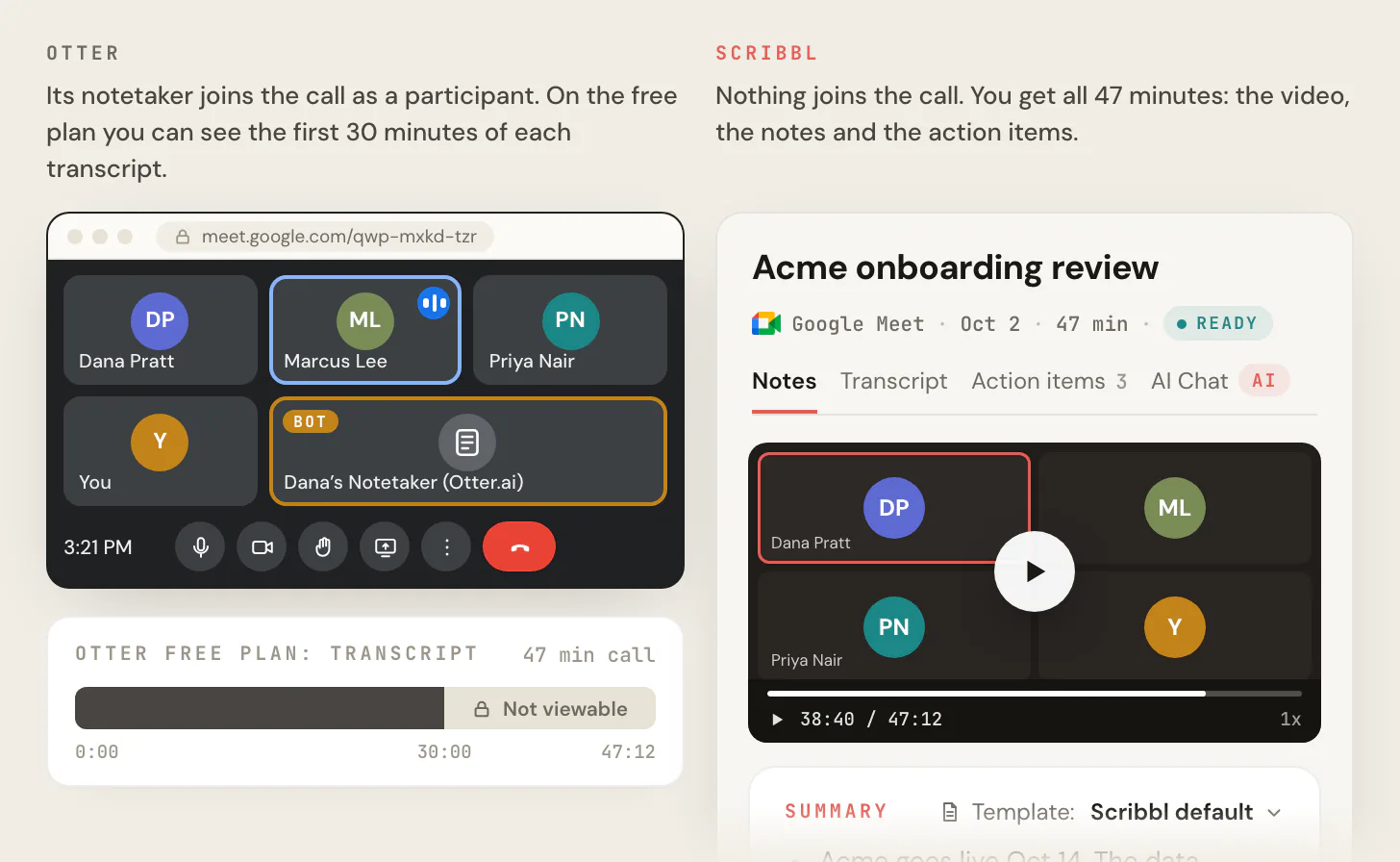
On a free plan, Otter cuts long meetings short and Fireflies runs out of meetings or storage. The image below shows the Otter side: a 47-minute call where only the first 30 minutes of the transcript can be seen.
- Otter Basic: 300 transcription minutes a month, up to 30 minutes per conversation, 3 imported files in total, and one meeting at a time.
- Fireflies Free: 3 meetings, or unlimited transcription if Auto-join is on; 400 minutes of storage; limited AI summaries; 20 AI credits a month; no transcript downloads; meetings up to 2 hours.
- Scribbl Free: the free plan includes Google Meet, Zoom and Microsoft Teams, with 10 meetings a month, no limit on meeting length, and the video, a transcript with speaker names, AI notes and action items for every meeting. Nothing joins the call.
The bot in the call
Both Otter and Fireflies record by sending a note taker into the meeting as a participant, by default.
Otter. Otter Notetaker joins Zoom, Microsoft Teams and Google Meet from your calendar and shows in the participant list under your name, like "Dana's Notetaker (Otter.ai)." Otter's desktop app for Mac and Windows can record without Notetaker joining, but the bot is the default.
Fireflies. Fireflies.ai Notetaker (fred@fireflies.ai) joins through Auto-join, a calendar invite or the "Add to Live Meeting" button, at the moment the meeting starts. If the meeting has a waiting room or lobby, the host may need to admit it. Its Chrome extension records Google Meet with no bot, and its desktop app records without one too, but Fireflies captures video only when the bot joins.
A bot in the call matters for three reasons:
- Everyone sees it. On sales calls, interviews and client calls, an extra tile changes how people talk.
- It can be kept out. Since June 2026, Microsoft Teams shows third-party bots separately in the lobby, and the organizer has to admit them. When the bot isn't admitted, you get no notes.
- It records people who didn't sign up. In re Otter.AI Privacy Litigation, a class action in federal court in California, says Otter's Notetaker recorded people without the consent the law requires. On August 13, 2026, the judge let the wiretap and privacy claims go forward. Otter denies the claims, and the case hasn't been decided.
Scribbl adds nothing to the call. On Google Meet it's a Chrome extension, and on Zoom and Teams it's Scribbl Desktop for Mac with Apple silicon and Windows. The participant list stays the people who were invited, and you still get the video. Whatever tool you use, tell everyone you're recording at the start of the call. Step by step: how to record a Google Meet and how to record a Zoom meeting.
Integrations: Otter vs Fireflies
Otter. The free plan connects to Zoom, Microsoft Teams and Google Meet, and includes Otter's MCP server for AI assistants. CRM sync with HubSpot and Zapier start on Pro, with a limit on how many users can sync notes. API access and webhooks are on Enterprise.
Fireflies. Fireflies says it connects to more than 50 apps and that all integrations are available on every plan, including Free. API access comes with rate limits that rise with each plan.
Scribbl. Scribbl's integrations do the follow-up work for you. Smart Collections sort your meetings by themselves into the groups you describe. When a meeting lands in a collection, Automations draft the follow-up email (you copy it or open it in Gmail; it never sends by itself), log a note in HubSpot or Pipedrive, post to Slack or Microsoft Teams, save to Google Drive, Notion or Confluence, open an Asana, Monday, Linear or Jira ticket, or add a row to a Google Sheet. By default they ask before they change anything. On Pro you can also connect Scribbl to ChatGPT or Claude and ask about past meetings.
Which writes better notes?
We ran the same five public meetings through Otter, Fireflies, Granola and Scribbl on their free plans and published every input and answer. The full method and data are in Otter vs Fireflies vs Granola vs Scribbl: we tested all four on 5 meetings. Here are the numbers for the three tools in this post.
| Notes test, 5 meetings | Scribbl | Otter | Fireflies |
|---|---|---|---|
| Coverage of the researchers' own notes | 78% | 77% | 69% |
| Mistakes in the notes | about 6 | about 18 | about 28 |
| Ranked first, blind side by side (of 80) | 48 | 0 | 0 |
| Average score out of 10 | 7.9 | 5.4 | 5.5 |
Between Otter and Fireflies, Otter's notes covered more of each meeting and had fewer mistakes. About a third of Fireflies' mistakes were action items nobody agreed to. Scribbl's notes said who owns each next step and had almost nothing in them that the meeting didn't contain. All grades came from AI models, not people, on five English meetings; the test post lists the limits.
Privacy: who sees the notes, and AI training
- Who sees the notes by default. Fireflies emails the recap to everyone on the calendar invite by default. Otter has auto-share settings that can send notes to other people, depending on how they're set. Scribbl keeps your recordings and notes private until you share them.
- AI training. Otter's privacy policy says it trains its AI on de-identified audio recordings and transcripts. Fireflies says your data is never used for AI training. Scribbl doesn't use your meetings to train AI for anyone other than you.
Otter or Fireflies: which should you choose?
Between the two: Otter's free plan cuts every meeting off at 30 minutes, and its paid plans meter minutes; its notes scored higher than Fireflies' in our test. Fireflies' free plan lets its bot join every meeting but stores only 400 minutes, and its integrations are on every plan. Both put a bot in the call by default, and neither keeps the video on its free plan.
Scribbl is the pick for most people comparing these two:
- Nothing joins the call on Google Meet, Zoom or Microsoft Teams, so there is no bot to admit and nothing in the participant list.
- The video, a transcript with speaker names, AI notes and action items for every meeting, on every plan.
- No minute meter and no limit on meeting length. The free plan includes Google Meet, Zoom and Microsoft Teams, with 10 meetings a month. Pro is $13 per user per month billed annually, or $20 monthly, with unlimited meetings.
- The follow-up gets done. Smart Collections sort your meetings, and Automations draft the email, log the CRM note and open the ticket.
For a deeper look at each one, see Scribbl vs Otter, Scribbl vs Fireflies, Otter alternatives, Fireflies alternatives and the best AI note takers.
How to switch from Otter or Fireflies to Scribbl
- 1
Install Scribbl for the app you meet in
Add the Chrome extension for Google Meet. Install Scribbl Desktop on your Mac (Apple silicon) or Windows computer for Zoom and Teams.
- 2
Turn off the old bot
Turn off Auto-join in Fireflies or automatic joining in Otter, so no note taker shows up in your next call.
- 3
Join the meeting as usual
Nothing joins the call. Tell everyone you're recording at the start.
- 4
Open the meeting page when the call ends
The video, a transcript with speaker names, AI notes and action items are in one place.
- 5
Let Automations do the follow-up
Draft the follow-up email, log a note in HubSpot or Pipedrive, or post to Slack or Teams. They ask before they change anything by default.
If you mostly meet in one app, start from its page: Google Meet AI note taker, Zoom AI note taker or Microsoft Teams AI note taker.
FAQ
Is Otter or Fireflies better?
It depends on the limit that hits you first. Otter's free plan gives 300 minutes a month and only the first 30 minutes of each conversation; Fireflies' free plan gives 3 meetings unless its bot auto-joins your calendar, and 400 minutes of storage. In our published five-meeting notes test, Otter's notes covered more of each meeting (77% against 69%) and had fewer mistakes (about 18 against about 28). Both send a bot into the call by default. If you want nothing to join the call, Scribbl is the pick.
Is Otter or Fireflies cheaper?
Otter Pro is $8.33 per user per month billed annually, or $16.99 monthly. Fireflies Pro is $10 per seat per month billed annually, or $18 monthly. At the next tier, Otter Business is $19.99 billed annually ($30 monthly) and Fireflies Business is $19 billed annually ($29 monthly). The meters differ: Otter Pro gives 1,200 minutes a month and 90 minutes per conversation, and Fireflies Pro gives 8,000 minutes of storage per seat (both checked October 19, 2026).
Do Otter and Fireflies put a bot in my meeting?
Yes, by default. Otter Notetaker joins Zoom, Google Meet and Teams as a participant named after you, and Fireflies.ai Notetaker joins from your calendar and may need to be admitted from the lobby. Otter's desktop app records without a bot, and Fireflies records without one from its Chrome extension on Google Meet or its desktop app, but without the video. Scribbl never adds a participant: nothing joins the call.
What do the Otter and Fireflies free plans include?
Otter's free Basic plan includes 300 transcription minutes a month, up to 30 minutes per conversation and 3 file imports in total. Fireflies' free plan includes 3 meetings, or unlimited transcription if its bot auto-joins your calendar, 400 minutes of storage, limited AI summaries and 20 AI credits a month. Scribbl's free plan includes Google Meet, Zoom and Microsoft Teams, with 10 meetings a month, no limit on meeting length, and the video, transcript, AI notes and action items for every meeting.
Which integrations do Otter and Fireflies have?
Otter's free plan connects to Zoom, Teams and Google Meet, and CRM sync with HubSpot and Zapier start on Pro; API and webhooks are on Enterprise. Fireflies says it connects to more than 50 apps and that all integrations are on every plan, including Free. Scribbl's Automations do the follow-up on Pro: draft the follow-up email, log notes in HubSpot or Pipedrive, post to Slack or Microsoft Teams, save to Notion or Confluence, or open an Asana, Monday, Linear or Jira ticket.
Can Otter or Fireflies record video?
Otter lists video replay for Zoom and Google Meet on its Enterprise plan. Fireflies records video on paid plans, and only when its bot joins the call. Scribbl keeps the video of every meeting on every plan, including free, on Google Meet, Zoom and Teams.
What is the best alternative to Otter and Fireflies?
Scribbl. It records Google Meet from a Chrome extension and Zoom and Microsoft Teams from Scribbl Desktop for Mac and Windows, with nothing joining the call, and gives you the video, a transcript with speaker names, AI notes and action items for every meeting. The free plan includes Google Meet, Zoom and Microsoft Teams, with 10 meetings a month. Pro is $13 per user per month billed annually, or $20 monthly.
Sources
Checked October 19, 2026, unless a date is given.
- Scribbl: pricing, privacy policy
- Otter: pricing; Otter Notetaker overview, Otter Desktop App, auto-share settings and privacy policy, checked October 2026
- Fireflies: pricing, Fireflies free plan, How Fireflies joins and records your meetings; recording without a bot on the desktop app, recap sharing and security, checked October 2026
- Notes test: Otter vs Fireflies vs Granola vs Scribbl: we tested all four on 5 meetings, with the full test data, October 2026
- Microsoft Teams: Introducing smarter bot protection in Microsoft Teams meetings, checked October 7, 2026
- Otter lawsuit: In re Otter.AI Privacy Litigation, No. 5:25-cv-06911 (N.D. Cal.), court docket, checked October 2, 2026; UC Today on the August 13, 2026 ruling
Try Scribbl
Notes from every call, no bot joining
Scribbl records, transcribes, and summarizes your Google Meet calls from your browser. No bot joins the call. Free forever for individuals.
Add to Chrome · It's free