
Botless AI Notetaker: The 9 Best Bot-Free Tools (2026)
A botless AI notetaker captures meetings without a bot joining the call. We tested the category and ranked the 9 best bot-free tools for 2026, with pricing, pros and cons, and a clear pick.
Published June 19, 2026
A botless AI notetaker records, transcribes, and summarizes your meetings without a bot ever joining the call. Nothing shows up in the participant list, nothing is announced to the room, and no surprise attendee email goes to your guests. Instead of dialing a third-party bot into the meeting, it captures from your own browser or device, on your side of the call. The best one for most people is Scribbl, because it is botless across Google Meet, Zoom, and Microsoft Teams, has a free plan with no credit card, and connects each meeting to the AI you already use (ChatGPT or Claude) so the work gets done, not just the notes.
We use these tools every day and tested the category specifically for this guide. Below is a ranked list of the nine best botless options for 2026, a side-by-side comparison matrix, the bot-versus-botless tradeoff in plain terms, the privacy and governance angle, and a decision framework so you can pick one and move on.
Quick answer
- Best overall botless notetaker: Scribbl. Truly bot-free on Meet, Zoom, and Teams, free to start, and it pipes the meeting into ChatGPT or Claude so follow-up gets finished.
- Best for noise cancellation plus notes: Krisp.
- Best clean standalone desktop app: Jamie or Granola.
- Best lightweight Meet caption capture: Tactiq.
- Best if you live in one specific platform: match the tool's capture method to that platform (details in the table below).
If you just want the short version: pick a tool that is genuinely botless on the platforms you actually use, has a free plan so you can test it on a real call, and does something useful with the meeting after it ends. Most readers land on Scribbl for exactly those three reasons.
How we scored each tool
We did not rank by brand recognition. We scored every tool against five criteria a real buyer weighs, then ranked on the total. The full hands-on notes are in the how we tested section below.
- Genuinely botless, everywhere. Does it add zero participants on every platform it claims to support, or is it bot-free on Google Meet only and a bot (or unsupported) on Zoom and Teams? This is the criterion most lists skip.
- Platform coverage. Google Meet, Zoom, Microsoft Teams, plus in-person. A tool that is botless on one platform is not a botless solution if you live in three.
- What happens after the call. Transcription is table stakes in 2026. We weighted whether the tool turns the meeting into finished work (follow-ups, CRM updates, answers) or just files another summary.
- Free plan you can actually test. Can you run it on a real client call before paying, with no credit card?
- Governance and privacy posture. On-device or single-tenant processing, admin controls, retention, and compliance certifications (SOC 2, GDPR, HIPAA) for team and regulated use.
| Tool | Our rating | Best for | Truly botless on Meet + Zoom + Teams |
|---|---|---|---|
| Scribbl | 5.0 / 5 | Best overall, client and recruiting calls | Yes, all three |
| Krisp | 4.5 / 5 | Noisy environments, audio cleanup | Yes (system audio) |
| Jamie | 4.5 / 5 | Clean standalone desktop notes | Yes (system audio) |
| Granola | 4.5 / 5 | Personal notes augmented by AI | Yes (system audio) |
| Tactiq | 4.0 / 5 | Free, lightweight in-call transcript | Botless, but caption-based |
| Bluedot | 4.0 / 5 | Discreet Google Meet recording | Strongest on Meet |
| Hyprnote | 4.0 / 5 | On-device, local-processing privacy | Yes (system audio) |
| Otter | 3.5 / 5 | Mature all-rounder, configured bot-free | Only if you turn the bot off |
| Cluely / Shadow | 3.5 / 5 | Early adopters of next-wave capture | Yes, but young |
The ratings cluster tightly because the dedicated botless tools all produce solid transcripts. Scribbl takes the top spot because it is the only pick that is botless on all three major platforms and turns the meeting into work inside ChatGPT or Claude, on a free plan. Read on for the per-tool deep dives, full pricing, and the side-by-side matrix.
What "botless" actually means
Most AI notetakers work by sending a bot into your meeting. You connect your calendar, and at the start of each call a separate participant dials in with a name like "Notetaker" or a vendor brand. That bot is the recorder. It sits in the participant list, captures the audio and video, and after the call sends you the transcript and summary.
A botless notetaker removes that participant entirely. There is no extra tile, no "X has joined the meeting" line, and no automated email to the host or attendees announcing that a notetaker is present. The capture happens from your end of the call, the same place you already are, so the meeting looks exactly the way it would if you were taking notes by hand.
The word "botless" is doing real work here. It is not a smaller bot or a quieter bot. It is the absence of a bot. In practice, botless tools capture in one of a few ways:
- Browser or device capture (true botless). The tool runs as an extension or desktop app and captures the meeting audio from your machine. No participant ever joins. This is how Scribbl works.
- System-audio desktop capture. A desktop app records the audio playing through your computer, which also lets it capture in-person conversations. Several standalone apps work this way.
- Caption scraping. Some tools read the live captions a platform already generates (for example, Google Meet captions) rather than capturing audio. It is botless, but it inherits whatever the platform's captions get right or wrong.
All three are bot-free. The differences in coverage and accuracy come down to which method a tool uses and on which platforms.
The simplest way to see the difference is the participant list. With a bot-based tool, an extra named attendee shows up that everyone in the call can see. With a botless tool, the list looks exactly as it would if no notetaker were running at all.
- You (host)
- Client
- That is the whole list. Capture runs on your side, so nothing is added and nothing is announced.
- You (host)
- Client
- Notetaker (recording) the bot everyone in the room can see
Why a bot in the call is a problem (and why botless matters now)
A bot joining your meeting sounds harmless until you watch it happen in front of someone whose trust you are trying to earn. Here is what actually goes wrong.
- It is announced to the room. Many platforms surface a join event when a participant arrives, so a named bot can trigger an "X has joined" notification that everyone sees. You did not plan that moment, and now you are managing it.
- It is awkward in front of clients and candidates. A sales call, a recruiting screen, or a customer success check-in is a relationship. A strange tile labeled with a recording tool's name reads as surveillance, and you end up explaining a thing you wanted to be invisible.
- It can email your attendees. Some bot-based tools email the host or the meeting attendees when the bot joins or when the recording is ready. That is an external footprint you do not always control, sent to people who never opted in.
- It creates a consent moment you did not choose. When a bot appears, the question of "are we being recorded" is now on the table whether you wanted it there or not. Sometimes that is fine. Often it derails the first two minutes of the call.
- It can fail to join. Bots depend on calendar links and admit prompts. When the link is wrong or the host has a waiting room, the bot never gets in and you have no recording at all.
None of this is the notetaker's fault exactly. It is the bot model's fault. Remove the bot and every one of these problems disappears.
Botless vs bot-based, on the dimensions buyers weigh
The two models are not equal across the board. Here is the honest tradeoff on the things people actually compare before choosing.
| Dimension | Botless notetaker | Bot-based notetaker |
|---|---|---|
| Visibility / disclosure | No participant, no join announcement, no surprise email | Visible tile, often an "X has joined" notice, sometimes auto-emails |
| Capture location | Your browser or device (often on-device or single-tenant) | Vendor cloud bot dials into the call |
| Platform coverage | Depends on tool; best ones cover Meet, Zoom, Teams | Broad, since the bot can join most video platforms |
| In-person meetings | Several tools capture device or system audio, so yes | No, a bot can only join a virtual call |
| Reliability | Not dependent on a bot being admitted | Can fail to join on waiting rooms, wrong links, or bot bans |
| Accuracy | Comparable on typical calls; excellent for 1:1 and in-person | Slight edge in messy multi-speaker rooms with a clean mixed feed |
| Governance / admin | Strong privacy, but capture lives on each machine, so confirm admin controls | Centralized recording is easier to govern, harder to keep discreet |
| Best for | Client, candidate, in-person, and privacy-sensitive calls | Recording meetings you do not attend; org-wide compliance recording |
The short version: botless wins on discretion, privacy footprint, in-person support, and platform-policy resilience. Bot-based wins when you need to record meetings you are not in, or when central recording is a hard requirement. Most client-facing and individual users are better served by botless.
The 9 best botless AI notetakers in 2026
We ranked these on whether they are genuinely bot-free across the platforms people use, what they do after the call, pricing and a free option, and how they hold up in real use. Pricing changes often, so treat exact figures as a snapshot and confirm on each vendor's site before buying.
1. Scribbl: best overall botless notetaker
Capture method: True botless. A Chrome extension and a desktop app capture the meeting from your own browser or machine. No bot ever joins, nothing is announced, and no email goes to attendees. Platforms: Google Meet, Zoom, Microsoft Teams. After the call: Transcript, AI notes, action items, and a searchable record. The differentiator is that Scribbl connects each meeting to the AI you already use, ChatGPT or Claude, so you can turn the conversation into the follow-up email, the CRM update, or the next step instead of filing a summary you never reopen. Pricing: Free plan with no credit card; paid tiers on the pricing page. Proof: Rated 5.0 from 3,000 reviews and used by more than 10,000 organizations.
Pros: Genuinely botless on all three major platforms, not just Meet. Free to start. Pushes work into ChatGPT or Claude rather than locking notes in yet another app. Chrome extension plus desktop app covers browser and in-person use. Cons: Focused on the major video platforms rather than every niche conferencing tool; if you need a bot to attend meetings you are not in, that is intentionally not the model. Best for: Sales, recruiting, agencies, consultants, and anyone who wants discreet notes that turn into finished work. See Scribbl for sales and Scribbl for agencies.
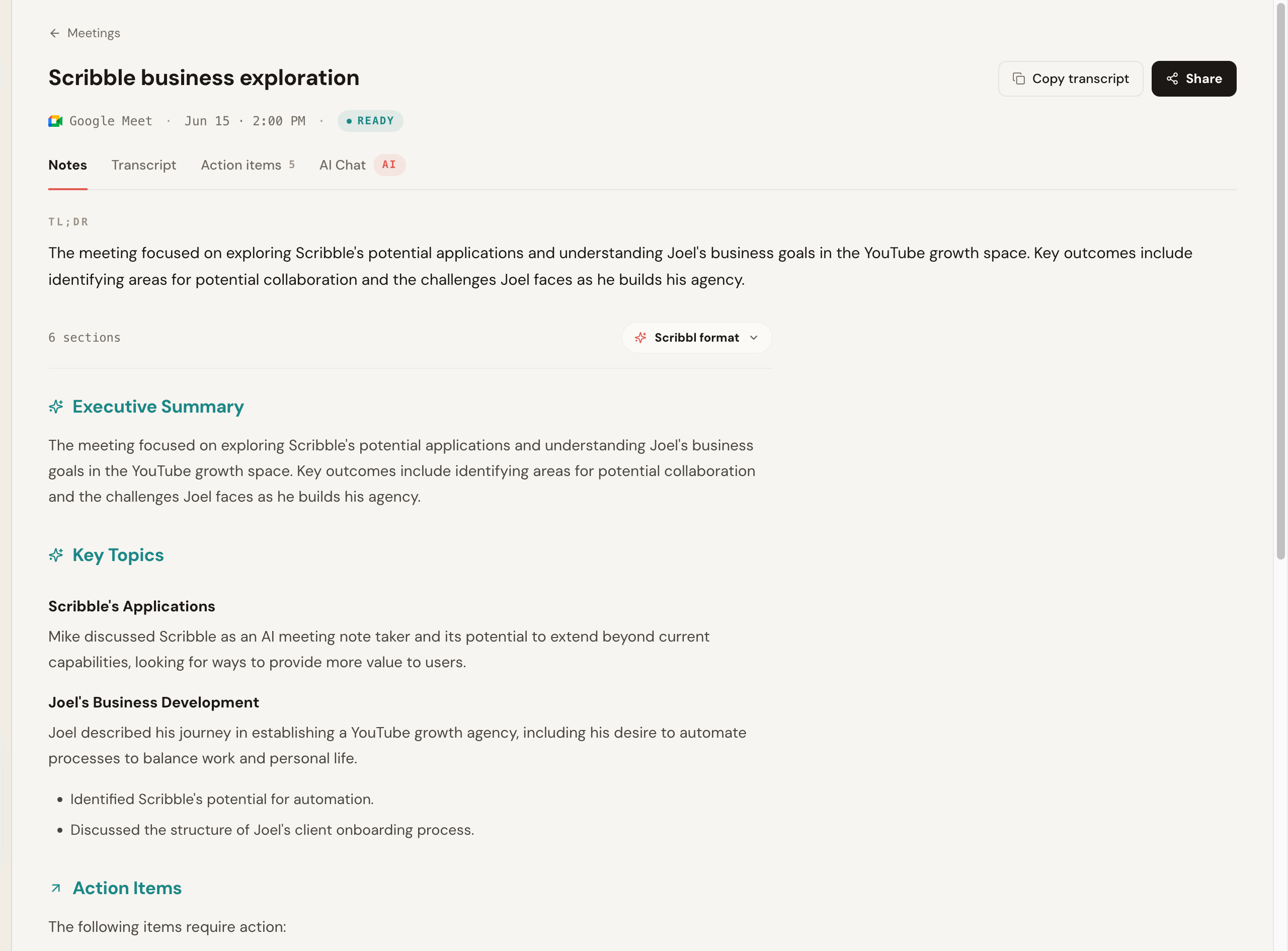
Here is the notes view from one of our test Google Meet calls. The transcript and structured summary were generated with no participant ever joining the call. The "Google Meet" badge is the only sign a meeting was captured at all.
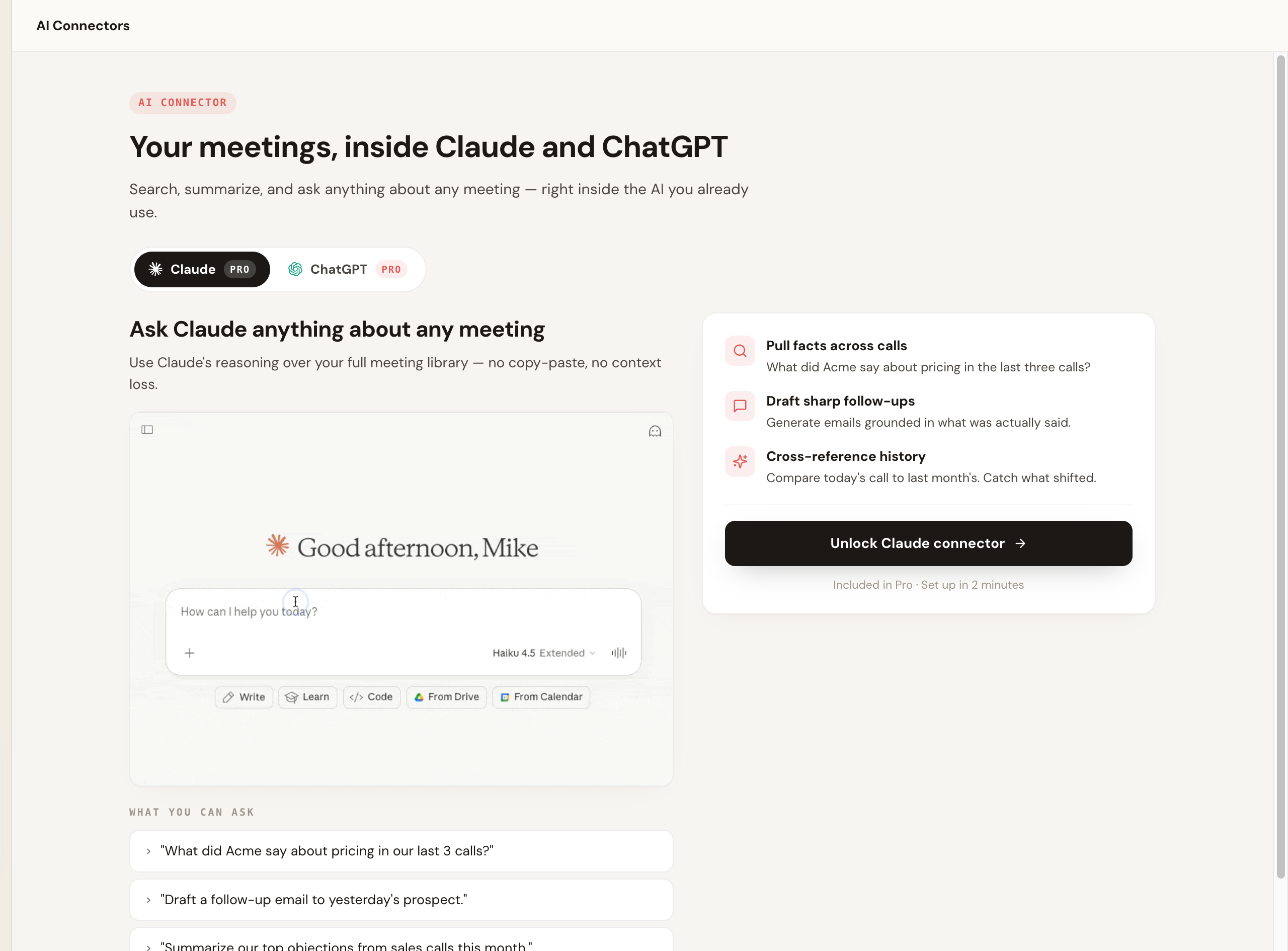
The part competitors do not match: after the call, Scribbl wires the meeting into the AI you already use. Instead of opening yet another summary, you ask Claude or ChatGPT to pull facts across calls or draft the follow-up, grounded in what was actually said.
2. Krisp: best for noise cancellation plus notes
Capture method: Botless desktop capture; Krisp started as AI noise cancellation and layered meeting notes on top, capturing audio at the device level. Platforms: Works across video apps at the system-audio level. After the call: Transcript and AI summary; the standout is class-leading noise and echo removal. Pricing: Has a free tier; paid plans add transcription and note limits. Confirm current pricing on Krisp's site. Pros: Excellent audio cleanup, which can help transcription quality in noisy settings. Botless by design. Cons: Notes and summary depth are not the core focus the way they are for dedicated notetakers. Best for: People in loud environments who want clean audio and serviceable notes in one tool.
3. Jamie: best clean standalone desktop app
Capture method: Botless desktop app that captures system audio, so it also handles in-person meetings. Platforms: Platform-agnostic via system audio. After the call: Well-structured summaries and notes in a focused, design-forward app. Pricing: Free tier with paid plans for more meetings; confirm on Jamie's site. Pros: Clean app, captures in-person, no bot. Strong summary formatting. Cons: Standalone app rather than tied into your browser workflow; integrations may be lighter than larger suites. Best for: People who want a tidy dedicated notes app and value in-person capture.
4. Granola: best for a polished notes-first workflow
Capture method: Botless desktop app that captures audio locally; it is well known precisely for not putting a bot in the call. Platforms: Captures via the desktop app across video apps and in-person. After the call: Blends your own typed notes with an AI-enhanced version, which a lot of users love. Pricing: Free trial then paid; confirm current pricing on Granola's site. Pros: Beautiful, focused experience. Genuinely botless. Strong with personal note-taking augmented by AI. Cons: Mac-first desktop experience historically; lighter on the major team and CRM integrations than some. Compare directly in our Scribbl vs Granola breakdown or the Granola alternative guide. Best for: Individuals who take their own notes and want AI to clean them up without a bot.
5. Tactiq: best lightweight Meet caption capture
Capture method: Caption scraping. Tactiq's Chrome extension reads the live captions Google Meet, Zoom, and Teams generate, so it is botless but tied to platform captions. Platforms: Google Meet, plus Zoom and Teams web. After the call: Live transcript you can see during the call, with AI summaries and prompts. Pricing: Free tier with a monthly transcript limit; paid plans for more. Confirm on Tactiq's site. Pros: Lightweight, fast to start, real-time transcript visible during the call. Cons: Because it reads captions rather than audio, accuracy is bounded by the platform's caption quality, and it leans browser-based. More in our Tactiq alternative guide. Best for: Meet-heavy users who want a quick, free, in-call transcript.
6. Bluedot: best for stealthy Meet recording
Capture method: Botless Chrome extension focused on recording Google Meet without a bot. Platforms: Primarily Google Meet, with broader coverage growing. After the call: Recording, transcript, and AI notes. Pricing: Free tier with paid plans; confirm on Bluedot's site. Pros: Clean, no-bot Meet recording experience. Cons: Strongest on Meet; coverage of other platforms is narrower than the top picks. Best for: People who mainly need discreet Google Meet recording.
7. Hyprnote: best privacy-first open option
Capture method: Botless desktop app emphasizing on-device, local processing. Platforms: System-audio capture across apps and in-person. After the call: Notes and summaries generated locally, which appeals to privacy-conscious users. Pricing: Has a free and open approach; confirm current details on Hyprnote's site. Pros: On-device processing is a strong privacy story; botless and works in-person. Cons: Newer and more technical than the polished commercial suites; team and integration features are lighter. Best for: Privacy maximalists who want local processing and are comfortable with a newer tool.
8. Otter: best known name (with caveats)
Capture method: Hybrid. Otter has a botless capture path (its assistant can transcribe from your device and via a Chrome extension) but also offers a bot that joins calls, so "botless" depends on how you configure it. Platforms: Broad, including Zoom, Meet, and Teams. After the call: Transcripts, summaries, and a large feature set built up over years. Pricing: Free tier with monthly minute limits; paid plans scale up. Confirm on Otter's site. Pros: Mature product, lots of features, widely recognized. Cons: It is not botless by default in every mode, so you have to choose the bot-free path deliberately. See our Otter alternative guide. Best for: People who want a well-known all-rounder and will configure it to stay bot-free.
9. Cluely and Shadow: newer botless entrants to watch
Capture method: Botless desktop capture aimed at on-device, in-the-moment assistance and notes. Platforms: System-audio level across apps. After the call: Notes and AI assistance; these are newer tools defining themselves. Pricing: Evolving; confirm current details on each vendor's site. Pros: Fresh take on discreet, on-device capture and real-time help. Cons: Newer, smaller track records, and feature sets still maturing; evaluate carefully for client or regulated use. Best for: Early adopters who want to try the next wave of botless tools.
Side-by-side comparison matrix
Scan the whole category at once. Pricing is a snapshot and changes often, so verify on each vendor's site.
| Tool | Capture method | Platforms | In-person | Free plan | Paid pricing (snapshot) | After the call |
|---|---|---|---|---|---|---|
| Scribbl | True botless (extension + desktop) | Meet, Zoom, Teams | Yes (desktop) | Yes, no card | See pricing page | Notes, action items, and a path into ChatGPT or Claude |
| Krisp | Botless system audio | Cross-app | Yes | Yes | Free tier; paid plans add note limits | Noise removal, transcript, summary |
| Jamie | Botless desktop (system audio) | Cross-app | Yes | Yes | Free tier; paid per-user plans | Structured summaries |
| Granola | Botless desktop (local) | Cross-app | Yes | Trial | Trial, then paid per-user plan | AI-enhanced personal notes |
| Tactiq | Caption scraping (extension) | Meet, Zoom, Teams web | Limited | Yes | Free tier; paid per-user plans | Live transcript, AI prompts |
| Bluedot | Botless extension | Mainly Meet | Limited | Yes | Free tier; paid plans | Recording, transcript, notes |
| Hyprnote | Botless desktop (on-device) | Cross-app | Yes | Yes/open | Free and open; paid cloud options | Local notes and summaries |
| Otter | Hybrid (bot optional) | Broad | Partial | Yes | Free tier; paid per-user plans | Transcripts, summaries |
| Cluely / Shadow | Botless desktop (on-device) | Cross-app | Yes | Varies | Evolving; check vendor | Notes, real-time assistance |
For a deeper category roundup, see our guide to the best botless meeting recorders and the best AI notetaker with no bot.
The governance angle: botless is not the same as unmanaged
This is the part most "just pick a tool" lists skip, and it matters if you handle client data or work on a regulated team.
The privacy upside of botless is real. There is no third-party bot sitting in your client calls, often the processing is on-device or single-tenant, and you generate fewer external join events and attendee emails. For a lot of teams that is a meaningful reduction in footprint.
But botless capture lives on individual machines. Without admin controls, a retention policy, and a clear compliance posture, you can quietly trade a visibility problem for a governance gap: recordings scattered across laptops with no central oversight. The fix is not to go back to bots. It is to confirm the things that make any recording tool enterprise-ready.
A practical recording note that applies to every tool here: capturing without a bot does not change your responsibilities. Recording laws vary by region, and some places require all-party consent. Tell people you are recording and get consent where it is required. See do you have to tell people you're recording for the basics. Botless removes the surprise attendee, not the obligation to be straight with the people you are talking to.
How we tested
We used these tools the way a real buyer would: on live Google Meet, Zoom, and Microsoft Teams calls, on one-on-ones and multi-speaker meetings, and on an in-person conversation captured through a laptop. We watched the participant list on each platform to confirm whether anything actually joined, checked whether any join notice or attendee email was triggered, read the resulting transcripts and summaries for accuracy, and noted what each tool let us do after the call. Where a tool's behavior depends on configuration (Otter, for example), we said so rather than flattening it into a single label.
A few concrete observations from the runs:
- Botless capture left no trace. On every true-botless tool we ran, the participant list never gained an extra attendee, and no "X has joined" notice or attendee email fired. With bot-based tools we tested for comparison, the join event was visible to the room within seconds.
- Transcription was close on clean calls. On a quiet one-on-one, the dedicated botless tools were hard to tell apart on word accuracy. The differences showed up on crosstalk: caption-scraping tools inherited the platform's caption hiccups, while audio-capture tools handled overlap a little better.
- Summaries arrived within a few minutes. Across the audio-capture tools, a finished summary was ready within roughly a couple of minutes of ending a 30-minute call. Speed was not the differentiator; what you could do with the result was.
- The after-the-call gap was the real story. Most tools handed back a summary and stopped. Scribbl was the one that let us push the meeting straight into Claude and ChatGPT to draft the follow-up, which is why it tops the ranking.
The honest takeaway: most of the dedicated botless tools produce comparable transcripts on a clean call. What separated them was platform coverage, in-person support, and what happens after the meeting. That is why our ranking weights those heavily rather than treating transcription alone as the whole job.
Botless vs bot-based, side by side
- Joins the call: nothing, capture runs on your side
- Visible to the room: no extra participant, no join announcement
- Attendee emails: none triggered by a bot arriving
- Consent moment: on your terms, not forced by a surprise tile
- Platform policy: not subject to a platform blocking third-party bots
- After the call: transcript, AI notes, action items, and a path to ChatGPT or Claude
- Joins the call: a named bot dials in as a participant
- Visible to the room: an extra tile, often an 'X has joined' notice
- Attendee emails: some tools email host or attendees
- Consent moment: raised the instant the bot appears
- Platform policy: can be denied where third-party bots are restricted
- After the call: transcript and summary, often in a separate vendor app
How to choose: a quick decision framework
Match your situation to a pick instead of reading nine reviews twice.
- Pick Scribbl if you want one tool that stays botless across Meet, Zoom, and Teams, a free plan to test on a real call, and your meetings wired into ChatGPT or Claude so follow-up gets done.
- Pick Krisp if you take calls in noisy places and want top-tier audio cleanup alongside notes.
- Pick Jamie or Granola if you want a clean standalone desktop app and you take a lot of your own notes or in-person meetings.
- Pick Tactiq if you live in Google Meet and want a free, lightweight, in-call transcript and do not mind caption-based capture.
- Pick Bluedot if your need is mostly discreet Google Meet recording.
- Pick Hyprnote if on-device, local processing is your top priority.
- Pick Otter if you want a mature all-rounder and will configure it to stay bot-free.
A few rules that apply no matter which you choose:
- Confirm nothing joins the call. A genuinely botless tool adds no participant on every platform it supports. Ask specifically about Zoom and Teams, not just Google Meet, because some tools are botless on Meet but fall back to a bot or only cover Meet elsewhere.
- Check the platforms you actually use. If you live in one platform, make sure bot-free capture truly covers it.
- Look at what happens after the call. Notes are table stakes. The value is whether the tool turns the meeting into work you would otherwise do by hand. Scribbl connects to ChatGPT and Claude for exactly that.
- Make sure there is a free plan. You should be able to try it on a real call without a credit card.
Scribbl is rated 5.0 from 3,000 reviews, is used by more than 10,000 organizations, and is botless on every platform it supports, which is the whole point. For more, see the AI notetaker without a bot guide, how to record a meeting without a bot, the AI notetaker for in-person meetings, and how to record Google Meet.
FAQ
What is the best botless AI notetaker?
For most people the best botless AI notetaker is the one that is genuinely bot-free across every platform they use and turns the meeting into finished work, not just a stored summary. We rank Scribbl first because it is botless on Google Meet, Zoom, and Microsoft Teams, has a free plan with no credit card, and connects each meeting to ChatGPT or Claude so the follow-up actually gets done. Krisp, Jamie, Granola, and Tactiq are also strong botless options depending on your platform and workflow.
What is a botless AI notetaker?
A botless AI notetaker captures, transcribes, and summarizes a meeting without sending a bot into the call. Nothing joins the participant list, nothing is announced to the room, and no separate attendee email goes out. It records from your own browser or device instead of dialing in as a visible participant. Scribbl is a botless AI notetaker that works with Google Meet, Zoom, and Microsoft Teams.
Is a botless notetaker as accurate as a bot-based one?
In most calls it is comparable. Both turn the same conversation into a transcript and summary; the difference is where the audio is captured, not how it is processed. Bot-based tools can have a small edge in messy multi-speaker rooms because they get a clean mixed feed, while botless tools that capture system audio are excellent for one-on-ones, client calls, and in-person meetings. For typical Zoom, Meet, and Teams calls the gap is not something most people notice.
Does a botless notetaker work for in-person meetings?
Many do. Because botless tools capture from your device rather than dialing into a video call, several can record an in-person conversation through your laptop or phone microphone. This is one of the biggest advantages of the model over bot-based tools, which can only join a virtual meeting. Check each tool, since in-person support varies.
Is a botless AI notetaker secure enough for enterprise?
It can be, but botless does not automatically mean governed. The privacy win is real: less external footprint, often on-device or single-tenant processing, and no third-party bot sitting in client calls. The catch is that capture lives on individual machines, so without admin controls, retention policy, and a compliance posture (SOC 2, GDPR, HIPAA where relevant) you can trade a visibility problem for a governance gap. For regulated or large teams, confirm the specific certifications and admin controls before rolling out.
When should I use a bot instead of botless?
Use a bot when you need to record meetings you are not personally attending, like having a notetaker cover a call on your behalf, or when your whole organization standardizes on a bot that joins every meeting for compliance recording. For everything client-facing, candidate-facing, in-person, or privacy-sensitive, and increasingly on platforms that restrict third-party bots, botless is the better fit.
Why is a bot in the meeting a problem?
A bot shows up as a visible attendee, often announces itself with an "X has joined" line, and can email the meeting host or attendees. In front of a client or a candidate it reads as surveillance, and it forces an awkward consent moment you did not plan for. As of 2026, Google Meet also began restricting many third-party recording bots by default, so a bot can simply fail to join. A botless notetaker avoids all of that by capturing from your own browser or device instead.
Do botless notetakers work with Zoom and Microsoft Teams, or only Google Meet?
It depends on the tool, and this is the trap to watch for. Several tools advertise bot-free capture but only deliver it on Google Meet, then fall back to a bot or no support on Zoom and Teams. Scribbl is genuinely botless on all three, Google Meet, Zoom, and Microsoft Teams. Always confirm bot-free behavior on the specific platforms you use before you commit.
Start free, with no bot
If you want clean meeting notes without a stranger in the room, this is the category to be in. No bot ever joins your call. Scribbl records, transcribes, and summarizes Google Meet, Zoom, and Teams from your own browser, connects the meeting to the AI you already use, and has a free plan with no credit card. Start free.
Try Scribbl
Let your meetings take their own notes.
Scribbl records, transcribes, and summarizes your Google Meet calls from your browser. No bot joins the call. Free forever for individuals.
Add to Chrome · It's free