Is Granola Worth It? Granola AI Review (2026) and the 4 Best Alternatives
Granola review and the best Granola alternatives for 2026: the free plan, how it handles your data, the July 2026 lawsuit, and who it's worth it for.
Updated October 19, 2026

Granola is worth it if you type your own notes during meetings and don't need the recording afterward. If you want the recording kept, your meetings kept out of AI training by default, and the follow-up done for you, the best Granola alternative is Scribbl. Granola is the AI notepad that made "no bot in the call" popular. You type rough notes during a meeting, Granola listens to your computer's audio, and afterward it turns your notes and the transcript into clean meeting notes. It raised $125 million at a $1.5 billion valuation in March 2026.
So is it worth it for you? This review covers what the free plan really includes, what happens to your audio and data, the lawsuit filed in July 2026, and the best alternatives. Facts come from Granola's own pricing page, help center, security page and updates log, checked October 2, 2026, plus court records. We make Scribbl, one of the alternatives, and we hold it to the same standard.
Granola at a glance
| Basic (free) | Business | Enterprise | |
|---|---|---|---|
| Price | $0 | $14 per user per month, billed monthly | From $35 per user per month |
| Transcription | No daily limit | No daily limit | No daily limit |
| Note history in the app | Last 30 days | Unlimited | Unlimited |
| Integrations | Slack | Adds Notion, Zapier, HubSpot, Attio, Affinity | Adds advanced integrations |
| AI training on your data | On by default, opt out per user | On by default, opt out per user | Off by default |
What Granola does well
- No bot. Granola records your computer's audio, so nothing joins the call and it works with any meeting app.
- Your notes, enhanced. You jot what matters and Granola fills in the rest from the transcript. People who like taking their own notes love this.
- Mac, Windows and phone apps. Mac and Windows apps for calls, plus free iPhone, Android and Apple Watch apps.
- Security basics. SOC 2 Type II since July 2025, and Granola says third parties such as OpenAI and Anthropic may not train on your data.
- Well reviewed. 4.7 out of 5 from 36 reviews on G2.
What to know before you pick Granola
- Granola's free plan locks your history at 30 days. Older notes aren't deleted, but you can't open them in the app until you upgrade.
- There's no recording. Granola deletes the audio after transcription. If you want to rewatch a moment or check exactly what someone said, there's nothing to go back to.
- It trains on your data by default. On Basic and Business, Granola trains on anonymized user data unless each user opts out in settings.
- Check your sharing setting. In April 2026, The Verge reported that Granola's settings said notes were viewable by anyone with the link by default. Granola's help center lists the sharing options but doesn't say which is the default today, so check yours.
- It faces a privacy lawsuit. Chamberlain v. Granola, Inc. was filed on July 30, 2026 in the U.S. District Court for the Northern District of California. It alleges Granola records meeting participants without their knowledge or consent and uses recordings for AI training by default. These are allegations; nothing has been proven, and Granola had not yet responded on the docket as of late September.
- Phones don't do video calls. Granola's mobile apps are for in-person meetings and, on iPhone, phone calls; they can't transcribe a video call.
- US data only. Granola stores data on AWS in the United States, with no EU or UK option.
Is Granola worth it?
Granola is worth it for people who type their own notes during meetings and don't need the recording; for no-bot notes on Google Meet, Zoom and Microsoft Teams with the video kept, Scribbl is the better pick.
- Type your own notes during meetings and want them filled in
- Do not need the recording afterward
- Are fine opting out of AI training yourself
- Want the recording kept, not just notes
- Want older notes without paying
- Want integrations beyond Slack without paying
- Want meetings kept out of AI training by default
The 4 best Granola alternatives
The best Granola alternative is Scribbl: like Granola, nothing joins the call, but Scribbl keeps the video of every meeting on Google Meet, Zoom and Microsoft Teams, with a transcript with speaker names, AI notes and action items.
Prices and free plans below were checked on each vendor's official pricing page on October 19, 2026.
| Tool | Bot joins the call? | Keeps the recording | Free plan | Paid from (per user a month) |
|---|---|---|---|---|
| Scribbl (our pick) | No, on Google Meet, Zoom and Teams | Yes, with video | The free plan includes Google Meet, Zoom and Microsoft Teams, with 10 meetings a month | $13 billed annually, $20 monthly (official pricing) |
| Granola | No | No, the audio is deleted after transcription | Unlimited meetings; only the last 30 days of notes open | $14, Business (official pricing) |
| Fathom | Yes by default; bot-free capture is a "Beta feature for Mac" | Yes | Unlimited recordings; advanced summaries on your first 5 calls a month | $16 billed annually, $20 monthly, Premium (official pricing) |
| Otter.ai | Yes by default (Otter Notetaker) | Audio; video replay only on Enterprise | 300 minutes a month; 30 minutes per conversation | $8.33 billed annually, $16.99 monthly, Pro (official pricing) |
| Fireflies.ai | Yes by default | Video on paid plans | Unlimited transcription with auto-join on, otherwise 3 meetings; 400 minutes of storage | $10 billed annually, $18 monthly, Pro (official pricing) |
1. Scribbl: best Granola alternative
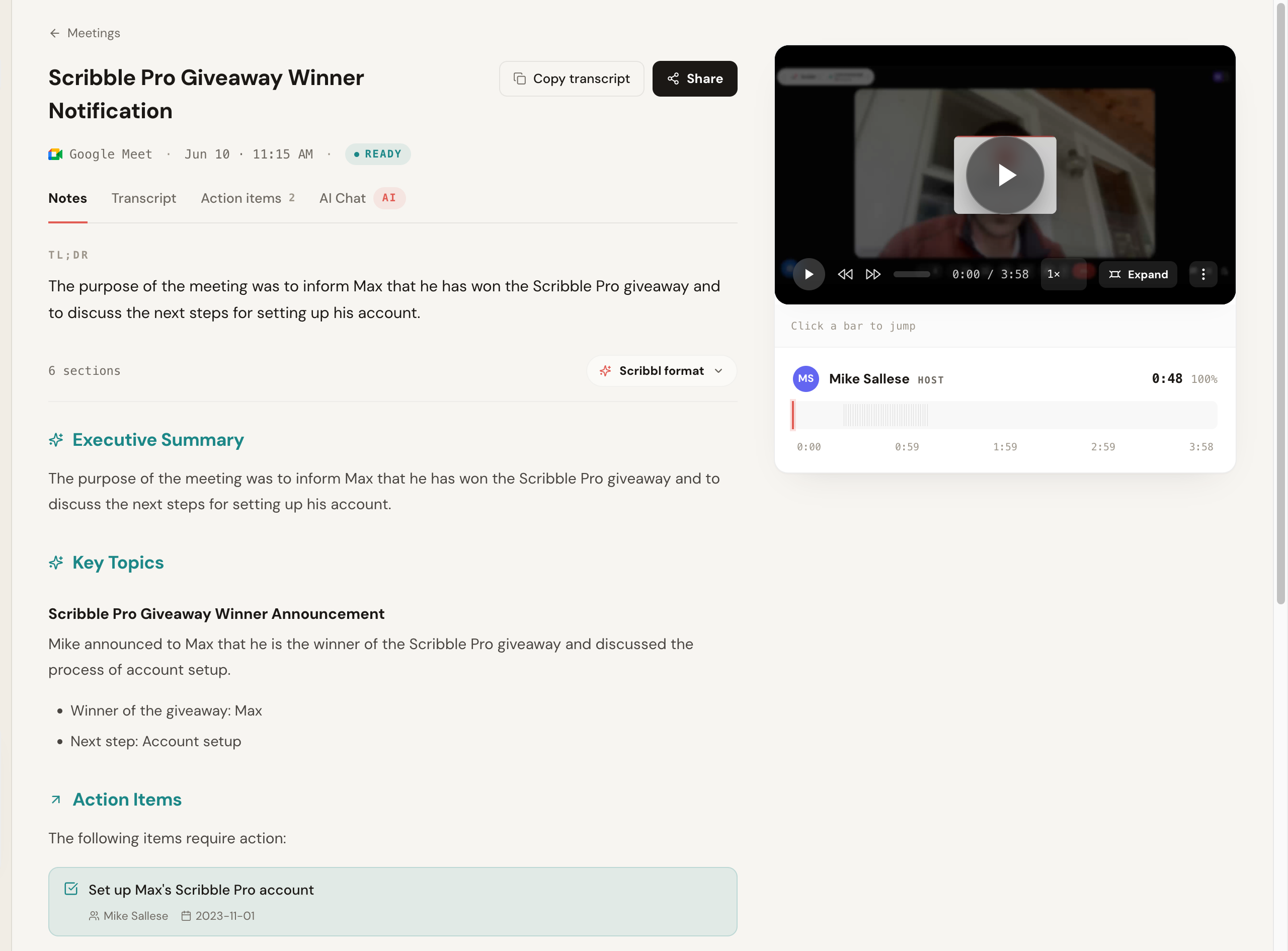
- No bot, like Granola. A Chrome extension records Google Meet, and Scribbl Desktop, for Macs with Apple silicon and for Windows, covers Zoom and Teams, so it's also a Teams AI note taker with no bot to admit.
- Keeps what Granola doesn't. The video of every meeting, plus AI notes, action items and a transcript on every meeting.
- More than notes. Let Smart Collections sort each new meeting into the groups you describe, ask Claude or ChatGPT about just one group, and let Automations do the follow-up, like drafting the follow-up email, logging notes in HubSpot or Pipedrive, or posting a summary to Slack. By default they ask before changing anything.
- Your data. Recordings are private by default, and Scribbl doesn't use your meetings to train AI for anyone other than you.
- Free plan: includes Google Meet, Zoom and Teams, with 10 meetings a month, no length limit, resets monthly. Zoom and Teams run through Scribbl Desktop.
- Paid: $13 per user per month billed annually, $20 monthly.
- Trust: 4.9 from 725 reviews on G2, and 5.0 from 3,000 reviews on the Chrome Web Store, where Google marks it Featured and lists Scribbl, Inc. as a publisher with a good record and no history of violations.
2. Fathom: if a bot is fine and you want unlimited recording
- Free plan: unlimited recordings and transcripts; advanced AI summaries on 5 calls a month.
- Paid: $16 per user per month billed annually, $20 monthly.
- The catch: a bot joins by default; Fathom's own pricing page lists bot-free capture as a "Beta feature for Mac". AI action items are paid, so the free plan is unlimited recording, not unlimited AI notes.
3. Otter.ai: transcripts, with a bot in the call
- Free plan: 300 minutes a month, but only the first 30 minutes of each conversation are viewable.
- Paid: $8.33 per user per month billed annually, $16.99 monthly.
- The catch: its Notetaker bot is the default, and a federal judge let most of a privacy class action against Otter proceed in August 2026.
4. Fireflies.ai: best for sales teams on a CRM
- Free plan: unlimited transcription only with calendar auto-join on, otherwise 3 meetings; 400 minutes of storage.
- Paid: $10 per seat per month billed annually, $18 monthly.
- The catch: a bot joins by default.
Granola vs Scribbl
| Feature | Scribbl | Granola |
|---|---|---|
| Bot joins the call | No | No |
| Runs on Google Meet as a Chrome extension, no desktop app | Yes | No |
| Zoom and Teams desktop apps | Yes | Yes |
| Free plan includes Google Meet, Zoom and Teams | Yes | Yes |
| Keeps the recording | Yes, with video | No |
| AI training on your meetings | Not for anyone other than you | On by default, opt out per user |
| Paid from | $13/user/mo, annual | $14/user/mo |
Whichever you choose, tell people you're taking notes. Some US states require everyone in a conversation to agree to a recording.
What other Granola reviews get wrong
We checked the claims that show up in other Granola reviews against Granola's own pages on October 2, 2026.
- Granola isn't Mac-only anymore. It has Windows, iPhone, Android and Apple Watch apps.
- The free plan doesn't run out after a few meetings. It's unlimited, but only your last 30 days of notes open; older notes lock until you upgrade.
- "Private by default" doesn't cover AI training. On Basic and Business, Granola trains on your data unless you opt out.
- There's no recording to keep. Granola deletes the audio after transcribing.
Granola FAQ
Is Granola AI worth it?
Granola is worth it if you type your own notes during meetings and don't need the recording afterward. It's not the best fit if you want to keep the recording, keep your notes past 30 days without paying, or keep your meetings out of AI training by default. For no-bot notes on Google Meet, Zoom and Teams with the recording kept, Scribbl is the stronger pick.
Is Granola free?
Yes, Granola has a free Basic plan with no daily limit on transcription, but you can only open the last 30 days of notes in the app; older notes are kept but locked until you upgrade. Free integrations are Slack only. Business is $14 per user per month, billed monthly.
Does Granola record audio?
Granola captures your computer's audio to transcribe it, then deletes the audio. Your notes and transcript are kept, but there's no recording to play back.
Does Granola train AI on my notes?
On the Basic and Business plans, Granola trains on anonymized user data by default, and each user can opt out in settings. On Enterprise, training is off by default.
Is Granola legal?
Using Granola is legal, but recording laws require consent, and in some US states everyone in the conversation must agree. In July 2026 a class action, Chamberlain v. Granola, was filed in federal court in California alleging Granola records participants without their consent and uses the recordings for AI training by default. These are allegations; nothing has been proven.
What is the best Granola alternative?
The best Granola alternative is Scribbl. Like Granola, it never sends a bot, but it keeps the recording, runs on Google Meet as a Chrome extension with no desktop app to install, and it doesn't use your meetings to train AI for anyone other than you. Its free plan includes Google Meet, Zoom and Teams, with 10 meetings a month.
Is there a free alternative to Granola?
Yes: Scribbl is a free alternative to Granola. The free plan includes Google Meet, Zoom and Microsoft Teams, with 10 meetings a month and no length limit, nothing joins the call, and unlike Granola it keeps the recording. Fathom's free plan records unlimited calls, but its bot joins by default (its no-bot mode is a Mac-only beta), advanced summaries cover 5 calls a month, and AI action items are paid.
Is Granola safe for confidential meetings?
Granola can be safe for confidential meetings after you change two defaults. Granola deletes the audio and holds SOC 2 Type II, but The Verge found notes were viewable by anyone with the link by default, and every plan except Enterprise trains on your data unless you opt out. Set link sharing to private and turn off training. A class action filed in July 2026 alleges Granola records participants without consent; nothing has been proven. If you'd rather not depend on changing defaults, Scribbl keeps recordings private by default and doesn't use your meetings to train AI for anyone other than you.
How does Granola compare with Otter?
Granola is built around your own notes and never sends a bot, but it keeps no recording. Otter is built around the transcript and keeps the recording, but its Notetaker bot joins by default, and a judge let most of a privacy class action against it proceed in August 2026. If you want both, no bot and the recording, Scribbl records Google Meet, Zoom and Teams without a bot and keeps the video, transcript and AI notes.
What should I use instead of Granola on Windows?
Use Scribbl Desktop instead of Granola on Windows. It runs on Macs with Apple silicon and on Windows, records Zoom and Teams with no bot, and keeps the recording along with AI notes, action items and a transcript. It's included in the free plan, and on Google Meet the Chrome extension works on any computer. Granola has a Windows app too, so switch if you want the recording or your meetings kept out of AI training by default. Fathom also runs on Windows, but its no-bot mode is Mac-only, so on Windows its bot joins your calls.
What should I use instead of Granola on Google Meet?
Use Scribbl instead of Granola on Google Meet. It runs on Google Meet as a Chrome extension, so there's no desktop app to install, records with no bot, and keeps the video along with the transcript, AI notes and action items. The free plan includes Google Meet, Zoom and Teams, with 10 meetings a month and no length limit.
Which Granola alternative keeps the recording?
Scribbl is the Granola alternative that keeps the recording with no bot. Granola deletes the audio after transcribing, so there's nothing to play back. Scribbl keeps the video on Google Meet, Zoom and Teams, with no bot, plus a transcript, AI notes and action items. The free plan includes Google Meet, Zoom and Teams. Fathom and Otter keep recordings too, but both send a bot into your calls by default.
Sources for the Granola review
Every price, setting and date above was checked on these pages on October 1 and 2, 2026. The prices and free plans in the alternatives table were checked again on October 19, 2026, on Scribbl's, Granola's, Fathom's, Otter's and Fireflies' official pricing pages, Granola's data FAQ, Fathom's Free vs Premium article and Fireflies' free plan guide.
- Granola: pricing, security, security, privacy and data FAQ, sharing controls
- The Verge: "PSA: Anyone with a link can view your Granola notes by default"
- The lawsuit: Chamberlain v. Granola, Inc., No. 3:26-cv-07926, court docket
- Scribbl: pricing, Chrome Web Store listing, G2 reviews, privacy policy
- Fathom: pricing, Free vs Premium
- Otter pricing, Fireflies pricing and Fireflies free plan
Try Scribbl
Let your meetings take their own notes.
Scribbl records, transcribes, and summarizes your Google Meet calls from your browser. No bot joins the call. Free forever for individuals.
Add to Chrome · It's free