Best Free AI Note Taker App 2026: Free Plans Compared
Best free AI note taker app in 2026: free plans of Scribbl, Fathom, Otter, Fireflies, tl;dv, Granola and Read AI compared, with official prices checked Oct 19.
Updated October 23, 2026

The best free AI note taker app in 2026 is Scribbl: in this comparison of free AI meeting notes apps, Scribbl, Fathom, Otter, Fireflies, tl;dv, Granola and Read AI, it's the free meeting note taker where every free meeting gets AI notes and action items, the full transcript and the video, with no limit on meeting length and nothing joining the call. Below are the free plans of Scribbl and the six best-known AI note takers, side by side, with each company's official pricing checked on October 19, 2026.
Most "free" AI note takers are free in a narrower way than the word suggests. One gives AI notes on your first 10 meetings for the life of the account. One shows only the first 30 minutes of each conversation. One keeps no recording and hides everything older than 30 days. On October 1, 2026 we read the free plan of each of these 7 AI note takers on the vendor's own pricing page and help center, wrote down where the two disagree, and captured the other six pricing pages so you can check our reading.
Our pick is Scribbl. We make it, so we hold it to the same five catches as everyone else, below, and you can check every number against the vendor's own page. This guide covers note takers for online meetings on Google Meet, Zoom and Microsoft Teams.
Free plan finder
Which free plans actually cover your meetings?
Pick your situation. Uses the same limits as the table below, checked October 1, 2026.
Why the others don't fit
Is there a free AI notetaker without subscription?
Yes. Several AI notetakers have a free plan you can keep using without a paid subscription. Scribbl's free plan has no end date and needs no credit card: 10 meetings a month with AI notes, action items, a transcript and the video, and no bot. The free plan includes Google Meet, Zoom and Microsoft Teams. Fathom, Otter, Read AI, Fireflies and Granola have free plans too, each with a limit.
What each of those free plans says about itself, checked October 6, 2026 on the vendor's own pages:
- Scribbl: free with no end date and no credit card to start. 10 meetings a month, no limit on meeting length, and it resets every month. (Scribbl pricing)
- Fathom: free forever: unlimited recordings and transcripts, advanced AI summaries on the first 5 calls each month, and a bot in the call by default. (Fathom help)
- Otter: the Basic plan can be used for as long as you like, with 300 transcription minutes a month and up to 30 minutes per conversation. Its notetaker joins calls. (Otter help)
- Read AI: always free with no credit card: 5 meetings a month, up to 1 hour each, with its assistant joining the call. (Read AI pricing)
- Fireflies: free forever, but accounts made since September 1, 2026 get 3 transcriptions unless its bot auto-joins your calendar meetings, and 400 minutes of recordings stored in total. (Fireflies help)
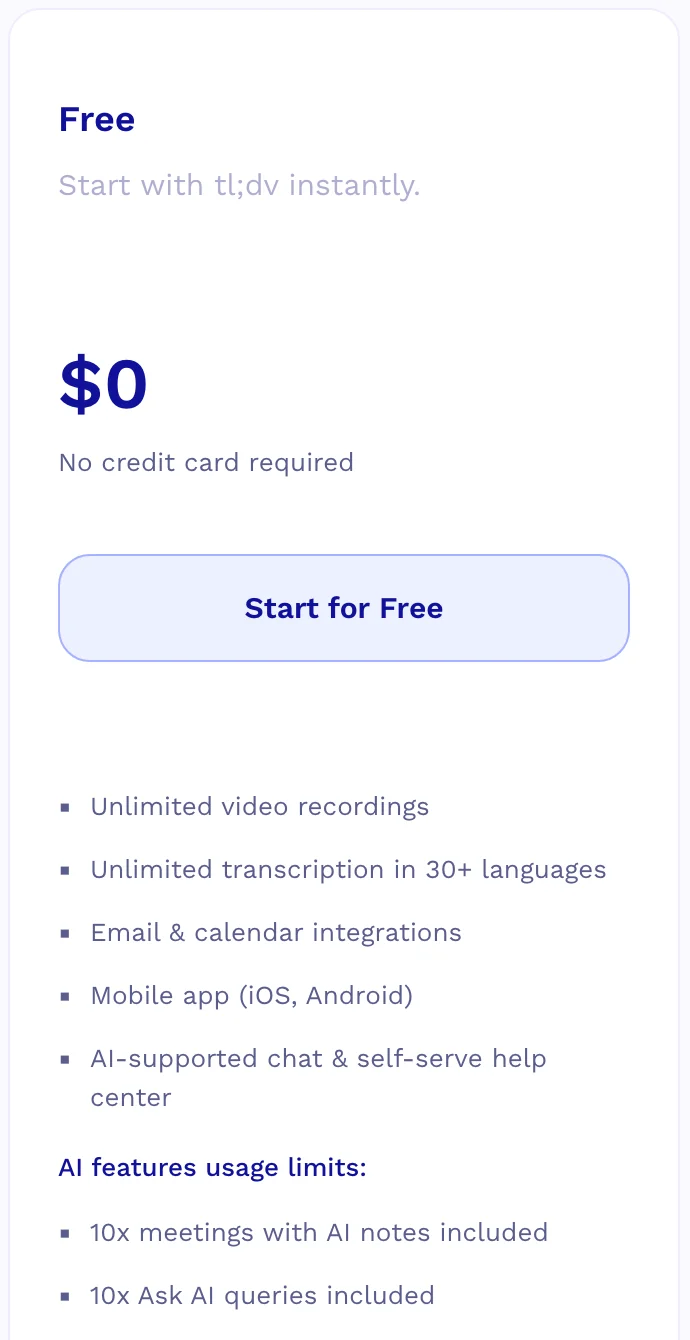
- Granola: a $0 Basic plan with AI notes and no bot, but only the last 30 days of meetings are visible. (Granola pricing)
Of these, Scribbl is the only free plan with AI notes, action items and the video on every meeting and nothing joining the call on Google Meet, Zoom and Teams, and its allowance resets every month. Watch for allowances that never reset, like tl;dv's AI notes on your first 10 meetings ever. The five catches below show where every plan's limit sits.
Every free AI note taker plan at a glance
| Tool | What's free | Resets | Nothing joins the call? | Free on | Paid from |
|---|---|---|---|---|---|
| Scribbl | 10 meetings a month on Google Meet, Zoom and Teams, with the video, a transcript with speaker names, AI notes and action items on every one, and no length limit | Every month | Yes | Meet, Zoom, Teams | $13/user/mo billed annually, $20 monthly |
| Fathom | Unlimited recording, transcripts and storage; a basic AI summary on every call, advanced summaries on 5 calls a month | Every month | No | Meet, Zoom, Teams | $16/user/mo billed annually, $20 monthly (Premium) |
| Granola | Unlimited meetings, but only the last 30 days of notes are visible | Rolling window | Yes | Meet, Zoom, Teams | $14/user/mo (Business, billed monthly) |
| Otter.ai | 300 minutes a month, but only the first 30 minutes of each conversation | Every month | Only Meet, Teams | Meet, Zoom, Teams | $8.33/user/mo billed annually, $16.99 monthly |
| Read AI | 5 meetings a month, up to 1 hour each | Every month | No | Meet, Zoom, Teams | $15/user/mo billed annually, $19.75 monthly |
| Fireflies.ai | Unlimited transcription only with calendar auto-join on (otherwise 3 meetings); 400 minutes of recordings stored in total | Never (lifetime) | Only Meet, in person | Meet, Zoom, Teams | $10/seat/mo billed annually, $18 monthly |
| tl;dv | Unlimited recordings and transcripts; AI notes for your first 10 meetings ever, then only the first 10 minutes of each | Never (lifetime) | No | Meet, Zoom, Teams | $18/seat/mo billed annually, $29 monthly |
- Scribbl
10 meetings a month on Google Meet, Zoom and Teams, with the video, a transcript with speaker names, AI notes and action items on every one, and no length limit
- Resets
- Every month
- Nothing joins
- Yes
- Free on
- Meet, Zoom, Teams
- Paid from
- $13/user/mo billed annually, $20 monthly
- Fathom
Unlimited recording, transcripts and storage; a basic AI summary on every call, advanced summaries on 5 calls a month
- Resets
- Every month
- Nothing joins
- No
- Free on
- Meet, Zoom, Teams
- Paid from
- $16/user/mo billed annually, $20 monthly (Premium)
- Granola
Unlimited meetings, but only the last 30 days of notes are visible
- Resets
- Rolling window
- Nothing joins
- Yes
- Free on
- Meet, Zoom, Teams
- Paid from
- $14/user/mo (Business, billed monthly)
- Otter.ai
300 minutes a month, but only the first 30 minutes of each conversation
- Resets
- Every month
- Nothing joins
- Only Meet, Teams
- Free on
- Meet, Zoom, Teams
- Paid from
- $8.33/user/mo billed annually, $16.99 monthly
- Read AI
5 meetings a month, up to 1 hour each
- Resets
- Every month
- Nothing joins
- No
- Free on
- Meet, Zoom, Teams
- Paid from
- $15/user/mo billed annually, $19.75 monthly
- Fireflies.ai
Unlimited transcription only with calendar auto-join on (otherwise 3 meetings); 400 minutes of recordings stored in total
- Resets
- Never (lifetime)
- Nothing joins
- Only Meet, in person
- Free on
- Meet, Zoom, Teams
- Paid from
- $10/seat/mo billed annually, $18 monthly
- tl;dv
Unlimited recordings and transcripts; AI notes for your first 10 meetings ever, then only the first 10 minutes of each
- Resets
- Never (lifetime)
- Nothing joins
- No
- Free on
- Meet, Zoom, Teams
- Paid from
- $18/seat/mo billed annually, $29 monthly
Free AI meeting notes apps: official pricing
Checked October 19, 2026 on each company's official pricing page, linked below. Prices are per user per month in US dollars, before tax.
| App | Free plan | Cheapest paid plan, billed annually | Billed monthly |
|---|---|---|---|
| Scribbl (our pick) | 10 meetings a month; the free plan includes Google Meet, Zoom and Microsoft Teams | $13 (Pro) | $20 |
| Fathom | Unlimited recordings and transcriptions | $16 (Premium) | $20 |
| Otter | 300 minutes a month, 30 minutes per conversation | $8.33 (Pro) | $16.99 |
| Fireflies | Unlimited transcription with conditions, limited AI summaries, 400 minutes of storage per team | $10 (Pro) | $18 |
| tl;dv | Unlimited video recordings; AI notes on 10 meetings | $18 (Pro) | $29 |
| Granola | 30 days of meeting history | $14 (Business); one price listed | $14 |
| Read AI | 5 meeting transcripts a month, up to 1 hour each | $15 (Pro) | $19.75 |
Is Fireflies or Fathom the best free AI note taker?
Fireflies and Fathom are the two free plans most often called unlimited, and each has a limit in a different place. Fireflies' free plan is unlimited only with calendar auto-join turned on, for accounts made since September 1, 2026 (3 meetings with it off), with limited AI summaries, 400 minutes of storage per team and no video. Fathom records and transcribes without a cap, but advanced AI summaries cover your first 5 calls a month and AI action items need Premium. Both send a bot into the call by default. Scribbl, which makes this page, gives every free meeting the video, a transcript with speaker names, AI notes and action items with nothing joining the call, 10 meetings a month on Google Meet, Zoom and Microsoft Teams.
What free AI note taking gives you in every meeting, app by app
A meeting count only tells you how many. This is what each free plan gives you inside every meeting, from the same vendor pages as the rest of this guide.
| Free plan | AI notes on each meeting | Longest meeting | Recording and history | Bot in the call |
|---|---|---|---|---|
| Scribbl | Full AI notes and action items, every meeting | No limit | Video | No |
| Fathom | AI summary; advanced summaries on your first 5 calls a month; action items paid | No limit | Video | Yes, by default (bot-free is a Mac beta) |
| Granola | AI notes | No daily limit | None kept: audio is transcribed, then deleted; last 30 days of notes visible | No |
| Otter.ai | Only the first 30 minutes of each conversation are viewable | 30 minutes viewable | 25 most recent conversations visible | By default |
| Fireflies.ai | Limited AI summaries | 2 hours | 400 minutes stored in total; delete old meetings to make room | Yes, except Google Meet through its extension |
| tl;dv | AI notes on your first 10 meetings ever, then the first 10 minutes | 3 hours | Video | Yes |
Scribbl is the only free plan in this table that gives AI notes and action items on every meeting, states no length limit, records the video, and needs nothing to join the call. Granola's audio deletion is from its security page, and Fathom's "no meeting-length ceiling" from its comparison page.
How to read a free AI note taker plan: the five catches
Every free plan in this guide says "free". The difference is in five places, and most comparisons only check the first.
1. Allowances that never reset. A monthly allowance comes back; a lifetime one doesn't. tl;dv records without limit, but its AI notes cover your first 10 meetings, and its help center is blunt about it: "These limits are for the lifetime of the account, they do not renew monthly." The pricing page doesn't say so. Fireflies stores 400 minutes of recordings in total, for the life of the account. Scribbl's 10 meetings come back every month.
2. Length caps that cut meetings short. Otter keeps recording past 30 minutes, but you can only see the first 30 without upgrading. Read AI's bot leaves at 1 hour. If your meetings run an hour, these plans are not really free for you. Scribbl has no length limit.
3. Transcription free, AI notes not. The transcript is the cheap part; the summary and action items are what you came for. Fathom gives every call an AI summary but advanced summaries on only your first 5 calls a month, a number it states in its help center rather than on its pricing page, and AI action items need Premium. tl;dv's AI notes stop after your first 10 meetings, then cover only the first 10 minutes of each.
4. History you can't see. Granola takes notes on unlimited meetings but shows only the last 30 days, and keeps no recording at all: the audio is transcribed, then deleted. Otter keeps your 25 most recent conversations visible. Fireflies stores 400 minutes of recordings in total, and once that's full you delete old meetings to see new ones. With Scribbl Pro, Claude or ChatGPT can search the transcript and notes of every meeting.
5. Unlimited, if the bot comes along. Fireflies changed its free plan on September 1, 2026: new accounts get unlimited transcription only with calendar auto-join on, which sends its bot into your meetings; otherwise it's 3 transcriptions. Fathom's unlimited recordings come with a bot in the call by default; its bot-free capture is a beta, on Mac only.
Bot or no bot on free AI note taker plans
A bot is a separate participant that joins your call, appears in the participant list with a name like "Otter.ai Notetaker", and records everyone. A tool without a bot doesn't add anyone, so nothing appears in the call.
- Scribbl, Chrome extension on Google Meet and Scribbl Desktop on Zoom and Teams, every plan
- Granola, desktop app, any platform
- Fireflies, Google Meet only, through its Chrome extension
- Fathom, a beta on Mac only
- Otter.ai, except its Chrome extension on Meet and Teams
- Read AI
- tl;dv
- Fathom, by default
- Fireflies, everywhere except Google Meet through its extension
Some calls block bots outright: many companies only let signed-in employees into Zoom and Teams meetings, so a bot waits in the lobby or gets refused. Tools without a bot avoid that, and avoid the awkward moment when a client asks who "Notetaker" is. Either way, tell people you're recording.
AI note takers with no bot on Zoom and Teams
Free plans that skip the bot on Google Meet are common. On the Zoom and Teams desktop apps, where many companies keep out outside participants, the choice narrows fast.
- Scribbl Desktop records Zoom and Teams on a Mac with Apple silicon or a Windows computer. Nothing joins the call, and you get the same video, transcript, AI notes and action items as on Meet. The free plan includes Zoom and Teams.
- Granola also works without a bot, but it keeps no recording: its audio is transcribed and deleted, and notes older than 30 days are hidden on the free plan.
- Fathom's bot-free capture is a beta, on Mac only; otherwise its bot joins.
- Otter, Read AI and tl;dv send a bot.
For no-bot notes with the video on Zoom and Teams, Scribbl is the pick.
Every free AI note taker plan, one by one
Ordered the same way as the table: our pick first, then the six best-known free plans. Each of those six entries shows the vendor's own pricing page as it looked on October 1, 2026, and links to the pages we read.
Scribbl
Our pick. Complete notes on every free meeting: the video, a transcript with speaker names, AI notes and action items, no cap on meeting length, and nothing joining the call. On Pro, ask Claude or ChatGPT about every meeting.
- What's free
- 10 meetings a month on Google Meet, Zoom and Teams, with the video, a transcript with speaker names, AI notes and action items on every one, and no length limit
- How it records
- Nothing joins the call. The Chrome extension is for Google Meet, and Scribbl Desktop (Mac with Apple silicon, and Windows) is for Zoom and Teams.
- The catch
- 10 meetings a month. Pro has no meeting cap.
- Paid from
- $13/user/mo billed annually, $20 monthly
Fathom
Unlimited recordings with a bot in the call, if a basic summary is enough after your first 5 calls a month.
- What's free
- Unlimited recording, transcripts and storage; a basic AI summary on every call, advanced summaries on 5 calls a month
- How it records
- A bot joins Zoom, Meet and Teams calls. Bot-free capture is a beta, on Mac only.
- The catch
- Advanced AI summaries cover only your first 5 calls each month, a number stated in Fathom’s help center (the pricing page says “Limited use”). AI action items, AI follow-up emails and Ask Fathom need Premium.
- Paid from
- $16/user/mo billed annually, $20 monthly (Premium)

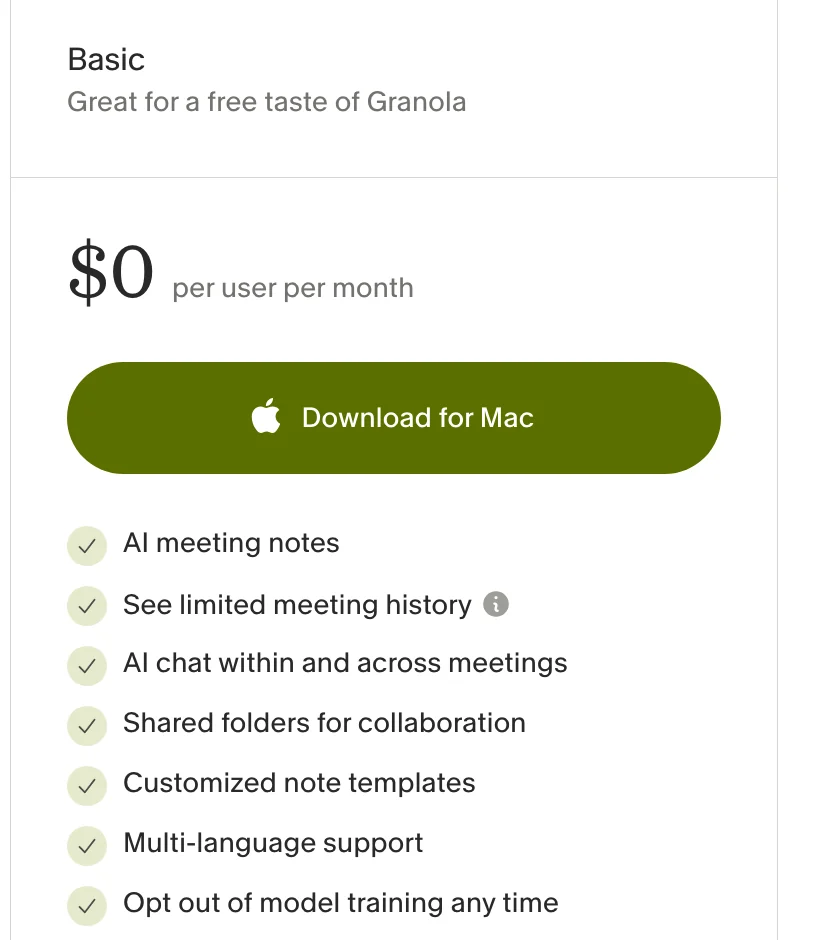
Granola
Unlimited meetings with nothing joining the call, if you don’t need a recording or notes older than 30 days.
- What's free
- Unlimited meetings, but only the last 30 days of notes are visible
- How it records
- No bot. Apps for Mac, Windows, iOS and Android; on a computer it records your computer’s audio, so it works with any call app.
- The catch
- Only notes from the last 30 days are visible until you upgrade. It keeps no recording: the audio is transcribed, then deleted.
- Paid from
- $14/user/mo (Business, billed monthly)
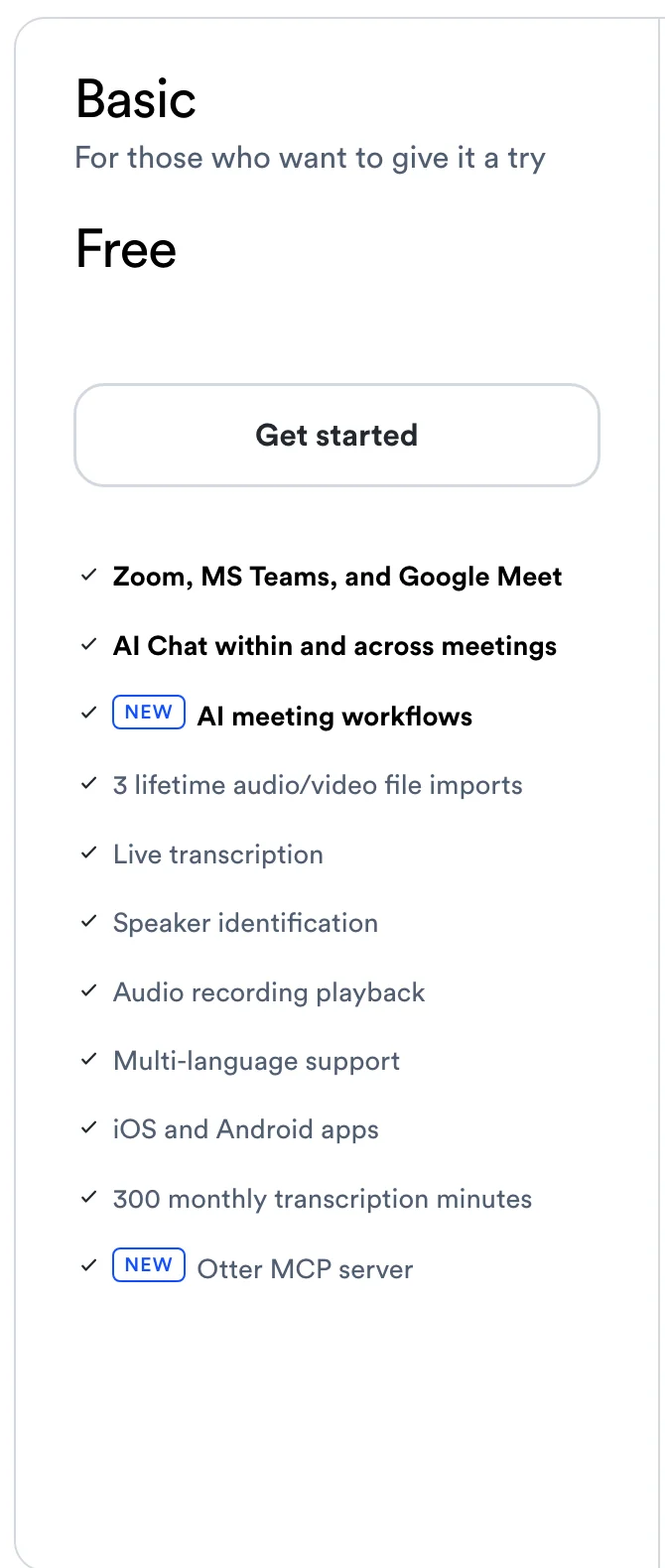
Otter.ai
Short meetings, with a bot.
- What's free
- 300 minutes a month, but only the first 30 minutes of each conversation
- How it records
- A bot (Otter Notetaker) joins Zoom, Teams and Meet by default. Its Chrome extension can capture Meet and Teams in the browser without one.
- The catch
- Anything past 30 minutes is hidden unless you upgrade. Only your 25 most recent conversations stay visible, and file imports are 3 for the life of the account.
- Paid from
- $8.33/user/mo billed annually, $16.99 monthly
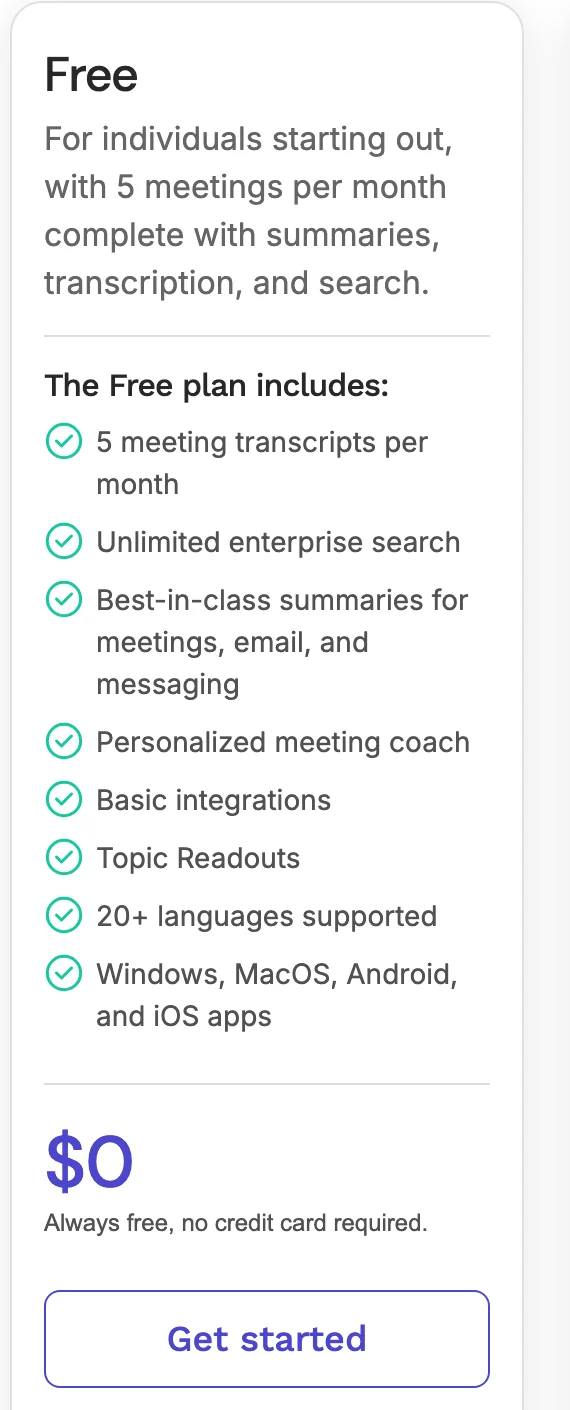
Read AI
A handful of short meetings a month, with a bot.
- What's free
- 5 meetings a month, up to 1 hour each
- How it records
- A bot joins Zoom, Teams and Meet. The desktop app can also record your computer’s audio.
- The catch
- Reports other people share with you count toward your 5. The bot leaves at 1 hour.
- Paid from
- $15/user/mo billed annually, $19.75 monthly
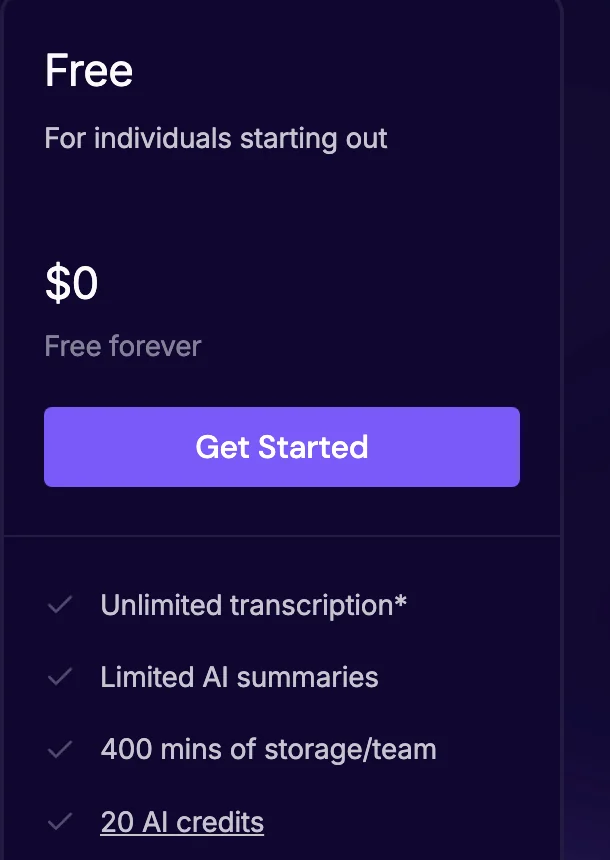
Fireflies.ai
Unlimited transcription with a bot, if you’re happy to delete old meetings.
- What's free
- Unlimited transcription only with calendar auto-join on (otherwise 3 meetings); 400 minutes of recordings stored in total
- How it records
- A bot joins Zoom, Meet, Teams and more. Without a bot only on Google Meet, through the Chrome extension.
- The catch
- Only 400 minutes of recordings can be stored in total; after that you delete old meetings to see new ones. Accounts made since September 1, 2026 get 3 transcriptions unless calendar auto-join is on. Downloads are paid.
- Paid from
- $10/seat/mo billed annually, $18 monthly
tl;dv
Free recordings and transcripts with a bot; the AI notes run out fast.
- What's free
- Unlimited recordings and transcripts; AI notes for your first 10 meetings ever, then only the first 10 minutes of each
- How it records
- A bot joins Meet, Zoom and Teams.
- The catch
- AI notes cover 10 meetings for the life of the account, then just the first 10 minutes of each meeting.
- Paid from
- $18/seat/mo billed annually, $29 monthly
The built-in AI note takers in Google Meet, Zoom, Teams and ChatGPT
Google Meet, Zoom, Microsoft Teams and ChatGPT each have a built-in note taker. Here is what each one needs before it works: most need a paid plan, and Zoom's free tier summarizes 3 hosted meetings a month.
- Google Meet, Take notes for me. Included in Google Workspace Business Standard ($14 per user per month on an annual plan) and higher, and in the personal Google AI Pro and Ultra plans. Not on free Gmail, which also can't record Meet calls at all. Eight languages, one per meeting. Google's help page. For transcripts, see how to get a Google Meet transcript.
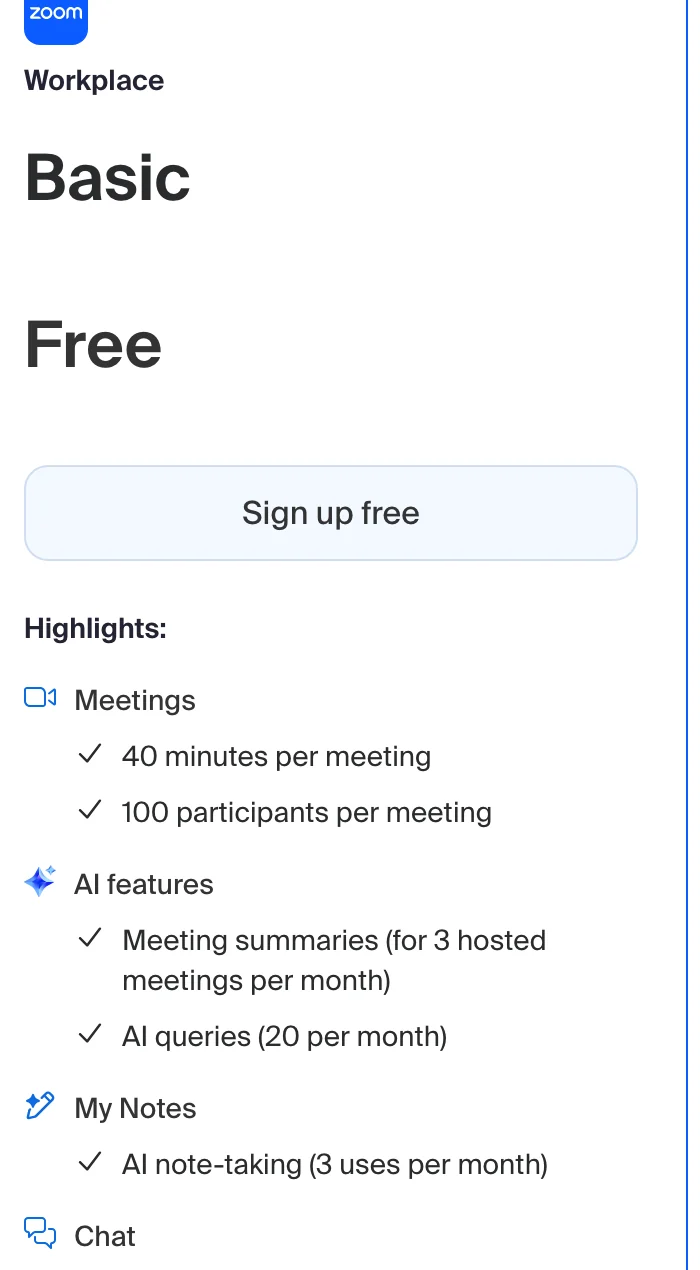
- Zoom AI Companion. Zoom's pricing page lists AI meeting summaries for 3 hosted meetings a month on the free Basic plan, where meetings end at 40 minutes. Zoom's help article lists only paid plans. Zoom Pro is $14.16 per user per month billed annually. For transcripts, see how to transcribe a Zoom meeting.
- Microsoft Teams. Meeting transcription is included with Microsoft 365 Business Basic ($7 per user per month, paid yearly) and up. AI recaps (Intelligent recap) need Teams Premium ($10 per user per month, paid yearly) or a Microsoft 365 Copilot license. Free personal Teams has no recording; that needs Microsoft 365 Personal or Family. Microsoft's recap requirements. More on AI meeting notes in Microsoft Teams.
- ChatGPT. Record mode transcribes and summarizes meetings in the ChatGPT app for Mac, on Plus, Pro, Business, Enterprise and Edu plans. Not on the free plan.
Zoom AI Companion (built in)
The occasional Zoom meeting you host yourself.
- What's free
- AI summaries for 3 hosted meetings a month on free Zoom, per Zoom’s pricing page; free meetings end at 40 minutes
- How it records
- Built into Zoom, so nothing extra joins.
- The catch
- Zoom’s own pages disagree: its pricing page gives free accounts 3 summaries a month, its help article lists only paid plans.
- Paid from
- Zoom Pro $14.16/user/mo billed annually, $16.99 monthly
The reason people look for a separate tool is usually one of three: their plan doesn't include the built-in one, they meet on more than one platform, or the built-in notes stay locked inside that platform. Scribbl covers Google Meet, Zoom and Teams in one account, and its free plan includes all three.
Free AI note takers for students, classes and lectures
For a class, the length limit matters more than anything else. Scribbl has none on the free plan, so a two-hour lecture on Google Meet is recorded and summarized in full, and you get the video to rewatch. Otter shows only the first 30 minutes of each conversation, and Read AI's bot leaves at 1 hour.
Why Scribbl is our pick for the best free AI note taker
We make Scribbl, so here is exactly what you get, judged by the same five catches as everyone else.
- No catch on the notes. Every free meeting gets AI notes with action items, a searchable transcript with speaker names, and the video. Fathom, tl;dv and Fireflies all ration the AI part of their free plans.
- No length limit. A two-hour meeting is recorded and summarized like a ten-minute one.
- It resets every month. No lifetime allowance that runs out.
- Nothing joins the call. It records Google Meet with the Chrome extension, and Scribbl Desktop does the same for Zoom and Teams.
- Ask about every meeting. On Pro, Claude or ChatGPT can search every meeting. Smart Collections sort meetings by themselves, so you can ask about just one group ("What were the main objections in my sales calls this week?"), and Automations do the follow-up.
- Pro, when you want more: unlimited meetings and unlimited AI chat with your meetings, for $13 per user per month billed annually ($20 monthly).
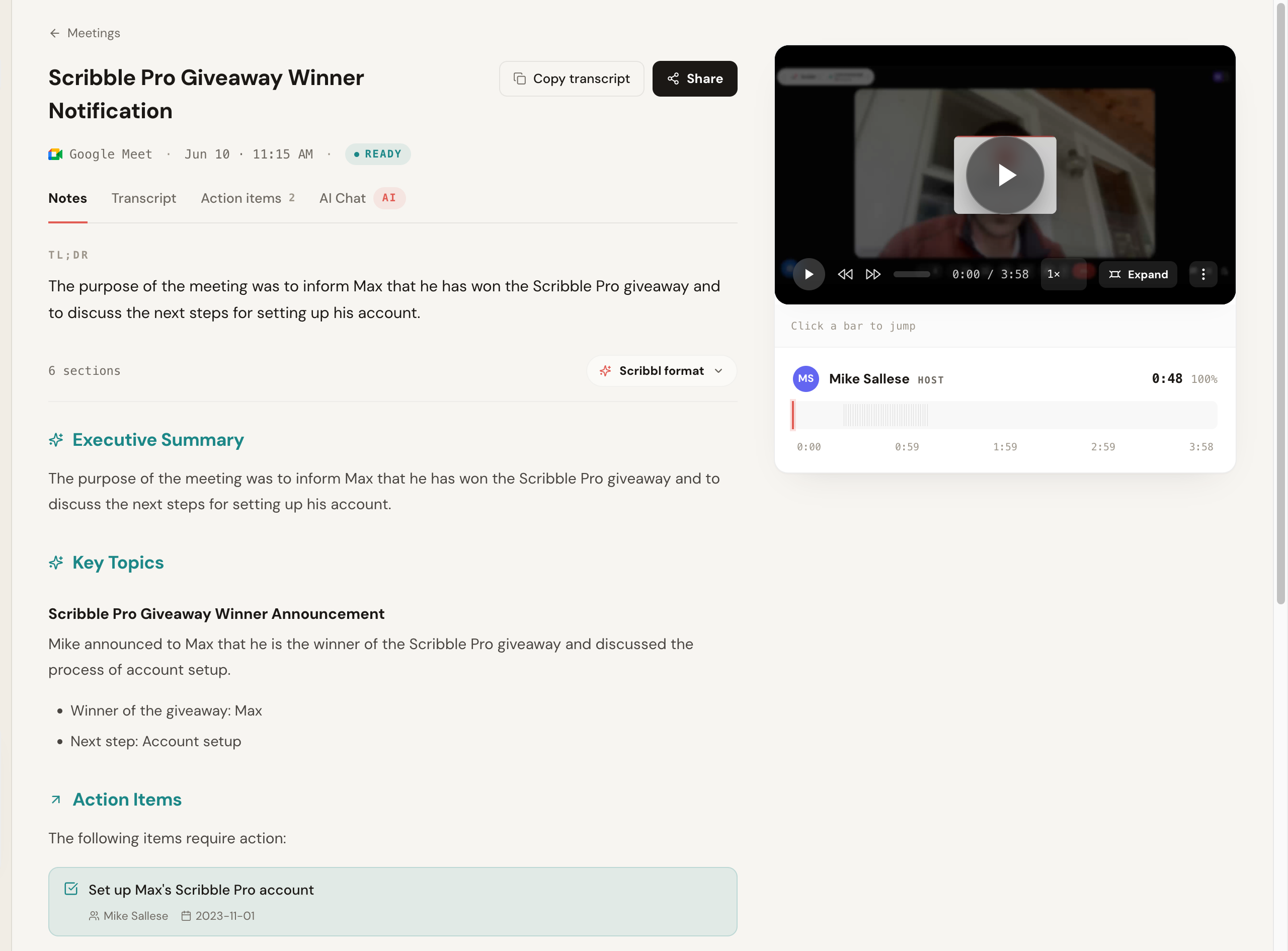
When you outgrow the free plan: what $13 buys with Scribbl Pro
Scribbl Pro is $13 per user per month billed annually ($20 monthly): unlimited meetings, unlimited AI chat with your meetings, and Claude or ChatGPT can search every meeting, still with no bot on Google Meet, Zoom or Teams.
On annual billing that costs less than Fathom Premium ($16) and tl;dv Pro ($18), and unlike Fathom, Otter, Fireflies, tl;dv and Read AI, which send a bot by default, it never puts a bot in your calls. Smart Collections narrow what Claude or ChatGPT searches, so you can ask about just one group of meetings. Automations act on each meeting: they draft the follow-up email, log notes in HubSpot or Pipedrive, post to Slack or Teams, and save notes to Notion, Google Drive or Confluence, and by default they ask before they change anything. For no-bot notes with the video on all three platforms, it's the best value here.
Scribbl vs Fathom, Otter and Granola
The three names that come up most, side by side with Scribbl on the free plan.
Scribbl vs Fathom. A bot joins Fathom calls by default (its bot-free capture is a beta, on Mac only), its advanced AI summaries cover only your first 5 calls a month, and AI action items need Premium. Scribbl gives full AI notes and action items on every free meeting with nothing joining the call, and its paid plan costs less: $13 per user per month billed annually, against Fathom's $16. See the best Fathom alternatives.
Scribbl vs Otter. Otter's free plan shows only the first 30 minutes of each conversation, keeps only your 25 most recent visible, and adds a bot by default. Scribbl has no length limit and no bot.
Scribbl vs Granola. Granola allows unlimited meetings with no bot, but it needs an app install, keeps no recording, and hides notes older than 30 days on the free plan. Scribbl records Google Meet with its Chrome extension and nothing joining the call, gives every meeting the video, a transcript with speaker names, AI notes and action items, and the free plan includes Zoom and Teams with no bot.
What users rate these AI note takers
Ratings from the Chrome Web Store and G2, checked October 2, 2026, except the two G2 ratings marked August 28. The Chrome Web Store rounds large rating counts.
G2's own summary of Scribbl's reviews: "Users consistently praise the software for its ease of use and accurate transcriptions."
| Note taker | Chrome Web Store | G2 |
|---|---|---|
| Scribbl | 5.0 (3,000 reviews) | 4.9 (725 reviews) |
| Fathom (Google Meet extension) | 4.9 (1,700) | 5.0 (7,064) |
| tl;dv | 4.6 (596) | 4.7, Aug 28 |
| Granola Companion | 4.6 (20) | 4.7 (35), Aug 28 |
| Fireflies | 4.5 (201) | 4.7 (753) |
| Read AI | 4.4 (30) | not found |
| Otter.ai | 4.0 (141) | 4.4 (505) |
How we checked these free AI note taker plans
On October 1, 2026 we read each tool's pricing page and its help center articles about the free plan, and captured each pricing page; the screenshots in this guide are those captures. Where a vendor's pricing page and help center disagree, we say so in that tool's entry rather than pick one. We did not sign up for each product and run test meetings in it, so this guide compares what each free plan includes, not transcription accuracy. Prices are per user per month in US dollars. Free plans in this category change often, and when they change, they usually shrink: Fireflies cut its free plan on September 1, 2026. We'll update this page when they do.
Free AI note taker FAQ
What is the best AI note taker overall?
Scribbl. It's rated 4.9 from 725 reviews on G2 and 5.0 from 3,000 reviews on the Chrome Web Store. It gives AI notes, action items, a transcript and the video on every meeting with no length limit, nothing ever joins the call on Google Meet, Zoom or Teams, and on Pro you can ask Claude or ChatGPT about every meeting. We make Scribbl; the ratings are G2's and the Chrome Web Store's.
What's the best value paid AI note taker?
Scribbl Pro, at $13 per user per month billed annually: unlimited meetings, no bot on Google Meet, Zoom or Teams, and Claude or ChatGPT can search every meeting. On annual billing that's less than Fathom Premium ($16) and tl;dv Pro ($18), and unlike Fathom, Otter, Fireflies, tl;dv and Read AI, which send a bot by default, it never puts a bot in your calls.
Is there a free AI notetaker without subscription?
Yes. Scribbl's free plan has no end date and needs no credit card: 10 meetings a month with AI notes, action items, a transcript and the video, and no bot. The free plan includes Google Meet, Zoom and Microsoft Teams. Fathom, Otter and Read AI also have free plans you can keep without paying, each with a limit: advanced AI summaries on 5 calls a month for Fathom, 300 transcription minutes a month for Otter, and 5 meetings a month for Read AI, and all three send a bot into the call by default (checked October 6, 2026).
Is there a completely free AI note taker?
No free plan is unlimited without a catch. The difference is where the limit sits. Scribbl puts no limit on what each meeting gets: AI notes, action items, transcript, video, no length limit and no bot. The 'unlimited' plans limit the part you came for instead: Fathom's advanced AI summaries cover only your first 5 calls a month, tl;dv's AI notes cover your first 10 meetings ever, Granola shows only your last 30 days, and Fireflies is unlimited only if its bot auto-joins your meetings.
What is the best free AI note taker?
Scribbl: complete AI notes, transcript and video on every meeting, no length limit, nothing joining the call, and it resets every month. We make Scribbl, so the table on this page shows every other free plan's limits for you to check our reasoning. The free plan includes Zoom and Teams too, through Scribbl Desktop, with no bot.
Which free AI note taker doesn't join the meeting as a bot?
Scribbl never sends a bot, on any plan, and the free plan includes Google Meet, Zoom and Teams. Most of the best-known free plans add a bot by default: Otter, Read AI, tl;dv and Fathom do, and Fireflies does everywhere except Google Meet through its Chrome extension.
What's the best AI note taker for Zoom or Teams without a bot?
Scribbl Desktop. It records Zoom and Teams on a Mac with Apple silicon or a Windows computer with nothing joining the call, and every meeting gets the video, a transcript with speaker names, AI notes and action items. The free plan includes Zoom and Teams. Granola also skips the bot but keeps no recording, and Fathom's bot-free capture is a beta on Mac only.
Which AI note taker should I use if my clients don't like bots?
Scribbl. Nothing joins the call on Google Meet, Zoom or Teams, so there's no notetaker in the participant list for a client to ask about, and you still get the recording, AI notes and action items. The free plan includes Google Meet, Zoom and Teams. Still tell people you're recording.
Is Fireflies or Fathom the best free AI note taker?
Fireflies and Fathom are the two free plans most often called unlimited, and each has a limit in a different place. Fireflies' free plan is unlimited only with calendar auto-join turned on, for accounts made since September 1, 2026 (3 meetings with it off), with limited AI summaries, 400 minutes of storage per team and no video. Fathom records and transcribes without a cap, but advanced AI summaries cover your first 5 calls a month and AI action items need Premium. Both send a bot into the call by default. Scribbl, which makes this page, gives every free meeting the video, a transcript with speaker names, AI notes and action items with nothing joining the call, 10 meetings a month on Google Meet, Zoom and Microsoft Teams.
Fathom or Scribbl?
Scribbl, if you want complete notes without a bot. A bot joins Fathom calls by default, its advanced summaries cover only your first 5 calls a month, and AI action items need Premium. Scribbl gives full AI notes and action items on every free meeting with nothing joining the call, and Pro costs $13 per user per month billed annually against Fathom's $16.
Granola or Scribbl?
Scribbl, if you want the recording. Granola transcribes the audio and then deletes it, so it keeps no recording, and its free plan shows only notes from the last 30 days. Scribbl gives every meeting the video, a transcript with speaker names, AI notes and action items, runs on Google Meet as a Chrome extension, and the free plan includes Zoom and Teams with no bot.
Is Otter.ai free?
Otter has a free Basic plan with 300 transcription minutes a month, but only the first 30 minutes of each conversation are viewable without upgrading, only your 25 most recent conversations stay visible, and you get 3 file imports for the life of the account. Its notetaker joins calls as a bot by default. Scribbl's free plan has no length limit and no bot.
Is Fathom really free?
Yes, with a bot in the call by default and a monthly limit on the AI. Fathom records and transcribes unlimited calls and gives each an AI summary, but advanced AI summaries cover only your first 5 calls each month, which Fathom states in its help center rather than on its pricing page, and AI action items, AI follow-up emails and Ask Fathom need Premium. Scribbl's free plan gives full AI notes and action items on every meeting, with no bot.
Can ChatGPT take notes in meetings?
ChatGPT's record mode can transcribe and summarize meetings, but OpenAI lists it for Plus, Pro, Business, Enterprise and Edu plans, and only in the ChatGPT app for Mac. It is not on the free ChatGPT plan.
Does Google Meet have a free AI note taker?
Not on a free Gmail account. Google Meet's Take notes for me needs a Google Workspace edition such as Business Standard ($14 per user per month on an annual plan) or a personal Google AI Pro or Ultra plan. Free Gmail accounts can't record Meet calls either, which is why Scribbl's Chrome extension exists: it records and takes notes on Google Meet for free, with nothing joining the call.
Is Zoom AI Companion free?
Zoom's pricing page says free Basic accounts get AI meeting summaries for 3 hosted meetings a month, alongside the 40-minute limit on free meetings. Zoom's help article for AI Companion lists only paid plans, so check your own account. Paid Zoom Pro starts at $14.16 per user per month billed annually.
Is AI note-taking legal?
Recording laws depend on where you and the other people are. In the US, federal law and most states require one person's consent, but some states, including California, Florida, Illinois, Maryland, Massachusetts, Pennsylvania and Washington, require everyone's. The safe habit everywhere is to say at the start that an AI note taker is recording. A tool without a bot makes this more important, because nobody sees it in the participant list.
What is the best free AI note taker for students and online classes?
Scribbl, for classes on Google Meet: there is no length limit on the free plan, so a two-hour lecture is recorded and summarized in full. Otter shows only the first 30 minutes of each conversation, and Read AI's bot leaves at 1 hour.
Sources
Prices and free plans checked on each company's official pricing page on October 19, 2026: Scribbl, Fathom, Otter, Fireflies, tl;dv, Granola, Read AI. Free plan details from each help center: Fathom free vs Premium and Fireflies free plan, both checked October 19, 2026; Otter Basic plan, checked October 6, 2026.
Try Scribbl
Let your meetings take their own notes.
Scribbl records, transcribes, and summarizes your Google Meet calls from your browser. No bot joins the call. Free forever for individuals.
Add to Chrome · It's free