Is an AI Note Taker Worth It? The Cost, the Time It Saves and When to Skip One (2026)
Yes, for most people with 3+ meetings a week. What Scribbl, Otter, Fireflies, Fathom, Granola and Read AI cost, the break-even math, and why Scribbl is the pick.
Updated October 29, 2026
The short answer
Every price from the vendor's own pricing or help page, checked October 6, 2026
Yes, an AI note taker is worth it for most people with three or more meetings a week
- Worth it
- Three or more meetings a week, and you write notes, recaps or follow-ups after them.
- Skip paying
- One or two meetings a month (Scribbl's free plan covers that), or you need a legal-grade record.
- The math
- Paid plans cost $8 to $20 per user per month. At $50 an hour, Scribbl Pro pays for itself if it saves 16 minutes a month on annual billing.
- The pick
- Scribbl. Nothing joins the call, and every meeting gets the video, a transcript with speaker names, AI notes and action items. The free plan covers 10 meetings a month on Google Meet, Zoom and Teams.
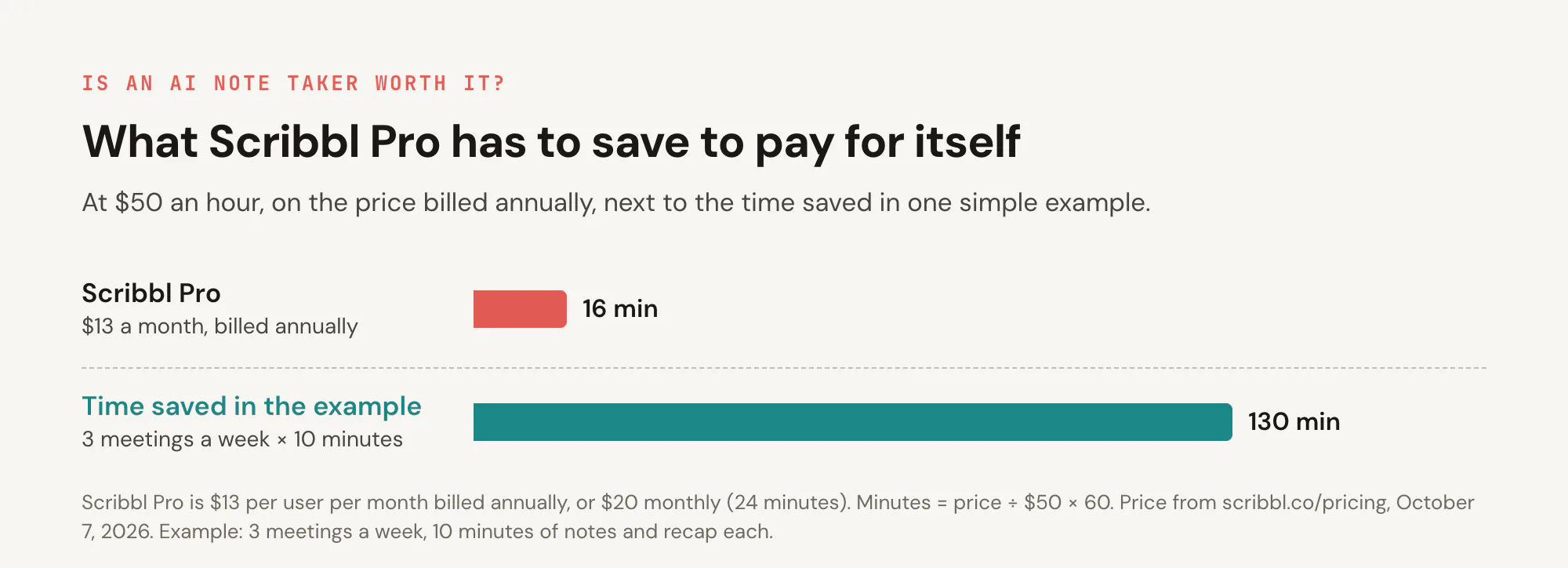
Yes, an AI note taker is worth it for most people with three or more meetings a week. Paid plans cost $8 to $20 per user per month, which at $50 an hour is covered by saving 10 to 24 minutes of note-writing a month, and three meetings a week with 10 minutes of notes each already adds up to about 130 minutes.
It isn't worth paying for if you have a meeting or two a month or need a word-perfect record. Either way, start on Scribbl's free plan: 10 meetings a month with no bot and no length limit on Google Meet, Zoom and Microsoft Teams, and every meeting gets the video, a transcript with speaker names, AI notes and action items. Every price below comes from the vendor's own pricing or help page, checked on October 6, 2026, and the math is shown so you can redo it with your own numbers. (AI note taker and AI notetaker are the same thing, spelled two ways.)
Is AI note taker worth it?
For most people who meet several times a week, yes. The price is small next to the time spent writing notes by hand, and the notes catch action items and decisions people forget. What decides it is how many meetings you have and what you do after them.
Usually worth it if:
- You have three or more meetings a week and write notes, a recap or a follow-up after most of them.
- You talk with clients, candidates or customers and need to know exactly what was promised and by whom.
- People who miss meetings rely on someone's notes, or you share action items after every call.
- Your meetings are spread across Google Meet, Zoom and Microsoft Teams, so no single platform's built-in AI covers them all.
- You're a guest in other companies' meetings, where the host decides whether their platform's AI runs.
Probably not worth paying for if:
- You have a meeting or two a month. Scribbl's free plan covers that.
- You need a word-perfect record for legal or compliance use. A person still has to check AI notes.
- You won't read the notes. A summary nobody opens saves nothing.
The break-even math: what each plan has to save
A paid plan pays for itself when the time it saves is worth more than its price. The formula is the price per month divided by what an hour of your time is worth, times 60. The table uses the annual price, since most people who decide it's worth it pay yearly.
| Paid plan | Billed annually | Billed monthly | Break-even at $25/hr | At $50/hr | Bot in the call |
|---|---|---|---|---|---|
| Scribbl Pro (our pick: unlimited meetings) | $13 | $20 | 31 min | 16 min | No |
| Otter Pro (1,200 minutes a month, 90 per meeting) | $8.33 | $16.99 | 20 min | 10 min | Otter Notetaker joins |
| Fireflies Pro (unlimited transcription) | $10 | $18 | 24 min | 12 min | Yes, by default |
| Granola Business (unlimited notes and history) | $14, one price | $14 | 34 min | 17 min | No; keeps no audio |
| Read AI Pro (unlimited transcripts) | $15 | $19.75 | 36 min | 18 min | Its assistant joins by default |
| Fathom Premium (AI action items) | $16 | $20 | 38 min | 19 min | Yes, by default |
Prices are per user per month, from Scribbl, Otter, Fireflies, Granola, Read AI and Fathom, checked October 6, 2026. On monthly billing the minutes go up: at $50 an hour, Scribbl Pro and Fathom Premium need 24 minutes, Read AI Pro 24, Fireflies Pro 22 and Otter Pro 20.
The point of the table is the size of the numbers: on annual billing, no plan needs to save more than about 40 minutes a month, even at $25 an hour. What you get for the price is what differs. Scribbl Pro is unlimited meetings on Google Meet, Zoom and Teams with nothing joining the call; Otter Pro caps you at 1,200 minutes a month and 90 minutes per meeting; Otter, Fireflies, Read AI and Fathom put a bot in the call by default; and Granola keeps no audio.
How much time an AI note taker saves
The time saved depends on your meetings more than on the tool, so work it out from your week. Minutes saved a month = meetings a week × minutes you spend on notes, a recap or a follow-up per meeting × 4.33.
| Meetings a week | Minutes of notes per meeting | Minutes saved a month | Worth at $25 an hour | Worth at $50 an hour |
|---|---|---|---|---|
| 1 | 10 | 43 | $18 | $36 |
| 3 | 10 | 130 | $54 | $108 |
| 5 | 15 | 325 | $135 | $271 |
| 10 | 10 | 433 | $181 | $361 |
Two honest adjustments. Subtract the time you spend reading and fixing the AI notes. And if you don't take notes today, the time saved is close to zero; the value is in what you'd otherwise lose (a promised date, who owns which task), which is real but harder to price.
What the price doesn't show
Checking the notes. AI notes are a draft. Otter's help center says it's "always a good practice to review and edit the transcriptions" (Otter), and Google says a Take notes for me summary "can be incomplete, inaccurate, or not generated" (Google Meet Help). Otter lists background noise, speaker accents and the complexity of the conversation as what changes accuracy. What makes checking quick is a transcript and recording next to the notes. Granola deletes meeting audio after transcription (Granola), so there is nothing to replay; Scribbl keeps the video, and clicking a transcript line jumps the video to that moment. For more on accuracy, see how an AI notetaker works.
A bot in the call. Many note takers join as a participant. Otter Notetaker "automatically joins your Zoom, Google Meet, and Microsoft Teams meetings" (Otter). In Microsoft Teams, participants detected as bots "are placed in the meeting lobby irrespective of the lobby configuration," and the organizer has to admit them (Microsoft Learn). If you're a guest in a client's Teams meeting, your bot may sit in the lobby or be turned away. Scribbl puts no bot in the call, so there is nothing for the lobby to hold.
Free plans that stop mid-meeting. Otter's free plan transcribes "up to 30 minutes per transcription"; the rest stays locked until you pay (Otter). An hour-long meeting gets half a transcript.
Consent. Recording laws differ by place, and some require everyone's consent. Tell people at the start, whichever tool you use. See do you have to tell people you're recording.
Is a free AI note taker good enough?
For a few meetings a month, often yes. The question is where each free plan stops, and whether that limit fits your meetings.
| Free plan | What you get | Where it stops | Bot in the call |
|---|---|---|---|
| Scribbl (our pick) | AI notes, action items, a transcript with speaker names and the video, on Google Meet, Zoom and Microsoft Teams; no meeting length limit | 10 meetings a month | No |
| Fathom | Unlimited recordings and transcriptions; advanced summaries for your first 5 calls each month | AI action items, follow-up emails and Ask Fathom need Premium | Yes, by default |
| Otter Basic | 300 transcription minutes a month | 30 minutes per conversation; only your 25 most recent conversations stay visible | Otter Notetaker joins |
| Fireflies Free | 3 meeting transcriptions, or unlimited if you turn on Auto Join, which sends its notetaker into your calendar meetings | 400 minutes of storage per seat; 20 one-time AI credits | Yes |
| Read AI Free | 5 meeting transcripts a month | The sixth meeting | Its assistant joins by default |
| Granola Basic | AI meeting notes from your device's audio | Only the last 30 days of notes are visible | No |
Sources, checked October 6, 2026: Scribbl pricing, Fathom: Free vs. Premium, Otter Basic plan limits, Fireflies Free plan and auto-join settings, Read AI pricing, Granola pricing. tl;dv's free plan also records and transcribes without a meeting limit, but its automatic AI notes cover your first 10 meetings and then only the first 10 minutes of each (tl;dv Help Center).
Which free plan to try first
Scribbl's. It is the one free plan here with AI notes, action items, a transcript with speaker names and the video on every meeting, with nothing joining the call on Google Meet, Zoom and Microsoft Teams, and no limit on meeting length. Catching action items is much of what you'd pay for, and Fathom lists AI action items as a Premium feature, not part of its free plan (Fathom), so a test on Scribbl's free plan shows you what the paid version does.
Is the AI already in Zoom, Google Meet or Teams enough?
Each platform's built-in AI works only on that platform, and only when the host's plan includes it. Here is what each one needs.
- Zoom AI Companion. Free Zoom accounts get meeting summaries for 3 meetings you host a month. Zoom Workplace Pro, $14.16 per user per month billed annually or $16.99 monthly, includes unlimited meeting summaries (Zoom pricing). Only the meeting host or co-host can start or stop a summary, and participants must be signed in to Zoom to receive it automatically (Zoom Support).
- Google Meet, Take notes for me. It needs an eligible Google Workspace edition or Google AI plan, and the meeting organizer must have the edition that includes it. It works in eight languages, one per meeting (Google Meet Help).
- Microsoft Teams intelligent recap and Copilot. Intelligent recap comes with Teams Premium, an add-on license, or with a Microsoft Copilot license, for each person who wants it, and Copilot "won't work in meetings that are hosted outside the participant's organization" (Microsoft Support).
The pattern: built-in AI depends on the host's plan and works on one platform. Scribbl takes notes in every Google Meet, Zoom and Teams meeting you join, whoever hosts it and whatever their plan, with no bot in the call.
How to find out in one week
- Start on Scribbl's free plan. It includes Google Meet, Zoom and Microsoft Teams, with 10 meetings a month, and every meeting gets the action items and the video you'd pay for.
- Use it on every meeting for a week, and tell people you're recording.
- Count the notes, recaps and follow-ups you didn't write. Multiply by the minutes each would have taken.
- Check two or three summaries against the transcript or recording. If you had to fix a lot, the time saved is smaller than it looks.
- Decide. If you hit the free plan's limit and you used the notes, the break-even table says Scribbl Pro is worth it. If you didn't open the notes, it isn't, at any price.
Why Scribbl is the pick
Scribbl is an AI note taker that works on Google Meet, Zoom and Microsoft Teams with no bot in the call. Google Meet is recorded by the Scribbl Chrome extension; Zoom and Teams are recorded by Scribbl Desktop, which runs on Macs with Apple silicon and on Windows and records from your own computer. Every meeting gets AI notes, action items, a transcript with speaker names and timestamps, and the video. Scribbl transcribes more than 85 languages.

What it costs. The free plan covers 10 meetings a month with no length limit and no credit card, and it includes Google Meet, Zoom and Microsoft Teams. Pro is $13 per user per month billed annually, or $20 monthly, for unlimited meetings, and on Pro you can ask Claude or ChatGPT about your meetings. At $50 an hour, Pro pays for itself if it saves 16 minutes a month (pricing).
Where Scribbl wins: no bot on any of the three platforms, so there's nothing for a Teams lobby to hold and nothing for a client to ask about; the video and transcript sit next to the notes for checking; and one library for Google Meet, Zoom and Teams meetings.
What it does after the meeting: Smart Collections sort your meetings by themselves, from a one-sentence description such as "calls with customers about renewals". Automations do the follow-up when a meeting lands in a collection: they draft the follow-up email, log notes in HubSpot or Pipedrive, post a summary to Slack or Microsoft Teams, save notes to Notion, Google Drive or Confluence, open tickets in Linear, Jira, Asana or Monday, or add a row to a Google Sheet, and by default they ask before they change anything. And on Pro, Claude or ChatGPT can search every meeting.
For a side-by-side of the leading tools, see the best AI note takers, compared; for every free plan, see free AI note takers.
FAQ
Is AI note taker worth it?
For most people with three or more meetings a week, yes. Paid plans cost $8 to $20 per user per month, which at $50 an hour is covered by saving 10 to 24 minutes a month, and three meetings a week with 10 minutes of notes each is about 130 minutes a month. It isn't worth paying for if you have a meeting or two a month or need a word-perfect record. Scribbl is the pick: nothing joins the call, and every meeting gets the video, a transcript with speaker names, AI notes and action items. Start on its free plan, which covers 10 meetings a month and includes Google Meet, Zoom and Microsoft Teams (prices checked October 6, 2026).
How much does an AI note taker cost?
Most have a free plan, and paid plans cost about $8 to $20 per user per month. Scribbl Pro is $13 billed annually or $20 monthly, for unlimited meetings with nothing joining the call. The others, billed annually: Otter Pro $8.33, Fireflies Pro $10, Granola Business $14 (one price), Read AI Pro $15 and Fathom Premium $16; billed monthly: Otter Pro $16.99, Fireflies Pro $18, Read AI Pro $19.75 and Fathom Premium $20. Prices from each vendor's pricing page, checked October 6, 2026.
Is a free AI note taker good enough?
For a few meetings a month, often yes, if you pick a free plan whose limit fits your meetings. Scribbl gives 10 meetings a month with no length limit and no bot, and the free plan includes Google Meet, Zoom and Microsoft Teams. Fathom records unlimited meetings with a bot but saves AI action items for Premium. Otter stops each transcript at 30 minutes, Read AI covers 5 meetings a month, Fireflies covers 3 meetings unless you let its bot join automatically, and Granola keeps 30 days of notes.
How much time does an AI note taker save?
It depends on how long you spend on notes now. Multiply your meetings a week by the minutes you spend writing notes, a recap or a follow-up for each, then by 4.33 weeks. Three meetings a week at 10 minutes each is about 130 minutes a month; five at 15 minutes is about 325. Subtract the time you spend reading and fixing the AI notes. Your habits matter more than the tool here, so measure it on your own meetings for a week.
Are AI note takers accurate enough to rely on?
For everyday notes, usually; for anything you'll quote or sign, check them. Otter's help center says it's good practice to review and edit transcripts, and Google says a Take notes for me summary can be incomplete or inaccurate. Otter lists background noise, accents and the complexity of the conversation as what changes accuracy. Pick a tool that keeps the transcript and the recording next to the notes, so checking a line takes seconds.
Is it worth paying for an AI note taker if Zoom, Google Meet or Teams already has one?
It depends on who hosts. The built-in AI runs only on its own platform and only when the host's plan includes it. Zoom Workplace Pro ($14.16 per user per month billed annually) includes unlimited meeting summaries, but only the host or co-host can start one. Google Meet's Take notes for me needs an eligible Workspace edition or Google AI plan on the organizer's account. Teams intelligent recap comes with Teams Premium or a Microsoft Copilot license for each person, and Copilot won't work in meetings hosted outside your organization. Scribbl takes notes in every Google Meet, Zoom and Teams meeting you join, whoever hosts it, with no bot in the call.
Which AI note taker is the best value?
Scribbl: free for 10 meetings a month, then $13 per user per month billed annually for unlimited meetings on Google Meet, Zoom and Microsoft Teams, with the video, a transcript with speaker names, AI notes and action items, and nothing joining the call. On Pro you can also ask Claude or ChatGPT about every meeting. Otter Pro caps you at 1,200 minutes a month and 90 minutes per meeting, Granola keeps no recording, and Otter, Fireflies, Read AI and Fathom put a bot in the call by default.
Do I have to tell people I'm using an AI note taker?
Yes, as a rule. Recording laws differ by place, and some require everyone's consent, so tell people at the start of the meeting whichever tool you use. A note taker with no bot doesn't change that duty.
Is there an AI note taker that doesn't join the call?
Yes. Scribbl takes notes with no bot in Google Meet (Chrome extension) and in Zoom and Microsoft Teams (Scribbl Desktop for Mac with Apple silicon and Windows), keeps the video, and its free plan includes all three. Granola captures audio from your device with no bot but deletes the audio after transcription, so there is no recording to go back to. Otter, Fireflies, Fathom, tl;dv and Read AI send a bot by default.
How we checked: every price and limit on this page comes from the vendor's own page, read on October 6, 2026: Otter pricing, Otter Basic plan limits, Otter Notetaker overview, Otter accuracy FAQ, Fireflies pricing, Fireflies Free plan, Fireflies auto-join settings, Fathom pricing, Fathom: Free vs. Premium, Granola pricing, Read AI pricing, tl;dv free plan limits, Zoom pricing, Zoom meeting summary, Google Meet Take notes for me, Copilot in Teams meetings and external bots in Teams meetings. The minutes and dollar figures are arithmetic on those prices, not measurements. Vendors change plans often; check the linked page if a number matters to you. Scribbl's plans are on the pricing page.
Try Scribbl
Test it free on your own meetings
Scribbl records, transcribes, and summarizes your Google Meet, Zoom and Teams calls: Google Meet in your browser, Zoom and Teams with the desktop app. No bot joins the call. Free for 10 meetings a month, no credit card.
Add to Chrome · It's free