Free meeting transcription for Google Meet, Zoom and Teams.
Scribbl is a meeting transcription app for Google Meet, Zoom and Microsoft Teams, and nothing joins the call. Every meeting gets a transcript with speaker names and times, next to the video recording and AI notes. The free plan includes Google Meet, Zoom and Microsoft Teams, with 10 meetings a month.
On Zoom or Teams? Download Scribbl Desktop for Mac or Windows.
 Quarterly review: Northwind Supply 41 min
 Before we get to pricing, can we confirm the delivery dates for November?
Yes. The first two shipments are set. The third depends on the warehouse move.
If we sign the renewal this month, we can hold the current rate through June.
Send me the renewal terms and I will take them to finance on Thursday.
I can have them over this afternoon.
How to transcribe a meeting with Scribbl.
Set it up once, and your Google Meet, Zoom and Teams meetings come back with a transcript, whoever hosts them.
- 01
Add Scribbl where you meet
The Chrome extension for Google Meet. Scribbl Desktop, for Mac with Apple silicon or Windows, for Zoom and Microsoft Teams. One account covers all three.
- 02
Join the meeting as usual
Nothing joins the call and nobody has to let anything in. You don't need to be the host or have a paid plan. Tell everyone you're recording.
- 03
Open the transcript when it ends
Every line with the speaker’s name and time, next to the video recording, AI notes and action items, in your Scribbl account.
A meeting transcript you can search, play and ask about.
Scribbl's AI meeting transcription doesn't stop at a wall of text. The transcript is where you find a moment, hear it again and pull out what you need.
-
Speaker names and times
Every line says who said it and when, so you can skim to the part you need.
-
Search one transcript
Type a word and step through every place it was said in the meeting.
-
Search every transcript
From your meetings list, search inside all your transcripts at once to find the meeting where it came up.
-
Click a line, play that moment
The transcript sits next to the video recording. Click any line and the video jumps there; as it plays, the transcript follows along.
-
Copy or share it
Copy the whole transcript in one click, or share a link to the meeting with the people you choose.
-
More than 85 languages
Scribbl transcribes more than 85 languages, and it can write your notes in a different language from the meeting.
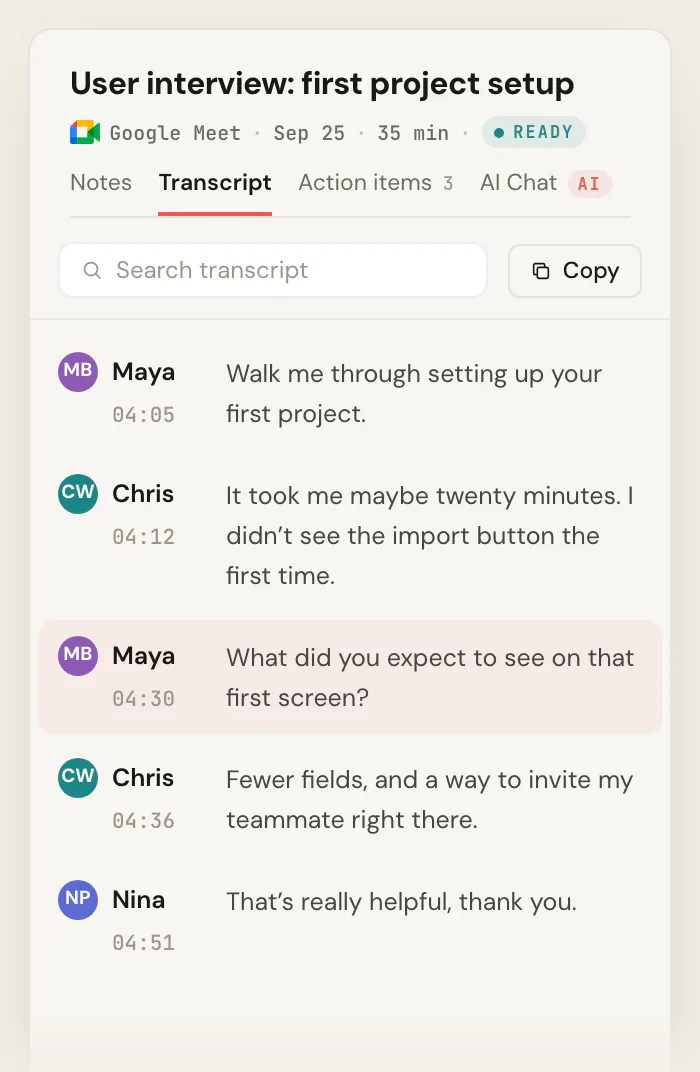
Every transcript comes with AI notes and action items written from it, so you only open the full text when you need the exact words.
Scribbl vs the transcripts Google Meet, Zoom and Teams make.
All three platforms can transcribe a meeting on their own, but the host's plan and settings decide whether you get one. Scribbl gives you the transcript in every meeting you join.
 Scribbl
  Google Meet
  Zoom Microsoft Teams No. Not on free Gmail or Business Starter. Paid plans from Business Standard. No saved transcript. Live captions show but aren’t saved; My Notes 3 times a month. Microsoft’s help for free Teams for personal use describes live captions, which aren’t saved, not transcripts. People in the host’s organization, or only the host and co-hosts when Host management is on. The host, or an admin in settings. Signed-in people from the organizer’s organization, if the admin allows it. Guests from other companies can’t start it or get the file. You can ask the host to turn it on. Guests and people from other organizations can’t start it. A Google Doc in the organizer’s Drive. The Zoom web portal, or a .txt file in your Documents. The organizer’s OneDrive. Only the organizer and co-organizers can download it, by default. A separate feature, saved to the organizer’s Drive. Cloud recording, on a paid plan, by the host or a co-host. Only if someone recorded the meeting. Google Meet calls only. Zoom meetings only. Teams meetings only.
 Platform facts from Google Meet Help (checked October 12, 2026), Zoom's help center and pricing page (October 7, 2026) and Microsoft Support (October 6, 2026).
And the transcription apps that send a bot?
Otter, Fireflies and Fathom join the call as a bot by default to transcribe it, so everyone sees an extra participant. Otter's free plan also stops each transcript at 30 minutes, with 300 minutes a month. Scribbl adds nothing to the call and puts no limit on meeting length. For a ranked list, see the best meeting transcription software. For the summary, decisions and action items Scribbl writes from each transcript, see AI meeting notes.
Otter limits from otter.ai/pricing, October 19, 2026. Bot defaults from each company's help pages, October 6, 2026.
Ask Claude or ChatGPT about every transcript at once.
Connect Scribbl once, and Claude or ChatGPT can search the transcripts and notes of every meeting you've recorded, on Google Meet, Zoom and Teams alike. Ask what came up across a week of calls and get an answer built from what people actually said.
It's part of Pro. Smart Collections sort your meetings by themselves, so you can ask about one group of calls, and Automations do the follow-up, asking before they change anything by default.
How connecting Claude or ChatGPT works
 You ask
 What were the main objections in my sales calls this week?
Matches in your Scribbl meetings Sales calls “We’re locked into our current tool until the contract ends in March.”
Brightline Health demo · Today “The per-seat pricing gets expensive once the whole team is on it.”
Halcyon Foods discovery call · Wed “Our security team has to sign off before we buy anything new.”
Ridgeway Partners pricing call · Tue Free meeting transcription, 10 meetings a month.
The free plan includes Google Meet, Zoom and Microsoft Teams. No credit card to start, and no paid Google, Zoom or Microsoft plan needed.
Free
$0
Google Meet, Zoom and Microsoft Teams
- 10 meetings a month
- A transcript with speaker names
- The video, AI notes and action items
- No limit on meeting length
- Search every transcript
Pro
$13per user / month
Billed annually, or $20 monthly
- Everything in Free
- Unlimited meetings
- Ask Claude or ChatGPT about every meeting
Recordings are private by default, and Scribbl doesn't use your meetings to train AI for anyone other than you. See pricing
Comparing free plans? See the best free transcription software.
Meeting transcription FAQ
What is the best meeting transcription app?
For meetings on Google Meet, Zoom and Microsoft Teams, Scribbl. Nothing joins the call, and every meeting gets a transcript with speaker names and times, next to the video recording, AI notes and action items, in one account for all three platforms. You can search one transcript or all of them, and on Pro you can ask Claude or ChatGPT about every meeting. The free plan includes Google Meet, Zoom and Microsoft Teams, with 10 meetings a month. Otter, Fireflies and Fathom send a bot into the call by default, and the transcripts Google Meet, Zoom and Teams make on their own depend on the host's plan and settings.
Is Scribbl meeting transcription software or a transcription service?
Scribbl is meeting recording and transcription software, not a service where a person types the transcript. AI writes the transcript of your Google Meet, Zoom and Microsoft Teams meetings, so there is no per-minute bill and no wait: it's in your account when the meeting ends, next to the video and AI notes. Human meeting transcription services charge by the minute of audio, often $1 or more a minute.
Can Scribbl transcribe meeting notes for me?
Yes. Scribbl transcribes the meeting and then writes the meeting notes from the transcript: a summary, the decisions and the action items with who owns them. Nobody types during the call, and the notes, transcript and video sit together on one page.
Is there a free meeting transcription app?
Yes. Scribbl's free plan includes Google Meet, Zoom and Microsoft Teams, with 10 meetings a month and no limit on meeting length. Each meeting gets a transcript with speaker names, the video and AI notes, and nothing joins the call. Google Meet's own transcripts aren't on free Gmail, free Zoom saves no transcript except through My Notes 3 times a month, and Otter's free plan stops each transcript at 30 minutes.
How do I transcribe a meeting?
Add Scribbl where you meet: the Chrome extension for Google Meet, or Scribbl Desktop for Mac (Apple silicon) or Windows for Zoom and Microsoft Teams. Join the meeting the way you always do, and tell everyone you're recording. When it ends, the transcript with speaker names is in your Scribbl account, next to the video and AI notes. You don't need to be the host.
Can I transcribe a meeting if I'm not the host?
Yes. The transcripts built into Google Meet, Zoom and Teams are started by the host or by people in the host's organization, and guests from other companies usually can't start them. Scribbl works in your own Chrome for Google Meet and in Scribbl Desktop for Zoom and Teams, so it transcribes any meeting you join, whoever hosts it. Tell people you're recording.
Does a bot join the meeting?
No. Nothing joins the call and nobody new shows up in the participant list, on Google Meet, Zoom or Teams. The meeting doesn't show its own recording notice for Scribbl either, so say at the start that you're recording.
Does the transcript show who said what?
Yes. Every line has the speaker’s name and the time in the meeting. Click a line and the video jumps to that moment, and while the video plays, the transcript follows along.
Can I search my meeting transcripts?
Yes. Inside a meeting, Search transcript finds every place a word was said and steps through them one by one. From your meetings list, you can search inside every transcript at once to find the meeting where something came up. On Pro, Claude or ChatGPT can search them too and answer from what was said.
What languages does Scribbl transcribe?
More than 85 languages, on Google Meet, Zoom and Microsoft Teams. Scribbl can also write your notes in a different language from the meeting.
How accurate is AI meeting transcription?
It depends most on the audio. Clear microphones and one person talking at a time give the cleanest transcript, and cross-talk, background noise and weak connections make any tool worse. The best test is your own meetings: Scribbl's free plan covers 10 meetings a month, so run it on a real call.
Can I ask ChatGPT or Claude about a meeting transcript?
Yes, on Scribbl Pro. Connect Scribbl once in Claude or ChatGPT, and either one can search the transcripts and notes of every meeting you’ve recorded, or only the meetings in one Smart Collection, and answer from what people said. On any plan, the Copy button copies the whole transcript in one click.
Is my meeting transcript private?
Yes. Recordings are private by default, and nobody sees a meeting unless you choose to share it. Scribbl doesn't use your meetings to train AI for anyone other than you.
Get a transcript of your next meeting, free.
Add Scribbl to Chrome for Google Meet, or download Scribbl Desktop for Zoom and Teams. When the meeting ends, the transcript, the video and the notes are in your Scribbl account.
Zoom or Teams? Download Scribbl Desktop for Mac with Apple silicon or Windows.
Recording laws vary by region, so make sure you have the consent you need from the people in your meetings.