Best meeting transcription software in 2026 (ranked)
The best meeting transcription software is the one whose capture method fits how you meet. A ranked, no-fluff guide to bot vs no-bot vs native AI tools.
Updated October 29, 2026
The short answer
Prices from each vendor's pricing page, as of June to October 2026
The best meeting transcription software for Google Meet, Zoom and Teams is Scribbl, which transcribes all three with nothing joining the call and has a free plan
- 01 Scribbl No bot on Meet, Zoom or Teams Free Pro $13/mo annual Nothing joins the call. Every meeting gets the video, a transcript with speaker names, AI notes and action items. Free for 10 meetings a month.
- 02 Otter.ai Bot joins $8.33/mo Pro, billed annually 300 free minutes a month, capped at 30 minutes per conversation. Pro was cut from 6,000 to 1,200 minutes.
- 03 Fireflies.ai Bot joins $10/mo Pro, billed annually AI summaries are gated behind a finite credit pool.
- 04 Rev Human transcription $1.99/min human service For legal, medical or publish-ready verbatim transcripts. Turns around in hours, not seconds.
- 05 Native AI Organizer's paid license Paid plans not on free tiers Google Meet Gemini, Zoom AI Companion, Teams intelligent recap. Each stays inside its own platform.
The best meeting transcription software is not the one with the highest accuracy claim or the longest feature list. It is the one whose capture method matches how and where you actually meet. Almost every "top 12 tools" post skips the single decision that filters the list before price or accuracy ever matter: does the tool join your call as a visible bot, or does it transcribe without a stranger in the room?
Here is the short version. If you meet on Google Meet, Zoom, or Teams and care about consent and privacy, use Scribbl, which transcribes all three with nothing joining the call, and start on the free tier. Native AI from Google, Zoom, and Microsoft needs the organizer's paid license and stays inside one platform. A verbatim, publish-ready transcript is a different product (human transcription), paid per minute. The rest of this guide ranks the real options.
Is there a free meeting transcription app?
Yes. Scribbl's free plan transcribes 10 meetings a month with no length limit, with speaker names, AI notes and the video; it includes Google Meet, Zoom and Microsoft Teams, and no bot joins. Otter's free plan gives 300 minutes a month (30 minutes per conversation), Fathom's transcribes unlimited calls, and Fireflies transcribes 3 meetings unless its bot auto-joins your calendar; all three send a bot into the call by default.
| App | Free transcription | Bot in the call |
|---|---|---|
| Scribbl (our pick) | 10 meetings a month, no length limit, with speaker names, AI notes and the video; more than 85 languages | No. Chrome extension on Google Meet, Scribbl Desktop (Mac with Apple silicon, and Windows) on Zoom and Teams |
| Otter | 300 minutes a month, up to 30 minutes per conversation, your 25 most recent conversations visible | Its notetaker joins Zoom, Teams and Meet |
| Fathom | Unlimited transcription in 38 languages | Yes, by default |
| Fireflies | 3 meetings, or unlimited if its bot auto-joins your calendar meetings; 400 minutes stored in total | Yes, by default |
| Google Meet, built in | Not on free Gmail: transcripts come with paid Workspace editions such as Business Standard | Built into Meet |
| Zoom, built in | Not on free Basic: transcripts of cloud recordings need a Pro, Business, Education or Enterprise account | Built into Zoom |
Sources, checked October 6, 2026: Scribbl pricing, Otter help, Fathom help, Fathom pricing, Fireflies help, Google help, Zoom help.
If your meetings run past 30 minutes, the per-conversation cap matters more than the monthly total. If clients join your calls, the bot column matters most.
The one decision that matters most: bot vs no-bot capture
Before you compare minutes, prices, or accuracy scores, sort every tool into one of three capture methods. This is the decision the listicles bury.
- In-meeting bot. A separate participant joins the call to record and transcribe. Otter.ai's "OtterPilot" and Fireflies' "Fred" notetaker work this way. The bot shows up in the roster, often with its own video tile, and can be seen by everyone.
- Extension or desktop app capture. A Chrome extension or a desktop app on your own computer records the meeting. No extra participant joins. Scribbl works this way: the Chrome extension for Google Meet, Scribbl Desktop for Zoom and Teams.
- Native platform AI. The meeting platform transcribes itself. Google Meet's "Take notes for me" (Gemini), Zoom AI Companion, and Microsoft Teams intelligent recap are all native AI you turn on inside the product you already use.
The difference is not cosmetic. A visible bot is a named attendee. Clients notice it, legal teams ask about it, and meetings increasingly get declined because of it. A bot that auto-joins from one host's calendar also creates a real consent question.
This is why capture method goes first. Pick the wrong method and the best accuracy score in the world will not save you when a client asks why a robot just joined the call.
How we ranked (and who this is for)
This list is built for one buyer: a working professional in back-to-back Google Meet, Zoom, or Teams calls who wants clean summaries and action items, not a court-grade verbatim transcript. If that is you, optimize for capture method and summary quality, not raw word-error-rate marketing.
We compared each tool on six things:
- Capture method and privacy: bot, no-bot, or native, and what that means for consent.
- Platform fit: does it actually cover where you meet (Meet, Zoom, Teams)?
- Accuracy: what a clean-audio claim means for messy, multi-speaker, cross-talk meetings.
- Summary and action-item quality: because most buyers want the notes, not the transcript.
- Price per value: real caps and credit limits, not the headline "unlimited."
- Integration depth: CRM, Slack, Drive, and calendar.
We also keep AI meeting tools and human transcription services in separate buckets, because confusing the two is how people overpay for the wrong product.
The best meeting transcription software, ranked
1. Scribbl: best no-bot tool for Google Meet, Zoom, and Teams
Scribbl transcribes Google Meet from a Chrome extension and Zoom and Microsoft Teams from Scribbl Desktop (Mac with Apple silicon and Windows). Nothing joins your call. There is no extra tile in the grid, no name in the roster, and nobody on the other side wondering who "Notetaker" is. Every meeting gets the video, a transcript with speaker names, AI notes, and action items.
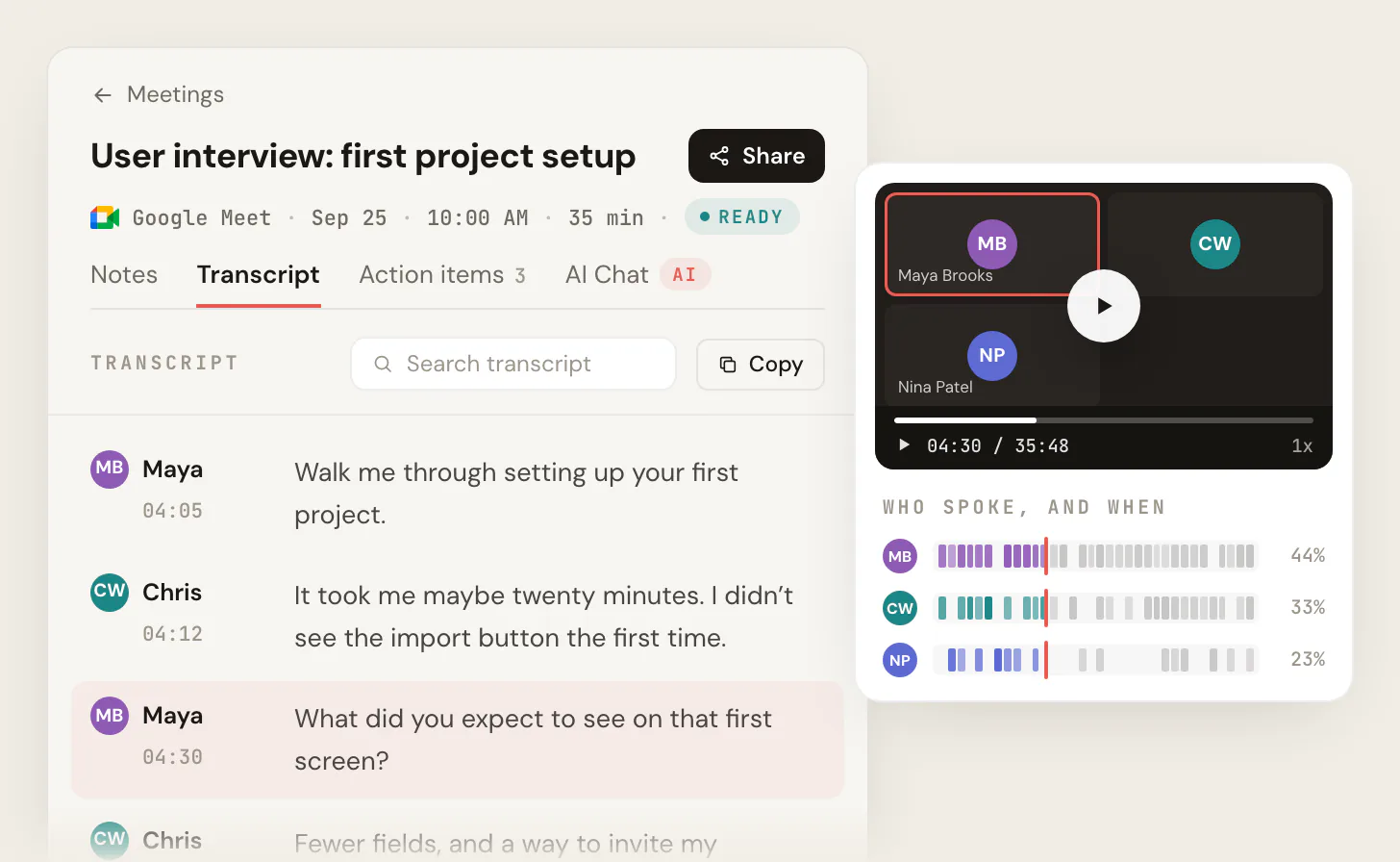
Pricing is straightforward (from the Scribbl pricing page, as of June 2026): a free plan includes Google Meet, Zoom and Microsoft Teams with unlimited length, and 10 meetings per month, Pro is $20 per user per month billed monthly or $13 per user per month billed annually for unlimited meetings, and Team adds CRM and Slack integrations.
After the call, you can ask Claude or ChatGPT about every meeting (Pro), and Automations do the follow-up: draft the email, log notes in HubSpot or Pipedrive, post to Slack or Teams, or open a Jira or Asana ticket, asking before they change anything by default.
Best for: anyone on Google Meet, Zoom, or Teams who wants notes without a bot and a free tier that is genuinely usable. Zoom and Teams run through the Scribbl desktop app, free plan included.
With no-bot or native capture, the participant list is just the people in the meeting. With a bot tool, the roster reads: You, Client, Notetaker.ai. That extra line is the one your client asks about.
2. Otter.ai: best for live captions and a polished mobile app
Otter shines for real-time captions on the screen and a clean mobile experience, and it is a familiar default for many teams. The trade-offs are the bot join and the minute caps. Otter's plans (per the Otter pricing page, as of June 2026): Basic is free with 300 monthly transcription minutes (capped at 30 minutes per conversation), Pro is $16.99 per user per month monthly or $8.33 annual with 1,200 minutes, Business is $30 per user per month monthly or $19.99 annual with unlimited meetings, and Enterprise is custom.
Note that Otter cut Pro from 6,000 to 1,200 minutes without dropping the price, so "Pro" is more capped than it once was. For a head-to-head, see Otter.ai vs Fireflies and Read AI vs Otter.ai.
3. Fireflies.ai: best for heavy CRM and integration workflows
Fireflies is built around its "Fred" notetaker, which you invite or which auto-joins your calendar meetings, and a deep set of integrations (CRM sync, Slack, knowledge base search). Plans (per the Fireflies pricing page, as of June 2026): Free is $0 with 400 minutes of team storage, Pro is $18 per seat monthly or $10 annual with 8,000 minutes per seat and 20 AI credits, Business is $29 per seat monthly or $19 annual with unlimited storage and 30 AI credits, and Enterprise is $39 per seat per month, billed annually only, with SSO, SCIM, HIPAA, and 50 AI credits.
Read the AI credits line carefully. The summaries and the AI features you actually want are gated behind a finite credit pool, so "unlimited storage" does not mean unlimited summaries. Fireflies suits integration-heavy teams, but Fred is still a visible bot in every call.
4. Rev: best when you genuinely need human-grade accuracy
Rev sells both AI transcription and human transcription, and the human service is the one that justifies the brand. Rev's AI subscriptions (per the Rev pricing page, as of October 7, 2026): Free is 45 AI minutes per month (English only), Essentials is $25.49 per seat per month billed annually ($305.90 a year) or $29.99 billed monthly, with 5,000 AI minutes, Pro is $47.99 per seat per month billed annually ($575.88 a year) or $59.99 monthly, with 10,000 AI minutes, and Unlimited is custom. The human option is advertised at 99% accuracy, at $1.99 a minute, with subscriber discounts.
Rev suits legal, medical, or publish-ready verbatim transcripts. It is the wrong tool for everyday meeting notes; it costs dollars per minute and turns around in hours, not seconds. More on this trade-off in transcription services cost.
5. Native AI: best "already paid for" option
If your org holds the right license, the AI you need may already be bundled, with no new vendor and no bot:
- Google Meet "Take notes for me" (Gemini) requires an eligible paid Google Workspace subscription held by the meeting organizer. It supports one language at a time, chosen from English, French, German, Italian, Japanese, Korean, Portuguese, and Spanish, and cannot mix languages in one meeting (per Google support, as of June 2026). Our deeper take is in the Google Meet AI note taker guide.
- Zoom AI Companion (meeting summary and action items) is included at no extra cost with paid Zoom user accounts and is not available on the free Basic plan (per Zoom, as of June 2026). See Zoom meeting transcription.
- Microsoft Teams intelligent recap (AI summary, action items, speaker timeline) requires either a Teams Premium add-on or a Microsoft 365 Copilot license, separate from your base Teams or M365 plan (per Microsoft support, as of June 2026). See Microsoft Teams AI note taker.
The catch with native AI is the gaps: the organizer must hold the license, free tiers are excluded, Meet does one language at a time, you generally cannot summarize an old recording after the fact, and each one stays inside its own platform. Scribbl covers Google Meet, Zoom, and Teams in one account, does not depend on the organizer's edition, and has a free plan.
- Scribbl: Chrome extension for Meet, Scribbl Desktop for Zoom and Teams; no participant joins
- Platforms: Google Meet, Zoom, and Teams in one account
- Free tier: 10 meetings/mo, unlimited length
- Paid: $13-20/user/mo, unlimited meetings
- Best for: client-facing, privacy-conscious teams on Meet, Zoom, or Teams
- Otter / Fireflies: a named bot joins the call
- Otter Pro: 1,200 min/mo (cut from 6,000)
- Fireflies: AI summaries gated by a credit pool
- Watch for: all-party-consent exposure
- Best for: deep CRM workflows, live captions
| Feature | Scribbl | Otter | Fireflies |
|---|---|---|---|
| No bot joins the call | Yes | No | No |
| Google Meet, Zoom, and Teams | Yes | Yes | Yes |
| AI summary and action items | Yes | Yes | Yes |
| Free plan | 10 meetings/mo, unlimited length | 300 min/mo, 30-min cap | 400 min team storage |
| Pro plan limit | Unlimited meetings | 1,200 min/mo | 8,000 min storage per seat |
AI vs human transcription: which do you actually need
This is the second-most-common mistake after ignoring capture method. People shopping for "transcription software" land on a human service and either overpay or wait hours for notes they needed before the next meeting.
- AI transcription is near-instant, flat-rate or minute-capped, and roughly 90-95% accurate on clean audio. This is the right tool for meetings.
- Human transcription (such as Rev's human service) is roughly 99% accurate, costs dollars per minute, and turns around in hours. This is the right tool for legal, medical, and published content.
The decision rule is simple: if you need the notes before your next meeting, you need AI. If a typo could end up in a court filing or a published article, pay a human.
Accuracy, privacy, and compliance: read this before you commit
A few things every "best transcription software" post should tell you and usually does not.
"99% accuracy" is a clean-audio claim, not a guarantee. Stated accuracy assumes one dominant accent and a quiet room. Real meetings have cross-talk, accents, cheap laptop mics, and people talking over each other. Your real-world number will be lower. Treat accuracy claims as a ceiling, not a promise, and weight summary quality at least as heavily as transcript fidelity.
Most buyers want action items, not a verbatim transcript. If the deliverable you actually use is the summary and the task list, judge the summarization, not the word error rate. A tool that nails the five decisions you made beats one that perfectly transcribes 90 minutes of rambling. See how to take better meeting notes.
Know where your audio goes. Cloud processing and retention defaults differ by vendor. Before you commit, check whether the tool retains audio, for how long, and whether your meetings train its models.
Consent in practice. Tell participants you are recording, get agreement, and prefer no-bot capture in client-facing and regulated settings so there is no silent third party in the room.
- 1
Do you need a verbatim, publish-ready transcript?
If yes (legal, medical, content), use a human service like Rev. If no, keep going.
- 2
Where do you meet?
Google Meet, Zoom, Teams, or a mix: Scribbl covers all three with no bot, from one account.
- 3
Are you in client-facing or all-party-consent settings?
If yes, avoid auto-joining bots. Prefer no-bot or native capture and disclose recording.
- 4
Do you already pay for Workspace, Zoom, or M365 Copilot?
Built-in AI needs the organizer license, skips free tiers, and stays in one platform. Scribbl works across all three with a free plan.
Quick-pick recommendations by situation
- Google Meet, privacy-conscious, want free to start: Scribbl.
- Zoom and Teams too: Scribbl Desktop, free plan included, so all three platforms sit in one account.
- Want the follow-up done, not just a transcript: Scribbl, where Automations draft the email, log notes in HubSpot or Pipedrive, and post to Slack or Teams.
- Want meetings organized without filing them: Scribbl Smart Collections sort meetings by themselves into groups you describe in one sentence.
- Legal, medical, or publish-ready verbatim: a human transcription service, which is a different product from meeting notes.
If your team is sales, agency, or management focused, the right fit also depends on workflow: see Scribbl for sales and what is conversation intelligence for where transcription feeds CRM and coaching.
Meeting transcription software FAQ
What is the most accurate meeting transcription software?
For everyday meetings, AI tools land around 90-95% on clean audio, and real accuracy drops with cross-talk, accents, and bad mics, so no consumer tool is reliably the most accurate in messy conditions. If you need verifiable near-99% accuracy, that is human transcription (Rev advertises 99%), which costs dollars per minute with hours of turnaround.
Do I have to let a bot into my meeting to transcribe it?
No. That is the most important and most overlooked option. Bot tools like Otter and Fireflies add a visible participant, but Scribbl transcribes Google Meet from a Chrome extension and Zoom and Teams from Scribbl Desktop with nothing joining the call, and native AI (Google Meet Gemini, Zoom AI Companion, Teams recap) transcribes from inside the platform itself. For client-facing or regulated meetings, no-bot capture is usually the safer choice.
Is it legal to record and transcribe a meeting?
It depends on where the participants are. Some states allow recording with one party's consent, but all-party-consent states like California require consent from every participant to record a confidential communication (Cal. Penal Code section 632, with civil damages under 637.2). The practical rule everywhere is to disclose that you are recording and get agreement.
Is there a free meeting transcription app?
Yes. Scribbl's free plan transcribes 10 meetings a month with no length limit, with speaker names, AI notes and the video; it includes Google Meet, Zoom and Microsoft Teams, and no bot joins. Otter's free plan gives 300 minutes a month (30 minutes per conversation), Fathom's transcribes unlimited calls, and Fireflies transcribes 3 meetings unless its bot auto-joins your calendar; all three send a bot into the call by default. Built-in transcripts in Google Meet and Zoom need paid plans (checked October 6, 2026). For a fuller breakdown, see best free transcription software.
What is the difference between meeting transcription and meeting recording?
Recording captures the audio or video; transcription turns that audio into searchable text, and good tools add an AI summary and action items on top. Most people want all three together.
Try Scribbl
Transcribe meetings with no bot in the call
Scribbl records, transcribes, and summarizes your Google Meet calls from your browser. No bot joins the call. Free forever for individuals.
Add to Chrome · It's free