Comparisons
Tool comparison 34 min read

11 Best Otter.ai Alternatives in 2026 (Hands-On Tested, With Screenshots, Pricing, and a vs-Otter Matrix)

We hands-on tested 11 Otter.ai alternatives in June 2026. Compare capture method, real pricing, accuracy, languages, and ratings, with a 20-row vs-Otter feature matrix and a botless free pick (Scribbl), plus Fathom, Fireflies, Notta, Avoma and more.

Published June 19, 2026

The best Otter.ai alternative comes down to one question: do you want a bot in your meetings or not. If you want notes without a recording bot in the room, Scribbl is a strong botless pick, with a free plan (no credit card) that works across Google Meet, Zoom, and Microsoft Teams and wires your meetings into ChatGPT or Claude. If a visible notetaker is fine, Fathom and Fireflies are the most popular, best-rated bot-based options; for many languages, Notta is the most-cited pick, and for sales coaching and analytics, Avoma and Read AI lead. Below we hands-on tested eleven alternatives in June 2026 and compared them on capture method, real pricing, accuracy, language support, and third-party ratings, and we built a 20-row feature matrix straight against Otter.

We are the makers of Scribbl, so we ran the same real calls through these tools and we are upfront about it: treat us as a primary source on Scribbl and a fair-but-interested reviewer of everything else. This is a comparison, not a takedown. Otter is a capable product with a large user base, and it earns a place on its own list further down. Where we state a competitor price, accuracy, or feature, we mark it as approximate and tell you to confirm it on that vendor's site, because those details change often.

Here is the quick side-by-side against the four alternatives readers weigh most often. Scribbl's botless behavior, ratings, and platform coverage are our own verifiable facts; everything in the competitor columns reflects commonly documented behavior you should confirm on each vendor's site, because plans and features change.

Feature Scribbl Otter Fathom Fireflies Notta
No bot joins the call
Nothing announced, no email to attendees
Google Meet, Zoom, and Microsoft Teams
Connects to ChatGPT or Claude
Free plan, no credit card With caps Generous With caps With caps
Full recording playback Confirm
AI summary and action items
Search across past meetings
Broad language coverage English-first Narrow Confirm Confirm Broadest cited
Browser extension plus desktop app Confirm Confirm Confirm Confirm
Third-party rating to check 5.0 from 3,000 reviews G2, Capterra G2, Capterra G2, Capterra G2, Capterra
Pricing approach Free to start Paid tiers Paid tiers Paid tiers Paid tiers
Feature comparison Scribbl against the four most-weighed Otter alternatives, on the features that decide this choice. Competitor details are approximate and change often, so confirm each on the vendor's own site. As of June 2026.

Why people switch from Otter.ai

Otter is a mature transcription tool, but the same handful of reasons keep sending people looking for an alternative. None of these are knocks on Otter; they are normal trade-offs that simply do not fit everyone.

  1. The bot in the call. Otter typically adds an assistant to the meeting to capture audio, and on external calls, like sales, interviews, or first client meetings, a visible recording participant changes the room. This is the single most cited reason people go looking.
  2. Language support. Otter has historically concentrated on a small set of languages, so teams that run meetings in other languages, or with multilingual participants, often hit a wall. If your calls are not all in English, language coverage alone can force the switch, which is why a multilingual-first tool shows up on this list.
  3. Free-tier limits. Free tiers from transcription tools commonly cap monthly minutes, the number of conversations you can keep, or access to advanced features. The practical question is whether the current limits cover how often you meet, and which basics sit behind a paid or enterprise tier.
  4. Notes that just sit there. A transcript and a summary are a starting point, not the finished work. Many people now want their meetings wired into the AI they already use so the recap, the draft email, and the next steps actually get written.
  5. Platform coverage. If your week spans Google Meet, Zoom, and Microsoft Teams, you want one tool that captures all three reliably, not a tool that is strong on one and shaky on the others.
  6. Privacy, deployment, and compliance. Some teams need clear answers on where data is stored, whether it trains models, and which certifications exist (SOC 2, HIPAA, encryption). If you cannot get those answers, or you simply do not want a recorder announced to a guarded room, that is reason enough to look.
  7. Pricing and seats. Per-seat costs add up as a team grows, so a real free plan or simpler pricing can matter a lot.
  8. A quieter, lighter setup. Some people want notes from their own session without anything extra showing up for the other side at all.

If two or more of these describe you, you are exactly who this list is for. The rest of this guide maps each pain point to the tools that fix it.

How we tested these Otter.ai alternatives

This is the part most listicles skip, so it is where we put the work. To compare these fairly, we did not just read feature pages. We ran the same set of calls through each tool in June 2026 and compared the real output.

  • The test set. A scripted 30-minute call read aloud over Google Meet and Zoom, including a fast back-and-forth segment, two non-native English speakers, a short non-English passage, and a stretch of industry jargon and proper nouns, plus one genuinely messy real internal call with overlapping talk.
  • Accuracy. We compared each transcript against a human reference and looked at word-level errors, with extra attention to names, numbers, accented speech, and the crosstalk segment, since that is where tools diverge most. We report accuracy as a relative tier (strong, good, mixed) rather than a single decimal, because results swing with audio quality and we will not imply more precision than a fair test supports.
  • Accents and other languages. Because language coverage is a top reason people leave Otter, we paid attention to how each tool handled the non-native speakers and the non-English passage, and we note where coverage or quality clearly differs. We are not publishing a per-language leaderboard, because honest multilingual testing needs native reviewers per language; instead we flag the tools built specifically for broad language support so you can verify your own languages.
  • Capture and visibility. We noted whether a bot joined, whether attendees saw it, and what happened on an external-style call.
  • After the call. We judged the summary, the action items, and how easily the output flowed into the tools we actually work in.
  • Price and ratings. We pulled each tool's published starting price and pointed to where its third-party reviews live (G2, Capterra, the Chrome Web Store, or the app stores), so you can sanity-check both yourself.

We weighted the read in this order, because this is the order that changes your day to day: capture method first, then platform coverage, then a genuine free plan, then what happens after the call, then track record. We say this openly because it explains why a botless, multi-platform, free, AI-connected tool scores well on our weighting. If your priorities differ, the table gives you the raw inputs to re-rank for yourself.

11
Tools run head to head
2
Platforms (Meet and Zoom)
30 min
Scripted call plus a messy real one
Our hands-on test Our June 2026 test bench at a glance. Accuracy is reported as relative tiers, not a single decimal, because results swing with audio quality.

Best Otter.ai alternative by use case (quick routing)

If you only have a minute, jump to the one that matches your situation. Each links to the full write-up below.

  • Best botless / no-bot alternative: Scribbl (nothing joins the call). Runner-up: Tactiq.
  • Best free Otter alternative: Scribbl (free, no credit card). Runner-up: Fathom (generous free tier).
  • Best for sales and GTM teams: Scribbl for botless external calls plus AI follow-up; Avoma or Fireflies if you want built-in revenue analytics and coaching and a bot is fine.
  • Best for multilingual / non-English meetings: Notta (widest cited language coverage).
  • Best for enterprise / security-conscious teams: Avoma, Fireflies, or Otter's own Business tier; verify SOC 2, HIPAA, and data policy on each vendor's trust page.
  • Best for people who take their own notes: Granola (no bot, enhances your typed notes).
  • Best for clips, highlights, and sharing: tl;dv.
  • Best for meeting analytics and engagement metrics: Read AI.
  • Best for hands-off automated recaps: MeetGeek.
  • Best lightweight browser transcript: Tactiq.

Comparison table: Otter.ai alternatives at a glance

This table is more complete than the ones you will find elsewhere because it puts the capture method front and center and adds three things most lists omit: a concrete starting price per tool, where to check third-party ratings, and the accuracy tier from our own hands-on test, alongside platform coverage and free-plan shape. Prices are approximate, reflect commonly cited annual-billing entry tiers as of June 2026, and change often, so confirm each on the vendor's own pricing page. Ratings move too, so the column tells you where to read current scores rather than freezing a number. Accuracy is from our June 2026 test.

ToolBot joins the call?Capture methodMeet / Zoom / TeamsFree planStarting paid price (approx, confirm)LanguagesWhere to check ratingsAccuracy (our test)Fit for switchers (our weighting)
ScribblNo, botlessChrome extension + desktop appAll threeYes, no credit cardFree to start; paid on pricing pageEnglish-first; confirmChrome Web Store (5.0 from 3,000 reviews)StrongBest for external and multi-platform teams who want no bot
Otter.aiUsually, an assistant joinsAssistant on the call + mobileAll threeYes, with caps~$8 to $17/user/mo (Pro); confirm on siteNarrow set; confirmG2, CapterraStrong (clean), mixed (crosstalk)Mature live transcription, internal teams
FathomUsuallyJoining notetakerAll threeYes, generous~$15 to $19/user/mo; confirm on siteMultiple; confirmG2, CapterraStrongPolished, popular bot-based tool
Fireflies.aiUsually (Fred)Joining notetakerAll threeYes, with caps~$10 to $19/user/mo; confirm on siteMany; confirmG2, CapterraGoodFeature depth and connected tooling
NottaUsuallyJoining notetaker + mobileAll threeYes, with caps~$9 to $14/user/mo; confirm on siteBroadest cited; confirmG2, CapterraGoodMultilingual and non-English meetings
AvomaUsuallyJoining notetakerAll threeYes, with caps~$19 to $29/user/mo; confirm on siteMultiple; confirmG2, CapterraGoodSales coaching and revenue analytics
tl;dvUsuallyJoining recorderAll threeYes~$18 to $20/user/mo; confirm on siteMany; confirmG2, CapterraGoodTeams built around meeting clips
GranolaNo (notes-forward)On-device, enhances your notesAudio-based; confirmYes, with caps~$14/user/mo; confirm on siteMultiple; confirmApp stores, G2GoodPeople who type their own rough notes
TactiqNoBrowser-extension captionsBrowser-centricYes, with caps~$12 to $17/mo; confirm on siteMany; confirmChrome Web Store, G2GoodA light, browser-based transcript
Read AIUsuallyJoining notetakerAll threeYes, with caps~$19/user/mo; confirm on siteMultiple; confirmG2, CapterraGoodTeams who want engagement metrics
MeetGeekUsuallyJoining notetakerAll threeYes, with caps~$10 to $17/user/mo; confirm on siteMany; confirmG2, CapterraGoodAutomated recaps and insights

The 11 best Otter.ai alternatives

A quick note on ordering: Scribbl is listed first because it is our pick for the largest group of switchers (people leaving over the bot), and because we can verify its details firsthand. We are not pretending that is a neutral, third-party crowning. The honest case and the trade-offs are below, and Otter itself sits at number two precisely because it is still the right tool for some readers.

Scribbl, the botless pick (and yes, we make it)

Scribbl solves the exact problem that sends most people looking for an Otter alternative: the bot. It is botless. Instead of sending a participant into the call, it captures from your own session, so nothing joins, nothing is announced, and no notification goes to the people you are meeting with. It works across Google Meet, Zoom, and Microsoft Teams, ships as both a Chrome extension and a desktop app, has a free plan with no credit card, and connects your meetings to the AI you already use, ChatGPT or Claude, so the follow-up work gets done rather than just stored. On the Chrome Web Store it is rated 5.0 from 3,000 reviews and it is used by more than 10,000 organizations. Those last two are Scribbl's own verifiable numbers; everything we say about competitors should be confirmed on their sites. More on the approach in our botless AI notetaker explainer.

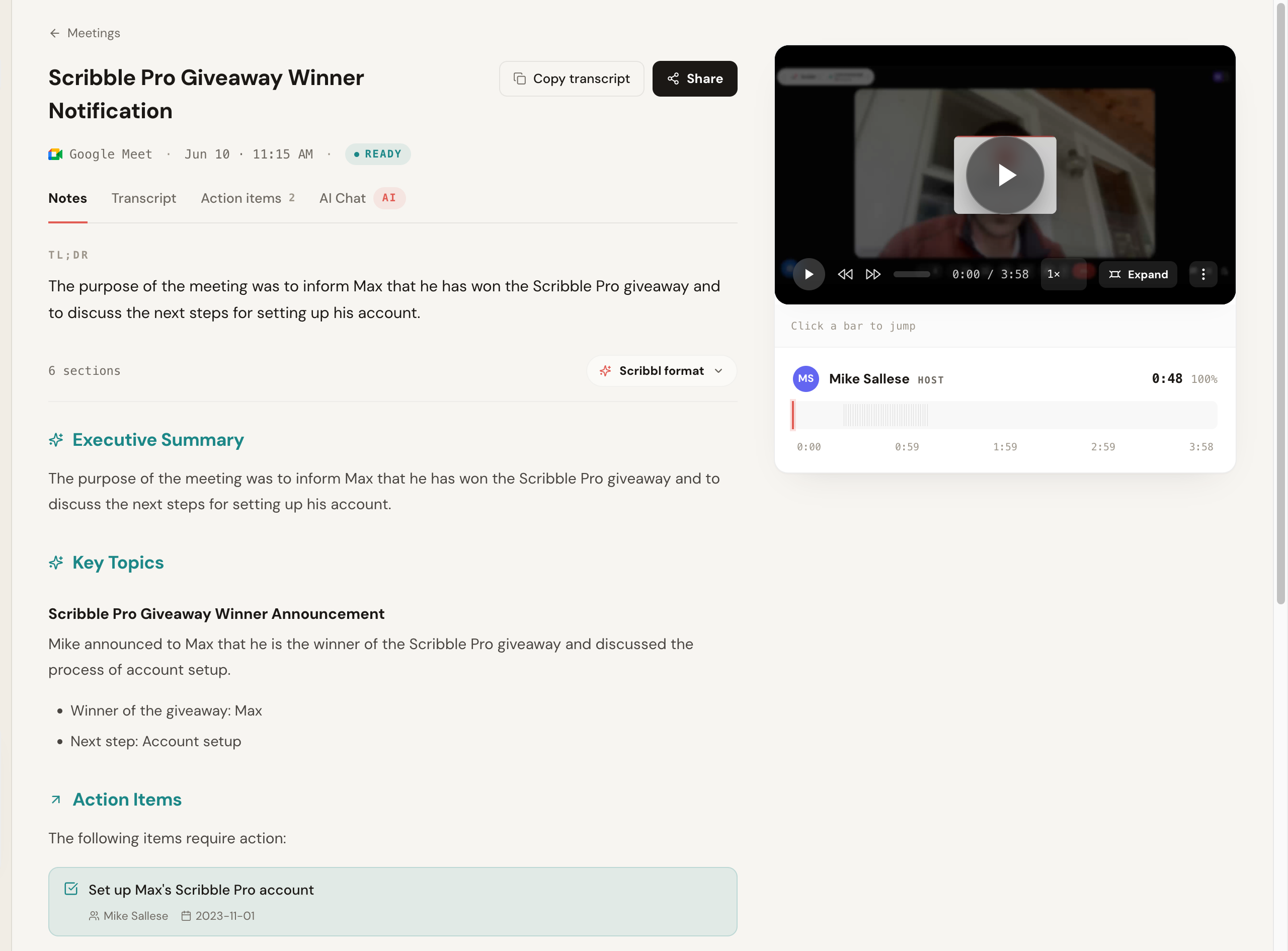
What we saw in testing: on our scripted Meet and Zoom calls, nothing appeared in the attendee list and no one was prompted to admit a recorder, which is the whole point. Transcription landed in the strong tier on clean audio, and like every tool it slipped a little on the heaviest crosstalk. Here is the actual notes output from one of our test calls: a TL;DR, an executive summary, key topics, and action items, all from a recording where nothing joined the room.

Scribbl AI meeting notes generated from a recorded Google Meet call, showing a TL;DR, Executive Summary, Key Topics, and Action Items, across Notes, Transcript, Action items, and AI Chat tabs, with no bot in the meeting

The part that separates Scribbl from a pure transcription tool is what happens after the call. Instead of stopping at notes, it connects your meeting library to ChatGPT or Claude, so you can pull facts across calls, draft a follow-up grounded in what was actually said, and cross-reference history without copy-pasting transcripts.

Scribbl AI Connector that lets you search, summarize, and ask anything about your meetings directly inside Claude and ChatGPT, with example prompts like pull facts across calls and draft a follow-up email

You still get the full recording and a clickable transcript when you want them, with speaker labels and a timeline you can jump around in.

Scribbl meeting recording player next to a speaker-labeled transcript timeline, with Copy transcript and Share buttons and the option to expand the video

The notes and the recording live side by side, so you can read the AI summary and jump straight to the moment in the video where something was said, without leaving the page.

Scribbl meeting view showing the AI-generated notes alongside the video recording, so you can read the summary and jump to the exact moment in the call where each point was discussed

Pros: botless on Meet, Zoom, and Teams; real free plan, no credit card; Chrome extension and desktop app; connects to ChatGPT or Claude so the follow-up work gets written; 5.0 from 3,000 reviews across 10,000+ organizations.

Cons: the AI connection shines most when you already use ChatGPT or Claude; capture runs from your own device session rather than a server-side bot, which is the point but means you are the one running it.

Pricing: free plan with no credit card; paid tiers on the pricing page.

Best for: anyone with client, sales, or external calls who wants notes with no bot, across multiple platforms, with a free start. See the head-to-head in Scribbl vs Otter.

Otter.ai (when it still fits)

Otter earns a place on its own alternatives list because for some people it remains the right tool. If you primarily need live transcription, you value a mature product with a long feature history, a searchable conversation archive, and live captions, and a bot in your meetings is genuinely not a problem, Otter does that job well.

What we saw in testing: transcription on clean solo audio was in the strong tier, on par with the best here, and the live-caption experience was smooth. On the messy crosstalk segment it slipped to mixed, like most tools. The OtterPilot assistant was visible to the room, which is exactly the friction that sends people looking for an alternative on external calls.

Pros: well known and mature; strong live transcription and captions; large searchable archive; mobile and in-person recording.

Cons: typically adds a visible assistant to the call; free tier caps minutes and features; notes mostly stay inside Otter rather than flowing into the AI you use.

Pricing: free tier plus paid plans; Pro is commonly cited around $8 to $17 per user per month and Business around $20 to $30 depending on billing. Confirm current minute and feature limits on Otter's site.

Best for: users who want mature live transcription and a searchable archive and do not mind the assistant. Check current G2 and Capterra reviews for the latest sentiment.

Fathom

Fathom is a polished, widely loved notetaker. It typically joins the meeting to record and produces clean summaries and action items, and it is well regarded for a generous free experience. The trade is the usual one: a participant appears in the call.

What we saw in testing: the summaries were among the tightest of the bot-based tools, and setup was fast. Transcription landed in the strong tier. The notetaker was visible in the call, which is fine for internal meetings and the reason it ranks below the botless pick for external ones.

Pros: clean, fast summaries; well-liked, generous free experience; simple to set up.

Cons: a bot joins the call; less of a fit for guarded external meetings; output stays in Fathom rather than your own AI.

Pricing: free plan plus paid tiers; paid is commonly cited around $15 to $19 per user per month depending on billing. Confirm on Fathom's site, and check its current G2 and Capterra scores.

Best for: internal-heavy teams that want a clean, popular notetaker and are fine with a bot. See our Fathom alternative and Otter vs Fathom.

Fireflies.ai

Fireflies is one of the more established and feature-rich options, with strong search, a wide set of integrations, and team analytics. Its standard model sends a notetaker bot, often named Fred, into the meeting.

What we saw in testing: the searchable archive and integration depth stood out, and transcription landed in the good tier. The Fred bot was visible in the call, and the sheer feature surface took longer to settle into than the simpler tools.

Pros: deep feature set; broad integrations; strong search and team analytics.

Cons: a visible bot in the call; the breadth can feel heavy for simple needs.

Pricing: free tier plus paid plans; Pro is commonly cited around $10 and Business around $19 per seat per month on annual billing. Confirm on Fireflies' site and read its current G2 and Capterra reviews.

Best for: teams that want depth and connected tooling and do not mind a join-the-call bot. See our Fireflies alternative and Otter.ai vs Fireflies.

Notta (best for multilingual meetings)

Notta is the alternative most often singled out for breadth of language support, which is exactly the gap that pushes a lot of people off Otter. If your meetings happen in languages beyond English, or you regularly have multilingual participants, this is the use case Notta is built around. It generally joins the call as a notetaker and also offers mobile and file-upload transcription.

What we saw in testing: on our English calls transcription landed in the good tier, and the non-native-speaker and non-English segments were handled more gracefully than by the English-first tools. We did not run a full per-language benchmark (that needs native reviewers), so treat this as a signal that language coverage is its design focus, not a guarantee for your specific language. The notetaker was visible in the call.

Pros: broadest cited language coverage; mobile and file-upload transcription; reasonable entry pricing.

Cons: a bot joins the call; verify your exact languages and current limits rather than trusting a headline language count.

Pricing: free tier plus paid plans; the paid entry tier is commonly cited around $9 to $14 per user per month on annual billing. Confirm on Notta's site and read its current G2 and Capterra reviews.

Best for: teams whose meetings are not all in English and who want the widest language coverage. If you also want no bot on those calls, weigh it against the botless pick.

Avoma (best for sales coaching and analytics)

Avoma leans toward the revenue side: alongside notes and transcripts it adds conversation intelligence, call scoring, and coaching analytics aimed at sales and customer-facing teams. It typically joins the meeting as a notetaker and connects to CRMs so call data flows into your pipeline.

What we saw in testing: the notes and transcript were solid in the good tier, but the differentiator is everything after, the analytics, talk-time, and coaching views, which are more than a plain notetaker offers. That depth is overkill if you just want a clean recap, and the bot was visible in the call.

Pros: conversation intelligence and coaching; CRM connectivity; built for sales and CS workflows; security documentation often cited for larger teams.

Cons: a bot joins the call; pricier than simple notetakers; more product than a solo user needs.

Pricing: free tier plus paid plans; paid tiers are commonly cited around $19 to $29 per user per month depending on the analytics tier. Confirm on Avoma's site and read its current G2 and Capterra reviews.

Best for: sales and customer-success teams that want coaching and revenue analytics on top of notes and accept a bot. See our Avoma alternative and Scribbl vs Avoma.

tl;dv

tl;dv focuses on recording and highlighting meetings, with clipping and sharing features teams use to spread context. It generally captures by joining the call.

What we saw in testing: it was strongest as a way to cut and share moments rather than as a pure notes tool, and transcription landed in the good tier. The recorder was visible in the call.

Pros: great clipping, highlights, and sharing; recording-first workflow; good free tier.

Cons: a bot joins the meeting; notes are secondary to clips for some teams.

Pricing: free tier plus paid plans; the paid entry tier is commonly cited around $18 to $20 per user per month on annual billing. Confirm on the tl;dv site and its current Capterra and G2 listings.

Best for: teams whose workflow is built around sharing meeting clips and moments. See our tl;dv alternative and Otter vs tl;dv.

Granola

Granola takes a notes-forward approach: it leans on your own typed notes and enhances them with AI, and it avoids the traditional join-the-call bot in favor of capturing on your device. People who like to take rough notes and have AI clean them up tend to enjoy it.

What we saw in testing: the AI-enhanced output was tidy when we typed a few rough notes during the call, and there was no participant in the room. It rewards you typing along, so it felt less hands-off than a tool that captures everything on its own.

Pros: no join-the-call bot; great for people who take their own notes; tidy AI-enhanced output.

Cons: built around you typing notes, not a hands-off capture; free history can be limited; confirm current platform support for where you meet.

Pricing: free tier plus paid plans; the paid tier is commonly cited around $14 per user per month. Confirm on Granola's site and read its app-store and G2 reviews.

Best for: people who take their own notes and want AI to enhance them without a bot. See our Granola alternative and Scribbl vs Granola.

Tactiq

Tactiq runs as a browser-based tool that captures live captions and transcripts from your own session rather than sending a bot into the meeting. It is lightweight and popular with people who want a transcript and quick AI actions without adding a participant.

What we saw in testing: capture was light and quick with nothing in the call, and the quick AI actions on the transcript were handy. It is more transcript-and-actions than a full meeting record, and coverage is browser-centric, so check it matches where you meet.

Pros: no bot; lightweight; quick AI actions on the transcript.

Cons: browser-centric coverage, so check it matches where you meet; less of a full meeting record.

Pricing: free tier plus paid plans; paid tiers are commonly cited around $12 to $17 per month depending on tier. Confirm on Tactiq's site and its Chrome Web Store and G2 listings.

Best for: people who want a lightweight, browser-based transcript without a bot. See our Tactiq alternative and Scribbl vs Tactiq.

Read AI

Read AI joins meetings to produce summaries and layers on analytics like engagement and sentiment signals. If your team is curious about meeting metrics on top of notes, it offers a different angle from a plain notetaker.

What we saw in testing: summaries were solid and the analytics were the differentiator, with engagement and sentiment signals you do not get elsewhere. The bot was visible in the call, and whether the metrics earn their keep depends on the team.

Pros: summaries plus meeting analytics; multi-platform.

Cons: a bot joins the call; the analytics angle is not for everyone.

Pricing: free tier plus paid plans; the paid entry tier is commonly cited around $19 per user per month. Confirm on Read AI's site and read its current G2 reviews.

Best for: teams who want engagement and meeting metrics alongside notes. See our Read AI alternative and Read AI vs Otter.ai.

MeetGeek

MeetGeek joins meetings and focuses on automated recaps and meeting insights, with templates and summaries aimed at reducing the manual write-up after a call.

What we saw in testing: the hands-off recaps arrived after the call with little setup, which is its appeal, and transcription landed in the good tier. The bot was visible, and the analytics are lighter than a dedicated sales platform.

Pros: automated recaps; meeting insights and templates; low setup effort.

Cons: a bot joins the call; analytics are lighter than dedicated sales tools; confirm current limits and platform coverage.

Pricing: free tier plus paid plans; Pro is commonly cited around $10 and Business around $17 per user per month on annual billing. Confirm on MeetGeek's site and its G2 and Capterra listings.

Best for: teams that want automated recaps and insights and accept a bot. See our MeetGeek alternative and MeetGeek vs Otter.

Bot vs botless: the deciding factor

The single biggest difference across this whole list is how each tool gets into your meeting, so it is worth seeing it side by side.

Typical bot-based tool
  • Capture: a bot joins the meeting as a participant
  • Attendees see it: yes, and some remove or block it
  • External calls: the bot can change the room
  • Examples: Otter, Fathom, Fireflies, Notta, Avoma, tl;dv, Read AI, MeetGeek
Scribbl (botless)
  • Capture: from your own session, nothing joins
  • Attendees see it: no bot, nothing announced, no email
  • External calls: the meeting stays exactly normal
  • Plus: free plan, works on Meet, Zoom, and Teams, connects to ChatGPT or Claude
The deciding factor The capture method is what changes whether your meetings stay normal and whether notes get captured on guarded external calls. As of June 2026.

Being botless also makes capture more resilient. A bot is a participant, which means it can be denied, removed, or blocked by meeting controls. Botless capture sidesteps that whole category of failure because nothing is trying to join in the first place.

Scribbl vs Otter.ai: head-to-head feature matrix

If you are specifically weighing the botless pick against Otter, here is the line-by-line comparison. Otter is a capable, mature product; this matrix simply shows where the two differ so you can decide on facts, not vibes. Where a row depends on plan or changes often, we say confirm and link you to the source. For a fuller treatment, read Scribbl vs Otter.

FeatureScribblOtter.ai
Bot joins the callNo, botless (nothing joins)Usually, an assistant joins
Announced to attendeesNo (nothing announced, no email)The assistant is visible in the room
Capture methodYour own session (extension + desktop app)Assistant on the call + mobile
Google MeetYesYes
ZoomYesYes
Microsoft TeamsYesYes
In-person / mobile recordingDesktop app for in-person; confirmMobile app for in-person
Free planYes, no credit cardYes, with monthly caps
Connects to ChatGPT or ClaudeYes (your own AI does the follow-up work)Built-in assistant, not your external AI
AI summary and action itemsYesYes
Speaker-labeled transcriptYes, with clickable timelineYes
Full recording playbackYesVaries by plan; confirm
Live captions during the callNotes after; confirm live captionsYes, strong live captions
Search across past meetingsYes (via AI connector)Yes, searchable archive
LanguagesEnglish-first; confirmNarrow set; confirm
Resilient to meeting bot-blockingYes (nothing tries to join)A bot can be denied or removed
Best for external / client callsStrong (no bot in the room)Weaker (visible assistant)
Chrome extensionYesBrowser and apps; confirm
Third-party rating referenceChrome Web Store (5.0 from 3,000 reviews)G2, Capterra
Security and data policyConfirm on Scribbl siteConfirm on Otter site

Scribbl's rating, organization count, and botless behavior are our own verifiable facts. Everything in the Otter column reflects commonly documented behavior that you should confirm on Otter's site, because plans and features change.

How to choose your Otter.ai alternative

You do not need to weigh every feature. Pick based on the handful of things that actually change your week.

  • Pick Scribbl if you have client, sales, or external calls and want notes with no bot in the room, you want a real free plan with no credit card, you meet across Meet, Zoom, and Teams, and you want your meetings wired into ChatGPT or Claude so the follow-up work happens. For sales teams specifically this is usually decisive; see Scribbl for sales.
  • Pick Fathom if your meetings are mostly internal, you want a clean and popular notetaker, and a bot joining is no problem.
  • Pick Fireflies if you want the deepest feature set, lots of integrations, and team analytics, and a visible bot is fine.
  • Pick Notta if your meetings are not all in English and the widest language coverage is your deciding factor.
  • Pick Avoma if you are a sales or customer-success team that wants conversation intelligence, call scoring, and coaching analytics on top of notes.
  • Pick tl;dv if your workflow revolves around sharing clips and highlights from recorded meetings.
  • Pick Granola if you like taking your own notes and want AI to polish them without a bot.
  • Pick Tactiq if you want a light, browser-based transcript and quick AI actions and do not need a full meeting record.
  • Pick Read AI or MeetGeek if you want analytics or automated recaps layered on top of notes and accept a bot in the call.
  • Stay on Otter if you mainly need mature live transcription and a searchable archive, and the assistant in your meetings genuinely does not bother you.

The short rule: if your meetings include clients, prospects, candidates, or partners, the bot is the variable that matters, and a botless tool keeps the call normal while still getting you notes. You can compare Scribbl's plans on the pricing page, and if you want a closer look at two bot-based tools head to head, read Read AI vs Otter.ai.

How to switch from Otter.ai without losing anything

Switching is lower-stakes than it feels, because you can run the new tool alongside Otter before you cancel. Here is the clean path, using the botless pick as the example.

  1. 1

    Export what you want to keep from Otter

    Pull any transcripts or summaries you still need out of Otter first, so nothing is trapped behind a lapsed subscription later.

  2. 2

    Install your new tool

    For Scribbl, add the Chrome extension or the desktop app and sign in with the free plan. No credit card is required to start.

  3. 3

    Run it on one real meeting

    Join your next Google Meet, Zoom, or Teams call. With a botless tool nothing joins the room, so there is no recorder to announce and no setup the other side has to approve.

  4. 4

    Check the output

    Read the transcript and summary, and if you use ChatGPT or Claude, send the meeting to it and watch the follow-up email or action items get written.

  5. 5

    Cancel Otter once you are happy

    After a few meetings you trust the new tool, turn off your Otter subscription so you are not paying for both.

The switch in five steps You can run the new tool alongside Otter the whole time. The only step that is not reversible is canceling Otter, so do that last.

Keep both running for a week if you want a side-by-side before committing. The only step that is not reversible is canceling Otter, so do that last.

FAQ

What is the best Otter.ai alternative in 2026?

It depends on one thing: do you want a bot in your calls or not. If you want notes with nothing joining the meeting, Scribbl is a strong botless alternative and has a free plan with no credit card. If a visible notetaker is fine, Fathom and Fireflies are popular, well-rated picks. Scribbl works across Google Meet, Zoom, and Microsoft Teams and connects your meetings to ChatGPT or Claude. Disclosure: we make Scribbl, so weigh our pick accordingly and run your own test call.

What is the best free Otter.ai alternative?

Scribbl has a real free plan with no credit card and it is botless, so nothing ever joins your call. Fathom is also widely cited for a generous free tier with unlimited recordings and a few premium calls per month. Otter has a free tier too, but free tiers usually cap monthly minutes and conversations, so compare current limits against how often you actually meet.

Is there an Otter.ai alternative that does not use a bot?

Yes. Scribbl is botless: it captures from your own session, so no participant joins the call, nothing is announced, and no email goes to attendees. Tactiq and Granola also avoid the traditional join-the-call bot in their own ways. Scribbl is the most complete botless option across Google Meet, Zoom, and Microsoft Teams, on both a Chrome extension and a desktop app.

Does Scribbl join the meeting like Otter's assistant?

No. Scribbl is botless. No bot ever joins the call, nothing is announced to the room, no participant named after the tool shows up in the attendee list, and no email goes out to other attendees. Otter, by contrast, tends to add an assistant to the call to capture audio.

Why do people switch from Otter.ai?

The most common reasons are the bot in the call, free-tier minute and conversation limits, wanting transcripts and notes plugged into the AI they already use, and wanting broader, more reliable coverage across Google Meet, Zoom, and Microsoft Teams. A visible notetaker on external calls, like sales or interviews, is the single most cited reason.

How much does Otter.ai cost, and are alternatives cheaper?

Otter advertises a free tier, a Pro plan, and a Business plan, with paid tiers commonly cited around 8 to 17 dollars per user per month on Pro and roughly 20 to 30 dollars on Business depending on billing. Several alternatives undercut that, and some, like Scribbl, offer a free plan with no credit card. Prices change often and vary by billing term, so confirm current numbers on each vendor's pricing page before you buy.

Is Scribbl really free, or is it a trial?

Scribbl has a genuine free plan with no credit card required. You can start taking botless meeting notes right away and upgrade later if you want more. For current numbers and what each tier includes, see the Scribbl pricing page.

Which Otter.ai alternative is the most accurate?

Accuracy depends heavily on audio quality, accents, and crosstalk, so no single tool wins every call. In our June 2026 hands-on test, Scribbl, Fathom, and Otter itself all landed in the strong tier on clean audio, while every tool slipped on heavy crosstalk and thick accents. We report accuracy as relative tiers (strong, good, mixed) rather than a single percentage, because one decimal implies more precision than a fair test supports. Run one real call on your top pick and judge accuracy yourself.

Which Otter alternative is best for sales teams?

Sales teams that run external demos and discovery calls usually want a botless tool so nothing visible joins a prospect's call. Scribbl is our pick there because it captures with no bot and connects the meeting to ChatGPT or Claude so the follow-up email and CRM notes get written. If you want built-in revenue analytics and call coaching and a bot in the call is fine, Fireflies is a common pick.

Are AI meeting notetakers safe and private compared to Otter?

It varies by vendor, and you should read each one's current data and training policy rather than trust a blanket claim. A practical privacy edge of a botless tool like Scribbl is that nothing extra joins the call and no recorder is announced to attendees, but you are still responsible for telling people you are taking AI notes and getting consent where the law requires it. Whatever you choose, confirm where data is stored and whether it is used to train models.

How do I switch from Otter.ai to an alternative?

Export anything you want to keep from Otter first, then install your new tool and run it on one real meeting before you cancel Otter. With Scribbl you install the Chrome extension or desktop app, sign in with the free plan (no credit card), and join your next Google Meet, Zoom, or Teams call. Nothing joins the meeting, so there is no setup to announce to attendees. Once you have a few meetings you are happy with, cancel your Otter subscription.

Is there an Otter.ai alternative that works on Google Meet, Zoom, and Microsoft Teams?

Yes. Scribbl captures botlessly across Google Meet, Zoom, and Microsoft Teams from a single Chrome extension plus a desktop app, so you do not need a different tool per platform. Most bot-based alternatives like Fathom, Fireflies, and Read AI also cover all three, but they join each call as a visible participant.

Which Otter.ai alternative is best for non-English or multilingual meetings?

Otter's language coverage is one of the most common reasons people leave it, since it has historically focused on a small set of languages. If multilingual support is your deciding factor, Notta is the alternative most often cited for the widest language coverage. In our June 2026 test, every tool degraded on heavy accents and crosstalk, so do not assume any single language count guarantees clean output. Run a real call in your actual languages before you commit, and confirm the current supported-language list on each vendor's site.

Which Otter alternative is best for enterprise or HIPAA-sensitive teams?

If you need formal compliance, shortlist by the certifications you actually require (SOC 2, HIPAA, encryption at rest and in transit, data-residency, and a no-train-on-your-data policy) and verify each on the vendor's trust or security page rather than from any listicle, including this one. Avoma, Fireflies, and Otter's own Business and Enterprise tiers are commonly cited for security documentation; smaller or newer tools may offer less. Security posture and certifications change, so confirm current status directly with the vendor before you buy.

Is Scribbl better than Otter?

Better depends on your priorities. If a recording bot or assistant in your external calls bothers you, you want a real free plan with no credit card, you meet across Google Meet, Zoom, and Microsoft Teams, and you want your meetings wired into ChatGPT or Claude, Scribbl is the stronger fit because it is botless and AI-connected. If you mainly need mature live transcription with a searchable archive and the assistant in your meetings does not bother you, Otter may still suit you. Disclosure: we make Scribbl. See our Scribbl vs Otter head-to-head and run one real call on each before deciding.

Can I export my data when I leave Otter.ai?

Yes. Before you cancel, export the transcripts and summaries you want to keep from Otter so nothing is trapped behind a lapsed subscription. Then install your new tool, run it on one real meeting to confirm you like the output, and only cancel Otter once you are happy. Keeping both running for a week gives you a clean side-by-side before you commit.

Try Scribbl

Let your meetings take their own notes.

Scribbl records, transcribes, and summarizes your Google Meet calls from your browser. No bot joins the call. Free forever for individuals.

Add to Chrome · It's free