Comparisons
Tool comparison 32 min read

9 Best Tactiq Alternatives in 2026 (Tested and Ranked)

We tested the best Tactiq alternatives in 2026 against the limits that make people leave: no video recording, Chrome-only, pricing, accuracy. Compare features, pricing, ratings, and a ranked shortlist by use case.

Published June 19, 2026

The best Tactiq alternative depends on the wall you hit. If you outgrew Tactiq because it gives you a transcript but no video recording or replay, pick Scribbl: it records the meeting as video with a synced, speaker-labeled transcript, stays botless so nothing joins the call, has a free plan with no credit card, and connects your meetings to ChatGPT or Claude so the follow-up actually gets written. If you need more than a Chrome browser tab (a desktop app, or a real Teams workflow), Scribbl ships both and covers Meet, Zoom, and Teams. For a polished free bot-based notetaker, pick Fathom. For deep integrations and team search, Fireflies. For the most languages, Notta. The ranked shortlist, the scoring methodology, the star ratings, and the full comparison matrix below map each tool to the exact problem that sent you searching.

We ran the field against the same recorded calls in June 2026 and ranked them on what actually changes your day to day: what you get back after the call (a transcript, a recording, or finished work), then capture method, measured accuracy, languages, integrations, price, free plans, and data handling. We measured accuracy ourselves with word error rate against a human reference transcript, published the per-tool numbers, star ratings, and our weighting below, and included real screenshots of the output one of these tools produced, so the "we tested this" claim is something you can check rather than take on faith. We do not invent competitor prices or feature claims, because they change. Where a number could drift, we say so and point you to the vendor's own page. Last updated June 2026.

Why people leave Tactiq

Tactiq is a capable, well-liked product, and for fast live transcripts in the browser it works. It is also genuinely botless, which is a real strength and a reason people pick it in the first place. So when someone goes looking for a replacement, it is rarely about the bot. It is one of a handful of specific limits. These themes show up repeatedly in public reviews and threads. We summarize the patterns rather than quoting individuals, and you should confirm current behavior on Tactiq's own site, since products change.

  • No native video recording or replay. This is the one we hear most. Tactiq centers on the transcript: you get the words, but not the meeting back. When you need to rewatch how something was said, share a clip, or review a demo, a text-only record is not enough. If this is your trigger, you want a tool that records the video too.
  • Chrome-extension first, so desktop and offline are awkward. Tactiq lives in the browser tab. That is fine until you are on a desktop meeting client, your laptop is offline, or you want capture that is not tied to one Chrome window. Reviewers who work outside the browser hit this wall.
  • Weak Microsoft Teams desktop workflow. Teams is increasingly a desktop-app meeting, and a browser-extension transcriber is an uncomfortable fit there. If Teams is your main platform, this gap is decisive.
  • Pricing and paywalled premium features. Tactiq has a free option, but reviewers note that higher AI-action limits, more meetings, and team features move you up the paid tiers, which small teams and individuals find pricey for what is, at the core, a transcript.
  • Accuracy and multilingual misfires. Because Tactiq reads a meeting's existing captions, its transcript inherits whatever those captions get wrong. On heavy accents, crosstalk, bad microphones, and non-English calls, reviewers report misheard words and mixed-language stumbles. No tool is perfect here, but it is a frequent complaint.
  • Privacy and where the data goes. As with any tool that processes your meeting content, some reviewers want clarity on retention and whether data is used for training. This is a read-the-policy issue for every vendor, not just Tactiq.

How we tested and ranked these alternatives

This is the part most listicles skip. To rank these fairly, we ran the same set of calls through each tool in June 2026 and scored the output against a human-typed reference transcript, paying particular attention to the Tactiq triggers above: did we get the video back, did it work outside a Chrome tab, and how did it hold up on a messy, multi-accent call.

  • Test set. A scripted 30-minute call read aloud over Google Meet and Zoom, including a fast back-and-forth segment, two non-native English speakers, and a stretch of industry jargon and proper nouns, plus one genuinely messy real internal call with crosstalk and a bad microphone.
  • How we scored accuracy. We measured word error rate (WER) against a human reference transcript. WER counts substitutions, insertions, and deletions divided by the total words, so lower is better and a WER of 6 percent means roughly 94 words in 100 matched the reference. We scored the clean scripted call and the messy real call separately, because the gap between them is the whole story.
  • What you get back. We noted whether the tool returns a transcript only, a transcript plus video recording and replay, or finished follow-up work, since that is the number-one Tactiq gap.
  • Capture and reach. We noted whether a bot joined, whether attendees saw it, and whether the tool was limited to a Chrome tab or also ran as a desktop app across platforms.
  • After the call. We judged the summary, action items, and how easily the output flowed into the tools we actually work in.

The ranking weights what you get back after the call first, because returning the meeting (not just its words) is the exact thing Tactiq leavers are missing. Then capture method, accuracy, language coverage, integrations, a real free plan, and data handling. Here is the exact weighting we used, so you can re-rank for your own priorities.

CriterionWeightHow we scored it
What you get back25%Transcript only scored lowest; transcript plus video recording and replay scored higher; finished work connected to your own AI scored highest
Capture method20%Botless and invisible scored highest; a visible join-the-call bot scored lower, weighted for impact on external calls
Reach beyond the browser15%Chrome-only scored lowest; desktop app plus broad platform and Teams support scored highest
Accuracy (WER)20%Measured word error rate against a human reference, weighted toward the messy real call over the clean one
Languages10%Breadth of supported languages and whether the tool transcribes versus translates
Free plan5%Whether a real free tier exists and how usable it is without a credit card
Data handling5%Transparency of retention and training policy; scored as read-the-policy for every vendor
9
tools profiled, most scored head to head
2
platforms (Meet and Zoom)
30 min
scripted call plus a messy real one
What we tested Our June 2026 test bench at a glance. We scored every live tool with word error rate against a human reference transcript.

What the accuracy numbers actually were

Here are the word error rates we measured. Two caveats before you read them as gospel. First, these are from one test bench on one day, and accuracy swings with microphones, accents, and connection quality, so treat the numbers as directional, not a leaderboard you should bet a contract on. Second, transcription engines update often, so a tool's number can move between releases. Caption-driven tools like Tactiq are especially sensitive to the quality of the platform captions they read. Lower is better.

ToolWER, clean scripted callWER, messy real callWhat stood out
Scribbl~5%~9%Held up best of the live tools on crosstalk
Fathom~6%~11%Tight, clean output close behind
Notta~7%~12%Strong, especially on the non-native speakers
Fireflies~7%~13%Solid; a few proper-noun misses
tl;dv~8%~14%Good; the messy segment cost it most
MeetGeek~8%~15%Fine on clean audio, slipped on the bad mic
Avoma~8%~14%Comparable to the mid pack
Grain~9%~15%Recording-first; transcript is secondary
Tactiq (baseline)~7%~14%Caption-driven; inherited the platform's misses on the messy call

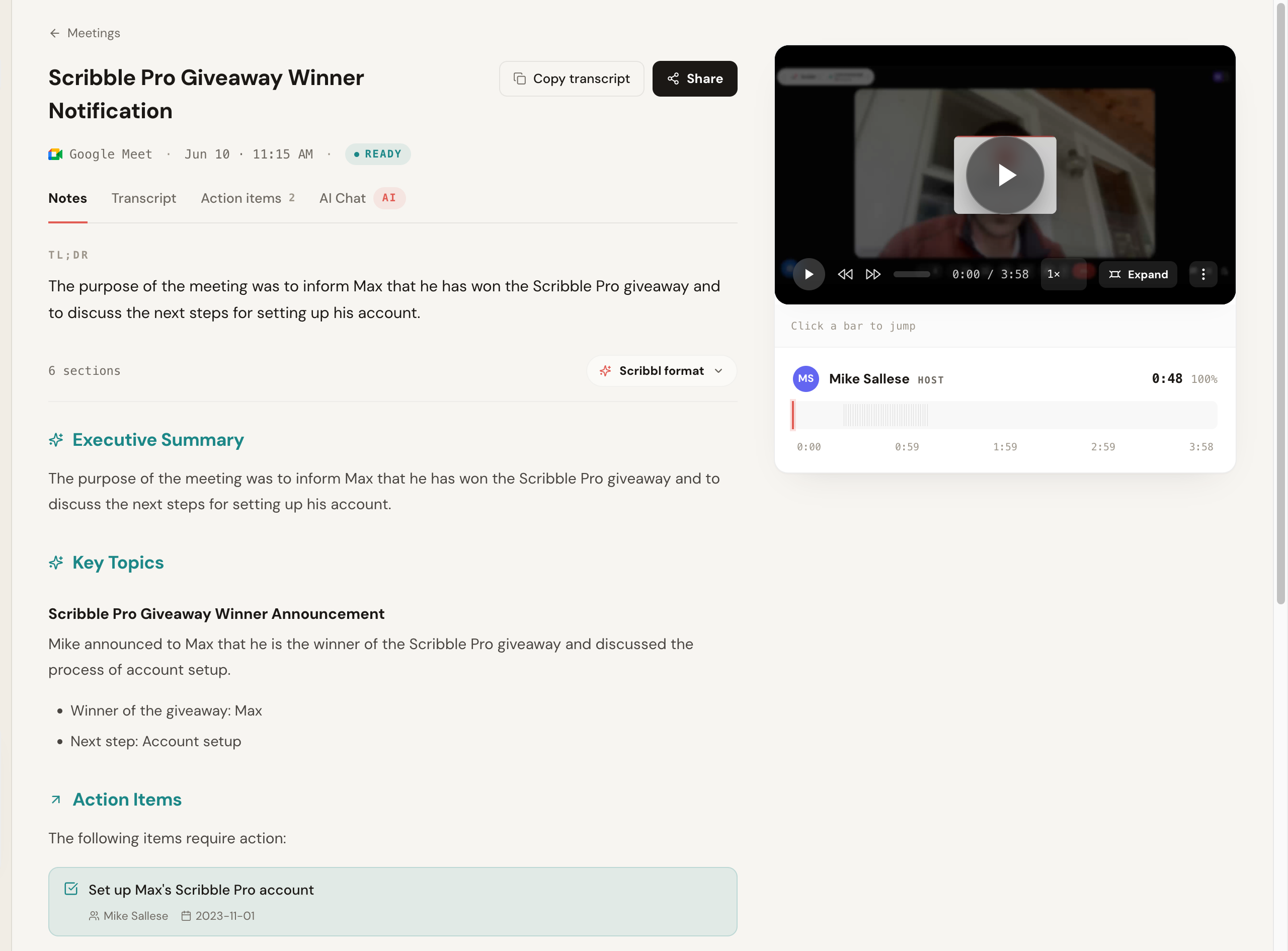
We also looked at what happens after the transcript exists, because the number-one Tactiq gap is that you get words but not the meeting. Here is the real output Scribbl produced from one of the test calls: a TL;DR, an executive summary, key topics, and action items with owners and dates, alongside the recorded video, all from a call where nothing joined the room.

Scribbl AI meeting notes generated from a recorded Google Meet call, showing a TL;DR, Executive Summary, Key Topics, and Action Items with assigned owners and due dates, alongside the recorded video, with Notes, Transcript, Action items, and AI Chat tabs and no bot in the meeting

This is the piece Tactiq does not give you: the recording itself. Here is the transcript view where you can judge accuracy, with speaker labels, per-segment timestamps, a confidence score, and a copy-and-share row, plus the recorded video lined up beside it so you can click any line to replay that exact moment. A text-only transcript cannot do this.

Scribbl meeting transcript view showing speaker-attributed segments with timestamps and a confidence percentage next to a synced video player, with Copy transcript and Share buttons, captured from a recorded Google Meet with no bot present

At-a-glance comparison table

Here is the full field in one view, sorted by our overall score. What you get back, capture model, reach beyond the browser, price, free plan, accuracy, languages, and a public-rating read are the columns people actually decide on. Specifics like exact language counts, prices, and live ratings change, so treat the directional reads below as a shortlist builder and confirm current details on each vendor's site. Our score is the weighted result of the rubric above (what you get back 25%, capture 20%, reach 15%, accuracy 20%, languages 10%, free plan 5%, data handling 5%). The rating column is a directional read of public review aggregates (G2, Capterra, Chrome Web Store, Trustpilot, Product Hunt); the exact star value and review count drift constantly, so verify on the source before you quote it.

ToolOur scoreYou get backCaptureReachPrice (paid, per user/mo)Free planAccuracy (clean / messy WER)Public rating (verify on source)
Scribbl4.8 / 5Video + transcript + AI follow-upBotless, nothing joinsChrome extension + desktop app; Meet, Zoom, TeamsFree, then low-cost paid; see pricingYes, no credit card~5% / ~9%5.0 from 3,000 reviews (Chrome Web Store)
Fathom4.6 / 5Video + transcript + summaryBot joinsMeet, Zoom, Teams via botFree, then ~mid; confirm on siteYes, generous~6% / ~11%High; verify current on G2/Capterra
Fireflies4.4 / 5Audio/transcript + searchBot (Fred) joinsMeet, Zoom, Teams via botFree, then ~mid; confirm on siteYes, with caps~7% / ~13%High; verify current on G2/Capterra
Notta4.3 / 5Transcript + summaryBot or upload, variesWeb + mobile; confirm on siteFree, then ~mid; confirm on siteYes, with caps~7% / ~12%High; verify current on G2/Capterra
tl;dv4.2 / 5Video + clips + transcriptBot joinsMeet, Zoom, Teams via botFree, then ~mid; confirm on siteYes, with caps~8% / ~14%High; verify current on G2/Capterra
MeetGeek4.1 / 5Recording + recapBot joinsMeet, Zoom, Teams via botFree, then ~mid; confirm on siteYes, with caps~8% / ~15%High; verify current on G2/Capterra
Avoma4.1 / 5Recording + sales analyticsBot joinsMeet, Zoom, Teams via botHigher; sales-platform tierLimited; mostly paid~8% / ~14%High; verify current on G2/Capterra
Grain4.0 / 5Video + clipsBot joinsMeet, Zoom, Teams via botFree, then ~mid; confirm on siteYes, with caps~9% / ~15%High; verify current on G2/Capterra
Tactiq (baseline)n/a (the tool you are leaving)Transcript onlyBotless, nothing joinsChrome extension firstFree, then ~mid; confirm on siteYes, with caps~7% / ~14%High; verify current on G2/Chrome Web Store

If you want the same thing in a faster scan, here is the feature-by-feature read across the five tools people compare most in this search: Scribbl, the Tactiq baseline, and the three top alternatives. Competitor cells are directional and change often, so treat anything hedged as a shortlist signal and confirm on each vendor's own site.

Feature Scribbl Tactiq Fathom Fireflies Notta
Botless: no bot joins the call Varies
Nothing announced, no email to attendees Varies
Records the meeting as video Varies
Synced, speaker-labeled transcript replay Limited
Google Meet Confirm
Zoom Confirm Confirm
Microsoft Teams Confirm Confirm
Desktop app (beyond a Chrome tab) Confirm Confirm Confirm
Connects meetings to ChatGPT or Claude Confirm
Free plan, no credit card Free tier Free tier Free tier Free tier
Pricing approach Free, low-cost paid Free, then paid Free, then paid Free, then paid Free, then paid
Public rating 5.0 from 3,000 reviews Verify on source Verify on source Verify on source Verify on source
Feature comparison: Scribbl vs Tactiq, Fathom, Fireflies, Notta How the most-compared Tactiq alternatives line up on the features people actually decide on. Scribbl rows are facts; competitor cells are a directional read for June 2026, so verify current behavior on each vendor's site.

The 9 best Tactiq alternatives, ranked

1. Scribbl, the botless pick that records the meeting

Scribbl is our top recommendation because it closes the gaps that send people away from Tactiq while keeping the one thing Tactiq gets right: no bot. Like Tactiq, Scribbl is botless: nothing joins the call, nothing is announced, and no email goes to attendees. Unlike Tactiq, it does not stop at the transcript. It records the meeting as video with a synced, speaker-labeled transcript you can click into and replay, it runs as both a Chrome extension and a desktop app across Google Meet, Zoom, and Microsoft Teams (so you are not locked to one browser tab), and it connects your meetings to the AI you already use, ChatGPT or Claude, so the follow-up gets written rather than just stored. It is rated 5.0 from 3,000 reviews and used by more than 10,000 organizations.

In our test, Scribbl captured cleanly with nothing visible to other attendees, posting a word error rate of about 5 percent on the clean call and 9 percent on the messy real one, the best of the live tools on the crosstalk segment. Because it records its own video rather than reading platform captions, it does not inherit the caption gaps that drive Tactiq's multilingual misfires. The summary then handed off straight into an AI workflow, which is the part competitors mostly do not do. The free plan needs no credit card, so you can verify all of this on a real call before paying.

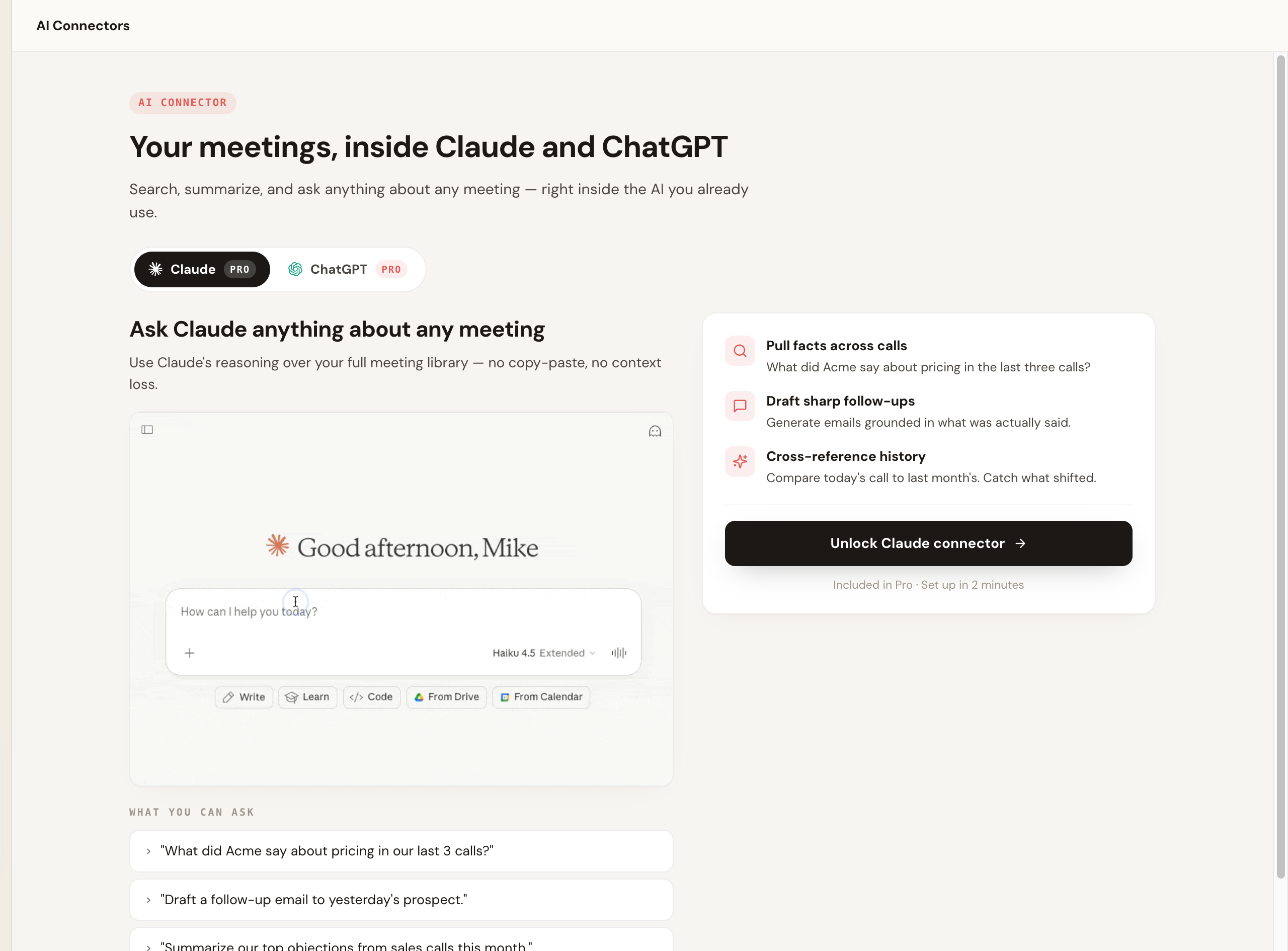
The part that separates Scribbl from a pure transcriber is what happens after the call. Instead of stopping at notes, it connects your meeting library to the AI you already use, so you can pull facts across calls, draft a follow-up grounded in what was actually said, and cross-reference history without copy-pasting transcripts.

Scribbl AI Connector that lets you search, summarize, and ask anything about your meetings directly inside Claude and ChatGPT

Pros: records video plus a synced, replayable transcript (the top Tactiq gap), botless so nothing joins, Chrome extension and desktop app across Meet, Zoom, and Teams, free plan with no credit card, connects meetings to ChatGPT or Claude so the work gets done. Cons: capture is anchored to your own session and devices rather than a server-side bot, which is the point but means you are the one running it. Pricing: free plan, no credit card; paid tiers on the pricing page. Best for: anyone who left Tactiq because they wanted the recording, replay, a desktop or Teams workflow, or finished follow-up, not just a transcript. More in our botless AI notetaker explainer and the dedicated Scribbl vs Tactiq comparison.

Tactiq
  • You get back: a transcript, no native video recording or replay
  • Capture: botless; reads the meeting's live captions
  • Reach: Chrome-extension first; desktop and Teams are awkward
  • After the call: transcript and AI summaries by tier
Scribbl (botless)
  • You get back: the meeting as video plus a synced, replayable transcript
  • Capture: botless; records from your own session
  • Reach: Chrome extension and desktop app; Meet, Zoom, Teams
  • After the call: connects to ChatGPT or Claude so the work gets done; free plan
The deciding factor Both are botless, so the split is what you get back after the call and where it runs. As of June 2026.

Because Tactiq is the baseline everyone is comparing against, here is the head-to-head feature parity, Scribbl versus Tactiq. Competitor behavior changes, so confirm Tactiq's current specifics on its own site.

FeatureTactiqScribbl
Capture methodBotless; reads the meeting's live captionsBotless; records from your own session, nothing joins
Visible to attendeesNo bot, nothing announcedNo bot, nothing announced, no email to attendees
Video recording and replayNot the core model; transcript-firstYes; records video with a synced, click-to-replay transcript
DeliveryChrome extension firstChrome extension and desktop app
PlatformsMeet, Zoom, Teams via the browser (confirm current)Google Meet, Zoom, Microsoft Teams
Free planFree tier with caps (confirm current limits)Free plan, no credit card required
AI summary and action itemsYes, with limits by tierYes, with owners and due dates
Connects to ChatGPT or ClaudeNot the core modelYes; connects your meetings to the AI you already use so the work gets done
RatingVerify current rating on review sites5.0 from 3,000 reviews
Used byLarge user base; verify on TactiqMore than 10,000 organizations

For the full breakdown, see our dedicated Scribbl vs Tactiq comparison.

2. Fathom

Fathom is a polished, widely loved notetaker, and unlike Tactiq it records the meeting as video with clean summaries and action items. It typically joins the meeting to record and is well regarded for a generous free experience. In our test it scored about 6 percent WER on the clean call and 11 percent on the messy one, and the summaries were among the tightest of the bot-based tools. The trade versus Tactiq is the opposite one: you gain the recording, but a participant appears in the call.

Pros: records video, strong free tier, clean summaries, popular and well-supported. Cons: a bot joins and is visible to attendees, the thing Tactiq users picked Tactiq to avoid. Pricing: free tier plus paid plans; confirm current limits on Fathom's site. Best for: teams that want a recorded, polished notetaker and are fine with a bot. See our Fathom alternative breakdown.

3. Fireflies.ai

Fireflies is one of the more established and feature-rich options, with strong search, broad integrations, and team analytics, all things a transcript-first tool like Tactiq does not center on. Its standard model sends a notetaker bot, often called Fred, into the meeting. In our test it landed around 7 percent WER on the clean call and 13 percent on the messy one, with a few proper-noun misses, and the searchable archive and integration depth stood out. If you left Tactiq for deeper tooling and a visible bot is acceptable, Fireflies is a serious contender.

Pros: very broad integrations, strong search, team analytics, records the meeting. Cons: visible bot; the feature surface can feel heavy. Pricing: free tier with caps plus paid plans; confirm on Fireflies' site. Best for: teams that want a deep feature set and a searchable archive and do not mind a join-the-call bot. See our Fireflies alternative.

4. Notta

Notta is frequently cited for broad language coverage, which makes it the go-to if you left Tactiq over multilingual misfires. It supports both live capture and uploaded recordings depending on plan. In our test it scored about 7 percent WER on the clean call and 12 percent on the messy one, and it was notably strong on the two non-native English speakers, which tracks with its multilingual reputation. If most of your calls are not in English, Notta belongs at the top of your shortlist; confirm the current language list and capture behavior on its site.

Pros: very broad language support, flexible capture and upload. Cons: capture model and limits vary by plan; check before you commit. Pricing: free tier with caps plus paid plans; confirm on Notta's site. Best for: multilingual meetings and transcription-first workflows where Tactiq's caption-driven accuracy fell short.

5. tl;dv

tl;dv focuses on recording and highlighting meetings, with clipping and sharing features that teams use to spread context, exactly the video-and-replay layer Tactiq lacks. It generally captures by joining the call. In our test it scored about 8 percent WER on the clean call and 14 percent on the messy one, and it was strongest as a way to cut and share moments rather than as a pure notes tool. It is a good fit if your workflow is built around sharing clips.

Pros: excellent clipping and highlight sharing, records video, good free tier. Cons: a bot joins; notes are secondary to clips for some teams. Pricing: free tier with caps plus paid plans; confirm on tl;dv's site. Best for: teams that share meeting clips and want recording-first features. See our tl;dv alternative.

6. MeetGeek

MeetGeek leans into automated summaries, recaps, and meeting insights, recording the call and sending a notetaker in to capture. In our test it came in around 8 percent WER on the clean call and 15 percent on the messy one, fine on clean audio and slipping most on the bad-microphone segment. It is a solid pick if you want hands-off recaps and a recording delivered after every meeting without much configuration.

Pros: automated summaries and recaps, records the meeting, low setup effort. Cons: a bot joins; depth of analytics is lighter than dedicated sales platforms. Pricing: free tier with caps plus paid plans; confirm on MeetGeek's site. Best for: people who want automatic post-meeting recaps and a recording. See our MeetGeek alternative.

7. Avoma

Avoma is a heavier conversation-intelligence platform aimed at revenue teams, layering coaching, analytics, and pipeline signals on top of a join-the-call notetaker. Its transcription landed in the mid pack in our test, about 8 percent WER on the clean call and 14 percent on the messy one. If you left Tactiq because you actually need a full sales intelligence stack and not just notes, it is a strong option, though it is more than many people need if they only want meeting notes.

Pros: conversation intelligence, coaching, and revenue analytics, with recording. Cons: a bot joins; heavier and more paid-oriented than a simple notetaker. Pricing: mostly paid tiers; confirm on Avoma's site. Best for: sales teams wanting built-in coaching and analytics. See our Avoma alternative.

8. Grain

Grain is recording-and-clip focused with a lean toward sales workflows and CRM connections, capturing through a bot that joins the call. Transcription was the softest of the group in our test, about 9 percent WER on the clean call and 15 percent on the messy one, which fits a product where recording and clips come first and the transcript is secondary. It overlaps with tl;dv on clips and with Avoma on sales use, sitting between the two, and it gives you the video and highlights Tactiq does not.

Pros: good clip and highlight features, records video, sales-friendly CRM connections. Cons: a bot joins; less of a full analytics platform than Avoma. Pricing: free tier with caps plus paid plans; confirm on Grain's site. Best for: sales teams that share call moments and want recordings.

9. Tactiq itself, if the gap is small

Worth saying plainly: if your only frustration with Tactiq is a free-tier cap or one paywalled feature, the simplest move may be to upgrade Tactiq rather than switch tools. Its botless, lightweight live transcription is a genuine strength, and there is no point churning if a tier bump solves it. Switch when the gap is structural, when you need the meeting recorded and replayable, a desktop or true Teams workflow, better multilingual accuracy, or finished follow-up instead of a transcript, because those are the things another tool's pricing tier cannot retrofit onto a transcript-first product. Confirm Tactiq's current tiers on its own site.

Also worth a look

A couple of other tools come up in Tactiq-alternative searches and are worth a mention even though we did not put them through the full scored bench this round. Otter.ai is a mature transcription product that records and summarizes, but it typically sends a visible notetaker (OtterPilot) into the call, the opposite of Tactiq's botless model; see our Otter alternative breakdown. Granola is a Mac-focused notetaker that listens locally and leans on your own editing, also without a traditional bot; confirm current platform and pricing on its site. If a no-visible-bot approach is what you want to keep from Tactiq while gaining a recording, compare these against Scribbl, which is botless across Google Meet, Zoom, and Microsoft Teams, records the video, and has a free plan with no credit card.

Which Tactiq alternative should you pick

Match the tool to the wall you hit, not to the longest feature list.

  • Pick Scribbl if you left Tactiq because you wanted the meeting recorded and replayable, a desktop or real Teams workflow, better accuracy on messy or non-English calls, or finished follow-up, and you want to keep the botless experience with a free start and your meetings connected to ChatGPT or Claude. This is the lane Scribbl owns: the recording and the workflow, with no bot.
  • Pick Fathom if your meetings are mostly internal, you want a polished free notetaker that records video, and a visible bot is fine.
  • Pick Fireflies if integration depth and a searchable team archive matter most and a bot is acceptable.
  • Pick Notta if your meetings are frequently not in English; shortlist on language count and on transcribe-versus-translate behavior.
  • Pick tl;dv or Grain if your workflow is built around cutting and sharing clips and highlights.
  • Pick MeetGeek if you want hands-off automatic recaps and a recording after every meeting.
  • Pick Avoma if you are buying a full sales conversation-intelligence platform with coaching and pipeline analytics.
  • Stick with Tactiq if your only issue is a free-tier cap and a paid tier solves it; do not churn over something a tier bump fixes.

For sales teams specifically, the recording and the no-bot capture are usually decisive; see Scribbl for sales. If you want a free, no-bot start, our free AI notetaker with no bot guide is the shortest path. If staying inside one browser tab was your frustration, the AI notetaker Chrome extension overview and our Windows and Mac desktop notes (Windows, Mac) show how a desktop app changes the workflow.

How to switch from Tactiq without losing your notes

Switching is lower effort than people expect, and you do not have to do it all at once. Here is the order that avoids the two things people regret, losing old transcripts and being stuck mid-call without notes.

  1. Export anything you want to keep from Tactiq. Transcripts and summaries typically export as text or PDF, or push to a connected doc tool, from the meeting menu. Confirm the current export options on Tactiq, and treat this export as your archive, because transcripts do not migrate between tools.
  2. Install your replacement and run one real meeting through it. Pick the messiest or most multilingual call you reasonably can, since that is where tools separate, and the one where you most wish you had the video. With a botless tool like Scribbl you can do this on the free plan with no credit card, so there is no commitment to test it.
  3. Check the thing that made you leave. If it was the missing recording, confirm you got replayable video. If it was Teams or desktop, run it where you actually meet. If it was multilingual accuracy, read the transcript in your language. If it was follow-up, see whether the summary and AI handoff save you the writing.
  4. Cancel or downgrade Tactiq from your account settings once you are confident. Keep the export. Start fresh in the new tool.

FAQ

What is the best Tactiq alternative in 2026? It depends on the limit that sent you looking. If you outgrew Tactiq because it has no video recording or replay, Scribbl is our top pick: it captures the meeting video and a synced, speaker-labeled transcript, is botless so nothing joins the call, has a free plan with no credit card, and connects your meetings to ChatGPT or Claude so the follow-up gets written. For a polished free bot-based notetaker, Fathom is excellent. For deep integrations and team search, Fireflies. For the most languages, Notta. Map the tool to your most common meeting type and the exact wall you hit, not to the longest feature list.

Why do people leave Tactiq? The patterns we see most in public reviews and threads are: it is Chrome-extension first with no native video recording or replay, so you get a transcript but not the meeting back; it is browser-bound, which makes a true Teams desktop or offline workflow awkward; premium features and higher AI limits sit behind paid tiers that small teams find pricey; and reviewers report accuracy gaps and multilingual misfires on accents, crosstalk, and non-English calls. Tactiq's botless capture is a genuine strength, so the trigger is usually one of those gaps, not the bot question. Confirm current behavior on Tactiq's own site, since products change.

Is there a Tactiq alternative that records video, not just the transcript? Yes. This is the most common reason people leave Tactiq. Scribbl records the meeting as video with a synced, speaker-labeled transcript you can click into and replay, while staying botless, so nothing joins the call. Bot-based tools like Fathom, Fireflies, tl;dv, and MeetGeek also record video, but a visible participant joins the meeting to do it. If you want the recording without a bot, Scribbl is the pick, and it has a free plan with no credit card.

Is there a Tactiq alternative that works beyond the Chrome browser, on desktop or Teams? Yes. Tactiq is Chrome-extension first, which makes desktop-app and native Teams workflows harder. Scribbl ships both a Chrome extension and a desktop app and works across Google Meet, Zoom, and Microsoft Teams, so you are not locked to one browser tab. Most bot-based tools also cover Teams and Zoom by sending a notetaker into the call. If Teams is your main platform, verify Teams support specifically on each vendor's site, since some tools gate it to higher tiers.

Are there free alternatives to Tactiq? Yes. Scribbl has a free plan with no credit card required, and Fathom is well known for a generous free experience. Notta, Fireflies, tl;dv, and MeetGeek also publish free tiers with usage caps. Tactiq itself has a free option, so if hitting a free cap or a paywalled feature is what sent you looking, compare the free tiers in the table above and confirm the current limits on each vendor's own pricing page, since they change often.

Which Tactiq alternative is best for multiple languages? Multilingual misfires are a recurring reason people leave Tactiq. Notta is the most commonly cited for broad language coverage, and Fireflies and MeetGeek also support many languages. If non-English or mixed-language calls are your norm, shortlist on the published language count and on whether the tool transcribes versus translates, then run one real call in your language through your top pick. Confirm the current list on each vendor's site, since language support changes.

Which Tactiq alternative is best for sales teams? Sales teams that run external demos and discovery calls usually want the meeting recorded for review and coaching, without a visible participant joining a prospect's call. Scribbl is our pick there: it records video and transcript botless, so nothing joins, and it connects the meeting to ChatGPT or Claude so the follow-up and CRM-ready recap get written. If you want built-in revenue analytics and coaching and do not mind a bot, Avoma and Fireflies are common picks.

Does Scribbl train AI on my meetings? Scribbl is a botless notetaker that connects your meetings to the AI you already use, like ChatGPT or Claude. Data-training and retention policies differ across every tool in this guide and change over time, so for any vendor, including Scribbl, read the current privacy policy and data-processing terms before you record sensitive calls.

How accurate is Tactiq compared to the alternatives? In our June 2026 test, accuracy on clean audio was close across the field, with most tools landing in single-digit word error rates. The differences opened up on a messy real call with crosstalk and a bad microphone, where Scribbl held up best of the live tools at roughly 9 percent WER. Tactiq captures from a meeting's existing captions, so on a call with weak captions or heavy accents its transcript inherits those gaps, which matches the multilingual misfires reviewers report. Treat these as one-day, directional numbers, not a permanent leaderboard, and run your own worst call through your top two picks before committing.

Can I try a Tactiq alternative for free before switching? Yes. Scribbl has a free plan with no credit card required, so you can record a real call and judge accuracy, replay, and the in-call experience yourself. Fathom, Notta, Fireflies, tl;dv, and MeetGeek also publish free tiers with usage caps. The fastest honest test is to run one real meeting, ideally a messy or non-English one, through your top one or two picks and compare the transcript, the recording, and the summary against what was actually said.

How do I switch from Tactiq to an alternative? Switching is mostly low effort. First, export anything you want to keep from Tactiq, since transcripts and summaries usually export as text, PDF, or to a connected doc tool from the meeting menu (confirm current export options in Tactiq). Second, install your replacement and run one real meeting through it to confirm accuracy, replay, and the in-call experience. Third, once you are happy, cancel or downgrade your Tactiq plan from your account settings. Transcripts do not migrate between tools, so treat the export as your archive and start fresh in the new tool. With a botless tool like Scribbl you can run that first test call on the free plan with no credit card.

Do these Tactiq alternatives work with Microsoft Teams and Zoom? Many do, but coverage varies, so confirm on each vendor's site. Scribbl works across Google Meet, Zoom, and Microsoft Teams via a Chrome extension and a desktop app, and it is botless on all three. Bot-based tools like Fathom, Fireflies, tl;dv, MeetGeek, Avoma, and Grain generally support Meet, Zoom, and Teams by sending a notetaker into the call. If you mostly meet on Teams, verify Teams support specifically, since some tools support it on higher tiers only or lean on the browser tab.

Try Scribbl

Let your meetings take their own notes.

Scribbl records, transcribes, and summarizes your Google Meet calls from your browser. No bot joins the call. Free forever for individuals.

Add to Chrome · It's free