Fathom Alternatives (2026): The 6 Best After the Superhuman Deal, Compared
The 6 best Fathom alternatives in 2026, after Superhuman bought Fathom: Scribbl, tl;dv, Fireflies, Otter, Granola and Read AI, with bots and prices compared.
Updated October 23, 2026
The short answer
Fathom's prices checked on fathom.ai/pricing on October 12, 2026; other vendors on their own pricing pages and help centers, October 5 to 12, 2026
Scribbl is the best Fathom alternative: the same video, transcript, AI notes and action items, with nothing joining the call.
- 01 Scribbl Best overall From $13/mo billed annually Nothing joins the call on Google Meet, Zoom or Teams. Every meeting gets the video, a transcript with speaker names, AI notes and action items, and Automations do the follow-up.
- 02 tl;dv If a bot is fine From $18/mo billed annually Keeps the video, recorded by its bot. Free AI notes stop after 10 meetings.
- 03 Fireflies CRM-heavy sales teams From $10/mo billed annually Its bot joins by default. Video recording starts on the paid plans.
- 04 Fathom (for reference) What you're leaving From $16/mo Premium, billed annually Now owned by Superhuman. Its bot joins to record video on most calls, and free advanced AI summaries stop after 5 calls a month.
The best Fathom alternatives and competitors in 2026 are Scribbl, tl;dv, Fireflies, Otter, Granola and Read AI, and Scribbl is the best overall: like Fathom, every meeting comes back with the video, a transcript with speaker names, AI notes and action items, but nothing joins the call on Google Meet, Zoom or Microsoft Teams. People are looking now because Superhuman announced on September 14, 2026 that it has acquired Fathom, Fathom still sends a bot to record video on most calls, and its free plan gives advanced AI summaries on only 5 calls a month.
This guide covers why people leave Fathom, the 6 alternatives side by side, what each one does after the call, and how to switch without losing your Fathom library. Fathom's prices were checked on fathom.ai/pricing on October 12, 2026; every other price comes from the vendor's own pricing page or help center, checked between October 5 and 12. We make Scribbl. For the full price breakdown, see Fathom pricing, and for security and AI training, Is Fathom safe?.
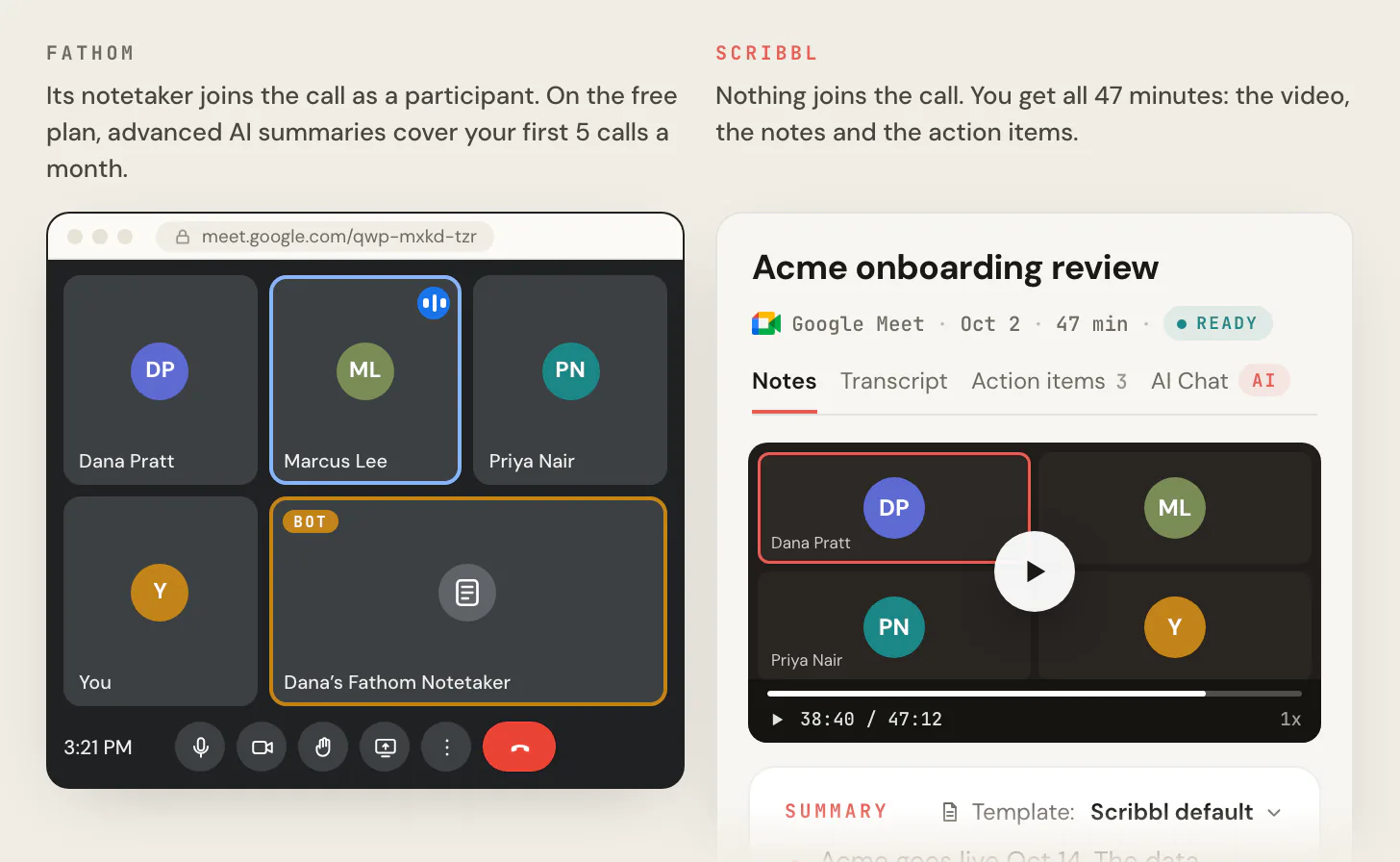
Why people leave Fathom
1. Fathom now belongs to Superhuman. On September 14, 2026, Superhuman, the company formerly known as Grammarly, announced that it has acquired Fathom. It plans to bring Fathom's note taking into its own email, calendar, documents and databases apps. Fathom's page on the deal says "Nothing changes today for Fathom users," with the same app, the same login and the same product. Neither company has said anything about future pricing, the free plan, or whether Fathom stays a separate app.
2. The bot in the call. Fathom's pricing page lists bot-free capture as a beta feature for Mac. Fathom's help center gives the details:
- The Fathom 3.0 desktop app that offers bot-free capture runs on Mac only. Windows is listed as coming soon.
- Its bot-free modes are Transcript Only (no recording saved) and Audio Only. To record audio and video, a bot joins the meeting. The exception is Zoom, where bot-free video is now available on a Mac.
- Bot-free video for Google Meet is listed as coming in the coming weeks, and bot-free support for Microsoft Teams is still being expanded.
The meeting platforms are holding bots back too. Since March 24, 2026, Google Meet can put a join request in a second queue where the default action is to deny entry. On June 29, 2026, Microsoft announced a Teams policy whose default puts detected bots in the meeting lobby until the organizer approves each one, even in meetings where people can skip the lobby. See how to get AI meeting notes in Microsoft Teams.
3. The free plan's AI limits. Fathom's free plan records and transcribes without limit. But advanced AI summaries cover only your first 5 calls each month; after that you get the General/Enhanced summary. AI action items, AI follow-up emails and Ask Fathom need Premium, at $16 per user per month billed annually or $20 monthly. CRM sync covers at most 3 users per email domain below the Business plan.
4. Training on your meetings. Fathom's privacy policy, last updated August 16, 2026, says that depending on your account settings it may use de-identified data from your meeting content to train its in-house AI models. You can opt out in your settings. More in Is Fathom safe?
What to check in a Fathom alternative
Most alternatives fix one of Fathom's problems and quietly drop something Fathom did well. Five questions catch that:
- Does a bot join your call? tl;dv, Fireflies, Otter and Read AI send one by default, like Fathom.
- Does it keep the video, like Fathom does? Granola keeps no recording. Otter and Read AI keep video playback for their Enterprise plans, and Fireflies starts video on Pro.
- Do AI notes and action items come with every free meeting? Fathom's advanced summaries cover 5 calls a month, tl;dv's free AI notes stop after 10 meetings, and Read AI's free plan covers 5 meetings a month.
- Does it work without a bot on Windows and on Teams? Fathom's bot-free mode is Mac only and still being expanded on Teams. Scribbl Desktop runs on Mac and Windows.
- Does it do the follow-up, or just write a recap? With Scribbl, Smart Collections sort meetings by themselves, and Automations do the follow-up when a meeting lands in a collection: draft the follow-up email, log a note in HubSpot or Pipedrive, post to Slack or Teams, or open an Asana, Monday, Linear or Jira ticket.
| Feature | Scribbl | tl;dv | Fireflies | Otter | Granola | Read AI | Fathom |
|---|---|---|---|---|---|---|---|
| No bot by default | Yes | No | No | No | Yes | No | No |
| Keeps the video | Yes, every plan | Yes, with its bot | From Pro | Enterprise only | No | Enterprise only | Yes, with its bot (bot-free on Zoom on a Mac) |
| AI notes and action items on every free meeting | Yes, 10 meetings a month | AI notes stop after 10 meetings | Limited AI summaries | 300 minutes a month | Notes from the last 30 days | 5 meetings a month | Advanced summaries on 5 calls; action items paid |
Fathom alternatives at a glance
| Tool | Bot joins the call? | Keeps the video | Free plan | Paid from (billed annually) | Best for |
|---|---|---|---|---|---|
| Scribbl | No, on Meet, Zoom and Teams | Yes, every plan | Includes Google Meet, Zoom and Microsoft Teams; 10 meetings a month, each with AI notes and action items | $13 per user ($20 monthly) | Best overall, no bot |
| tl;dv | Yes by default | Yes, recorded by its bot | Unlimited recordings; AI notes on 10 meetings | $18 per seat ($29 monthly) | Video if a bot is fine |
| Fireflies | Yes by default | From Pro | 3 meetings, or unlimited transcription with bot auto-join on | $10 per seat ($18 monthly) | Sales teams on a CRM |
| Otter | Yes by default | Enterprise only | 300 transcription minutes a month | $8.33 per user ($16.99 monthly) | Transcription |
| Granola | No | No recording kept | Notes from the last 30 days | $14 per user, Business | Typing your own notes |
| Read AI | Yes by default | Enterprise only | 5 meetings a month | $15 per user ($19.75 monthly) | Meeting reports |
| Fathom (reference) | Yes, except bot-free beta on Mac | Yes, with its bot | Unlimited recordings; advanced summaries on 5 calls a month | $16 Premium, $15 per user Team ($20 and $19 monthly) | What you're leaving |
The 6 best Fathom alternatives
1. Scribbl: best Fathom alternative overall
Best for: anyone leaving Fathom who wants the same things after every call, without a bot in the meeting.
How it records: a Chrome extension on Google Meet, and Scribbl Desktop for Mac (Apple silicon) and Windows on Zoom and Microsoft Teams. Nothing joins the call on any of them, so nothing waits in the Teams lobby or the Google Meet admit queue.
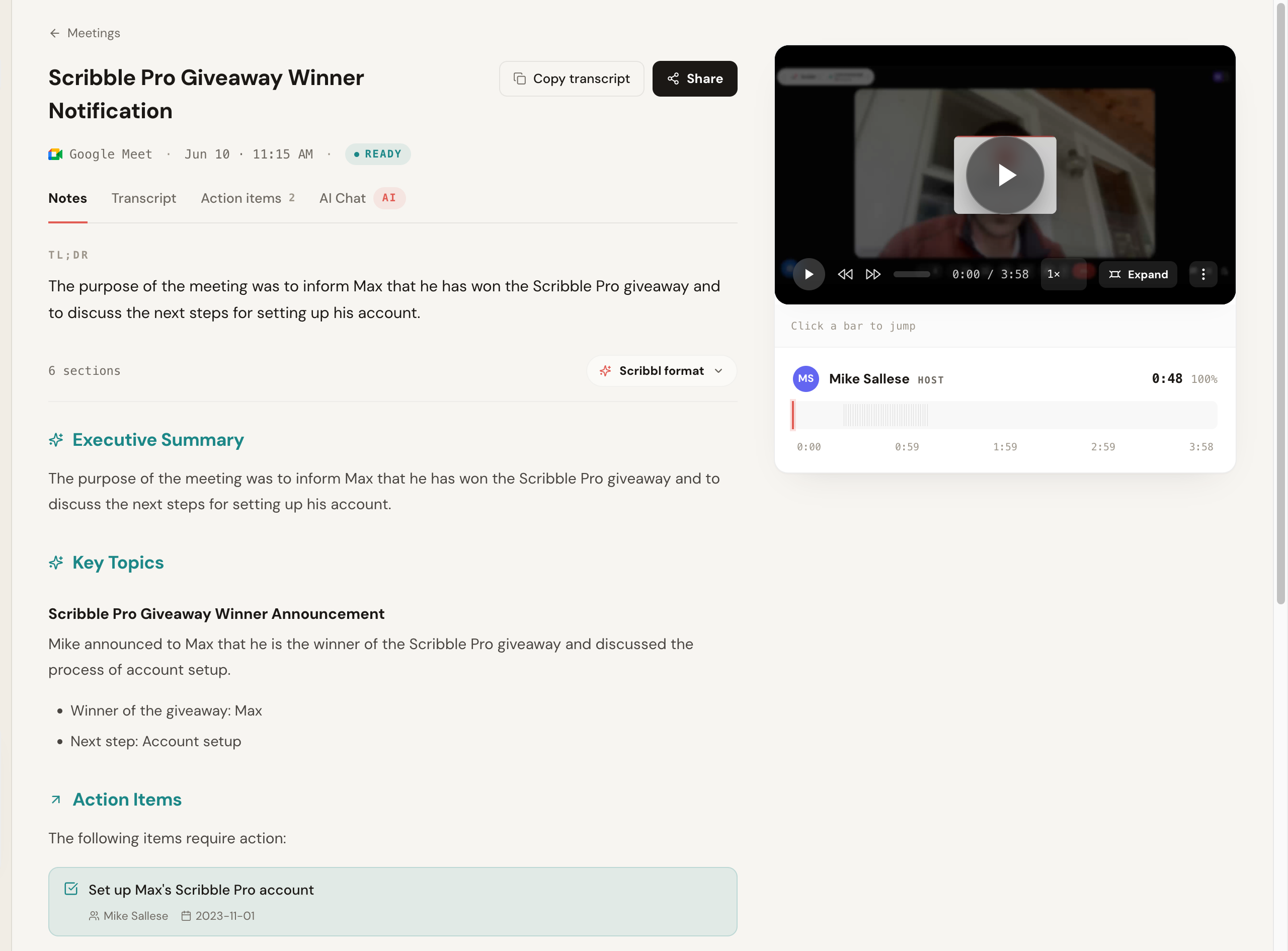
What every meeting gets: the video recording, a transcript with speaker names, AI notes and action items. On Pro, connect Scribbl to ChatGPT or Claude and ask about past meetings.
What happens after the call: Smart Collections sort your meetings by themselves. When a meeting lands in a collection, Automations do the follow-up:
- Draft the follow-up email, ready to copy or open in Gmail. It never sends by itself.
- Log a note in HubSpot or Pipedrive.
- Post to Slack or Microsoft Teams (send meeting notes to Slack).
- Save to Google Drive, Notion or Confluence.
- Open an Asana, Monday, Linear or Jira ticket, or add a Google Sheet row.
By default, they ask before they change anything.
Free plan: The free plan includes Google Meet, Zoom and Microsoft Teams, with 10 meetings a month.
Paid: Pro is $13 per user per month billed annually, or $20 monthly.
Privacy: recordings are private by default, and Scribbl doesn't use your meetings to train AI for anyone other than you.
Scribbl vs Fathom:
- The bot: Fathom sends a bot to record video unless you're on a Mac and on Zoom. Scribbl never sends one, on Mac or Windows, on any of the three platforms.
- AI notes and action items: Fathom's free plan gives advanced summaries on 5 calls a month, and action items need Premium. Scribbl gives AI notes and action items on every meeting it records, free plan included.
- Follow-up: Fathom's AI follow-up emails need Premium. Scribbl's Automations draft the email and also log notes in your CRM, post to Slack or Teams and open tickets.
- Price: Scribbl Pro is $13 per user per month billed annually; Fathom Premium is $16, and a Fathom Team seat is $15 with a 2-user minimum.
- Ownership: Fathom's plans now sit inside Superhuman's suite. Scribbl is built for notes and follow-up on Google Meet, Zoom and Teams.
The full side-by-side is in Scribbl vs Fathom.
2. tl;dv: if a bot is fine and you want video
Bot: joins by default. Its desktop app records without the bot, but tl;dv's help center says that mode captures audio only: no video, screen sharing or chat.
Keeps the video: yes, recorded by the bot.
Free plan: unlimited recordings and transcripts, with AI notes on 10 meetings.
Paid: Pro is $18 per seat per month billed annually, or $29 monthly.
The catch: the bot is the same problem you had with Fathom, and free AI notes run out after 10 meetings. More in Fathom vs tl;dv and Scribbl vs tl;dv.
3. Fireflies: for sales teams on a CRM
Bot: joins by default.
Keeps the video: video recording starts on Pro.
Free plan: 3 meetings, or unlimited transcription if you turn on calendar auto-join so the bot joins your meetings on its own. AI summaries are limited, with 20 AI credits and 400 minutes of storage.
Paid: Pro is $10 per seat per month billed annually, or $18 monthly.
The catch: to keep the free plan unlimited, you let the bot into every meeting, and the free plan keeps no video. Scribbl's Automations log notes in HubSpot or Pipedrive with nothing joining the call. More in Fathom vs Fireflies and Scribbl vs Fireflies.
4. Otter: for transcription
Bot: Otter's Notetaker joins Zoom, Google Meet and Teams as a participant by default.
Keeps the video: audio playback on every plan; video replay is on Enterprise only.
Free plan: 300 transcription minutes a month, and 3 file imports for the life of the account.
Paid: Pro is $8.33 per user per month billed annually, or $16.99 monthly.
The catch: a monthly minute cap instead of Fathom's unlimited recording, a bot in the call, and no video below Enterprise. More in Otter vs Fathom and Scribbl vs Otter.
5. Granola: for typing your own notes
Bot: none. Its desktop app captures your computer's audio while you type rough notes, and fills them in with AI.
Keeps the video: no. Granola keeps the transcript and your notes, not the recording.
Free plan: Basic, with your notes from the last 30 days.
Paid: Business is $14 per user per month, and Enterprise $35.
The catch: there's nothing to play back, which is the part of Fathom many people miss first. More in Scribbl vs Granola.
6. Read AI: for meeting reports
Bot: joins by default. Its Mac and Windows desktop app can record without the bot, audio only.
Keeps the video: playback starts on Enterprise, at $22.50 per user per month billed annually.
Free plan: 5 meetings a month.
Paid: Pro is $15 per user per month billed annually, or $19.75 monthly.
The catch: a bot by default, and Pro keeps no recording to play back. More in Read AI alternatives.
Bot or no bot: Fathom vs Scribbl
- In the call: nothing joins, on Google Meet, Zoom and Teams
- Video: kept on every plan, on all three platforms
- Computers: Mac (Apple silicon) and Windows
- Free plan: AI notes and action items on all 10 meetings a month
- After the call: Automations draft the email, log CRM notes, post to Slack or Teams
- In the call: a bot joins to record video, except on Zoom on a Mac
- Bot-free modes: transcript only or audio only, Mac only
- Teams and Meet: bot-free video not yet available
- Free plan: advanced summaries on 5 calls a month; action items paid
- Owner: Superhuman, since September 14, 2026
How to switch from Fathom
- Export what you want to keep. Each Fathom recording downloads as an MP4 from the call's menu, and each transcript copies out with the Copy Transcript button above it.
- Install Scribbl for your platform. The Chrome extension for Google Meet, or Scribbl Desktop for Zoom and Teams.
- Record one real meeting on the platform you actually use and watch the participant list. Nothing is added.
- Open the meeting in Scribbl and check the video, the transcript with speaker names, the AI notes and the action items.
- Set up one Automation, like drafting the follow-up email or logging the note in HubSpot, so the next meeting's follow-up is done for you.
- Tell everyone on the call you're recording, whichever tool you use. Our guide to whether you have to tell people you're recording covers the rules.
- Cancel Fathom last, once your notes in Scribbl are what you want. Fathom's cancel steps are in Fathom pricing.
The verdict
If you're leaving Fathom because of the Superhuman deal, the bot or the free plan's AI limits, Scribbl is the pick. It keeps what Fathom does well, the video, the transcript, AI notes and action items, sends no bot on Google Meet, Zoom or Teams on Mac or Windows, and its Automations do the follow-up Fathom leaves to you. Compare plans on the pricing page, or start free.
FAQ
What is the best alternative to Fathom?
Scribbl. It gives you what Fathom gives you after each meeting, the video, a transcript with speaker names, AI notes and action items, but nothing joins the call on Google Meet, Zoom or Microsoft Teams. Automations then do the follow-up, like drafting the follow-up email or logging notes in HubSpot or Pipedrive. Pro is $13 per user per month billed annually, against $16 for Fathom Premium.
What is the best free Fathom alternative?
Scribbl. The free plan includes Google Meet, Zoom and Microsoft Teams, with 10 meetings a month, and every one gets the video, a transcript with speaker names, AI notes and action items, with no bot in the call. On Fathom's free plan, advanced AI summaries cover only your first 5 calls a month, and AI action items need Premium.
Is there a Fathom alternative that doesn't join the meeting as a bot?
Yes. Scribbl records Google Meet with a Chrome extension and Zoom and Teams with Scribbl Desktop for Mac and Windows, and nothing joins the call on any of them. You still get the video. Granola also skips the bot but keeps no recording, and tl;dv, Otter and Read AI send a bot by default. Whichever you use, tell everyone on the call you're recording.
Did Superhuman buy Fathom?
Yes. Superhuman, the company formerly known as Grammarly, announced on September 14, 2026 that it has acquired Fathom and plans to bring Fathom's note taking into its email, calendar, documents and databases apps. Fathom says nothing changes today for its users: same app, same login, same product. Neither company has said anything about future pricing or the free plan.
Is Fathom AI free to use?
Yes. Fathom's free plan has unlimited recordings and transcripts, but advanced AI summaries cover only your first 5 calls each month, and AI action items, AI follow-up emails and Ask Fathom need Premium, at $16 per user per month billed annually or $20 monthly (checked October 12, 2026).
Which is better, Fathom or Otter?
Both send a bot into your calls by default. Fathom's free plan records without limit and keeps the video, while Otter's free plan gives 300 transcription minutes a month and keeps video replay for its Enterprise plan. If the bot is the problem with both, Scribbl records Google Meet, Zoom and Teams with nothing joining the call and keeps the video, with AI notes and action items on every meeting.
Which is better, Fathom or Fireflies?
Both send a bot by default. Fireflies Pro is $10 per seat per month billed annually and is built around pushing notes into a CRM; its free plan transcribes 3 meetings unless you let the bot auto-join your calendar, and video starts on Pro. Fathom's free plan records without limit. If you want neither bot, Scribbl's Automations log notes in HubSpot or Pipedrive with nothing joining the call.
What is the best Fathom alternative for Microsoft Teams?
Scribbl. Scribbl Desktop for Mac and Windows records Teams meetings from your own computer, so no bot waits in the Teams lobby, and you get the video, a transcript with speaker names, AI notes and action items. Fathom's bot-free mode runs on Mac only, and Fathom says bot-free support for Teams is still being expanded.
Why isn't Fathom joining my Google Meet?
Since March 24, 2026, Google Meet can put a join request in a second queue where the default action is to deny entry, so the host has to let the bot in. A note taker that doesn't join the call, like Scribbl's Chrome extension, has nothing for the host to admit.
How do I switch from Fathom without losing my calls?
Export first. Each Fathom recording downloads as an MP4 from the call's menu, and each transcript copies out with the Copy Transcript button. Then record one real meeting with Scribbl on the platform you use, check the video, notes and action items, and cancel Fathom last.
Sources
Fathom checked October 12, 2026. tl;dv, Fireflies, Otter, Granola and Read AI checked October 5 and October 12, 2026.
- Fathom: pricing, Free vs Premium, How to upgrade to Fathom 3.0 (capture modes), Coming soon to Fathom 3.0, privacy policy (last updated August 16, 2026), downloading a recording, copying a transcript
- Superhuman, "Superhuman Acquires Fathom, AI Notetaker", September 14, 2026, and Fathom, "Fathom is now part of Superhuman"
- tl;dv: pricing, recording without a bot
- Fireflies: pricing, free plan
- Otter: pricing, Otter Notetaker overview
- Granola: pricing
- Read AI: pricing, desktop app
- Google Workspace Updates, "Safeguarded guest admit flow in Google Meet", rollout from March 24, 2026
- Microsoft Teams blog, "Introducing smarter bot protection in Microsoft Teams meetings", June 29, 2026
- Scribbl: pricing, Scribbl Desktop
Try Scribbl
Let your meetings take their own notes.
Scribbl records, transcribes, and summarizes your Google Meet calls from your browser. No bot joins the call. Free forever for individuals.
Add to Chrome · It's free