Fathom Pricing (2026): Is Fathom Free? Every Plan, the Free Plan's Limits, and What a Team Pays
Fathom pricing, checked October 7, 2026: Free is $0, Premium $16 or $20, Team $15 or $19, Business $25 or $34 per user. Where free stops and what teams pay.
Updated October 29, 2026
The short answer
Checked on fathom.ai/pricing, Fathom's help center and its Terms of Service, October 7, 2026
Fathom is free with no end date; Premium is $16 a month billed annually ($20 monthly), Team $15 per user, Business $25 per user, and Enterprise is priced by sales.
- Free
- $0, unlimited recordings, storage and transcripts. Advanced summaries cover only your first 5 calls a month. AI action items, AI follow-up emails and Ask Fathom need Premium.
- Premium (one person)
- $16 a month billed annually, or $20 monthly. Unlimited advanced summaries, AI action items, AI follow-up emails, Ask Fathom.
- Team and Business
- Team $15 per user billed annually ($19 monthly), Business $25 ($34 monthly). 2-user minimum, and every member pays.
- What a team pays
- 10 people on Team cost $1,800 a year billed annually, or $2,280 billed monthly.
- The better buy
- Scribbl, which we make. Nothing joins the call, AI action items come with every meeting on the free plan, and Pro is $13 per user per month billed annually, with no 2-user minimum.
Fathom pricing has a free plan and four paid ones: Free is $0, Premium is $16 a month billed annually ($20 monthly), Team is $15 per user ($19 monthly), Business is $25 per user ($34 monthly), and Enterprise is priced by sales. So yes, the Fathom AI note taker is free, with no end date and no cap on recordings or transcripts, but advanced AI summaries stop after your first 5 calls each month and AI action items need a paid plan.
Team and Business need at least 2 users, and on those plans every member pays. Below is every plan, exactly where the free plan stops, what 1, 2, 5 and 10 people pay, how trials, cancelling and refunds work, and six places where Fathom's own pages disagree with each other. If you're looking for fathom.video pricing: Fathom's old site address now sends you to fathom.ai/pricing (checked October 23, 2026), and its help center is still at help.fathom.video, so the prices here are the same ones.
Every Fathom number on this page comes from fathom.ai/pricing, Fathom's help center and its Terms of Service, checked on October 7, 2026. Prices are in US dollars. We make Scribbl, an AI note taker for Google Meet, Zoom and Microsoft Teams with nothing joining the call, and near the end we show why it's the better buy for most people pricing Fathom.
What does Fathom AI cost?
Fathom has five plans: Free at $0, Premium at $16, Team at $15 per user and Business at $25 per user, all per month on annual billing, plus Enterprise with custom pricing. On monthly billing, Premium is $20, Team $19 and Business $34. Premium is for one person. Team and Business are for 2 or more users.
| Feature | Free | Premium | Team | Business | Enterprise |
|---|---|---|---|---|---|
| Who it is for | One person | One person | 2 or more users | 2 or more users | Larger companies |
| Price, billed annually | Free | $16 | $15 | $25 | Talk to sales |
| Price, billed monthly | Free | $20 | $19 | $34 | Talk to sales |
| Recordings, storage and transcripts | Unlimited | Unlimited | Unlimited | Unlimited | Unlimited |
| Advanced AI summaries | First 5 calls a month | Unlimited | Unlimited | Unlimited | Unlimited |
| AI action items and follow-up emails | No | Yes | Yes | Yes | Yes |
| Ask Fathom (chat about your calls) | Limited use, within a single call | Your calls | Your calls; limited lookback on team calls | Your calls and team calls | Your calls and team calls |
| Shared team library, folders, comments, trackers | No | No | Yes | Yes | Yes |
| CRM sync (HubSpot and other CRMs) | Up to 3 users per domain | Up to 3 users per domain | Up to 3 users per domain | Yes | Yes |
| CRM field sync, Deal View, coaching metrics | No | No | No | Yes | Yes |
| Zapier and Make | Limited use | Limited use | Yes | Yes | Yes |
| Claude and ChatGPT, Slack, API and MCP | Yes | Yes | Yes | Yes | Yes |
| Remove in-meeting banner, rename the bot | No | Yes | Yes | Yes | Yes |
| SSO, SCIM, custom data retention | No | No | No | No | Yes |
| HIPAA with a signed BAA | No | No | No | No | Yes |
Every plan includes clips, playlists of your own meetings, search across your own calls, video downloads, Fathom's Claude and ChatGPT integrations, and a choice of recording with Fathom's bot or without one, which Fathom's pricing page marks as a beta feature for Mac. Fathom's pricing page shows a "90 day guarantee" on every plan, and its meta description says paid plans are "backed by a 90-day money-back guarantee." (Source: Fathom pricing, as of October 7, 2026.)
Old plan names. In August 2025, Fathom renamed Team Edition Standard to Team and Team Edition Pro to Business (What does Fathom cost?). Many help articles still say "Team Edition," and some third-party pages still list those old plans and prices.
Is Fathom AI note taker free?
Yes. Fathom's help center says "Fathom will always have a free version of the app for individuals," and the Free plan includes unlimited storage and recordings (What does Fathom cost?, as of October 7, 2026). It works in Zoom, Google Meet and Microsoft Teams on a Mac or Windows computer. Fathom says it offers the app free because it "generates leads" for its team plans, and that it doesn't sell your data (Is Fathom secure?).

What stays unlimited on Free (Free vs. Premium for Individuals, edited June 4, 2026, and How many recordings can I have in Fathom?):
- Recordings and storage. No monthly cap. Fathom says it will store all your recordings "indefinitely (or until you manually delete them)."
- Transcripts, in 38 languages (languages). Transcripts can't be downloaded as a file; you copy them with a Copy Transcript button (Get a copy of your transcript).
- Video downloads as MP4 files (Downloading the Recording).
- A summary of every call. After your first 5 calls each month, it's the General/Enhanced summary.
The 30-day Premium preview. New accounts get Premium features for the first 30 days after sign-up. Fathom says "You have no obligation to upgrade," and when the preview ends you stay on Free and lose the Premium features.
Where Fathom's free plan stops
These are the Free plan's limits, from Fathom's pricing table and help center, as of October 7, 2026:
- Advanced summaries on 5 calls a month. Advanced summaries use Fathom's meeting templates, such as sales frameworks. After your first 5 calls each month, "only the General/Enhanced template will be available" (Free vs. Premium).
- No AI action items or AI follow-up emails. The pricing table marks both as paid.
- Ask Fathom needs Premium. Ask Fathom is Fathom's chat for questions about your calls. The Free vs. Premium article lists it as a Premium feature. The pricing table gives Free "Limited use" within a single call, and another help article says "Usage limits may apply to Free plans starting November 2026" for the version that searches all your calls (Using Account-Wide Ask Fathom, edited October 1, 2026).
- Zapier is personal use only, and CRM sync with HubSpot and other CRMs is for up to 3 users per email domain.
- Fathom's branding stays. You can't remove the in-meeting banner or rename the meeting bot; both need Premium.
- No team features. The shared team library, team folders, comments and trackers start on Team.
- A sign-up rule for personal email. If you sign up with an email from gmail.com, yahoo.com, outlook.com or a similar provider, you need at least one Zoom, Google Meet or Teams meeting on your calendar in the next seven days to finish signing up. If you're blocked, you can't make another free account with that email (Quick Start Guide).
- Computers and phones. Fathom records meetings on Mac and Windows, and its iOS app records in-person conversations on every plan. It doesn't support Chromebooks, Linux, iPads, webinars or breakout rooms (What devices is Fathom compatible with?, iOS app).
How far the free plan goes: if you want every call recorded and kept, Fathom's bot can join for the video, and a General/Enhanced summary is enough after the first 5 calls each month, Free covers one person with no meeting cap. If you want action items and the better summaries on every call, Fathom charges for Premium. Scribbl's free plan includes AI notes and action items on every meeting, with nothing joining the call (compared below).
Fathom Premium: $16 or $20 a month
Premium is Fathom's paid plan for one person. It's $16 a month billed annually ($192 a year) or $20 billed monthly. Over Free, Premium adds (Fathom pricing, Free vs. Premium):
- Unlimited advanced AI summaries on every call
- AI action items and AI follow-up emails
- Ask Fathom on single calls, and across all your own calls with no limit on how far back it looks
- Removal of the in-meeting banner and a custom name for the meeting bot
Premium keeps Free's limits on integrations: Zapier and Make are "Limited use," and CRM sync is for up to 3 users per email domain.
Fathom Team: $15 or $19 per user, 2-user minimum
Team is $15 per user per month billed annually or $19 billed monthly, with a 2-user minimum. Over Premium, it adds (Fathom pricing):
- A shared library of team recordings, team folders, and comments and mentions
- Search across all team meetings, and playlists of highlights from team meetings
- Trackers, which flag topics such as competitor mentions across future calls and send them to Slack, email or the app
- A customer view of each customer's meetings
- Full Zapier and Make integrations
Two limits matter for teams. Ask Fathom covers your own calls with no limit but has "limited lookback" on team calls. And CRM sync is still capped at 3 users per email domain, the same as Free.
Fathom Business: $25 or $34 per user
Business is $25 per user per month billed annually or $34 billed monthly, also with a 2-user minimum. Over Team, it adds:
- CRM field sync, which writes meeting details into specific fields in your CRM, and CRM sync with no 3-user cap
- Deal View, one page for every meeting and summary about a sales deal
- Coaching metrics and AI scorecards
- Launch Assist Onboarding as a paid extra (it's included on Enterprise)
(Source: Fathom pricing, as of October 7, 2026.)
Fathom Enterprise
Enterprise has no listed price; you Talk to sales. Over Business it adds SSO, SCIM provisioning, organization-wide security controls, custom data retention, increased cyber security insurance coverage, custom contracts, a dedicated success manager with priority support, Launch Assist Onboarding, and HIPAA with a signed BAA. (Source: Fathom pricing, as of October 7, 2026.)
What Fathom costs for 1, 2, 5 and 10 people
Fathom shows every price per user per month. These totals multiply that out, before tax. Fathom's Terms of Service say fees don't include taxes.
| Who | Plan and billing | Per month | Per year |
|---|---|---|---|
| 1 person | Premium, annual | $16 | $192 |
| 1 person | Premium, monthly | $20 | $240 |
| 2 people | Team, annual | $30 | $360 |
| 2 people | Team, monthly | $38 | $456 |
| 2 people | Business, annual | $50 | $600 |
| 5 people | Team, annual | $75 | $900 |
| 5 people | Team, monthly | $95 | $1,140 |
| 5 people | Business, annual | $125 | $1,500 |
| 5 people | Business, monthly | $170 | $2,040 |
| 10 people | Team, annual | $150 | $1,800 |
| 10 people | Team, monthly | $190 | $2,280 |
| 10 people | Business, annual | $250 | $3,000 |
| 10 people | Business, monthly | $340 | $4,080 |
Four things decide your bill (Fathom pricing, Understanding Free vs. Paid Users, Managing Team Members):
- One person can't buy Team. Team and Business need 2 users, so one person pays Premium: $16 a month, not the $15 in Fathom's page title.
- Two people pay less on Team. Two Team seats cost $30 a month on annual billing; two Premium accounts cost $32, without the shared library.
- Every member pays. Fathom's help center says that on Team and Business "free seats are no longer available." Admins "will always occupy a paid seat." Older Team Edition plans (Standard and Pro) still allow free seats.
- CRM sync for more than 3 people needs Business. Free, Premium and Team cap CRM sync at 3 users per email domain.
For comparison, Scribbl Pro is $13 per user per month billed annually, or $20 monthly (Scribbl pricing), with no 2-user minimum and nothing joining the call. On annual billing that's $156 a year for one person against $192 on Fathom Premium, $780 for 5 people against $900 on Fathom Team, and $1,560 for 10 people against $1,800 on Fathom Team or $3,000 on Fathom Business.
How Fathom billing, trials, cancelling and refunds work
From Fathom's help center and Terms of Service (last updated March 4, 2026), as of October 7, 2026:
- Upgrading. Go to Settings › Premium Features and click Upgrade, or go to fathom.video/manage_subscription. You choose monthly or annual billing and pay by credit or debit card or Link by Stripe (Upgrade to Premium).
- Trials. New individual accounts get Premium free for 30 days. Someone who signs up through a referral link gets 60 days, and the person who referred them gets 30 extra days of Premium (Referral Program). Team and Business have a free trial for 2 or more users; Fathom's pages don't say how long it lasts.
- When a team trial ends. If a team trial ends, a payment fails or the team cancels, team features such as Team Calls turn off until an admin clicks Reactivate and picks a plan (When a Team Account Becomes Inactive).
- Renewal. Paid plans renew automatically, monthly or annually as you chose, and the card on file is charged until you cancel. Fathom says it gives advance notice of price changes before they apply to your next billing cycle.
- Cancelling Premium. Go to Settings › Premium Features › Downgrade to Free, then Cancel Plan. The plan ends at the end of the billing period and your account moves to Free. To cancel immediately, email help@fathom.video (Cancel your Individual Plan).
- Cancelling Team or Business. Email success@fathom.video. Only team admins can see and change billing, under Settings › Users › Manage Billing (Team billing).
- Refunds. The pricing page advertises a 90-day money-back guarantee. The Terms of Service say "All fees are non-refundable." We found no Fathom page that explains how the guarantee works, so get the terms from Fathom support in writing before you count on it.
- Removing someone from a team. Removing a member also removes their shared recordings from the team. Deactivating them keeps their recordings available to the team (Managing Team Members).
Discounts for startups, nonprofits and Gong customers
From the "More ways to get started" section of Fathom's pricing page, as of October 7, 2026:
- Startups: up to 2 years of Fathom Team free for startups backed by VCs and accelerators on Fathom's partner list, which includes Y Combinator and TinySeed (Qualified Portfolio Partners).
- Nonprofits: 10 free seats, through an application form.
- Switching from Gong: Fathom Business free through your current contract, plus data migration.
Fathom's pages don't list the full terms of these offers, and the pricing page lists no student discount.
How Fathom records on each plan
Fathom works in Zoom, Google Meet and Microsoft Teams, and only records while you're on the call (Can the Fathom Notetaker join my calls without me?). Every plan has the same two ways to record:
- With Fathom's bot. A bot joins the meeting as a participant to record audio and video.
- Without a bot, on Mac. Fathom's newer Mac app adds capture modes without a bot: Transcript Only, where "No recording is saved," and Audio Only. Fathom's upgrade guide lists Audio and Video as the mode where a bot joins. Windows support is "coming soon" (How to Upgrade to Fathom 3.0+, edited October 2, 2026).
Whichever way you record, tell everyone first. Fathom says "There's no way to silently record": the bot is visible, and without the bot, Fathom posts a message in the meeting chat or asks you to confirm consent (Can I record calls without asking for permission?). Some places require everyone's consent; see do you have to tell people you're recording. For how Fathom handles your data, see is Fathom safe.
Where Fathom's own pages disagree
We found six places where Fathom's pages don't match each other on October 7, 2026. When they differ, the feature table on the pricing page is the most detailed.
- "Plans from $15/mo." That's the pricing page's title. $15 is the Team price on annual billing with a 2-user minimum. The lowest price for one person is Premium at $16 a month billed annually, and the smallest Team bill is $30 a month on annual billing.
- "Save 25%+" on annual billing. The toggle says annual saves "25%+." Worked out from Fathom's own prices, annual saves 20% on Premium ($16 against $20), 21% on Team ($15 against $19) and 26% on Business ($25 against $34). Only Business reaches 25%.
- "Unlimited" AI summaries. The pricing page's meta description says the free plan includes "unlimited recordings, transcripts, and AI summaries." The help center limits advanced summaries to your first 5 calls a month; what's unlimited is the General/Enhanced summary.
- Refunds. The pricing page says paid plans are "backed by a 90-day money-back guarantee." The Terms of Service say "All fees are non-refundable."
- Custom summaries. The Free vs. Premium article lists "custom AI summaries" under Premium, and the Customizing AI Summaries article says Premium and Team users can add their own instructions to a summary template. The Business card says "including custom summaries." The feature table marks "Custom summaries," described as templates for your organization, as Enterprise only.
- Ask Fathom and video without a bot. The pricing table gives Free "Limited use" of Ask Fathom within a single call, while the Free vs. Premium article lists Ask Fathom as a Premium feature and the Using Ask Fathom article says Premium and Team users can access it. And Fathom's upgrade guide lists the bot as the way to capture video, while its release notes for June 2026 add "a botless video recording option for Zoom" for users on the beta.
Some third-party pricing pages are further off. One pricing article from another note-taker company, dated July 10, 2026, still lists Fathom's Team Edition and Team Edition Pro plans, with prices that don't match Fathom's pricing page today.
Is Fathom worth paying for? Who each plan is for
- Free works for one person who wants every call recorded and kept, is fine with Fathom's bot joining for the video, and can live with a General/Enhanced summary after the first 5 calls each month.
- Premium is for one person set on Fathom who wants action items, follow-up emails and advanced summaries on every call. Pay annually: $192 a year against $240 monthly.
- Team is for 2 or more people who want a shared library of calls. Per person, it costs less than Premium. If more than 3 of you need CRM sync, Fathom moves you to Business.
- Business is for sales and customer teams that want CRM field sync, Deal View, coaching metrics and scorecards.
- Enterprise is for companies that need SSO, SCIM, custom data retention or a signed HIPAA BAA.
Is there something better for the money? For most people, yes. Fathom keeps the video of a call only when its bot joins, apart from a Zoom beta on Mac, AI action items start on Premium at $16 a month, and a team pays for every member with a 2-user minimum. Scribbl, which we make, keeps the video with nothing joining the call on Google Meet, Zoom and Teams, on Mac and Windows; puts AI notes and action items on every meeting, free; and costs $13 per user per month on Pro, billed annually. See the side-by-side below and Scribbl vs Fathom.
Fathom vs Scribbl: the better buy
Scribbl is an AI note taker for Google Meet, Zoom and Microsoft Teams, and for most people pricing Fathom it's the better buy. Nothing joins the call: it uses a Chrome extension for Google Meet and Scribbl Desktop for Mac (Apple silicon) and Windows for Zoom and Teams, so no bot shows up in your clients' participant list. Every meeting comes back with the video recording, a transcript with speaker names, AI notes and action items, in one account for all three meeting apps. Step by step: how to record a Google Meet and how to record a Zoom meeting.
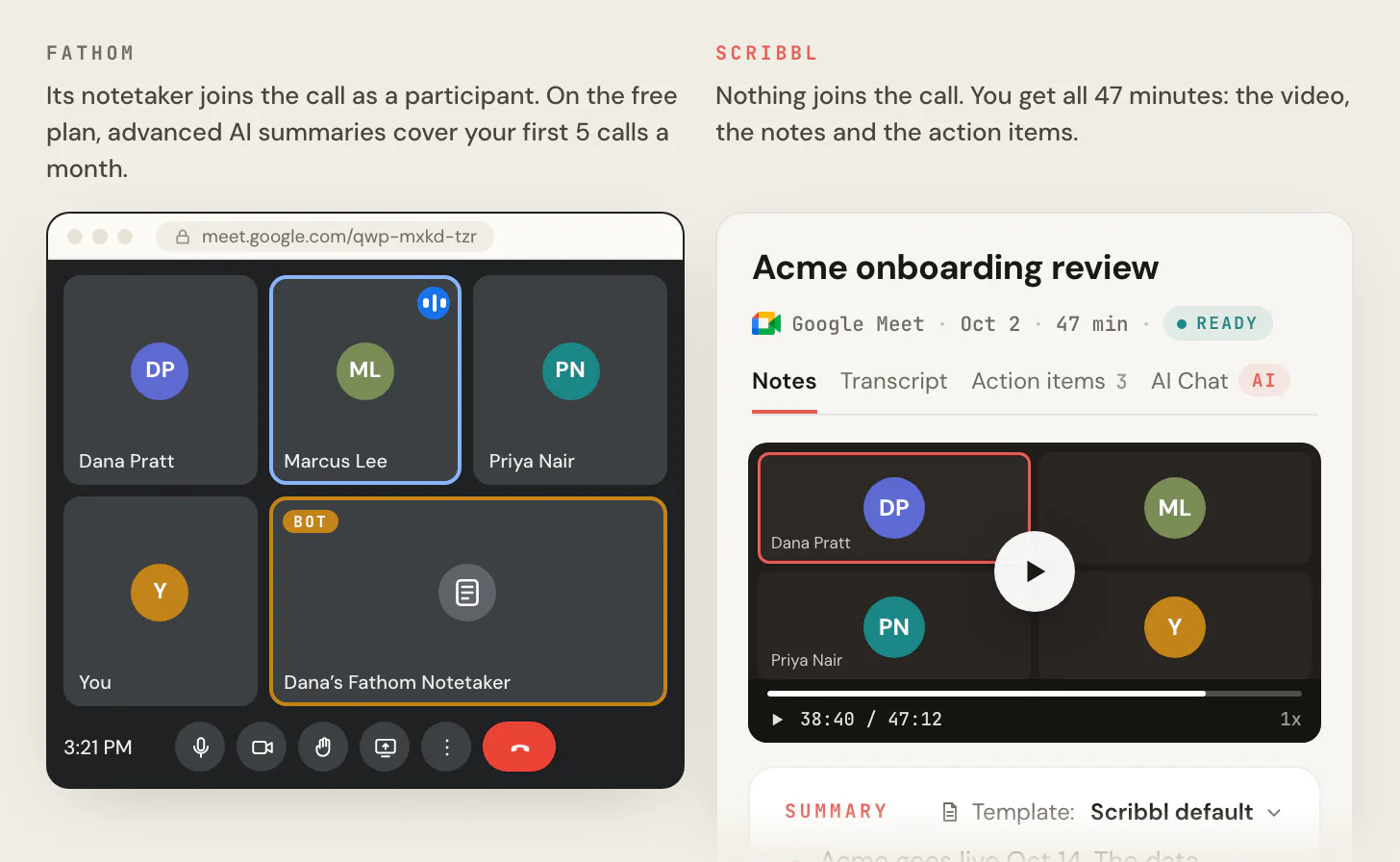
It also does the work after the call. Smart Collections sort your meetings by themselves. Automations do the follow-up: they draft the follow-up email for you to send, log notes in HubSpot or Pipedrive, post a summary to Slack or Teams, or open a ticket in Linear, Jira or Asana, and they ask before changing anything by default. On Pro you can ask Claude or ChatGPT about every meeting you've recorded, or about just one Smart Collection ("What were the main objections in my sales calls this week?"). Recordings are private by default, and Scribbl doesn't use your meetings to train AI for anyone other than you.
| Feature | Scribbl | Fathom |
|---|---|---|
| Does anything join the call? | No, on Google Meet, Zoom and Teams | Fathom's bot, for video; on Mac, beta modes without a bot |
| Video of the meeting | Every meeting, with nothing in the call | Through the bot (a Mac beta adds video without it on Zoom) |
| AI action items on the free plan | Yes | No: Premium and up |
| AI notes on the free plan | Every meeting | General/Enhanced summary; advanced summaries on 5 calls a month |
| Free plan | 10 meetings a month on Google Meet, Zoom and Teams, nothing in the call | No meeting cap, with Fathom's bot in the call for video |
| One person, billed annually | $13 (Pro) | $16 (Premium) |
| One person, billed monthly | $20 (Pro) | $20 (Premium) |
| A team, billed annually | $13 per user, no seat minimum | $15 per user (Team), 2-user minimum; $25 for CRM field sync (Business) |
| Follow-up after the call | Automations draft the email, log notes in HubSpot or Pipedrive, post to Slack or Teams | AI follow-up emails from Premium; full Zapier and Make from Team |
| Your meetings used to train AI | Not for anyone other than you | De-identified data trains Fathom's own models unless you opt out |

The math. On annual billing, Scribbl Pro costs $156 a year for one person against $192 on Fathom Premium, $780 for a team of 5 against $900 on Fathom Team, and $1,560 for 10 against $1,800. And AI action items, which Fathom charges for, come with every Scribbl meeting on the free plan, along with the video, with nothing joining the call. The free plan includes Google Meet, Zoom and Microsoft Teams, with 10 meetings a month. Whichever tool you use, tell everyone in the meeting you're recording.
FAQ
What does Fathom AI cost?
Fathom has five plans. Free is $0. Premium, for one person, is $16 a month billed annually or $20 billed monthly. Team is $15 per user per month billed annually or $19 monthly, and Business is $25 or $34, both with a 2-user minimum. Enterprise has no public price; you talk to sales. Prices are in US dollars, before tax.
Is Fathom AI note taker free?
Yes. Fathom's Free plan has no end date and no cap on recordings, storage or transcripts on Zoom, Google Meet and Microsoft Teams. The limit is the AI: advanced summaries on your first 5 calls each month, then only the General/Enhanced summary, and no AI action items or AI follow-up emails. The free plan is for individuals; Fathom's Team and Business plans have no free seats.
Is Fathom AI notetaker free?
Yes, for one person. New accounts get Premium features for 30 days after sign-up, then move to the Free plan with no obligation to pay. Free keeps unlimited recordings and transcripts in 38 languages, video downloads as MP4 files and a General/Enhanced summary of every call. It shows Fathom's in-meeting banner and doesn't let you rename the bot. AI action items, AI follow-up emails and full use of Ask Fathom need Premium.
How much does Fathom cost for a team?
Team is $15 per user per month billed annually or $19 monthly, and Business is $25 or $34, with at least 2 users. On annual billing, a team of 5 pays $900 a year on Team or $1,500 on Business, and a team of 10 pays $1,800 or $3,000. On Fathom's current Team and Business plans, every member is a paid seat, and admins always take a paid seat.
What is the difference between Fathom Free and Premium?
Both have unlimited recordings, storage and transcripts. Premium, at $16 a month billed annually or $20 monthly, adds unlimited advanced summaries, AI action items, AI follow-up emails, full use of Ask Fathom on your own calls, removal of the in-meeting banner and a custom bot name. Free gets advanced summaries on your first 5 calls each month, and Fathom's help center lists Ask Fathom as a Premium feature (the pricing table gives Free limited use within a single call).
Does Fathom have a free trial?
Yes. New individual accounts get Premium features free for 30 days after sign-up, or 60 days if they sign up through a referral link. Team and Business have a free trial for 2 or more users, but Fathom's pages don't say how long it lasts. If a team trial ends without payment, team features such as Team Calls turn off until an admin picks a plan.
Does Fathom offer refunds?
Fathom's pricing page says paid plans are backed by a 90-day money-back guarantee. Its Terms of Service, last updated March 4, 2026, say all fees are non-refundable, and neither page explains how the guarantee works, so ask Fathom support in writing before you rely on it. When you cancel, you keep paid features until the end of the billing period.
How do I cancel Fathom Premium?
Go to Settings, scroll to Premium Features and click Downgrade to Free, then Cancel Plan. The plan ends at the end of the billing period and your account moves to the Free plan. To cancel immediately, email help@fathom.video. To cancel a Team plan, email success@fathom.video.
Can a team use Fathom for free?
Not on Fathom's current plans. Fathom's help center says free seats are no longer available on Team and Business, so every member pays. Older Team Edition plans (Standard and Pro) still allow free seats. Each person can use the Free plan on their own, but the Free plan has no shared team library, team folders or comments.
Does Fathom have a discount for startups or nonprofits?
Yes. Startups backed by VCs and accelerators on Fathom's partner list can get up to 2 years of Fathom Team free. Nonprofits can apply for 10 free seats. Teams switching from Gong can get Fathom Business free through their current contract, plus data migration. Fathom's pages don't list the full terms of these offers.
Is Fathom worth paying for?
Fathom Premium ($16 a month billed annually, $20 monthly) is worth it only if you're set on Fathom and want AI action items, follow-up emails and advanced summaries on every call, with its bot joining for the video. For most people, Scribbl, which we make, is the better buy: nothing joins the call, the video, a transcript with speaker names, AI notes and action items come with every meeting on the free plan, and Pro is $13 per user per month billed annually, with Automations that draft the follow-up email and log notes in HubSpot or Pipedrive.
Is there a free alternative to Fathom with nothing joining the call?
Yes: Scribbl, which we make, and for most people pricing Fathom it's the better buy. Nothing joins the call, and every meeting comes back with the video recording, a transcript with speaker names, AI notes and action items. AI action items are on Scribbl's free plan; on Fathom they start at Premium. The free plan includes Google Meet, Zoom and Microsoft Teams, with 10 meetings a month. Pro is $13 per user per month billed annually, less than Fathom Premium ($16) or a Fathom Team seat ($15), with no 2-user minimum.
Sources
Every Fathom price, limit and rule above was checked on these pages on October 7, 2026. The four plan prices and the fathom.video to fathom.ai redirect were checked again on October 23, 2026.
- Fathom: pricing (Individuals and Teams tabs, monthly and annual prices, feature table, page title and meta description), Qualified Portfolio Partners, Terms of Service (last updated March 4, 2026), privacy policy (updated August 16, 2026)
- Fathom help center, plans and limits: What does Fathom cost? (edited August 28, 2025), Free vs. Premium for Individuals (edited June 4, 2026), How many recordings can I have in Fathom?, Understanding Free vs. Paid Users in Team Edition, Using Ask Fathom, Using Account-Wide Ask Fathom, Customizing AI Summaries, languages, Get a copy of your transcript, Downloading the Recording
- Fathom help center, billing: Upgrade to Premium after your trial, Cancel your Individual Plan, Team billing, Managing Team Members, When a Team Account Becomes Inactive, Referral Program
- Fathom help center, recording: Quick Start Guide, devices, iOS app, joining calls without you, How to Upgrade to Fathom 3.0+, recording without permission, Is Fathom secure?, Release Notes
- Scribbl: pricing
Try Scribbl
AI action items free, nothing in the call
Scribbl records, transcribes, and summarizes your Google Meet calls from your browser. No bot joins the call. Free forever for individuals.
Add to Chrome · It's free