An AI meeting summary of every Google Meet, Zoom and Teams call.
An AI meeting summary is a short write-up of a meeting: what it was about, what was decided, and the action items with who owns them. Scribbl writes one for every Google Meet, Zoom and Microsoft Teams meeting you join, whoever hosts it, and nothing joins the call. The free plan includes Google Meet, Zoom and Microsoft Teams, with 10 meetings a month.
Scribbl Desktop covers Zoom and Teams. On Google Meet? Add Scribbl to Chrome.
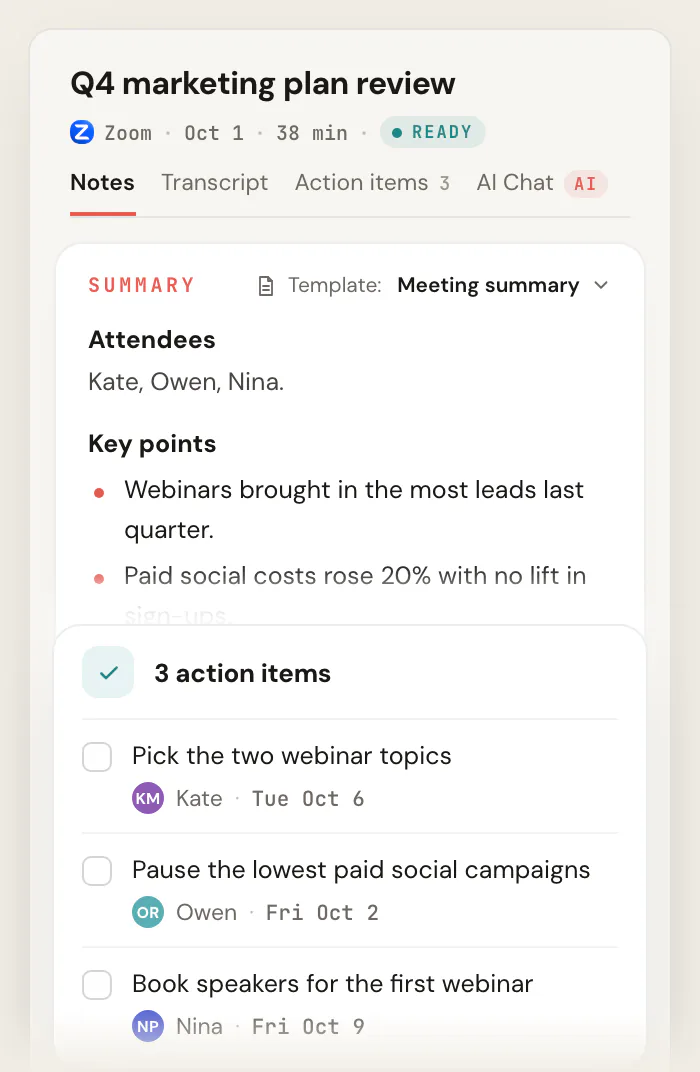
What's in a Scribbl meeting summary.
Scribbl's AI meeting summarizer leads with what the meeting changed, so you can skip the hour and still know what to do next.
What it was about
A few lines at the top, so you see at a glance what the meeting covered.
Decisions
What was agreed, in plain sentences.
Action items
Each task, with who owns it and when it is due.
The words behind it
The transcript with speaker names and the video sit next to the summary, for when you need the exact words.
The summary is the top of Scribbl's AI meeting notes, which also show who spoke and for how long.
Scribbl vs the AI summaries in Google Meet, Zoom and Teams.
Google Meet has Gemini's "Take notes for me", Zoom has Zoom AI (formerly AI Companion), and Teams has intelligent recap. Each one depends on the host's plan, or on a license you pay for yourself. Scribbl summarizes every meeting you join.
 Scribbl
  Gemini in Meet
  Zoom AI
  Teams recap No. Not on free Gmail or Business Starter. Business Standard and up, or Google AI Pro or Ultra. Summaries for 3 meetings you host a month. Unlimited from $14.16 per user a month, billed annually. No. Needs Teams Premium, about $10 per user a month, or Microsoft 365 Copilot, about $30. The organizer’s. The host’s, and the host or a co-host starts it. Each person who wants the recap needs their own license. Guests from other companies can’t start it, and the notes go to the organizer. You can only ask the host to start it, and you get it only if the host shares it. You get the recap only if someone in that company shares it with you. A Google Doc emailed to the organizer. An email to the host. The meeting’s Recap tab in Teams. No video. The transcript is a separate feature. A transcript only if the host turns it on too. The meeting has to be transcribed for the recap to work. Google Meet calls only. Zoom meetings only. Teams meetings only.
 Google facts from Google Meet Help and Zoom facts from Zoom Support and zoom.com/pricing, checked October 19, 2026. Microsoft facts from Microsoft Support, checked October 6, 2026. Note takers that send a bot, such as Otter, Fireflies and Fathom, join the call as a participant; Scribbl never does.
How to get an AI meeting summary with Scribbl.
Set it up once, and every Google Meet, Zoom and Teams meeting comes back summarized, whoever hosts it. The free plan includes Google Meet, Zoom and Microsoft Teams.
- 01
Add Scribbl where you meet
The Chrome extension for Google Meet. Scribbl Desktop, for Mac with Apple silicon or Windows, for Zoom and Microsoft Teams.
- 02
Join the meeting as usual
Nothing joins the call. You don't need to be the host or have a paid Google, Zoom or Microsoft plan. Tell everyone you're recording.
- 03
Read the summary when it ends
The summary, decisions and action items, in your Scribbl account, next to the video and transcript.
A meeting summary in a format that fits the meeting.
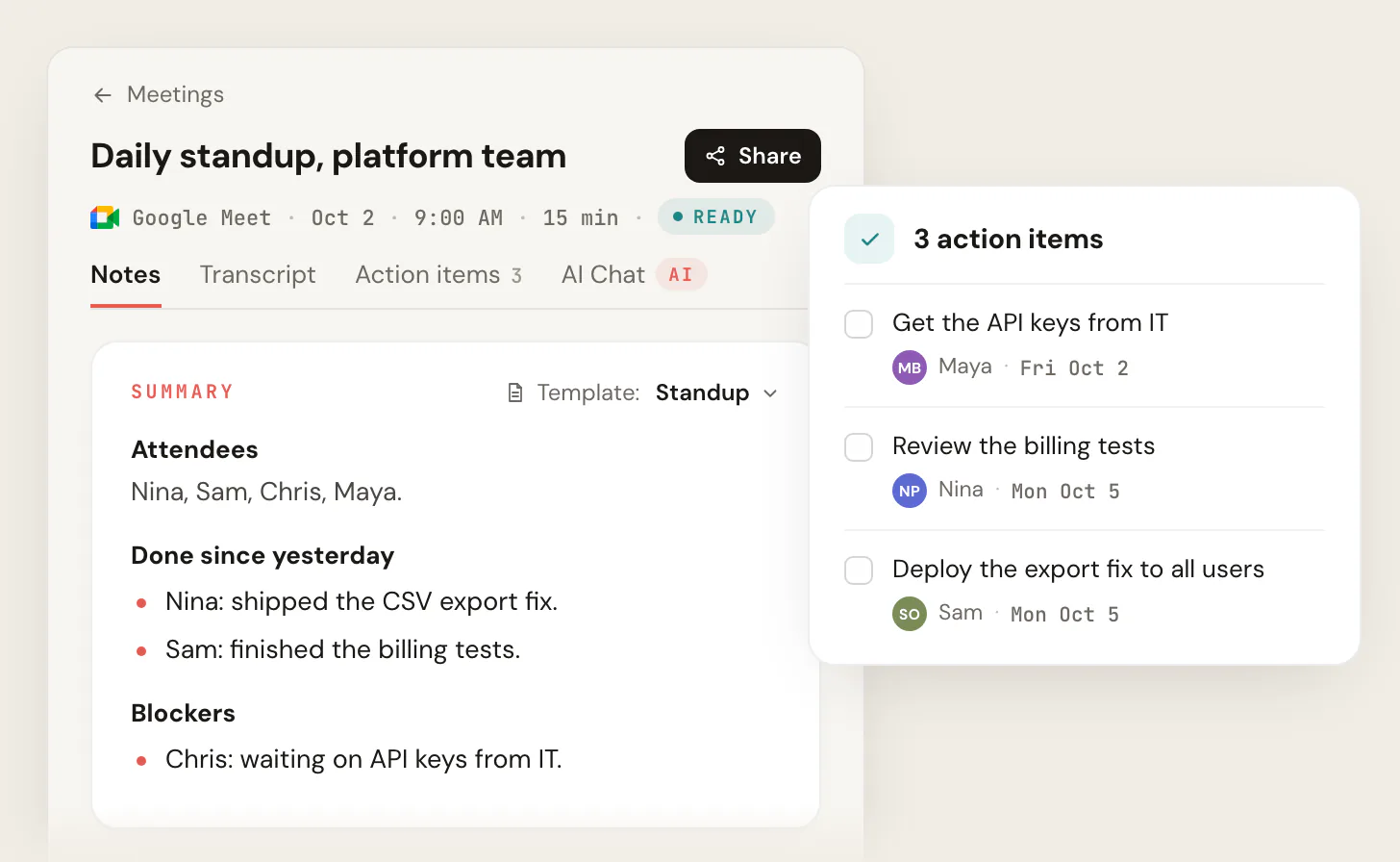
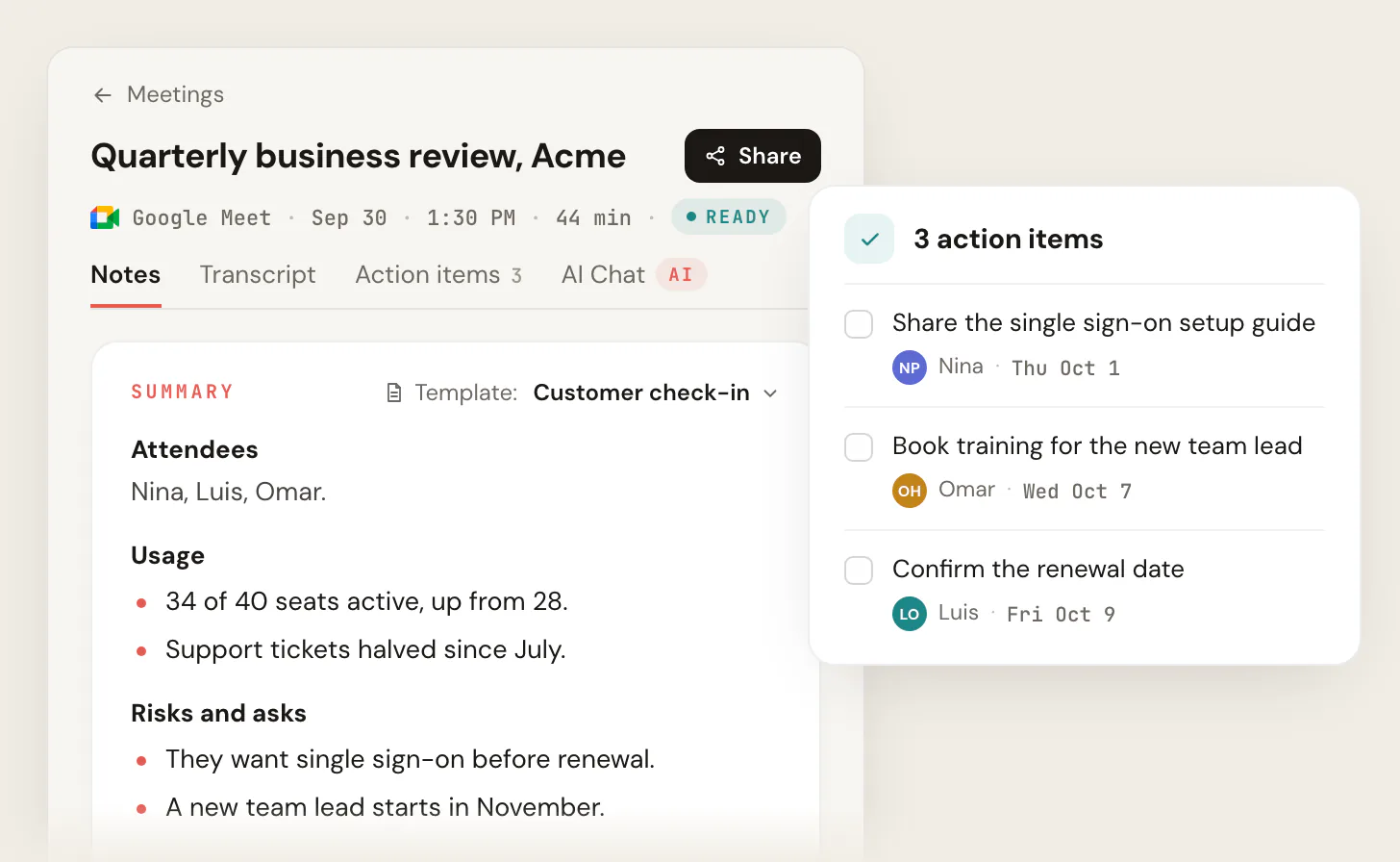
A standup summary needs what got done and what's blocked. A customer call needs usage, risks and asks. Pick a template for the kind of meeting and the summary comes back in those sections. Describe a new kind of meeting and Scribbl drafts the template for you. Switch the template on a meeting that already happened and the notes are rewritten in the new format.
Scribbl can also write the summary in a different language from the meeting. Writing one by hand? Start from this meeting summary template.
Get the summary to the people who need it, and ask it questions.
- Share it. Send a link to the summary, the transcript and the video. Recordings are private until you do.
- Post it. An Automation can post the summary to Slack or Microsoft Teams when a meeting lands in a Smart Collection.
- Follow up. An Automation can draft the follow-up email for you to copy or open in Gmail. It never sends by itself.
On Pro, connect Scribbl once and Claude or ChatGPT can search the summaries, notes and transcripts of every meeting Scribbl recorded for you, and answer from what people said.
Automations ask before they change anything by default.
How connecting Claude or ChatGPT works
 You ask
 What were the main objections in my sales calls this week?
Matches in your Scribbl meetings Sales calls “We’re locked into our current tool until the contract ends in March.”
Brightline Health demo · Today “The per-seat pricing gets expensive once the whole team is on it.”
Halcyon Foods discovery call · Wed “Our security team has to sign off before we buy anything new.”
Ridgeway Partners pricing call · Tue AI meeting summaries for 10 meetings a month, free.
The free plan includes Google Meet, Zoom and Microsoft Teams. No credit card to start, and no paid Google, Zoom or Microsoft plan needed.
Free
$0
Google Meet, Zoom and Microsoft Teams
- 10 meetings a month
- An AI summary, decisions and action items
- Templates for each kind of meeting
- The video and a transcript with speaker names
- No limit on meeting length
Pro
$13per user / month
Billed annually, or $20 monthly
- Everything in Free
- Unlimited meetings
- Ask Claude or ChatGPT about every meeting
Recordings are private by default, and Scribbl doesn't use your meetings to train AI for anyone other than you. See pricing
AI meeting summary FAQ
What is an AI meeting summary?
An AI meeting summary is a short write-up an AI makes from a meeting: what it was about, what was decided, and the action items with who owns them. Nobody has to take notes during the call. Scribbl writes one for every Google Meet, Zoom and Microsoft Teams meeting you join, with nothing joining the call, and keeps the video and the transcript next to it.
What is the best AI meeting summarizer?
For Google Meet, Zoom and Microsoft Teams, Scribbl. It summarizes every meeting you join, whoever hosts it and whatever plan they're on, with nothing joining the call, in a format that fits the kind of meeting. All three platforms go into one account, and on Pro you can ask Claude or ChatGPT about every meeting. The free plan includes Google Meet, Zoom and Microsoft Teams, with 10 meetings a month.
Is there a free AI meeting summary tool?
Yes. Scribbl's free plan includes Google Meet, Zoom and Microsoft Teams, with 10 meetings a month and no limit on meeting length. Each meeting gets an AI summary with the decisions and action items, plus the video and a transcript with speaker names. The summaries built into the platforms aren't free in the same way: Gemini's isn't on free Gmail, free Zoom covers 3 meetings you host a month, and Teams needs a Teams Premium or Copilot license.
How do I get an AI summary of a Google Meet, Zoom or Teams meeting?
Sign up for Scribbl, add the Chrome extension for Google Meet, and download Scribbl Desktop for Zoom and Microsoft Teams, on a Mac with Apple silicon or a Windows PC. Join your meetings the way you always do. When a meeting ends, the summary, decisions and action items are in your Scribbl account. Tell people at the start that you're recording.
Can I get a meeting summary if I'm not the host?
Yes, with Scribbl. The summaries built into Google Meet, Zoom and Teams depend on the organizer: Gemini needs the organizer's plan to include it, Zoom's summary is started by the host or a co-host, and a guest in someone else's Teams meeting gets the recap only if someone there shares it. Scribbl summarizes every meeting you join, host or guest.
Does Google Meet have an AI summary?
Yes, Gemini's Take notes for me, on Business Standard and higher Workspace plans and the Google AI Pro and Ultra plans, but not on free Gmail or Business Starter. The organizer's plan is the one that counts, and the notes go to the organizer as a Google Doc, with no video. Scribbl's Chrome extension summarizes any Google Meet you're in, on any Google account.
How do I get a Zoom AI summary?
With Zoom AI, which Zoom called AI Companion until June 2026, the host or a co-host starts the meeting summary, and Zoom emails it to the host. A free Zoom account gets summaries for 3 meetings it hosts a month. Scribbl Desktop summarizes every Zoom meeting you join, hosted by you or not, with nothing joining the call.
Does Microsoft Teams summarize meetings?
Yes, with intelligent recap, which needs a Teams Premium license (about $10 per user a month) or Microsoft 365 Copilot (about $30), and the meeting has to be transcribed. Each person who wants the recap needs one of those licenses. Scribbl Desktop summarizes every Teams meeting you join without either license.
Can I change the format of the summary?
Yes. Pick a template for the kind of meeting, such as a standup or a customer check-in, and the summary comes back in those sections. Describe a new kind of meeting and Scribbl drafts the template for you. Set one as your default, or switch the template on a meeting that already happened and the notes are rewritten in the new format. Scribbl can also write them in a different language from the meeting.
Can Scribbl send the summary to my team?
Scribbl never sends anything by itself. Share any meeting with a link, or set up an Automation that posts the summary to Slack or Microsoft Teams, or drafts the follow-up email for you to copy or open in Gmail. Automations ask before they change anything by default.
Will people see anything join the call?
No. Nothing joins the call and nobody new shows up in the participant list, on Google Meet, Zoom or Teams. The meeting doesn't show its own recording notice for Scribbl either, so say at the start that you're recording.
Are my meeting summaries private?
Yes. Recordings are private by default, and you choose who gets a link. Scribbl doesn't use your meetings to train AI for anyone other than you.
Step by step: How to get a Google Meet AI summary, How to get a Zoom meeting summary and the Meeting summary template. The full notes are on AI meeting notes.
Get a summary of your next meeting, free.
The free plan includes Google Meet, Zoom and Microsoft Teams. Sign up, add Scribbl where you meet, and when the meeting ends the summary is waiting.
Google Meet uses the Chrome extension. Zoom and Teams use Scribbl Desktop for Mac with Apple silicon or Windows.
Recording laws vary by region, so let everyone in the meeting know you're recording and make sure you have the consent you need.