Meeting summary template: the 5 sections that make notes useful
A copy-paste meeting summary template plus the rule behind it: a summary captures what changed, not what was said. Templates for syncs, clients, 1:1s, and kickoffs.
Updated October 7, 2026
On this page6 sections
A meeting summary is not a shorter transcript. It is a record of what changed: the decisions made, the actions owned, and the open questions left on the table. Most templates you find online get this backwards. They hand you a "discussion" section and you fill it with a play-by-play of who said what, and three weeks later nobody reopens it because it reads like a recording, not a record.
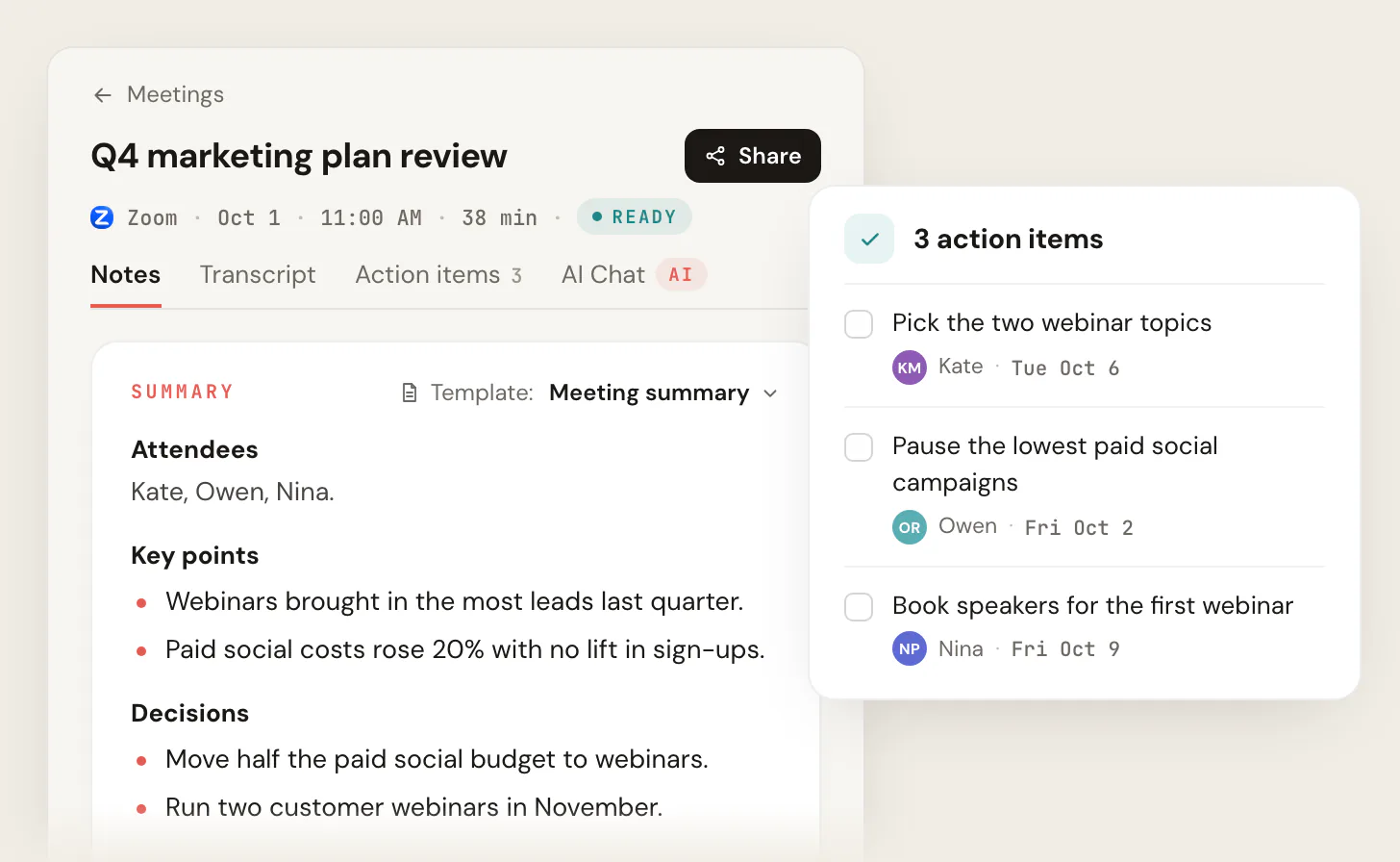
The argument of this guide is simple: a good summary answers one question for the person reading it later, "what do I need to know or do because this meeting happened?" Everything in the template below exists to answer that. Paste it into a doc, an email, or Slack and fill it in. The five sections, in this order, are decisions, action items, key discussion points, open questions, and next meeting. The order matters, and so does what you leave out.
What a meeting summary is for (and what it is not)
Before the template, get clear on the job. A summary serves people who were not in the room and the version of you who has forgotten everything by next Tuesday. Both of those readers want the same thing: the outcome, fast.
That means three formats people confuse are not the same document.
| Document | What it captures | When you use it |
|---|---|---|
| Transcript | Every word, verbatim | Legal, research, "what exactly did they say" |
| Meeting summary | Decisions, actions, key points | The default for almost every meeting |
| Meeting minutes | A formal record with attendance, motions, votes | Boards, nonprofits, governance |
A summary sits in the middle and is what you want most of the time. If you need the formal version with attendance and motions, see meeting minutes example and meeting minutes format with action items. If you just need the short note you fire off afterward, that is a recap, covered in meeting recap format. This page is the structured summary that lives in your team's notes. For the full set of notes taken during the meeting, use the meeting notes template.
The 5-section meeting summary template
Here is the full template. Copy it as-is into Notion, a Google Doc, Confluence, or an email. The header line gives readers the context to file it; the five sections give them the substance in priority order.
MEETING SUMMARY

Meeting:   [Name / purpose]
Date:      [YYYY-MM-DD]
Attendees: [Names]
Note-taker: [Name]

DECISIONS
- [What was decided] (because [the reasoning, if it matters later])
- [What was decided]

ACTION ITEMS
- [Owner]: [Verb-led task] (due [date])
- [Owner]: [Verb-led task] (due [date])

KEY DISCUSSION POINTS
- [Topic]: [The takeaway, not the back-and-forth]
- [Topic]: [The takeaway]

OPEN QUESTIONS / PARKED
- [Question still unresolved, and who will chase it]

NEXT MEETING
- [Date/time] · [The one thing it needs to cover]
Notice the order. Decisions and action items come first because they are what a busy reader scans for. Discussion points come third because they are context, not outcome. Putting the verbatim discussion at the top is the single most common template mistake, and it buries the two things people actually came for.
- 1
Decisions
What the group actually settled. This is the highest-value line in the doc. One sentence each, with the "why" only if it will be forgotten.
- 2
Action items
Who does what by when. One owner, a verb, a date. The part that turns a meeting into work that happens.
- 3
Key discussion points
The takeaway from each major topic, not a transcript of the debate. If nothing changed, it probably is not worth a line.
- 4
Open questions
What got parked, blocked, or punted, and who owns chasing it. Skipping this is how issues silently disappear.
- 5
Next meeting
When you meet again and the single thing it must cover. Closes the loop and sets the agenda.
A filled-in example
A blank template is abstract. Here is the same structure with a real client sync inside it, so you can see how short each line should be.
MEETING SUMMARY

Meeting:   Acme Q3 campaign sync
Date:      2026-06-13
Attendees: Maria, Devin, Priya, client (Sam)
Note-taker: Devin

DECISIONS
- Going with the 3-tier pricing layout for the landing page (client preferred it over the single CTA)
- Launch slips one week to Jun 30 to fit the legal review

ACTION ITEMS
- Maria: Send revised SOW with new launch date (due Mon Jun 16)
- Devin: Rebuild the pricing section as 3 tiers (due Thu Jun 19)
- Priya: Book the legal review slot (due Tue Jun 17)

KEY DISCUSSION POINTS
- Budget: Client confirmed Q3 budget is firm; no room for paid media add-ons until Q4
- Creative: Sam wants warmer photography; mood board to follow before the rebuild

OPEN QUESTIONS / PARKED
- Whether to localize the page for the UK market (Sam to confirm with their team)

NEXT MEETING
- Tue Jun 23, 10am · Review the rebuilt page and the mood board
That whole summary takes two minutes to read and tells anyone who missed the call exactly where things stand. Compare it to a transcript of the same hour and you can see why the summary is the artifact people keep.
- Decision: Going with 3-tier pricing.
- Action: Devin rebuilds the section by Thu Jun 19.
- Open: UK localization, Sam to confirm.
- Two minutes to read. Tells you the state of the project.
- "Sam said he liked the tiers but wasn't sure..."
- "Then Maria asked about the timeline and we discussed..."
- "There was some back-and-forth about budget."
- A wall of narration. You still have to hunt for the outcome.
Templates for the four meetings you summarize most
The five-section structure is the default, but a few meeting types want a tweaked shape. Use these variants rather than forcing every meeting into the same mold.
Team sync / standup. Keep it lean. Most standups produce no decisions, so lead with action items and surface blockers loudly.
SYNC SUMMARY · [Date]
DONE SINCE LAST: [What shipped]
IN PROGRESS: [What is moving]
BLOCKED: [What is stuck + who can unblock it]
ACTION ITEMS:
- [Owner]: [task] (due [date])
Client meeting. Add status and next touchpoint, because a client reads the summary as a record of the relationship. The decisions section carries extra weight here, since it documents what you agreed to deliver.
CLIENT SUMMARY · [Client] · [Date]
WHAT WE DECIDED: [Agreements / approvals]
WHAT WE OWE THEM: [Owner]: [deliverable] (due [date])
WHAT THEY OWE US: [Their action] (due [date])
OPEN ITEMS: [Anything unresolved]
NEXT CHECK-IN: [Date + purpose]
For the deeper version of this with sample language, see client meeting notes template and how to write a follow-up email.
1:1. A 1:1 summary is mostly private and forward-looking. Decisions are rare; commitments and follow-ups are everything.
1:1 SUMMARY · [Name] · [Date]
DISCUSSED: [Topics, one line each]
COMMITMENTS:
- [Manager]: [what you'll do] (by [date])
- [Report]: [what they'll do] (by [date])
GROWTH / FEEDBACK: [Anything to revisit next time]
Project kickoff. A kickoff summary doubles as the project's founding document, so it carries scope, owners, and the schedule. It is longer on purpose.
KICKOFF SUMMARY · [Project] · [Date]
GOAL: [The one-sentence objective]
SCOPE / OUT OF SCOPE: [What's in, what's explicitly not]
ROLES: [Owner per workstream]
KEY DATES: [Milestones]
DECISIONS: [Anything settled at kickoff]
ACTION ITEMS: [Owner]: [task] (due [date])
RISKS / OPEN QUESTIONS: [What could derail it]
For the agenda that feeds this, see the project kickoff meeting agenda.
The rules that separate a useful summary from a transcript with bullets
The template is the easy part. These habits are what make the summary worth reopening.
Write outcomes, not narration. "Maria raised pricing, Sam pushed back, then we landed on tiers" is narration. "Decision: going with 3-tier pricing" is the outcome. Readers want the outcome. If you catch yourself writing "then," "after that," or "we discussed," you are narrating. Cut to what was decided.
One owner and one date per action item. This is the rule that decides whether anything actually happens. "The team will follow up" is not an action item; it is a wish. Name one person and a specific calendar date. The full discipline lives in the action items template, but the short version: a verb, one name, a real date, every time.
Capture the "why" only when it will be forgotten. Most decisions need no explanation. But when a choice was contested or counterintuitive, a five-word "because" saves a re-litigation six weeks later. "Launch slips a week (because legal review)" stops the future argument before it starts.
Distribute within 24 hours. A summary's value decays fast. Send it the same day while everyone still remembers the context and can correct a wrong line. A perfect summary that goes out next week has already lost half its readers.
Make open questions loud. The section people skip is the one that bites them. If something got parked, blocked, or punted, write it down with an owner to chase it. Silent drops are how a "we'll figure that out later" becomes a missed deadline.
- "We talked about the timeline."
- No decision recorded. What was settled?
- No owner, no date on the follow-up.
- You have to ask someone what actually happened.
- "Decision: launch moves to Jun 30."
- The outcome is stated, not the discussion.
- Paired action: Maria updates the SOW by Jun 16.
- A reader knows the state of the project in one line.
Let the meeting tool draft the summary for you
You no longer have to type the summary from memory while half-listening. The major platforms now generate a structured draft, and your job has shifted from transcribing to editing.
Google Meet's Take notes for me (powered by Gemini) produces a Google Doc with a Summary, Details, and a Next steps section after the call. It is included with Workspace Business Standard, Business Plus, Enterprise Standard, Enterprise Plus, and Gemini/AI Pro plans, and it is not available on free Google accounts or Business Starter (per Google Workspace documentation, as of June 2026). The assignable Next steps feature rolled out starting February 18, 2025. Microsoft Teams and Zoom have their own equivalents (Teams Recap and Zoom AI Companion), both gated behind paid tiers.
More options (Google Meet)
- Take notes with Gemini
- Record meeting
- Captions
- Settings
The catch is the same across all of them: the AI draft is a starting point, not a finished summary. It tends to over-narrate (the very thing this guide warns against), it drops the owner and date on action items, and it sometimes records something that was discussed but never agreed. Treat the generated draft as your raw material and run it through the five-section structure: pull out the real decisions, assign one owner and a date to each action, and cut the play-by-play.
If you are on a free Google account, in Meet often, and do not want a meeting bot announcing itself as a third attendee, Scribbl records, transcribes, and summarizes Google Meet with its Chrome extension, with no bot joining the call. It produces a summary with decisions and action items you can clean up and send, and it is free for individuals, with Zoom and Microsoft Teams included through the desktop app (see pricing and Scribbl Desktop). It is the right call when native AI notes are paywalled or you would rather not have a bot in every meeting. Either way, the tool drafts; you decide what changed.
Meeting summary template FAQ
What should a meeting summary include?
Five sections, in this order: decisions made, action items (one owner and a date each), key discussion points (the takeaway, not the play-by-play), open questions or parked items, and the next meeting. Add a short header with the meeting name, date, attendees, and note-taker so readers can file it. Lead with decisions and actions because that is what people scan for; put context below.
What is the difference between a meeting summary and meeting minutes?
A summary captures decisions, actions, and key points in a fast, readable form, and it is the right choice for most meetings. Minutes are a more formal record that typically logs attendance, motions, and votes, and they exist mainly for boards, nonprofits, and governance bodies. If you are not running a formal governance meeting, write a summary. See meeting minutes example for the formal version.
How long should a meeting summary be?
As short as it can be while still recording everything that changed. For a typical 30-to-60-minute meeting, that is usually a header plus a handful of bullets per section, often under 250 words. If your summary is approaching the length of the meeting itself, you are narrating instead of summarizing. Cut anything that is not a decision, an action, an open question, or context someone will need later.
Can I use AI to generate the meeting summary?
Yes, and you should let it write the first draft. Google Meet (Take notes for me), Microsoft Teams (Recap), and Zoom (AI Companion) all produce a structured summary, though they are gated behind paid tiers, and tools like Scribbl do it with no bot in the call (with the Chrome extension on Google Meet, and with the desktop app on Zoom and Teams). The catch is that AI drafts tend to over-narrate and drop the owner and date on tasks, so always edit the output into clean, outcome-first sections before you send it.
How soon should I send the summary after the meeting?
Within 24 hours, ideally the same day. The summary's value decays as memory fades: send it while people can still correct a wrong line and the context is fresh. A same-day summary gets read and acted on; one that arrives a week later gets skimmed and filed. For the short version you fire off right after the call, see meeting recap format.
Try Scribbl
Let your meetings take their own notes.
Scribbl records, transcribes, and summarizes your Google Meet calls from your browser. No bot joins the call. Free forever for individuals.
Add to Chrome · It's free