Meeting Notes Template: Free Copy-Paste Templates and a Filled Example (2026)
A free meeting notes template to copy into Google Docs, Word, OneNote or Notion, a table version, a filled example, and team and project versions.
Updated October 23, 2026
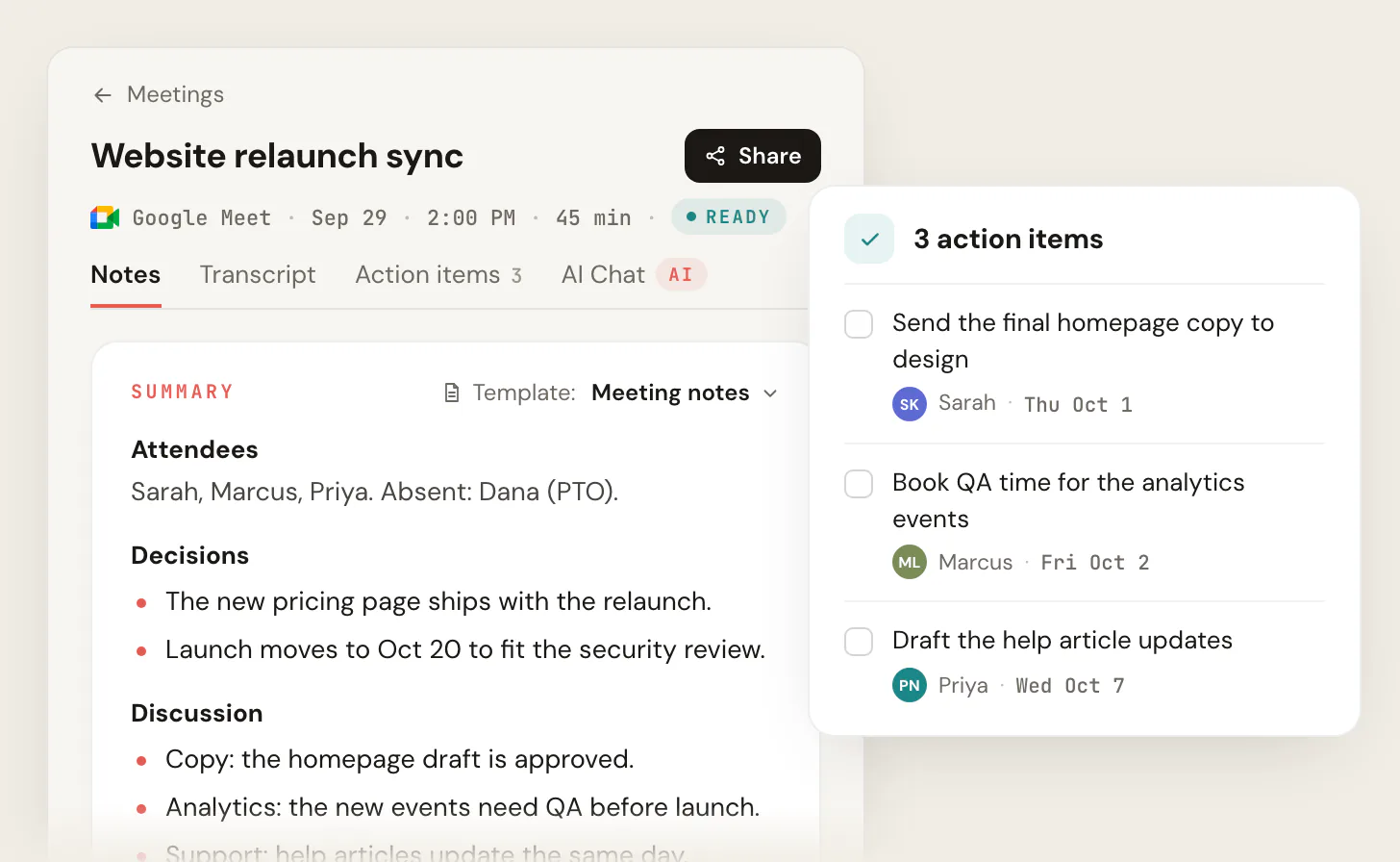
Here is a free meeting notes template you can copy into Google Docs, Word, OneNote or Notion: a header with the meeting, date and attendees, then the agenda, decisions, discussion, action items with an owner and a due date, open questions and the next meeting. If you'd rather not type it during the call, Scribbl writes your notes in this shape after every Google Meet, Zoom or Microsoft Teams meeting, with nothing joining the call and on the free plan: Start free.
Below: the template in plain text, the same template as a table, a filled example, versions for team and project meetings, and how to put it into the tools you already use.
The meeting notes template (copy and paste)
MEETING NOTES

Meeting:     [Name of the meeting]
Date / time: [Date], [start time] to [end time]
Attendees:   [Names]  Absent: [Names]
Notes by:    [Name]

AGENDA
1. [Topic]
2. [Topic]
3. [Topic]

DECISIONS
- [What was decided]
- [What was decided] (why: [only if someone will ask later])

ACTION ITEMS
- [ ] [Owner]: [Task, starting with a verb] (due [date])
- [ ] [Owner]: [Task] (due [date])

DISCUSSION
- [Topic]: [The takeaway, in one line]
- [Topic]: [The takeaway]

OPEN QUESTIONS
- [Question] (who will find out: [Name])

NEXT MEETING
- [Date and time]: [What it needs to cover]
Why it's in this order: decisions and action items are what people come back for, so they sit right under the agenda. Discussion is context, so it comes after. One owner and one date on every action item is the rule that decides whether the work gets done; more on that in the meeting action items template.
Meeting notes template as a table
Paste this into Word or Google Docs when you want each section in its own row.
| Section | What to write |
|---|---|
| Meeting | [Name] |
| Date and time | [Date], [start] to [end] |
| Attendees | [Names]. Absent: [Names] |
| Notes by | [Name] |
| Agenda | 1. [Topic] 2. [Topic] 3. [Topic] |
| Decisions | [What was decided] |
| Action items | [Owner]: [Task] (due [date]) |
| Discussion | [Topic]: [Takeaway] |
| Open questions | [Question] ([Name] to find out) |
| Next meeting | [Date]: [What it covers] |
A filled-in example
The same template after a real 45-minute project meeting. Each line is short on purpose.
MEETING NOTES

Meeting:     Website relaunch sync
Date / time: Sep 29, 2:00 PM to 2:45 PM
Attendees:   Sarah, Marcus, Priya  Absent: Dana (PTO)
Notes by:    Priya

AGENDA
1. Pricing page
2. Launch date
3. Analytics and help articles

DECISIONS
- The new pricing page ships with the relaunch.
- Launch moves to Oct 20 (why: to fit the security review).

ACTION ITEMS
- [ ] Sarah: Send the final homepage copy to design (due Thu Oct 1)
- [ ] Marcus: Book QA time for the analytics events (due Fri Oct 2)
- [ ] Priya: Draft the help article updates (due Wed Oct 7)

DISCUSSION
- Copy: the homepage draft is approved.
- Analytics: the new events need QA before launch.
- Support: help articles update the same day as the launch.

OPEN QUESTIONS
- Do we announce the new pricing by email? (Sarah to check with Dana)

NEXT MEETING
- Tue Oct 6, 2:00 PM: QA results and the launch checklist
Anyone who missed the call can read that in a minute and know where the project stands. The image at the top of this page shows the same meeting in Scribbl: the attendees, decisions, discussion and three action items, written with the Meeting notes template.
Have Scribbl write your meeting notes
Filling in a template by hand means half-listening while you type. Scribbl, an AI note taker for Google Meet, Zoom and Microsoft Teams, writes the notes for you after the meeting, in the Meeting notes template or one you make. To make your own, describe the meeting and what the notes must capture, and Scribbl drafts the template for you.
- 1
Add Scribbl
Add the Chrome extension for Google Meet, or install Scribbl Desktop on your Mac (Apple silicon) or Windows computer for Zoom and Teams.
- 2
Join the meeting as usual
Nothing joins the call, and you don't need to be the host. Tell everyone at the start that you're recording.
- 3
Open the notes when it ends
The video recording, a transcript with speaker names, AI notes in your template and the action items with owners and due dates are on one page.
What you get that a blank template can't give you:
- The whole meeting kept. The video and a transcript with speaker names sit next to the notes, so you can check a decision in the exact words someone used.
- Action items pulled out for you, each with an owner and a due date, like the card in the image at the top.
- The follow-up done. Automations draft the follow-up email (copy it or open it in Gmail; it never sends by itself), post the notes to Slack or Microsoft Teams, or save them to Notion, Google Drive or Confluence. They ask before they change anything by default.
- Meetings sorted by themselves. Smart Collections group your meetings, such as every client call or every weekly sync, so last month's notes are easy to find.
- Answers about past meetings. On Pro, connect Scribbl to ChatGPT or Claude and ask what was decided in any meeting.
Recordings are private by default, and Scribbl doesn't use your meetings to train AI for anyone other than you. The free plan includes Google Meet, Zoom and Microsoft Teams, with 10 meetings a month. Start free. For Zoom and Teams, get Scribbl Desktop.
| Feature | Scribbl | Google Docs meeting notes | Typing it yourself |
|---|---|---|---|
| Who writes the notes | Scribbl, after the meeting | You, during the meeting | You, during the meeting |
| Works on Google Meet, Zoom and Teams | Yes | Any meeting on your Google Calendar | Yes |
| Action items with an owner and a due date | Pulled out for you | A checklist you fill in | You write them |
| Video and transcript with speaker names | Yes | No | No |
| Follow-up email drafted | Yes | A Gmail draft of the notes | No |
Team and weekly meeting notes template
Most weekly syncs make few decisions, so lead with what changed since last week and what's stuck.
TEAM MEETING NOTES: [Team] [Date]

Attendees: [Names]

DONE SINCE LAST WEEK
- [Name]: [What shipped]

THIS WEEK
- [Name]: [What they're working on]

BLOCKED
- [What is stuck] (who can unblock it: [Name])

DECISIONS
- [What was decided]

ACTION ITEMS
- [ ] [Owner]: [Task] (due [date])

NEXT MEETING: [Date]
Project meeting notes template
A project meeting needs the status against the plan and the risks, on top of the usual sections.
PROJECT MEETING NOTES: [Project] [Date]

Attendees: [Names]
Status:    [On track / At risk / Off track], [one line why]

MILESTONES
- [Milestone]: [Due date], [status]

DECISIONS
- [What was decided]

ACTION ITEMS
- [ ] [Owner]: [Task] (due [date])

RISKS AND OPEN QUESTIONS
- [Risk or question] (owner: [Name])

NEXT MEETING: [Date]: [What it covers]
More templates for one kind of meeting:
- 1:1s: one on one meeting template
- Client meetings: client meeting notes template
- Sales and client calls: call notes template
- The short version you send after: meeting summary template
- Boards and committees: meeting minutes format with action items
Meeting notes vs meeting minutes vs a meeting summary
| Meeting notes | Meeting minutes | Meeting summary | |
|---|---|---|---|
| What it is | The team's working record | A formal record | A short recap |
| What it holds | Decisions, action items, discussion, open questions | Attendance, motions, votes, decisions | Decisions and action items |
| Who it's for | The team and anyone who missed it | Boards, committees, members | People who need the outcome fast |
| Template | This page | Minutes format | Summary template |
How to use this template in Google Docs, Word, OneNote and Notion
- Google Docs. Type @ in a Doc and choose Meeting notes under Building Blocks, then pick the Google Calendar event. Google fills in the date, title and attendees and adds sections for notes and action items with a checklist (Google). Paste the decisions, open questions and next meeting sections from the template above under it.
- Microsoft Word. Paste the table version into a blank document and save it as a template, so every new meeting starts from it.
- OneNote. On the Home tab, choose Meeting Details and pick the meeting. OneNote puts the date, location, agenda, topic and attendees from Outlook on a new page; Outlook and OneNote need to be on the same computer (Microsoft Support). Paste the template under them.
- Notion. Paste the plain-text template into a page, or save it as a template page you duplicate for each meeting.
Or skip the pasting: Scribbl's Automations save each meeting's notes to Notion, Google Drive or Confluence when it lands in a Smart Collection.
The free plan includes Google Meet, Zoom and Microsoft Teams, with 10 meetings a month. Start free and let Scribbl fill in the template for you.
FAQ
What should a meeting notes template include?
A header with the meeting name, date, time, attendees and who took the notes, then the agenda, the decisions, the key discussion points, the action items with one owner and a due date each, the open questions, and the next meeting. Put decisions and action items near the top, because those are what people look for later.
What is the difference between meeting notes and meeting minutes?
Meeting notes are a working record for the team: what was decided, who does what by when, and what is still open. Meeting minutes are a formal record, usually for boards and committees, with attendance, motions, votes and approval at the next meeting. If nobody will vote to approve the record, you want meeting notes.
Is there a meeting notes template in Google Docs?
Yes. In a Google Doc, type @ and choose Meeting notes under Building Blocks, then pick the Google Calendar event. Google fills in the date, title and attendees and adds sections for notes and action items. You can paste the template on this page under it to add decisions, open questions and the next meeting.
How do I take meeting notes without typing during the call?
Use an AI note taker. Scribbl writes the notes in the Meeting notes template, or one you make, after every Google Meet, Zoom or Microsoft Teams meeting, with nothing joining the call. You also get the video recording, a transcript with speaker names and the action items. Tell everyone at the start that you're recording.
Is Scribbl free?
Yes, there is a free plan. The free plan includes Google Meet, Zoom and Microsoft Teams, with 10 meetings a month. Pro is $13 per user per month billed annually, or $20 monthly. Start free at extension.app.scribbl.co/signup.
Sources
Checked on October 23, 2026.
- Google: How to create meeting notes in Google Docs (August 2, 2023)
- Microsoft Support: Insert Outlook meeting details into OneNote
- Scribbl: pricing, Scribbl Desktop
Try Scribbl
Let your meetings take their own notes.
Scribbl records, transcribes, and summarizes your Google Meet calls from your browser. No bot joins the call. Free forever for individuals.
Add to Chrome · It's free