Microsoft Teams AI note taker with no bot and no Copilot license.
Scribbl is the AI note taker to use for Teams. Scribbl Desktop records the meeting from your own Mac or Windows PC, so nothing joins the call, and it works the same when another company hosts. You don't need a Teams Premium or Copilot license. Every Teams meeting gets the video, a transcript with speaker names, AI notes and action items. Then ask Claude or ChatGPT about any of them, and let Scribbl do the follow-up.
 Northwind renewal call 45 min
 TL;DR Renewal on track. They want single sign-on before more teams join.


Connected to
ChatGPT & Claude
Does Teams have an AI note taker?
Yes, Teams has AI notes of its own: intelligent recap writes them after the meeting and Copilot can take them during it, but each person who wants them needs a Teams Premium or Microsoft Copilot license, and guests from other companies don't get them. Scribbl is the AI note taker for Teams that needs neither license and works in every Teams meeting you join.
The full answer: does Microsoft Teams have AI meeting notes?The Teams meetings where Teams' own notes stop, and what Scribbl does in each.
Teams decides who gets AI notes, who can record and who gets into the meeting by license and by organization. Here is what happens in the Teams meetings people ask about most, and what Scribbl Desktop does in each.
You're a guest in another company's Teams meeting.
Teams on its own
Copilot isn't available in a meeting organized outside your organization. Teams' AI recap is only for invited people in the organizer's organization, and people outside it can't open it even with the recording link or their own Teams Premium license, unless someone there shares it with you.
With Scribbl Desktop
Scribbl Desktop records the meeting on your own computer, so the video, the transcript and the AI notes are yours, whoever organized the call.
Your note taker bot is stuck in the lobby.
Teams on its own
Since June 2026, Teams detects external bots when they join, marks them Unverified under Suspected threats and keeps them in the lobby until an organizer admits them, even when the meeting lets everyone else skip the lobby. Microsoft is also rolling out an admin option, off by default, that blocks identified bots from joining at all. In a client's meeting, their admin and their organizer decide.
With Scribbl Desktop
Nothing joins the call, so there's no lobby entry, no Unverified label and nothing for a bot policy to hold or block.
What Teams changed for bots, and whenRecording belongs to the organizer's organization.
Teams on its own
Teams' Record button works only for people signed in from the organizer's organization, with a license that includes recording and an admin who allows it. In our test, a guest who joined without signing in had no Record and transcribe in the More menu at all. The file goes to the organizer's OneDrive, and people from other companies can watch it only if it's shared with them.
With Scribbl Desktop
Scribbl Desktop doesn't depend on your Teams role or license. The video is saved with the meeting in your Scribbl account, next to the transcript and the notes.
Who can record a Teams meetingYou don't have your own Copilot or Teams Premium license.
Teams on its own
Microsoft licenses Teams' AI notes person by person. If the organizer or a colleague has Teams Premium and you don't, you see the basic recap: the recording, the transcript and a Notes tab people type into, with no AI summary.
With Scribbl Desktop
Only you need Scribbl, with no Microsoft license. Every Teams meeting gets AI notes and action items. The free plan includes Google Meet, Zoom and Microsoft Teams.
Nobody started transcription.
Teams on its own
Teams' AI notes need a transcribed meeting that runs at least five minutes. If nobody clicks Start transcription or Start recording, or the admin hasn't allowed transcription, there's nothing to summarize.
With Scribbl Desktop
In our test, Scribbl Desktop started capturing on its own when the Teams meeting began, with nothing to click. There's no transcript someone else has to start.
The meeting has no calendar invite.
Teams on its own
Bot note takers such as Otter and Fireflies join from your calendar, so a meeting without a calendar invite often gets missed.
With Scribbl Desktop
Scribbl Desktop works in any Teams meeting you join: from your calendar, from a pasted link, or a Meet now meeting.
You're on free Teams for personal use.
Teams on its own
Microsoft lists meeting recording as No for free Teams.
With Scribbl Desktop
Scribbl Desktop records free Teams meetings in the Teams app, the same way it records work meetings.
Install Scribbl Desktop on a Mac with Apple silicon or a Windows PC, join your Teams meeting as usual, and open the notes when it ends. Teams shows its recording notice only when Teams records, so tell everyone you're recording. Get Scribbl Desktop
Teams now holds note taker bots in the lobby.
Scribbl has nothing to admit.
Since June 2026, Microsoft Teams detects third-party bots and keeps them in the lobby until the organizer admits them. Admins control it in Teams meeting policies. A Teams note taker that joins as a bot, like Otter or Fireflies, may now wait there until someone lets it in. Scribbl Desktop records on your own computer instead.
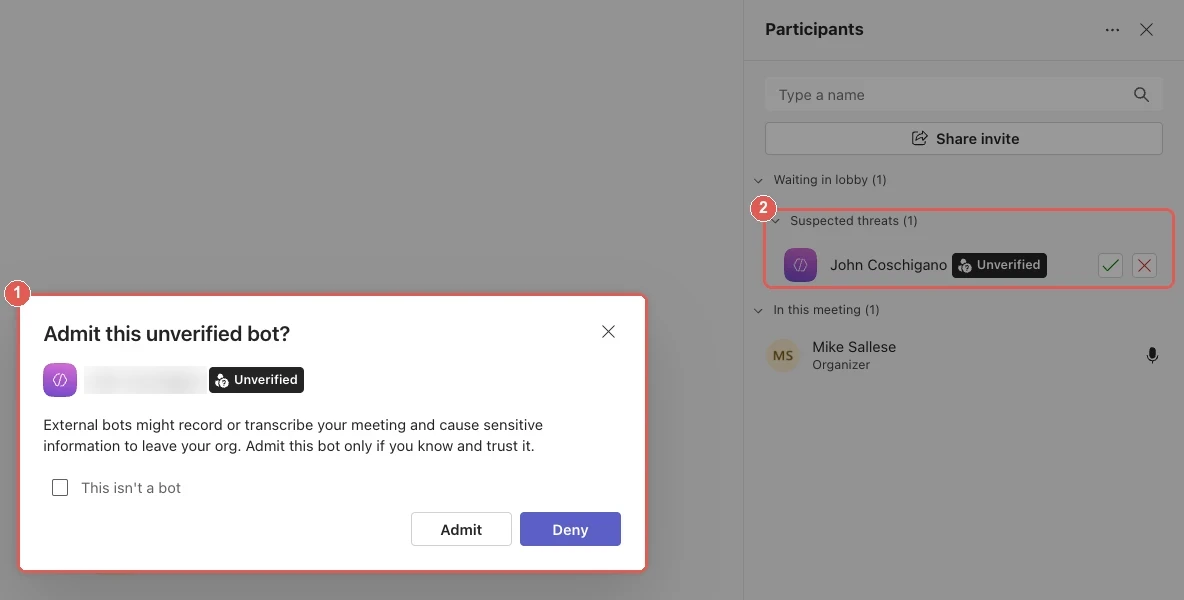
What Teams showed the organizer in our test on October 6, 2026 (the guest's name is blurred). Anyone Teams takes for a bot waits in the lobby behind this warning.
 Scribbl Capturing
 Scribbl starts capturing on its own when your Teams meeting begins. Nothing joins the call, so there is nothing to let in.
Nothing waits in the lobby.
No bot asks to join, so nobody has to admit anything and nothing can be turned away.
Works when you're not the organizer.
Teams' own Record button is only for people in the organizer's organization. Scribbl records from your seat, including in meetings other companies host.
No Copilot license needed.
Teams' AI summary and action items need a Teams Premium or Microsoft 365 Copilot license for each person who wants them. Scribbl writes yours without either.
Your last Teams meeting can now do your next task.
No bot to admit and no Copilot license is the start. What makes Scribbl the best AI note taker for Teams is what happens after the call.
Ask Claude or ChatGPT about every Teams meeting.
Connect Scribbl once, and Claude or ChatGPT can search the transcript and notes of every meeting you've recorded. Ask across a month of Teams calls instead of rewatching one.
In Teams itself, asking about a meeting means Copilot, and Copilot needs its own license. Scribbl works with the Claude or ChatGPT you already use. It's part of Pro.
How the Claude and ChatGPT connection works What did Northwind push back on across this month's Teams calls?
Found in your Scribbl meetings Northwind renewal call Oct 2 · 45 min They said the per-seat price is hard to justify for a second year.
Northwind security review Sep 24 · 38 min Their IT lead wants single sign-on before more teams join.
Northwind pilot check-in Sep 16 · 31 min Setting up the pilot took two weeks longer than they planned.
Smart Collections sort your Teams meetings by themselves.
Describe a collection in one sentence, like "calls with customers about renewals", and Scribbl puts each new meeting that fits into it. Nobody files anything. Then ask about just that group.
Then ask
“What were the main objections in this week's sales calls?”
Renewals
Smart Collection
What belongs in it
Calls with customers about renewals.
Joined on their own
Northwind renewal call
Just joined
Harper Co contract renewal Sep 30 Belmont renewal check-in Sep 25 Open in Claude
Ask about these meetings, draft from them, dig into any of it.
Automations do the follow-up after every Teams call.
When a meeting lands in a collection, Scribbl does the follow-up you'd otherwise do by hand. It asks before it changes anything, by default.
- Drafts the follow-up email in your format
- Logs notes in HubSpot or Pipedrive
- Posts a summary to Slack or Microsoft Teams
- Saves notes to Google Drive, Notion or Confluence
- Opens tickets in Linear, Jira, Asana or Monday
- Adds a row to a Google Sheet
When a meeting lands in
Sales calls
Draft the follow-up email
In your format, for you to read and send
Log the notes in HubSpot
On the deal the call was about
Post a summary to Microsoft Teams
In the Sales channel
Open tickets in Linear
One for each action item
Tell Scribbl the job in plain words.
Write an instruction the way you'd brief a colleague. Scribbl runs it with your own Claude and the tools you've connected, using the meeting that just ended and your Smart Collections.
One instruction can cover several tools at once, and it asks before it changes anything, by default.
Runs on your own Claude
What should Claude do?
What Claude can reach
The meeting that just ended
Your Smart Collections
HubSpotLinearGmail After the Northwind renewal call
- Follow-up drafted In your usual format, ready for you to send
- HubSpot note written Ready for your go-ahead
- 2 Linear issues written One for each bug they mentioned, ready for your go-ahead
All four work on the Teams meetings Scribbl records from your computer, including meetings other companies host.
Scribbl vs Microsoft Copilot for Teams meeting notes.
Teams' own AI notes come with Teams Premium or Microsoft 365 Copilot. Here is how they compare with Scribbl on what decides the choice: the price, other companies' meetings, asking questions, and the video.
Teams Premium or Copilot Scribbl Microsoft list prices as of June 2026. Licensing from Microsoft Learn, "Intelligent recap for Teams calls, meetings, and events", checked October 7, 2026. Teams' own recap reaches only licensed people in meetings their own organization runs. Scribbl covers every Teams meeting you join: other companies' meetings, no extra Microsoft license, and the work after the call.
A free AI note taker for Teams.
The free plan includes Google Meet, Zoom and Microsoft Teams. Download Scribbl Desktop and your next Teams meeting comes back with notes.
Free
$0
Google Meet, Zoom and Microsoft Teams
- 10 meetings a month
- AI notes and action items
- A searchable transcript and the video
- No limit on meeting length
- Scribbl Desktop for Mac and Windows
Pro
$13per user per month
Billed annually, or $20 monthly
- Everything in Free
- Unlimited meetings
- Ask Claude or ChatGPT about every meeting
Recordings are private by default, and Scribbl does not use your meeting data to train AI for anyone other than you. See pricing
Microsoft Teams AI note taker FAQ
Is there an AI note taker for Microsoft Teams?
Yes. Microsoft's own is Copilot in Teams, which needs a Microsoft 365 Copilot license; its AI meeting recap, intelligent recap, also comes with Teams Premium. Copilot isn't available in meetings organized by another company. Scribbl is an AI note taker for Teams that needs neither license: Scribbl Desktop records any Teams meeting you join from a Mac with Apple silicon or a Windows PC, with no bot to admit, and the free plan includes Teams. Bot note takers such as Otter and Fireflies join as a participant, and Teams now holds detected bots in the lobby until the organizer admits them.
What is the best Teams AI note taker?
Scribbl is the best AI note taker for Teams for most people. It needs no Teams Premium or Copilot license, works in meetings other companies organize, and has no bot for the organizer to admit. Every Teams meeting gets the video, a transcript with speaker names, AI notes and action items, and on Pro you can ask Claude or ChatGPT about all of them. It runs as Scribbl Desktop on a Mac with Apple silicon or a Windows PC, and the free plan includes Google Meet, Zoom and Microsoft Teams.
Is there a free AI note taker for Microsoft Teams?
Yes. Scribbl's free plan includes Google Meet, Zoom and Microsoft Teams, with 10 meetings a month and no limit on meeting length. Each Teams meeting gets AI notes, action items, a searchable transcript and the video. Pro is $13 per user per month billed annually, or $20 monthly.
Do I need Copilot or Teams Premium to use an AI note taker in Teams?
No, not with Scribbl. Teams' own AI notes, called intelligent recap, need Teams Premium (about $10 per user a month) or a Microsoft 365 Copilot license (about $30 per user a month), and the meeting has to be transcribed. Each person who wants them needs one of those licenses, and as a guest in another company's meeting you get the recap only if someone there shares it with you. On a regular paid Microsoft 365 plan, Teams gives you a transcript but no AI summary. Scribbl writes AI notes and action items without either license.
Can I record a Teams meeting if I'm not the organizer?
With Teams' own recorder, only if you're in the organizer's organization and your admin allows recording. Guests and people from other companies can't use it. Scribbl records from your own computer, so it works in any Teams meeting you join, including ones other companies host. Either way, tell people you're recording.
Will a note taker bot be blocked in Microsoft Teams?
It can be held up. Since June 2026, Teams detects third-party bots and keeps them in the lobby until the organizer admits them, and admins control this in Teams meeting policies. Microsoft's roadmap also lists an admin option that blocks identified bots from joining at all. Scribbl doesn't send a bot, so there is nothing for Teams to hold in the lobby.
Do other people in the meeting see that Scribbl is recording?
No. Teams only shows its recording dot and notice when Teams itself records. In our test, the other person saw neither while only Scribbl was recording. So tell everyone at the start of the meeting, and check the consent rules where you and they are.
Can I ask Claude or ChatGPT about my Teams meetings?
Yes, on Pro. Connect Scribbl once in Claude or ChatGPT, and either one can search the transcript and notes of every meeting you have recorded. You can ask across a month of Teams calls at once.
Which computers does Scribbl Desktop run on?
Macs with Apple silicon (M1 or newer) and Windows. Scribbl Desktop records Microsoft Teams and Zoom. For Google Meet, Scribbl uses a Chrome extension.

Get notes from your next Teams meeting, free.
Download Scribbl Desktop and join your Teams meeting as usual. The notes are waiting when it ends.
No Scribbl account yet? Start free. More about Scribbl Desktop.
Recording laws vary by region, so make sure you have the consent you need from the people in your meetings.