AI Note Takers That Don't Join Meetings (2026): Scribbl, Granola, and the Bot Tools With a No-Bot Mode
AI note takers that don't join your meeting as a bot, for Google Meet, Zoom and Teams: Scribbl first, plus each tool's no-bot mode, checked October 2026.
Updated October 19, 2026

The best AI note taker that doesn't join meetings is Scribbl: nothing joins the call on Google Meet, Zoom or Teams, and you still get the recording, a transcript, AI notes and action items. An AI note taker that doesn't join meetings, such as Scribbl, takes notes from your own computer instead of sending a bot into the call. Nothing appears in the participant list, no "Notetaker has joined" message pops up, and there's nothing for the host or IT to hold in the lobby.
The catch with most of them is that dropping the bot means dropping something else: the recording, the AI notes on most meetings, or your notes after 30 days. This guide compares the two note takers built with no bot, Scribbl and Granola, and the no-bot modes that five bot-based tools have added. We make Scribbl. Every claim about every tool, ours included, comes from the vendor's own pricing page or help center, checked on October 1 and 2, 2026, and each one is linked at the end.
Is there an AI note taker that doesn't join the meeting?
Yes: Scribbl is an AI note taker that doesn't join the meeting on Google Meet, Zoom or Microsoft Teams. Nothing appears in the participant list, and you still get the video, a transcript, AI notes and action items. The free plan includes Google Meet, Zoom and Microsoft Teams. Granola also skips the bot but keeps no recording, and each platform's own AI tool runs inside its meeting app, on one platform and mostly on paid plans. Scribbl is the pick: the only one here that skips the bot on all three platforms and still keeps the video.
| Note taker | How it works without a bot | Keeps a recording | What you need |
|---|---|---|---|
| Scribbl (our pick) | Google Meet through a Chrome extension; Zoom and Teams through Scribbl Desktop for Mac (Apple silicon) and Windows | Yes, the video | The free plan includes Google Meet, Zoom and Microsoft Teams, with 10 meetings a month. Pro is $13 per user a month billed annually |
| Granola | A desktop app that uses your device's microphone and system audio | No, the audio is deleted after transcription | Free plan with your last 30 days of meeting history; Business is $14 per user a month |
| Fathom | A bot joins by default; bot-free capture works only on Mac | Yes | Free plan with unlimited recordings and transcriptions |
| ChatGPT Record mode | Listens to any call through the ChatGPT app on a Mac | No, the audio is deleted after transcription | ChatGPT Plus, Pro, Business, Enterprise or Edu |
The platforms' own tools run inside their own meeting apps, but each covers one platform and depends on the organizer's plan. Gemini's "Take notes for me" in Google Meet needs an eligible Google Workspace edition or Google AI plan. Copilot in Teams needs a Microsoft 365 Copilot license and isn't available in meetings organized by another company. Zoom AI Companion covers 3 meetings you host a month on free Zoom, and when you send it to a Google Meet or Teams call, it joins as a participant. Here's how to get AI meeting notes automatically on each platform. Whichever note taker you use, tell people you're taking notes.
Checked on October 6, 2026 on each company's own pages: Granola's security and privacy FAQ and pricing, Fathom pricing, ChatGPT Record, Google Meet Help (Take notes for me), Microsoft Support (Welcome to Copilot in Microsoft Teams), Zoom pricing and Zoom's article on AI Companion in third-party meetings.
What to check before you pick an AI note taker that doesn't join meetings
Every tool here can keep the bot out of your call. These four questions are what separate them.
- Does it keep the recording? A bot gave you the recording. Granola keeps text only, so there's nothing to replay or share.
- Do you get AI notes and action items on every meeting? Some free plans cap the AI part: Fathom's advanced summaries cover your first 5 calls each month and its AI action items need a paid plan, and tl;dv's free AI notes cover your first 10 meetings ever.
- Is your meeting data used to train AI by default? Granola trains on your data on its Basic and Business plans unless you opt out. Scribbl doesn't use your meetings to train AI for anyone other than you.
- Does it cover all three of Google Meet, Zoom and Teams without a bot? Fathom's no-bot mode is a Mac-only beta.
| Feature | Scribbl | Granola | Fathom |
|---|---|---|---|
| Nothing joins on Meet, Zoom and Teams | Yes | Yes | Mac beta only |
| Keeps the recording | Yes, with video | No | Yes |
| AI notes on every free meeting | Yes, 10 a month | Yes | Advanced summaries on 5 a month |
| Trains AI on your meetings by default | Not for anyone other than you | Yes, opt out per user | Not stated |
| Paid from (per user) | $13 billed annually | $14 | $16 billed annually |
Scribbl vs Granola
Granola and Scribbl are the two no-bot note takers that come up most. Both keep the bot out of your call. The difference is what you're left with afterwards.
- Recording: kept, with the video, on Meet, Zoom and Teams
- Notes: AI notes and action items beside a transcript with speaker names, and Automations do the follow-up
- Free plan: includes Google Meet, Zoom and Microsoft Teams, with 10 meetings a month and no length limit
- AI training: Scribbl doesn't use your meetings to train AI for anyone other than you
- Setup on Meet: a Chrome extension
- Paid: $13 per user per month billed annually
- Recording: none; the audio is deleted after transcription
- Notes: in the Granola app; the free plan opens only the last 30 days
- Free plan: unlimited meetings, with that 30-day window
- AI training: on by default on Basic and Business, opt out per user
- Setup: a desktop app for Mac or Windows
- Paid: $14 per user per month (Business)
Two more things to know about Granola. In April 2026 The Verge found that Granola notes were viewable by anyone with the link by default. In July 2026 a class action, Chamberlain v. Granola, was filed alleging Granola records participants without consent; nothing has been proven.
The pick: if you want the recording, AI notes and action items on every meeting, follow-up that gets done for you, and your meetings kept out of anyone else's AI, pick Scribbl.
Why a no-bot AI note taker matters more in 2026
A bot in the call makes people guarded and triggers a "who is that?" moment with clients and candidates. Since June 2026 it can also be kept waiting: Microsoft Teams now shows third-party bots separately in the meeting lobby, the organizer has to admit them one by one, and IT admins can set a policy for how bots are handled, according to Microsoft's Teams blog. A note taker that records from your own computer isn't a participant, so it isn't affected.
There are two ways to take notes without joining:
- With a Chrome extension. Scribbl records Google Meet with its Chrome extension, with nothing joining the call.
- From a desktop app. A desktop app runs on your computer, so it works with the Zoom and Teams desktop apps too. Scribbl Desktop (on Zoom and Teams) and Granola work this way.
The two AI note takers built with no bot
1. Scribbl: best overall, no bot on Meet, Zoom and Teams
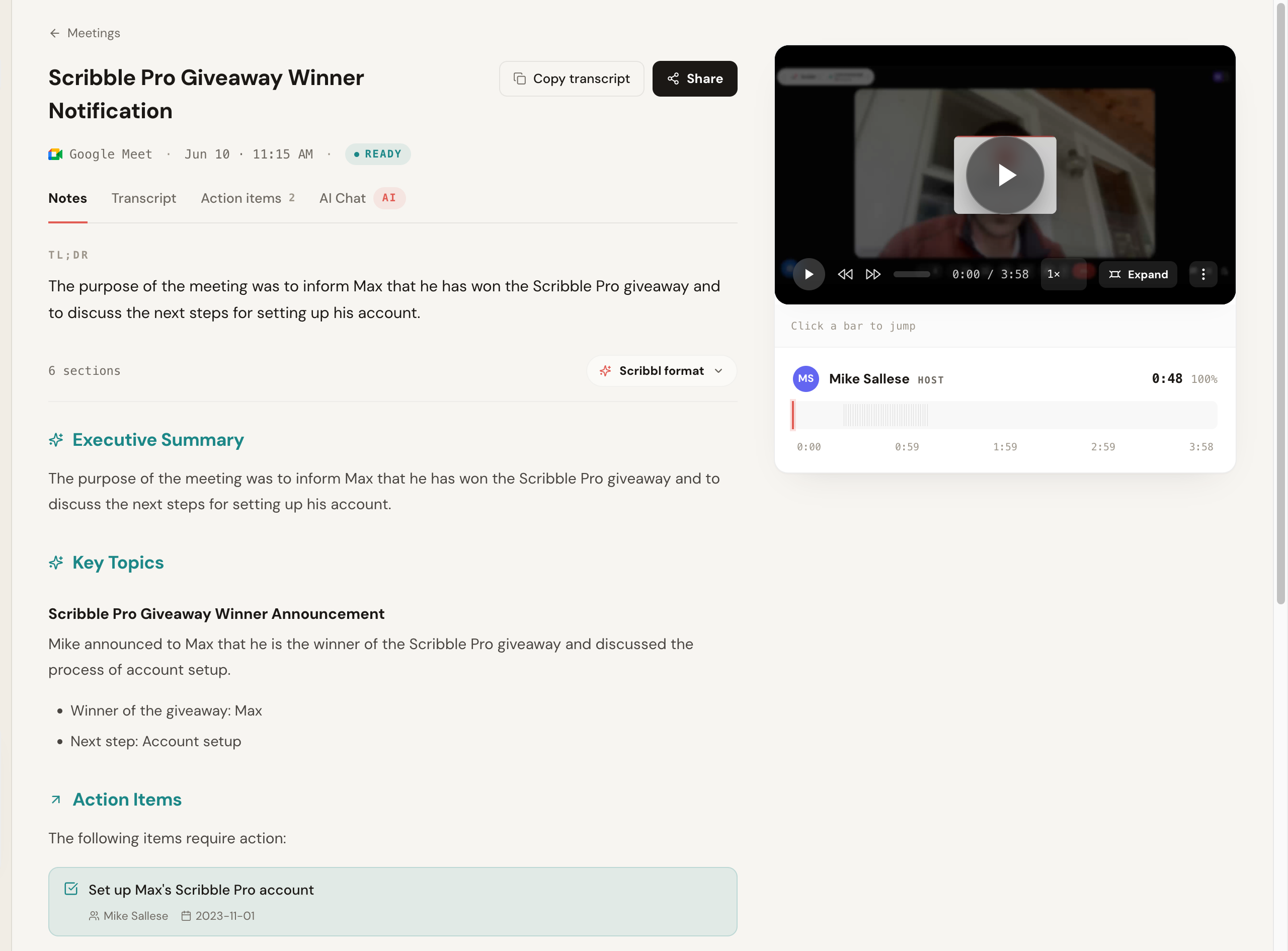
- How it captures: a Chrome extension on Google Meet; Scribbl Desktop for Mac (Apple silicon) and Windows on Zoom and Teams. Nothing joins any of them.
- What every meeting gets: the video, a searchable transcript with speaker names, AI notes and action items.
- After the call: on Pro, ask Claude or ChatGPT about every meeting through the Claude and ChatGPT connector. Smart Collections sort meetings into groups you describe in one sentence, so you can ask about just one group. Automations do the follow-up (draft the email, log notes in HubSpot or Pipedrive, post to Slack or Teams), and by default they ask before they change anything.
- Free plan: includes Google Meet, Zoom and Microsoft Teams, with 10 meetings a month and no length limit, resetting every month. Zoom and Teams run through Scribbl Desktop.
- Paid: $13 per user per month billed annually, $20 monthly, with unlimited meetings on Meet, Zoom and Teams.
- Trust: 4.9 from 725 reviews on G2, and 5.0 from 3,000 reviews on the Chrome Web Store, where Google marks it Featured and lists Scribbl, Inc. as a publisher with a good record and no history of violations.
2. Granola: best for typing your own notes
- How it captures: a Mac and Windows app records your computer's audio, so it works with any call app.
- Free plan: unlimited meetings, but only the last 30 days of notes open.
- Paid: $14 per user per month, billed monthly (Business).
- The catch: it keeps no recording, notes older than 30 days lock until you upgrade, and it trains on your data by default unless you opt out.
Bot tools that now have a no-bot mode
Several bot-based note takers have added a way to record without a bot. Each comes with a limit, and the bot is still the default.
| Tool | No-bot option | Where the bot still shows up |
|---|---|---|
| Fathom | A beta on Mac only; Fathom's update notes name Zoom and Slack huddles | By default, and always on Windows |
| Otter | Mac and Windows desktop apps; Chrome extension on Meet and Teams in the browser | Its Notetaker bot is the default |
| Fireflies | Chrome extension on Google Meet | Every other platform; new free accounts get 3 meetings unless the bot auto-joins |
| Read AI | Google Meet integration and a desktop app | By default; free meetings stop at 1 hour |
| tl;dv | Desktop app | By default; free AI notes cover your first 10 meetings ever |
About Fathom's free plan. It records unlimited calls, which is why it shows up on free lists. But Fathom's own pricing page lists bot-free capture as a "Beta feature for Mac" (checked October 2, 2026), its update notes list Windows as coming soon, and its help center says advanced AI summaries cover your first 5 calls each month. AI action items are a paid feature. Some comparison lists say Fathom's no-bot mode already works on Windows; Fathom's own pages don't. More in Fathom alternatives.
How to pick an AI note taker that doesn't join meetings
- You want no bot and the recording: Scribbl.
- You meet on Google Meet, Zoom and Teams: Scribbl, with the Chrome extension on Meet and Scribbl Desktop on Zoom and Teams.
- You want something free: Scribbl. The free plan includes Google Meet, Zoom and Teams.
Is a no-bot note taker secret recording?
A no-bot note taker such as Scribbl isn't secret recording when you tell everyone at the start of the meeting that you're taking AI notes. No bot only means nobody sees a note taker in the participant list; it doesn't change the law. Recording rules depend on where you and the other people are, and some US states, including California, Florida, Illinois, Maryland, Massachusetts, Pennsylvania and Washington, require everyone's consent. Say at the start of the meeting that you're taking AI notes. For the rules, see is it illegal to record a conversation.
What other no-bot AI note taker lists get wrong
We checked the claims that show up in other 2026 lists against each vendor's own pages on October 1 and 2, 2026.
- Fathom's no-bot mode isn't on Windows yet. Fathom's own pricing page lists bot-free capture as a "Beta feature for Mac", and its update notes list Windows as coming soon.
- Granola isn't the private choice by default. On its Basic and Business plans it trains on your data unless you opt out, and The Verge found notes were viewable by anyone with the link by default.
No-bot AI note taker FAQ
Is there an AI note taker that doesn't join the meeting?
Yes: Scribbl is an AI note taker that doesn't join the meeting. It takes notes in Google Meet, Zoom and Microsoft Teams with nothing joining the call, and keeps the video, a transcript, AI notes and action items. The free plan includes Google Meet, Zoom and Microsoft Teams, with 10 meetings a month. Granola and ChatGPT's Record mode also skip the bot but keep no recording, and Fathom's bot joins by default, with bot-free capture only on Mac. Gemini in Google Meet, Copilot in Teams and Zoom AI Companion run inside their own meeting apps, mostly on paid plans. Whichever you use, tell people you're taking notes.
What is the best AI note taker that doesn't join the meeting as a bot?
Scribbl. Nothing joins the call on Google Meet, Zoom or Microsoft Teams, and you still get everything a bot would have given you: the recording, a transcript with speaker names, AI notes and action items, and Automations do the follow-up. Granola, the other name that comes up most, also skips the bot but deletes the audio, so there's no recording to go back to, and its free plan opens only your last 30 days of notes.
Is there a free AI note taker that doesn't join meetings?
Yes: Scribbl is a free AI note taker that doesn't join meetings. The free plan includes Google Meet, Zoom and Microsoft Teams, with 10 meetings a month and no length limit, and every one gets the video, a transcript, AI notes and action items with no bot in the call. The plans that call themselves unlimited limit the part you came for instead: Granola keeps no recording and opens only your last 30 days of notes, and Fathom's bot joins your calls unless you're on a Mac using its beta no-bot mode.
Which note taker works best on Google Meet without a bot?
Scribbl. It's a Chrome extension that records Google Meet with nothing joining the call, and keeps the video along with the transcript, AI notes and action items. The free plan includes Google Meet, Zoom and Microsoft Teams, with 10 meetings a month and no length limit; Zoom and Teams run through Scribbl Desktop.
How do I take AI notes on Zoom without a bot?
Use Scribbl Desktop. It runs on Mac and Windows and records Zoom from your own computer, so nothing joins the call, and it keeps the recording along with AI notes, action items and a transcript. The free plan includes Zoom and Teams. Granola also records Zoom without a bot, but it keeps no recording. Fathom's no-bot mode is a beta on Mac only, so on Windows its bot joins your Zoom calls.
How do I take AI notes on Microsoft Teams without a bot?
Use Scribbl Desktop. It records the Teams app from your own Mac or Windows computer, so it never waits in the meeting lobby the way third-party bots now do, and it keeps the recording, transcript, AI notes and action items. The free plan includes Teams. Granola also works without a bot on Teams but keeps no recording.
What should I use if clients don't like meeting bots?
Scribbl. Nothing appears in the participant list on Google Meet, Zoom or Teams, and it keeps the recording, so you can go back to a client's exact words. Scribbl doesn't use your meetings to train AI for anyone other than you. Granola also skips the bot, but it keeps no recording and trains on your data by default unless you opt out. Whichever you use, tell clients you're taking notes; some US states require everyone's consent.
Can I keep the recording without a bot in the call?
Yes, with Scribbl. It keeps the video on Google Meet, Zoom and Teams, with a transcript, AI notes and action items, and nothing joins the call. Granola keeps text only: it deletes the audio after transcription.
How do Scribbl and Granola compare?
Both keep the bot out of your call. Scribbl keeps the video on Google Meet, Zoom and Teams, with a transcript, AI notes and action items on every meeting, and Automations do the follow-up. Granola is a desktop app that records your computer's audio and deletes it after transcription, so there's no recording, and its free plan opens only your last 30 days of notes.
Will Microsoft Teams block my AI note taker?
Microsoft Teams can hold a bot note taker in the meeting lobby, but it doesn't hold back Scribbl Desktop, which records from your own computer and isn't a participant. Since June 2026, according to Microsoft, Teams shows third-party bots separately in the meeting lobby and the organizer has to admit them one by one, and admins can set a policy for how bots are handled.
Can other people tell I'm using a note taker that doesn't join?
Nobody sees it join, because nothing joins: no extra tile and no join message. You should still tell people you're taking notes.
Sources for AI note takers that don't join meetings
Every price, limit and no-bot claim above was checked on these pages on October 1 and 2, 2026. Scribbl's pricing, Granola's pricing and data FAQ, Fathom's pricing and Microsoft's Teams bot post were checked again on October 19, 2026.
- Scribbl: pricing, Chrome Web Store listing, G2 reviews, privacy policy
- Granola: pricing, security, sharing controls, security, privacy and data FAQ
- The Verge: "PSA: Anyone with a link can view your Granola notes by default", Chamberlain v. Granola, Inc., court docket
- Fathom: pricing (bot-free capture listed as "Beta feature for Mac"), what's new, Free vs Premium
- Otter: pricing, Otter Notetaker overview
- Fireflies pricing and free plan, Read AI pricing, tl;dv pricing
- Microsoft Teams bot lobby: Introducing smarter bot protection in Microsoft Teams meetings
Try Scribbl
Let your meetings take their own notes.
Scribbl records, transcribes, and summarizes your Google Meet calls from your browser. No bot joins the call. Free forever for individuals.
Add to Chrome · It's free