Gemini 'Take Notes for Me' in Google Meet (2026): Is It Free, How to Turn It On, Limits
Gemini's Take notes for me in Google Meet isn't free: it needs Workspace Business Standard or higher, or Google AI Pro. Plans, steps, limits, and a free option.
Updated October 19, 2026
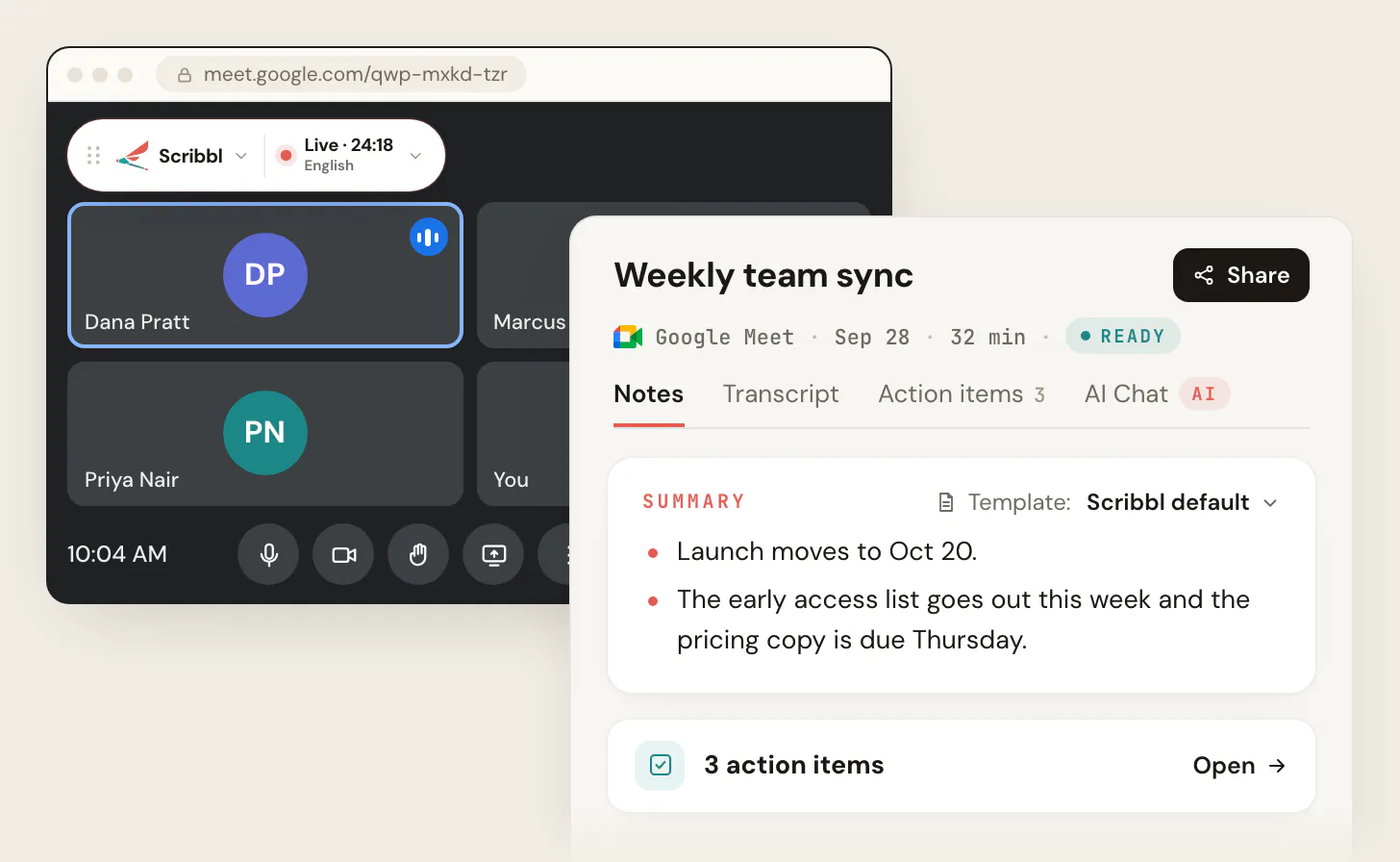
Gemini's Take notes for me in Google Meet is not free: it comes with Google Workspace Business Standard and higher, and with the Google AI Pro and AI Ultra plans, and only meetings organized by someone on one of those plans can use it. If you're on a free Gmail account, on Business Starter, or a guest in someone else's meeting, Scribbl is the free way to get AI notes from the same call: it runs as a Chrome extension, nothing joins the call, you don't need to be the host, and you get the video, a transcript with speaker names, AI notes and action items. Start free.
Every Google fact below comes from Google's own help, plan and announcement pages, checked on October 19, 2026, and is linked next to it. We make Scribbl, an AI note taker for Google Meet, Zoom and Microsoft Teams.
Is Take notes for me free?
No. Google lists Take notes for me as part of these plans (Workspace Updates, August 13, 2026):
| Plan | Take notes for me | Price |
|---|---|---|
| Free Gmail account | No | Free |
| Workspace Business Starter | No. Google's pricing page marks Gemini in Meet as not supported on Starter | $7 per user per month |
| Workspace Business Standard | Yes | $14 per user per month |
| Workspace Business Plus | Yes | $22 per user per month |
| Workspace Enterprise Standard and Enterprise Plus | Yes | Contact sales |
| Workspace Frontline Plus | Yes | Contact sales |
| Google AI Pro (personal Google account) | Yes, English only | $19.99 a month |
| Google AI Ultra (personal Google account) | Yes, English only | From $99.99 a month |
(Workspace prices from Google Workspace pricing, US dollars, list price per user per month. Google AI plan prices and the "Take notes for me in Google Meet (EN only)" line from Google AI plans. Both checked October 19, 2026.)
Google AI Pro and Ultra got the feature on June 29, 2026, for meetings those subscribers host (Google's announcement). That condition is the catch for everyone else: the plan has to belong to the person who organized the meeting. Your own Business Standard license doesn't put Gemini notes in a client's meeting, and a friend's AI Pro plan doesn't help you in yours.
If that rules you out, skip to getting AI notes from any Google Meet call with Scribbl. The free plan covers 10 meetings a month, with the video, and nothing joins the call.
How to turn on Take notes for me in Google Meet
These steps follow Google's announcement and its admin help page, checked October 19, 2026.
- 1
Check the organizer's plan
The meeting organizer has to be on Business Standard or higher, Frontline Plus, Google AI Pro or Google AI Ultra. In a Workspace organization the admin also has to turn on Gemini note-taking, under Apps, then Google Workspace, then Google Meet, then Gemini settings.
- 2
Join the meeting on a computer or phone
On the web, the control is the pencil icon at the top right of the Meet window. On Android and iPhone, it's in the call's Menu.
- 3
Click Take notes for me and confirm
Google notifies everyone in the call that notes are being taken. Notes start from the moment you turn them on, not from the start of the meeting.
- 4
Or set it for every call
Open Google Meet settings and set it under Meeting records. Google's admin page also lets admins set automatic note-taking for the organization.
- 5
Open the Doc after the meeting
Google emails a Google Doc with the summary and action items to the organizer and to whoever started the notes.
Two rules decide whether the button does anything:
- Anyone can press it, if the organizer qualifies. Google's admin page says: if the meeting organizer has Gemini note-taking turned on, anyone in the meeting can start it (Let Google Meet AI take notes for my users). The same page lists when it won't work: Gemini isn't enabled for the organizer, the meeting is host-controlled and the host has Gemini off, or Meet isn't enabled for the user.
- Host management changes that. When the host has turned on Host management, only hosts and co-hosts can turn Take notes for me on or off.
So a guest in a Business Starter company's meeting, or in a call set up from a free Gmail account, has no Gemini notes to turn on. That is the case Scribbl is built for: it takes notes from your own Chrome, in any Meet call, whoever organized it.
Do it with Scribbl: AI notes for the Meet calls Gemini can't cover
If the organizer's plan doesn't include Gemini notes, or you want the video and a transcript as well as the summary, use Scribbl for Google Meet.
- Add Scribbl to Chrome and sign in. Start free.
- Join your Meet call as usual. Scribbl shows Live at the top left of the call. Nothing joins the call and nobody has to admit anything. Tell everyone you're recording.
- Open the notes when the call ends. The meeting page has the video recording, a transcript with speaker names, AI notes and action items.
You don't need to be the host, and the organizer's plan doesn't matter. The free plan includes Google Meet, Zoom and Microsoft Teams, with 10 meetings a month. Pro is $13 per user per month billed annually, or $20 monthly (pricing).
Where the notes go, and who gets them
Take notes for me writes into a Google Doc, and Google's admin help page spells out where it lands (Let Google Meet AI take notes for my users, checked October 19, 2026):
- Emailed to the organizer and to the person who started note-taking, after the meeting. Google's announcement adds that the Doc is saved to your Google Drive.
- Attached to the Calendar event, if the meeting was scheduled in Google Calendar.
- Shared with invited guests in your organization by default. The admin can change the default to all invited guests, or to the hosts and co-hosts only, and can let hosts change sharing during a meeting. These sharing settings apply to scheduled meetings, not impromptu ones.
The Doc has a summary and action items. Since 2026 you can choose the sections (Summary, Decisions, Next steps, Details) and the level of detail from the in-call menu (9to5Google, June 29, 2026). Admins can also allow screenshots of presented content in the notes, always or only when the meeting is recorded.
Take notes for me limits
From Google's admin help page and plan pages, checked October 19, 2026:
- Eight languages. English, French, German, Italian, Japanese, Korean, Portuguese and Spanish. The meeting has to be held in one of them, and mixed-language meetings aren't supported. On Google AI Pro and Ultra, the plan page says English only.
- No video. The output is a Doc. Meet's recording is a separate feature that needs a paid Workspace plan (Google's pricing page lists "Meeting recordings saved to Google Drive" as not supported on Business Starter).
- No transcript in the notes Doc. Meet's transcript is a separate feature, Transcribe, on some paid Workspace plans; see Google Meet transcription: where to find it and get it free.
- Not retroactive. Notes begin when someone turns them on.
- Short meetings get nothing. Google says notes won't be produced for a meeting with fewer than 50 spoken words.
- The organizer's plan and admin settings decide, as above. An admin can switch Gemini note-taking off for the whole organization or for a unit.
Get AI notes from any Google Meet call with Scribbl
Scribbl gives you more than the Gemini notes Doc, in every Meet call, without a Workspace upgrade.
| Scribbl (our pick) | Gemini Take notes for me | |
|---|---|---|
| Price | Free plan includes Google Meet, Zoom and Microsoft Teams, with 10 meetings a month. Pro $13 per user per month billed annually, or $20 monthly | Workspace Business Standard ($14 per user per month) or higher, or Google AI Pro ($19.99 a month) or Ultra |
| Who needs the plan | Only you | The meeting organizer |
| Works when you're a guest in another company's meeting | Yes | Only if that organizer's plan includes it |
| Works on free Gmail and Business Starter | Yes | No |
| What you get | The video recording, a transcript with speaker names, AI notes and action items | A summary and action items in a Google Doc |
| Does anything join the call? | No | No, it's built into Meet |
| After the meeting | Automations draft the follow-up email, post to Slack or Teams, log notes in HubSpot or Pipedrive, save to Notion, Google Drive or Confluence; Smart Collections sort meetings by themselves | Notes in Drive and Calendar |
| Other platforms | Zoom and Microsoft Teams too, with Scribbl Desktop | Google Meet only |
(Google facts from the pages linked above; Scribbl's plans from pricing. As of October 19, 2026.)
Everything you get stays with you: recordings are private by default, and Scribbl doesn't use your meetings to train AI for anyone other than you. On Pro you can also connect Scribbl to ChatGPT or Claude and ask about past meetings.
Tell everyone you're recording. Gemini posts a notice in the call when its notes are on. Scribbl doesn't put a participant in the call, so say so at the start of the meeting. For the rules by place, see do you have to tell people you're recording.
The free plan includes Google Meet, Zoom and Microsoft Teams, with 10 meetings a month. Start free and your next Meet call comes with the video, the transcript and the notes.
FAQ
Is Gemini's Take notes for me free in Google Meet?
No. Take notes for me comes with Google Workspace Business Standard, Business Plus, Enterprise Standard, Enterprise Plus and Frontline Plus, and with the Google AI Pro ($19.99 a month) and Google AI Ultra plans. A free Gmail account and Workspace Business Starter don't have it. Scribbl is a free way to get AI notes from any Google Meet call: the free plan includes Google Meet, Zoom and Microsoft Teams, with 10 meetings a month.
How do I turn on Take notes for me in Google Meet?
In a Meet call on a computer, click the pencil icon at the top right of the window and choose Take notes for me, then confirm. On Android or iPhone, open the Menu in the call. To turn it on for every call, open Google Meet settings and set it under Meeting records. It only works if the meeting organizer's plan includes it and, in a Workspace organization, if the admin has turned on Gemini note-taking.
Do I have to be the host to use Take notes for me?
Not always, but the organizer's plan decides. Google's admin help page says that if the meeting organizer has Gemini note-taking turned on, anyone in the meeting can start it. If the organizer is on free Gmail or Business Starter, nobody in that meeting can start it, whatever plan you have. When Host management is on, only hosts and co-hosts can turn it on or off.
Where do the Gemini meeting notes go?
Into a Google Doc. After the meeting, Google emails the Doc to the organizer and to the person who started the notes, and if the meeting was scheduled in Google Calendar the Doc is attached to the event. By default the notes are shared with invited guests in the organizer's organization; the admin can change that to all invited guests or to hosts and co-hosts only.
What languages does Take notes for me support?
Eight: English, French, German, Italian, Japanese, Korean, Portuguese and Spanish. Google says the meeting has to be held in one of them, and only one language per meeting is supported. On the Google AI Pro and Ultra plans, Google's plan page lists the feature as English only.
Does Take notes for me record the video or write a transcript?
No video. Take notes for me writes a summary with action items into a Google Doc. A transcript is a separate Meet feature called Transcribe, which also needs a paid Workspace plan, and recording is another separate feature. Scribbl gives you all three from one meeting: the video recording, a transcript with speaker names, and AI notes with action items.
Is Scribbl free, and will anyone see it join the call?
Yes, it's free to start, and nothing joins the call. Scribbl is a Chrome extension for Google Meet, so there's no extra participant and no join message. The free plan includes Google Meet, Zoom and Microsoft Teams, with 10 meetings a month, and it works whether or not you're the host and whatever plan the organizer has. Start free at extension.app.scribbl.co/signup, then join your next Meet call as usual.
Sources
All checked on October 19, 2026. Google changes plan names and limits often; check the linked page if a detail matters to you.
- Google: Take notes for me in Google Meet (June 29, 2026: Google AI Pro and Ultra, "for meetings they host", the pencil icon, Meeting records setting, the Doc and the email, participants notified)
- Google Workspace Updates: Take notes for me, August 13, 2026 (availability list: Business Standard and Plus, Enterprise Standard and Plus, Google AI Pro and Ultra, Frontline Plus, Google AI Pro for Education)
- Google Workspace admin help: Let Google Meet AI take notes for my users (editions, admin setting, who can start it, where notes go, sharing defaults, languages, when it won't work)
- Google: Google AI plans (Google AI Pro $19.99 a month, Ultra from $99.99 a month, "Take notes for me in Google Meet (EN only)")
- Google: Google Workspace pricing (Starter, Standard and Plus prices; Gemini in Meet not supported on Starter; recordings not on Starter)
- 9to5Google: Google Meet's Gemini-powered 'Take notes for me' comes to Google AI Pro, Ultra (June 29, 2026: the in-call menu, sections and level of detail)
- Scribbl: Google Meet AI note taker, pricing
Try Scribbl
Let your meetings take their own notes.
Scribbl records, transcribes, and summarizes your Google Meet calls from your browser. No bot joins the call. Free forever for individuals.
Add to Chrome · It's free