How to Get an AI Summary of a Google Meet (2026): Gemini's Take Notes for Me, or Scribbl
How to get an AI summary of a Google Meet: Gemini's Take notes for me (which plans, how to turn it on, limits) and Scribbl on any Google account, host or not.
Updated October 19, 2026
The short answer
Google's Meet Help and Workspace admin pages and Scribbl's own pages, checked October 19, 2026
Two ways: click Take notes for me at the top right of the call if the organizer's Google plan includes Gemini notes, or run Scribbl's Chrome extension on any Google account.
- Gemini: which plans
- Business Standard, Business Plus, Enterprise Standard, Enterprise Plus, plus Frontline Plus and the personal Google AI Pro and Ultra plans. Not free Gmail, not Business Starter. The organizer's plan is what counts.
- Gemini: how to start
- On a computer, join the call and click Take notes for me at the top right, then pick a Google Doc. Or turn on automatic notes under Settings Meeting records, or tick Take notes with Gemini on the Calendar event.
- Gemini: what you get
- A Google Doc with the summary and action items, emailed to the organizer and attached to the Calendar event. No video, and the transcript is a separate feature.
- Scribbl: any account, host or not
- Scribbl's Chrome extension gives you AI notes, action items, a transcript with speaker names and the video of any Meet call you're in, with nothing joining the call. Free plan: 10 meetings a month.
There are two ways to get an AI summary of a Google Meet: Gemini's "Take notes for me," built into Meet when the organizer's Google plan includes it, or Scribbl's Chrome extension, which writes AI notes and action items for any Meet call you're in, on any Google account, with nothing joining the call. Gemini's notes need a paid Workspace plan from Business Standard up (or a Google AI Pro or Ultra plan), the organizer's plan is the one that counts, and the notes go to the organizer; Scribbl works on free Gmail, works when you're a guest, and keeps the video and a transcript with speaker names next to the notes.
Below: which Google plans include Gemini's summaries, how to turn them on, what they give you, and how to get an AI summary with Scribbl when Gemini isn't an option. All Google facts come from Google Meet Help and the Workspace admin help, checked October 19, 2026. If you're on free Gmail or not the host, skip ahead: Start free and your next Meet call comes back with AI notes, action items, the transcript and the video.
Which Google plans include Gemini AI summaries in Google Meet?
Gemini's "Take notes for me" is Google's own AI note taker for Meet. Google lists it on these plans:
| Plan type | Includes Take notes for me | Doesn't include it |
|---|---|---|
| Google Workspace | Business Standard, Business Plus, Enterprise Standard, Enterprise Plus, Frontline Plus | Business Starter |
| Personal Google accounts | Google AI Pro, Google AI Ultra | Free Gmail |
Three things decide whether you'll see the button:
- The organizer's plan. Google's admin help lists "Gemini isn't enabled for the meeting organizer" as a reason note-taking won't work. If you're a guest in a call organized by someone on free Gmail or Business Starter, there's no Gemini summary, whatever your own plan.
- The admin setting. In Google Workspace, an admin turns it on under Admin console, Apps, Google Workspace, Google Meet, Gemini settings, Gemini note-taking, then "Let people use Gemini note-taking in meetings."
- Host management. If the host turned on Host management, only hosts and co-hosts can turn notes on or off.
How to turn on Take notes for me in Google Meet
During the call, on a computer:
- Join the meeting at meet.google.com on a computer or laptop. The feature isn't on phones.
- Click Take notes for me at the top right of the screen.
- Choose a Google Doc for the notes, an existing one or a new one. Before you start, you can set who gets the notes and the notes language.
- Google Meet tells everyone that notes are being taken, and a pencil icon shows on every participant's screen.
If you join late, Summary so far gives you what you missed.
Automatically, for every meeting you organize:
- At meet.google.com, click Settings, then Meeting records, and pick an option under "Automatic note taking for all future meetings."
- Or, when creating or editing a Google Calendar event with a Meet link, tick Take notes with Gemini.
What you get: after the call, Google emails the organizer and the person who started the notes a link to the Google Doc. If the meeting was on Google Calendar, the notes are attached to the event too. The Doc has the summary and the action items; it isn't a recording or a transcript, which are separate Meet features.
Limits Google states: eight languages (English, French, German, Italian, Japanese, Korean, Portuguese, Spanish), one language per meeting; no notes for a meeting with fewer than 50 spoken words; recommended for meetings of 15 minutes up to 8 hours.
Get an AI summary of any Google Meet with Scribbl
If any of these is you, Gemini's summary isn't coming: you're on free Gmail, your company is on Business Starter, your admin hasn't turned Gemini notes on, you're a guest in another company's meeting, or you want the video and the transcript next to the notes. Scribbl covers all of them from a Chrome extension that runs in your own browser:
- 1
Add Scribbl to Chrome
Start free and sign in with your Google account, free Gmail or Workspace. No admin needed.
- 2
Join the Google Meet call as usual
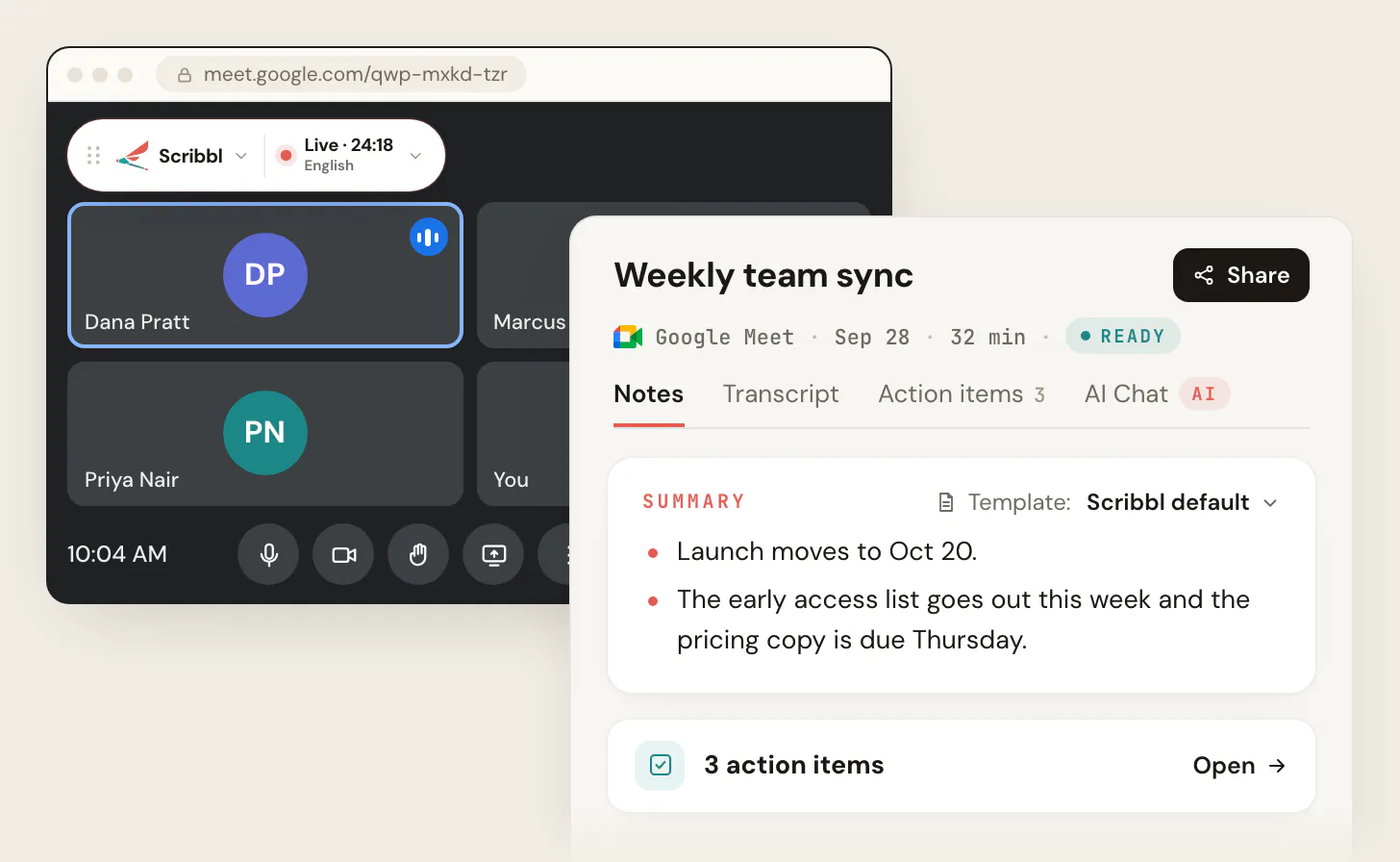
Scribbl shows Live at the top left. Nothing joins the meeting and nothing appears in the participant list, whether you host or just attend. Tell everyone you are recording.
- 3
Open the notes when the call ends
AI notes with the decisions, action items with owners, a transcript with speaker names and the video, on one meeting page you can share.
The free plan includes Google Meet, Zoom and Microsoft Teams, with 10 meetings a month. Start free. What the notes look like and how to pick a template: AI meeting notes with Scribbl.
What else Scribbl does with the summary:
- Smart Collections sort your meetings by themselves, and Automations do the follow-up when a meeting lands in a collection: draft the follow-up email for you to copy or open in Gmail (it never sends by itself), log a note in HubSpot or Pipedrive, post to Slack or Microsoft Teams, save to Google Drive, Notion or Confluence, open an Asana, Monday, Linear or Jira ticket, or add a Google Sheet row. They ask before they change anything by default.
- Ask ChatGPT or Claude about any past meeting on Pro (how it works).
- Zoom and Microsoft Teams get the same notes through Scribbl Desktop for Mac (Apple silicon) and Windows.
- Private by default. Recordings are private, and Scribbl doesn't use your meetings to train AI for anyone other than you.
Gemini Take notes for me vs Scribbl
| Feature | Scribbl | Gemini Take notes for me |
|---|---|---|
| Works on free Gmail | Yes | No |
| Works on Business Starter | Yes | No |
| Works when you are a guest in another company's call | Yes | Only inside the organizer's organization |
| Who gets the notes | You, in your own account | The organizer and whoever started it |
| Video of the meeting | Yes | No |
| Transcript with speaker names | Yes | Separate Meet feature |
| AI notes and action items | Yes | Yes |
| Nothing joins the call | Yes | Yes |
| Follow-up done for you | Automations: email draft, CRM note, Slack or Teams post, tickets | No |
| Zoom and Microsoft Teams in the same account | Scribbl Desktop | No |
| Free plan | Google Meet, Zoom and Microsoft Teams, 10 meetings a month | No free plan |
If your organizer's plan already includes Gemini notes and a notes document is all you need, Take notes for me is built in. For everything else, and for the video and the transcript with the notes, Scribbl is the pick.
The free plan includes Google Meet, Zoom and Microsoft Teams, with 10 meetings a month. Pro is $13 per user per month billed annually, or $20 monthly. Start free, or see pricing.
FAQ
How do I get an AI summary of a Google Meet?
If the meeting organizer's Google plan includes Gemini notes, join the call on a computer and click Take notes for me at the top right; after the call, Google emails the organizer a Google Doc with the summary and action items. If you're on free Gmail, on Business Starter, or a guest in someone else's meeting, run Scribbl's Chrome extension: it gives you AI notes, action items, a transcript with speaker names and the video of any Meet call you're in, with nothing joining the call.
Is Google Meet's AI summary free?
No. Gemini's Take notes for me comes with paid Google Workspace plans from Business Standard up, Frontline Plus, and the personal Google AI Pro and Ultra plans. Free Gmail accounts and Business Starter don't have it. For a free AI summary of any Google Meet, Scribbl's free plan includes Google Meet, Zoom and Microsoft Teams, with 10 meetings a month, and each meeting gets AI notes, action items, a transcript with speaker names and the video. Start free at extension.app.scribbl.co/signup.
Why don't I see Take notes for me in Google Meet?
Usually one of these: the meeting organizer's plan doesn't include Gemini notes (free Gmail and Business Starter don't), a Workspace admin hasn't turned on Gemini note-taking, Host management is on and you're not a host or co-host, you're a guest from outside the organizer's organization, or you're on a phone. Scribbl's Chrome extension works in all of those cases because it runs in your own browser.
Can I get a Gemini summary if I'm not the host?
Only if you're in the organizer's organization, the organizer's plan includes Gemini notes, and the host hasn't limited it with Host management. Guests from other companies can't start it, and the notes go to the organizer. Scribbl gives you your own AI notes and the video of any Meet call you join, host or guest. Tell people you're taking notes.
Where does the Gemini meeting summary go?
Into a Google Doc that Google emails to the meeting organizer and to whoever started the notes. If the meeting was scheduled in Google Calendar, the notes are also attached to the event. The organizer can share the Doc like any other.
Does Take notes for me record the meeting or make a transcript?
No. It writes a notes document. Recording and transcripts are separate Google Meet features with their own plan requirements. Scribbl gives you the video, the transcript with speaker names and the AI notes together for every Meet call.
What languages does Gemini's Take notes for me support?
English, French, German, Italian, Japanese, Korean, Portuguese and Spanish, one language per meeting. Google also says it won't produce notes for a meeting with fewer than 50 spoken words.
Will people see that notes are being taken?
With Gemini, yes: Google Meet tells all participants that notes are being taken and shows a pencil icon on everyone's screen. With Scribbl, nothing joins the call and nothing appears in the participant list, so tell everyone at the start that you're recording and taking notes.
Sources
- Google Workspace admin help: Let Google Meet AI take notes for my users (page dated October 13, 2026; checked October 19, 2026): editions, admin setting, languages, the 50-spoken-words minimum, where the notes go
- Google Meet Help: Take notes for me in Google Meet and Calendar and Meet settings for Take notes for me: the click paths, Google AI Pro and Ultra, Frontline Plus, Summary so far, the pencil icon, Host management, the 15-minute to 8-hour guidance (read in full October 12, 2026; confirmed against Google's search listing of the same pages October 19, 2026)
- Scribbl: Scribbl for Google Meet, AI meeting notes, pricing, Scribbl Desktop
Try Scribbl
Let your meetings take their own notes.
Scribbl records, transcribes, and summarizes your Google Meet calls from your browser. No bot joins the call. Free forever for individuals.
Add to Chrome · It's free