Zoom Meeting Summary: How to Get One (With AI Companion and Without It) in 2026
How to get a Zoom meeting summary: Zoom AI Companion's rules (host only, which plans, 3 free meetings a month) and Scribbl Desktop for any Zoom call you join.
Updated October 19, 2026
The short answer
Zoom Support and Zoom's pricing page, checked October 19, 2026
As the host, hover over the Zoom AI icon at the top right of the meeting, tick Meeting summary and click Start Zoom AI. Not the host? Scribbl Desktop summarizes any Zoom call you join.
- Who can start it
- The host or a co-host. A participant can only click Ask host to start Zoom AI.
- Which plans
- Zoom Workplace Pro, Pro Plus, Business, Business Plus and Enterprise. A free Zoom account gets summaries for 3 hosted meetings a month, with the 40-minute limit.
- Turn it on first
- Web portal › Settings Zoom AI › turn on Meeting summary with AI. Grayed out means your admin locked it.
- Where it goes
- Emailed to the host after the meeting, and to invitees only if the host shares it and they were signed in. Past summaries: My account Summaries.
- Without AI Companion
- Scribbl Desktop for Mac (Apple silicon) and Windows gives you AI notes, action items, a transcript with speaker names and the video of any Zoom call you join, host or not, with nothing joining the call. Free plan: 10 meetings a month.
To get a Zoom meeting summary with AI Companion, you have to be the host or a co-host on a plan that includes it: turn on Meeting summary with AI in the Zoom web portal, then in the meeting hover over the Zoom AI icon at the top right, tick Meeting summary and click Start Zoom AI, and Zoom emails you the summary afterward. If you're not the host, or you're on a free Zoom account past its 3 summaries a month, Scribbl Desktop is the way to get one: it runs on your Mac or Windows PC, nothing joins the call, and every Zoom meeting you join comes back with AI notes, action items, a transcript with speaker names and the video.
Everything about AI Companion below is from Zoom Support and Zoom's pricing page, checked October 19, 2026. Zoom's support pages now call the feature Zoom AI, and the button in the meeting says Start Zoom AI; the rules are the same. If the host rule is your problem, Scribbl is a Zoom AI note taker that works for any call you join: Get Scribbl Desktop, free for 10 meetings a month.
Who can get a Zoom meeting summary with AI Companion?
Zoom's rules, from its support article on using meeting summary:
- The host or a co-host starts it. A participant can't. If no AI feature is running, a participant can click Ask host to start Zoom AI, and the host decides.
- A plan that includes it. Zoom lists meeting summary for licensed users on Zoom Workplace Pro, Pro Plus, Business, Business Plus, Enterprise, Enterprise Plus and Enterprise Bundle. Zoom's pricing page gives a free Basic account "Meeting summaries (for 3 hosted meetings per month)," with meetings capped at 40 minutes.
- Meeting summary turned on in the account's settings, by you or your admin. Zoom also notes that AI features may be unavailable in some industries and regions.
- Who receives it. The host, by email. Invitees get it only if the host's sharing setting includes them, and only if they were signed in to Zoom during the meeting. People who joined ad hoc through an invitation or a shared link don't get it.
How to turn on Zoom meeting summaries
For your own account:
- Sign in to the Zoom web portal.
- Click your profile picture or initials, then Settings.
- Click the Zoom AI tab.
- Under Meeting, turn on Meeting summary with AI. If the toggle is grayed out, it's locked at the group or account level and you'll need to ask your admin.
- Under Automatically share summary with, pick who gets it: only the host; the host, co-hosts and alternative hosts; the host and invitees in your organization; or all invitees including people outside your organization. "Only meeting host" turns off automatic sharing.
- Tick Auto-start when meetings start if you want a summary of every meeting you host without pressing anything. Zoom says generation then starts as soon as anyone starts the meeting, even if the host isn't there yet.
Admins do the same under Admin Center, Settings, Zoom AI, and can lock the setting so users can't change it. If an admin disables and locks it, they also choose whether the option shows in the meeting toolbar; if it shows, participants can request it, and if no admin is in the meeting, Zoom emails all account admins.
How to start a Zoom meeting summary in the meeting
As the host or co-host, in the Zoom desktop app:
- 1
Hover over the Zoom AI icon
It is at the top right of the meeting window. The in-meeting AI window opens.
- 2
Tick Meeting summary
Optionally tick Generate transcript too, to get a transcript after the meeting.
- 3
Click Start Zoom AI
Participants are told the summary is on. To stop it, untick Meeting summary or click Stop Zoom AI.
On a phone, tap the Zoom AI icon, turn on Meeting summary, then tap Start Zoom AI. In a Zoom Room, tap More, then Start Summary.
After the meeting, Zoom finalizes the summary and sends it by email to the host, and to anyone the sharing setting covers. To find it later: web portal, profile picture, My account, Summaries; My Summaries is meetings you hosted, Shared with me is summaries other hosts shared with you. If the host has the chat setting on, the summary is also posted to the meeting's group chat in Team Chat.
Get a Zoom meeting summary without AI Companion: Scribbl Desktop
If you're the one who's never the host, your company's admin locked Zoom AI off, you're on a free Zoom account and used this month's 3 summaries, or you want the video and the transcript with the summary, Scribbl Desktop does the job from your own computer:
- 1
Install Scribbl Desktop
On a Mac with Apple silicon or a Windows PC. Sign in with your Google account.
- 2
Join the Zoom meeting as usual
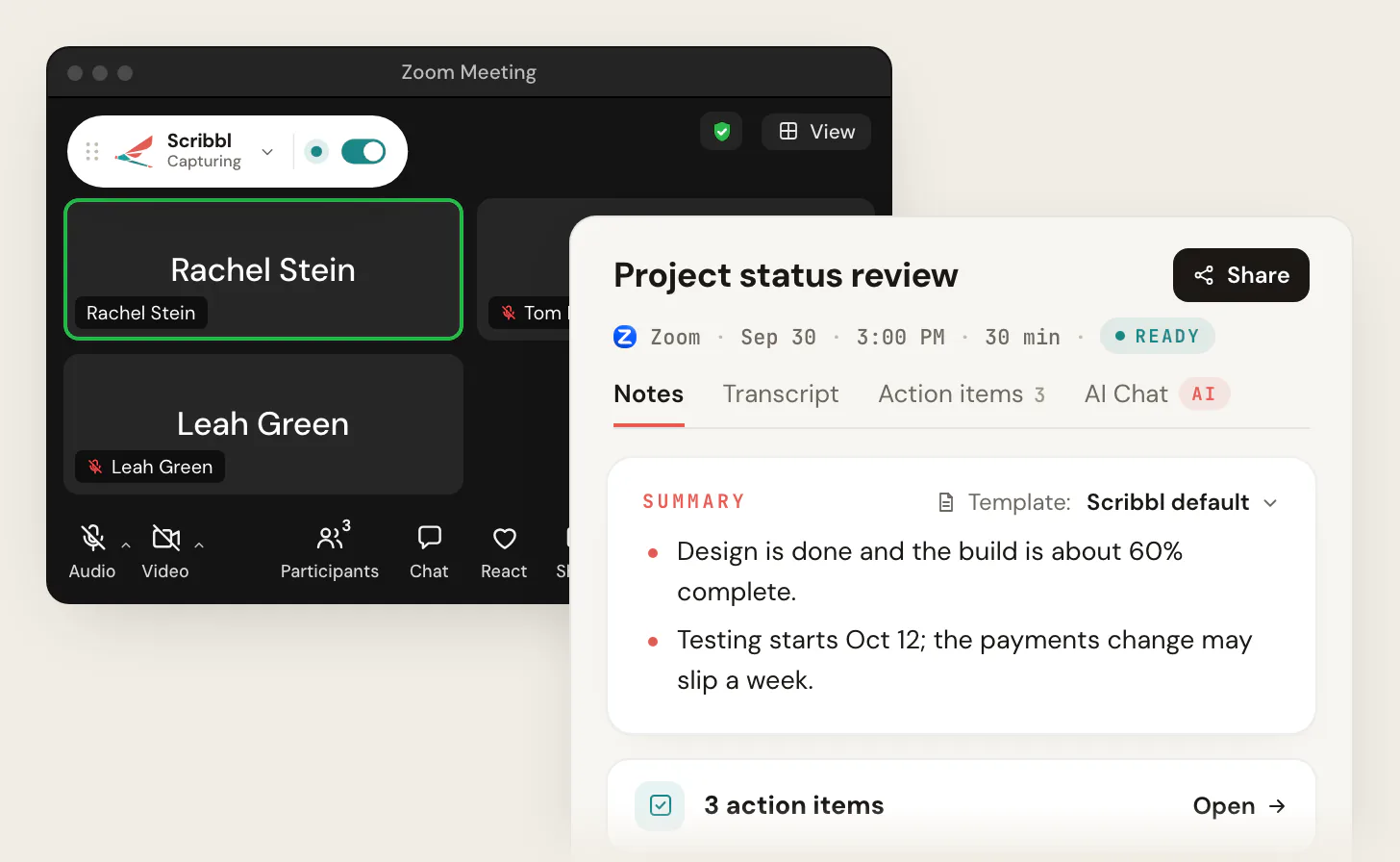
Scribbl Desktop starts on its own when a Zoom meeting opens and shows Capturing. Nothing joins the call, so there is nothing for the host to admit. Tell everyone you are recording.
- 3
Open the notes when the meeting ends
AI notes with the decisions, action items with owners, a transcript with speaker names and the video, on one meeting page you can share.
The free plan includes Google Meet, Zoom and Microsoft Teams, with 10 meetings a month. Get Scribbl Desktop.
What else you get with Scribbl:
- Smart Collections sort your meetings by themselves, and Automations do the follow-up when a meeting lands in a collection: draft the follow-up email for you to copy or open in Gmail (it never sends by itself), log a note in HubSpot or Pipedrive, post to Slack or Microsoft Teams, save to Google Drive, Notion or Confluence, open an Asana, Monday, Linear or Jira ticket, or add a Google Sheet row. They ask before they change anything by default.
- Ask ChatGPT or Claude about any past meeting on Pro (how it works).
- Google Meet and Microsoft Teams in the same account: the Chrome extension covers Google Meet, Scribbl Desktop covers Teams.
- Private by default. Recordings are private, and Scribbl doesn't use your meetings to train AI for anyone other than you.
Zoom AI Companion vs Scribbl Desktop
| Feature | Scribbl Desktop | Zoom AI Companion |
|---|---|---|
| Works when you are not the host | Yes | Host or co-host only |
| Works on a free Zoom account | Any Zoom call you join | 3 hosted meetings a month, 40-minute limit |
| Who gets the summary | You, in your own account | The host; invitees only if shared and signed in |
| Video of the meeting | Yes | Separate recording feature |
| Transcript with speaker names | Yes | Only if the host ticks Generate transcript |
| AI notes and action items | Yes | Yes |
| Nothing joins the call | Yes | Yes |
| Starts on its own | When a Zoom meeting opens on your computer | Auto-start, for meetings you host |
| Follow-up done for you | Automations: email draft, CRM note, Slack or Teams post, tickets | Separate Zoom features |
| Google Meet and Microsoft Teams in the same account | Yes | Paid plans, as a participant in the call |
| Free plan | Google Meet, Zoom and Microsoft Teams, 10 meetings a month | 3 hosted meetings a month |
If you host every meeting on a paid Zoom plan and a text recap is all you need, AI Companion is built in. For everyone else on the call, and for the video and the transcript with the notes, Scribbl Desktop is the pick. More on what Zoom's AI does and costs: Zoom AI, formerly AI Companion.
The free plan includes Google Meet, Zoom and Microsoft Teams, with 10 meetings a month. Pro is $13 per user per month billed annually, or $20 monthly. Get Scribbl Desktop, or see pricing.
FAQ
How do I get a Zoom meeting summary?
If you host the meeting on a paid Zoom Workplace plan, turn on Meeting summary with AI in the Zoom web portal, then in the meeting hover over the Zoom AI icon at the top right, tick Meeting summary and click Start Zoom AI. Zoom emails you the summary after the meeting. If you're not the host, or you're on a free Zoom account past 3 hosted meetings this month, run Scribbl Desktop on your Mac or Windows PC: it gives you AI notes, action items, a transcript with speaker names and the video of any Zoom call you join, with nothing joining the call.
Can I get a Zoom meeting summary if I'm not the host?
Not from Zoom AI Companion. Only the host and co-hosts can start a meeting summary; as a participant you can click Ask host to start Zoom AI, and you receive the summary only if the host shares it and you were signed in to Zoom during the meeting. Scribbl Desktop works for any Zoom call you join, host or not. Tell people you're recording.
Is the Zoom meeting summary free?
Partly. A free Zoom account gets meeting summaries for 3 hosted meetings a month, and free meetings end at 40 minutes. Paid Zoom Workplace plans include summaries with no monthly cap; Pro is $14.16 per user per month billed annually, or $16.99 monthly. Scribbl's free plan includes Google Meet, Zoom and Microsoft Teams, with 10 meetings a month, and works whether or not you host. Get Scribbl Desktop at scribbl.co/desktop.
Why can't I see the meeting summary option in Zoom?
Usually because your account isn't on a plan that includes it, Meeting summary with AI isn't turned on in your Zoom settings, an admin turned it off and locked it, or you're not the host or a co-host of this meeting. If the toggle in the web portal is grayed out, your admin has locked it and you'd need to ask them.
Where do I find past Zoom meeting summaries?
Sign in to the Zoom web portal, click your profile picture, then My account, then Summaries. My Summaries lists meetings you hosted; Shared with me lists summaries other hosts shared with you. Summaries also arrive by email, and in the meeting's group chat in Team Chat if the host has that setting on.
Does the Zoom meeting summary include a transcript?
Only if the host also ticks Generate transcript when starting Zoom AI. The summary itself is a text recap of the key points and topics. Scribbl Desktop gives you the transcript with speaker names, the AI notes and the video together for every Zoom call.
Can Zoom summarize a meeting automatically?
Yes, for meetings you host. In the web portal, under Settings, Zoom AI, Meeting summary with AI, tick Auto-start when meetings start. Generation then begins as soon as the meeting starts. Scribbl Desktop also starts on its own when a Zoom meeting opens on your computer, for meetings you host and meetings you join.
Sources
All checked October 19, 2026. Zoom changes these features and names often, so check the linked page if a detail matters to you.
- Zoom Support: Using Meeting Summary with AI: prerequisites, who can start it, the in-meeting steps, who receives it, finding past summaries
- Zoom Support: Enabling or disabling meeting summary with AI: the settings path, sharing options, auto-start, admin locks
- Zoom: Zoom Workplace pricing: the free plan's 3 hosted meetings a month and 40-minute limit, Pro and Business prices
- Scribbl: Zoom AI note taker, Scribbl Desktop, pricing, Zoom AI, formerly AI Companion
Try Scribbl
Let your meetings take their own notes.
Scribbl's desktop app records, transcribes, and summarizes your Zoom meetings from your own computer. No bot joins the call and you don't need to be the host. Free forever for individuals.
Get Scribbl for Zoom · It's free