Is Fathom AI Note Taker Safe? (2026): Security, AI Training, Sharing and Consent
Is Fathom safe? Checked October 7, 2026: SOC 2 Type II, HIPAA, GDPR, US data storage, encryption, the AI training opt-out, sharing, consent and deletion.
Updated October 29, 2026
The short answer
From Fathom's Trust Center, privacy policy, terms, DPA, pricing page and help center, checked on October 7, 2026
Yes, Fathom is safe by the usual business measures: a SOC 2 Type II report, HIPAA and GDPR compliance, encryption in transit and at rest, and all data stored in the United States.
- AI training
- Fathom's own models learn from de-identified meeting data unless you opt out. Its AI providers aren't allowed to train on your data.
- Sharing
- A share link can be open to anyone who has it, and auto-share can email the recording to everyone on the invite.
- Consent
- The bot is visible and Fathom says you can't record silently, but getting everyone's consent is your job.
- Ownership
- Superhuman acquired Fathom on September 14, 2026.
- More private
- Scribbl records Google Meet, Zoom and Teams with nothing joining the call. Recordings are private by default, and your meetings don't train AI for anyone other than you.
Yes, Fathom AI Notetaker is safe by the usual business measures: it has a SOC 2 Type II report, says it is HIPAA and GDPR compliant, encrypts data in transit and at rest, stores all data in the United States, and says it will never sell your data. Two things to know before you rely on it: Fathom uses de-identified meeting data to improve its own AI models unless you opt out, and it keeps recordings until you delete them.
Fathom's own help page, "Is Fathom secure?", gives the short version, but it was last edited on September 8, 2025. It doesn't cover encryption, sharing, the bot and consent, or Fathom's sale to Superhuman on September 14, 2026. This page covers all of it: certifications and audits, encryption and where data is stored, AI training, who can see your recordings, consent, deleting your data, and what independent sources report.
Every Fathom fact here comes from Fathom's Trust Center, privacy policy, terms, Data Processing Agreement, pricing page and help center, checked on October 7, 2026, plus the US Commerce Department's Data Privacy Framework list and news coverage. We compared Fathom from those pages; we didn't create a Fathom account. We make Scribbl, an AI note taker with nothing joining the call. Near the end we explain why it's the more private choice for Google Meet, Zoom and Teams.
Is Fathom AI note taker safe?
Yes, for most business meetings. Fathom has what most security reviews ask a vendor for: an outside SOC 2 Type II audit, encryption in transit and at rest, a HIPAA Business Associate Agreement, a GDPR Data Processing Agreement, a published list of the companies that process your data, and $3 million of cyber insurance. We found no reported data breach at Fathom and no lawsuit over its note taker as of October 7, 2026.
What decides whether it's safe for you is mostly settings, not certificates. The problems people run into with any AI note taker are about who ends up with the recording, what the vendor does with it, and whether everyone on the call agreed to be recorded. With Fathom, those come down to six settings, listed in Settings to check before your first Fathom call.
Is Fathom AI notetaker safe? Fathom's security at a glance
| Question | What Fathom says | Where it says it |
|---|---|---|
| SOC 2 | SOC 2 Type II; full report on request | Trust Center |
| ISO 27001 | No | Help center, "Is Fathom secure?" |
| HIPAA | Compliant; BAA in its terms; signed BAA on Enterprise | Help center, terms, pricing page |
| GDPR and CCPA | Compliant; Data Processing Agreement available | Trust Center, DPA |
| Encryption | All data, in transit and at rest | Trust Center FAQ, DPA |
| Where data is stored | United States; Google Cloud Platform is the primary cloud | Trust Center |
| Trains its own AI on your calls | Yes, on de-identified data, unless you opt out | Privacy policy, Trust Center |
| Lets outside AI companies train on your calls | No, forbidden by contract | Trust Center |
| Sells your data | No | Trust Center, privacy policy |
| How long recordings are kept | Until you delete them; automatic deletion on Enterprise | Trust Center, help center |
| Is the bot visible in the call? | Yes; "There's no way to silently record" | Help center |
| Sign-in | Your Google or Microsoft account; Okta SSO and SCIM on Enterprise | Help center, Trust Center, pricing page |
| Breach notice to business customers | No later than 72 hours after Fathom becomes aware | DPA |
Fathom certifications and audits
- SOC 2 Type II. Fathom's Trust Center lists SOC 2 Type II. A Type II report is an outside auditor's check that a company's security controls worked over a period of months. The full SOC 2 Type 2 report, a penetration test report and a vulnerability scan report are available by request, and a SOC 2 bridge letter for 2025 to 2026 is posted. The Trust Center also lists the controls behind it, such as data encryption, penetration testing, employee background checks and disaster recovery plans.
- No ISO 27001. Fathom's help page says it doesn't have ISO 27001 and points to SOC 2 as similar. If your company's vendor review requires ISO 27001, Fathom won't meet it.
- HIPAA. Fathom's help center says it is "fully HIPAA compliant." Its terms (updated March 4, 2026) make the Fathom Business Associate Agreement (updated September 9, 2026) part of the agreement for anyone HIPAA applies to. The help center says you can email help@fathom.video for a signed BAA, and the pricing page lists "HIPAA: signed BAA" on Enterprise only.
- GDPR, CCPA and EU transfers. The Trust Center lists GDPR and CCPA, and Fathom's Data Processing Agreement (updated May 5, 2026) is public. Fathom is also on the US government's Data Privacy Framework list, covered under What independent sources report.
- Cyber insurance. $3 million in total coverage through Vouch, according to the Trust Center FAQ. Enterprise lists increased coverage.
- Zoom's reviews. Fathom's help page says it "has passed extensive security reviews by Zoom."
- Not for government meetings. Fathom says that "for security reasons" it doesn't support Zoom for Government or Teams for Government.
Is Fathom data encrypted, and where is it stored?
Encryption. Yes. Fathom's Trust Center FAQ says all application data, including recordings, is encrypted in transit and at rest, and its Data Processing Agreement says the same. Fathom's own pages don't describe end-to-end encryption. Your recordings are processed on Fathom's servers and by its AI providers to transcribe and summarize them.
Storage. Fathom says "All Fathom data is stored in the United States." Its primary cloud provider is Google Cloud Platform. The Trust Center lists 30 subprocessors, the outside companies that handle data for Fathom; 29 are in the US and one, a partnership marketing tool, is in Belgium. Eight of them handle meeting content:
- Google Cloud Platform: primary cloud, holding recordings and transcripts
- Anthropic, OpenAI, ElevenLabs, Fireworks, Modal and Voyage AI: AI providers
- Elastic: search
Each of the six AI providers is marked "Forbidden from training AI on Fathom Customer Data." The rest are analytics, email, payments, monitoring, support and sales tools, which Fathom doesn't mark as handling meeting content.
For business customers, the DPA adds two promises: Fathom will give at least 10 business days' notice before adding or replacing a subprocessor, and it will report a security incident no later than 72 hours after it becomes aware of it.
Sign-in. There's no separate Fathom password. You sign in with your Google or Microsoft account, or through Okta single sign-on, and two-factor authentication comes from those providers. The pricing page puts Okta SSO and SCIM provisioning on Enterprise.
Does Fathom use your calls to train AI?
Fathom's own models: yes, unless you opt out. Outside AI companies: no.
- Fathom's own AI. Fathom's Trust Center says it "uses de-identified customer data to improve the accuracy of our proprietary AI models." Its privacy policy (updated August 16, 2026) says this depends on your account settings and that you can opt out there. De-identified means the data has had details that identify people removed.
- How to opt out. Turn it off in My Settings (fathom.video/customize). Admins on Fathom's team plans can opt out every user at once in Organization Settings.
- Outside AI companies. Fathom says none of its AI providers are allowed by contract to use your data to train their models, and its privacy policy names OpenAI, Anthropic and Google as examples.
- Voiceprints. Fathom's iPhone app has an optional voiceprint feature for recognizing your voice in transcripts. It needs your explicit consent, and Fathom's biometric notice says voiceprints aren't used for advertising, profiling or product training. You can withdraw consent and have yours deleted by emailing privacy@fathom.video.
Who can see your Fathom recordings?
You, plus anyone you share with, plus your team if you're on a team plan and your settings allow it. In detail (Sharing Call Recordings, auto-share, team visibility, as of October 7, 2026):
- Share links. A link shows the video, the transcript and questions asked during the call, and people don't need a Fathom account to open it. You choose who it works for: Anyone with the link, Anyone on your same domain, or Only people added. Fathom notes that an "anyone with the link" recording stays open to whoever has the link, and suggests Only people added for more security. Fathom's help pages don't say which option is the default, so check it the first time you share.
- Access levels. People you add get Limited, Standard or Admin access. Standard can download the call; Admin can share it, trim it and edit the transcript. You can remove anyone's access at any time.
- Auto-share. If it's on, Fathom emails attendees right after the call: Summary & Recording, Summary Only, or Nothing. It goes to everyone on the Google or Outlook calendar invite, "even if they didn't attend." An email can't be unsent, but you can remove that person's access to the recording.
- Your team. On team plans, a recording can be private to you, visible to your team, or visible to all teams. Admins set the default separately for external, internal and unscheduled meetings, and can lock it so you can't change it.
- Mentions. In Fathom's new Mac app, @mentioning someone in your notes who isn't on the call emails them and gives them access to the call, including people outside your company.
- ChatGPT and Claude. Fathom connects to Claude and ChatGPT on every plan, Free included, and that connection can only reach meetings you already have permission to view in Fathom (Fathom MCP).
- People you share with. Fathom's privacy policy says that if someone who isn't a Fathom user opens a recording you shared, Fathom may use their information to market Fathom to them.
- Company accounts. If your employer runs the team account, your employer controls the data, and Fathom says it can't delete that data at your personal request. Ask your admin.
The Fathom bot, recording notices and consent
The bot. When Fathom records audio and video, a bot joins the call as a participant, named "[your name]'s Fathom Notetaker" by default. Premium and higher plans can rename it. The bot can only record if you're on the call too, and it leaves when the meeting ends (help).
Without the bot. Fathom's new desktop app, on Mac only for now (Windows is "coming soon"), lets you pick a capture mode before each meeting (How to Upgrade to Fathom 3.0+):
- Transcript Only: "No recording is saved"; you get a transcript and summary
- Audio Only: audio is captured on your device, no video
- Audio & Video: the bot joins to record
What other people see. Fathom's help center says "There's no way to silently record" (help):
- The bot is in the participant list, and a recording banner appears to everyone. Turning off the banner is a paid feature (Premium and up), and the bot stays in the participant list either way.
- On Zoom, Zoom shows its own recording notice.
- Without the bot, Fathom's Recording Notice posts this in the meeting chat: "Fathom is recording and taking notes, and you consent by continuing." If Recording Notice is off, Fathom asks you in the app to confirm you have consent.
Consent emails. With Auto Request Recording Consent on, Fathom emails external attendees 24 hours before a scheduled meeting. On the bot-free Mac app, that covers any scheduled external meeting (on Zoom, only when you have host rights). With the bot, it only happens when you host and there is exactly one guest. Fathom doesn't send consent emails for same-day or unscheduled meetings. If someone declines, Fathom turns off auto-record for that meeting. If nobody answers, Fathom records as normal (Automatically Requesting Recording Consent, updated September 23, 2026).
Whose job consent is. Fathom's terms say you may not use Fathom "if any participant on your call does not consent to be recorded," and that you must get every participant's consent before the call begins. Fathom's help center says the recording owner controls the data, so an attendee who wants a recording deleted has to ask the person who recorded it.
Auto-record. Fathom connects to your calendar and can join and record meetings automatically. Its quick start guide recommends turning on auto-record for all meetings and auto-share. In Settings you choose All Meetings, External Meetings, Internal Meetings or No Meetings.
Whichever tool you use, tell everyone you're recording. Some places require everyone's consent; see do you have to tell people you're recording and is it legal to record a meeting.
How to delete your Fathom recordings and account
- One recording. On the call page, open the three dots next to Share and click Delete Call, or open the three dots next to the recording on your home page and click Delete Recording. Its notes go with it, and Fathom says a deleted call can't be recovered (How to delete a recording).
- Recordings you don't delete. Fathom's Trust Center says it keeps your recordings and other data indefinitely unless you delete them. Automatic deletion after a set time is a retention policy, which is an Enterprise feature that you request by emailing help@fathom.video; one policy applies to the whole team (Retention Policies).
- Your account. Delete it from your account settings. The Trust Center says recordings, transcripts and metadata are removed, and leave Fathom's backups after 7 more days. The privacy policy says Fathom will use "commercially reasonable efforts" to delete within 30 days. Uninstalling the app doesn't delete anything; Fathom's terms say your content stays until you delete your account.
- A company account. Your admin handles deletion, not Fathom.
- Voiceprints. Email privacy@fathom.video to withdraw consent and have yours deleted.
Settings to check before your first Fathom call
- AI training: in My Settings, opt out if you don't want de-identified data from your calls used to improve Fathom's models.
- Auto-record: choose which meetings Fathom joins on its own: all, external, internal or none.
- Auto-share: choose what attendees get after the call: summary and recording, summary only, or nothing.
- Share link access: for sensitive calls, set links to Only people added.
- Consent: turn on Auto Request Recording Consent, and on the bot-free Mac app, Recording Notice.
- Team visibility: on team plans, check whether your external and internal calls default to private, your team or all teams.
Fathom safety features by plan
Fathom's free plan has unlimited recordings, and paid plans start at $16 a month for one person on Premium, or $15 per user on Team with a 2-user minimum, both billed annually; for every plan and price, see Fathom pricing.
| Feature | Free | Premium | Team | Business | Enterprise |
|---|---|---|---|---|---|
| Unlimited recordings and storage | Yes | Yes | Yes | Yes | Yes |
| Capture without the bot (Mac only for now) | Yes | Yes | Yes | Yes | Yes |
| Opt yourself out of AI training | Yes | Yes | Yes | Yes | Yes |
| Opt every user out at once | No | No | Yes | Yes | Yes |
| Turn off the in-meeting banner | No | Yes | Yes | Yes | Yes |
| Rename the bot | No | Yes | Yes | Yes | Yes |
| Team recordings and folders | No | No | Yes | Yes | Yes |
| Automatic deletion (retention policies) | No | No | No | No | Yes |
| Okta SSO and SCIM | No | No | No | No | Yes |
| Organization-wide security controls | No | No | No | No | Yes |
| HIPAA: signed BAA | No | No | No | No | Yes |
| Increased cyber insurance coverage | No | No | No | No | Yes |
Who should look closely before using Fathom:
- Healthcare. Fathom covers HIPAA through the BAA in its terms; a signed BAA, automatic deletion and SSO are on Enterprise.
- EU and UK teams. Your data is stored in the US. Fathom offers a DPA and is on the Data Privacy Framework list, but doesn't offer storage in another region.
- Government. Zoom for Government and Teams for Government aren't supported.
- Companies that require ISO 27001. Fathom has SOC 2 Type II, not ISO 27001.
- Anyone who needs recordings deleted on a schedule. Without Enterprise, you delete them yourself.
What independent sources report about Fathom
- Superhuman owns Fathom. On September 14, 2026, Superhuman, an AI productivity company, acquired Fathom. Reworked reported that the terms of the deal weren't disclosed. Fathom's announcement says "Nothing changes today for Fathom users," with the same app and login, and that Fathom is already available inside Superhuman Go, Superhuman's AI assistant, through a connector. Fathom's privacy policy says that after a merger or sale, data is governed by the privacy policy in effect when it was collected. That policy was last updated on August 16, 2026, before the sale, so watch for changes.
- A US government list. The US Commerce Department's Data Privacy Framework list shows Fathom.video as an active participant in the EU-U.S. framework and its UK Extension since May 7, 2024, and in the Swiss-U.S. framework since November 6, 2024, with the next certification due June 23, 2027. The list shows the verification method as self-assessment, meaning Fathom checks its own compliance rather than using an outside reviewer.
- No reported breach or lawsuit. We searched news coverage on October 7, 2026 and found no reported data breach at Fathom and no lawsuit over its note taker.
- Third-party reviews that get it wrong. One review written for lawyers says Fathom doesn't train its own models on meeting content and doesn't publicly market a HIPAA BAA; Fathom's privacy policy and public BAA page say otherwise. Another review says Fathom uses end-to-end encryption; Fathom's own pages say in transit and at rest.
- Fake apps. Fathom itself warns that impostor apps using its name and logo have appeared in the Apple App Store and Google Play, and that some people paid for subscriptions in them. The official iPhone app is published by Fathom Video (help, updated October 1, 2026).
Where Fathom's own pages disagree
We found five places where Fathom's pages don't match each other on October 7, 2026.
- How long deletion takes. The Trust Center says account data is removed on deletion and gone from backups after 7 more days. The privacy policy says Fathom aims to delete within 30 days of the request. The terms say copies may stay in database backups for up to 30 days.
- "No!" on AI training. The help page's answer to "Do you train AI models on customer data?" starts with "No!", then says Fathom does use de-identified customer data for its own models. The privacy policy states the opt-out plainly.
- Which AI companies. The help page names Anthropic, OpenAI and Google as Fathom's AI providers. The Trust Center's subprocessor list names Anthropic, OpenAI, ElevenLabs, Fireworks, Modal and Voyage AI as AI providers, with Google Cloud as the main cloud.
- Which plan has retention policies. The Trust Center FAQ says custom retention is on "the Pro plan of our Team Edition," a plan name the pricing page no longer uses. The help center and pricing page put retention policies on Enterprise.
- Signed BAA. The help center says to email help@fathom.video for a signed BAA, without naming a plan. The pricing page lists "HIPAA: signed BAA" only on Enterprise.
If one of these matters to your company, ask Fathom to confirm it in writing at trust@fathom.video, the contact its Trust Center gives for security questions.
Scribbl: the more private choice
This section is about our own product. Scribbl is an AI note taker for Google Meet, Zoom and Microsoft Teams, built so your meetings stay yours:
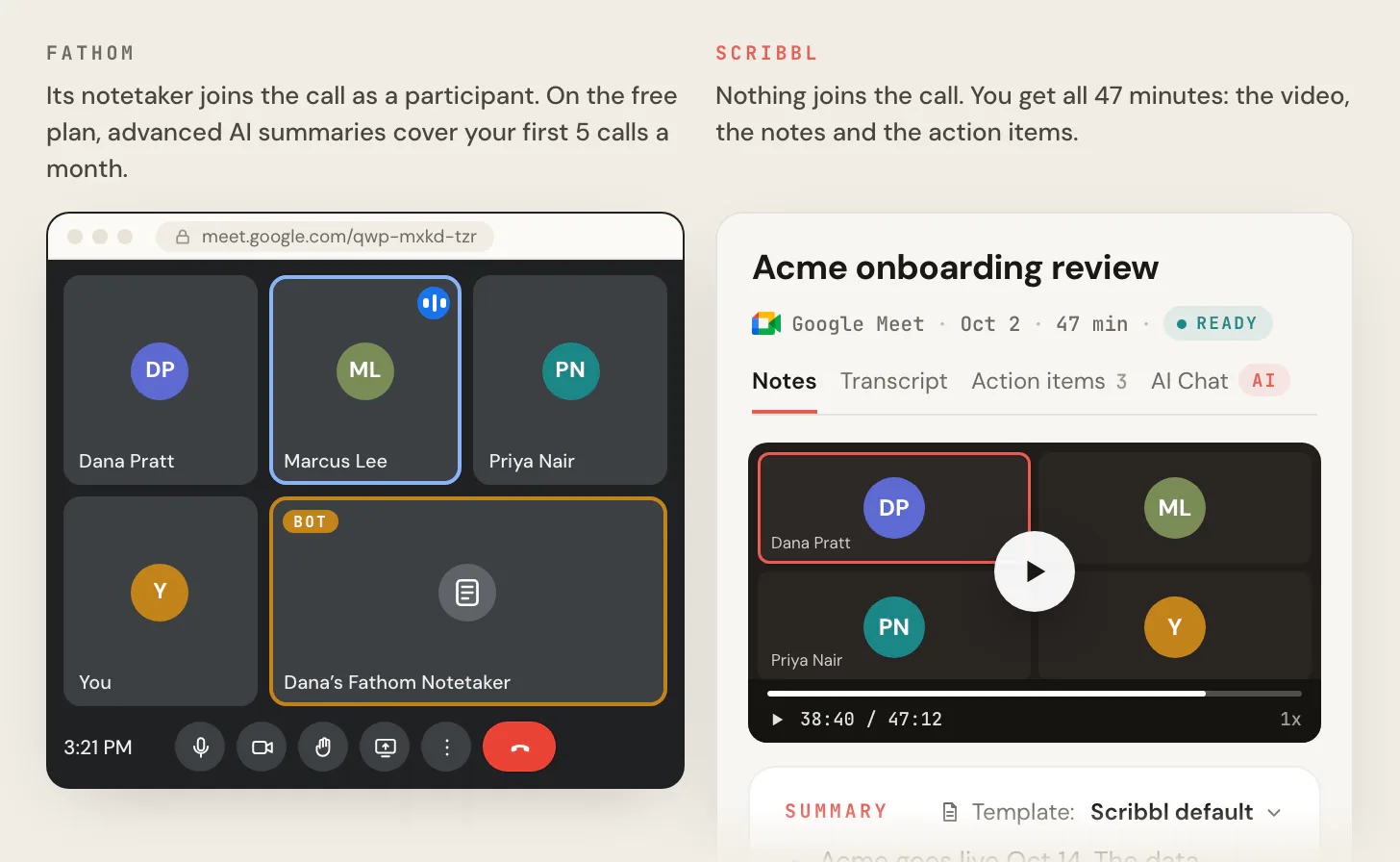
- Nothing joins the call. Google Meet runs from a Chrome extension, and Zoom and Teams run from Scribbl Desktop for Mac (Apple silicon) and Windows. No bot sits in the participant list, so nothing announces itself to your clients or makes them wonder who else is listening. You still tell people you're recording, the way you'd tell them yourself in any meeting.
- Private by default. Your recordings are private by default, and nobody sees a meeting unless you choose to share it.
- Your meetings don't train anyone else's AI. Scribbl doesn't use your meetings to train AI for anyone other than you, so there's no opt-out setting to look for.
- You keep the video. Every meeting comes back with the video, a transcript with speaker names, AI notes and action items.
| Feature | Scribbl | Fathom |
|---|---|---|
| Anything in the participant list? | No, on Google Meet, Zoom and Teams | Its bot, whenever it records video (apart from a Zoom beta on Mac) |
| Recordings private by default | Yes | Share-link default not stated; on team plans an admin sets visibility |
| Your meetings used to train AI | Not for anyone other than you | De-identified data trains Fathom's own models until you opt out |
| The video, with nothing in the call | Yes | Zoom on Mac only, in a limited beta |
| Free plan | Google Meet, Zoom and Teams, 10 meetings a month | Unlimited recordings, with the bot for video |
What that means next to Fathom: Fathom's bot is a visible participant whenever it records video, and Fathom says "There's no way to silently record." Its auto-share can email the recording to everyone on the calendar invite, and its own models learn from de-identified meeting data until you find the opt-out in My Settings. With Scribbl, nothing joins the call, recordings are private by default, and your meetings don't train AI for anyone other than you.
Who should pick Scribbl: people whose meetings are on Google Meet, Zoom or Teams, who want the video of each meeting, and whose clients or company would rather not see a bot in the call. The free plan includes Google Meet, Zoom and Microsoft Teams, with 10 meetings a month. Pro is $13 per user per month billed annually, or $20 monthly (pricing).
Whichever tool you use, tell everyone you're recording. For more on Fathom, see Scribbl vs Fathom, Fathom pricing and Fathom alternatives.
FAQ
Is Fathom AI note taker safe?
Yes, by the usual business measures. Fathom has a SOC 2 Type II report, says it is HIPAA and GDPR compliant, encrypts data in transit and at rest, stores all data in the United States, and says it will never sell your data. Two things to know first: Fathom uses de-identified meeting data to improve its own AI models unless you opt out in My Settings, and it keeps recordings until you delete them.
Is Fathom AI notetaker safe?
Yes for most business meetings, once you check a few settings. Opt out of AI training in My Settings if you don't want de-identified data from your calls used to improve Fathom's models, check who your share links and auto-share emails reach, and tell everyone you're recording. Fathom's terms make you responsible for getting consent from everyone on the call.
Is Fathom SOC 2 compliant?
Yes. Fathom's Trust Center lists SOC 2 Type II, and its SOC 2 Type 2 report, penetration test report and vulnerability scan report are available there on request. Fathom doesn't have ISO 27001 certification.
Is Fathom HIPAA compliant?
Fathom says it is HIPAA compliant. Its terms include a Business Associate Agreement for anyone HIPAA applies to, and its pricing page lists a signed BAA on the Enterprise plan. Custom data retention, SSO and organization-wide security controls are also Enterprise features.
Does Fathom use my calls to train AI?
Fathom uses de-identified customer data to improve its own AI models unless you opt out. You can turn this off in My Settings, and admins on team plans can opt out everyone in Organization Settings. Fathom says its AI providers, such as Anthropic and OpenAI, are not allowed by contract to train their models on your data.
Where does Fathom store data?
In the United States. Fathom's primary cloud provider is Google Cloud Platform, and 29 of the 30 subprocessors in its Trust Center are in the US. EU and UK customers can sign a Data Processing Agreement, and Fathom is an active participant in the EU-U.S. Data Privacy Framework.
Is Fathom data encrypted?
Yes. Fathom's Trust Center and Data Processing Agreement say all data, including recordings, is encrypted in transit and at rest. Fathom's pages don't describe end-to-end encryption: your recordings are processed on Fathom's servers and by its AI providers to transcribe and summarize them.
Can people tell when Fathom is recording?
Yes. Fathom says there's no way to silently record. Its bot joins as a visible participant and shows a recording banner, and on Zoom, Zoom adds its own recording notice. In Fathom's bot-free Mac app, Fathom can post a notice in the meeting chat, or asks you in the app to confirm consent. Fathom can also email external attendees a consent request before scheduled meetings.
Can Fathom record a meeting without me?
No. Fathom's bot can only record a Zoom, Google Meet or Microsoft Teams call if you are on the call too, and it leaves when the meeting ends.
Who can see my Fathom recordings?
You, plus anyone you share with. A share link can be open to anyone with the link, anyone on your email domain, or only people you add, and viewers don't need a Fathom account. If auto-share is on, everyone on the calendar invite gets the summary, the recording or both. On team plans, admins set whether recordings are private or visible to your team or to all teams.
How do I delete my Fathom data?
Delete a single recording from the three-dot menu next to Share; it can't be recovered. You can delete your whole account in your account settings. Fathom's Trust Center says your data then leaves its backups after 7 more days, while its privacy policy says it aims to delete within 30 days. On a company's team account, ask your admin.
Does Fathom sell your data?
No. Fathom says it does not and will never sell your data to third parties, and its privacy policy says it doesn't sell meeting content or information about your attendees. Fathom says the free app exists because it brings in leads for its paid team plans.
Who owns Fathom?
Superhuman, an AI productivity company, acquired Fathom on September 14, 2026. Fathom said nothing changed that day for users: same app, same login. Fathom's privacy policy says that after a sale, data is governed by the policy in effect when it was collected.
Is there an AI note taker that doesn't join the call?
Yes. Scribbl, which we make, takes notes in Google Meet, Zoom and Microsoft Teams with nothing joining the call, so no bot sits in the participant list, and you still get the video recording, a transcript with speaker names, AI notes and action items. Recordings are private by default, and Scribbl doesn't use your meetings to train AI for anyone other than you. The free plan includes Google Meet, Zoom and Microsoft Teams, with 10 meetings a month. Fathom's Mac app can also skip the bot, but outside a limited Zoom beta it then keeps a transcript or audio, not the video.
Sources
Every Fathom fact above was checked on these pages on October 7, 2026.
- Fathom Trust Center: overview, FAQ, subprocessors, resources
- Fathom legal pages: privacy policy (August 16, 2026), terms of service (March 4, 2026), Data Processing Agreement (May 5, 2026), Business Associate Agreement (September 9, 2026), biometric notice (August 16, 2026)
- Fathom website: homepage, pricing, Fathom is now part of Superhuman (September 14, 2026)
- Fathom help center, security: Is Fathom secure? (edited September 8, 2025), Is Fathom HIPAA-compliant?, Zoom for Government or Teams for Government, Can I update my password in Fathom?, Beware of impostors
- Fathom help center, sharing: Sharing Call Recordings, If I share my recording, will my client need a Fathom account?, auto-share with attendees, Manage Auto-capture and Team Visibility Settings, External Meeting Recording Visibility, Fathom MCP: Connect Claude & ChatGPT
- Fathom help center, recording and consent: Can I record calls without asking for permission?, Automatically Requesting Recording Consent, Can the Fathom Notetaker join my calls without me?, How to Upgrade to Fathom 3.0+, Navigating the Settings Page, Quick Start Guide, What devices is Fathom compatible with?, Using the Fathom iOS mobile app
- Fathom help center, deleting: How to delete a recording, Retention Policies in Fathom
- US Department of Commerce: Data Privacy Framework list, entry for Fathom.video
- Reworked: Superhuman Buys AI Notetaker Fathom to Bring Meeting Insights Into Work (September 14, 2026)
- Scribbl: pricing
Try Scribbl
Private notes, nothing in the call
Scribbl records, transcribes, and summarizes your Google Meet calls from your browser. No bot joins the call. Free forever for individuals.
Add to Chrome · It's free