Tactiq Pricing (2026): Is Tactiq AI Free, and Can You Use It on Your Phone?
Tactiq pricing, checked October 7, 2026: Free is $0 for 10 transcripts a month, Pro $8 or $12, Team $16.67 or $20. Tactiq has no phone app.
Updated October 7, 2026

Yes, Tactiq AI is free: the Free plan costs $0, has no time limit and includes 10 meeting transcripts and 5 AI credits a month. No, you can't use Tactiq on your phone: Tactiq has no iPhone or Android app, and its help center says to use Chrome or Edge on a computer, or Tactiq's Mac app.
Paid plans start at $8 per user per month billed annually, or $12 billed monthly. Below is every plan with its monthly and annual price, what happens after your 10th free transcript, where Tactiq works (browsers, meeting apps, Mac, phones), what a team pays, and where Tactiq's own pages disagree with each other.
Every Tactiq number on this page comes from tactiq.io/buy and Tactiq's help center, checked on October 7, 2026. Prices are in US dollars. We make Scribbl, an AI note taker for Google Meet, Zoom and Microsoft Teams with nothing joining the call, and near the end we show why it's the better pick if you want the video and AI on every meeting.
How much does Tactiq cost?
Tactiq has five plans: Free at $0, Pro at $8, Team at $16.67 and Business at $29.17 per user per month billed annually, and Enterprise at a custom price. Billed monthly, Pro is $12, Team is $20 and Business is $40. The pricing page says annual billing saves "up to 33%."
| Feature | Free | Pro | Team | Business | Enterprise |
|---|---|---|---|---|---|
| Price, billed annually | Free | $8 ($96 a year) | $16.67 ($200 a year) | $29.17 ($350 a year) | Custom |
| Price, billed monthly | Free | $12 | $20 | $40 | Custom |
| Who it is for | 1 user | 1 person | 1 to 20 users | 20 to 200 users | 200 or more users |
| Meeting transcripts a month | 10 | Unlimited | Unlimited | Unlimited | Unlimited |
| AI credits a month | 5 | 10 | Unlimited | Unlimited | Unlimited |
| Upload audio, video or transcript files | Yes | Yes | Yes | Yes | Yes |
| Turn off the chat message that you are transcribing | No | Yes | Yes | Yes | Yes |
| Ask before transcribing each meeting | No | Yes | Yes | Yes | Yes |
| Auto-share transcripts with your team | No | No | Yes | Yes | Yes |
| Centralized billing and admin | No | No | Yes | Yes | Yes |
| Data retention rules (6 to 60 months) | No | No | No | Yes | Yes |
| SAML SSO | No | No | No | Yes | Customizable |
| Support | Standard | Standard (pages differ) | Priority | Customer success manager | Dedicated account manager |
Tactiq's comparison table gives every plan AI summaries and insights, Ask Tactiq AI, AI during the meeting, AI workflows, file uploads, transcript editing and search, sharing and export, integrations such as Google Drive and Notion, Google Meet Companion mode, and the free Chrome extension for Google Meet, Zoom and Microsoft Teams. Annual plans are billed upfront for the full year, and each person on a paid plan needs their own license. (Source: Tactiq pricing and How to choose the right Tactiq plan and pricing, as of October 7, 2026.)
Is Tactiq AI free?
Yes. Tactiq's help center says you can sign up for the Free plan and use it indefinitely, and the pricing page says "Free forever. No credit card." What Free limits is how many meetings you can open in full and how much AI you can run (What are meeting credits?, How Tactiq AI credits work, as of October 7, 2026):
- 10 meeting transcripts a month. Each meeting Tactiq transcribes uses one meeting credit. Meetings shorter than 5 minutes don't use one. Each file you upload uses one too.
- Credits reset monthly and don't roll over. They reset on the day of the month you signed up. If you have 3 left on that day, you go back to 10, not 13.
- After the 10th, new transcripts are previews. Tactiq may keep capturing meetings, but you can't fully view or search them or use AI on them. Next month's credits don't unlock them. Upgrading does, including for transcripts that were already limited.
- Archive to get a credit back. Archiving an old transcript in My Meetings returns its credit for a future meeting. Archived transcripts are deleted after 30 days unless you restore them first.
- 5 AI credits a month. One credit covers all the AI you run on one meeting: summaries, action items, questions and workflows. So 5 credits means AI on 5 meetings a month. Running out of AI credits doesn't stop transcription.
- Tactiq tells the meeting. On Free, Tactiq posts a message in the meeting chat saying your Tactiq extension is transcribing, and you can't turn it off. On Pro and higher you can turn it off or choose each time (Turn off the automated chat notification).
- It starts on its own. Tactiq transcribes meetings automatically. Being asked before each meeting is a paid feature; on Free you pause by hand in the Tactiq widget, and paused parts can't be recovered later (Pause transcription).
- Referrals add credits. Each new user who signs up through your referral link gives you 5 meeting credits and 1 AI credit (Invite a friend).
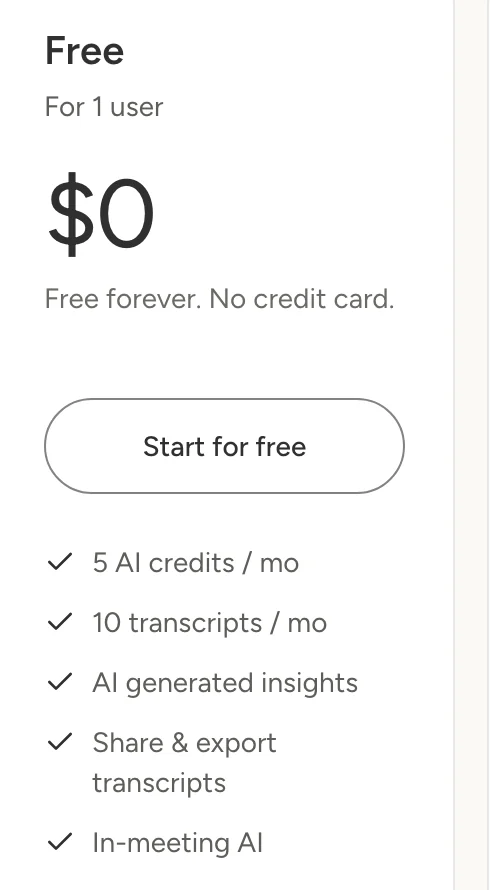
How far the free plan goes: two meetings a week of 5 minutes or more is about 9 a month, which fits inside 10, with AI on 5 of them. One meeting every working day, about 22 a month, doesn't fit. If you have more meetings than that, Pro is Tactiq's cheapest way to keep every transcript open. Scribbl's free plan puts the video, AI notes and action items on every meeting (compared below).
Can I use Tactiq on my phone?
No. Tactiq doesn't run on phones or tablets. Everything it offers runs on a computer:
- The extension needs a computer. Tactiq's install guide says to use Google Chrome or Microsoft Edge on a computer. The Google Meet and Microsoft Teams guides both say a laptop or desktop computer.
- The Mac app is for Macs only. Tactiq's Mac app guide answers the iPad and iPhone question in its FAQ: the app works on Mac laptops and desktops, and on other devices you use the browser extension.
- There is no phone app. Tactiq's download page offers two things: the Chrome extension and the Mac app. On October 7, 2026 we searched the US App Store and Google Play for Tactiq and found no app from the company behind tactiq.io.
- So calls on your phone aren't transcribed. If you join a meeting from the Zoom, Google Meet or Teams app on your phone, nothing from Tactiq is running there to capture it.
A different app is also called Tactiq. The app called Tactiq on Google Play, and the website tactiqapp.com, belong to a different company. It is a security workforce app for guards and supervisors: shifts, patrols and incident reports. It has nothing to do with meeting notes. If a search or an AI answer points you to tactiqapp.com for a phone app, it has the wrong Tactiq.
What you can do from a phone:
- Record in person, then upload. Tactiq's upload guide says to record an in-person meeting with a voice recorder or a phone app, then upload the file in your Tactiq dashboard. It takes mp4, m4a, mp3 and mov files up to 2GB, labels speakers as Speaker 1, Speaker 2 and so on, and can take up to 2 hours to process a large file. Each upload uses one of the Free plan's 10 monthly credits, and AI tools need a recording longer than 2 minutes.
- Open a transcript link. Tactiq can email you a link to each transcript after a meeting. Its help center doesn't say whether the full Tactiq dashboard works in a phone's browser.
Where Tactiq works: browsers, meeting apps and the Mac app
| Feature | Chrome or Edge on a computer | Tactiq Mac app | Phone or tablet |
|---|---|---|---|
| Google Meet | Yes, including Companion mode | No: use the extension | No |
| Zoom | Yes, if you join from the browser | Yes, the Zoom desktop app | No |
| Microsoft Teams | Yes, in the browser or the Teams web app (PWA) | Yes, the Teams desktop app | No |
| Slack huddles and calls | No | Yes, in the Slack desktop app | No |
| Uploaded audio or video files | Yes, in the Tactiq dashboard | Yes, in the Tactiq dashboard | Not covered by Tactiq |
What Tactiq's guides say about each setup (as of October 7, 2026):
- Browsers. The install guide covers Google Chrome and Microsoft Edge only. It has no steps for Safari or Firefox.
- Zoom in the browser. The extension works only when you join Zoom in Chrome or Edge, not in the Zoom desktop app. Tactiq's Zoom guide also says the host's Zoom account needs the Automated captions setting turned on, which it says is off by default on many accounts.
- Teams. The extension works in Chrome, Edge and the Teams web app installed from Chrome. It doesn't work in the Teams desktop app. Names appear in the transcript only for people who turned on a Teams setting to identify themselves; otherwise you see labels like Speaker 1.
- The Mac app. It runs on Apple silicon and Intel Macs and transcribes the Zoom desktop app, the Teams desktop app and Slack huddles and calls in the Slack desktop app. You download it from the Integrations page of your Tactiq dashboard. For Google Meet you still need the extension.
- Windows. There is no Tactiq app for Windows. Tactiq's Mac app guides say it is exploring one. On a Windows PC, you join Zoom and Teams in Chrome or Edge.
- Nothing joins the call. Tactiq says no bot joins your Zoom or Teams meeting; the extension works from your browser and the Mac app through macOS.
- Transcripts, not video. Tactiq's pages describe transcripts. To keep a video next to a transcript, you add it yourself by uploading the file or pasting a YouTube link. Transcripts export to PDF or TXT, one at a time.
- Languages. Tactiq lists more than 30 transcription languages, and the list varies by meeting platform (languages, updated October 6, 2026).
Tactiq can post a message in the meeting chat when it starts, and on the Free plan it always does. Whatever tool you use, let everyone know you're recording or transcribing. Some places require everyone's consent; see do you have to tell people you're recording.
Tactiq Pro: $8 or $12 per user per month
Tactiq calls Pro the plan "For busy pros." It costs $8 per user per month billed annually ($96 a year) or $12 billed monthly ($144 a year), so annual billing saves 33%. Over Free, Pro adds (How to upgrade your Tactiq plan, as of October 7, 2026):
- Unlimited meeting transcripts, of any length
- 10 AI credits a month, which is AI on 10 meetings. You can't buy more; for unlimited AI, Tactiq points you to Team
- Turning off the chat message, or choosing each time
- Being asked before each meeting whether to transcribe it
Pro is for individuals. If your account is part of a Tactiq team workspace, the billing page shows only the Team plan, even if you're the only member. To buy Pro, you leave the team first under Team Members.
Tactiq Team: $16.67 or $20 per user per month
Team is for 1 to 20 users. It costs $16.67 per user per month billed annually ($200 a year) or $20 billed monthly ($240 a year). Over Pro, Team adds unlimited AI credits, priority support, auto-sharing of transcripts with your team, and centralized billing and admin. With unlimited AI credits, Team is the cheapest plan that runs AI on every meeting.
Admins can buy any number of seats at checkout, or 5, 10 or 25 at once from Team Members. Seats added mid-cycle are prorated by the day and charged on the next invoice. If the team has more than one member, the admin assigns licenses by hand. Team accepts card payments only (Upgrade to the Team plan, prorated seats).
Tactiq Business and Enterprise
Business is for 20 to 200 users. It costs $29.17 per user per month billed annually ($350 a year) or $40 billed monthly. It adds SAML SSO, data retention rules an admin sets between 6 and 60 months, reports and analytics, a customer success manager, and on the pricing page, the Tactiq MCP and Tactiq Claude Connector (data retention).
Enterprise is for 200 or more users at a custom price; you contact sales. It adds a curated data processing agreement, a custom in-meeting notification an admin can enforce for the whole team, customizable SAML SSO, domain claiming, more retention options and a dedicated account manager. (Source: Tactiq pricing, as of October 7, 2026.)
What Tactiq costs for 1, 5 and 10 people
Tactiq shows every price per user per month. These totals multiply that out. Tactiq may show local prices at checkout in some countries.
| Who | Plan and billing | Per month | Per year |
|---|---|---|---|
| 1 person | Pro, annual | $8 | $96 |
| 1 person | Pro, monthly | $12 | $144 |
| 1 person | Team, annual | $16.67 | $200 |
| 5 people | Team, annual | $83.33 | $1,000 |
| 5 people | Team, monthly | $100 | $1,200 |
| 10 people | Team, annual | $166.67 | $2,000 |
| 10 people | Team, monthly | $200 | $2,400 |
| 25 people | Business, annual | $729.17 | $8,750 |
| 25 people | Business, monthly | $1,000 | $12,000 |
Three things decide which row is yours:
- Whether you share a workspace. Five people can each buy Pro on their own accounts, but anyone in a Tactiq team workspace sees only the Team plan.
- How much AI you use. Pro covers AI on 10 meetings a month. If you want a summary of every meeting, you need Team.
- Team size. Team is for up to 20 users and Business for 20 to 200, so a team of 25 is on Business.
For comparison, Scribbl Pro is $13 per user per month billed annually, or $20 monthly (Scribbl pricing), and it runs AI on every meeting and keeps the video. On Tactiq, AI on every meeting takes the Team plan, and against Team, Scribbl costs less on annual billing ($156 a year per person against $200, or $1,560 for 10 people against $2,000) and the same on monthly billing.
How Tactiq billing, cancelling and refunds work
From Tactiq's help center and terms (How to upgrade your Tactiq plan, Disable auto-renewal, Terms of Use), as of October 7, 2026:
- Payment. Tactiq uses Stripe. You can pay by debit or credit card, Apple Pay, Google Pay or Link, or through PayPal. PayPal is charged in US dollars; card payments can be in a local currency in some countries.
- Upgrading. In the web app, go to Account & Settings › Billing. An upgrade takes effect at once, starts a new billing period and is charged right away. Moving from Pro to Team credits the unused part of your Pro period.
- Cancelling. Billing › Cancel the subscription. You keep paid features until the end of the period, then the account goes back to Free. Only a team admin or billing admin can cancel a Team subscription. You can resume before the period ends.
- Downgrading. Team to Pro takes effect right away, from Downgrade to Pro plan on the Billing page.
- Renewal. Plans renew automatically, monthly or yearly, until you cancel. Annual plans are billed upfront for the full year.
- Refunds. The help center doesn't describe refunds. Tactiq's Terms of Use, last updated June 6, 2019, say upgrade fees are not refundable.
Student and teacher pricing
Individual university students and teachers can apply for Tactiq's education plan. You sign up first, then apply with a school-issued email address through Tactiq's education form, and support applies the discount. Tactiq doesn't publish the discount amount. It can't be combined with other promotions, and if you're already on a discounted annual plan it starts at your next renewal (How to upgrade your Tactiq plan).
Where Tactiq's own pages disagree
We found eight places where Tactiq's pages don't match each other on October 7, 2026. When the pricing page and a help article differ, the help article is usually the more detailed one, so check both before you buy.
- What happens after 10 free transcripts. The pricing page FAQ says Tactiq keeps transcribing, only AI pauses, and your transcripts "always stay accessible." The meeting credits article (updated August 25, 2026) says new meetings past 10 are limited to a preview you can't fully view or search until you upgrade.
- What one AI credit is. The pricing page FAQ says one credit covers a single AI action, such as one summary or one question. The AI credits article (updated August 27, 2026) says one credit covers every AI action on the same meeting.
- Phones. The data Tactiq's pricing page gives search engines lists Android, iOS and Safari among its operating systems. The help center says Chrome or Edge on a computer, the Mac app is for Macs only, and the download page has no phone app.
- What the Mac app covers. The download page says the Mac app transcribes Zoom desktop calls only and doesn't yet do Teams. Help articles updated August 21, 2026 say it also covers the Teams desktop app and Slack huddles.
- Connecting Claude or ChatGPT. The pricing page lists the Tactiq MCP and Claude Connector under Business. The MCP server and ChatGPT articles say Tactiq connects to both Claude and ChatGPT on every plan: on Free and Pro the assistant can only search and list your meetings, and from Team up it can read summaries and full transcripts.
- Priority support. The Team card lists priority support as something Team adds over Pro. The comparison table on the same page marks it for Pro too.
- Data retention on Business. The Business card lists "Advanced Data Retention." The comparison table and the help center put advanced retention on Enterprise only, and give Business the standard retention rules.
- The Business price. The pricing page says $29.17 per user per month billed annually. The help center says $29.16. Both work out to about $350 a year.
Is Tactiq worth it? Who each plan is for
- Free is worth it if you have up to 10 meetings a month in Chrome or Edge, are fine with Tactiq announcing itself in the meeting chat, and want AI summaries for only some of them.
- Pro is worth it for one person with more than 10 meetings a month who needs AI on 10 or fewer. At $96 a year on annual billing, it's Tactiq's cheapest paid plan.
- Team is worth it if you want AI on every meeting or want to share transcripts with colleagues automatically. Budget $200 per person per year.
- Business and Enterprise are for 20 or more people who need SSO, retention rules or a data processing agreement.
Tactiq may not be the right fit if you use the Zoom or Teams desktop app on Windows, you want the video of each meeting, or you want AI on every meeting without paying for Team. Scribbl, which we make, does all three: see the side-by-side below and Scribbl vs Tactiq. For more options, see Tactiq alternatives.
Tactiq vs Scribbl: the better pick
Scribbl is an AI note taker for Google Meet, Zoom and Microsoft Teams, and if you want the video and AI on every meeting it's the better pick. Nothing joins the call: it uses a Chrome extension for Google Meet and Scribbl Desktop for Mac (Apple silicon) and Windows for Zoom and Teams, so it records the Zoom and Teams desktop apps on Windows too. Every meeting comes back with the video recording, a transcript with speaker names, AI notes and action items, in one account for all three meeting apps.
It also does the work after the call. Smart Collections sort your meetings by themselves. Automations do the follow-up: they draft the follow-up email for you to send, log notes in HubSpot or Pipedrive, post a summary to Slack or Teams, or open a ticket in Linear, Jira or Asana, and they ask before changing anything by default. On Pro you can ask Claude or ChatGPT about every meeting you've recorded, or about just one Smart Collection ("What were the main objections in my sales calls this week?"). Recordings are private by default, and Scribbl doesn't use your meetings to train AI for anyone other than you.
| Feature | Scribbl | Tactiq |
|---|---|---|
| Does anything join the call? | No | No |
| Meeting apps | Google Meet, Zoom, Microsoft Teams | Google Meet, Zoom, Microsoft Teams; Slack huddles with the Mac app |
| Zoom and Teams desktop apps on Windows | Yes | No: join in Chrome or Edge |
| Where it runs | Chrome extension for Google Meet; Scribbl Desktop for Mac (Apple silicon) and Windows for Zoom and Teams | Chrome or Edge on a computer; Mac app |
| Video of the meeting | Every meeting | Only if you upload it yourself |
| Transcript with speaker names | Yes | Yes; in Teams, only for people who turn on a Teams setting |
| AI notes and action items | Every meeting, free plan included | 5 meetings a month free, 10 on Pro; every meeting from Team |
| Ask Claude or ChatGPT about your meetings | Pro: transcripts and notes of every meeting, or just one Smart Collection | Free and Pro only search and list meetings; summaries and full transcripts from Team |
| Free plan | 10 meetings a month | 10 meeting transcripts a month |
| Cheapest plan with AI on every meeting | Pro, $13 per user per month billed annually, or $20 monthly | Team, $16.67 per user per month billed annually, or $20 monthly |

The short version. Tactiq gives you transcripts, with AI on a few meetings a month until you pay for Team. Scribbl gives every meeting the video, the transcript, AI notes and action items, on Google Meet, Zoom and Teams, on Mac and Windows. The free plan includes Google Meet, Zoom and Microsoft Teams, with 10 meetings a month. Whichever tool you use, tell everyone in the meeting you're recording.
FAQ
Is Tactiq AI free?
Yes. Tactiq's Free plan costs $0, needs no credit card and has no time limit. It includes 10 meeting transcripts and 5 AI credits a month for one user, and meetings shorter than 5 minutes don't count. After your 10th transcript in a month, new meetings are kept as previews you can't fully open, search or use AI on until you upgrade.
Can I use Tactiq on my phone?
No. Tactiq has no iPhone or Android app. Its help center says to use the Tactiq extension in Google Chrome or Microsoft Edge on a computer, or the Tactiq Mac app, which runs on Mac laptops and desktops only. The app called Tactiq on Google Play is a security-guard app from a different company. To get an in-person conversation into Tactiq, record it with your phone and upload the audio file to your Tactiq dashboard.
How much does Tactiq cost?
Tactiq has five plans. Free is $0. Pro is $8 per user per month billed annually ($96 a year) or $12 monthly. Team is $16.67 per user per month billed annually ($200 a year) or $20 monthly, for 1 to 20 users. Business is $29.17 per user per month billed annually ($350 a year) or $40 monthly, for 20 to 200 users. Enterprise, for 200 or more users, has a custom price.
What happens when I use all 10 free Tactiq transcripts?
Tactiq's help center says it may keep capturing new meetings, but they are limited to a preview: you can't fully view or search them or use AI on them. Next month's credits don't unlock them; upgrading does. Archiving an old transcript gives you a credit back for a future meeting. Tactiq's pricing page puts it differently, saying Tactiq keeps transcribing and only the AI features pause.
Does Tactiq have a free trial?
Tactiq's answer is the Free plan: its pricing page says the Free plan lets you try Tactiq with no credit card and no time limit. It doesn't list a trial of the paid plans. You upgrade when you need more than 10 transcripts or 5 AI credits a month.
Is there a Tactiq app for iPhone or Android?
No. Tactiq's download page offers only the Chrome extension and a Mac app, and we found no Tactiq meeting app in the US App Store or Google Play on October 7, 2026. Apps named Tactiq in those stores come from other developers, including a security-guard app from tactiqapp.com that has nothing to do with meeting notes.
Does Tactiq work with the Zoom and Teams desktop apps?
On a Mac, yes: the Tactiq Mac app transcribes the Zoom desktop app, the Microsoft Teams desktop app and Slack huddles. The Chrome and Edge extension doesn't work inside those desktop apps, so on Windows you join Zoom or Teams in Chrome or Edge, or Teams through its web app. Tactiq says it is exploring a Windows version.
Does Tactiq work in Safari or Firefox?
Tactiq's install guide covers only Google Chrome and Microsoft Edge on a computer. It gives no steps for Safari or Firefox, and Tactiq's download page offers the Chrome extension and the Mac app only.
What counts as a Tactiq AI credit?
Tactiq's help center says each meeting uses at most one AI credit, however many summaries, prompts or questions you run on it. So the Free plan's 5 credits cover AI on 5 meetings a month, and Pro's 10 cover 10. Tactiq's pricing page describes one credit as a single AI action instead. Team and higher plans have unlimited AI credits.
How do I cancel Tactiq?
Go to Account & Settings, then Billing, and select Cancel the subscription. Only a team admin or billing admin can cancel a Team subscription. You keep the paid features until the end of the billing period, then the account goes back to the Free plan. If you pay through PayPal, you can also cancel in PayPal's subscription settings.
Does Tactiq give refunds?
Tactiq's Terms of Use say upgrade fees are not refundable, and its help center doesn't describe refunds. When you cancel, the plan stays active until the end of the period you paid for. Annual plans are billed upfront for the full year.
Does Tactiq have a student discount?
Yes. Individual university students and teachers can apply for Tactiq's education plan with a school-issued email address. Tactiq doesn't publish the discount amount, and the discount can't be combined with other promotions. If you're already on a discounted annual plan, the education discount starts at your next renewal.
Is there a free alternative to Tactiq that records video?
Yes, Scribbl, which we make. The free plan includes Google Meet, Zoom and Microsoft Teams, with 10 meetings a month. Nothing joins the call, and every meeting comes back with the video recording, a transcript with speaker names, AI notes and action items. Tactiq's pages describe transcripts; to keep a video you upload it yourself. Scribbl also records the Zoom and Teams desktop apps on Windows, where Tactiq has no app, and runs AI on every meeting, which on Tactiq takes the Team plan.
Sources
Every Tactiq price, limit and rule above was checked on these pages on October 7, 2026. Dates in parentheses are when Tactiq last updated each help article.
- Tactiq: pricing (plan cards, Monthly and Annual tabs, comparison table and FAQ), download, education plan form, Terms of Use (June 6, 2019)
- Tactiq help center, plans and credits: How to upgrade your Tactiq plan (September 25, 2026), How to choose the right Tactiq plan and pricing (June 30, 2026), What are meeting credits? (August 25, 2026), How Tactiq AI credits work (August 27, 2026), Archive transcripts to get credits back (July 22, 2026), Invite a friend (September 17, 2026)
- Tactiq help center, billing: Upgrade to the Team plan (September 25, 2026), Prorated charges for added seats (July 2, 2025), Disable auto-renewal (August 5, 2025), Supported billing currencies (November 26, 2025), Data retention rules (December 30, 2025)
- Tactiq help center, where it works: Getting Started, Install the extension (August 11, 2026), Google Meet (August 27, 2026), Companion mode (August 13, 2026), Zoom (August 20, 2026), Microsoft Teams (September 21, 2026), Teams web app (April 12, 2026), Mac app for Zoom (August 20, 2026), Mac app for Teams (August 21, 2026), Mac app for Slack huddles (August 21, 2026), Uploads (March 24, 2026), Languages (October 6, 2026)
- Tactiq help center, settings: Turn off the automated chat notification (August 12, 2026), Pause transcription (April 30, 2026), Link video recordings (April 16, 2025), Download a transcript (December 21, 2025), Connecting Tactiq MCP Server (August 18, 2026), How to use Tactiq MCPs with ChatGPT
- A different product named Tactiq (not the meeting note taker): tactiqapp.com app page and its Google Play listing; US App Store and Google Play searches for "Tactiq," October 7, 2026
- Scribbl: pricing
Try Scribbl
Let your meetings take their own notes.
Scribbl records, transcribes, and summarizes your Google Meet calls from your browser. No bot joins the call. Free forever for individuals.
Add to Chrome · It's free