Fireflies vs Otter vs Fathom (2026): Best Free AI Note Taker, and Is Paying Worth It?
Fireflies vs Otter vs Fathom, checked October 7, 2026: what each free plan includes, what the paid plans cost, which use a bot, and who should pay.
Updated October 7, 2026

For meetings on Google Meet, Zoom and Teams, the best free AI note taker is Scribbl, which we make: nothing joins the call, and every meeting comes back with the video, a transcript with speaker names, AI notes and action items. Of Fireflies, Otter and Fathom, each one makes you give something up: Fathom's free plan records every call, but its bot joins the call for the video, a Fathom recording banner shows to everyone until you pay, and AI action items start at $16 a month; Otter's free plan shows only 30 minutes of each transcript and keeps no video; and Fireflies' free plan stops at 3 meetings unless its bot joins your calendar meetings, with no video. An AI note taker is worth paying for once you have meetings most days and keep hitting a free plan's limit; with a few short meetings a month, a free plan is enough.
Otter's free plan stops at 300 minutes a month. Fireflies' free plan stops at 3 transcribed meetings for new accounts, unless you let its bot join your calendar meetings automatically. The cheapest paid plans are Otter Pro at $8.33 per user per month billed annually, Fireflies Pro at $10 and Fathom Premium at $16, and all three need their bot in the call for the video. Scribbl Pro is $13, with the video and no bot.
Below is what each free plan really includes, what each paid plan adds and costs, whether a bot joins your call, which platforms each one works on, which ones keep the video, and a straight answer on paying for each kind of user. Every price and limit comes from each company's own pricing page and help center, checked on October 7, 2026. We compared the three from those pages; we didn't create accounts on them. Prices are per user per month in US dollars.
We make Scribbl, and we've put it in every table next to the three so you can see where it wins; why it's the pick for most people is near the end. Don't just take our word for it: the free plan costs nothing, needs no credit card and covers Google Meet, Zoom and Teams, so you can check every claim on this page against your own meetings.
Fireflies vs Otter vs Fathom at a glance
| Feature | Scribbl | Fireflies | Otter | Fathom |
|---|---|---|---|---|
| Best for | Most meetings: no bot, and the video | Many languages; a plain transcript of every meeting | Short calls, live transcripts, the lowest paid price | Unlimited free recording, if its bot and banner in your calls are fine |
| Free plan, in one line | 10 meetings a month on Google Meet, Zoom and Teams | 3 meetings for new accounts; no cap with Auto-join on | 300 minutes a month, 30 minutes per transcript | Unlimited recordings, transcripts and storage |
| AI summaries on the free plan | AI notes and action items on every meeting | A few, from credits given at sign-up | Yes, with action items | Yes; advanced summaries on 5 calls a month; AI action items paid |
| Longest meeting on the free plan | No limit | 2 hours | 30 minutes of transcript | No limit listed |
| Video of the meeting | Every plan, with nothing in the call | Paid plans, through the bot | Enterprise only | All plans, through the bot; without it for Zoom on Mac in a limited beta |
| Does a bot join? | Never | Yes: Fireflies.ai Notetaker | Yes: [Your Name]'s Notetaker (Otter.ai) | Yes, for video (apart from the Zoom beta on Mac) |
| Recording without a bot | Always: the video, transcript, AI notes and action items | Chrome extension (Google Meet audio) or desktop app (no audio file kept) | Desktop app for Mac and Windows (audio) | Mac desktop app: transcript only, audio only, or Zoom video in a limited beta |
| Meeting apps | Google Meet, Zoom, Teams | Zoom, Google Meet, Teams and 10+ others | Zoom, Google Meet, Teams | Zoom, Google Meet, Teams |
| Transcription languages | More than 85, on Google Meet, Zoom and Teams | 100+ | 6 | 38 |
| Follow-up after the call | Automations draft the email, log notes in HubSpot or Pipedrive, post to Slack or Teams | Email Assistant from Pro | AI meeting workflows | AI follow-up emails from Premium |
| Connects to ChatGPT and Claude | Yes, on Pro; ask about every meeting or one Smart Collection | Yes (Fireflies MCP server) | Yes, on every plan (Otter MCP server) | Yes, on every plan |
| Cheapest paid plan, billed annually | Pro, $13 | Pro, $10 | Pro, $8.33 | Premium, $16 (Team, $15 with 2 users minimum) |
| Same plan, billed monthly | $20 | $18 | $16.99 | $20 (Team, $19) |
All four work with Zoom, Google Meet and Microsoft Teams, write a transcript and a summary, and have a free plan with no end date. The difference that matters most is the bot: Scribbl keeps the video with nothing in the call, and the three need their bot for the video. Then there's what the free plan holds back: Otter limits minutes, Fireflies limits meetings, summaries and storage, and Fathom limits its better AI features.
What is the best free note taker?
For meetings on Google Meet, Zoom and Teams, Scribbl: the free plan includes all three, with 10 meetings a month, and every meeting gets the video, a transcript with speaker names, AI notes and action items, with nothing joining the call.
Of the three in the title, Fathom records the most for free, on its terms: its bot joins the call for the video, and a Fathom banner shows to everyone until you pay. Its free plan has no cap on recordings, transcripts or storage, it works in Zoom, Google Meet and Microsoft Teams, and you can download the video. What it holds back is the AI: advanced summaries on your first 5 calls each month (after that, only Fathom's General or Enhanced summary), and no AI action items or AI follow-up emails. (Source: Fathom, Free vs. Premium for Individuals, as of October 7, 2026.)
Here's when each one is the better free choice:
| Tool | Best free choice if | The free limit to know |
|---|---|---|
| Scribbl (we make it) | You want the video, AI notes and action items on every meeting, with no bot in the call, on Google Meet, Zoom or Teams | 10 meetings a month |
| Fathom | You want every meeting recorded and kept, with no monthly cap, and its bot and banner in your calls are fine | Advanced AI summaries on 5 calls a month; AI action items are paid; its bot joins whenever you keep the video |
| Otter | You record short calls, classes or in-person talks on your phone and want a live transcript | 300 minutes a month, and you see only 30 minutes of each transcript |
| Fireflies | You want a plain transcript of every meeting and don't mind its bot joining your calendar meetings | 3 meetings unless Auto-join is on; few summaries; 400 minutes of storage |
If you only use Zoom: Scribbl Desktop records Zoom on Mac and Windows with no bot and keeps the video. Of the three, Fathom's free plan records unlimited Zoom meetings, and on a Mac you can skip its bot (Zoom video without the bot is a limited beta).
One more thing about the word "free." Fathom's free plan is for individuals; its shared team library needs a paid plan. And Fireflies made its free plan smaller on September 1, 2026, so many comparisons still describe the older one.
Which note taker is free?
All four have a free plan with no end date. Scribbl's gives every meeting the full set with no bot. Fathom's has the most volume, with its bot in the call: unlimited recordings, transcripts and storage. Otter's Basic plan gives 300 minutes a month. Fireflies' Free plan transcribes 3 meetings for new accounts, or every calendar meeting its bot joins if you turn on Auto-join. Here is what each one really includes.
Scribbl's free plan
From Scribbl's pricing page:
- 10 meetings a month, on Google Meet, Zoom and Microsoft Teams, with no limit on meeting length.
- Every meeting gets the full set: the video, a transcript with speaker names, AI notes and action items.
- Nothing joins the call. Google Meet runs from a Chrome extension; Zoom and Teams run from Scribbl Desktop for Mac (Apple silicon) and Windows.
- No credit card to start.
Fathom's free plan
From Fathom's pricing page and help center, as of October 7, 2026:
- Recordings and storage: unlimited. Fathom says it will "store all of your recordings indefinitely (or until you manually delete them)" (How many recordings can I have in Fathom?).
- Transcripts: unlimited, in 38 languages (languages). Transcripts can't be downloaded; you copy them with a Copy Transcript button (Get a copy of your transcript).
- Summaries: a summary on every call. Advanced summaries, with more than 15 meeting templates, on your first 5 calls each month.
- Not on the free plan: AI action items, AI follow-up emails and Ask Fathom, the chat that answers questions about your calls. All three need Premium.
- Also included: clips, playlists, search across your calls, video downloads as MP4 (Downloading the Recording), Slack, ChatGPT and Claude integrations, Fathom's public API and MCP, and CRM sync for up to 3 users per email domain.
- Bot or no bot: the free plan includes Fathom's "Choice of bot-free (in beta) or bot capture," which works on Mac only for now.
- In the meeting: the free plan shows Fathom's in-meeting banner and its standard bot name. Removing the banner and renaming the bot are Premium features.
- Premium preview: new accounts get Premium features for 30 days after sign-up. After that, Fathom says "You have no obligation to upgrade" and you stay on the free plan.
Otter's free plan (Basic)
From Otter's Basic plan limits and pricing page, as of October 7, 2026:
- 300 transcription minutes a month, one pool for meetings, recordings and imports. When they're used up, "you will not be able to record or import recordings until your next monthly cycle." Deleted conversations still count. Minutes don't roll over.
- 30 minutes per conversation. The recording doesn't stop, but you can only see 30 minutes of the transcript. Upgrading unlocks the rest.
- 3 file imports for the life of the account, not per month.
- Your 25 most recent conversations. Older ones are archived, not deleted.
- AI: summaries with action items and outlines on every plan, and 20 AI Chat questions a month (3 per conversation).
- Also included: live transcription, speaker identification, the iOS and Android apps, export to mp3 and txt, and Otter Notetaker in one meeting at a time. Playback is audio only, at 1x speed.
300 minutes is ten 30-minute calls a month. If your meetings run an hour, you'll see only the first half of each transcript.
Fireflies' free plan
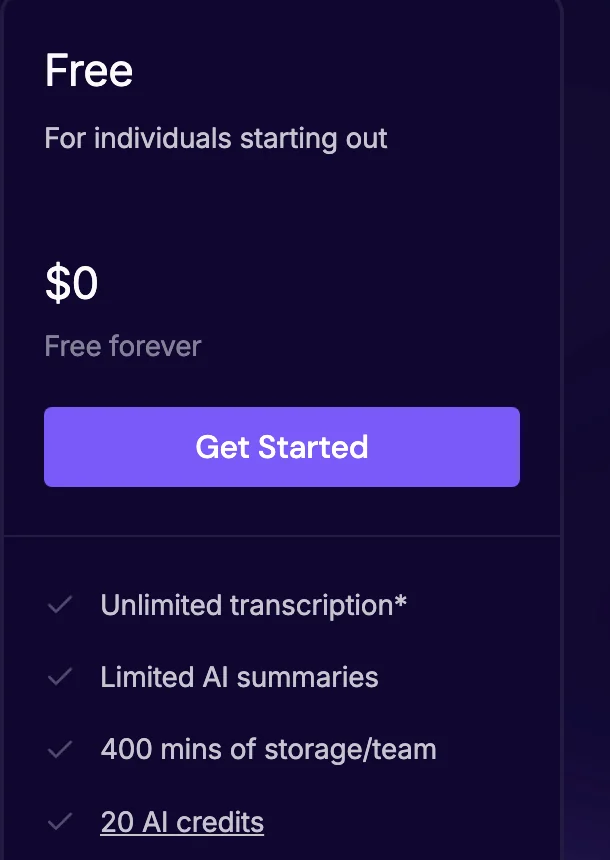
Fireflies' pricing page lists four things on its Free card: "Unlimited transcription*", "Limited AI summaries", "400 mins of storage/team" and "20 AI credits." The asterisk opens a note that reads "For shared bot meetings, chrome extension, and mobile app." Fireflies' help center explains the rest, as of October 7, 2026:
- 3 meetings, unless Auto-join is on. For people who signed up on or after September 1, 2026, the free plan transcribes 3 meetings with Auto-join calendar meetings off. Turned on, it has "no cap on the number of transcriptions" (Unlock Unlimited Transcriptions on the Fireflies Free Plan). Auto-join means the Fireflies bot joins your eligible calendar meetings. The setting "Only when I invite fred@fireflies.ai" doesn't count. Accounts made before September 1 keep their old limits. An older Fireflies FAQ adds one more condition: that you "share recaps with all invitees" (How Fireflies joins and records your meetings).
- Few summaries. Fireflies says unlimited transcripts give you "complete, raw text," while summaries, action items and analytics depend on credits. Summaries use what Fireflies calls "transcription credits," and you get them when you sign up: 3 if you sign up on the website, 5 through the Chrome extension and 10 as a new user of the phone app (What's included in the Fireflies Free plan).
- 400 minutes of storage, about six hours of meetings. "If you hit the limit, delete older files to store new ones."
- A 2-hour recording limit per meeting, on Free and Pro.
- No video and no downloads. Video starts on a paid plan, and "Downloading transcripts requires a paid plan."
- Also included: transcription in 100+ languages, file uploads, all integrations, the phone app, the Chrome extension and the desktop app.
What the paid plans add and cost
| Plan | Billed annually | Billed monthly | What it adds |
|---|---|---|---|
| Scribbl Pro | $13 | $20 | Unlimited meetings with no length limit, unlimited AI chat, Claude and ChatGPT across every meeting; the video with no bot, as on every Scribbl plan |
| Scribbl Team | See pricing | See pricing | Tell Scribbl a job in plain words and it runs with your own Claude; Smart Collections and Automations that include teammates' meetings once each person says yes; no limit on Automations runs; seats, admins and one bill; self-serve checkout |
| Otter Pro | $8.33 | $16.99 | 1,200 minutes a month, up to 90 minutes per meeting, 10 imports a month, every conversation, 50 AI Chat questions, more export formats, up to 5 billed users |
| Otter Business | $19.99 | $30 ($24 for 3 months, first-time subscribers) | No monthly cap on meetings, up to 4 hours per meeting, up to 25 billed users, 200 AI Chat questions, usage analytics and activity logs, 3 meetings at once |
| Otter Enterprise | Ask sales | Ask sales | SSO and SCIM (100-user minimum), the Otter API, video replay for Zoom and Google Meet, HIPAA as an add-on |
| Fireflies Pro | $10 | $18 | Unlimited transcription and AI summaries, 8,000 minutes of storage per seat, video recording at 720p, downloads |
| Fireflies Business | $19 | $29 | Unlimited storage, 3-hour recording limit, conversation intelligence, team analytics, Multi-language Mode, priority support |
| Fireflies Enterprise | $39 (annual only) | Not offered | 4-hour recording limit, 1080p video, SSO, SCIM, HIPAA, private storage, custom data retention |
| Fathom Premium | $16 | $20 | Unlimited advanced summaries, AI action items, AI follow-up emails, Ask Fathom across your calls, custom bot name, no in-meeting banner |
| Fathom Team (2 users minimum) | $15 | $19 | Premium features plus a shared team library, search across team calls, folders, comments and team playlists |
| Fathom Business (2 users minimum) | $25 | $34 | CRM field sync, Deal View, coaching metrics and AI scorecards |
| Fathom Enterprise | Talk to sales | Talk to sales | SSO, SCIM, custom data retention, HIPAA with a signed BAA |
Sources: Scribbl pricing, Otter pricing, Fireflies pricing and Fathom pricing, as of October 7, 2026.
Fathom. For 2 or more people, Team at $15 costs less per person than Premium at $16. Fathom's pricing page says paid plans are "backed by a 90-day money-back guarantee." Fathom is now part of Superhuman: Fathom's CEO announced it on September 14, 2026, and said nothing changes for Fathom users today (Fathom is now part of Superhuman).
Otter. Pro stops at 5 billed users. Students and teachers with a .edu email get 20% off Pro: $6.67 a month billed annually ($79.99 a year), or $13.59 monthly. Otter "does not offer refunds for purchased subscriptions" (Cancel an Otter subscription), so pay monthly until you're sure. Its 7-day Business trial needs a card, then bills every seat at the Business monthly rate unless an admin cancels (Business free trial).
Fireflies. AI credits, which run features like AskFred, are shared by the whole team and "do not scale with the number of seats" (AI Credits). Its 7-day Business trial needs a card (free trial). Its refund policy gives a full refund within 7 days if you've logged 3 meetings or fewer on a monthly plan, or 20 or fewer on an annual plan.
What a year costs for 1, 5 and 10 people
| Team size | Scribbl Pro | Otter | Fireflies Pro | Fathom |
|---|---|---|---|---|
| 1 person, annual | $156 | $99.96 (Pro) | $120 | $192 (Premium) |
| 1 person, monthly | $240 | $203.88 (Pro) | $216 | $240 (Premium) |
| 5 people, annual | $780 | $499.80 (Pro) | $600 | $900 (Team) |
| 5 people, monthly | $1,200 | $1,019.40 (Pro) | $1,080 | $1,140 (Team) |
| 10 people, annual | $1,560 | $2,398.80 (Business; Pro allows 5) | $1,200 | $1,800 (Team) |
| 10 people, monthly | $2,400 | $3,600 (Business) | $2,160 | $2,280 (Team) |
Of the three, Otter is cheapest for one person or a team of 5. At 10 people, Fireflies Pro is cheapest of the three, because Otter pushes you to Business. Fireflies' pricing page lists no seat limit for Pro. Scribbl Pro costs less than Fathom at every size on annual billing, and unlike Otter Pro (no video) and Fireflies Pro and Fathom (video through the bot), it keeps the video with nothing joining the call.
Does a bot join the meeting?
For Fireflies, Otter and Fathom, yes, whenever you want the video, with one exception still in testing: Fathom's limited beta of bot-free Zoom video on Mac. Each also has a way to record without a bot, with less in the result. Scribbl never sends one.
-
Scribbl. Never. Google Meet runs from a Chrome extension, and Zoom and Teams from Scribbl Desktop for Mac and Windows. Nothing appears in the participant list, and you still get the video, a transcript with speaker names, AI notes and action items.
-
Otter. Otter Notetaker joins Zoom, Google Meet and Microsoft Teams "as a guest participant and will be visible in the meeting," named "[Your Name]'s Notetaker (Otter.ai)." Once your calendar is connected, it can join any event with a meeting link, even if you can't attend. Your meeting has to allow guests. Without the bot, Otter's desktop app for Mac and Windows records the meeting's audio from your computer (Otter Notetaker Overview, Otter Desktop App).
-
Fireflies. The bot appears as "Fireflies.ai Notetaker" and is "always visible in the participant list." It can record when you aren't there. Without the bot, the Chrome extension records Google Meet audio (not Zoom or Teams, and no video), and the desktop app for Mac and Windows captures your computer's audio. Fireflies says that desktop mode "does not save audio or video files" and shows speakers as Speaker 1 and Speaker 2 (Chrome extension, recording without a bot).
-
Fathom. Fathom's bot records the audio and video, and it can only record "if you are also present on the call" (Can the Fathom Notetaker join my calls without me?). Fathom's newer desktop app, on Mac only for now, adds two modes without a bot: Transcript Only, where "No recording is saved," and Audio Only, with no video. Windows is "coming soon" (How to Upgrade to Fathom 3.0+, devices). Fathom's pricing page marks this as a beta feature for Mac. Fathom's What's New page adds a fourth mode, Zoom video without the bot, as "a limited beta," and its help center says bot-free Google Meet video through its Chrome extension is coming (What's New, Coming soon to Fathom 3.0).
Whichever way you record, tell everyone first. Fathom says "There's no way to silently record," and Fireflies' desktop app can play a spoken consent message or, on a Mac, post one in the meeting chat. Some places require everyone's consent; see do you have to tell people you're recording.
Platforms, devices and integrations
- All four work with Zoom, Google Meet and Microsoft Teams, and all four connect to ChatGPT and Claude. Scribbl puts all three meeting apps in one account. On Pro, Claude or ChatGPT can search every meeting or just the meetings in one Smart Collection, so you can ask "What were the main objections in my sales calls this week?" Its Automations post to Slack or Teams, log notes in HubSpot or Pipedrive, save notes to Notion or Confluence and open tickets in Linear, Jira or Asana.
- Integrations: Fireflies connects to 50+ apps, and its help center says all of them are on the Free plan (What's included in the Fireflies Free plan); its MCP server connects Fireflies to ChatGPT and Claude (Fireflies MCP server). Fathom's free plan includes Slack, ChatGPT and Claude, its public API and MCP, and CRM sync for up to 3 users per email domain; CRM field sync needs Business. Otter's free plan includes its MCP server, and Otter's help center says Otter.ai is in the ChatGPT App Store and has steps for Claude (Otter MCP Server); Zapier starts on Pro, and syncing notes to a CRM covers 1 user on Pro and 5 on Business.
- Fireflies also lists 10+ other meeting apps, plus a desktop app for Mac and Windows, iOS and Android apps, and the Chrome extension (Google Meet only).
- Otter has a desktop app for Mac and Windows, and iOS and Android apps for in-person recording.
- Fathom records on Mac and Windows computers, and its iOS app records in-person conversations. Fathom doesn't support Chromebooks, Linux, iPads, webinars or breakout rooms (What devices is Fathom compatible with?).
Which ones keep the video?
- Scribbl: on every plan, including free, with nothing joining the call.
- Fathom: on every plan, including Free, when its bot joins. You can download the video as an MP4. On a Mac, Zoom video without the bot is a limited beta.
- Fireflies: on paid plans only, through its bot. The pricing page lists 720p on Pro and Business and 1080p on Enterprise. The Chrome extension records audio only.
- Otter: only on Enterprise, as "Video replay for Zoom and Google Meet." Basic, Pro and Business play back audio.
If you want to rewatch a moment, Scribbl's free plan keeps the video with nothing joining the call; of the three, only Fathom's free plan keeps the video, through its bot.
Which is most accurate: Fireflies, Otter or Fathom?
None of the three publishes an independent accuracy test. Here is what each claims on its own site, as of October 7, 2026:
- Fireflies: its homepage says "95% Accurate" and calls Fireflies "the industry leader in transcription accuracy" (fireflies.ai).
- Fathom: its homepage promises "shockingly accurate transcripts," with no number (fathom.ai).
- Otter: no accuracy figure on its homepage or pricing page.
Reviewers who measured their own calls report anywhere from 86% to 97%, and several put Otter slightly ahead of Fireflies, by a point or two. None of that is a shared test. What you can compare instead: languages (Fireflies 100+, Scribbl more than 85, Fathom 38, Otter 6), custom vocabulary for names and jargon (Otter takes 5 terms on Basic and up to 100 names plus 100 other terms on Pro), and speaker names (Fireflies' desktop app without the bot shows "Speaker 1" and "Speaker 2"). The fair test is your own: record the same real meeting on two free plans and check each transcript against the recording. Scribbl keeps the video next to every transcript, so you can check any line.
Do they use your meetings to train AI?
- Scribbl: doesn't use your meetings to train AI for anyone other than you.
- Fireflies: its pricing page says "Your data is never used for AI training or any purpose outside your direct business needs."
- Fathom: its privacy policy (updated August 16, 2026) says it may use de-identified meeting data to train "our in-house artificial intelligence models," that "You can opt out from this use of your data in your account settings," and that it doesn't let outside companies such as OpenAI, Anthropic or Google train on it.
- Otter: its privacy policy (effective June 16, 2026) lists "training our proprietary AI technology on de-identified audio recordings and on transcriptions (which may contain Personal Information)." It doesn't describe a setting to turn this off.
Is AI note taker worth it?
Yes, if you have meetings most days and you use the notes afterward. But for many people a free plan is enough, so the real question is whether paying is worth it. That depends on which free limit you hit. Here's a direct answer for each kind of user, from the limits and prices above:
- A few meetings a month, mostly short. Don't pay. Scribbl's free plan covers 10 meetings a month with the video and AI notes, Otter's 300 minutes cover ten 30-minute calls, and Fathom's free plan has no recording cap.
- One person with meetings most days (consultants, recruiters, founders). Scribbl Pro at $13 billed annually gives you unlimited meetings with the video and no bot, AI notes and action items on every call, and Automations for the follow-up. Fathom Premium costs more ($16 billed annually, $20 monthly) for AI action items, follow-up emails and Ask Fathom on every call, with its bot joining for the video. If you mainly need transcripts and your meetings stay under 90 minutes and 1,200 minutes a month, Otter Pro at $8.33 is the cheapest paid plan here.
- Meetings longer than 90 minutes (workshops, board meetings, classes). Otter Pro covers up to 90 minutes per meeting and Business up to 4 hours, so you'd need Business at $19.99. Fireflies records up to 2 hours on Free and Pro, 3 hours on Business and 4 on Enterprise. Fathom's pricing page lists no meeting-length limit, and Scribbl has none on any plan.
- A team of 2 to 5. Otter Pro is cheapest ($499.80 a year for 5 on annual billing), with no video. Fireflies Pro costs $600 and adds video through its bot. Scribbl Pro costs $780 and keeps the video with no bot. Fathom Team costs $900 and adds a shared library of the team's calls.
- Sales or customer teams that work in a CRM. Scribbl's Automations log notes in HubSpot or Pipedrive and draft the follow-up email, with no bot in your prospect's call. For heavier sales tooling with a bot, Fireflies Business ($19 annually) adds conversation intelligence and team analytics. Fathom Business ($25) adds CRM field sync, Deal View and scorecards. Otter syncs notes to a CRM for 1 user on Pro and 5 on Business.
- You want the video. Scribbl keeps it on every plan, with no bot. Fathom's free plan keeps it, through the bot. Fireflies keeps it from Pro ($10), also through the bot. Otter keeps it only on Enterprise.
- Your clients or your company don't allow bots. Pick Scribbl: nothing joins the call, and you keep the video. The three can record without a bot, but mostly without the video: Fathom on Mac (transcript or audio, plus Zoom video in a limited beta), Otter's desktop app (audio) and Fireflies' Chrome extension for Google Meet or desktop app (no audio file, no speaker names).
- Meetings in many languages. Fireflies lists 100+ languages, Scribbl more than 85, Fathom 38 and Otter 6.
When paying isn't worth it: when a free plan already covers your meetings, when the feature you'd pay for is one you won't open after the call, or when you'd pay for a whole team that mostly doesn't record. If you do pay, annual billing costs 51% less than monthly on Otter Pro, 44% less on Fireflies Pro and 20% less on Fathom Premium. With Otter, remember there are no refunds.
Where the three companies' own pages disagree
We found seven places where a company's pages don't match each other on October 7, 2026:
- Fireflies' free transcription. The Free card says "Unlimited transcription*." The comparison table on the same page says "Limited." The help center says 3 meetings for new accounts unless Auto-join is on.
- Fireflies' free storage. The pricing page says "400 mins of storage/team." The help center says "400 minutes of storage per seat."
- Fireflies' video. The pricing page lists video recording on Pro at 720p. The FAQ on the same page says "The business tier gets ... video recording," and a help article answers "Does Fireflies record video?" with "Yes, if you're on a Business plan or higher."
- Fireflies' free AI credits. The Free plan article says "20 AI credits per month." The AI credits article says Free gets "20 AI credits on sign-up" that are "one-time."
- Fathom's custom summaries. The Free vs. Premium help article lists "custom AI summaries" under Premium. The pricing page table marks custom summaries for Enterprise only.
- Fireflies' free AI summaries. Fireflies' own blog post on free note takers, dated September 15, 2026, says its free plan has unlimited AI summaries (fireflies.ai/blog/free-ai-note-taker). The pricing page says "Limited AI summaries."
- Fathom's video without a bot. Fathom's capture-mode guide lists no video without the bot. An update article says bot-free Zoom video "is now available on Mac," and the What's New page calls it a limited beta.
Some comparisons that rank for this search are further off: one says Fireflies' free plan covers 800 minutes a month, one prices Otter Pro at roughly $10 a month, and one lists Fathom as having no bot and working only with Zoom and Meet. None of those match the companies' pages today. A widely cited comparison of these three, dated September 8, 2026, doesn't mention Fireflies' September 1 change, gives no language count for Fathom (its help center lists 38), and predates Fathom joining Superhuman.
Why Scribbl is the pick for most people
This section is about our own product. Scribbl is an AI note taker for Google Meet, Zoom and Microsoft Teams, and for most people comparing these three, it's the better choice. Nothing joins the call: Google Meet runs from a Chrome extension, and Zoom and Teams run from Scribbl Desktop for Mac (Apple silicon) and Windows. Every meeting comes back with the video recording, a transcript with speaker names, AI notes and action items, in one account for all three meeting apps.
It also does the work after the call. Smart Collections sort your meetings by themselves. Automations do the follow-up: they draft the follow-up email for you to send, log notes in HubSpot or Pipedrive, post a summary to Slack or Teams, or open a ticket in Linear, Jira or Asana, and they ask before changing anything by default. On Pro you can ask Claude or ChatGPT about every meeting you've recorded, or just the meetings in one Smart Collection. You can also tell Scribbl the job in plain words and it runs with your own Claude. Recordings are private by default, and Scribbl doesn't use your meetings to train AI for anyone other than you.
| Feature | Scribbl free | Fireflies Free | Otter Basic | Fathom Free |
|---|---|---|---|---|
| Does anything join the call? | No | Its bot, unless you use the Chrome extension or desktop app | Its bot, unless you use the desktop app | Its bot, unless you use the Mac app (video without the bot is a Zoom beta) |
| Video of the meeting | Yes | No | No | Yes, with its bot |
| AI notes and action items | Every meeting | Limited by sign-up credits | Summaries with action items | Summaries; AI action items are paid |
| Meeting apps | Google Meet, Zoom, Teams | Zoom, Google Meet, Teams, 10+ others | Zoom, Google Meet, Teams | Zoom, Google Meet, Teams |
| How much is free | 10 meetings a month | 3 meetings, or no cap with Auto-join on | 300 minutes a month | Unlimited recordings |
| Paid plan, billed annually | Pro, $13 | Pro, $10 | Pro, $8.33 | Premium, $16 |

Pick Scribbl if your meetings are on Google Meet, Zoom or Teams, you want the video of each meeting, and you'd rather your clients didn't see a bot in the call. Fathom, Otter and Fireflies all need their bot for the video, apart from Fathom's limited beta of bot-free Zoom video on Mac. The free plan includes Google Meet, Zoom and Microsoft Teams, with 10 meetings a month. Pro is $13 per user per month billed annually, or $20 monthly (pricing).
As with any of these tools, tell everyone you're recording. Head-to-head pages: Scribbl vs Fireflies, Scribbl vs Otter, Scribbl vs Fathom, and with Granola added, Granola vs Otter vs Fireflies vs Fathom.
FAQ
What is the best free note taker?
For meetings on Google Meet, Zoom and Microsoft Teams, Scribbl, which we make: nothing joins the call, and every meeting comes back with the video, a transcript with speaker names, AI notes and action items. The free plan includes Google Meet, Zoom and Microsoft Teams, with 10 meetings a month. The free plan needs no credit card, so you can check that on your own meetings. Of Fireflies, Otter and Fathom, Fathom records the most for free, on its terms: unlimited recordings, transcripts and storage, but video only through its bot, a Fathom banner everyone sees until you pay, advanced AI summaries on 5 calls a month and no AI action items. Otter's stops at 300 minutes a month and shows 30 minutes of each transcript, and Fireflies' transcribes 3 meetings for accounts made since September 1, 2026, unless you turn on Auto-join.
Is AI note taker worth it?
Yes, if you have meetings most days and use the notes afterward. Start on a free plan and pay when you hit a limit that matters to you. Scribbl Pro, from the company that makes this page, is $13 per user per month billed annually for unlimited meetings, with the video, no bot in the call and Automations for the follow-up. Among the three: Otter Pro ($8.33) for longer meetings and full history, Fireflies Pro ($10) for unlimited summaries and video through its bot, or Fathom Premium ($16) for AI action items and follow-up emails on every call. With a few short meetings a month, it isn't worth paying.
Which note taker is free?
All four here have a free plan with no end date. Scribbl's, from the company that makes this page, includes Google Meet, Zoom and Microsoft Teams, with 10 meetings a month, and gives every meeting the video, AI notes and action items with nothing joining the call. Fathom's has the most volume, with its bot in the call: unlimited recordings, transcripts and storage. Otter's Basic plan gives 300 minutes a month and shows 30 minutes of each transcript. Fireflies' Free plan transcribes 3 meetings for new accounts, or every calendar meeting its bot joins if you turn on Auto-join.
What is the best AI note taker for Zoom free?
Scribbl, which we make: Scribbl Desktop records Zoom on Mac and Windows with nothing joining the call and keeps the video, and the free plan includes Google Meet, Zoom and Microsoft Teams, with 10 meetings a month. Of the three, Fathom's free plan records unlimited Zoom meetings, with video when its bot joins, and on a Mac you can skip the bot (bot-free Zoom video is a limited beta). Otter's free plan covers 300 minutes a month of Zoom and other meetings, and Fireflies' covers 3 meetings unless its bot auto-joins your calendar.
Is Fathom really free?
Yes. Fathom's free plan has no end date and no cap on recordings, transcripts or storage. The limits are on the AI: advanced summaries on your first 5 calls each month, and no AI action items or AI follow-up emails. New accounts get Premium features for the first 30 days, then move to the free plan with no obligation to pay.
Is Fireflies free?
Yes, but the free plan got smaller on September 1, 2026. Accounts made since then get 3 meeting transcriptions unless they turn on Auto-join, which lets the Fireflies bot join their calendar meetings with no cap. AI summaries are limited to credits given at sign-up, storage is 400 minutes, the recording limit is 2 hours, and there's no video.
Do Fireflies, Otter and Fathom join meetings as a bot?
Yes, by default. Fireflies and Otter record video only through a bot that joins the call as a visible participant, and so does Fathom, apart from a limited beta of bot-free Zoom video on Mac. Each can also record without the bot: Otter's desktop app captures meeting audio on Mac and Windows, Fireflies' Chrome extension captures Google Meet audio and its desktop app captures your computer's audio without keeping an audio file, and Fathom's newer Mac app captures a transcript only or audio only. Scribbl, which we make, never sends a bot and still keeps the video.
Which one records video?
Scribbl, which we make, keeps the video of every Google Meet, Zoom and Teams meeting on every plan, including free, with nothing joining the call. Fathom records video on every plan, including Free, when its bot joins the call, and you can download it as an MP4; on a Mac, bot-free Zoom video is in a limited beta. Fireflies records video only on paid plans, also through its bot. Otter offers video replay for Zoom and Google Meet only on its Enterprise plan; other Otter plans play back audio.
Which is most accurate: Fireflies, Otter or Fathom?
None of the three publishes an independent accuracy test. Fireflies' homepage claims 95% accuracy. Fathom promises 'shockingly accurate transcripts' without a number. Otter gives no figure on its homepage or pricing page. Try two free plans on the same real meeting and check each transcript against the recording. Scribbl keeps the video next to the transcript of every meeting, so you can check any line.
Which is cheapest to pay for: Fireflies, Otter or Fathom?
Otter Pro, at $8.33 per user per month billed annually or $16.99 monthly, with a bot by default and no video. Fireflies Pro is $10 annually or $18 monthly, and Fathom Premium is $16 annually or $20 monthly. For a team of 10, Fireflies Pro is cheapest, because Otter Pro allows only 5 billed users and Otter Business costs $19.99. Scribbl Pro, from the company that makes this page, is $13 annually or $20 monthly, less than Fathom on annual billing, and it keeps the video with no bot in the call.
Can you get a refund from Fireflies, Otter or Fathom?
Fathom advertises a 90-day money-back guarantee on its paid plans. Fireflies gives a full refund if you ask within 7 days and have logged 3 meetings or fewer on a monthly plan, or 20 or fewer on an annual plan. Otter says it doesn't offer refunds for purchased subscriptions.
Do Fireflies, Otter or Fathom train AI on my meetings?
Scribbl, which we make, doesn't use your meetings to train AI for anyone other than you. Fireflies' pricing page says your data is never used for AI training. Fathom's privacy policy says it may train its own AI models on de-identified meeting data, and that you can opt out in your account settings. Otter's privacy policy says it trains its own AI on de-identified audio recordings and transcriptions, and it doesn't describe a setting to turn that off.
Is there a free AI note taker that doesn't join the meeting as a bot?
Yes. Scribbl, which we make, takes notes in Google Meet, Zoom and Microsoft Teams with nothing joining the call, and you get the video recording, a transcript with speaker names, AI notes and action items. The free plan includes Google Meet, Zoom and Microsoft Teams, with 10 meetings a month. Fathom, Otter and Fireflies can also record without a bot, but not the video, apart from Fathom's limited beta of bot-free Zoom video on Mac.
Sources
Every price, limit and rule above was checked on these pages on October 7, 2026.
- Fathom: pricing (plan cards, feature table and page description), homepage, What's New, Fathom is now part of Superhuman (September 14, 2026), Coming soon to the Fathom 3.0 experience, Free vs. Premium for Individuals, What does Fathom cost?, How many recordings can I have in Fathom?, languages, Get a copy of your transcript, Downloading the Recording, Can the Fathom Notetaker join my calls without me?, How to Upgrade to Fathom 3.0+, What devices is Fathom compatible with?, Can I record calls without asking for permission?, privacy policy
- Otter: pricing (plans, comparison table and student discount FAQ), homepage, start for free, Basic plan limits, Otter Notetaker Overview, Otter Desktop App, Otter MCP Server, Cancel an Otter subscription, Business free trial, privacy policy
- Fireflies: pricing (plan cards, comparison table and FAQ), homepage, Fireflies' blog post Best Free AI Note Takers in 2026 (fireflies.ai/blog/free-ai-note-taker, dated September 15, 2026), What's included in the Fireflies Free plan, Unlock Unlimited Transcriptions on the Fireflies Free Plan, How Fireflies joins and records your meetings, Chrome extension, recording without a bot on the desktop app, AI Credits, MCP server, free trial, refund policy
- Scribbl: pricing
Try Scribbl
Let your meetings take their own notes.
Scribbl records, transcribes, and summarizes your Google Meet calls from your browser. No bot joins the call. Free forever for individuals.
Add to Chrome · It's free