Granola vs Otter vs Fireflies vs Fathom (2026): Best AI Note Taker for Meetings
The best AI note taker for meetings in 2026: Granola vs Otter vs Fireflies vs Fathom on free plans, prices, bots, video, accuracy and privacy.
Updated October 7, 2026

The best AI note taker for meetings in 2026 is Scribbl, which we make, if your meetings are on Google Meet, Zoom or Microsoft Teams: it's the only one in this comparison that keeps the video with nothing joining the call, on Mac and Windows, and every meeting comes back with a transcript with speaker names, AI notes and action items. Of the four in the title, each one makes you give something up: Fathom's free plan records every call, but its bot joins the call for the video, a Fathom recording banner shows to everyone until you pay, and AI action items start at $16 a month; Granola keeps no recording at all; Otter's free plan shows only 30 minutes of each transcript; and Fireflies' free plan stops at 3 meetings unless its bot joins your calendar meetings.
Every fact about Granola, Otter, Fireflies and Fathom comes from each company's own pricing page and help center, checked on October 7, 2026, and is linked to that page. We make Scribbl, and we've put it in every table next to the four so you can see where it wins. Don't just take our word for it: the free plan costs nothing, needs no credit card and covers Google Meet, Zoom and Teams, so you can check every claim on this page against your own meetings.
Granola vs Otter vs Fireflies vs Fathom at a glance
| Feature | Scribbl | Granola | Otter | Fireflies | Fathom |
|---|---|---|---|---|---|
| Best for | Most meetings: no bot, and the video | Typing your own notes, with no bot | Live transcripts, recording in person, the lowest price | Many languages and integrations | Unlimited free recording, if its bot and banner in your calls are fine |
| Free plan | 10 meetings a month on Google Meet, Zoom and Teams | Notes from the last 30 days | 300 minutes a month, 30 per conversation | Unlimited transcripts with auto-join on; 400 minutes of storage per team | Unlimited recordings and storage |
| Cheapest paid plan, billed annually | $13 (Pro) | $14 (Business, billed monthly only) | $8.33 (Pro) | $10 (Pro) | $16 (Premium); $15 on Team, 2-user minimum |
| Same plan, billed monthly | $20 | $14 | $16.99 | $18 | $20 ($19 on Team) |
| Does a bot join the call? | Never | Never | Yes by default; the desktop app records without it | Yes by default; the desktop app and Chrome extension record without it | On Windows, yes. On Mac you choose (no-bot capture is in beta) |
| Video of the meeting | Every plan, with no bot | No | Enterprise only (Zoom and Google Meet) | Paid plans, from bot meetings | Every plan, from bot meetings; without the bot for Zoom on Mac in a limited beta |
| Audio you can play back | Yes, with the video | No | Yes | Bot meetings only | Yes, unless you choose transcript only |
| Meeting apps | Google Meet, Zoom, Teams | Any app on your computer; speaker names in Zoom, Meet and Teams | Zoom, Google Meet, Teams | Zoom, Google Meet, Teams and more | Zoom, Google Meet, Teams |
| Records on | Chrome extension for Google Meet; Mac (Apple silicon) and Windows for Zoom and Teams | Mac, Windows | Mac, Windows, web | Mac, Windows; Chrome extension for Meet | Mac, Windows |
| Transcription languages | More than 85, on Google Meet, Zoom and Teams | Several (no count given) | 6 | 100+ | 38 |
| AI notes on the free plan | AI notes and action items on every meeting | AI meeting notes | Summaries with action items; 20 AI Chat questions a month | Limited, by credits | Summaries; advanced ones on 5 calls a month; action items paid |
| Follow-up after the call | Automations draft the email, log notes in HubSpot or Pipedrive, post to Slack or Teams | Follow-up email drafts on Business | AI meeting workflows | Email Assistant from Pro | AI follow-up emails from Premium |
| Connects to ChatGPT and Claude | Yes, on Pro; ask about every meeting or one Smart Collection | Yes, through MCP; Basic reaches the last 30 days of notes | Yes, on every plan (Otter MCP server) | Yes (Fireflies MCP server) | Yes, on every plan |
| Trains its own AI on your data by default | No: not for anyone other than you | Yes, anonymized; you can opt out | Yes, de-identified | No | Yes, de-identified; you can opt out |
Two rows decide most choices: does a bot join, and do you keep the video. Scribbl is the only one here that never sends a bot and keeps the video. Granola never sends a bot but keeps no recording at all, and among the four, Fathom is the only one whose free plan includes video, through its bot. The sections below explain each row and link to the page each fact came from.
What is the best AI note taker for meetings?
For meetings on Google Meet, Zoom and Teams, Scribbl: nothing joins the call, every meeting comes back with the video, a transcript with speaker names, AI notes and action items, and Automations do the follow-up (more below). If you're choosing among the four in the title, three questions decide it.
- Can a bot join your calls? If not, Scribbl and Granola are built for that: nothing joins the call. Otter and Fireflies can also record without a bot from their desktop apps, and Fathom can on a Mac, in beta. On Windows, Fathom's bot joins.
- Do you need the recording afterward? If you want to rewatch a moment or check exactly what someone said, Granola is out: it deletes the audio after transcribing and never records video. Scribbl keeps the video on every plan with no bot. Fathom keeps the video on its free plan and Fireflies on its paid plans, both from their bots. Otter has video replay only on Enterprise.
- What will you pay, and for how many people? Otter Pro is the cheapest paid plan at $8.33 per user per month billed annually, but it stops at 5 billed users and 90-minute meetings, and keeps no video. Fireflies Pro is $10. Scribbl Pro is $13, with no meeting-length limit. Granola Business is $14, billed monthly. Fathom Premium is $16, or $15 per user on Team for 2 or more people.
If you answered "no bot" and "I want the recording," pick Scribbl: none of the four says it does both on Windows today, and on a Mac only Fathom says it can, for Zoom, in a limited beta. If you answered "no bot" and "no recording needed," Granola fits. If its bot and banner in your calls are fine and you want unlimited recording for free, Fathom. If you want a live transcript or the lowest price, Otter. If your team meets in many languages or wants analytics across many calls, Fireflies.
Head to head: each pair
Many people are choosing between just two of these. Here's the short answer for each pair, from the facts in this article.
| Pair | Scribbl beats both if | Pick the first if | Pick the second if |
|---|---|---|---|
| Granola vs Otter | You want no bot, like Granola, and the recording, with video (Otter keeps video only on Enterprise) | You type your own notes and want no bot in the call | You want the recording, a live transcript, file imports or the lowest price |
| Granola vs Fireflies | You want no bot and the video, with speaker names, on the free plan | You want no bot, with speaker names, and don't need the recording | You need 100+ languages, many integrations, or the video (paid plans, from its bot) |
| Granola vs Fathom | You want no bot and the video, on Windows as well as Mac | You want no bot on Windows as well as Mac | You want unlimited free recordings with video, or sales tools on Business |
| Otter vs Fireflies | You want the video with no bot in the call, and AI notes on every meeting | You want the cheapest paid plan for up to 5 people ($8.33), or 4-hour meetings on Business | You need 100+ languages, video on Pro at $10, or more than 5 people on the cheaper plan |
| Otter vs Fathom | You want the video without a bot, on Google Meet, Zoom and Teams | You want the lowest price, a live transcript or an Android app | You want unlimited free recording with its bot in the call, video on every plan, or a 90-day money-back guarantee |
| Fireflies vs Fathom | You want the video without a bot, and AI action items on the free plan | You want more languages, a cheaper paid plan ($10 against $16) or a Chrome extension for Google Meet without a bot | You want the bigger free plan, with video, or CRM field sync and coaching on Business |
Longer pages: Scribbl vs Granola, Scribbl vs Otter, Scribbl vs Fireflies, Scribbl vs Fathom, and on three of these pairs, Otter vs Fireflies, Otter vs Fathom and Fathom vs Fireflies.
Which is the best AI note taker?
For online meetings, the answer above holds: Scribbl, built for meetings on Google Meet, Zoom and Teams. For in-person conversations, phone calls or audio files, the four in the title look different:
- Otter has iPhone and Android apps, live transcription and file imports (3 for the life of the account on the free plan, 10 a month on Pro, unlimited on Business). It's the strongest of the four for recording in person and uploading files.
- Granola has iPhone, Android and Apple Watch apps, which Granola describes as "Meeting notes on the go and for your phone calls." The same rule applies: no recording is kept.
- Fireflies has iPhone and Android apps, and its free plan can upload and transcribe audio and video files.
- Fathom lists an iPhone app for in-person conversations, and no Android app. Its help center lists Chromebooks, Linux computers and iPads as not supported.
So among the four, Otter is the strongest in person and for uploaded files, Granola fits if you take your own notes and want nothing in the call, Fathom if you want unlimited free recording and don't mind its bot, and Fireflies if you need many languages or integrations.
Scribbl: best for no bot and the video
We make Scribbl, so here it is with the same facts the four get below. Scribbl is an AI note taker for Google Meet, Zoom and Microsoft Teams, and it's the one we'd pick for most meetings. (Scribbl pricing.)
- No bot, ever. Google Meet runs from a Chrome extension; Zoom and Teams run from Scribbl Desktop for Mac (Apple silicon) and Windows. Nothing joins the call, so there's no bot in your clients' participant list and nothing for your company's guest settings to block.
- The video, and everything with it. Every meeting comes back with the video recording, a transcript with speaker names, AI notes and action items, in one account for all three meeting apps.
- The work after the call. Smart Collections sort your meetings by themselves. Automations do the follow-up: they draft the follow-up email for you to send, log notes in HubSpot or Pipedrive, post a summary to Slack or Teams, or open a ticket in Linear, Jira or Asana, and they ask before changing anything by default. You can also tell it the job in plain words and it runs with your own Claude.
- Ask Claude or ChatGPT. On Pro, connect Scribbl once and Claude or ChatGPT can search the transcript and notes of every meeting you've recorded, or just the meetings in one Smart Collection, so you can ask "What were the main objections in my sales calls this week?" (how it works).
- Free plan. The free plan includes Google Meet, Zoom and Microsoft Teams, with 10 meetings a month and no limit on meeting length, with the video, AI notes and action items on every meeting.
- Price. Pro is $13 per user per month billed annually, or $20 monthly, with unlimited meetings. That's $156 a year for one person, $780 for 5 and $1,560 for 10.
- Privacy. Recordings are private by default, and Scribbl doesn't use your meetings to train AI for anyone other than you.
- Languages. More than 85 on Google Meet, Zoom and Teams, and it can write your notes in a different language from the meeting.

Best for: anyone whose meetings are on Google Meet, Zoom or Teams who wants the video afterward with nothing joining the call, on Mac or Windows, and the follow-up done for them. Head-to-head pages: Scribbl vs Granola, Scribbl vs Otter, Scribbl vs Fireflies, Scribbl vs Fathom.
Granola: best for typing your own notes
Granola calls itself an AI notepad. You type rough notes during a meeting, Granola transcribes your computer's microphone and system audio, and afterward it writes up the notes from both. (Granola pricing, How transcription works, as of October 7, 2026.)
- No bot, any meeting app. "There is no meeting bot," says Granola's help center. It works with anything that plays audio on your computer, and it labels speakers by name in Google Meet, Zoom and Microsoft Teams on macOS and Windows. Elsewhere the transcript shows "Me" and "Them."
- No recording. Granola "does not record or save audio or video at any point during the call." The audio is deleted once transcription is done, so there's nothing to play back.
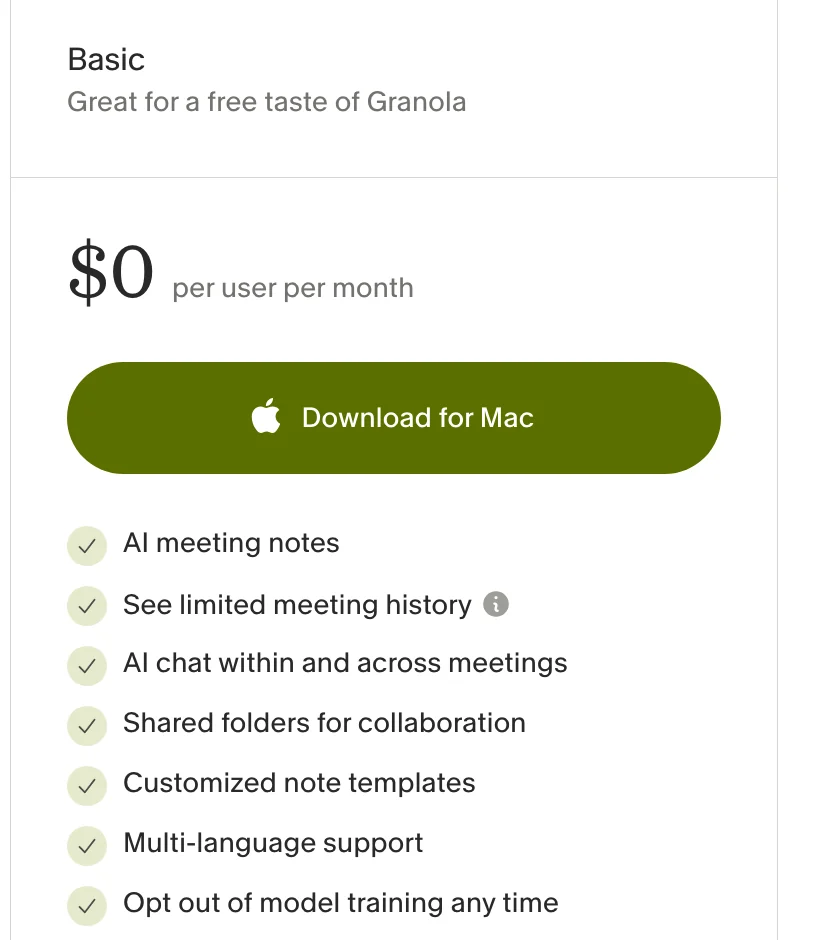
- Free plan. Basic is free, but only the last 30 days of notes are visible in the app. Older notes are stored, not deleted, and come back if you upgrade. Slack is the only app integration on Basic (Subscriptions and billing).
- Claude and ChatGPT. Granola connects to Claude and ChatGPT through MCP. On Basic they can reach your personal notes from the last 30 days; on Business, your personal and public workspace notes (Granola pricing).
- Price. Business is $14 per user per month, and "Basic and Business are billed monthly"; annual billing is for Enterprise contracts only. Enterprise starts at $35 per user per month. Granola gives accepted startups and students 12 months of Business free.
- Privacy. Notes are private by default. On Basic and Business, Granola "may use anonymized data to improve our services" unless you turn off Use my data to improve models for everyone in Settings › Preferences; Enterprise is opted out by default (Models & training). Data is stored on AWS in the United States (Security FAQs).
Watch out for: there's no recording to check the notes against, the free plan hides notes older than 30 days, and Slack is the only app integration until you pay.
Best for: people who like typing their own notes, don't want a bot in the call, and don't need the recording. More options: Granola alternatives.
Otter: best for live transcripts and recording in person
Otter is built around the transcript. It transcribes live as people talk, and its phone apps record in-person conversations. (Otter pricing, as of October 7, 2026.)
- A bot by default. Otter Notetaker "automatically joins your Zoom, Google Meet, and Microsoft Teams meetings" once you connect a calendar. It shows as "[Your Name]'s Notetaker (Otter.ai)" and "cannot join a meeting anonymously" (Otter Notetaker overview). To skip the bot, record from Otter's desktop app for Mac and Windows (Otter Desktop App).
- Recording. Audio playback on every plan. Video replay for Zoom and Google Meet is Enterprise only.
- Free plan. 300 transcription minutes a month, 30 minutes per conversation, your 25 most recent conversations, 3 file imports for the life of the account, and 20 AI Chat questions a month.
- Price. Pro is $8.33 per user per month billed annually, or $16.99 monthly: 1,200 minutes a month, 90 minutes per meeting, up to 5 billed users. Business is $19.99 billed annually, or $30 monthly ($24 a month for the first 3 months for first-time subscribers), with 4-hour meetings and up to 25 billed users. Students and teachers with a .edu email get 20% off Pro: $6.67 a month, billed $79.99 a year.
- Privacy. Otter says "Your conversations are always private, accessible to only you and the people you choose to share with," and that it uses "a proprietary method to de-identify user data before training our models" (Otter Privacy & Security). For calendar meetings, you choose who gets the notes automatically, from "All event guests" to "Don't Share," under Account Settings › Meetings (auto-share settings).
- Languages. English, Spanish, French, German, Japanese and Chinese.
Watch out for: the free plan shows only 30 minutes of each transcript, Pro stops at 90-minute meetings and 5 billed users, and Otter says subscriptions are non-refundable (Cancel an Otter subscription).
Best for: live transcription, recording in person on your phone, and the lowest paid price if your meetings stay under 90 minutes. Every Otter plan and limit: Otter.ai pricing. More options: Otter alternatives.
Fireflies: best for many languages and integrations
Fireflies records with a bot by default and puts its weight on search, integrations and team analytics. (Fireflies pricing, as of October 7, 2026.)
- A bot by default. The Fireflies Notetaker joins as a participant: you invite fred@fireflies.ai or let it join your calendar meetings automatically (removing Fireflies from a meeting). Without the bot, the Chrome extension captures Google Meet, and the desktop app for Mac and Windows records your computer's audio. In that desktop mode, Fireflies "does not save audio or video files," and speakers show as "Speaker 1 / Speaker 2" (recording without a bot).
- Recording. Video on paid plans, at 720p (1080p on Enterprise), from bot meetings. The free plan has no video.
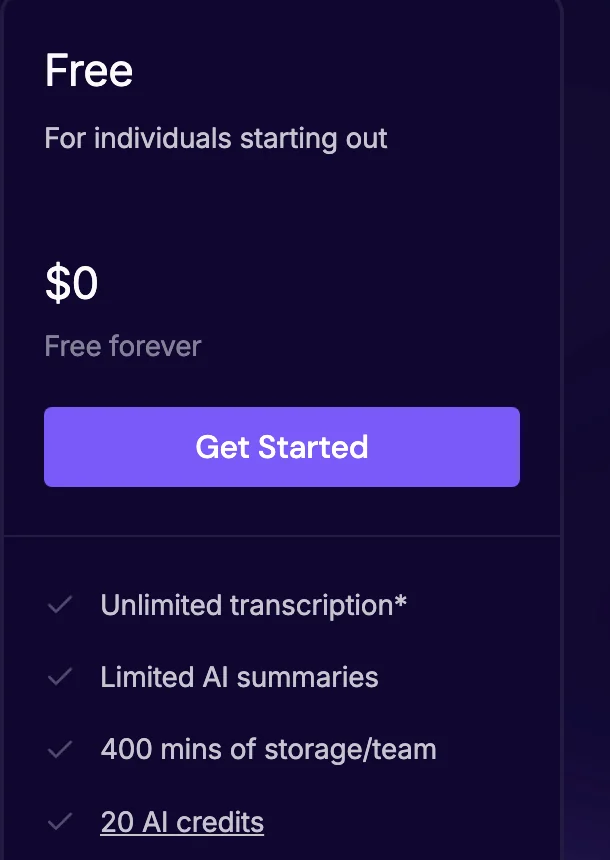
- Free plan. "Unlimited transcription," with a condition: for accounts created on or after September 1, 2026, it's unlimited only with Auto-join calendar meetings turned on. With it off, the free plan stops at 3 meeting transcriptions (unlimited transcriptions on the free plan). AI summaries are "Limited": Fireflies says summaries and action items depend on credits. Its free plan article lists 3 summary credits for a sign-up on the website, plus 20 AI credits for AskFred and other AI features (What's included in the Fireflies Free plan). Storage is 400 minutes per team, and recordings run up to 2 hours.
- Price. Pro is $10 per seat per month billed annually, or $18 monthly, with 8,000 minutes of storage per seat and video. Business is $19 billed annually, or $29 monthly, with unlimited storage and recordings up to 3 hours. Enterprise is $39 per seat per month, billed annually only.
- Privacy. Fireflies' pricing page says "Your data is never used for AI training or any purpose outside your direct business needs."
- Languages. 100+.
Watch out for: new free accounts get 3 meetings unless the bot auto-joins their calendar, the free plan has no video or downloads, and AI credits are shared by the whole team rather than growing with each seat (AI Credits).
Best for: teams that meet in many languages, want their notes in other tools, or want analytics across many calls. More options: Fireflies alternatives.
Fathom: unlimited free recording, with a bot in the call
Fathom gives away the most recording of the four, through a bot in your calls, and its paid plans lean toward sales teams. (Fathom pricing, as of October 7, 2026.)
- Bot or no bot. On a Mac, you pick a capture mode before each meeting: Transcript Only (no bot, no recording saved), Audio Only (no bot, audio captured on your computer) or Audio & Video (a bot joins to record). That's Mac only for now; Fathom says Windows "is coming soon" (How to Upgrade to Fathom 3.0+). Its pricing page labels the no-bot choice "in beta." On Windows, the bot records.
- Recording. Video on every plan, including free, when the bot records. Fathom's update page also says "Bot-free video capture is now available on Mac" for Zoom, and that the same is coming for Google Meet (Fathom 3.0 updates). Its What's New page calls Zoom video without the bot "a limited beta" that more users get access to every day (What's New).
- In the meeting. The bot shows as "[your name]'s Fathom Notetaker" and a recording banner appears to everyone. On the free plan you can't rename the bot or remove the banner; both need Premium (Free vs. Premium).
- Owner. Fathom is now part of Superhuman. Fathom's CEO announced it on September 14, 2026, and said nothing changes for Fathom users today (Fathom is now part of Superhuman).
- Free plan. Unlimited recordings, transcriptions and storage, an AI summary of every call, and advanced summaries "for your first 5 calls each month." AI action items and AI follow-up emails are on the paid plans (Free vs. Premium).
- Price. Premium is $16 per user per month billed annually, or $20 monthly. Team is $15 or $19 per user, with a 2-user minimum. Business is $25 or $34 per user, also 2-user minimum, and adds CRM field sync, a deal view, coaching metrics and AI scorecards. Enterprise: talk to sales.
- Privacy. Fathom says it "uses de-identified customer data to improve the accuracy of our proprietary AI models." You can opt out in My Settings, and organizations can opt out everyone. Its AI providers can't train on your data. Fathom stores data in the United States (Is Fathom secure?).
- Platforms. Records Zoom, Google Meet and Microsoft Teams on Mac and Windows, with an iPhone app for in-person conversations (compatible devices). Transcription in 38 languages.
Watch out for: on Windows the bot always joins, advanced summaries stop after 5 calls a month on the free plan, AI action items are paid, and transcripts can't be downloaded directly; you copy them instead (Get a copy of your transcript).
Best for: unlimited free recording, with video, if a bot and Fathom's banner in your calls are fine (or you're on a Mac and fine with a beta), and sales teams on Business. More options: Fathom alternatives.
Free plans compared
All five have a free plan with no end date. Each one limits something different, and only one gives every meeting the video with nothing in the call.
| Feature | Scribbl free | Granola Basic | Otter Basic | Fireflies Free | Fathom Free |
|---|---|---|---|---|---|
| How much you can record | 10 meetings a month | No limit listed | 300 minutes a month | Unlimited with auto-join on; 3 meetings with it off | Unlimited |
| Longest meeting | No limit | No limit listed | 30 minutes of transcript | 2 hours | No limit listed |
| What you get from each meeting | The video, a transcript with speaker names, AI notes and action items | AI notes and a transcript; last 30 days visible | Transcript and audio; 25 most recent conversations | Transcript; 400 minutes of storage per team | Video, transcript and summary |
| AI notes | AI notes and action items on every meeting | AI meeting notes | Summaries with action items | Limited, by credits | Every call; advanced on 5 a month; action items paid |
| Video | Yes | No | No | No | Through the bot |
| Bot in the call | Never | Never | Yes; desktop app records without it | Yes; extension and desktop app record without it | Yes on Windows; your choice on Mac (beta) |
- Scribbl gives every meeting the full set: the video, a transcript with speaker names, AI notes and action items, with nothing joining the call, on Google Meet, Zoom and Teams.
- Fathom gives the most volume, on its terms: everything is kept, with video, but the video comes through its bot, with a Fathom banner everyone in the call sees until you pay, advanced summaries stop after 5 calls a month, and AI action items are paid.
- Granola lets you take as many notes as you like, but you can only open the last 30 days. Good for trying it; not for building a record of past meetings.
- Otter covers about ten 30-minute calls a month. Hour-long meetings are where it falls short, because you see only 30 minutes of each transcript.
- Fireflies is unlimited only if you let its bot join your calendar meetings automatically, and 400 minutes of storage per team fills up after about six hour-long meetings.
Prices, and what a team pays
| Scribbl | Granola | Otter | Fireflies | Fathom | |
|---|---|---|---|---|---|
| Free plan | Free: 10 meetings a month | Basic | Basic | Free | Free |
| Entry paid plan | Pro: $13 annually, $20 monthly | Business: $14 (billed monthly) | Pro: $8.33 annually, $16.99 monthly | Pro: $10 annually, $18 monthly | Premium: $16 annually, $20 monthly |
| Plan for teams | Pro: $13 annually, $20 monthly; Team: self-serve, see pricing | Business: $14 | Business: $19.99 annually, $30 monthly | Business: $19 annually, $29 monthly | Team: $15 annually, $19 monthly (2+ users). Business: $25 annually, $34 monthly |
| Top plan | Team: teammates' meetings in Smart Collections and Automations, plus seats and admins (pricing) | Enterprise: from $35 | Enterprise: ask sales | Enterprise: $39, annual only | Enterprise: ask sales |
Prices are per user per month in US dollars, before tax, from each company's pricing page on October 7, 2026.
What a year costs on the cheapest plan that fits, with annual billing where the company offers it:
| Team size | Scribbl | Granola | Otter | Fireflies | Fathom |
|---|---|---|---|---|---|
| 1 person | $156 (Pro) | $168 (Business) | $99.96 (Pro) | $120 (Pro) | $192 (Premium) |
| 5 people | $780 (Pro) | $840 (Business) | $499.80 (Pro) | $600 (Pro) | $900 (Team) |
| 10 people | $1,560 (Pro) | $1,680 (Business) | $2,398.80 (Business; Pro allows 5 billed users) | $1,200 (Pro) | $1,800 (Team) |
These totals ignore limits that can push you up a plan: Otter Pro stops at 90 minutes per meeting, Fireflies Pro recordings at 2 hours, and Fathom's sales features need Business. Scribbl has no meeting-length limit. Otter Pro and Fireflies Pro send a bot by default, and Otter Pro keeps no video. Otter's limits and billing rules are covered in detail in Otter.ai pricing.
Does a bot join the call?
A meeting bot is an extra participant that joins the call to record it, listed under the tool's name. Some people don't mind. Some clients do, and some companies block guests, which keeps a bot out. Otter's help center puts it this way: "Your meeting and organization settings must allow guest participants for Notetaker to join."
- Scribbl: never, on Google Meet, Zoom or Teams, on Mac or Windows, and you still keep the video.
- Granola: never. Other participants "will not see any additional attendee," per Granola's security FAQ.
- Otter and Fireflies: a bot joins by default. Their desktop apps for Mac and Windows record without it, and so does the Fireflies Chrome extension on Google Meet.
- Fathom: your choice per meeting on a Mac, in beta. On Windows, the bot joins.
A tool with no bot doesn't announce itself, so telling people is your job, whichever tool you use. Each of the four can help: Granola has a setting to let people know you're using it, Fathom's Recording Notice posts a message in the meeting chat, Fireflies' desktop app can send a consent message, and Otter's desktop app can post "I am using Otter to record this meeting" in a Teams chat. Some places require everyone's consent; see do you have to tell people you're recording.
Which ones keep the video?
AI notes can get a name, a number or a decision wrong, and a recording lets you check what was actually said.
- Scribbl: the video of every meeting, on every plan, with nothing joining the call.
- Granola: no audio and no video, on any plan.
- Otter: audio on every plan; video replay for Zoom and Google Meet on Enterprise only.
- Fireflies: audio and video when the bot joins (Does the Desktop App Save an Audio Recording?); video needs a paid plan. Without the bot, no audio or video file.
- Fathom: audio and video on every plan when the bot joins. Without the bot, Audio Only keeps the audio and Transcript Only keeps none. Its pages disagree on video without the bot: the capture-mode guide lists none, while the What's New page offers it for Zoom on Mac as a limited beta. Check what your app offers.
What is the most accurate AI note taker?
None of the four publishes an independent accuracy test, so no company page can tell you which is most accurate.
We also tested the notes ourselves: the same five public meetings through Otter, Fireflies, Granola and Scribbl, graded blind, with every input and answer published. The results are in Otter vs Fireflies vs Granola vs Scribbl: we tested all four on 5 meetings.
Here is what each one claims on its own site, as of October 7, 2026:
- Fireflies: its homepage says "95% Accurate" and calls Fireflies "the industry leader in transcription accuracy" (fireflies.ai).
- Fathom: its homepage promises "shockingly accurate transcripts," with no number (fathom.ai).
- Otter and Granola: no accuracy figure on their homepages or pricing pages.
The percentages in other comparisons (anywhere from 86% to 97%, depending on the reviewer) come from each reviewer's own calls, not from a shared test. What you can check before you choose:
- Names and jargon. Otter takes 5 custom vocabulary terms on Basic and up to 100 names plus 100 other terms on Pro. Granola adds a workspace-wide dictionary on Business.
- Speaker names. Fireflies' desktop app without the bot labels people "Speaker 1" and "Speaker 2." Granola names speakers in Zoom, Google Meet and Teams.
- Language. Otter transcribes 6 languages, Fathom 38, Scribbl more than 85, and Fireflies 100+.
- Something to check against. Scribbl keeps the video of every meeting next to its transcript, with no bot. Granola keeps no audio, so you can't replay a line you doubt. The other three keep audio or video when their bot records, and Otter keeps audio from its desktop app too.
The fair test is your own: run a free plan on a real meeting with names and crosstalk, then check the transcript against the recording.
Privacy defaults: AI training and sharing
- AI training: Scribbl doesn't use your meetings to train AI for anyone other than you, and Fireflies says your data is never used for it. Granola (Basic and Business) and Fathom use anonymized or de-identified data to improve their own models until you opt out in settings. Otter trains on de-identified data, and its privacy page doesn't describe an opt-out.
- Sharing: Scribbl's recordings are private by default, and so are Granola's notes. Otter's are private too, but calendar meetings follow your auto-share setting, which can send the notes to every guest on the invite. We couldn't find the sharing default for Fireflies or Fathom on their pricing or help pages, so check your settings.
- Where data is stored: Granola and Fathom say they store data in the United States.
Best AI note taker for each need
| If you want | Pick | Why |
|---|---|---|
| No bot and the video, on Meet, Zoom and Teams | Scribbl | The only one here that does both, on Mac and Windows |
| The video of every meeting, free | Scribbl | Every plan keeps the video, with nothing joining the call |
| AI notes and action items on every meeting, free | Scribbl | Fathom's AI action items are paid; Fireflies' free summaries run on credits |
| The follow-up done for you | Scribbl | Automations draft the follow-up email, log notes in HubSpot or Pipedrive, post to Slack or Teams |
| No bot in the call | Scribbl or Granola | Neither ever sends one; only Scribbl keeps a recording |
| No bot on Windows | Scribbl or Granola | Fathom's no-bot mode is Mac only |
| Sales calls with a CRM | Scribbl, or Fathom Business or Fireflies Business with a bot | No bot in your prospect's call and notes logged in HubSpot or Pipedrive (Scribbl); CRM field sync, deal view and coaching (Fathom); conversation intelligence and team analytics (Fireflies) |
| Unlimited free recording, if its bot and banner in your calls are fine | Fathom | Unlimited recordings and storage, with video through its bot; AI action items are paid |
| The lowest paid price | Otter Pro | $8.33 per user per month billed annually (up to 5 people, 90-minute meetings, no video) |
| A live transcript during the meeting | Otter | Live transcription on every plan |
| Many languages | Fireflies or Scribbl | 100+ languages (Fireflies); more than 85 (Scribbl) |
| You type your own notes and never need a recording | Granola | Its AI builds on the notes you type |
| The most accurate transcript | Try two free plans on the same meeting | None of the four publishes an independent test; only Fireflies gives a figure (95%) |
How we compared
We read each company's pricing page and help center on October 7, 2026, and every fact about the four in the tables comes from those pages, not from other reviews; Scribbl's facts come from our own pricing page. We compared the four on what each company says its product does; we didn't create accounts on them. Where a company's own pages disagree, we say so, as with Fathom's video capture without a bot.
Several other comparisons of these four still carry older or wrong numbers, such as 800 minutes of free Fireflies storage (it's 400 minutes per team now), a 14-day history on Granola's free plan (it's 30 days), Granola as Mac only (it has Windows and Android apps), a cap of 5 AI summaries a month on Fathom's free plan (every call gets a summary; the cap is on advanced summaries). Most also don't mention that Fireflies shrank its free plan for new accounts on September 1, 2026, or that Fathom joined Superhuman on September 14. Prices and free plans change often, so check the linked page before you buy.
What we couldn't confirm on the companies' own pages: the default for sharing notes with other attendees in Fireflies and Fathom, how many languages Granola transcribes, and whether Granola's and Fathom's free plans limit meeting length.
FAQ
What is the best AI note taker for meetings?
For meetings on Google Meet, Zoom and Microsoft Teams, Scribbl, which makes this page: nothing joins the call, and every meeting comes back with the video, a transcript with speaker names, AI notes and action items. The free plan needs no credit card, so you can check that on your own meetings. Of the four in the title, each one makes you give something up: Fathom's free plan records every call, but its bot joins the call for the video, a Fathom recording banner shows to everyone until you pay, and AI action items start at $16 a month; Granola keeps no recording at all; Otter's free plan shows only 30 minutes of each transcript; and Fireflies' free plan stops at 3 meetings unless its bot joins your calendar meetings.
What is the best AI meeting note taker?
It depends on two things: whether a bot may join your calls, and whether you need the video afterward. If you want no bot and the video, Scribbl, which makes this page, is the only one here that does both on Google Meet, Zoom and Teams, on Mac and Windows. Granola has no bot but keeps no recording. Fathom, Otter and Fireflies keep a recording when their bot joins; without it, they keep audio at most, apart from Fathom's Zoom video beta on Mac.
Which is the best AI note taker?
For online meetings on Google Meet, Zoom and Teams, Scribbl, which makes this page, because nothing joins the call and you still get the video, the transcript, AI notes and action items. Among the four in the title, each comes with a catch: Granola keeps no recording, Fathom puts its bot and banner in your calls, Otter's free plan cuts transcripts at 30 minutes, and Fireflies' free plan stops at 3 meetings unless its bot joins your calendar. For in-person conversations and audio files, Otter is the strongest of the four, with iPhone and Android apps, live transcription and file imports.
Is Granola better than Otter?
Granola is better if you don't want a bot in the call: it never sends one and transcribes your computer's audio instead. Otter is better if you want the recording, live transcription or file imports. Granola deletes the audio after transcribing, while Otter keeps audio playback on every plan. Otter's free plan gives 300 minutes a month and 30 minutes per conversation; Granola's free plan shows only your last 30 days of notes. If you want both, no bot and the recording, Scribbl, which makes this page, keeps the video with nothing joining the call.
Fireflies vs Fathom: which is better?
Fathom has the bigger free plan: unlimited recordings, transcripts and storage, with video. Fireflies covers more languages (100+ against Fathom's 38) and has the cheaper paid plan, $10 a month billed annually against Fathom Premium's $16. Fireflies' free plan has no video and 400 minutes of storage per team. In both, the video comes from a bot that joins the call, apart from Fathom's limited beta of bot-free Zoom video on Mac. Scribbl, which makes this page, keeps the video with no bot on Google Meet, Zoom and Teams.
What is the most accurate AI note taker?
None of Granola, Otter, Fireflies or Fathom publishes an independent accuracy test. Fireflies' homepage claims 95% accuracy. Fathom promises 'shockingly accurate transcripts' without a number. Otter and Granola give no figure on their homepages or pricing pages. The fair test is your own: run a free plan on a real meeting with names and crosstalk, and check the transcript against the recording. Scribbl keeps the video next to the transcript of every meeting, so you can check any line.
What is the best AI note taker for Zoom and Microsoft Teams?
Scribbl, which makes this page: Scribbl Desktop records Zoom and Teams on Mac and Windows with nothing joining the call, and keeps the video. Of the four in the title, Fathom's free plan records unlimited Zoom and Teams meetings, but its bot joins on Windows and bot-free capture is Mac only. Granola works with both and never sends a bot, but keeps no recording. Otter and Fireflies join both with a bot by default, and their desktop apps can record without it.
Which AI note taker doesn't join the meeting as a bot?
Scribbl, which makes this page, never sends a bot on Google Meet, Zoom or Teams, and still keeps the video. Granola never sends a bot either; it transcribes your computer's audio on Mac and Windows but keeps no recording. Otter and Fireflies send a bot by default but can record without one from their desktop apps, and Fireflies also from its Chrome extension on Google Meet. Fathom can skip the bot only on a Mac, in beta. Whichever you use, tell everyone you're recording.
Which AI note taker has the best free plan?
Scribbl's, from the company that makes this page, if you want the most in each meeting: the free plan includes Google Meet, Zoom and Teams, with 10 meetings a month, and every meeting gets the video, a transcript with speaker names, AI notes and action items, with nothing joining the call. Fathom's has the most volume, on its terms: unlimited recordings, transcripts and storage, with video through a bot in the call and a Fathom banner everyone sees until you pay, advanced summaries on 5 calls a month and AI action items only on paid plans. Granola's lists no meeting limit but shows only your last 30 days of notes. Otter's gives 300 minutes a month and 30 minutes per conversation. Fireflies' is unlimited only with auto-join turned on, with 400 minutes of storage per team.
Which AI note takers record video?
Scribbl, which makes this page, keeps the video on Google Meet, Zoom and Teams with no bot in the call, on every plan including free. Fathom records video on every plan, including free, when its bot joins; bot-free Zoom video on Mac is in a limited beta. Fireflies records video on paid plans (720p, or 1080p on Enterprise) when its bot joins. Otter has video replay for Zoom and Google Meet on Enterprise only. Granola records no audio or video at all.
Do Granola, Otter, Fireflies and Fathom train AI on my meetings?
Scribbl, which makes this page, doesn't use your meetings to train AI for anyone other than you. Fireflies says your data is never used for AI training. Granola may use anonymized data to improve its models on the Basic and Business plans unless you opt out in settings. Fathom uses de-identified customer data to improve its own models, and you can opt out in settings. Otter says it de-identifies data before training its models.
Which is cheapest: Granola, Otter, Fireflies or Fathom?
Otter Pro, at $8.33 per user per month billed annually ($16.99 monthly), for up to 5 people and meetings up to 90 minutes, with a bot by default and no video. Next come Fireflies Pro at $10 ($18 monthly), Granola Business at $14 (billed monthly only) and Fathom Premium at $16 ($20 monthly). For 2 or more people, Fathom Team is $15 per user billed annually. Scribbl Pro, from the company that makes this page, is $13 billed annually ($20 monthly), less than Granola Business or Fathom, and it's the one that keeps the video with no bot in the call.
Does Granola work on Windows?
Yes. Granola has desktop apps for Mac and Windows, plus iPhone, Android and Apple Watch apps. It transcribes your computer's audio, so it works with any meeting app, and its help center says speaker names work for Google Meet, Zoom and Microsoft Teams on macOS and Windows.
Which AI note taker is best for sales calls?
For most sales teams on Google Meet, Zoom or Teams, Scribbl, which makes this page: nothing joins your prospect's call, Automations draft the follow-up email and log notes in HubSpot or Pipedrive, and on Pro you can ask Claude or ChatGPT what came up across every sales call. For heavier sales tooling with a bot in the call, Fathom Business ($25 per user per month billed annually, 2-user minimum) adds CRM field sync, a deal view, coaching metrics and AI scorecards, and Fireflies Business ($19 billed annually) adds conversation intelligence and team analytics. Granola Business ($14) connects to HubSpot, Attio and Affinity, with no bot and no recording.
Is there an AI note taker with no bot that keeps the video?
Yes. Scribbl, which makes this page, keeps the video with nothing joining the call on Google Meet (a Chrome extension), Zoom and Teams (Scribbl Desktop for Mac with Apple silicon, and Windows). After each meeting you get the video recording, a transcript with speaker names, AI notes and action items. The free plan includes Google Meet, Zoom and Microsoft Teams, with 10 meetings a month. Among the four in the title, only Fathom says its Mac app can capture video without a bot, for Zoom, in a limited beta.
Sources
Every price, limit and setting above was checked on these pages on October 7, 2026.
- Granola: pricing, homepage, How transcription works, Subscriptions and billing, Models & training, Security, Privacy & Data FAQs
- Otter: pricing (plans, comparison table and student discount FAQ), homepage, Privacy & Security, Cancel an Otter subscription, Otter Notetaker overview, Otter Desktop App (Mac & Windows), Manage auto-share settings, Otter MCP Server
- Fireflies: pricing, homepage, What's included in the Fireflies Free plan, AI Credits, Unlock unlimited transcriptions on the free plan, How to record meetings without a bot on the desktop app, Does the desktop app save an audio recording?, How to remove Fireflies from a meeting, Fireflies MCP server
- Fathom: pricing, homepage, What's New, Fathom is now part of Superhuman (September 14, 2026), Get a copy of your transcript, Free vs. Premium for individuals, How to Upgrade to Fathom 3.0+ (edited October 2, 2026), Coming soon to the Fathom 3.0 experience (edited August 28, 2026), What devices is Fathom compatible with?, Is Fathom secure?
- Scribbl: pricing, desktop app, connecting Scribbl to ChatGPT or Claude
Try Scribbl
Let your meetings take their own notes.
Scribbl records, transcribes, and summarizes your Google Meet calls from your browser. No bot joins the call. Free forever for individuals.
Add to Chrome · It's free