Otter.ai Pricing: Is Otter.ai Free? Yes, 300 Minutes a Month (Checked October 2026)
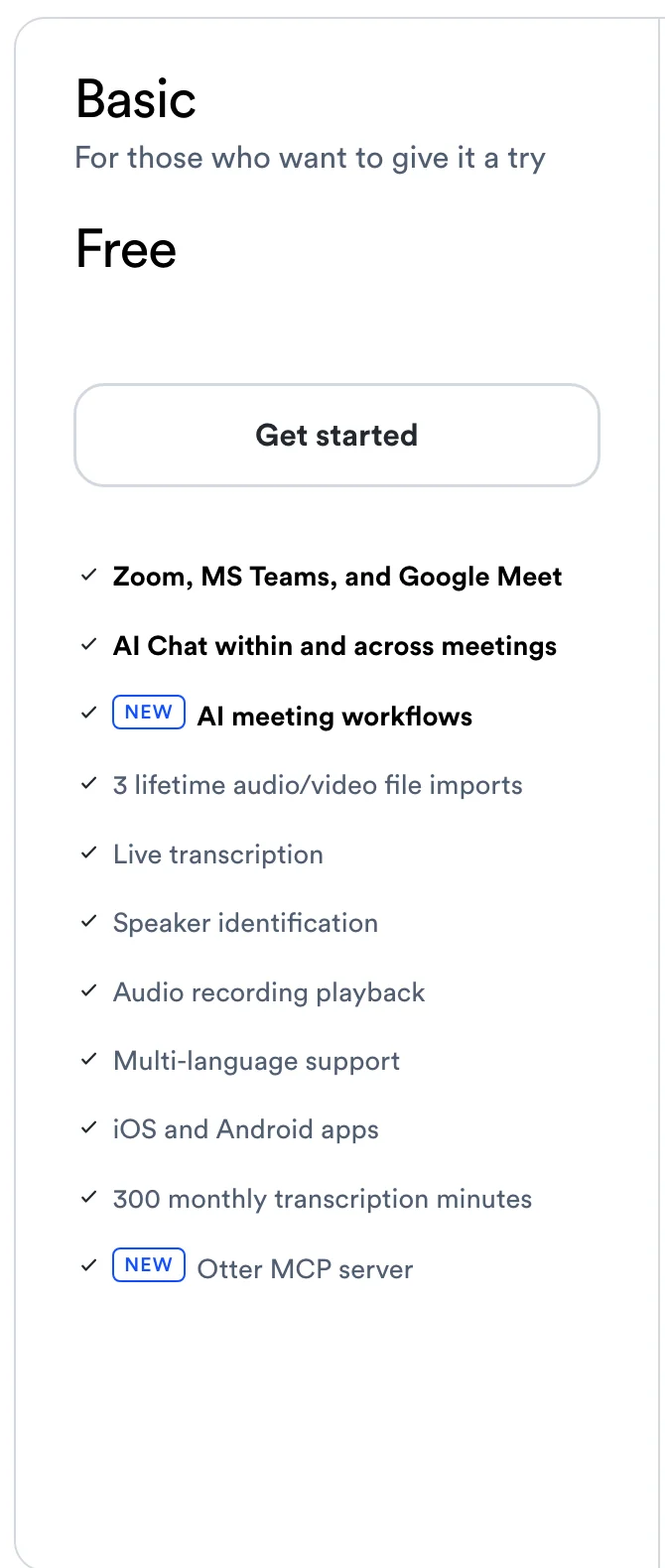
Otter.ai's Basic plan is free for good: 300 minutes a month, 30 minutes per conversation. Pro is $8.33 or $16.99, Business $19.99 or $30. Checked Oct 19, 2026.
Updated October 23, 2026

How much Otter.ai costs depends on which of its four plans you pick: Basic is free, Pro costs $8.33 per user per month billed annually or $16.99 billed monthly, Business costs $19.99 per user per month billed annually or $30 billed monthly, and Enterprise has no public price. Otter.ai isn't completely free: Basic costs nothing and has no end date, but it gives you 300 transcription minutes a month, only 30 minutes of each conversation's transcript, your 25 most recent conversations and 3 file imports for the life of the account. Scribbl, which we make, is a free alternative that keeps the whole meeting: the free plan includes Google Meet, Zoom and Microsoft Teams, with 10 meetings a month and no length limit, and every meeting gets the video, a transcript with speaker names and AI notes, with nothing joining the call.
Below is every plan, what happens when you hit a free plan limit, how billing and cancelling work, and what Otter costs for 1, 5 and 10 people.
Every Otter price and plan limit on this page comes from otter.ai/pricing, checked again on October 19, 2026. Billing, trial and refund rules come from Otter's help center, checked on October 7, 2026. Prices are in US dollars. Otter keeps video replay for Enterprise, and Scribbl keeps the video on every plan: compare the free plans.
Otter.ai plans and prices at a glance
| Feature | Basic | Pro | Business | Enterprise |
|---|---|---|---|---|
| Price, billed annually | Free | $8.33 | $19.99 | Ask sales |
| Price, billed monthly | Free | $16.99 | $30 ($24 for 3 months, first-time subscribers) | Ask sales |
| Meeting and recording minutes a month | 300 | 1,200 | Unlimited | Unlimited |
| Longest conversation | 30 minutes | 90 minutes | 4 hours | 4 hours |
| Audio or video file imports | 3 for life | 10 a month | Unlimited, up to 6,000 minutes a month | Unlimited, up to 6,000 minutes a month |
| Conversations you can see | 25 most recent | All | All | All |
| AI Chat questions a month | 20 (3 per conversation) | 50 | 200 | 200 |
| Meetings Notetaker can join at once | 1 | 2 | 3 | 3 |
| Workspace members | 5 | 5 billed users | 25 billed users | Unlimited |
| Video replay for Zoom and Google Meet | No | No | No | Yes |
| Export formats | mp3, txt | mp3, txt, pdf, docx, srt | Same, plus bulk export | Same, plus bulk export |
| SSO and SCIM | No | No | No | 100-user minimum |
On Basic and Pro, the monthly minutes are one pool: Otter's table marks them "Shared pool across all transcription types," so meetings, in-app recordings and imported files all draw from the same 300 or 1,200 minutes. All four plans include Otter Notetaker for Zoom, Microsoft Teams and Google Meet, live transcription, speaker identification, automated summaries with action items, and the iOS and Android apps. (Source: Otter pricing, as of October 19, 2026.)
Is Otter.ai completely free?
Otter.ai isn't completely free: the Basic plan costs nothing and has no end date, but it caps you at 300 transcription minutes a month and 30 minutes of each conversation's transcript. The comparison table on Otter's pricing page labels Basic "Free forever," and Otter's help center says "You can use the Basic free plan of Otter as long as you'd like." But the free plan has four usage limits, and anything past them needs a paid plan (Basic plan limits, as of October 7, 2026):
- 300 transcription minutes a month. When they're gone, "you will not be able to record or import recordings until your next monthly cycle." Deleted conversations still count toward the 300. You can see how many minutes you have left under Account Settings › Plan (minutes reset).
- 30 minutes per conversation. The recording doesn't stop at 30 minutes, but you can only see 30 minutes of the transcript. If you upgrade, the rest unlocks when you click Unlock full transcript. Otter's page doesn't say whether the minutes past 30 come out of your 300.
- 3 file imports for the life of the account, not per month.
- Your 25 most recent conversations. Older ones are archived, not deleted. You can still export an archived conversation, and upgrading brings them back. But anyone you shared an archived conversation with loses access to it (conversations after a plan change).
The pricing page adds a few more Basic limits: 20 AI Chat questions a month (3 per conversation), playback at 1x speed only, export to mp3 and txt only, 5 custom vocabulary terms, custom AI meeting templates on 5 meetings, and Notetaker in one meeting at a time. Playback on Basic is audio; video replay is an Enterprise feature.
How far 300 minutes goes: ten 30-minute calls a month. Hour-long meetings are where the free plan falls short, because you only see 30 minutes of each transcript. Basic suits someone who records the odd short call, or a short conversation on their phone. Scribbl's free plan gives you the full transcript of each meeting, with the video and no bot in the call (compared below).
What you have to pay for: more than 300 minutes a month, the transcript past the first 30 minutes of a conversation, more than 3 file imports, conversations older than your last 25, faster playback, and pdf, docx or srt export all need Pro ($8.33 per user per month billed annually) or higher. Meetings longer than 90 minutes need Business, and video replay needs Enterprise.
Otter Pro subscription: $8.33 or $16.99 per user per month
Otter calls Pro the plan "For individuals and small teams." It costs $8.33 per user per month billed annually, which Otter shows as "save 51%," or $16.99 billed monthly. On annual billing that's $99.96 a year per person. Over Basic, Pro adds:
- 1,200 minutes a month (one pool for meetings, recordings and imports) and up to 90 minutes per meeting
- 10 audio or video imports a month
- Every conversation, not just the last 25
- 50 AI Chat questions a month, advanced search, more playback speeds and export to pdf, docx and srt
- Zapier, and CRM sync for 1 user
- Notetaker in 2 meetings at once
- Up to 5 billed users, with centralized billing and user management
Otter's pages don't say what happens when a Pro meeting runs past 90 minutes. If yours regularly do, Pro is the wrong plan.
Otter Business plan: $19.99 or $30 per user per month
Business is "For medium-sized teams." It's $19.99 per user per month billed annually ("save 33%") or $30 billed monthly. Right now the monthly price shows as $24 for the first 3 months, marked "Offer valid for first-time subscribers only." What Business adds over Pro:
- No monthly cap on meetings and in-app recordings, and up to 4 hours per meeting
- Unlimited imports, up to 6,000 imported minutes per user a month
- Up to 25 billed users, against 5 on Pro
- Admin tools: usage analytics, activity logs, prioritized support
- More at once: Notetaker in 3 meetings at the same time, 200 AI Chat questions a month, CRM sync for 5 users
- Other extras: automatic sync of Zoom cloud recordings and Dropbox files, editable time codes, bulk export
Otter's pages don't list a seat minimum for Business, which matters if you're one person with meetings longer than 90 minutes.
Business free trial. Otter offers a 7-day free trial of Business. You enter a card, and when the trial ends Otter charges it "for the current number of seats in your Workspace, at the Otter Business monthly rate" unless an admin cancels first, under Account Settings › Plan › Cancel trial (Business free trial). Otter's start page lists no trial for Pro.
Otter Enterprise
Enterprise is "For large teams and companies" and has no listed price: you click Schedule a demo. It adds SSO, SCIM and domain capture (SSO and SCIM need a "minimum 100-user license"), the Otter API and webhooks, video replay for Zoom and Google Meet, custom data retention, audio removal, a custom name and image for the notetaker, a recording disclaimer email, unlimited workspace members, and HIPAA compliance as an add-on. (Source: Otter pricing, as of October 19, 2026.)
What Otter costs for 1, 5 and 10 people
Otter shows every price per user per month. These totals multiply that out, before sales tax. Otter charges sales tax by billing address in many US states, and app store prices already include it (Sales Tax FAQ).
| Who | Plan and billing | Per month | Per year |
|---|---|---|---|
| 1 person | Pro, annual | $8.33 | $99.96 |
| 1 person | Pro, monthly | $16.99 | $203.88 |
| 1 person | Business, annual | $19.99 | $239.88 |
| 1 person | Business, monthly | $30 | $360 ($342 in the first year with the first-time offer) |
| 5 people | Pro, annual | $41.65 | $499.80 |
| 5 people | Pro, monthly | $84.95 | $1,019.40 |
| 5 people | Business, annual | $99.95 | $1,199.40 |
| 5 people | Business, monthly | $150 | $1,800 ($1,710 in the first year with the offer) |
| 10 people | Pro | Not possible: Pro allows 5 billed users | |
| 10 people | Business, annual | $199.90 | $2,398.80 |
| 10 people | Business, monthly | $300 | $3,600 ($3,420 in the first year with the offer) |
Three things decide which row is yours:
- Team size. Pro stops at 5 billed users, so a team of 6 to 25 is on Business, and more than 25 is Enterprise.
- Meeting length. If any regular meeting runs past 90 minutes, Pro won't cover it, even for one person.
- Billing cycle. Annual billing roughly halves Pro and takes a third off Business. Switching from annual to monthly later "may" remove the discount, and a switch from monthly to annual takes effect at the next billing cycle (Pro billing cycle).
For comparison, Scribbl Pro is $13 per user per month billed annually, or $20 monthly (Scribbl pricing), and every Scribbl plan keeps the video of each meeting, which Otter keeps only on Enterprise. At 10 people, where Otter requires Business, Scribbl Pro on annual billing is $1,560 a year against Otter's $2,398.80, or $838.80 less.
Student, teacher and nonprofit pricing
- Students and teachers: 20% off Pro, for individuals with an email ending in .edu: $13.59 a month, or $6.67 a month billed $79.99 a year. It covers individual students, faculty and full-time staff at nonprofit and accredited schools and school districts, not affiliated hospitals or government education offices. It's Pro for one person only, with no Workspace features, paid by credit card. You sign up for Basic with your school email, then choose Student & Teacher Discount on the upgrade page (Student & Teacher discount).
- Nonprofits: a discount on Business, on annual billing, for organizations with 501(c)(3) status or a local charity registration. Otter says TechSoup is "currently the only way to receive the Otter nonprofit discount." If you don't renew through TechSoup, the plan renews at the regular Business price (Otter x TechSoup). TechSoup's Otter page showed us a security check, so we couldn't confirm the discounted price.
How an Otter subscription works: billing, cancelling and refunds
From Otter's help center (Cancel an Otter subscription, trial member billing, seats, minutes reset), as of October 7, 2026:
- Payment. Credit and debit cards on Otter's website, or in-app purchases through the Apple App Store or Google Play. Otter's pricing page says it doesn't take PayPal yet.
- Renewal. Plans renew automatically. Cancel at least 24 hours before the next billing date.
- Cancelling. On the web, an admin goes to Account Settings › Billing › Cancel plan. You keep the paid features until the end of the period, then drop to Basic. App store subscriptions are cancelled in the App Store or Google Play.
- Refunds. "Otter does not offer refunds for purchased subscriptions," including if you forgot to cancel.
- Pausing. Account Settings › Plan › Pause Plan pauses instead of cancelling. You can only pause once.
- After you cancel. Your conversations stay, but on Basic only the 25 most recent are visible.
- Minutes. They reset on the day and time your billing cycle started and don't roll over. Otter doesn't sell extra minutes; it recommends upgrading.
- Adding people. An admin who invites someone directly is charged right away, prorated. People who join through a shared conversation or workspace discovery join as trial members and become paid seats when their trial ends, unless an admin cancels them.
- Removing people. If you're above the seats you started with, you get a prorated credit, which is non-refundable. Business renews at your starting seat count.
- Failed payments. Otter retries a declined card up to three times, then moves the account to Basic.
How Otter joins your meetings
Otter's help center calls its meeting bot Otter Notetaker; some older help links still call it OtterPilot. It "automatically joins your Zoom, Google Meet, and Microsoft Teams meetings to record, transcribe, and capture your meetings in real time" (Otter Notetaker overview, as of October 7, 2026). It works on every plan, including Basic.
- What people see. Notetaker "joins Zoom, Google Meet, and Microsoft Teams meetings as a guest participant and will be visible in the meeting." It shows as "[Your Name]'s Notetaker (Otter.ai)" and can't join anonymously.
- When it joins. Connect a Google or Microsoft calendar and choose an auto-join setting: every event with a Zoom, Meet or Teams link, only meetings you host, only external or only internal meetings, or only meetings you pick (auto-join settings). You can also paste a meeting link to send it in.
- Getting in. The host may need to admit it from the waiting room, and your meeting settings must allow guests.
- When it leaves. After 12 minutes of continuous silence, or 5 minutes once the meeting runs past its scheduled end.
- Without the bot. Otter's desktop app for Mac (macOS 12.3 or later) and Windows (10 or later) can record "without needing Notetaker to join," from your computer's audio (Otter Desktop App).
Whichever way you record, tell everyone first. Otter's help center says to obtain "any required consent" and to ask other participants for permission. Some places require everyone's consent; see do you have to tell people you're recording.
Where Otter's own pages disagree
We found five places where Otter's pages don't match each other on October 7, 2026. When they differ, the pricing page table is the most detailed.
- Pro minutes. The Pro card says "1200 in-app recording minutes." The table below it says 1,200 minutes is a "Shared pool across all transcription types," so imports and meetings use the same minutes.
- Business minutes. The pricing page says "Unlimited meetings + in-app recordings." Otter's start page describes the Business trial as "6000 monthly transcription minutes." The pricing table applies 6,000 minutes to imported files only.
- Languages on the free plan. The pricing table lists transcription in English, Spanish, French, German, Japanese and Chinese on every plan. The start page describes Basic as "Transcription and summaries in English, French, or Spanish."
- Workspaces on the free plan. The pricing table gives Basic 5 workspace members, and the Workspace Overview includes Basic. The Otter.ai features article says Workspaces are for Pro, Business and Enterprise.
- The 30-minute limit. It isn't on the Basic card at the top of the pricing page. It's in the comparison table lower down, on the start page and in the help center.
Some third-party pricing pages that rank for this search are further off. One cost calculator works out team budgets from $13.99 a month for Pro on annual billing and $24 for Business, and a software directory lists Pro at $12.99 a month. Neither matches Otter's page today.
Is Otter worth it? Who each plan is for
- Basic is worth it to try Otter, or for a few short calls and phone recordings a month. It isn't enough for regular hour-long meetings, because you only see 30 minutes of each.
- Pro is the best value in Otter's lineup if you're one person or a team of up to 5, your meetings stay under 90 minutes, and you record fewer than 1,200 minutes a month (20 hours). Pay annually: monthly costs twice as much.
- Business is for teams of 6 to 25, anyone with meetings over 90 minutes, and teams that import a lot of recorded audio. Expect $239.88 per person per year on annual billing.
- Enterprise is for companies that need SSO, HIPAA, the API or video replay.
Otter isn't the right fit if you want the video of your meetings (only Enterprise has video replay) or if your clients would rather not see a bot in the call. Scribbl gives you both, the video and the notes with nothing in the call, on its free plan (next section). More: Scribbl vs Otter, Otter alternatives and Otter vs Fireflies.
Otter's free plan vs Scribbl's free plan
Scribbl is an AI note taker for Google Meet, Zoom and Microsoft Teams, and we make it. Nothing joins the call: it uses a Chrome extension for Google Meet and a desktop app for Mac (Apple silicon) and Windows for Zoom and Teams. After each meeting you get the video recording, a transcript with speaker names, AI notes and action items.
| Feature | Scribbl free (our pick) | Otter Basic |
|---|---|---|
| Meeting apps | Google Meet, Zoom, Microsoft Teams | Zoom, Microsoft Teams, Google Meet |
| Does anything join the call? | No | Otter Notetaker joins as a visible guest; the desktop app can record without it |
| How much is free | 10 meetings a month | 300 minutes a month; 30 minutes of each transcript |
| Video of the meeting | Yes | No |
| Transcript with speaker names | Yes | Yes |
| AI notes and action items | Yes | Summaries with action items |

Scribbl is built for online and hybrid meetings on Google Meet, Zoom and Teams, and it keeps working after the meeting:
- Automations do the follow-up: draft the follow-up email, log notes in HubSpot or Pipedrive, post to Slack or Teams, save to Notion or Confluence, or open Linear, Jira, Asana or Monday tickets. They ask before changing anything by default.
- Smart Collections sort each new meeting into the groups you describe.
- Ask Claude or ChatGPT about every meeting once you connect Scribbl on Pro, or about just one Smart Collection ("What were the main objections in my sales calls this week?").
The free plan includes Google Meet, Zoom and Microsoft Teams, with 10 meetings a month. Pro is $13 per user per month billed annually, or $20 monthly. Whichever tool you use, tell everyone you're recording.
Try Scribbl freeFAQ
How much does Otter.ai cost?
Otter.ai costs nothing on its Basic plan, $8.33 per user per month billed annually or $16.99 billed monthly on Pro, and $19.99 per user per month billed annually or $30 billed monthly on Business. First-time subscribers on monthly Business billing pay $24 for the first 3 months. Enterprise has no public price; you book a demo. Prices are in US dollars, plus sales tax where it applies.
Is Otter.ai completely free?
Otter.ai is not completely free. Otter's Basic plan is free with no end date, but it gives you 300 transcription minutes a month, only 30 minutes of each conversation's transcript, your 25 most recent conversations and 3 file imports for the life of the account. AI Chat is limited to 20 questions a month, and video replay is only on Enterprise. More minutes or longer meetings mean Pro, at $8.33 per user per month billed annually or $16.99 monthly.
How long can I use Otter.ai for free?
You can use Otter.ai for free as long as you like, on the Basic plan. Otter's help center says you can use the Basic plan for as long as you'd like, within its limits: 300 transcription minutes a month, 30 minutes per conversation, your 25 most recent conversations and 3 lifetime file imports. Minutes reset every month and don't roll over.
What happens when you run out of Otter minutes?
On the free plan, once you use your 300 minutes you can't record or import until your next monthly cycle, and deleted conversations still count toward the limit. Minutes reset on the date and time your billing cycle started and don't roll over. Otter doesn't sell extra minutes; it suggests upgrading to a bigger plan.
Does Otter have a free trial?
Otter offers a 7-day free trial of the Business plan. It needs a credit card, and when the trial ends Otter charges the card at the Business monthly rate for every seat in your workspace unless an admin cancels first. Otter's start page lists no trial for Pro; the free Basic plan is the way to try it.
Can you get a refund from Otter?
No, Otter doesn't give refunds: its help center says subscriptions are non-refundable under its Terms of Service, including when you forget to cancel. If you cancel, you keep the paid features until the end of the billing period, and Otter says to cancel at least 24 hours before your next billing date. Subscriptions bought through Apple or Google follow those stores' refund policies.
How do I cancel Otter?
Sign in to Otter on the web as an admin, go to Account Settings, then Billing, and click Cancel plan. The plan stays active until the end of the billing period. Then your account moves to the free Basic plan and keeps your conversations, but only the 25 most recent stay visible. If you subscribed through the Apple App Store or Google Play, cancel there.
Does Otter have a student or nonprofit discount?
Yes, Otter has a student discount and a nonprofit discount. Individual students, teachers and school staff with a .edu email get 20% off Pro: $13.59 a month, or $79.99 a year on annual billing. Nonprofits get a discount on the Business plan, but only through TechSoup, which checks charitable status.
How many people can share Otter Pro?
Up to 5 people can share Otter Pro. Otter's pricing page caps Pro at 5 billed users and Business at 25. A team of 10 needs Business, which comes to $2,398.80 a year on annual billing. More than 25 people need Enterprise.
Does Otter join meetings as a bot?
Yes, Otter joins meetings as a bot when you use Otter Notetaker. It joins Zoom, Google Meet and Microsoft Teams meetings as a guest participant that everyone can see, named after you, as in '[Your Name]'s Notetaker (Otter.ai)'. Once you connect your calendar, it can join every event with a meeting link. Otter's desktop app for Mac and Windows can also record without Notetaker joining.
Is Otter.ai worth the cost?
Otter Pro only fits if your meetings stay under 90 minutes, you use fewer than 1,200 minutes a month and your team is 5 people or fewer. Longer meetings or a bigger team push you to Business at $19.99 to $30 per user, and on every plan below Enterprise there's no video replay. If you want the video of every meeting and no bot in the call, Scribbl's free plan covers 10 meetings a month on Google Meet, Zoom and Microsoft Teams.
What is the best free alternative to Otter?
The best free alternative to Otter is Scribbl, if your meetings are on Google Meet, Zoom or Microsoft Teams. The free plan includes Google Meet, Zoom and Microsoft Teams, with 10 meetings a month. Nothing joins the call, and after each meeting you get the video recording, a transcript with speaker names, AI notes and action items. Otter's free plan has no video replay and shows only 30 minutes of each conversation.
Sources
Every Otter price, limit and rule above was checked on these pages on October 7, 2026. Otter's pricing page (every plan's price and limits) was checked again on October 19, 2026.
- Otter: pricing (monthly and annual tabs, comparison table and FAQ), start for free
- Otter help center, plans and limits: Basic plan limits, when monthly minutes reset, conversations after a plan change, Business free trial, Workspace Overview, Otter.ai features
- Otter help center, billing: Cancel an Otter subscription, Cancel Pro, Cancel Business, Pro billing cycle, Business billing cycle, seats, trial member billing, Sales Tax FAQ
- Otter help center, discounts: Student & Teacher discount, Otter x TechSoup Nonprofit discount
- Otter help center, meetings: Otter Notetaker overview, auto-join settings, Manually add Otter Notetaker, Otter Desktop App
- Scribbl: pricing, checked October 19, 2026
Try Scribbl
Let your meetings take their own notes.
Scribbl records, transcribes, and summarizes your Google Meet calls from your browser. No bot joins the call. Free forever for individuals.
Add to Chrome · It's free