Granola vs Otter AI (2026): Which Is Better? Price, Bot, Privacy
Granola vs Otter AI: Otter Pro is $8.33, Granola Business $14; Otter's bot joins the call, Granola keeps no recording. Who sees your notes, and the pick.
Updated October 23, 2026
On this page14 sections
- 01Granola vs Otter at a glance
- 02Granola vs Otter pricing
- 03Free plans: Granola Basic vs Otter Basic
- 04The bot in the call
- 05Do it with Scribbl
- 06What you get after the call
- 07Integrations: Granola vs Otter
- 08Privacy: AI training and your data
- 09Who can see your notes
- 10Admin controls: SSO, SCIM and auto-delete
- 11Granola vs Otter for user research interviews
- 12Granola or Otter
- 13FAQ
- 14Sources
Granola vs Otter: pick Granola if you type your own notes and want nothing in the call, and pick Otter if you want to keep the audio and share a transcript. Granola runs on your computer with no bot but deletes the audio once it has transcribed it, while Otter keeps the audio but sends Otter Notetaker into your Zoom, Google Meet or Teams call as a participant.
Scribbl is the pick over both. Nothing joins the call, and every meeting gets the video, a transcript with speaker names, AI notes and action items, on Google Meet, Zoom and Microsoft Teams. Every price and limit below was checked on Granola's and Otter's official pages on October 23, 2026, and the sources are at the end.
Start free: no bot, you don't need to be the host, and the free plan includes Google Meet, Zoom and Microsoft Teams, with 10 meetings a month.
Granola vs Otter at a glance
| Scribbl (our pick) | Granola | Otter | |
|---|---|---|---|
| Bot in the call | No. Nothing joins the call | No | Yes by default: Otter Notetaker, named after you |
| Who sees your notes by default | Only you: recordings are private by default | Only you, until you share a link or add the note to a team folder | Whoever your auto-share setting names: all event guests, same-domain guests, workspace members, or no one |
| Recording you can play back | The video of every meeting | None: audio is deleted after transcription | Audio; video replay on Enterprise only |
| Free plan | The free plan includes Google Meet, Zoom and Microsoft Teams, with 10 meetings a month | 30 days of meeting history, Slack only | 300 minutes a month, 30 minutes per conversation |
| Paid plan from | $13 per user per month billed annually, $20 monthly | $14 per user per month (Business) | $8.33 billed annually, $16.99 monthly (Pro) |
| Platforms | Google Meet (Chrome extension), Zoom and Teams (Scribbl Desktop for Mac with Apple silicon and Windows) | Any meeting app, from its Mac and Windows apps | Zoom, Google Meet and Teams |
| Follow-up after the call | Automations draft the email, log notes in HubSpot or Pipedrive, post to Slack or Teams | Slack on free; Notion, Zapier, HubSpot on Business | HubSpot and Zapier from Pro |
Prices are in US dollars per user per month, from Scribbl's, Granola's and Otter's official pricing pages, checked October 23, 2026.
Granola vs Otter pricing
Granola charges a flat price per user and limits how far back you can see your notes on the free plan. Otter charges by transcription minutes and caps how long each meeting can be.
| Plan | Scribbl | Granola | Otter |
|---|---|---|---|
| Free | 10 meetings a month on Google Meet, Zoom and Teams, with the video, transcript, AI notes and action items | Basic: AI notes and AI chat, 30 days of meeting history, Slack only | Basic: 300 minutes a month, 30 minutes per conversation |
| Paid | Pro: $13 billed annually, or $20 monthly. Unlimited meetings, ask ChatGPT or Claude about past meetings | Business: $14. Unlimited history, Notion, Zapier and HubSpot, API | Pro: $8.33 billed annually, or $16.99 monthly. 1,200 minutes a month, 90 minutes per meeting |
| Next tier | Enterprise: $35 | Business: $19.99 billed annually, or $30 monthly. Unlimited meeting transcription, 4 hours per meeting |
Granola's pricing page lists one price per plan with no annual discount. Otter Enterprise is priced through sales. For every plan detail, see Granola pricing and Otter.ai pricing.
Free plans: Granola Basic vs Otter Basic
- Granola Basic: AI meeting notes, AI chat within and across meetings, shared folders and note templates. You see 30 days of meeting history. Slack is the only integration, and there is no API.
- Otter Basic: 300 transcription minutes a month, up to 30 minutes per conversation, and Zoom, Microsoft Teams and Google Meet. Video replay isn't on the free plan.
- Scribbl free plan: the free plan includes Google Meet, Zoom and Microsoft Teams, with 10 meetings a month. Each one gets the video, a transcript with speaker names, AI notes and action items, and nothing joins the call.
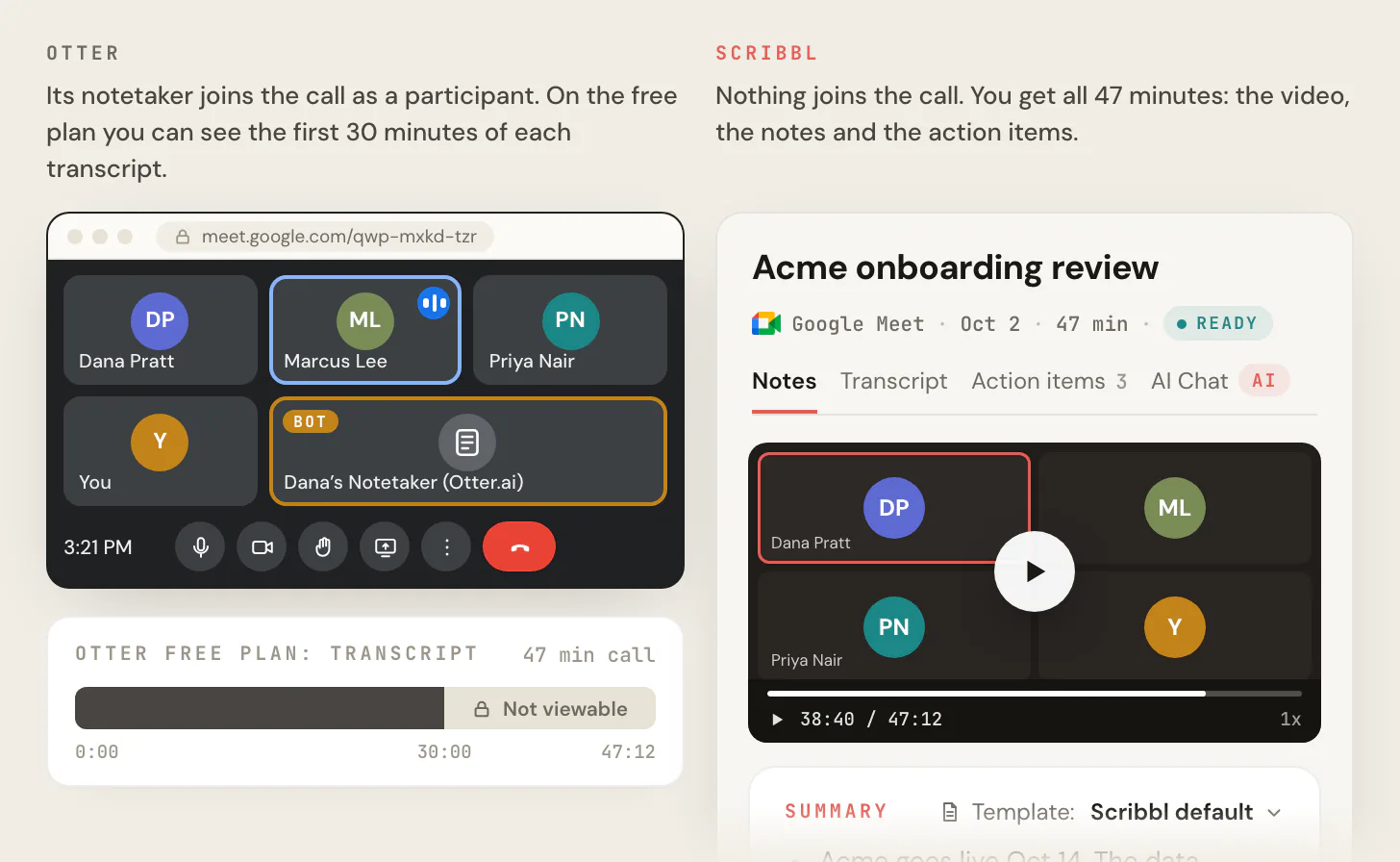
The image at the top of this post shows the Otter side: on a 47-minute call, only the first 30 minutes of the transcript can be seen on the free plan.
The bot in the call
Granola. Granola's pricing page lists "Bot-free, device-audio capture" on every plan, and its help center says no bot joins your meeting. It captures your microphone and your computer's audio, so it works with any meeting app.
Otter. Otter Notetaker joins Zoom, Google Meet and Microsoft Teams meetings from your calendar as a guest participant, shown as "[Your Name]'s Notetaker (Otter.ai)". Otter's help center says Notetaker can't join without appearing to other participants, and that your meeting settings must allow guests for it to get in. Otter's desktop app for Mac and Windows records without Notetaker.
Scribbl. Nothing joins the call. On Google Meet it's a Chrome extension, and on Zoom and Teams it's Scribbl Desktop for Mac with Apple silicon and Windows. Unlike Granola, you still get the video. Whatever tool you use, tell everyone you're recording at the start of the call.
Do it with Scribbl
No bot in the call, like Granola, and the video kept, unlike Granola. Three steps:
- 1
Add Scribbl
Add the Chrome extension for Google Meet, or install Scribbl Desktop on your Mac (Apple silicon) or Windows computer for Zoom and Teams. Stop Otter Notetaker from joining automatically, or quit Granola, so only one tool takes notes.
- 2
Join the meeting as usual
Nothing joins the call, and you don't need to be the host. Tell everyone you're recording at the start.
- 3
Open the notes when the meeting ends
The video, a transcript with speaker names, AI notes and action items are on one page.
Every meeting gets the video, a transcript with speaker names, AI notes and action items. The free plan includes Google Meet, Zoom and Microsoft Teams, with 10 meetings a month. Start free.
What you get after the call
This is where Granola and Otter differ most.
- Granola gives you your own notes filled in from the transcript. There is no recording: its help center says audio is deleted from its systems once transcription is complete.
- Otter gives you the transcript, an AI summary and the audio. Video replay for Zoom and Google Meet is on Enterprise.
- Scribbl gives you the video, a transcript with speaker names, AI notes and action items for every meeting, on every plan.
Integrations: Granola vs Otter
Granola. The free plan connects to Slack. Business adds Notion, Zapier and HubSpot, plus Attio and Affinity, API access and Granola's MCP server for your notes.
Otter. The free plan connects to Zoom, Microsoft Teams and Google Meet. CRM sync with HubSpot and Zapier start on Pro, with a limit on how many users can sync notes. Otter's API and webhooks are on Enterprise.
Scribbl. Smart Collections sort your meetings by themselves into the groups you describe. When a meeting lands in a collection, Automations draft the follow-up email (you copy it or open it in Gmail; it never sends by itself), log a note in HubSpot or Pipedrive, post to Slack or Microsoft Teams, save to Google Drive, Notion or Confluence, open an Asana, Monday, Linear or Jira ticket, or add a row to a Google Sheet. They ask before they change anything by default. On Pro you can also connect Scribbl to ChatGPT or Claude and ask about past meetings.
Privacy: AI training and your data
- Granola. Granola's help center says that by default on Free and Business plans, anonymised data may be used for Granola's own model improvements, and each user can opt out in settings. It says third parties such as OpenAI and Anthropic may not train on your data, and that all data is stored on AWS in the United States.
- Otter. Otter's privacy policy lists training its own AI on de-identified audio recordings and on transcriptions, which it says may contain personal information.
- Scribbl. Recordings are private by default, and Scribbl doesn't use your meetings to train AI for anyone other than you.
Who can see your notes: Granola vs Otter
This is the biggest privacy difference between the two, and it comes down to sharing.
- Granola doesn't share anything on its own. Its sharing guide says it "does not auto-share your notes to attendees," and that notes are never shared with participants unless you share the link or add the note to a folder in your team space. On Free and Business you pick the default link setting yourself: Anyone with the link, Only my company or Private (sharing controls). Workspace-wide sharing rules are Enterprise only.
- Otter can share each calendar meeting's notes automatically. Its auto-share settings (Account Settings, then Meetings) choose a Default audience for shared notes: All event guests, Same domain guests, Workspace members or Don't share, and that covers meetings Otter Notetaker joins from your calendar. Otter notes that a sharing setting you customized for a single event overrides the account default, so check both if you want notes kept private.
- Scribbl keeps recordings private by default: nobody sees a meeting unless you share it, and Scribbl doesn't use your meetings to train AI for anyone other than you.
Admin controls: SSO, SCIM and auto-delete
For a company rolling either tool out, both put the admin controls on Enterprise:
- Granola: single sign-on (SSO) and SCIM group provisioning are Enterprise only. Transcript retention and auto-deletion are set per user on Basic and Business, and by a workspace-wide admin policy on Enterprise (pricing).
- Otter: Enterprise adds SSO and SCIM user provisioning, each with a minimum 100-user license, plus custom data retention, which you set up through your Otter account manager (pricing, custom data retention).
Granola vs Otter for user research interviews
- Granola writes your typed notes up from the transcript, with templates for meeting types such as customer discovery calls, shared folders, and questions asked across a whole folder of interviews (Granola for customer research). There's no recording, so you can't go back and watch what the user did.
- Otter keeps the audio and the transcript of each interview, with video replay only on Enterprise. Its Notetaker joins as a visible participant, named after you.
- Scribbl keeps the video of every interview, so you can rewatch the moment a user hesitated, with a transcript with speaker names, AI notes and action items. Smart Collections sort interviews into groups by themselves, and on Pro you can ask ChatGPT or Claude a question across all of them. Nothing joins the call, so the interview feels like a normal conversation. Tell every participant you're recording.
Granola or Otter: which should you choose?
Between the two: Granola leaves no bot in the call and no recording behind, and its free plan shows 30 days of notes. Otter keeps the audio, but its Notetaker joins as a visible participant, and its free plan stops at 30 minutes per conversation.
Scribbl is the pick for most people comparing these two:
- Nothing joins the call on Google Meet, Zoom or Microsoft Teams, like Granola.
- You get the video, unlike Granola, plus a transcript with speaker names, AI notes and action items for every meeting.
- No minute meter. The free plan includes Google Meet, Zoom and Microsoft Teams, with 10 meetings a month. Pro is $13 per user per month billed annually, or $20 monthly, with unlimited meetings.
- The follow-up gets done. Smart Collections sort your meetings, and Automations draft the email, log the CRM note and open the ticket.
For more on each, see Scribbl vs Granola, Scribbl vs Otter, Granola alternatives, Otter alternatives, Otter vs Fireflies and the four-way Granola vs Otter vs Fireflies vs Fathom. If you mostly meet in one app, start from its page: Google Meet AI note taker, Zoom AI note taker or Microsoft Teams AI note taker.
The free plan includes Google Meet, Zoom and Microsoft Teams, with 10 meetings a month. Start free, and nothing joins your next call.
FAQ
Is Granola or Otter better?
Granola is better if you type your own notes and want nothing in the call, and Otter is better if you want to keep the audio and share a transcript. Granola deletes the audio once it has transcribed it, and Otter sends Otter Notetaker into Zoom, Google Meet and Teams calls as a participant. Scribbl is the pick over both: nothing joins the call, and every meeting gets the video, a transcript with speaker names, AI notes and action items.
Is Granola or Otter cheaper?
Otter Pro is $8.33 per user per month billed annually, or $16.99 monthly, with 1,200 transcription minutes a month and up to 90 minutes per meeting. Granola Business is $14 per user per month, and its pricing page lists only that monthly price. Scribbl Pro is $13 per user per month billed annually, or $20 monthly, with unlimited meetings and the video of every meeting (all checked October 23, 2026).
Does Granola or Otter join the call as a bot?
Granola doesn't: it captures your computer's audio and no bot joins. Otter Notetaker joins Zoom, Google Meet and Microsoft Teams meetings as a guest participant named after you, and Otter says it can't join without being seen; Otter's desktop app records without it. Scribbl never adds a participant on Google Meet, Zoom or Teams.
What do the Granola and Otter free plans include?
Granola's free Basic plan includes AI meeting notes and AI chat, with 30 days of meeting history and Slack as the only integration. Otter's free Basic plan includes 300 transcription minutes a month and up to 30 minutes per conversation. The free plan includes Google Meet, Zoom and Microsoft Teams on Scribbl, with 10 meetings a month and the video, transcript, AI notes and action items for each one.
Does Granola record the meeting?
No. Granola's pricing page says audio is deleted after transcription, and its help center says it does not keep audio recordings, so there is nothing to play back. Otter lists video replay for Zoom and Google Meet on its Enterprise plan. Scribbl records the video of every meeting on Google Meet, Zoom and Teams.
What is the best alternative to Granola and Otter?
Scribbl. Like Granola, nothing joins the call, and unlike Granola it records the video. It runs as a Chrome extension on Google Meet and as Scribbl Desktop for Mac with Apple silicon and Windows on Zoom and Teams, and every meeting gets a transcript with speaker names, AI notes and action items. Pro is $13 per user per month billed annually, or $20 monthly.
Who can see my notes in Granola and Otter by default?
In Granola, only you: Granola says it does not auto-share notes to attendees, and notes are shared only when you share the link or add them to a team folder. In Otter, it depends on your auto-share setting, which can send each calendar meeting's notes to all event guests, same-domain guests, workspace members or no one; check Account Settings, then Meetings. In Scribbl, recordings are private by default.
Do Granola and Otter have SSO, SCIM and auto-delete controls?
Both put them on Enterprise. Granola Enterprise adds SSO, SCIM group provisioning and a workspace-wide auto-deletion policy; on Basic and Business, retention is set per user. Otter Enterprise adds SSO and SCIM, each with a minimum 100-user license, and custom data retention set up through your Otter account manager.
Which is better for a small team that wants private notes and no bot?
Between the two, Granola: no bot joins and it doesn't share notes unless you do. But Granola keeps no recording, and on Free and Business it may train its models on de-identified data from your meetings until you opt out. Scribbl gives a small team both: nothing joins the call, recordings are private by default, your meetings never train AI for anyone other than you, and you keep the video. The free plan includes Google Meet, Zoom and Microsoft Teams, with 10 meetings a month.
Is Scribbl free?
Yes. The free plan includes Google Meet, Zoom and Microsoft Teams, with 10 meetings a month, and each meeting gets the video, a transcript with speaker names, AI notes and action items. Nothing joins the call, and you don't need to be the host. Start free, and move to Pro at $13 per user per month billed annually, or $20 monthly, when you want unlimited meetings.
Sources
Checked October 19, 2026, and rechecked October 23, 2026.
- Scribbl: pricing, Scribbl Desktop, privacy policy
- Granola: pricing, security, privacy and data FAQ, sharing notes, sharing controls, Granola for customer research (March 27, 2026), "Granola for Windows"
- Otter: pricing, Otter Notetaker overview, Manage auto-share settings, Set a custom data retention policy, privacy policy
Try Scribbl
Let your meetings take their own notes.
Scribbl records, transcribes, and summarizes your Google Meet calls from your browser. No bot joins the call. Free forever for individuals.
Add to Chrome · It's free