Granola Pricing (2026): Is Granola AI Free? Every Plan and What a Team Pays
Is Granola AI free? Yes. Granola pricing, checked October 7, 2026: Basic is $0 with 30 days of notes, Business $14 and Enterprise $35 per user a month.
Updated October 29, 2026
The short answer
Checked on granola.ai/pricing and Granola's help center, October 7, 2026
Yes, Granola is free: Basic is $0 with notes from the last 30 days. Business is $14 and Enterprise $35 per user a month
- Basic (free)
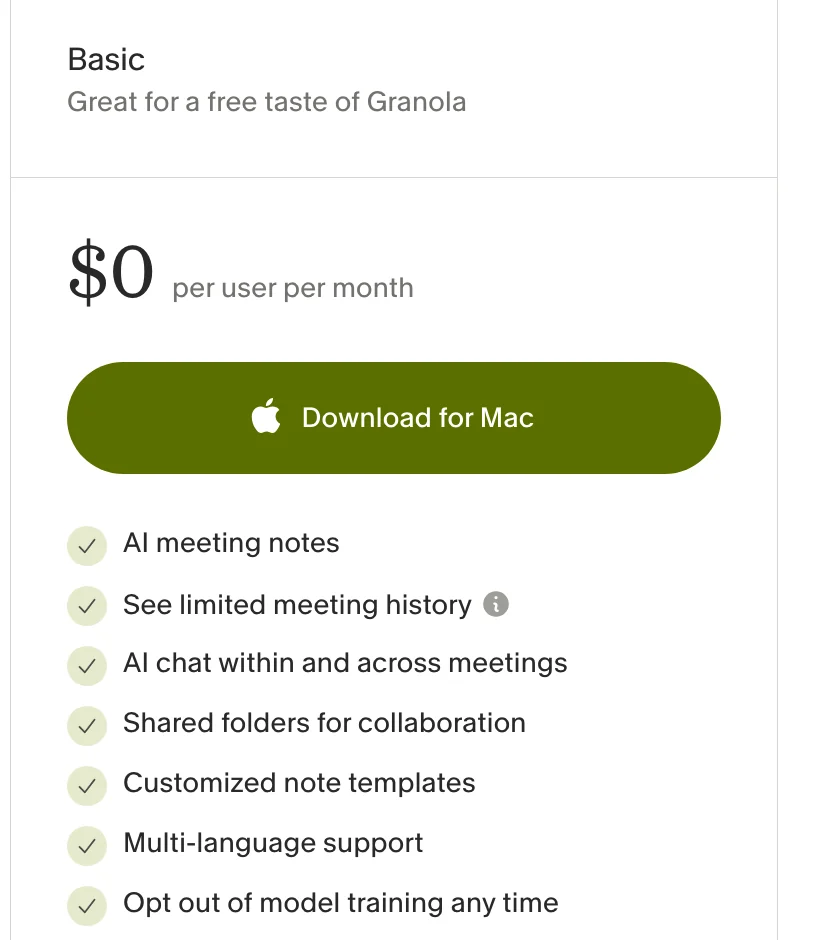
- No daily limit on transcription, notes from the last 30 days visible in the app, AI chat on the Auto model only, Slack as the only integration.
- Business
- $14 per user per month, billed monthly. Unlimited note history, a choice of AI models, Notion, HubSpot, Attio, Affinity and Zapier, and API access.
- Enterprise
- $35 per user per month, no seat minimum. Admin controls, model training off for everyone by default, HIPAA. SSO needs 50 or more users.
- What a team pays
- 10 people on Business: $140 a month, or $1,680 a year.
- No recording
- On every plan, Granola deletes the audio after transcribing it.
- Want the video too?
- Scribbl, which we make. Nothing joins the call either, and every meeting gets the video, a transcript with speaker names, AI notes and action items, with no typing. The free plan includes 10 meetings a month; Pro is $13 per user per month billed annually.
Yes, Granola AI is free: the Basic plan costs $0, has no end date and has no daily limit on transcription, but the app only shows your notes from the last 30 days. Granola pricing has three plans: a Granola note taker costs $0 on Basic, $14 per user per month on Business and $35 per user per month on Enterprise.
Business is billed monthly only; annual billing is available only on Enterprise contracts. The free plan works in Granola's Mac, Windows, iPhone and Android apps and includes AI notes and AI chat. Below is every plan, what 1, 5 and 10 people pay, how billing and cancelling work, and where Granola's own pages disagree with each other.
Every Granola number on this page comes from granola.ai/pricing and Granola's help center, checked on October 7, 2026. Prices are in US dollars. We make Scribbl, an AI note taker for Google Meet, Zoom and Microsoft Teams with nothing joining the call, and near the end we show why it's the better pick if you want the meeting captured for you, with the video.
How much does a Granola note taker cost?
Granola has three plans: Basic at $0, Business at $14 and Enterprise at $35, all per user per month. Billing is per workspace, and every member of a workspace is on the same plan.
| Feature | Basic | Business | Enterprise |
|---|---|---|---|
| Price per user per month | Free | $14 | $35 |
| Billing | Free | Monthly only | Monthly, or annual by contract |
| Meetings you can transcribe | No daily limit | No daily limit | No daily limit |
| Mac, Windows, iPhone, Android and Apple Watch apps | Yes | Yes | Yes |
| Note history in the app | Last 30 days | Unlimited | Unlimited |
| AI chat across meetings | Auto model only | Auto, or pick a model | Auto, or pick a model |
| Integrations | Slack only | Slack, Notion, HubSpot, Attio, Affinity, Zapier | Same, plus more advanced ones |
| MCP (Claude, ChatGPT and other tools) | Your own notes from the last 30 days, no transcripts | Your notes and shared workspace notes, full history, transcripts | Same, with admin controls |
| API access | No | Yes | Yes |
| Pre-meeting briefs and follow-up emails | No | Yes | Yes |
| Model training on your data | On unless you opt out | On unless you opt out | Off by default |
| Default link sharing set by | Each user | Each user | An admin, for everyone |
| SSO | No | No | 50 or more users |
| HIPAA-compliant workspaces | No | No | Yes |
| Recording of the meeting | No | No | No |
| Support | Standard | Standard | Dedicated |
All three plans include AI meeting notes, capture of your device's audio with no bot, the Mac, Windows, iOS, Android and Apple Watch apps, speaker tags, custom note templates, Recipes (saved prompts), shared folders, multi-language support and SOC 2 Type II. Granola's help center adds that the mobile apps are free to use without a paid plan. (Source: Granola pricing and subscriptions and billing, as of October 7, 2026.)
Is the Granola AI app free?
Yes. The Granola app is free to download for Mac, Windows, iPhone and Android, and its free plan, Basic, costs $0 with no end date. Granola's help center says the phone apps (iPhone, Apple Watch and Android) "are free to use," with no paid subscription needed, and Granola's blog says you don't need a credit card to start.
Basic also has "No daily limit" on transcriptions, and Granola's homepage puts it as "Unlimited meeting notes for free." What Basic limits is everything around those notes (subscriptions and billing, Granola free trial, as of October 7, 2026):
- 30 days of history. You can see and search notes from the last 30 days. Older notes "are stored (not deleted), but they aren't accessible in the app until you upgrade."
- Slack is the only integration. Notion, Zapier, HubSpot, Attio and Affinity need Business.
- No API, pre-meeting briefs or follow-up email drafts. Those start on Business.
Which app you use depends on the meeting: calls are transcribed in the Mac or Windows app, the phone apps cover in-person meetings, and the web app only views and edits notes (more on how Granola works).
Getting older notes without paying. In Settings › Profile, click Generate CSV. Granola emails a CSV "within a few hours" with the title, note summary and transcript of every note you own, including notes older than 30 days. The download link works for 24 hours, you can request one export every 24 hours, and only notes that have a summary are included (Exporting historical notes).
How far the free plan goes: if you take notes in meetings and only look back a few weeks, Basic covers you with no meeting cap. If you need last quarter's notes inside the app, you need Business. If you want the meeting captured for you, with the video kept, Scribbl's free plan does that with nothing joining the call (compared below).
Is Granola free for AI?
Yes, the core AI is free. Every plan, Basic included, writes AI meeting notes from your own notes and the transcript, and includes AI chat within and across meetings, custom note templates and Recipes (saved prompts). What the free plan holds back is the choice of model and how far other AI tools can reach (Granola pricing, Granola + ChatGPT, Granola + Claude, as of October 7, 2026):
- AI chat uses Auto only. Business lets you pick models, including what Granola calls advanced AI thinking models.
- ChatGPT and Claude see 30 days. Granola's MCP connector works on every plan. On Basic, ChatGPT, Claude and similar tools can reach only your own notes from the last 30 days; folder browsing and transcripts aren't included, and Granola says some search is limited. Business adds full history, transcripts, folder browsing and public workspace notes.
- No API. API access starts on Business.
- Model training is on unless you turn it off. On Basic and Business, Granola may use anonymized data to improve its own models until you opt out. Granola says it doesn't let third parties such as OpenAI or Anthropic train on your data.
Granola Business: $14 per user per month
Granola calls Business "Great for individuals or small teams." It costs $14 per user per month and is billed monthly; there's no annual option for Business. Over Basic, Business adds:
- Unlimited note history
- A choice of AI models in chat, including advanced AI thinking models
- Integrations with Notion, HubSpot, Attio, Affinity and Zapier, on top of Slack
- API access, and MCP access to your own notes and shared workspace notes with no 30-day window
- Pre-meeting briefs, follow-up email drafts and a workspace-wide dictionary for company terms
- Centralized billing and user management
On Business, an admin can add and remove members and control who can join the workspace. Each user still makes their own choice on model training and default link sharing. (Source: Granola pricing, as of October 7, 2026.)
Upgrading only yourself. Because everyone in a workspace is on the same plan, Granola's advice for paying for just yourself is to create a personal workspace, move your notes into it and subscribe there. You're its only member, so you pay for one seat (Workspaces).
Granola Enterprise: $35 per user per month
Enterprise is "Great for larger companies." Granola's Enterprise page says it costs "$35 per user per month," you can buy it in the app, and "there is no minimum number of seats you have to buy." Over Business, Enterprise adds:
- Model training turned off by default for everyone, enforced by an admin
- Org-wide sharing settings, which also apply to existing notes
- Workspace-wide auto-deletion policies for transcripts
- SSO and SCIM, for workspaces with 50 or more users
- HIPAA-compliant workspaces with a BAA, usage analytics, an audit API and dedicated support
- An admin-enforced chat message or video watermark that tells participants Granola is in use
- Annual billing, by contract through Granola's sales team
(Source: Granola pricing and Security, Privacy & Data FAQs, as of October 7, 2026.)
How much does Granola note taker cost for 1, 5 and 10 people?
Granola shows every price per user per month. These totals multiply that out, before tax. Annual Enterprise contracts are priced by Granola's sales team and aren't published.
| Who | Plan | Per month | Per year |
|---|---|---|---|
| 1 person | Business | $14 | $168 |
| 1 person | Enterprise | $35 | $420 |
| 5 people | Business | $70 | $840 |
| 5 people | Enterprise | $175 | $2,100 |
| 10 people | Business | $140 | $1,680 |
| 10 people | Enterprise | $350 | $4,200 |
| 50 people | Enterprise (the smallest team that gets SSO) | $1,750 | $21,000 |
Four things decide your bill (subscriptions and billing, Workspaces, Understanding your invoice):
- Everyone pays for the same plan. Granola says "Mixed plan tiers within a single workspace are not supported." If only some of your team need Business, it suggests a smaller Business workspace for them and a free workspace for everyone else. Notes and folders aren't shared across workspaces.
- You pay for people who have joined. Pending invitations don't count, and sharing a note with someone doesn't make them a seat. On a paid plan, everyone who joins the workspace, whether by invite, invite link or automatic joining for your email domain, is charged from the day they join.
- Changes are prorated. Adding or removing someone mid-cycle shows up on the next invoice as an "Unused time" credit and a "Remaining time" charge, so each seat is paid only for the days it was active.
- SSO starts at 50 users. Enterprise has no seat minimum, but SSO is only for Enterprise workspaces with 50 or more users.
For comparison, Scribbl Pro is $13 per user per month billed annually, or $20 monthly (Scribbl pricing). On annual billing that's $156 a year per person against $168 on Granola Business, or $1,560 against $1,680 for 10 people, and Scribbl keeps the video of every meeting, which Granola doesn't on any plan.
How Granola billing, cancelling and refunds work
From Granola's help center (subscriptions and billing, Cancelling your subscription, Workspaces, Referral program), as of October 7, 2026:
- Payment. Payments run through Stripe. You upgrade in Settings › Billing. If someone else pays, Share checkout link makes a link that works for 7 days.
- Who can change billing. Members can view the billing page and upgrade, but only admins can cancel, change plans or update the payment method.
- Cancelling. Settings › Billing › Manage subscription opens Stripe's billing portal, where you select Cancel subscription. Without the app, you can log in on the web. The plan runs to the end of the current billing cycle, then the workspace moves to Basic.
- Refunds. The help center doesn't describe refunds. Granola's Platform Terms (dated December 19, 2025) say "payments are non-refundable."
- Trials. The help center describes time-limited trials of Business and Enterprise. When one ends without a subscription, the workspace moves to Basic and "You will not be charged." Granola emails you before the trial ends. The help center doesn't say how long a trial lasts, and one of Granola's blog posts says Granola "does not offer a trial" (see where Granola's pages disagree).
- Coupons and referrals. A promo code applies only to the workspace where you redeem it. Someone who signs up through a referral link gets 2 months of Business if they're new to Granola, sign up with a company email (not Gmail or Outlook.com) and their company doesn't already have a Granola workspace.
- Tax. VAT and similar taxes are calculated from your billing address. A valid VAT ID added in Stripe removes VAT from future invoices, and tax-exempt organizations can send Granola their certificate.
- Removing someone. It deactivates their account in that workspace, and they lose their personal notes there, so ask them to export or move their notes first. If the removed person's card is the payment method, it keeps being charged until an admin changes it.
- After a downgrade. Notes older than 30 days lock, integrations other than Slack stop working, and AI chat goes back to the Auto model.
Student, startup and nonprofit pricing
- Students: 12 months of Business free, marked "Limited edition," for currently enrolled students at accredited universities in the US, UK and Canada. You apply with your academic email (Granola for students).
- Startups: 1 year of Business free for startups with fewer than 30 employees at pre-seed or seed, funded by one of Granola's 500+ approved investors, that have never paid for Granola or used a promo code. Bootstrapped and self-funded startups aren't eligible. After the year, standard Business pricing applies (Granola for startups).
- Nonprofits: 50% off Business, which is $7 per user per month at today's price, for registered nonprofits verified through Goodstack. Granola says approval isn't guaranteed (Granola for nonprofits).
Once accepted, you finish checkout in Settings › Billing, and the coupon should apply on its own. Until you do, the account stays on the standard trial.
How Granola works: no bot and no recording
Here is how Granola's own pages describe it (How transcription works, security page, Common feature requests, as of October 7, 2026):
- Nothing joins the call. "There is no meeting bot." Granola runs on your computer and transcribes your microphone and system audio, so it works with Zoom, Google Meet, Teams and other meeting apps.
- You start it. It transcribes only after you open a meeting's note or a New Note; it doesn't start on its own. It stops when it detects the call has ended, after 15 minutes with no new audio, or when your computer goes to sleep.
- No recording is kept. Granola "does not record or save audio or video at any point during the call," and its feature request page says it has no plans to support audio or video recordings. It keeps the transcript and your notes. You can't upload a recorded file for transcription, and you can delete parts of a transcript but not edit it.
- Desktop for calls, phone for in-person. Transcription needs the Mac or Windows app, or the iPhone or Android app. The web app at notes.granola.ai only views and edits notes. The phone apps are for in-person meetings and, on iPhone, outgoing phone calls; they can't capture Zoom or Google Meet calls.
- Speaker names take setup. Speaker tags label who said what on Google Meet, Zoom and Teams in the Mac and Windows apps. Without them, the transcript shows "Me" and "Them."
- Where your notes live. Notes and transcripts are stored on AWS in the US and kept until you delete them, unless you or an admin turn on auto-deletion for transcripts. Granola doesn't offer EU, UK or other regional storage.
Granola says you're responsible for getting consent, and it recommends always telling participants. It can post an automatic message in the meeting chat or show a watermark on your video (Let people know you're using Granola). Whatever tool you use, let everyone know you're recording or transcribing. Some places require everyone's consent; see do you have to tell people you're recording.
Where Granola's own pages disagree
We found ten places where Granola's pages don't match each other on October 7, 2026. When they differ, the pricing page and the subscriptions and billing help page are the most current.
- Is the free plan limited on meetings? The Business card lists "Unlimited meeting notes and history" as an upgrade, which reads as if Basic caps meetings. The help center says Basic has "No daily limit" on transcriptions, and the homepage says "Unlimited meeting notes for free." What Basic limits is the 30-day history.
- Slack on the free plan. The pricing table and help center include Slack on Basic. Granola's blog posts "Granola free vs. paid" and "Granola free trial", both updated August 5, 2026, list Slack among the integrations the free plan doesn't include.
- API access. The pricing page includes API access on Business. The "Granola free vs. paid" post's table puts API access with SSO and admin controls, on Enterprise only, and the table in Granola's "Granola pricing: Plans, features, and ROI calculator for teams" post says API access on Business "requires Enterprise plan upgrade."
- "Advanced integrations." The Business card says "Advanced integrations with Attio, Notion, HubSpot, Affinity, and Zapier." The comparison table below it uses "Advanced integrations" for a separate row that only Enterprise gets.
- The Enterprise price. The pricing page and the Enterprise page say $35 per user per month. The help center's plan table says "from $35/user/month," and two Granola blog posts say "$35+" and "Starting at $35."
- Who can auto-delete transcripts. The pricing table and the Transcript auto-deletion article let any user set their own period, from 1 day to 1 year. The security page describes custom periods as an Enterprise option.
- Billing term. Granola's Platform Terms say that, unless an order form says otherwise, charges are made "in advance annually" and subscriptions renew for one-year terms, with 30 days' written notice to stop a renewal. The help center says Business is billed monthly and you can cancel any time. If you sign an Enterprise contract, read the renewal terms in it.
- Mac version. The setup guide says Granola needs at least macOS 14. The "Granola free trial" blog post says macOS 13 or later.
- How long free notes stay visible. The pricing page, the help center and the "Granola free vs. paid" post all say 30 days. The glossary at the end of the "Granola free trial" post says the free plan gives access to notes "from the past 14 days."
- Whether there's a trial. The help center describes time-limited trials of Business and Enterprise and says Granola emails you before one ends. The FAQ in the "Granola pricing: Plans, features, and ROI calculator for teams" post says "Granola does not offer a trial."
Some third-party pages that rank for "granola pricing" are further off. One directory calls Granola "primarily a paid product," and a review site says paid plans start at $10 a month. Neither matches Granola's pricing page today. A Granola review updated July 29, 2026 still shows "$18/mo" in its summary box, though its own correction says Business is now $14. It also says the raw recording isn't kept "by default on the consumer plans"; Granola's pricing table says audio is deleted after transcription on every plan.
Is Granola AI worth it?
Only if you're happy to type your own notes in meetings and never need to replay one, because Granola keeps no recording on any plan. If that's you, whether Business is worth $14 a month comes down to one question: do you need notes older than 30 days, or integrations beyond Slack?
- Basic is worth it if you take your own notes, look back only a few weeks, and are fine with Slack as the only integration.
- Business is worth it if you search old meetings, push notes into Notion or a CRM like HubSpot, Attio or Affinity, or want the API and full MCP access. Business is billed monthly with no annual discount, so budget $168 per person per year.
- Enterprise is for companies that need SSO (50 or more users), HIPAA, model training off for everyone by default, or admin control over sharing and auto-deletion.
What $14 buys next to other note takers. Granola Business is $14 a month with no annual option. Here it is next to Scribbl and the other big note takers, per user per month for one person, from each company's pricing page and help center on October 7, 2026. The difference that matters most isn't the price: Scribbl and Granola are the two that never send a bot, Granola is the only one that keeps no recording at all, and Scribbl is the one that gives you both, no bot and the video.
| Feature | Scribbl | Granola | Otter | Fireflies | Fathom |
|---|---|---|---|---|---|
| Does a bot join the call? | Never | Never | Yes by default; the desktop app records without it | Yes by default; the Chrome extension and desktop app record without it | Yes for video; Mac beta modes without it |
| Recording you can replay | The video | None: audio is deleted after transcription | Audio; video on Enterprise only | Video on paid plans, through the bot | Video, through the bot |
| Free plan | 10 meetings a month on Google Meet, Zoom and Teams | No meeting cap; notes from the last 30 days | 300 minutes a month, 30 minutes per conversation | Unlimited transcription with auto-join on, 3 meetings with it off (accounts from September 1, 2026); 400 minutes of storage per team | Unlimited recordings and transcripts; advanced summaries on your first 5 calls a month |
| Cheapest paid plan, billed annually | $13 (Pro) | No annual option | $8.33 (Pro) | $10 (Pro) | $16 (Premium) |
| Same plan, billed monthly | $20 | $14 (Business) | $16.99 | $18 | $20 |
Sources: Scribbl, Granola, Otter and its Notetaker overview, Fireflies and its free plan rules, Fathom. For bots, video and privacy across all five, see Granola vs Otter vs Fireflies vs Fathom.
Two settings to check first.
- Default link sharing. Granola's security page says notes are "private by default," and nobody sees a note until you share it. But what a shared link shows depends on Settings › Preferences › Data & sharing: "Anyone with the link," "Only my company" or "Private" (Sharing controls). In April 2026, The Verge reported that the app's settings said "By default, your notes are viewable to anyone with the link." Granola told The Verge its links are unlisted, and that full transcripts are never shown to anyone you haven't explicitly shared a note with. A change to the default applies only to notes created afterward.
- Model training. On Basic and Business, Granola "may use anonymized data" to improve its models until you turn off Use my data to improve models for everyone in Settings › Preferences. Granola says it can't guarantee data wasn't used before you opted out (Models & training).
Granola may not be the right fit if you need to watch or listen to the meeting again, you need to correct the transcript, your data has to stay outside the US, you work with student records (Granola says it is "not currently FERPA compliant"), or you rely on Apple Calendar (Granola syncs with Google and Microsoft calendars only). If replaying the meeting is what you need, Scribbl, which we make, keeps the video of every meeting with nothing joining the call: see the side-by-side below and Scribbl vs Granola.
Granola vs Scribbl: the better pick
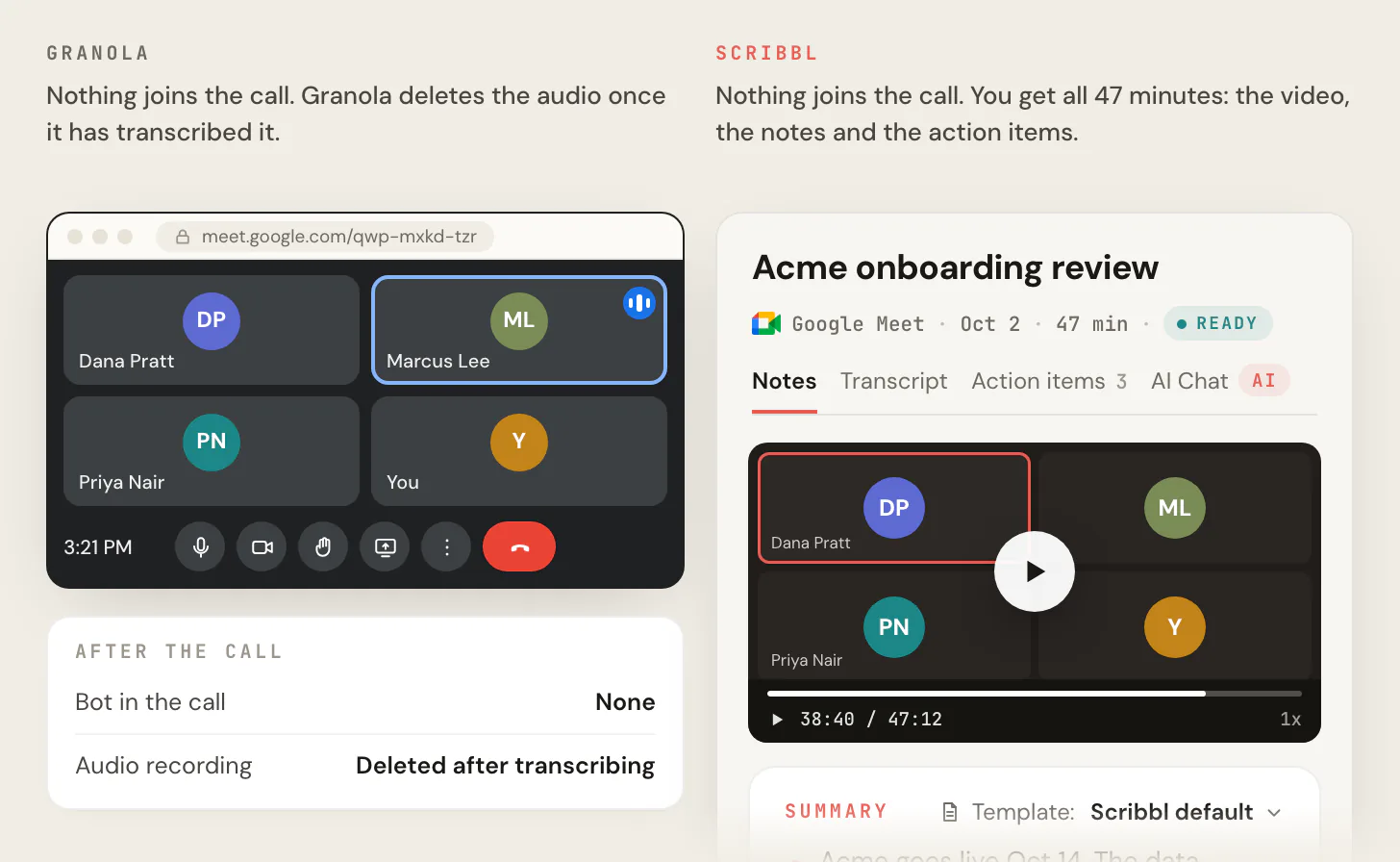
Scribbl is an AI note taker for Google Meet, Zoom and Microsoft Teams, and if you want the whole meeting captured for you, with the video kept, it's the better pick. Like Granola, nothing joins the call: Scribbl uses a Chrome extension for Google Meet and Scribbl Desktop for Mac (Apple silicon) and Windows for Zoom and Teams. Unlike Granola, you don't type anything during the call, and nothing is thrown away: every meeting comes back with the video recording, a transcript with speaker names, AI notes and action items, in one account for all three meeting apps.
It also does the work after the call. Smart Collections sort your meetings by themselves. Automations do the follow-up: they draft the follow-up email for you to send, log notes in HubSpot or Pipedrive, post a summary to Slack or Teams, or open a ticket in Linear, Jira or Asana, and they ask before changing anything by default. On Pro you can ask Claude or ChatGPT about every meeting you've recorded, or about just one Smart Collection ("What were the main objections in my sales calls this week?"). Recordings are private by default, and Scribbl doesn't use your meetings to train AI for anyone other than you.
| Feature | Scribbl | Granola |
|---|---|---|
| Does anything join the call? | No | No |
| Video or audio of the meeting | Yes, the video | No: audio is deleted after transcription |
| Who takes the notes | Scribbl captures the whole meeting; no typing | You type rough notes; its AI builds on them and the transcript |
| Transcript with speaker names | Yes | Yes, once speaker tags are set up; otherwise Me and Them |
| AI notes and action items | Every meeting | Yes, built on the notes you type |
| Free plan | 10 meetings a month on Google Meet, Zoom and Teams | No daily limit; notes from the last 30 days visible |
| Follow-up after the call | Automations draft the email, log notes in HubSpot or Pipedrive, post to Slack or Teams | Follow-up email drafts and integrations beyond Slack start on Business |
| Your meetings used to train AI | Not for anyone other than you | Anonymized data may be, unless you opt out |
| Paid plan | Pro, $13 per user per month billed annually, or $20 monthly | Business, $14 per user per month, billed monthly |

The short version. Granola is a notepad: you type, it tidies up, and the audio is gone. Scribbl is automatic: it captures the whole meeting with nothing joining the call and keeps the video, so you can check exactly what was said. The free plan includes Google Meet, Zoom and Microsoft Teams, with 10 meetings a month. Whichever tool you use, tell everyone in the meeting you're recording.
FAQ
How much does a Granola note taker cost?
Granola has three plans. Basic is free, Business is $14 per user per month and Enterprise is $35 per user per month. Business is billed monthly only; annual billing is offered only on Enterprise contracts. Prices are in US dollars, and tax such as VAT is added based on your billing address.
How much does Granola note taker cost?
$0 on the free Basic plan, $14 per user per month on Business and $35 per user per month on Enterprise. For a team, Business comes to $70 a month for 5 people or $140 a month for 10. Everyone in a Granola workspace is on the same plan, and you pay for each person who has joined.
Is Granola free?
Yes. Granola's Basic plan is $0, has no end date and has no daily limit on transcription. The limit is history: you can only see and search notes from the last 30 days in the app. Older notes are stored but locked until you upgrade. Basic also limits integrations to Slack and AI chat to the Auto model.
Is Granola free for AI?
Yes. Granola's free Basic plan includes AI meeting notes, AI chat within and across meetings, custom note templates and Recipes, with no daily limit on transcription. The limits: AI chat uses the Auto model only, and ChatGPT or Claude connected through Granola's MCP connector can reach only your own notes from the last 30 days, without transcripts. A choice of AI models, full MCP access and the API start on Business at $14 per user per month.
Is the Granola AI app free?
Yes. The Granola app is free to download for Mac, Windows, iPhone and Android, and its Basic plan costs $0 with no end date. Granola's help center says the phone apps are free to use without a paid plan. On Basic you can see and search only the last 30 days of notes in the app; Business, at $14 per user per month, removes that limit.
Is the Granola app free?
Yes, on the Basic plan, which costs $0 and has no end date. You transcribe calls with the Mac or Windows app and in-person meetings with the iPhone or Android app; the web app only views and edits notes. The free plan shows only your last 30 days of notes in the app, and older notes stay stored until you upgrade or export them.
Is Granola AI for free?
Yes, and not only as a trial: Granola's Basic plan is $0 with no end date and no daily limit on transcription, and Granola's blog says you don't need a credit card to start. The catch is history, since only the last 30 days of notes stay visible in the app, and Slack is the only integration. If you need more, Business costs $14 per user per month, billed monthly.
Is Granola AI worth it?
Granola is worth it only if you type a few notes during meetings, want notes without a bot in the call, and never need to replay a meeting, because Granola deletes the audio after transcribing. The free plan is enough if you only look back 30 days. Business at $14 per user per month is worth it once you need older notes or integrations like Notion or HubSpot. Before you rely on it, check two settings: default link sharing and model training. If you want the whole meeting captured for you, with the video kept, Scribbl, which we make, does that with nothing joining the call.
What happens to Granola notes after 30 days on the free plan?
They are stored, not deleted, but you can't open them in the app until you upgrade. To get them without paying, go to Settings, then Profile, and click Generate CSV. Granola emails a file with the title, summary and transcript of every note you own, usually within a few hours.
Does Granola have a free trial?
Granola's help center mentions time-limited trials of Business and Enterprise but doesn't say how long they last. When a trial ends without a subscription, the workspace moves to the free Basic plan and you aren't charged, and Granola emails you before it ends. One of Granola's blog posts says Granola doesn't offer a trial, so don't count on one. The free Basic plan itself has no end date.
Does Granola offer annual billing?
Only on Enterprise contracts, which you arrange with Granola's sales team. Basic is free and Business is billed monthly at $14 per user, so there is no annual discount on Business.
How much does Granola cost for a team?
On Business, $14 per person per month: $70 a month for 5 people ($840 a year) and $140 a month for 10 ($1,680 a year). On Enterprise, $35 per person per month: $175 a month for 5 and $350 a month for 10. Enterprise has no seat minimum, but SSO needs 50 or more users. Everyone in a workspace is on the same plan.
How do I cancel my Granola subscription?
A workspace admin goes to Settings, then Billing, clicks Manage subscription to open Stripe's billing portal, and selects Cancel subscription. You can also do this from the Granola web app. The plan runs to the end of the current billing period, then the workspace moves to the free Basic plan, where only the last 30 days of notes are visible.
Can you get a refund from Granola?
Granola's help center doesn't describe refunds, and its Platform Terms say payments are non-refundable. When you cancel, the plan stays active until the end of the period you paid for. If a member leaves a paid workspace mid-cycle, the next invoice credits the unused days of that seat.
Does Granola have a student, startup or nonprofit discount?
Yes. Accepted students and startups get 12 months of Business free. Students must be enrolled at an accredited university in the US, UK or Canada. Startups must have fewer than 30 employees and pre-seed or seed funding from one of Granola's approved investors. Registered nonprofits can apply for 50% off Business, which is $7 per user per month at today's price.
Does Granola record audio or video?
No. Granola transcribes your computer's microphone and system audio during the meeting and doesn't save the audio or video, so there's no recording to play back. It keeps the transcript and your notes. Granola's help center says it has no plans to support audio or video recordings.
Does Granola use my notes to train AI?
On the Basic and Business plans, Granola may use anonymized data to improve its own models unless you opt out. Turn off 'Use my data to improve models for everyone' in Settings, then Preferences. Enterprise workspaces are opted out by default. Granola says third parties such as OpenAI and Anthropic can't train on your data.
Is there a free alternative to Granola that keeps the recording?
Yes, Scribbl, which we make. Its free plan includes Google Meet, Zoom and Microsoft Teams, with 10 meetings a month. Like Granola, nothing joins the call, but Scribbl keeps the video recording along with a transcript with speaker names, AI notes and action items, and you don't have to type notes during the call. Granola deletes the audio after transcription on every plan, so there's nothing to replay.
Sources
Every Granola price, limit and rule above was checked on these pages on October 7, 2026.
- Granola: pricing (plan cards, comparison table and FAQ), Enterprise, security, homepage, students, startups, nonprofits, Platform Terms (December 19, 2025)
- Granola blog: "Granola free vs. paid" and "Granola free trial", both updated August 5, 2026; "Granola pricing: Plans, features, and ROI calculator for teams", updated September 17, 2026; "AI meeting notes pricing explained", updated August 5, 2026
- Granola pages on ChatGPT, Claude and MCP: Granola + ChatGPT, Granola + Claude, Granola MCP
- Granola help center, plans and billing: Subscriptions and billing, Understanding your invoice, Cancelling your subscription, Referral program, Workspaces, Exporting historical notes
- Granola help center, how it works: How transcription works, Speaker tags, Setup guide, Getting started with Granola for mobile, Common feature requests
- Granola help center, privacy: Sharing controls, Sharing notes, Models & training, Transcript auto-deletion, Security, Privacy & Data FAQs, Let people know you're using Granola
- The Verge: "PSA: Anyone with a link can view your Granola notes by default" (April 2, 2026, updated April 3)
- Other note takers' prices, October 7, 2026: Otter pricing, Fireflies pricing and Fireflies free plan transcriptions, Fathom pricing
- Scribbl: pricing
Try Scribbl
Get the video Granola doesn't keep
Scribbl records, transcribes, and summarizes your Google Meet calls from your browser. No bot joins the call. Free forever for individuals.
Add to Chrome · It's free