Best Botless Meeting Recorders for 2026: Scribbl, Granola and Otter Compared
A guide to the best botless meeting recorders for 2026: what botless means, how it works, and how Scribbl, Granola and Otter's desktop app record Meet, Zoom, and Teams with no bot.
Updated October 7, 2026

On this page9 sections
- 01What "botless" actually means
- 02How botless meeting recording works
- 03The 3 best botless meeting recorders for 2026
- 04Comparison table: how the 3 botless recorders stack up
- 05Bot vs. botless
- 06How to pick the right botless recorder
- 07Honorable mention: native platform recording
- 08Our pick: Scribbl
- 09Botless meeting recorders FAQ
A botless meeting recorder captures your call without sending a bot to join it, so nothing new shows up in the participant list and no recording notice is announced to the room. It works one of three ways: a browser extension runs in the browser where you joined the call, a desktop app captures your system audio with native OS APIs, or transcription runs locally on your device. The best all-around pick for 2026 is Scribbl, which records Google Meet, Zoom, and Microsoft Teams with no bot on any of them, keeps the video with a transcript, AI notes, and action items, and does the follow-up for you. Below we compare the botless options (Scribbl, Granola, and Otter's desktop app), explain exactly how botless capture works, and give you a one-line rule for picking.
| Feature | Scribbl | Granola | Otter |
|---|---|---|---|
| No bot ever joins the call | Yes | Yes | Bot by default |
| Nothing announced to attendees | Yes | Yes | Bot by default |
| Google Meet | Yes | Desktop | Yes |
| Zoom | Yes | Desktop | Yes |
| Microsoft Teams | Yes | Desktop | Yes |
| Connects to ChatGPT or Claude | Yes | Yes | Yes |
| Searchable transcript | Yes | Yes | Yes |
| AI notes and action items | Yes | Yes | Yes |
| Browser extension | Yes | No | Yes |
| Desktop app | Yes | Yes | Yes |
| Free plan, no credit card | Yes | Limited | Limited |
| Rating and scale | 5.0 from 3,000 reviews on the Chrome Web Store | Not listed | Not listed |
What "botless" actually means (and its synonyms)
Most meeting recorders join your call as a participant. You connect a calendar, and a tile named after the tool, for example "Otter.ai Notetaker" or "Fireflies Notetaker", appears next to the real attendees, records, and leaves. That is the bot model.
A botless recorder never adds that tile. Nothing dials in, nothing is announced, and no email goes to attendees saying a notetaker has joined. You will also see this exact same idea sold under several names. They all mean the same thing:
- Botless or bot-free
- No-bot or no notetaker
- Records without a bot or without bots
- AI notetaker that does not join meetings
If you searched any of those phrases, you are in the right place. The rest of this guide treats them as interchangeable.
How botless meeting recording works (the technical part)
This is the part most listicles skip. There are exactly three ways a recorder can capture a meeting without a bot, and knowing which one a tool uses tells you almost everything about its strengths and limits.
- 1
1. Browser extensions
A Chrome extension runs in the browser where you joined the call, so nothing has to join the call.
- 2
2. System-audio capture (desktop apps)
A native desktop app records whatever is playing through your speakers and mixes it with your microphone, entirely on your machine. On macOS this uses Apple frameworks like ScreenCaptureKit, AVFoundation, or the older CoreAudio process taps. On Windows it uses WASAPI loopback, which lets an app capture the system's render stream. Because it records device audio, it works with any meeting app, not just one platform.
- 3
3. Local speech-to-text (on-device STT)
Some botless tools run the transcription model locally, often a Whisper variant, so audio never leaves your computer. This is the most private path and the one open-source projects lean on. It trades cloud convenience and polished summaries for full data control.
A few practical notes on the mechanics:
- macOS keeps moving the goalposts. Apple has tightened system-audio access over several macOS releases, so desktop tools have migrated from CoreAudio taps toward ScreenCaptureKit, and newer macOS versions expose cleaner audio-capture APIs. If you are on a Mac, check that the desktop app supports your OS version.
- Windows loopback is stable. WASAPI loopback has been the standard way to grab system audio on Windows for years, so Windows desktop capture tends to be reliable across versions.
The 3 best botless meeting recorders for 2026
We rank these by how well they serve the typical buyer searching "botless meeting recorder": someone who wants their own Meet, Zoom, and Teams calls recorded and summarized without a bot in the room. Pricing changes often, so confirm current numbers on each vendor's site; the facts below describe how each tool records.
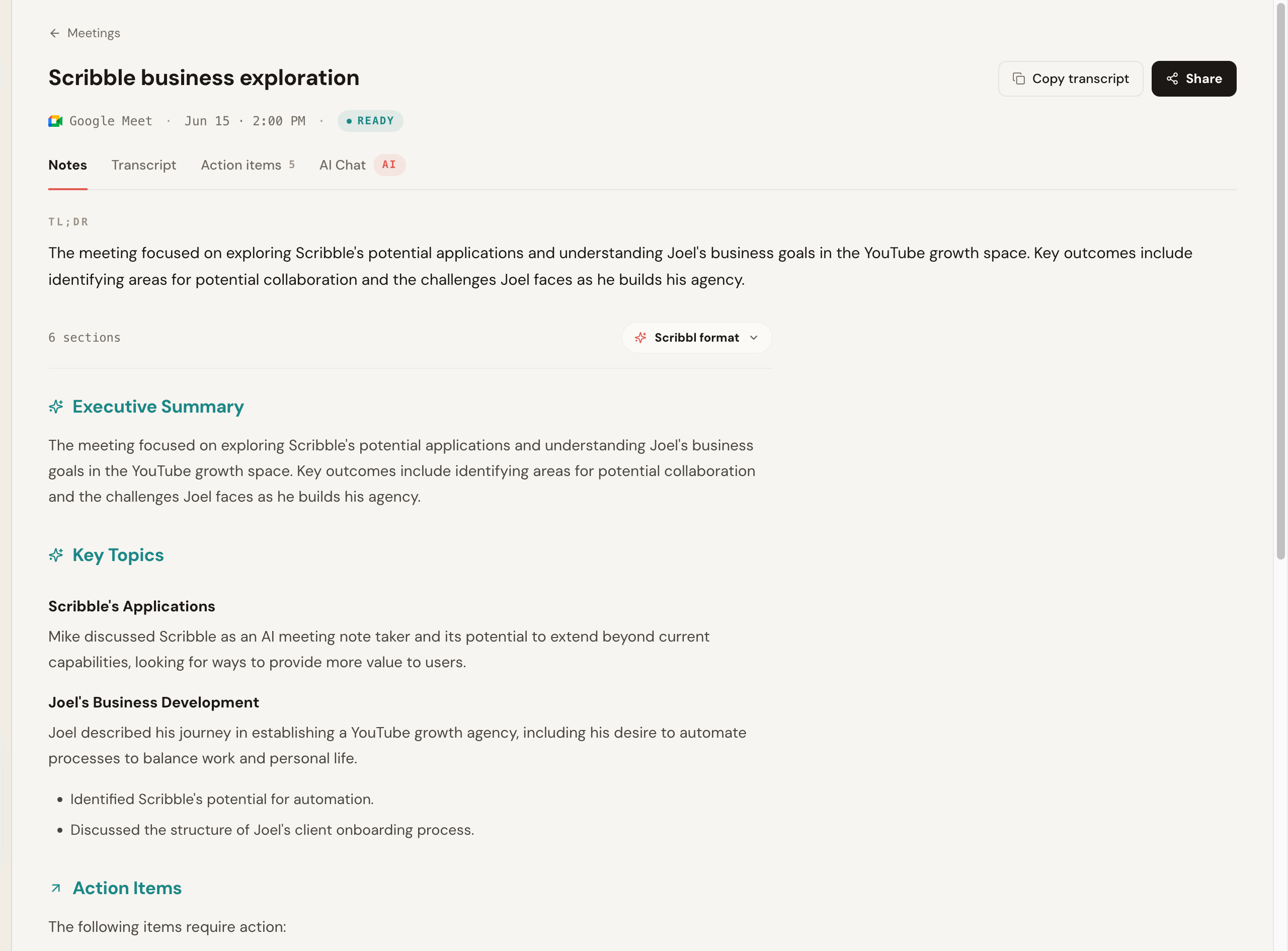
1. Scribbl: best overall, and it does the follow-up for you
Capture method: Chrome extension on Google Meet, Scribbl Desktop on Zoom and Teams. Platforms: Google Meet, Zoom, Microsoft Teams. Botless on all three.
Scribbl records, transcribes, and summarizes Google Meet calls from a Chrome extension, and Scribbl Desktop for Mac and Windows does the same for Zoom and Microsoft Teams. No bot joins any platform, nothing is announced, and no email goes to attendees. After the call you get the video, a searchable transcript with speaker names, AI notes, and action items.
What sets it apart is what happens after the call. Smart Collections sort meetings into groups you describe in one sentence, so you can ask Claude or ChatGPT about just one group ("What were the main objections in my sales calls this week?"). Automations do the follow-up: draft the email, log notes in HubSpot or Pipedrive, post to Slack or Teams, and save notes to Notion, Google Drive or Confluence, asking before they change anything by default. You can also tell it the job in plain words, and it runs with your own Claude. There is a free plan with 10 meetings a month and no credit card, and Pro is $13 per user per month billed annually, or $20 monthly.
- Pros: botless on all three major platforms; Chrome extension for Google Meet and Scribbl Desktop for Zoom and Teams; the video, transcript, AI notes and action items for every meeting in one account; Automations do the follow-up; free plan, no card; 5.0 from 3,000 reviews on the Chrome Web Store; used by 10,000+ organizations.
- Best for: teams who meet across Meet, Zoom, and Teams and want the recording to turn into done work.
2. Granola: botless notes, but no recording
Capture method: desktop app (system audio). Platforms: platform agnostic on the desktop. Botless.
Granola is a desktop app for Mac and Windows, with phone apps, that captures your meeting audio and merges your own typed notes with an AI-cleaned summary. No participant joins. It is built around the habit of jotting during a call and letting the AI fill in the rest. It transcribes and then deletes the audio, so there is no recording to go back to.
- Pros: botless by design; captures any meeting your device can hear.
- Cons: keeps no recording; the free plan opens only your last 30 days of notes; you have to actually take notes for the model to shine.
- Best for: solo operators and managers who like typing during calls and never need the recording.
3. Otter: capable, but bot-first by default
Capture method: desktop capture exists, but calendar recording defaults to a bot. Platforms: Meet, Zoom, Teams.
Otter offers desktop apps for Mac and Windows that can capture without a bot. The catch for this search is that its default, calendar-driven recording sends a visible notetaker bot into the call. If botless is your hard requirement, you have to deliberately use the desktop app and turn off the auto-join bot.
- Pros: mature product with a deep feature set; desktop capture is botless.
- Cons: bot-first by default; getting a consistently no-bot experience takes care.
- Best for: teams already invested in Otter who will stick to desktop capture.
Comparison table: how the 3 botless recorders stack up
The single most important column is capture method, because it determines cross-platform support and whether a tool is truly botless or only botless in a specific mode.
| Tool | Capture method | Meet / Zoom / Teams | Truly botless? | Standout |
|---|---|---|---|---|
| Scribbl | Chrome extension (Meet) + Scribbl Desktop (Zoom, Teams) | All three | Yes, all three | The video, transcript, AI notes and action items; Automations do the follow-up; free, no card |
| Granola | Desktop (system audio) | Platform agnostic | Yes | Merges your typed notes with AI; keeps no recording |
| Otter | Desktop, but bot by default | All three | Only in desktop mode | Mature, deep feature set |
Bot vs. botless: the trade-off, with real data
The move toward botless is not just aesthetic. The bot model has two real costs.
First, surprise recording in external calls. A bot is a visible third party that records everyone, and on a client or candidate call the other side did not necessarily agree to it. In 2025, Otter's notetaker bot became the subject of consolidated consumer-privacy litigation in federal court over exactly this auto-joining, auto-recording behavior. Regardless of how that resolves, it pushed teams to think harder about whether a surprise recording attendee belongs in their external relationships.
Second, the volume of automated recording is now enormous. Calendly has reported that around 58 percent of professionals use an AI tool to take meeting notes, and Gartner has projected that by 2026 roughly 40 percent of new B2B sales deals will involve AI-assisted analysis of recorded conversations. (Treat both as directional vendor and analyst figures, not lab measurements.) When that many calls are being captured by software, whether a recorder announces itself with a bot or stays quietly in your seat stops being a detail and becomes a relationship decision.
- How it records: from your own seat: a browser extension, or a desktop app on your computer
- Participant list: nothing added, nothing announced
- External calls: nothing intrudes on the relationship
- Privacy: local-capture options can keep audio off third party servers
- Trade-off: you have to be in the call to capture it
- Examples: Scribbl, Granola
- How it records: a named attendee dials in and records
- Participant list: an extra tile everyone sees, often with a notice
- External calls: a surprise attendee raises consent questions
- Privacy: audio routes through the vendor's bot by design
- Trade-off: it can cover a call you are not in
- Examples: Otter, Fireflies, Fathom, tl;dv by default
How to pick the right botless recorder (decision framework)
Match the tool to the one fact that matters most for you.
- You meet across Google Meet, Zoom, and Teams. Pick Scribbl: botless on all three in one account, with a free plan and no card.
- You want the recording to turn into finished follow-up. Pick Scribbl: Automations draft the email, log notes in HubSpot or Pipedrive, and post to Slack or Teams, asking before they change anything by default.
- You want the video, not just text. Pick Scribbl: every meeting gets the video, a transcript with speaker names, AI notes, and action items.
- You want meetings organized without filing them. Pick Scribbl: Smart Collections sort meetings by themselves into groups you describe in one sentence.
Otter is botless only in desktop mode, so confirm the capture mode before you rely on it for a client call.
Honorable mention: native platform recording
Google Meet, Zoom, and Teams each have their own built-in recording. It is botless by definition, but it hands you a raw video file with no AI summary, no action items, and no follow-up, so it is a recorder, not a notetaker. Most people who land on this page want the AI layer too, which is what the tools above add. If you just need the raw file, see how to record a Google Meet, how to record a Zoom meeting, and how to record on Microsoft Teams.
Our pick: Scribbl
For most teams, Scribbl is the botless recorder we recommend. It records, transcribes, and summarizes Google Meet from a Chrome extension and Zoom and Microsoft Teams from Scribbl Desktop, never sends a participant into the call, and turns each meeting into the video, a searchable transcript, AI notes and action items. What sets it apart is the follow-up: Automations draft the email, log notes in HubSpot or Pipedrive and post to Slack or Teams, and on Pro you can ask Claude or ChatGPT about every meeting or just one Smart Collection. The free plan needs no credit card and covers 10 meetings a month, Pro lifts the meeting limit for $13 per user per month billed annually, the Team plan adds shared access and admin controls, and sales teams can wire notes into their pipeline from Scribbl for sales. For more on the no-bot approach, read our botless AI notetaker explainer.
Botless meeting recorders FAQ
What is a botless meeting recorder?
A botless meeting recorder captures your meeting without adding a participant to the call. Instead of sending a named attendee that joins and records, it captures the meeting from your own seat, usually through a browser extension, a native platform API, or a desktop app on your computer. Nobody sees an extra tile in the participant list because there is not one, and no recording notice is announced to the room.
What is the best botless meeting recorder?
Scribbl is the strongest all-around botless recorder because it covers Google Meet, Zoom, and Microsoft Teams with no bot on any of them, keeps the video with a transcript, AI notes, and action items, and its Automations do the follow-up work. It has a free plan with no credit card, a Chrome extension for Google Meet and Scribbl Desktop for Zoom and Teams, a 5.0 rating from 3,000 reviews on the Chrome Web Store, and is used by 10,000+ organizations. Granola is also botless, but it deletes the audio after transcription, so there is no recording to go back to, and Otter offers botless desktop capture but sends a bot by default for calendar-based recording.
How does botless meeting recording actually work?
There are three botless capture methods. Browser extensions run in the browser where you joined the call. Desktop apps capture system audio with native OS APIs (ScreenCaptureKit or CoreAudio on macOS, WASAPI loopback on Windows) and mix it with your microphone. And some tools run speech to text locally on your machine. None of them dials into the meeting as a separate participant, so nothing is added to the call.
Are botless meeting recorders legal?
Recording laws apply the same whether or not a bot is in the call. Botless removes the surprise attendee, not your obligation to disclose recording where the law or your company requires it. In one party consent states one participant's consent is enough; in all party consent states everyone must agree. Tell participants you are recording when needed. The advantage of botless is that you control that disclosure clearly, instead of a bot announcing it for you by accident.
Is a botless recorder more private than a bot?
Often, yes, but it depends on the tool, not just on whether a bot joins. Botless tools that capture locally on your device or run transcription on your machine keep audio off third party servers. Many botless browser extensions still send your meeting to the cloud for AI summaries, so check the data policy. The privacy win of botless is consistent in one respect: no third party bot is sitting in your call recording everyone by default.
Can a botless recorder record a meeting I am not in?
No, and that is the core trade-off. A botless recorder captures the meeting from your seat, on your own computer. If you need a recording of a call no one on your team attends, you need a bot that can dial in on your behalf. For most teams that record their own client, sales, and internal calls, this is not a limitation.
Do botless recorders work on Zoom and Microsoft Teams, or only Google Meet?
It varies by tool, and this is the single most important thing to check. Scribbl's Chrome extension covers Google Meet, and Scribbl Desktop covers Zoom and Teams. Some tools are botless only on Google Meet (where Google offers a native recording API) and fall back to a bot on Zoom and Teams. Desktop apps that capture system audio are platform agnostic because they record whatever is playing through your speakers.
What is the difference between botless, bot-free, no-bot, and without bots?
Nothing. Botless, bot-free, no-bot, no notetaker, and records without a bot all describe the same thing: a meeting recorder that does not add a participant to your call. Vendors use the phrases interchangeably in marketing, so search for any of them and you are looking at the same category.
Try Scribbl
Let your meetings take their own notes.
Scribbl records, transcribes, and summarizes your Google Meet calls from your browser. No bot joins the call. Free forever for individuals.
Add to Chrome · It's free