
Best AI Notetaker for In-Person Meetings (2026, Ranked and Compared)
The 6 best AI notetakers for in-person and hybrid meetings in 2026, ranked, with Scribbl first for meetings where the room joins a call. Why face-to-face capture is different from a bot on a call, a comparison of capture method, speaker ID, offline support and pricing, a meeting-type decision matrix, a step-by-step how-to with mic placement, a hybrid-meeting guide, plus a consent guide and FAQ.
Updated October 7, 2026
On this page11 sections
- 01What is an AI notetaker for in-person meetings?
- 02In-person vs virtual AI note-taking
- 03AI notetakers for in-person meetings compared at a glance
- 04Match the tool to the meeting type
- 05What to look for in an in-person AI notetaker
- 06How to record an in-person meeting, step by step
- 07The 6 best AI notetakers for in-person and hybrid meetings, ranked
- 08The bot vs botless choice, in a room
- 09What about hybrid meetings (some people in the room, some remote)?
- 10A note on consent for in-person recording
- 11AI notetaker for in-person meetings FAQ
The best AI notetaker for an in-person meeting depends on the room, not the brand, because in person there is no meeting link for a bot to join, so capture comes from a device microphone instead of a platform stream. Many meetings that feel in-person have someone dialed in. For those hybrid meetings, where the room joins a Google Meet, Zoom or Microsoft Teams call, Scribbl captures the call with no bot, gives you the video, a transcript with speaker names, AI notes and action items, and lets you ask ChatGPT or Claude about every meeting so the follow-up gets written, with a free plan and no credit card. For a room with no call, a phone app like Otter covers a quiet office or a 1:1, a dedicated multi-microphone hardware recorder separates voices best at a large, noisy table, and Granola suits solo typed notes.
Here is the quick answer, then the full breakdown. The ranked picks, an at-a-glance comparison table, a meeting-type decision matrix, a step-by-step recording walkthrough with mic placement, a hybrid-meeting note, a buying guide, and a consent section are all below. Last updated October 2026.
What is an AI notetaker for in-person meetings?
An AI notetaker for in-person meetings captures the audio of a face-to-face conversation from a device microphone (a laptop, a phone, or a dedicated recorder), then uses AI to turn it into a transcript, a summary, and action items. The output is the same thing you would get from a video-call notetaker. The difference is the source: instead of reading a meeting platform's audio stream, it picks up the air in the room.
That single change ripples through everything. There is no meeting link, so there is nothing for a bot to join. Everyone is on one shared microphone, so separating speakers across a table is harder than on a call where each person has their own channel. Room noise, table size, and distance all matter. And because the recorder does not announce itself the way a platform bot might, disclosure is on you.
The best in-person notetakers do more than transcribe. They identify speakers, work offline or on-device when the room has poor Wi-Fi, and push the result into the tools you already use so the meeting turns into action. For online and hybrid meetings, Scribbl takes that last step furthest: ask ChatGPT or Claude about every meeting or just one Smart Collection, and Automations draft the follow-up email, log notes in HubSpot or Pipedrive, and post the recap to Slack or Teams, all from what was actually said.
In-person vs virtual AI note-taking: what actually differs
This is the part the keyword is really about, so it is worth being precise. On a video call, the meeting platform hands the app a clean, per-participant audio stream, and there is a link to attach the recording to. In a room, none of that exists. Here is how the two diverge on the dimensions that change your results.
- Audio source: the meeting platform's per-participant stream
- Speaker ID: easy, each person has their own channel
- Joining: a calendar bot can join the link, or a botless app captures it with nothing joining
- Internet: usually required to be on the call at all
- Consent: a visible bot may announce itself for you
- Audio source: one device microphone picking up the room
- Speaker ID: harder, everyone shares one mic across a table
- Joining: no link exists, so no bot, capture is on a device
- Internet: offline or on-device capture is a real advantage
- Consent: nothing announces itself, so disclosure is on you
The five practical consequences:
- No link, no bot. The whole calendar-bot model assumes a meeting URL for a virtual participant to join. In person there is none, which is why apps that lean entirely on a join-the-call bot need a separate recording mode for face-to-face meetings, and why a botless approach translates cleanly.
- One microphone, not many. A video call gives the app separate channels per person. A room gives it one shared microphone, so telling speakers apart across a table is genuinely harder. This is the single biggest reason dedicated multi-mic recorders are pitched for in-person work.
- The environment is in the recording. Background noise, a large echoey boardroom, distance, and people talking over each other all degrade quality. A quiet room and a centered device matter more than any feature.
- Offline capability counts. Plenty of rooms have weak Wi-Fi, and some conversations are sensitive. Tools that can record locally on a device and transcribe later have a real edge in person that simply does not come up on a video call.
- Disclosure shifts to you. On a call, a visible bot can effectively announce the recording. In a room, nothing does, so saying it out loud is the only disclosure that happens.
AI notetakers for in-person meetings compared at a glance
The full matrix across the axes that decide an in-person notetaker: how it captures the room, whether a bot is involved, action-item capture, integrations, and price. Pricing figures are vendor-published entry tiers (Otter, Granola and Fireflies checked October 2026) and change often; the in-person capture notes reflect how each tool is commonly positioned for face-to-face use as of June 2026. Confirm specifics on each vendor's site.
| Feature | Scribbl | Otter | Plaud | Granola | Fireflies | tl;dv |
|---|---|---|---|---|---|---|
| How the room is captured | The room joins the Meet, Zoom or Teams call | Phone app, room mic | Multi-mic hardware device | Device mic (desktop or phone app) | Mobile app, room mic | Mobile or device mic |
| No bot in the meeting | Yes | In person only; bot on calls | Yes | Yes | In person only; bot on calls | In person only; bot on calls |
| Summaries + action items | Yes | Yes | Yes | Yes | Yes | Yes |
| Connects to ChatGPT or Claude | Yes | Yes | Yes | Yes | Yes | Yes |
| Captures Meet, Zoom, Teams calls | Yes | Yes | Audio import | Local calls | Yes | Yes |
| Free plan | Yes, 10 meetings a month, no credit card | Yes, 300 minutes a month | Limited; hardware cost | Yes, notes from the last 30 days | Yes, with caps | Yes, with caps |
| Starting paid (confirm on each site) | $13/user/mo annual, $20 monthly | $8.33/user/mo annual, $16.99 monthly | Device + plan | $14/user/mo (Business) | $10/seat/mo annual, $18 monthly | ~$18-30/user/mo |
| Best for | Meetings on a call, hybrid rooms included | Mobile live transcription | Noisy multi-speaker rooms | Solo live note-taking | Integrations + search | Clips and highlights |
Two room-only questions are covered in the reviews below. Speaker separation across a table: Plaud's multi-mic array is the strongest, Granola has reported gaps on multi-person audio, and the phone and app recorders (Otter, Fireflies, tl;dv) depend on placement because everyone shares one mic. Offline capture: Plaud records offline, and Granola, Otter, Fireflies and tl;dv are worth confirming on each vendor's site.
Match the tool to the meeting type
The fastest way to choose is to start from the meeting you actually have, not the feature list. Map your most common in-person setting to the capture approach that fits it, then confirm the specifics on each vendor's site.
| Feature | Best fit | Why | Watch for |
|---|---|---|---|
| Hybrid: some in-room, some remote | Botless call notetaker (Scribbl) | No bot joins; one capture covers the room and remote attendees | Center the laptop so in-room voices carry |
| Quiet 1:1 or small office meeting | Phone app that records the room (Otter) | One centered mic covers close speakers cleanly | Keep the device off soft surfaces |
| In-person sales or client meeting | Phone app that records the room (Otter) | Records and transcribes live from the table | Disclose that you are recording |
| Large, noisy conference-room workshop | Multi-mic hardware recorder | More mics placed centrally separate distant voices | Extra device to carry, charge, and pay for |
| Solo live note-taking | Botless app (Granola) | Merges your typed notes with the AI summary | Speaker-ID gaps on multi-person audio |
| Confidential meeting, weak Wi-Fi | Offline hardware recorder (e.g. Plaud) | Records locally, transcribes later when online | Confirm what works fully offline |
What to look for in an in-person AI notetaker (buying guide)
In a room, the feature list matters less than these six things. The comparison above and the reviews below cover each one.
- Ambient and room-mic audio reliability. Can it cleanly pick up several people a few feet away, not just the person holding the laptop? This is the make-or-break axis in person. A single far-field mic struggles in a big room; a multi-mic device or a centrally placed laptop in a quiet room does well.
- Automatic speaker identification. With everyone on one microphone, accurate speaker labels are harder than on a call. Check how the tool handles multiple voices across a table, and expect any single-mic setup to need clean placement to do well.
- Structured summaries and action items. A transcript is the floor. You want a recap with decisions and owners, so the meeting becomes work, not a wall of text.
- Integrations and where the output goes. Does the result flow into your CRM, your docs, your chat, or an AI you already use, or does it sit in a separate app? For online and hybrid meetings, Scribbl connects the meeting to ChatGPT or Claude so the follow-up gets drafted from what was said.
- Privacy and consent controls. Because nothing announces itself in a room, you want a tool whose capture you control and whose data terms you have read. See the consent section below.
- Language support and offline capture. If your meetings are not in English, confirm the supported-language count and whether the tool transcribes or translates. If your rooms have weak Wi-Fi or the talk is sensitive, prioritize offline or on-device recording.
How to record an in-person meeting, step by step
Most guides skip this, but the recording itself is where in-person notes succeed or fail. Here is a device-agnostic flow that works whether you use a laptop, a phone, or a dedicated recorder.
- 1
Pick the room and the device
Choose the quietest room you can. For a 1:1 or a small, quiet meeting, the laptop or phone you already carry is enough. For a large or noisy table, plan to use a dedicated multi-mic recorder.
- 2
Place the mic centrally, within earshot of everyone
Set the device in the middle of the table, roughly within 10 to 15 feet of each speaker, on a hard surface. Keep it off cushions and bags that muffle sound and away from fans, vents, and laptop speakers.
- 3
Disclose and get consent before you start
Say out loud that you are using an AI notetaker to capture the meeting, and confirm everyone is comfortable. Nothing in the room announces it for you, so this verbal step is the disclosure.
- 4
Start the recording and let it run
Begin capture in your app or device, confirm it is recording, then put it down and actually listen. The point of an AI notetaker is that you stop writing and pay attention to the people in front of you.
- 5
Stop, then let the AI build the notes
End the recording. The app transcribes the room audio, identifies speakers as best it can on a shared mic, and produces a summary with action items. If you were offline, this happens once you reconnect.
- 6
Turn the notes into the follow-up
Review the summary, then send the recap and write the follow-up. If the room joined a Google Meet, Zoom or Microsoft Teams call, Scribbl can connect that meeting to ChatGPT or Claude and have the email or CRM note drafted from what was actually said, so the loop is closed before you leave the building.
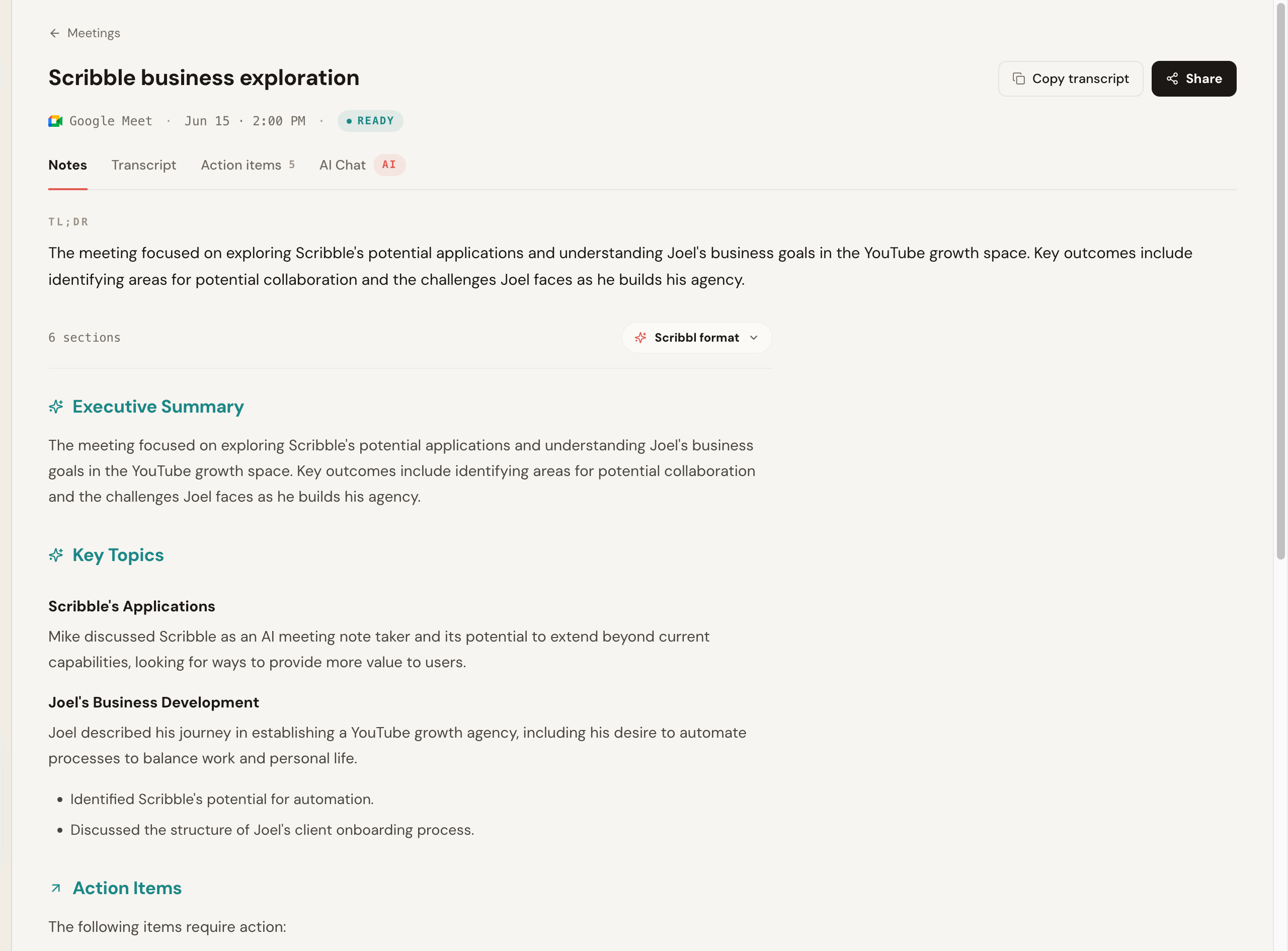
Below is what Scribbl's notes look like after a Google Meet call: a clean summary and action items you can send, not a raw transcript you still have to read.
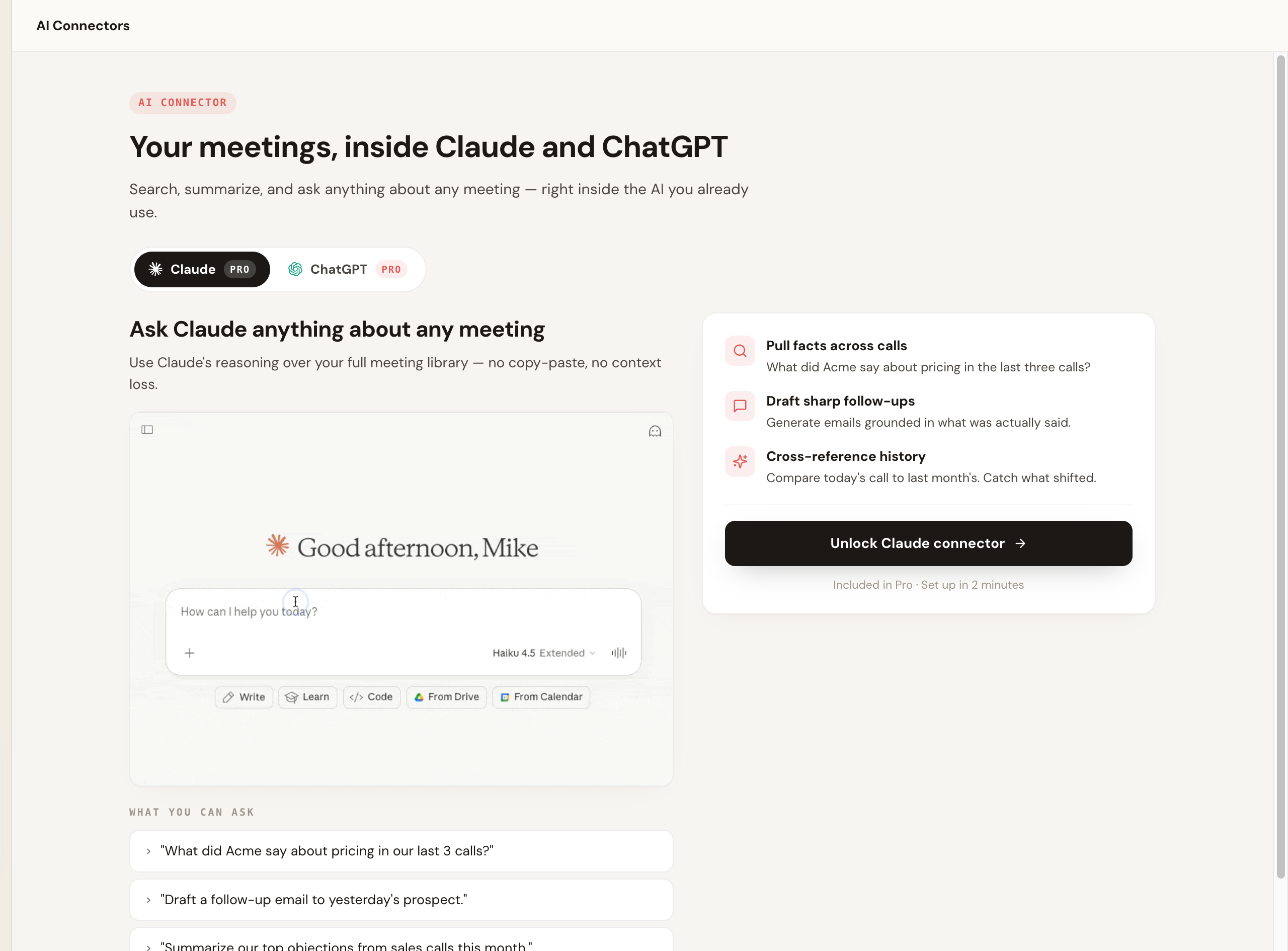
And the step that separates a notetaker from a transcription tool, asking questions and drafting the follow-up across your meetings inside the AI you already use:
- 1 Place the device dead center on the table, within ~10-15 ft of every speaker
- 2 Keep speakers facing in; voices carry toward a centered mic
- 3 Avoid the corner near the door, vents, and the screen fan, the noise sources
The 6 best AI notetakers for in-person and hybrid meetings, ranked
Scribbl leads the list for the most common setup: many in-person meetings have someone dialed in, and when the room joins a Google Meet, Zoom or Microsoft Teams call, Scribbl captures that call with no bot. For rooms with no call, the rest are ranked by the job they fit (a noisy boardroom, solo typed notes, phone capture). Every competitor price or feature should be confirmed on that vendor's own site, since they change.
1. Scribbl, for hybrid meetings where the room joins the call
Scribbl is built for online and hybrid meetings on Google Meet, Zoom, and Microsoft Teams, with no bot, nothing joining and nothing announced, using a Chrome extension for Google Meet and Scribbl Desktop for Zoom and Teams. When the room joins the call, it is captured like any other call, and every meeting gets the video, a transcript with speaker names, AI notes and action items. It is rated 5.0 from 3,000 reviews on the Chrome Web Store and 4.9 from 725 reviews on G2, used by more than 10,000 organizations, with a free plan that needs no credit card.
Scribbl connects your meetings to the AI you already use, ChatGPT or Claude, and Smart Collections sort meetings by themselves, so you can ask about just one group ("What did clients push back on in this month's workshops?") and draft the follow-up from what was actually said. Automations do the rest: draft the email, log notes in HubSpot or Pipedrive, post to Slack or Teams, or open a Linear, Jira, Asana or Monday ticket, asking before they change anything by default. For the people in the room, center the laptop and keep the room quiet so every voice carries to the call.
Pros: botless, no participant to introduce on the call; ask ChatGPT or Claude about every meeting or just one Smart Collection; Automations handle the follow-up; works across Meet, Zoom, and Teams in one account; free plan with no credit card; 5.0 from 3,000 reviews on the Chrome Web Store. Pricing: free plan with 10 meetings a month, including Google Meet, Zoom and Teams, no credit card; Pro is $13 per user per month billed annually, or $20 monthly (pricing page). Rating: 5.0 from 3,000 reviews on the Chrome Web Store and 4.9 from 725 reviews on G2, across 10,000+ organizations. Best for: hybrid meetings where the room joins a Google Meet, Zoom or Microsoft Teams call, when you want clean notes, no bot, and a follow-up that writes itself. More in our botless AI notetaker explainer and AI notetaker for 1-on-1 meetings guide.
2. A dedicated multi-mic hardware recorder (e.g. Plaud), for noisy rooms
For large conference tables, workshops, and noisy rooms with several speakers, a dedicated pocket recorder with a multi-microphone array is commonly the strongest in-person option. The pitch is straightforward and physically true: more microphones, placed centrally, separate distant voices better than a single laptop mic trying to cover a boardroom. Devices in this category are positioned around broad language support and offline recording, so they can capture without Wi-Fi and transcribe later.
The trade-off is that it is a separate device to carry, charge, and pay for (hardware plus, usually, a transcription plan), and it lives outside the apps where your calls already happen. Verify current device price, plan cost, and any accuracy or language claims on the vendor's own site, since these are exactly the figures that move.
Pros: multi-mic array improves speaker separation in big or noisy rooms; offline recording; often broad language support. Cons: extra hardware to buy and carry; separate from your call workflow; verify accuracy and language claims on the vendor's site. Pricing: device cost plus a transcription plan; confirm on the vendor's site. Best for: noisy, multi-speaker conference rooms where a single laptop mic cannot cleanly separate voices.
3. Granola, for solo live note-taking
Granola is a botless app (Mac, Windows, iOS and Android) that captures audio on your device while you optionally type your own notes, then merges your notes with the AI summary. For in-person use it shines as a solo, live note-taking companion: you sit in the meeting with your laptop, jot the occasional line, and it fills in the rest. Nothing joins, and Granola transcribes and then deletes the audio, so there is no recording to go back to.
The known limitation is speaker identification on multi-person, single-microphone audio, where gaps have been reported, which matters more in a busy room than in a quiet 1:1. Confirm current pricing on its site.
Pros: botless; merges your typed notes with the AI summary; runs on Mac, Windows, iOS and Android. Cons: keeps no recording (it transcribes and then deletes the audio); speaker-ID gaps on multi-person audio; the free Basic plan keeps notes from the last 30 days. Pricing: Basic is $0 (notes from the last 30 days); Business is $14 per user per month, billed monthly; Enterprise from $35 per user per month (Granola pricing). Best for: solo professionals taking live notes in 1:1s and small meetings. See our Granola alternative comparison.
4. Otter, for mobile live transcription in the room
Otter offers a mobile app that can record and transcribe an in-person conversation live, which makes it a familiar choice for capturing a meeting from your phone on the table. The live transcription experience and mobile apps are its long-standing strengths. On video calls it defaults to a join-the-call bot, but the phone-recording mode is what applies in person.
As with any single-microphone phone capture, expect speaker separation and accuracy to depend heavily on placement and room noise, and confirm current minute caps and pricing on its site. Note that Otter's auto-joining bot drew consumer-privacy litigation in 2025 on the virtual side, a reminder to choose your capture method on purpose and disclose in person.
Pros: strong mobile app and live transcription; familiar; free tier available. Cons: virtual mode defaults to a visible bot; single-phone-mic limits in big rooms; minute caps on free; confirm pricing. Pricing: Basic is free with 300 monthly transcription minutes; Pro is $16.99 per user per month billed monthly, or $8.33 billed annually (Otter pricing). Best for: capturing in-person meetings live from a phone. See our Otter alternative comparison.
5. Fireflies, for integrations and team search
Fireflies is best known as an integration-heavy, bot-based notetaker for virtual calls, with broad CRM connections and strong cross-meeting search. For in-person use it offers a mobile recording mode, so a team already standardized on Fireflies for its CRM and search can keep face-to-face meetings in the same library rather than adopting a second tool.
The in-room capture is still single-microphone, with the usual placement and crosstalk caveats, and the product's center of gravity is the virtual bot. Confirm current mobile-capture behavior, CRM integrations, and pricing on its site.
Pros: very broad integrations and deep cross-meeting search; mobile capture keeps in-person notes in the same library. Cons: built around a virtual bot; single-mic limits in person; confirm in-person capture details and pricing on site. Pricing: free plan; Pro is $10 per seat per month billed annually, or $18 monthly (Fireflies pricing). Best for: teams that want one searchable library and deep CRM integrations across virtual and in-person meetings. See our Fireflies alternative comparison.
6. tl;dv, for clips and highlight sharing
tl;dv is best known for turning meetings into shareable clips and highlights, a useful pattern when you want to circulate the key moment of an in-person meeting rather than the whole transcript. It supports device and mobile capture for face-to-face use, and the clipping and sharing workflow is its real strength.
Like the others here, in-room capture is single-microphone, and clipping matters more for sharing than for raw accuracy. Confirm current in-person capture details, free-tier limits, and pricing on its site.
Pros: strong clipping and highlight-sharing workflow; device and mobile capture; free tier available. Cons: built primarily for virtual calls; single-mic limits in person; confirm in-person details and pricing on site. Pricing: free with caps, then roughly $18-30/user/mo (June 2026, confirm). Best for: sharing standout moments and clips from in-person meetings. See our tl;dv alternative comparison.
The bot vs botless choice, in a room
On a video call, the bot debate is about a visible participant joining the link. In a room, the bot model is not even on the table, because there is no link, and that is exactly why a botless approach is the natural fit for in-person work. Scribbl brings the same no-bot principle to calls on Google Meet, Zoom and Teams, hybrid meetings included: nothing joins, nothing is announced, and no email goes out.
- Built for: joining a meeting link as a visible participant
- In a room: needs a separate mobile or device recording mode
- Workflow: in-person notes can sit apart from the bot-driven library
- Examples: Otter, Fireflies, tl;dv add a phone or device mode
- Built for: capturing without anything joining, by design
- Hybrid: when the room joins a Meet, Zoom or Teams call, it is captured like any call
- Workflow: connects the meeting to ChatGPT or Claude for the follow-up
- Plus: free plan, no credit card, on Meet, Zoom and Teams
What about hybrid meetings (some people in the room, some remote)?
This is the case the in-person guides skip, and it is increasingly the norm: a few people around a table and a few more dialed in on Google Meet, Zoom, or Microsoft Teams. The good news is that a hybrid meeting still has a meeting link, so you are back on familiar ground. Capture the call the way you normally would, and the remote participants come through on their own clean per-participant streams.
The wrinkle is the people in the room. They share one in-room microphone (whatever device is on the call), so the same single-mic limits apply to the far end of the table: voices that are far from the laptop can come through faint, and speaker separation among the in-room group is harder than for the remote attendees. The fix is the same as pure in-person: center the device, ask people across the table to speak up, and keep the room quiet. A botless tool like Scribbl is a clean fit for hybrid because it captures the platform call across Meet, Zoom, and Teams without a bot announcing itself to anyone, in the room or remote, and then connects the meeting to ChatGPT or Claude so one follow-up covers the whole group. If your hybrid rooms are large, a centrally placed conference mic on the call helps the far end of the table carry.
A note on consent for in-person recording
Recording an in-person conversation is still recording, and the law treats it the same as a call. Consent rules vary by country and, in the US, by state, with some places allowing one-party consent and others requiring all-party consent, and they apply to face-to-face conversations as well as phone and video calls. The difference in person is that nothing announces the recording the way a meeting-platform bot sometimes does, so the disclosure is entirely on you.
The safe default is simple: at the start of the meeting, say out loud that you are using an AI notetaker to capture the conversation, and confirm everyone is comfortable before you begin. It takes a few seconds and keeps things straightforward later. This is general information, not legal advice; check the rules for your jurisdiction and your company policy before recording sensitive meetings. For a deeper read, see do you have to tell people you are recording and is it legal to record a meeting.
AI notetaker for in-person meetings FAQ
What is the best AI notetaker for in-person meetings in 2026?
It depends on the room. For hybrid meetings, where the room joins a Google Meet, Zoom or Microsoft Teams call, Scribbl captures the call with no bot and connects the meeting to ChatGPT or Claude so the follow-up gets written, with a free plan and no credit card. For a quiet office, a 1:1, or a sales meeting with no call, a phone app that records the room works: Otter's mobile app records and transcribes an in-person conversation live. For a noisy conference table or a multi-speaker workshop, a dedicated multi-mic hardware recorder (commonly cited examples include Plaud and similar pocket devices) separates voices better than a single laptop mic. For solo live note-taking, Granola is a strong botless option. Pick on your most common in-person setting (room size, number of speakers, and whether you carry a device) rather than the longest feature list, and confirm current pricing on each vendor's site.
How is capturing an in-person meeting different from a video call?
On a video call, the platform carries a clean audio stream for each participant, so speaker labels are easy and there is a link to attach to. In a room there is no platform stream and no link, so capture comes from a device microphone (laptop, phone, or a dedicated recorder) picking up the air in the room. That means one shared microphone instead of separate channels, harder speaker separation across a table, more sensitivity to room noise and distance, and a stronger need for offline or on-device recording. The calendar-bot model simply does not apply in person, because there is nothing for a bot to join.
Do I need consent to record an in-person meeting?
Yes, treat it the same as recording a call. Recording laws vary by country and, in the US, by state, with some places allowing one-party consent and others requiring all-party consent, and they apply to face-to-face conversations as well as phone and video calls. Because an in-person recorder does not announce itself the way a meeting-platform bot might, the disclosure is entirely on you. The safe default is to say at the start that you are using an AI notetaker to capture the conversation and confirm everyone is comfortable before you begin. This is general information, not legal advice; check the rules for your jurisdiction and your company policy before recording sensitive meetings.
Does a bot join an in-person meeting?
No. The bot model only works when there is a meeting link for a virtual participant to join, and an in-person meeting has no link. Capture instead comes from a device microphone in the room. Some apps that use a calendar bot on video calls offer a separate mobile or desktop recording mode for in-person use. On Google Meet, Zoom and Microsoft Teams calls, including hybrid meetings where the room joins the call, Scribbl captures with no bot at all: nothing joins and nothing is announced.
How accurate are AI notetakers in a conference room?
Accuracy in a room depends mostly on the microphone and the distance, not the brand. Close, clean audio from one or two nearby speakers transcribes nearly as well as a video call. Accuracy drops with crosstalk, a large table, distance beyond a few feet, hard echoey rooms, and a single far-field laptop mic trying to cover everyone. This is the main reason dedicated multi-microphone recorders are pitched for in-person use: more mics, placed centrally, separate voices better than one laptop mic across a boardroom. For any tool, the honest test is to record your own worst room (a busy table with crosstalk) and read the transcript before you commit.
Can I record an in-person meeting without internet?
Sometimes, and it depends on the tool. Dedicated hardware recorders and some on-device or desktop apps can record audio locally with no connection and then transcribe later once you are online, which is useful in rooms with poor Wi-Fi or for confidential offline capture. Many cloud notetakers need a connection to transcribe in real time. If offline capture matters to you, confirm on each vendor's site whether recording, transcription, or both require internet, since the answer varies by tool and tier.
What is an AI notetaker for in-person meetings?
It is a tool that captures the audio of a face-to-face meeting from a device microphone (a laptop, phone, or dedicated recorder) and uses AI to turn it into a transcript, a summary, and action items, the same output you would get from a video-call notetaker, just sourced from the room instead of a meeting platform's stream. The best ones also identify speakers, work offline or on-device, and push the result into the tools you already use so the follow-up gets done, not just stored.
Which AI notetaker is best for in-person sales meetings?
For an in-person sales meeting with no call, use a tool that records the room, such as Otter's mobile app on the table, and if your sales meetings are large, noisy, multi-person rooms, a dedicated multi-mic recorder can improve speaker separation. For sales meetings on Google Meet, Zoom or Microsoft Teams, including ones where your side joins from a conference room, Scribbl captures the call with no bot, and Automations log the notes in HubSpot or Pipedrive and draft the follow-up email. Either way, disclose that you are recording, since face-to-face conversations carry the same consent rules as calls. See Scribbl for sales for how the follow-up plays out.
Can I use a phone or laptop as an in-person AI notetaker, or do I need special hardware?
For most quiet rooms, 1:1s, and small meetings, a phone or laptop microphone placed near the speakers is enough, and it is what most people already carry. Dedicated hardware (a pocket recorder with a multi-microphone array) earns its keep in larger rooms, around big conference tables, and in noisy environments where one built-in mic cannot cleanly separate several distant voices. Start with the device you have, record one real meeting, and only buy hardware if the transcript shows the room is too big or noisy for a single mic.
How do I capture a hybrid meeting where some people are in the room and some are remote?
A hybrid meeting still has a meeting link, so capture the call the way you normally would and the remote attendees come through on their own clean per-participant streams. The catch is the in-room group: they share whatever single microphone is on the call, so far-side voices can come through faint and speaker separation is harder than for the remote side. Center the device, ask people across the table to speak up, and keep the room quiet. A botless tool like Scribbl fits hybrid well because it captures the call across Meet, Zoom, and Teams without a bot announcing itself to anyone in the room or remote, then connects the meeting to ChatGPT or Claude so one follow-up covers the whole group. If in-room voices stay faint in a big room, add a centrally placed conference mic to the call.
Try Scribbl
Let your meetings take their own notes.
Scribbl records, transcribes, and summarizes your Google Meet calls from your browser. No bot joins the call. Free forever for individuals.
Add to Chrome · It's free