AI Notetaker for Product Managers: The Honest 2026 Guide
The best AI notetaker for product managers captures user interviews and syncs, extracts decisions and action items, and turns customer quotes into prioritized roadmap items. A ranked comparison, a decision tree, a discovery-to-roadmap workflow, and a copy-paste synthesis prompt.
Updated October 29, 2026
The short answer
The best AI notetaker for most product managers is Scribbl: it records user interviews and syncs with nothing joining the call, so research stays candid
- 01 Scribbl Discovery without a bot Free 10 meetings a month Nothing joins the call on Google Meet, Zoom or Teams. Every meeting gets the video, a transcript with speaker names, AI notes and action items, and you can ask Claude or ChatGPT across your interviews.
- 02 Granola Keeps no recording Deletes the audio after transcribing, so there is nothing to rewatch or share with design. Free notes from the last 30 days only.
- 03 tl;dv Bot joins Bot-based, so the observer effect applies on sensitive interviews.
- 04 Otter.ai Bot joins Bot-based capture, and summary quality on nuanced discovery calls is the usual PM complaint.
- 05 Fireflies.ai Bot joins A bot joins calls, and some teams find the volume of automated output noisy.
The best AI notetaker for product managers captures user interviews and cross-functional syncs without breaking the conversation, extracts the decisions, action items, and feature requests you would otherwise lose, and helps you turn scattered customer quotes into prioritized roadmap items. For discovery-heavy work, a botless tool (nothing joins the call) protects candor; for internal syncs you want broad platform coverage, reliable action-item extraction, and clean handoff into Jira, Linear, Notion, and Slack. Scribbl is our pick for most PMs, and this guide ranks the real contenders, maps each PM job to the feature that does it, gives you a decision tree, and shows the workflow that turns a week of interviews into RICE-scored roadmap items.
You already know the pain, because you live it. You cannot facilitate a discovery call and take good notes at the same time, so you do one badly. Action items end up scattered across a Notion page, a Slack thread, and the back of your own memory. And the insight a customer gave you last Tuesday, the one that should reshape the next sprint, never makes it into the roadmap because by the time you sit down to synthesize, you are already in the next meeting. The notetaker is not the point. Closing the gap between what was said and what gets built is the point.
What a PM actually needs from a notetaker
Generic "best meeting notes" lists miss the PM job entirely. Strip away the marketing and a product manager is evaluating a notetaker against five things:
- Discovery capture that stays candid. User interviews are the highest-value calls you run. A visible recorder bot makes people guarded right when you need them open. This is the single criterion most lists ignore.
- Decisions and action items, extracted, not just transcribed. A wall of transcript is not an output. You need the decision, the owner, and the follow-up, ready to move.
- Cross-meeting pattern analysis. One interview is an anecdote. Ten interviews are a signal. You need to query across conversations to find what repeats.
- Speaker ID and search. "Who said the onboarding was confusing, and what was the exact quote?" should take five seconds, not a re-watch.
- The integrations you live in. Jira, Linear, Notion, Slack, and your CRM. If the action items die in the notetaker, the tool failed.
Hold every tool below to those five. Most clear two or three.
The six PM jobs an AI notetaker has to cover
A notetaker that only handles "meetings" is generic. The PM calendar is six distinct jobs, and a tool can be excellent at one and useless at another.
1. User interviews and discovery
This is the keystone. You are trying to extract an honest account of a real person's problem, and rapport decides whether you get the candid story or the polished one. The right notetaker disappears into the background so you can listen, then gives you a transcript you can mine later. A botless tool wins here because there is no extra participant signaling "you are being recorded for a tool you have never heard of" the moment you are trying to build trust.
2. Sprint planning and standups
Fast, structured, decision-dense. You need the commitments captured (who took what, what got deferred, what is blocked) without you typing while you run the room. A good recap turns into a Slack summary the team actually reads and a tidy set of items for Jira or Linear.
3. Backlog grooming and refinement
Grooming generates a lot of small decisions: this story is too big, that acceptance criterion is fuzzy, this one is a duplicate. They evaporate if no one writes them down. A notetaker with reliable action-item extraction keeps the refinement decisions attached to the right tickets.
4. One-on-ones and cross-team syncs
Relationship and alignment calls. You want the commitments and context preserved (so the next 1:1 starts where the last one ended) without a recorder making a private conversation feel surveilled. Botless capture and tight access control matter most here.
5. Stakeholder updates and reviews
Leadership wants the decision and the rationale, not a 40-minute recording. The notetaker should give you a stakeholder-ready recap you can forward in two minutes, drawn from what was actually said, with the trade-offs intact.
6. Roadmap and PRD inputs
The synthesis job. This is where interview quotes, sync decisions, and stakeholder constraints get turned into prioritized roadmap items and the evidence section of a PRD. The best notetakers help you query across many conversations and pull cited evidence, so a roadmap call lands as "three customers said X, here are the quotes" rather than "I have a feeling."
- Joins as a visible guest in your interview, an unexplained attendee in the list
- Announces recording before you have built any rapport
- Triggers the observer effect: users get guarded and answers get shorter and more polished
- Adds friction to fast internal syncs and feels heavy on private 1:1s
- Nothing joins the call and nothing is announced to participants
- You disclose recording on your own terms, when it fits the conversation
- Research stays candid because there is no extra participant to notice
- Full speaker-labeled transcript plus a recap with decisions and owners
Feature to PM job: what each capability actually does for you
Feature lists are noise until you map them to the work. Here is how the capabilities that matter translate into the PM jobs above, so you can tell a real differentiator from a checkbox.
| Feature | Does this PM job |
|---|---|
| Botless capture (no bot joins) | Keeps user interviews and private 1:1s candid; no observer effect |
| Speaker-labeled transcript | Lets you quote the exact customer, attributed, in a PRD or roadmap |
| Decision + owner extraction | Turns sprint planning and reviews into a commitments list nobody forgets |
| Action-item extraction | Produces Jira / Linear-ready tickets from grooming and standups |
| Feature-request mining | Surfaces stated and implied asks from discovery to feed the backlog |
| Cross-meeting queries | Finds the pattern across ten interviews so a theme becomes a signal |
| Timestamped quotes | Backs every roadmap bet with verbatim evidence, not a hunch |
| Connects to ChatGPT / Claude | Runs your own synthesis, RICE scoring, and PRD drafting on the transcript |
The integrations a PM lives in
The notetaker is the start of the pipeline, not the end. If the action items and quotes die inside the tool, it failed. The destinations that matter for product work are the tracker (Jira or Linear), the doc (Notion or Confluence), and the team channel (Slack). Scribbl handles this two ways. Automations do the handoff: they open Linear, Jira, Asana, or Monday tickets, save notes to Notion or Confluence, and post the recap to Slack or Teams, and by default they ask before changing anything. And because Scribbl connects your transcripts to ChatGPT or Claude, the AI you already use can format and route the output exactly how your team works.
- 1 Action items become Jira or Linear tickets, with the source quote attached.
- 2 Decisions and themes land in Notion or Confluence as PRD and roadmap inputs.
- 3 A stakeholder-ready recap posts to the Slack channel the team reads.
- 4 The full transcript flows to ChatGPT or Claude for synthesis and RICE scoring.
The best AI notetakers for product managers, ranked
Six tools, ranked for PM work. Pricing and ratings move and competitor behavior changes, so treat the specifics as "verify on the vendor's site" and the verdicts as our honest take for PM work. The scannable matrix is below the write-ups.
1. Scribbl, best for discovery without a bot in the call
Scribbl is botless: no bot ever joins, nothing is announced, and no email goes to attendees. Every meeting on Google Meet, Zoom, and Microsoft Teams gets the video, a transcript with speaker names, AI notes and action items, and you can ask Claude or ChatGPT about every meeting, so the recap and the discovery synthesis get done, not just a transcript you will never reread. The Chrome extension covers Google Meet and Scribbl Desktop covers Zoom and Teams. The free plan covers 10 meetings a month on Google Meet, Zoom and Teams, no credit card. Rated 5.0 from 3,000 reviews on the Chrome Web Store and 4.9 from 725 reviews on G2, and used across 10,000+ organizations.
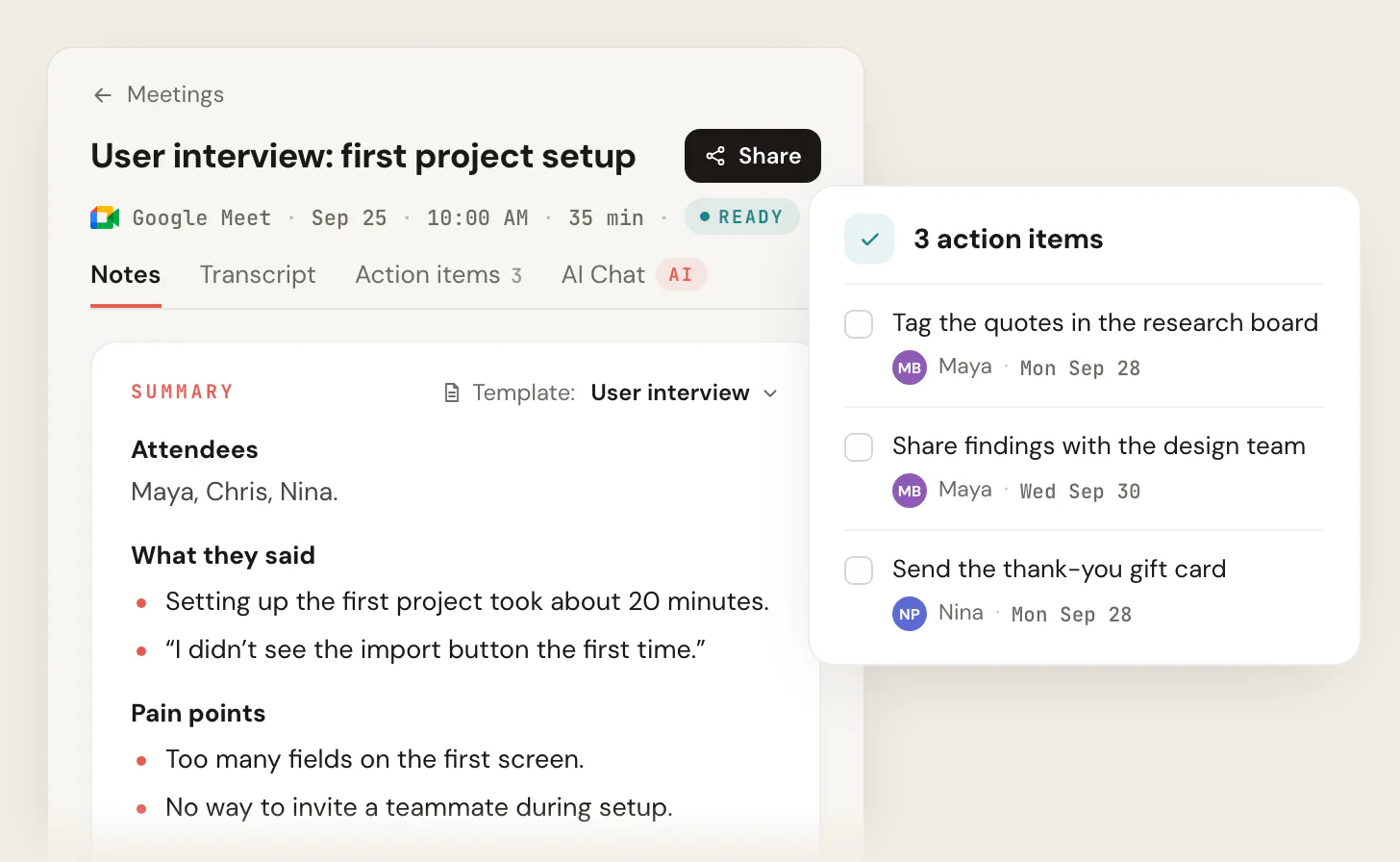
Why it works for PMs: keeps user interviews candid (no observer effect), and Smart Collections sort your interviews by themselves, so you can ask Claude or ChatGPT about just one group ("What pain points came up in this month's onboarding interviews?"). Automations then open the tickets, save the notes, and post the recap, so the action items never die in the notetaker.
2. Granola, best for the "notes plus your own thinking" interview style
Granola captures system audio (no meeting bot) and blends the transcript with notes you type yourself, then runs customizable templates over the result. PMs like its discovery framing and cross-meeting querying. Where it falls short: Granola transcribes and then deletes the audio, so there is no recording to rewatch or share with design, and the free Basic plan keeps notes from the last 30 days only.
3. tl;dv, best for tagging and multi-language discovery clips
tl;dv leans into timestamps, tagging, and clipping highlight reels from calls, which is handy for sharing a single damning user quote with the team. Strong multi-language support. Where it falls short: it is bot-based, so the same observer-effect caveat applies on sensitive interviews; confirm current limits on the free tier.
4. Otter.ai, best for live transcript and broad familiarity
Otter is widely adopted, with live transcription, speaker ID, and a searchable archive. Easy to roll out to a team that already knows it. Where it falls short: the bot-based capture and summary quality on nuanced discovery calls are the usual PM complaints; verify accuracy on your accents and jargon.
5. Fireflies.ai, best for CRM-heavy and integration-dense teams
Fireflies has one of the broadest integration footprints and strong search across a meeting archive, which suits PMs who live in a connected tool stack. Where it falls short: it is a bot that joins calls, and some teams find the volume of automated output noisy; confirm pricing tiers for the features you need.
6. Fathom, best free recap for internal syncs
Fathom is fast, generous on its free tier, and produces clean summaries and action items with minimal setup. A strong default for internal meetings. Where it falls short: a bot joins the call, and on the free plan advanced summaries cover only your first 5 calls each month, while AI action items and Ask Fathom need Premium.
The comparison table
The axes a PM actually decides on, with the Scribbl column highlighted because we make it. Competitor cells reflect publicly published behavior as of June 2026; confirm on each vendor's site before you buy. Public ratings are approximate and move.
| Feature | Scribbl | Granola | Otter | Fireflies | Fathom |
|---|---|---|---|---|---|
| Botless (no bot joins the call) | Yes | Yes | No | No | No |
| Nothing announced to attendees | Yes | Yes | No | No | No |
| Meet + Zoom + Teams | Yes | Yes | Yes | Yes | Yes |
| Speaker ID + search | Yes | Yes | Yes | Yes | Yes |
| Action-item + decision extraction | Yes | Yes | Yes | Yes | Yes |
| Customizable templates / recipes | Yes | Yes | Limited | Limited | Limited |
| Connects to ChatGPT / Claude | Yes | Yes | Yes | Yes | Yes |
| Cross-meeting pattern queries | Yes, including one Smart Collection | Yes | Limited | Yes | Limited |
| Jira / Linear / Notion / Slack | Yes | Confirm | Partial | Yes | Partial |
| Free plan, no credit card | Yes | Notes from the last 30 days | Yes | With caps | Yes |
| Public rating (approx, Jun 2026) | 5.0 from 3,000 (Chrome Web Store); 4.9 from 725 (G2) | Verify | ~4.3 G2 | ~4.7 G2 | ~5.0 G2 |
Which one should you pick? A decision tree
- 1
Mostly user interviews and discovery?
Pick botless. Scribbl keeps research candid because no bot joins the call, and you can ask Claude or ChatGPT across every interview, or just one Smart Collection, to synthesize across conversations. This is the highest-leverage choice for a discovery PM.
- 2
Mostly internal syncs across Zoom, Meet, and Teams?
Prioritize broad platform coverage plus reliable action-item extraction. Scribbl covers all three botless, and Automations push the action items into Jira or Linear and the recap into Slack.
- 3
Working closely with sales?
Scribbl Automations log meeting notes in HubSpot or Pipedrive and draft the follow-up email, so customer calls feed both the CRM and the roadmap.
- 4
Multi-language interviews a regular thing?
Confirm language coverage on the vendor's site before committing, and verify your specific languages and accents on a real call.
- 5
Still unsure?
Audit your last two weeks of meetings first. Count interviews vs. syncs. The biggest bucket decides the tool. Then run one real week through a free plan before you pay.
The discovery-to-roadmap workflow
A notetaker that stops at "here is your transcript" leaves the hardest PM job undone. The value is the pipeline from a candid interview to a prioritized, evidence-backed roadmap item. Here is the sequence that works.
- 1
Capture the interview cleanly
Run the call botless so the user stays candid. You get a full, speaker-labeled transcript and a recording, with nothing joining the call and nothing announced.
- 2
Auto-synthesize each conversation
Run a discovery synthesis prompt (below) over the transcript to pull pain points, current workarounds, feature requests, and jobs-to-be-done, with the supporting quote and timestamp for each.
- 3
Query across the batch for patterns
Once you have five to ten interviews, ask across all of them: which pain shows up most, which workaround repeats, which segment feels it hardest. One interview is an anecdote; the pattern is the signal.
- 4
Score each theme with RICE
Turn each recurring theme into a candidate item and score it: Reach (how many users), Impact, Confidence (how strong the evidence is), Effort. RICE = (Reach x Impact x Confidence) / Effort. The synthesis you just did is exactly the evidence that sets Confidence.
- 5
Carry the quotes into the roadmap and PRD
Attach the cited quotes, with timestamps, to the roadmap item and the PRD's evidence section. Now the prioritization call is 'seven users said this, here are their words,' not a hunch.
A copy-paste discovery synthesis prompt
Because Scribbl connects your transcripts to ChatGPT or Claude, you can run a structured synthesis prompt over any interview instead of re-reading it. Paste this and point it at the transcript:
For a batch, change the opening to "From the N transcripts below" and add: "Then rank the pain points by how many interviews mention each, note which user segment feels each most, and surface any contradictions between interviews." That batch query is what produces a defensible roadmap.
What the output looks like
A PM-useful notetaker hands back structured output you can act on, not a wall of text. After a discovery call, the recap separates the decisions from the action items from the synthesis, each with the speaker and the moment it happened.
- 1 Speaker-labeled summary header: who was on the call and the topic.
- 2 Decisions and owners, pulled out so nothing gets lost after the call.
- 3 Action items ready to drop into Jira, Linear, or Notion.
- 4 Discovery themes with cited quotes that feed the roadmap and PRD.
Proof and accuracy
A few honest notes on the things PMs ask about most. Transcription accuracy depends on audio quality, accents, and jargon, so test any tool on a real call with your own product vocabulary before you trust it for synthesis. Multi-language support varies widely between vendors; confirm your specific languages on a live call rather than a feature page. Privacy: check each vendor's privacy terms and confirm where recordings are stored and who can access them, especially for customer interviews under NDA.
A note on consent
User interviews and stakeholder calls are exactly the kind of conversation where consent matters, and recording and consent laws vary by region and by state. Participants and research subjects often join from different locations, so follow the strictest applicable rule. The safe default is to say at the start that you are using an AI notetaker to capture the call, and to confirm everyone is comfortable before you begin. Botless capture makes that disclosure cleaner because you control the moment, but it does not replace the need to ask.
AI notetaker for product managers FAQ
What is the best AI notetaker for product managers?
For most product managers, Scribbl. It is botless, so nothing joins your user interviews or syncs and research stays candid. It covers Google Meet, Zoom, and Microsoft Teams in one account, every meeting gets the video, a transcript with speaker names, AI notes and action items, and it connects to ChatGPT or Claude so the discovery synthesis and RICE scoring get done. Automations then open the Linear or Jira tickets, save notes to Notion or Confluence, and post the recap to Slack. Most alternatives (Otter, Fireflies, Fathom, tl;dv) send a bot into the call, which makes user interviews guarded.
Can a product manager use an AI notetaker without a bot joining the call?
Yes. Scribbl is botless, so nothing joins your user interview or sync as a participant. No extra attendee appears, nothing is announced, and no email goes to the people on the call. You get the video, a transcript with speaker names, AI notes and action items on Google Meet, Zoom, or Microsoft Teams, which keeps research candid and internal calls free of friction.
How do I turn customer interviews into roadmap items with an AI notetaker?
Capture each interview, let the notetaker produce a speaker-labeled transcript, then run a synthesis prompt that pulls pain points, current workarounds, feature requests, and jobs-to-be-done. Query across a batch of interviews to find patterns that repeat. Score each recurring theme with a framework like RICE (reach, impact, confidence, effort) and carry the supporting quotes, with timestamps, into the roadmap item as evidence.
Why does a visible bot hurt user interviews?
A strange participant labeled as a recorder triggers the observer effect: people get guarded, give shorter and more polished answers, and self-censor exactly when you want candor. With a botless notetaker nothing joins the call and there is no visible attendee, so the conversation stays natural. You still disclose that you are recording, but you do it on your own terms instead of letting a bot announce it for you.
How does an AI notetaker help capture decisions and action items?
It produces a full, speaker-labeled transcript of the call, then extracts the decisions made, the owners assigned, and the follow-ups. Scribbl connects that transcript to ChatGPT or Claude so you get a clean recap and an action-item list ready to drop into Jira, Linear, or Notion, without typing while you facilitate.
Do I need consent to record a user interview or sync?
Yes. Recording and consent laws vary by region and by state, and participants often join from different locations. The safe default is to say at the start that an AI notetaker is capturing the call and confirm everyone is comfortable before you begin. A botless tool makes that disclosure cleaner because you control the moment, but it does not remove the need to ask.
Is there a free AI notetaker for product managers?
Yes. Scribbl's free plan covers 10 meetings a month and includes Google Meet, Zoom and Microsoft Teams, with no credit card required. Several tools in this guide offer free tiers with caps on minutes or summaries. Start free, run it through a week of your real meetings, and only pay once a tool has earned a spot in your workflow.
Will a botless notetaker work if my company blocks meeting bots?
Often yes, and this is a real advantage for PMs in security-conscious orgs. Many IT policies block third-party bots from auto-joining calls, which kills bot-based notetakers in customer-facing or regulated environments. With a botless tool like Scribbl, nothing joins the call (the Chrome extension covers Google Meet and Scribbl Desktop covers Zoom and Teams), so there is no external participant to admit or whitelist. You still disclose recording and follow your company policy, but you sidestep the unknown-bot-in-the-meeting objection entirely.
How many user interviews do I need before I can trust a pattern?
Five to ten interviews in a segment is the common rule of thumb for surfacing the dominant pain points, and a notetaker that supports cross-meeting queries is what makes that practical. Run the per-interview synthesis as you go, then query across the batch to rank pains by how many interviews mention each. That count is exactly the Reach and Confidence evidence a RICE score needs.
Try Scribbl
Keep user interviews candid, no bot
Scribbl records, transcribes, and summarizes your Google Meet calls from your browser. No bot joins the call. Free forever for individuals.
Add to Chrome · It's free