What is CRM integration? A plain guide to what data flows and how
What CRM integration actually is, the four ways to connect a CRM (native, data sync, iPaaS, custom API), and how to pick the right one without over-integrating.
Updated October 29, 2026
The short answer
CRM integration is connecting your CRM to another system so they share data and trigger actions without anyone retyping anything
- What it does
- One of three jobs: data sync, workflow automation, or a unified view of another tool's data inside the CRM.
- Four methods
- Native app, built-in data sync, iPaaS, or a custom API build. Work down the list and stop at the first one that does the job.
- Don't over-integrate
- Pick the method per job, prefer native, and resist connecting things that do not need to be connected.
- Set up first
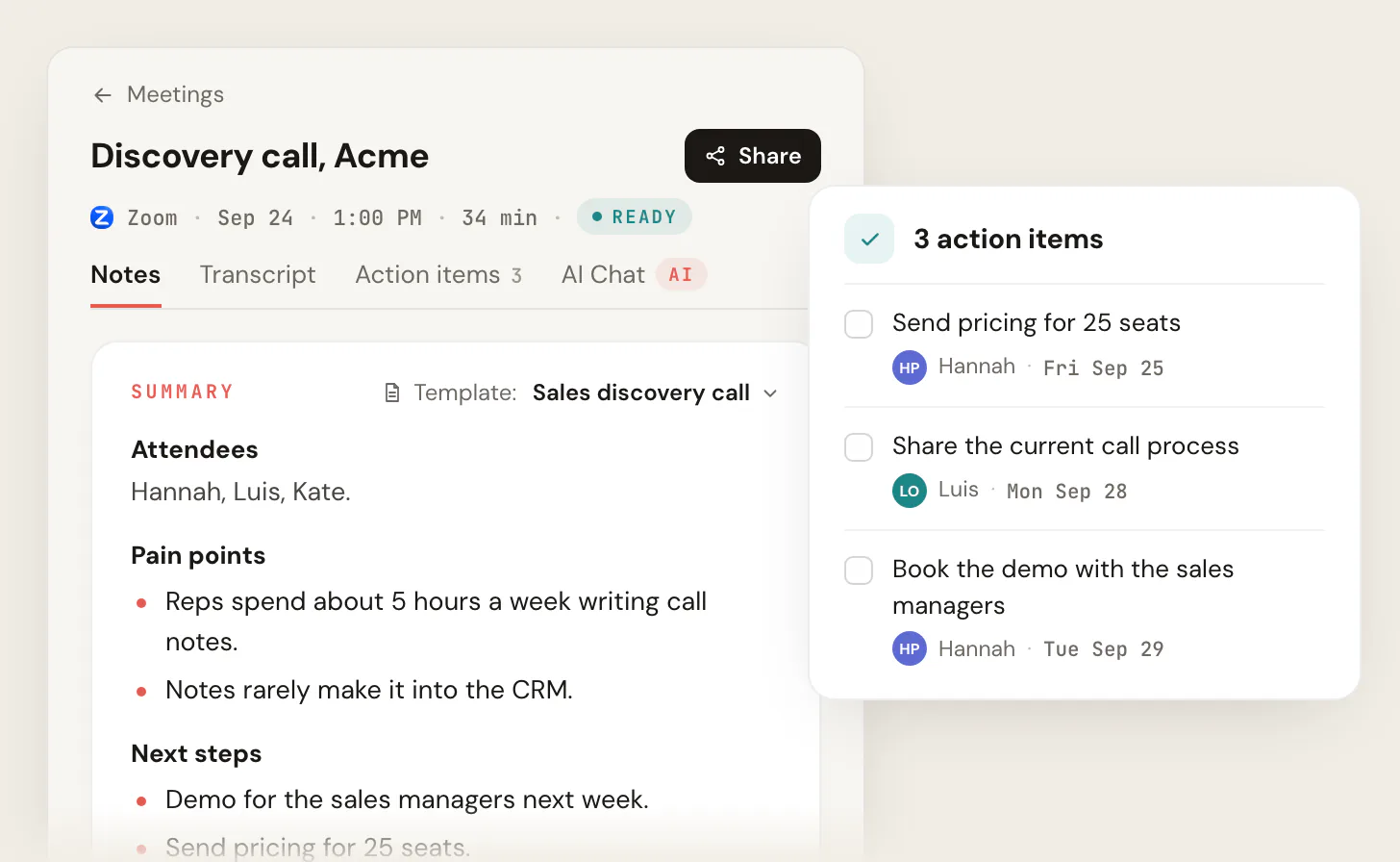
- Conversation data. Scribbl records your calls on Google Meet, Zoom and Teams with nothing joining the call, and Automations log the notes in HubSpot or Pipedrive, so the summary and next steps reach the deal record.
CRM integration is connecting your CRM to another system so they share data and trigger actions without anyone retyping anything. That is the whole definition. The hard part is not the wiring; it is deciding what data should flow, in which direction, and which of four connection methods to use. Most teams get this backwards: they connect every tool they own, end up with records that fight each other, and miss the one integration that actually moves the needle, which is getting what was said in meetings onto the contact and deal record automatically.
Scribbl handles that one. It records your calls on Google Meet, Zoom and Microsoft Teams with nothing joining the call, and its Automations log the notes in HubSpot or Pipedrive, asking before they change anything by default.
What CRM integration actually does
A CRM (customer relationship management system) is the database of record for your contacts, companies, and deals. Left alone, it is a static address book that someone has to keep filling in by hand. Integration changes what the CRM is for: instead of a place you visit to type things in, it becomes the place where data from your other tools lands on its own.
Every integration does one of three things, and it helps to name which one you mean:
- Data sync. Information moves between two systems and stays aligned. A contact added in your email tool shows up in the CRM; an email address corrected in the CRM flows back. This is the most common and the one people usually mean by "integration."
- Workflow automation. An event in one system triggers an action in the other. A closed-won deal in the CRM creates an invoice in your billing tool. A form submission on your site creates a new lead. Nothing has to be in sync continuously; one thing happens, another follows.
- Unified view. Another tool's data appears inside the CRM screen so reps do not have to switch tabs. Call recordings, support tickets, or contract status show up right on the contact record.
These are not exclusive. A good Salesforce-to-billing integration might sync customer records, trigger an invoice on close, and surface payment status on the account. But naming the job up front tells you which method to reach for. (Salesforce integrations overview, and HubSpot's integration methods, as of 2026-06-14.)
The four ways to connect a CRM
There are exactly four methods, and they go from cheapest and easiest to most expensive and most flexible. Work down the list and stop at the first one that does the job.
- 1
Native app
The vendor publishes a maintained connector in the CRM marketplace (Salesforce AppExchange, HubSpot App Marketplace). Install it. The vendor owns the upkeep and the field mappings are purpose-built. This is the cheapest, fastest, most reliable option.
- 2
Built-in data sync
No native app, but you need standard records (contacts, companies, deals) kept aligned with another app. Use the CRM's own sync engine. HubSpot Data Sync handles de-duplication and conflict resolution for default mappings at no extra cost.
- 3
iPaaS
For glue-it-yourself recipes the native app does not cover, use one integration platform (Zapier, Make, n8n, Workato). It listens for an event in one app and fires an action in another. Pick one tool, not seven.
- 4
Custom API build
Only when nothing off the shelf fits: custom objects, true real-time two-way sync, high volume, or a legacy system. Build against the CRM's API (Salesforce REST, SOAP, or Bulk). Authenticate with OAuth or a private app token, not a legacy API key.
The order matters because the failure mode is always the same: teams skip to an iPaaS or a custom build when a native app already exists, then they own a brittle recipe forever. Check the marketplace first. The Salesforce AppExchange lists more than 7,000 apps; HubSpot's ecosystem passed 1,000. The integration you want has probably already been built and is maintained by someone else.
Why disconnected systems cost you
The case for integration is not abstract. When your CRM, your calendar, your email, and your meeting notes live in separate places, three things happen. Reps spend time copying data between tabs instead of selling. Records drift out of sync, so two people see two different "truths" about the same account. And the context that actually matters, what the customer said and agreed to, never makes it into the CRM at all because typing it up is tedious and gets skipped.
That last one is the expensive gap. A deal record might have a name, an amount, and a stage, but none of the texture: the objection raised on the call, the feature the buyer asked for, the deadline they mentioned. When that lives only in someone's head or a stray doc, the next rep, the manager, and the renewal owner are all flying blind.
The market reflects how much this matters. CRM spend keeps climbing because the database alone is not enough; the integrations around it are where the value lands.
The integration most teams skip: conversation data
Here is the integration that pays for itself and almost nobody sets up first: getting the content of your meetings onto the right CRM record automatically. Sales calls, client check-ins, and discovery meetings are where the real information lives. If that information only exists as a recording nobody rewatches, your CRM is missing the part that drives decisions.
This is a data-sync and unified-view job at the same time. You want the summary, the action items, and the searchable transcript to land on the contact and deal, and you want a rep to see them without leaving the record. An AI note taker handles the capture; the integration handles the routing.
Scribbl records, transcribes, and summarizes your calls on Google Meet, Zoom and Microsoft Teams with nothing joining the call, and Automations log the notes in HubSpot or Pipedrive (asking before they change anything, by default). For a sales team, that means the call summary and next steps reach the deal record without a rep retyping anything after every call. Zoom and Teams go through Scribbl Desktop, and the free plan covers 10 meetings a month on Google Meet, Zoom and Microsoft Teams. This is the integration to set up before you wire up your billing tool, because it is the one that changes what reps actually do.
Native vs. iPaaS: when to use which
The two methods most teams actually choose between are a native app and an iPaaS. Here is the honest split.
- Best for: a tool that publishes a maintained CRM connector
- Vendor owns the upkeep and field mappings
- Fastest to set up, usually no per-task cost
- Limited to what the connector exposes
- Check the marketplace here first, every time
- Best for: recipes no native app covers
- Connects almost anything to almost anything
- You own the logic, the upkeep, and the failure modes
- Per-task or per-step pricing adds up at volume
- Use one platform for everything, not several
A simple test: if the tool you want to connect has a tile in the CRM marketplace and the default field mapping covers your needs, use the native app. If you are gluing together two niche tools, or the trigger-and-action logic is specific to your business, that is iPaaS territory. If you need custom objects, real-time two-way sync, or high volume, you are into a custom build and should budget developer time accordingly.
How to set up a CRM integration without making a mess
The mechanics differ by tool, but the shape is the same every time. Whether you are wiring up Salesforce automation tools or shopping the best HubSpot integrations, follow this sequence.
- 1
Name the job
Data sync, workflow automation, or unified view. Write it down in one sentence before you touch any settings.
- 2
Pick the lightest method that does it
Native app, then data sync, then one iPaaS, then custom. Stop at the first that fits.
- 3
Map the fields and pick a direction
Decide exactly which fields sync and which system wins a conflict. One-way is safer than two-way; only sync two-way when both systems are real sources of truth.
- 4
Test on a handful of records
Run it on a sandbox or a few real records first. Confirm nothing duplicates and the right system overwrites the wrong one, not the reverse.
- 5
Turn it on and watch for a week
Most integration pain shows up as silent duplicates or stale records. Check the first week's data before you trust it.
CRM integration FAQ
What is the difference between a CRM integration and an API?
An API (application programming interface) is the technical doorway a system exposes so other software can read and write its data. A CRM integration is the actual connection built through that doorway. Salesforce offers REST, SOAP, and Bulk APIs; an integration is what you create using one of them, whether that is a native app someone published, an iPaaS recipe, or custom code. You can have an API without an integration, but you cannot build a custom integration without one.
Do I need a developer to integrate my CRM?
Usually not. Native apps install in a few clicks, and iPaaS platforms like Zapier are built for non-developers. You only need a developer for a custom build, which is the last resort for cases the off-the-shelf options cannot cover: custom objects, real-time two-way sync at high volume, or a legacy system with an awkward API. Most teams never get there.
What CRM integrations should a sales team set up first?
Start with conversation capture, then meeting scheduling, then dialing and documents. Getting call summaries and action items onto the deal record changes daily behavior more than any other integration, which is why it should come first, not last. See how to improve sales productivity and the Scribbl for sales page for how meeting data feeds the pipeline.
Will integrating my CRM create duplicate records?
It can, if the sync is misconfigured. Duplicates come from two-way syncs with no de-duplication rule and from matching on the wrong field (matching on name instead of email, for example). Pick a unique key like email, prefer one-way sync where you can, and test on a few records before going live. Tools with built-in data sync handle most of this for you.
Is CRM integration worth it for a small team?
Yes, but be selective. A two-person agency does not need ten integrations; it needs the two or three that remove real retyping. Start with the meeting-notes-to-CRM connection and a calendar sync, skip the rest until a clear pain shows up. The goal is fewer tabs and honest records, not a wall of connected logos. For agencies specifically, see AI for agencies.
CRM integration: the bottom line
CRM integration is simple to define and easy to over-do. It is connecting your CRM to another system so data flows and actions fire automatically. The discipline is in restraint: name the job, use the lightest method that does it, prefer native apps, and connect only what removes real work. And of all the integrations you could set up, the one that changes the most is the least flashy: getting what was actually said in your meetings onto the record, so the CRM holds the context and not just the contact.
Try Scribbl
Get call notes onto the deal record
Scribbl records, transcribes, and summarizes your Google Meet, Zoom and Teams calls: Google Meet in your browser, Zoom and Teams with the desktop app. No bot joins the call. Free for 10 meetings a month, no credit card.
Add to Chrome · It's free