The AI meeting assistant for Google Meet, Zoom and Teams, with no bot.
An AI meeting assistant records your meetings, writes the notes and action items, answers questions about what was said, and helps with the follow-up. Scribbl does all four for every Google Meet, Zoom and Microsoft Teams call you join, and nothing joins the call. The free plan includes Google Meet, Zoom and Microsoft Teams, with 10 meetings a month.
On Google Meet? Add Scribbl to Chrome instead.
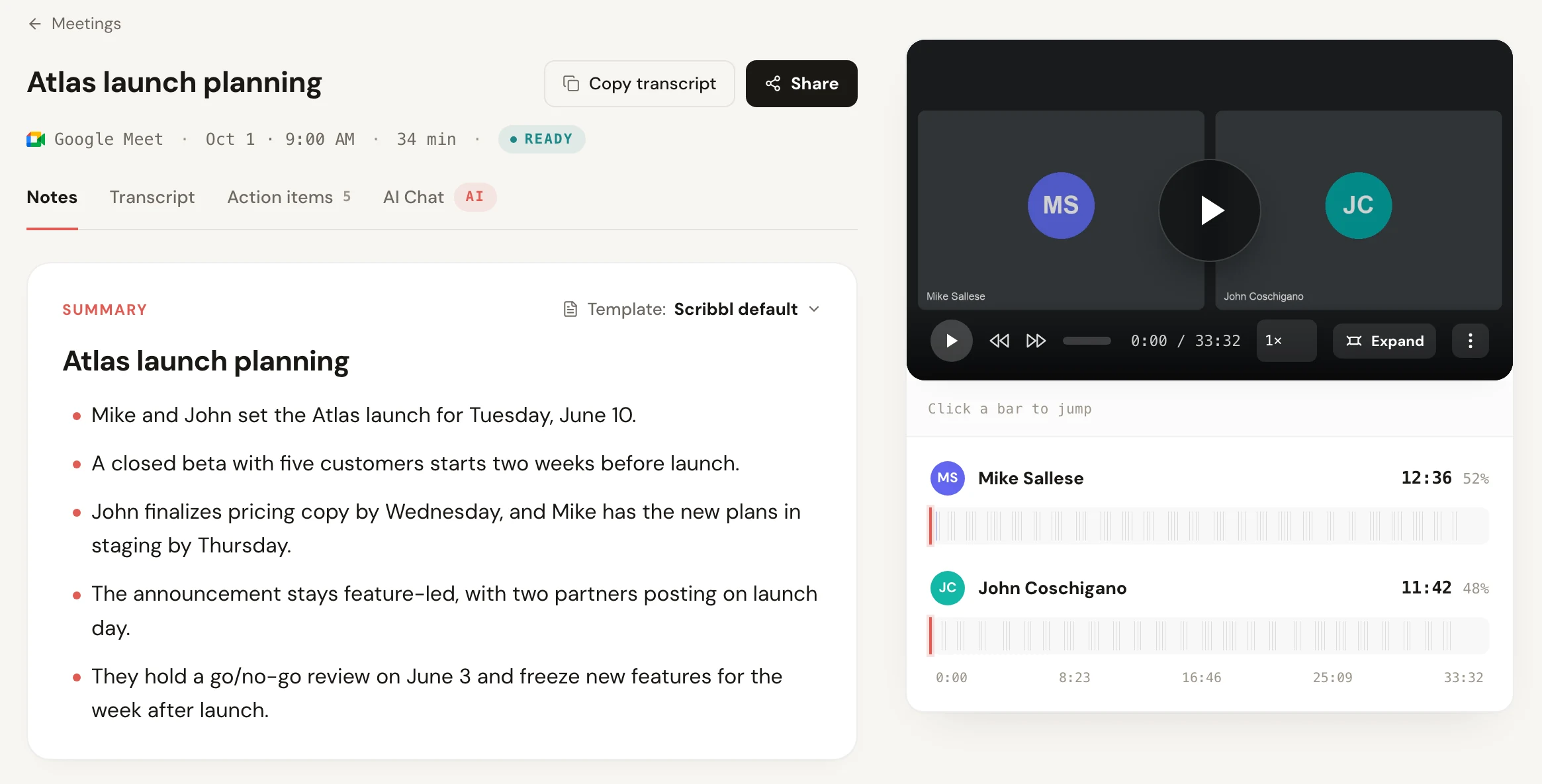
A real Scribbl meeting page after a 34-minute call: the notes, tabs for the transcript and the 5 action items, the video, and how long each person spoke.
What Scribbl's AI meeting assistant does for every call.
You run the meeting. Scribbl takes care of the record of it and the work it leaves behind, the same way on Google Meet, Zoom and Teams.
Records the meeting
The video and a transcript with speaker names, for every Google Meet, Zoom and Teams call you join. Nothing joins the call.
Writes the notes
A summary, the decisions and each action item with its owner, in a template that fits the kind of meeting.
Answers questions
Ask ChatGPT or Claude about every meeting Scribbl recorded for you, across all three apps (Pro).
Does the follow-up
Drafts the follow-up email for you to send, posts the summary to Slack or Teams, and logs notes where your team works.
What's in the notes is on AI meeting notes, and the short write-up on the AI meeting summarizer page.
An AI meeting assistant that keeps working after the call.
Here it is for a week of sales calls, one each on Zoom, Google Meet and Teams.
01 ChatGPT and Claude
Ask about every meeting at once.
Connect Scribbl once, and ChatGPT or Claude can search the transcripts and notes of every meeting Scribbl recorded for you. Ask what came up across a week of calls and get an answer built from what people actually said, with the call and the moment it came from.
It works the same for Google Meet, Zoom and Teams calls, and it's part of Pro.
How connecting ChatGPT or Claude works
 You ask
What were the main objections in my sales calls this week?
 Matches in your Scribbl meetings Sales calls
“We’re locked into our current tool until the contract ends in March.”
 Brightline Health demo · Today
“The per-seat pricing gets expensive once the whole team is on it.”
 Halcyon Foods discovery call · Wed
“Our security team has to sign off before we buy anything new.”
 Ridgeway Partners pricing call · Tue
02 Smart Collections
Meetings sort themselves.
Write one sentence about what belongs, like "calls with prospects about buying from us", and each new meeting that fits joins on its own, from any of the three apps. Hiring interviews, a client's project and your 1:1s can each have their own. Nobody tags or files anything.
Smart Collections
Sales calls
18 meetingsWhat belongs in it
Calls with prospects about buying from us.
Joined on their own
Brightline Health demo
Just joined
Halcyon Foods discovery call Wed Ridgeway Partners pricing call Tue Open in Claude
Ask about these meetings, draft from them, dig into any of it.
03 Automations
The follow-up gets done.
When a meeting lands in a Smart Collection, Scribbl takes its notes and does the chores that usually come after the call. By default it asks before it changes anything in another tool, and the email always waits for you to send it.
- Drafts the follow-up email for you to send
- Logs a note in HubSpot or Pipedrive
- Posts a summary to Slack or Microsoft Teams
- Saves the notes to Google Drive, Notion or Confluence
- Opens a ticket in Asana, Monday, Linear or Jira
- Adds a row to a Google Sheet
Sales calls
18 meetingsCalls with prospects about buying from us.
After every sales call
Draft the follow-up email
in your format · waits for you
Log the notes in HubSpot
asks you first · on the deal
Post a summary to Slack
asks you first · #sales
Open a Jira ticket per bug
asks you first · Support board
How to start with Scribbl's AI meeting assistant.
- 01
Sign up free
Create a Scribbl account. The free plan includes Google Meet, Zoom and Microsoft Teams, with 10 meetings a month.
- 02
Add Scribbl where you meet
The Chrome extension for Google Meet. Scribbl Desktop for Zoom and Teams, on a Mac with Apple silicon or a Windows PC.
- 03
Join your calls as usual
Nothing joins the call and you don't need to be the host. When the call ends, the notes, action items, transcript and video are in your account. Tell people you're recording.
The best AI meeting assistants, compared.
How each AI meeting assistant gets into your meeting, and what it gives you free. Scribbl, our pick, first.
Scribbl Our pick Otter, Fathom, Fireflies, Read AI, Krisp and Granola plans checked on their own pricing pages on November 24, 2026. Prices change, so check theirs before you buy. Google, Zoom and Microsoft facts from their help and pricing pages, as on our AI meeting summary page. More on choosing one: AI meeting assistant without a bot.
Which AI meeting assistant to pick
- You use more than one of Google Meet, Zoom and Teams
- Scribbl. One account for all three, and the free plan includes all three.
- You join meetings other companies run
- Scribbl. Nothing joins the call, so there's no bot for their organizer to admit, and it doesn't depend on their plan.
- You want it free and keep using it
- Scribbl's 10 meetings a month with no length limit. Otter stops each conversation at 30 minutes, Read AI at 1 hour and 5 a month, and Krisp's free time is a 7-day trial.
- Your whole company is on Microsoft 365 with Copilot
- Copilot's recap covers Teams meetings your organization runs. Add Scribbl for Zoom, Google Meet and meetings other companies host.
- You want answers across months of meetings
- Scribbl Pro: connect it once in ChatGPT or Claude and ask about every meeting it recorded.
Free for 10 meetings a month.
The free plan includes Google Meet, Zoom and Microsoft Teams. Pro adds unlimited meetings and asking ChatGPT or Claude about every one.
Free
$0
Google Meet, Zoom and Microsoft Teams
- 10 meetings a month
- AI notes, decisions and action items
- A transcript with speaker names, and the video
- Note templates for each kind of meeting
- No limit on meeting length
Pro
$13per user / month
Billed annually, or $20 monthly
- Everything in Free
- Unlimited meetings
- Ask ChatGPT or Claude about every meeting
Recordings are private by default, and Scribbl doesn't use your meetings to train AI for anyone other than you. See pricing
AI meeting assistant FAQ
What is an AI meeting assistant?
An AI meeting assistant is software that takes care of the work around a meeting: it records the call, writes a transcript and notes with the decisions and action items, answers questions about what was said, and helps with the follow-up. Scribbl is an AI meeting assistant for Google Meet, Zoom and Microsoft Teams, and nothing joins the call.
What is the best AI assistant for meetings?
For Google Meet, Zoom and Microsoft Teams, Scribbl. It records every call you join with nothing joining the call, writes the notes and action items, keeps the video and a transcript with speaker names, sorts meetings into Smart Collections, and drafts the follow-up. On Pro, ChatGPT or Claude can answer questions across all your meetings. The free plan includes Google Meet, Zoom and Microsoft Teams, with 10 meetings a month.
Can I get an AI meeting assistant for free?
Yes. Scribbl's free plan covers 10 meetings a month on Google Meet, Zoom and Microsoft Teams, with no limit on meeting length and no credit card. Each meeting gets AI notes, action items, a transcript with speaker names and the video. Pro is $13 per user per month billed annually, or $20 monthly, for unlimited meetings and asking ChatGPT or Claude about every meeting.
Can ChatGPT take meeting minutes?
ChatGPT can turn a transcript you paste in into minutes, but it doesn't hear your Google Meet, Zoom or Teams call on its own. Scribbl records the call and writes the notes, and on Pro you connect Scribbl once in ChatGPT or Claude so either one can answer questions about every meeting Scribbl recorded for you.
Does an AI meeting assistant have to join the call?
No. Many do: Otter's and Fireflies' notetakers join as a participant, and Teams now holds detected bots in the lobby until the organizer admits them. Scribbl doesn't join the call. On Google Meet it works from the Chrome extension, and on Zoom and Teams from Scribbl Desktop on your own Mac or Windows PC. Tell people at the start that you're recording.
Does it work in meetings I don't host?
Yes. Scribbl works the same in any Google Meet, Zoom or Teams meeting you join, including meetings another company runs. The assistants built into the apps depend on the host: Gemini needs the organizer's plan to include it, Zoom's summary is started by the host or a co-host, and Teams' recap needs a Teams Premium or Copilot license.
Will Scribbl send emails or change my other tools on its own?
No. The follow-up email is a draft you send yourself. Automations that change another tool, such as logging a note in HubSpot or opening a ticket in Jira, ask before they change anything by default.
Are my meetings private?
Yes. Recordings are private by default, and you choose who gets a link. Scribbl doesn't use your meetings to train AI for anyone other than you.
More from Scribbl: AI meeting notes, AI meeting summarizer, AI meeting note taker, Meeting transcription software, Google Meet AI note taker, Zoom AI note taker, AI meeting note taker for Microsoft Teams, AI meeting assistant without a bot: the buyer's guide.
Bring an AI meeting assistant to your next call.
Sign up free, add Scribbl where you meet, and join the call the way you always do. When it ends, the notes are waiting.
Google Meet uses the Chrome extension. Zoom and Teams use Scribbl Desktop.
Recording laws vary by region, so let everyone in the meeting know you're recording and make sure you have the consent you need.