AI Meeting Assistant Without a Bot: The 2026 Buyer's Guide
An AI meeting assistant without a bot captures and summarizes your calls with no participant joining. Here is how botless capture works, plus Scribbl, Granola and Otter compared on platforms, privacy, and price.
Updated October 29, 2026
The short answer
Software that records, transcribes and summarizes your calls from your own browser or desktop app, so nothing joins the meeting
- How it records
- A browser extension records from the browser you joined in; a desktop app records on your computer. No attendee dials in.
- What attendees see
- Nothing extra: no tile in the participant list, no join announcement, no attendee email.
- The trap
- Some tools are botless on Google Meet only and fall back to a bot on Zoom and Teams. Check every platform you use.
- Consent
- Removing the bot doesn't remove your duty to tell people you're recording.
- Our pick
- Scribbl: botless on Google Meet with the Chrome extension and on Zoom and Teams with Scribbl Desktop. Free plan with 10 meetings a month, no credit card. Start free.
An AI meeting assistant without a bot is software that records, transcribes, and summarizes your calls, then helps you act on them, without ever sending a participant into the meeting. Instead of dialing a recorder bot in as an attendee, it records from your own browser or desktop app, on your side of the conversation. Nothing appears in the participant list, nothing is announced, and no surprise attendee email goes out. The word that matters is assistant: the best of these tools do not just hand you a transcript, they connect the meeting to the AI you already use so the follow-up actually gets done.
This guide explains what botless really means, how the capture works, and compares Scribbl, Granola and Otter so you can pick one. Short version: if you want one recommendation, we recommend Scribbl, because it is botless on Google Meet, Zoom, and Microsoft Teams and turns each meeting into work with ChatGPT or Claude.
What is an AI meeting assistant without a bot?
It is software that captures, transcribes, and summarizes a meeting from your side of the call rather than by adding a recorder as a visible participant. A traditional AI notetaker connects to your calendar and, at the start of each meeting, sends a bot that dials in as an attendee, sits in the participant list, and often triggers an "X has joined" notice. A botless assistant skips that step entirely. It records from a desktop app on your computer or from a browser extension in the browser you joined with, so there is nothing to announce and nothing to consent-warn about beyond what you would do anyway.
The practical result: the room looks normal. No logo with a vendor's name sits across from your prospect, candidate, or client. You still get the recording, the searchable transcript, the clean summary, and the action items afterward, just without the awkward third wheel.
Why go without a bot: the real reasons
The bot is not just a cosmetic detail. It changes the meeting. Three things happen the moment a recorder dials in as a participant, and a botless assistant removes all three.
First, it changes the dynamic in the room. A named recorder sitting in the participant list reads as surveillance, especially on a sales, recruiting, or client call. People hedge, glance at the tile, and ask who that is. Take the bot out and the call feels like a conversation again, while you still keep the full record.
Second, it puts your meeting through a third party. A bot is an attendee that has to be admitted, holds the shared stream, and on some platforms triggers a host notification or an automated email to everyone invited. That is a participant you did not choose, doing things on your behalf that you cannot fully see.
Third, it depends on the platform letting the bot in. Waiting rooms, external-guest blocks, and admin policies can keep a bot out of the very meetings you most need recorded. Botless capture runs on your machine, so it does not need anyone's permission to join.
How botless capture actually works
This is the conceptual core of the category, so it is worth getting right. A bot-based recorder is a software participant: it authenticates into the meeting, occupies a seat, and records the shared stream the way any attendee would. A botless assistant captures locally instead, using one of two mechanisms.
- 1
Desktop app: local microphone plus system audio
A desktop assistant records your mic and the audio your computer is playing back through its speakers. Together that captures both sides of the conversation, on your machine, with no participant added to the call. This is how Mac and Windows apps record Zoom, Meet, and Teams without joining.
- 2
Browser extension: record from your browser
An extension records the meeting from the browser you joined it in, so it never has to dial anything in.
- 3
By contrast, a bot dials in as an attendee
A bot-based recorder connects to the meeting as its own participant. It shows up in the list, may announce itself, and on some platforms triggers a notification to the host or attendees. That visible recorder is exactly what the botless approach removes.
Here is what that looks like in the meeting itself. On Google Meet, Scribbl works through its Chrome extension, so the participant list shows only the real people on the call.
Summary and action items build here while you talk.
- 1 Recording is on, and nothing has joined the call as a participant.
- 2 The participant list shows only the real attendees. No bot tile, no vendor name.
- 3 The AI notes panel is on your side of the call, where you already are.
Bot-based vs bot-free, side by side
Once you understand the mechanism, the tradeoff is easy to see. A bot gets you recording without installing anything on your machine, but it does so by putting a visible recorder in the room. A botless assistant keeps the room clean at the cost of a quick install on your side.
- What joins: nothing, capture runs on your side
- Visible to the room: no tile, no join announcement
- Attendee emails: none triggered by a bot
- Platforms: botless on Google Meet, Zoom, Microsoft Teams
- Setup: a one-time install: the Chrome extension for Google Meet, Scribbl Desktop for Zoom and Teams
- After the call: notes, action items, then ChatGPT or Claude does the follow-up
- What joins: a named bot dials in as a participant
- Visible to the room: an extra tile, often an 'X has joined' notice
- Attendee emails: some tools notify the host or attendees
- Platforms: some are bot-only on Zoom and Teams
- Setup: connect a calendar, nothing to install
- After the call: a transcript and summary you still have to act on yourself
Notetaker vs assistant: the difference that decides the shortlist
A notetaker gives you a transcript and a summary, and then the work is still yours. You reopen the summary, retype the action items into an email, and copy the highlights into your CRM by hand. That is a notetaker.
An assistant goes one step further. It treats the meeting as the input to your next task. After the call you can draft the follow-up email, write the recap, update the deal, or prep for the next conversation, using the AI you already work in. The meeting becomes the start of the work, not a document you file and forget. When you read the shortlist below, this is the line that separates a recorder you babysit from an assistant that moves the work forward.
Questions buyers ask that most guides skip
The basics are covered everywhere. Here are the answers that actually decide a purchase once you understand the category.
Does a botless assistant need IT approval or a network allowlist?
This is the quiet advantage. A meeting bot is an external participant that has to connect into your call, so security-conscious teams often have to allowlist the vendor, review what that participant can access, and decide whether an outside service should hold the shared stream. A botless assistant captures on a device you already control, with no new participant to admit, so there is usually far less to review. Still loop in your IT or security team, share the vendor's security page, and confirm your own recording policy before you roll it out widely.
What about hybrid meetings?
A hybrid meeting is still a call: the people in the room join from a laptop, and everyone else joins remotely. What matters is that the assistant stays botless on whichever platform the call runs on, so the remote side sees a normal meeting too. Scribbl is built for online and hybrid meetings on Google Meet, Zoom, and Microsoft Teams: the Chrome extension records Google Meet and Scribbl Desktop records Zoom and Teams, with no bot in the call either way.
Does removing the bot remove the host notification?
On platforms that warn the host or attendees when a recorder joins, that warning is tied to the recorder being a participant. Capture on your own side, and there is no joining participant to trigger it. That is exactly why botless is quieter: you are not suppressing a notification, there is simply no extra attendee to announce. It does not change your own obligation to tell people you are recording, which the consent section below covers.
The 3 best AI meeting assistants without a bot
These are the tools that come up most in the bot-free category. Capture method, platforms, and the headline price are summarized below, with honest limitations. Competitor prices are from each vendor's own pricing page, checked October 7, 2026; they change often, so confirm them on each vendor's site.
1. Scribbl: best overall, and the one we recommend
- Best for: people whose calls are relationships (sales, recruiting, client work) who want a clean room and the follow-up actually drafted.
- Capture method: botless. The Chrome extension records Google Meet, and Scribbl Desktop (Mac with Apple silicon and Windows) records Zoom and Teams; no bot is ever added to the call.
- Platforms: Google Meet with the Chrome extension; Zoom and Microsoft Teams with Scribbl Desktop.
- Standout feature: Automations do the follow-up (draft the email, log notes in HubSpot or Pipedrive, post to Slack or Teams), asking before they change anything by default, and on Pro you can ask Claude or ChatGPT about every meeting or just one Smart Collection.
- Price: free plan with 10 meetings a month, Google Meet, Zoom, and Teams included, no credit card; Pro is $13 per user per month billed annually, or $20 monthly. See the pricing page.
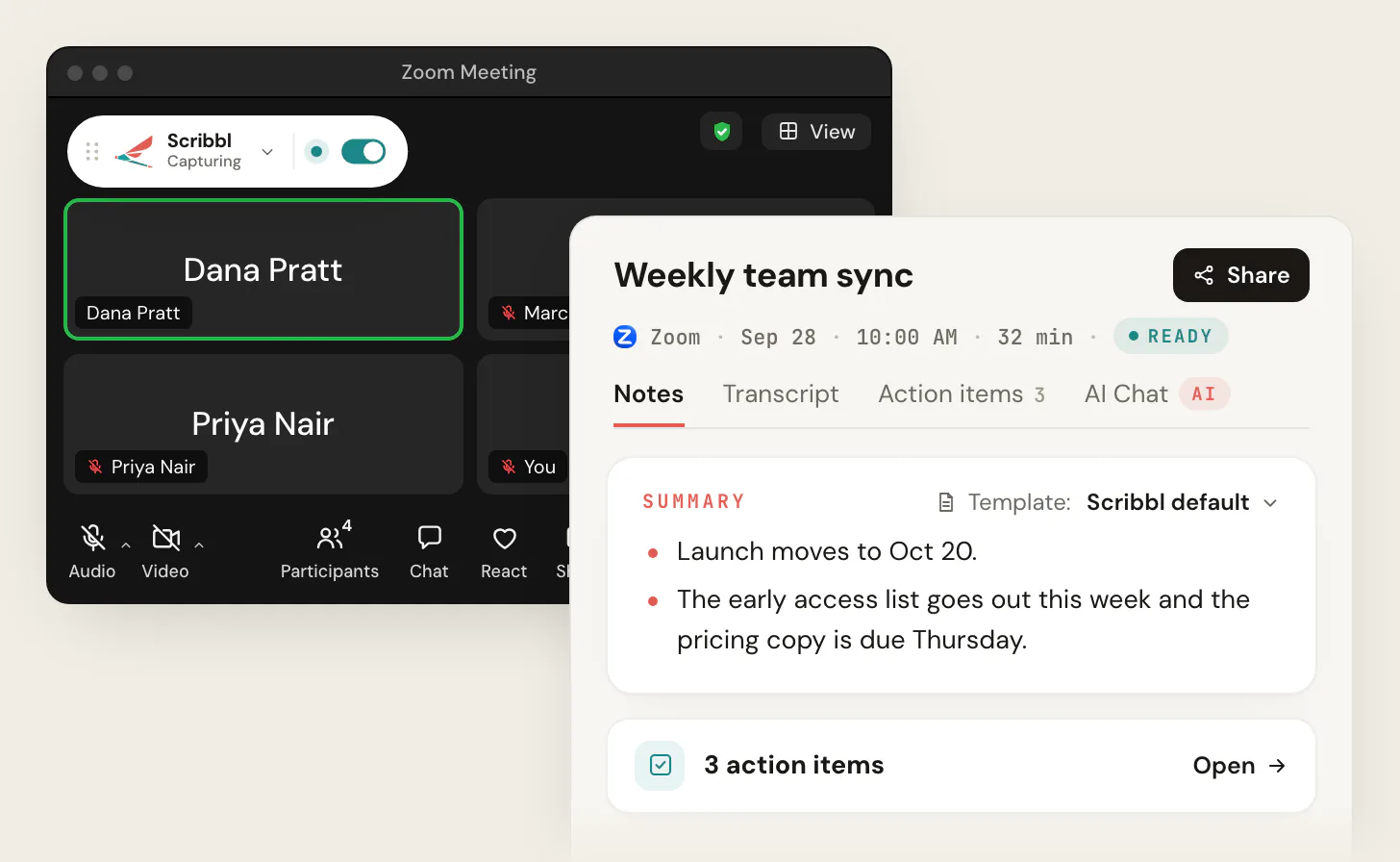
2. Granola: botless notes, no recording
- Best for: individuals who want quiet note-taking with minimal setup and never need the recording.
- Capture method: botless desktop app that captures meeting audio locally.
- Platforms: Mac and Windows desktop apps, plus iOS and Android.
- Standout feature: a polished notepad that merges your typed notes with an AI summary.
- Price: Basic is free, with notes from the last 30 days; Business is $14 per user per month, billed monthly; Enterprise starts at $35 per user per month.
- Limitations: it transcribes and then deletes the audio, so there is no recording to go back to, and the free plan opens only your last 30 days of notes.
3. Otter: established notetaker with a desktop capture path
- Best for: existing Otter users who want its ecosystem.
- Capture method: its Notetaker bot is the default; Otter's Mac and Windows desktop apps can record without it.
- Platforms: web, mobile, and desktop; the bot covers Meet, Zoom, and Teams.
- Standout feature: large, mature transcription product with broad integrations.
- Price: Basic is free, with 300 monthly transcription minutes; Pro is $8.33 per user per month billed annually, or $16.99 monthly.
- Limitations: the bot-free behavior is not its default story, so you have to choose the desktop app on purpose.
The feature matrix
One grid, the dimensions that actually differ for bot-free assistants. Competitor cells come from each vendor's own pages, checked in October 2026; confirm them on each vendor's site.
| Feature | Scribbl | Granola | Otter |
|---|---|---|---|
| Bot-free (nothing joins the call) | Yes | Yes | Desktop app only |
| Meet, Zoom, and Teams | Yes | Any app, from the desktop | Yes, bot by default |
| Capture method | Extension + desktop | Desktop | Bot, or desktop app |
| Keeps the recording | Yes, with video | No | Yes |
| Connects meeting to ChatGPT / Claude | Yes | Yes | Yes |
| Free plan | Yes, no card | Notes from the last 30 days | 300 minutes a month |
| Standout strength | Gets the work done | Typed notes plus AI | Mature product |
How to choose: a quick decision framework
- 1
List the platforms you actually use
If your week is all Google Meet, a Meet-first extension can be enough. If you mix Zoom and Teams, rule out anything that quietly falls back to a bot off Meet. Scribbl is botless across all three.
- 2
Decide whether you want notes or finished work
If you just need a record, a notepad is fine. If you want the follow-up email, the CRM update, or the next-call prep drafted for you, pick an assistant that does the follow-up. Scribbl's Automations draft the email, log notes in HubSpot or Pipedrive, and post to Slack or Teams.
- 3
Match the install to your platforms
Google Meet runs in the browser, so a Chrome extension covers it. Zoom and Teams calls usually run in their own desktop apps, so you need a desktop app for those. Scribbl has both: the Chrome extension for Google Meet and Scribbl Desktop for Zoom and Teams.
- 4
Run it on one real call, free
The only honest test is a live meeting. Use a free plan with no credit card so you can confirm clean capture and real time saved before you pay.
Use-case scenarios
- Sales calls: a clean room with just you and the prospect reads as a conversation, not surveillance, and the follow-up gets drafted before the next call. See Scribbl for sales.
- Client and confidential calls: no vendor logo in the room means no consent friction you did not plan, while you still keep the full record for your files.
- Recruiting screens: candidates do not feel watched by a faceless recorder, and notes flow straight into the next step.
- Design and code reviews: every meeting gets the video next to the transcript and AI notes, so you can replay the review, not just read the words.
Security and privacy
Bot-free is partly a privacy story, so evaluate it like one. The strongest tools keep raw audio local until you choose to process it, avoid third-party server logging, and give you data-residency and retention controls. Because nothing joins the call, you also avoid the situation where a third-party bot is itself a participant holding the shared stream.
What to check before you commit, for any tool:
- On-device vs cloud: is capture and early processing local, and what is sent to a server, when?
- Data residency and GDPR: where are audio and transcripts stored, and can you control the region?
- Retention and deletion: how long is data kept, and can you delete it on demand?
- No third-party server logging: confirm the vendor's statement and what their subprocessors see.
See the Scribbl privacy policy for how we handle this.
A word on recording and consent
Going without a bot does not change your legal responsibilities. Recording laws vary by region, and some jurisdictions require consent from everyone on the call. Removing the bot removes the surprise attendee, not the obligation. Tell people you are recording and get consent where it is required. The right posture is quiet and upfront at the same time.
How to get started in under five minutes
- 1
Install the extension or desktop app
Add the Chrome extension for Google Meet, or install Scribbl Desktop for Zoom and Teams. There is no bot to schedule and no calendar bot to authorize.
- 2
Grant permissions once
Allow the permissions the app asks for. This is what lets it record the call without joining it.
- 3
Join your meeting normally
Open Google Meet, Zoom, or Teams the way you always do. Capture runs in the background on your side; nothing appears in the room.
- 4
Get notes, then act
After the call you have the recording, transcript, summary, and action items. With Scribbl, ask Claude or ChatGPT about the meeting on Pro, or let Automations draft the follow-up and log notes in your CRM.
The recommendation
If you want an AI meeting assistant without a bot, Scribbl is the one we recommend. It is botless on Google Meet, Zoom, and Microsoft Teams, it gives you a recording, transcript, AI notes, and action items, and it connects the meeting to the AI you already use so the follow-up gets done. It is rated 5.0 from 3,000 reviews on the Chrome Web Store and 4.9 from 725 reviews on G2, it is used by more than 10,000 organizations, and the free plan needs no credit card.
If you want the deeper mechanics first, the botless AI notetaker pillar covers how no-bot capture works, and how to record Google Meet walks through a real call. For platform-specific setups, see the no-bot notetaker for Zoom and no-bot AI notes for Google Meet. If recording-first is your priority, compare the best botless meeting recorders; if privacy is the driver, read private AI notetaker. Teams setting this up across a company should read Scribbl for teams.
AI meeting assistant without a bot FAQ
What is an AI meeting assistant without a bot?
It is an assistant that records, transcribes, and summarizes your meetings, then helps you act on them, without sending a participant into the call. It records from your own browser or desktop app instead of dialing a bot into the meeting, so nothing appears in the participant list and nothing is announced. Scribbl does this for Google Meet, Zoom, and Microsoft Teams with a free plan and no credit card.
How does a botless assistant capture audio without joining the call?
Two mechanisms. A desktop app captures your microphone plus the system audio coming out of your speakers, so it hears both sides of the conversation locally on your machine. A browser extension records from the browser you joined the meeting in. Either way the capture runs on your side of the call, so no separate attendee dials in.
Do attendees get notified or see a bot join?
No. Because nothing joins the call, there is no extra tile in the participant list, no 'X has joined' announcement, and no automated notification email sent to attendees. The meeting looks exactly as it would if you were taking notes by hand.
Does it work on Zoom, Google Meet, and Microsoft Teams?
The best botless tools do. Some are botless only on Google Meet and quietly fall back to a bot on Zoom and Teams, so check each platform before you commit. Scribbl is botless on Google Meet with its Chrome extension, and on Zoom and Microsoft Teams with Scribbl Desktop (Mac with Apple silicon and Windows).
How is an assistant different from a notetaker?
A notetaker stops at the transcript and summary. An assistant takes the next step: it connects the meeting to the AI you already use so you can draft the follow-up, update your CRM, or prep the next call. Scribbl does both: on Pro you can ask Claude or ChatGPT about any meeting, and Automations draft the follow-up email, log notes in HubSpot or Pipedrive, and post to Slack or Teams.
Is a botless meeting assistant free?
Several offer a free plan, though limits on minutes, history, and AI features vary by tool. Scribbl has a free plan with no credit card required, so you can run it on a real call before deciding.
Is it legal or ethical to record without a bot?
Removing the bot removes the surprise attendee, not your legal obligation. Recording and consent laws vary by region, and some jurisdictions require consent from everyone on the call. Tell people you are recording and get consent where it is required. The right posture is quiet and upfront at the same time.
Is botless capture private and on-device?
It depends on the tool. Local desktop capture keeps the raw audio on your machine until you choose to process it, and privacy-forward tools avoid third-party server logging and offer data-residency and retention controls. Always read the vendor's security page and confirm where audio and transcripts are stored.
Does a botless assistant need IT approval or a network allowlist?
There is usually far less to review than with a bot. A meeting bot is an external participant that connects into your call and holds the shared stream, which security teams often want to allowlist and vet. A botless assistant captures on a device you already control, with no new participant to admit. Still loop in IT or security, share the vendor's security page, and confirm your recording policy before a company-wide rollout.
What is the best botless assistant for hybrid meetings?
Pick one that is botless on every platform you meet on. In a hybrid meeting the room joins the call from a laptop, so the assistant records it like any other call, with no bot for the remote side to notice. Scribbl is built for online and hybrid meetings on Google Meet, Zoom, and Microsoft Teams, and every meeting gets the video, the transcript, AI notes, and action items.
Will a botless tool quietly fall back to a bot on Zoom or Teams?
Some do, which is the trap to check for. A tool can be genuinely botless on Google Meet and still dial a bot into Zoom or Teams. Confirm the capture method on every platform you use, not just the one in the marketing. Scribbl is botless on Google Meet, Zoom, and Microsoft Teams, with no bot on any of them.
Start free, without a bot
You do not have to choose between a clean call and a finished follow-up. No bot ever joins your meeting. Scribbl records, summarizes, and follows up on Google Meet with its Chrome extension and on Zoom and Teams with Scribbl Desktop, does the follow-up with Automations, and has a free plan with no credit card. Start free.
Try Scribbl
A meeting assistant that never joins the call
Scribbl records, transcribes, and summarizes your Google Meet calls from your browser. No bot joins the call. Free forever for individuals.
Add to Chrome · It's free