Best AI Chrome Extensions for Productivity in 2026: 14 Picks, With Ratings and Prices Checked
The 14 best AI Chrome extensions for productivity in 2026, from meeting notes and writing to research and automation. Users, ratings and prices checked on each Chrome Web Store listing in October 2026.
Updated October 7, 2026

The best AI Chrome extensions for productivity in 2026 are Scribbl for meeting notes, Grammarly for writing, Sider or Monica for an AI sidebar on any page, Text Blaze and AI Blaze for reusable text and prompts, and HARPA AI for automating repeat browser tasks. The best ones take a task you do every day and make it disappear: the notes from your meetings, the first draft of an email, the summary of a long page, the form you fill out for the tenth time. The rest add a chat window and a subscription.
We ranked them by where the time goes. Microsoft's 2023 Work Trend Index found the average employee spends 57% of their time communicating, in meetings, email and chat, and people are in about 3 times as many Teams meetings and calls a week as in early 2020. So the extensions that save the most time are the ones that take meetings and writing off your plate, and those come first.
We picked the 14 worth knowing about, grouped by the job they do, including one built into Chrome and one with a low rating you should know about before you install it. Users, ratings and prices were checked on each Chrome Web Store listing and the vendor's own pricing page on October 2, 2026. Several lists still recommend extensions that are gone; Wiseone, for example, was removed from the Chrome Web Store in May 2025. We make Scribbl, the first pick, and we hold it to the same standard as the rest.
All 14 at a glance
| Extension | Best for | Users | Rating (ratings) | Free plan | Paid from |
|---|---|---|---|---|---|
| Scribbl | Meeting notes, no bot | 60,000 | 5.0 (3,000) | Meet, Zoom, Teams; 10 meetings a month | $13/mo annual |
| Grammarly | Writing everywhere | 40,000,000 | 4.5 (43,131) | 100 AI prompts a month | $12/mo annual |
| Sider | AI sidebar, many models | 5,000,000 | 4.9 (114,491) | 30 basic credits a day | $8.33/mo annual |
| Monica | All-in-one assistant | 3,000,000 | 4.9 (32,302) | 40 basic-model uses a day | $8.30/mo annual |
| Text Blaze | Reusable text with forms | 800,000 | 4.9 (1,896) | Limited snippets | $2.99/mo annual |
| AI Blaze | Saved AI prompts on any page | 90,000 | 5.0 (254) | Free | No paid price published |
| HARPA AI | Browser automation | 400,000 | 4.7 (3,156) | 10 messages a day | $12/mo |
| Merlin | Chat and summaries | 900,000 | 4.8 (8,762) | Limited, no number given | $19/mo annual |
| QuillBot | Rewriting and paraphrasing | 6,000,000 | 4.7 (5,970) | 125 words at a time | $8.33/mo annual |
| MaxAI | Reading and writing sidebar | 700,000 | 4.7 (14,477) | Unlimited on the fast model | $12/mo annual |
| Liner | Cited answers and PDFs | 300,000 | 4.4 (5,967) | Unlimited search, with ads | $14.99/mo annual |
| Glasp | Highlights and summaries | 500,000 | 4.4 (987) | Public highlights, 3 YouTube summaries a day | $12.50/mo annual |
| Speechify | Reading pages aloud | 1,000,000 | 4.6 (22,658) | Up to 1.5x speed, basic voices | $139/yr |
| Claude | Acts on web pages for you | 16,000,000 | 2.8 (1,710) | None, paid plans only | $17/mo annual |
The 14 best AI Chrome extensions
1. Scribbl: best for meetings
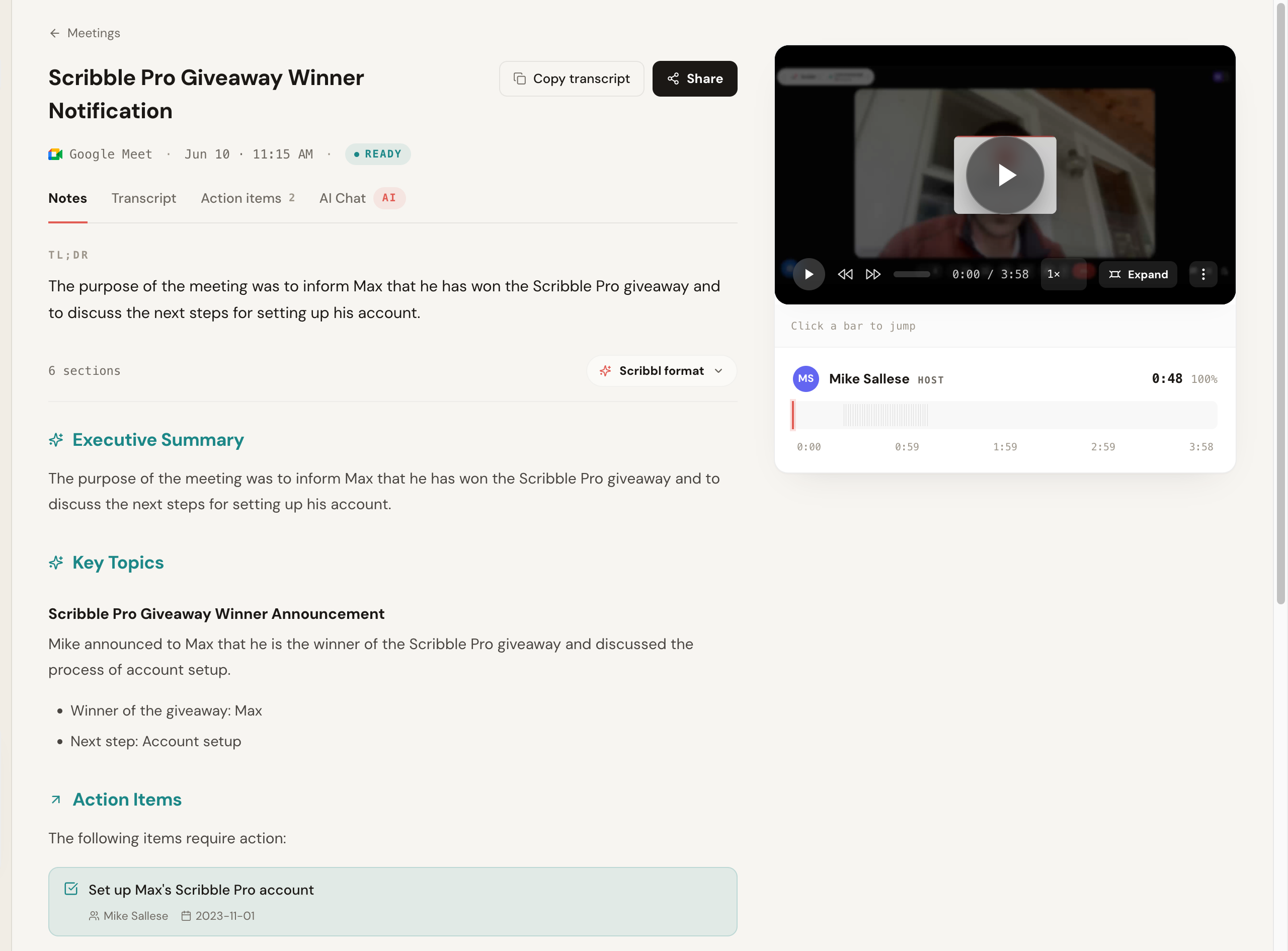
Meetings take a big share of the week, and notes are the part nobody wants to do. Scribbl takes them for you on Google Meet, with no bot joining the call.
- What you get: AI notes and action items, a searchable transcript, and the video for every meeting.
- Free plan: includes Google Meet, Zoom and Teams, with 10 complete meetings a month, no length limit, resetting monthly.
- Paid: $13 per user per month billed annually, $20 monthly, with unlimited meetings.
- Trust: 4.9 from 725 reviews on G2, and 5.0 from 3,000 reviews on the Chrome Web Store, with 60,000 users on its Chrome Web Store listing, where Google marks it Featured and lists Scribbl, Inc. as a publisher with a good record and no history of violations.
- Zoom and Teams: Scribbl Desktop for Mac and Windows, included in the free plan.
2. Grammarly: best for writing everywhere
Grammar, tone and clarity checks plus AI drafting in almost any text box. 40 million users and 4.5 from 43,131 ratings. Free: 100 AI prompts a month. Pro: $12 a month billed annually. The limit: its listing says it handles personal communications, location and website content, so it sees a lot of what you type.
3. Sider: best AI sidebar
A sidebar that lets you chat with many AI models on any page, plus a mode that carries out tasks in the browser for you. 4.9 from 114,491 ratings. Free: 30 basic credits a day. Paid: from $8.33 a month billed annually. The limit: the free plan isn't on its pricing page; it's in the help center.
4. Monica: best all-in-one assistant
Chat with many models, plus writing, translation and image tools. 4.9 from 32,302 ratings. Free: 40 basic-model uses a day. Pro: $8.30 a month billed annually. The limit: an account is required.
5. Text Blaze and AI Blaze: best for reusable text and prompts
Text Blaze inserts templates with a keyboard shortcut, including form fields that fill in names, dates and choices. 4.9 from 1,896 ratings, 800,000 users. Pro is $2.99 a month billed annually. Its sister extension, AI Blaze, puts saved AI prompts like /reply and /fix on any page, rated 5.0 from 254 ratings. The limit: full form fields and images in snippets need Text Blaze Pro.
6. HARPA AI: best for automating repeat browser tasks
An AI sidebar with 100+ commands, page monitoring and automation. 4.7 from 3,156 ratings. Free: 10 messages a day. Paid: $12 a month. The limit: free use runs through your own logged-in ChatGPT, Claude or Gemini session.
7. Merlin: chat and summaries on any page
Chat with many models, summarize pages and have it carry out tasks in the browser for you. 4.8 from 8,762 ratings. Pro: $19 a month billed annually. The limit: the free allowance is "limited" with no number published.
8. QuillBot: best for rewriting
Paraphrasing, grammar, AI detection and a humanizer. 4.7 from 5,970 ratings, 6 million users. Premium: $8.33 a month billed annually. The limit: the free plan rewrites up to 125 words at a time.
9. MaxAI: reading and writing sidebar
4.7 from 14,477 ratings. Free: unlimited chat on its fast model and 3 Pro chats a day. Pro: $12 a month billed yearly, marked as a limited-time price.
10. Liner: cited answers for pages, YouTube and PDFs
4.4 from 5,967 ratings. Free: unlimited search and 1 file upload a day, with ads. Pro: $14.99 a month billed annually.
11. Glasp: highlights and summaries
Highlight web pages, PDFs and YouTube, with AI summaries. 4.4 from 987 ratings. Free: unlimited public highlights and 3 YouTube summaries a day. The limit: highlights are public by default; private ones need Pro at $12.50 a month billed annually.
12. Speechify: best for reading pages aloud
4.6 from 22,658 ratings, 1 million users. Free: up to 1.5x speed with basic voices. Premium: $139 a year.
13. Claude: acts on web pages for you (rated 2.8)
Anthropic's Claude in the Chrome side panel can read pages, click, type and fill forms for you. 16 million users. The limit: it needs a paid Claude plan (Pro is $17 a month billed annually), its rating is 2.8 from 1,710 ratings, and Anthropic warns that hidden instructions on web pages can try to take control of it.
14. Gemini in Chrome: built in, no extension needed
Google's assistant is built into Chrome: ask about the current tab, or up to 10 tabs you share with it, for free with a signed-in Chrome profile in supported regions. The limit: it shares the current tab's content by default, isn't available in Incognito, and its auto browse feature needs Google AI Pro.
AI meeting note takers in Chrome, compared
If meetings are your biggest time sink, the note taker is the extension that pays back most. Here's how the main ones compare. Scribbl is the only one rated 5.0, and the only free plan here with AI notes on every free meeting and no length limit.
| Feature | Scribbl | Otter | Fireflies |
|---|---|---|---|
| Chrome Web Store rating | 5.0 (3,000) | 4.0 (141) | 4.5 (201) |
| Works on Google Meet with no bot | Yes | Yes | Main product is a bot |
| Free meetings | 10 a month, any length | 300 minutes a month | 3, or unlimited with calendar auto-join; 400 minutes of storage |
| AI on the free plan | Every meeting | First 30 minutes of each | 20 credits |
| Paid from (per user, annual) | $13 | $8.33 | $10 |
If your day is back-to-back meetings, check the paid plan's cap. Scribbl Pro has no limit on meetings or meeting length. Otter Pro includes 1,200 minutes a month, about 20 hours, and caps each conversation at 90 minutes.
Every meeting extension in this table carries Google's Featured badge, so the badge doesn't separate them. What separates them is what each free plan lets you keep.
How to stay safe with AI extensions
Extensions that click and type for you carry a newer risk: a web page can hide instructions meant for the AI. Anthropic warns about this for Claude in Chrome. Use them on sites you trust, and review what they do before they submit anything.
For a wider look beyond AI tools, see our guide to the best Chrome extensions for productivity.
What other AI Chrome extension lists get wrong
We checked the claims that show up in other 2026 roundups against the live Chrome Web Store listings and pricing pages on October 2, 2026.
- Wiseone is gone. It was removed from the Chrome Web Store in May 2025, but some lists still rank it.
- Otter isn't the pick for heavy meeting days. Its Pro plan includes 1,200 minutes a month, about 20 hours, and caps each conversation at 90 minutes. Its Chrome extension is rated 4.0 from 141 ratings, not the 4.6 some lists show.
- Sider is rated 4.9 from 114,491 ratings, not 4.3 to 4.5.
- Merlin doesn't publish a daily free number. Its pricing page says the free plan is limited, with no figure.
AI Chrome extensions FAQ
What are the best AI Chrome extensions for productivity?
Start with Scribbl, because meetings are where the most time goes: Microsoft's Work Trend Index found the average employee spends 57% of their time in meetings, email and chat. Scribbl records Google Meet with no bot, and every meeting gets the video, a transcript, AI notes and action items; it's rated 5.0 from 3,000 reviews on the Chrome Web Store, and the free plan includes Google Meet, Zoom and Teams. Then Grammarly for writing, Sider or Monica for an AI sidebar on any page, Text Blaze and AI Blaze for reusable text and prompts, and HARPA AI for automating repeat browser tasks.
What is the best AI Chrome extension for meetings?
Scribbl. It records Google Meet with no bot joining the call, and every meeting gets the video, a transcript, AI notes and action items. The free plan includes Google Meet, Zoom and Teams, with 10 complete meetings a month and no length limit, with Zoom and Teams through Scribbl Desktop. Otter shows the first 30 minutes of each free meeting, and Fireflies' free plan gives 20 AI credits and 400 minutes of storage.
Which AI extension helps most if your day is full of meetings?
Scribbl. When your day is meetings, a note taker saves the most time, and Scribbl records Google Meet with no bot: the video, a transcript, AI notes and action items for every meeting. The free plan includes Google Meet, Zoom and Teams, and Pro ($13 per user per month billed annually) has no cap on meetings or meeting length. For comparison, Otter Pro includes 1,200 minutes a month, about 20 hours, with up to 90 minutes per conversation.
Is there a free AI Chrome extension?
Most have free plans with limits. Scribbl's free plan includes Google Meet, Zoom and Teams, with 10 complete meetings a month. Grammarly gives 100 AI prompts a month, Monica 40 basic-model uses a day, Sider 30 basic credits a day, and QuillBot rewrites up to 125 words at a time. Gemini in Chrome is built into Chrome for free in supported regions.
Are AI Chrome extensions safe?
Treat each one like an app with access to your browsing. Check what the listing says it handles (some say they handle personal communications, web history or website content), install only from well-reviewed publishers, and remove ones you don't use. Extensions that act on web pages for you, like Claude in Chrome, come with a warning: hidden instructions on a page can try to take control of them.
Does Chrome have AI built in?
Yes. Gemini in Chrome answers questions about the current tab and up to 10 shared tabs for free with a signed-in Chrome profile in supported regions. Its auto browse feature needs a Google AI Pro subscription. It isn't available in Incognito, and work accounts need admin approval.
Which AI Chrome extensions are best for work?
Scribbl for meetings and Grammarly for writing, the two places most of the workday goes. Scribbl records Google Meet with no bot and gives every meeting the video, a transcript, AI notes and action items; Grammarly checks and drafts text in almost any box. Add an AI sidebar such as Sider or Monica for questions about any page, and Text Blaze for text you type over and over.
Sources for the best AI Chrome extensions
Users and ratings are the figures shown on each Chrome Web Store listing on October 2, 2026; prices are from each vendor's pricing page the same day.
- Scribbl (pricing, G2 reviews), Grammarly, Sider, Monica, Text Blaze, AI Blaze, HARPA AI, Merlin, QuillBot, MaxAI, Liner, Glasp, Speechify
- Meeting note takers: Otter, Fireflies
- Gemini in Chrome overview
- Otter: pricing
- Microsoft: 2023 Work Trend Index, "Will AI Fix Work?"
Try Scribbl
Let your meetings take their own notes.
Scribbl records, transcribes, and summarizes your Google Meet calls from your browser. No bot joins the call. Free forever for individuals.
Add to Chrome · It's free