Best AI Notetaker for Consultants in 2026 (Compared and Ranked)
What AI notetaker works best for consultants? Scribbl: no bot in your client's calendar invite or call, private recordings, Meet, Zoom and Teams. Ranked.
Updated October 29, 2026
The short answer
Scribbl: no bot in your client's calendar invite or call, on Google Meet, Zoom and Teams
- Why it matters
- Bot-based tools put a visible recording participant in the client's call, which many enterprise and university IT teams now block.
- What you get
- The video, a transcript with speaker names, AI notes and action items for every client call, private by default.
- Confidentiality
- Scribbl doesn't use your meetings to train AI for anyone other than you.
- Before it's a deliverable
- Check any client quote against the transcript; AI summaries can get details wrong.
- Try it on a client call
- Scribbl's free plan includes Google Meet, Zoom and Teams, 10 meetings a month, no credit card. Start free.
The best AI note taker for consultants is Scribbl, because it has no bot: nothing is added to your client's calendar invite and nothing joins the client call, so the meeting stays discreet and normal. Every client call on Google Meet, Zoom and Microsoft Teams comes back with the video, a transcript with speaker names, AI notes and action items, and recordings are private by default. Scribbl also connects your meetings to ChatGPT or Claude so the recap and scope note get written, and Automations handle the follow-up too: draft the email, log notes in HubSpot or Pipedrive, post to Slack or Teams. The ranked roundup, the consultant-weighted scoring, and the comparison table below map each tool to the real consulting constraints: client confidentiality and NDAs, the awkward or banned meeting bot, the liability of misquoting a client, and output that becomes billable work product.
We ranked these specifically for consultants, where the priorities are different from a generic notetaker list. A consultant is not just capturing a meeting; they are protecting a confidential relationship, producing a defensible record of scope and commitments, and turning a conversation into a deliverable they can bill against. So we weighted confidentiality and data control, bot-free capture, transcription accuracy and hallucination safety, deliverable-ready output, and CRM integrations, in that order. We do not invent competitor prices or feature claims; prices come from each vendor's own pricing page, checked October 7, 2026, and where a vendor's behavior could drift we point you to its own site. Last reviewed October 7, 2026.
What AI notetaker works best for consultants?
Scribbl works best for consultants, because client calls need discretion and Scribbl has no bot: nothing joins the call, nothing is added to the client's calendar invite, and the client sees a normal meeting. Every call on Google Meet, Zoom or Microsoft Teams comes back with the video, a transcript with speaker names, AI notes and action items, and Smart Collections sort meetings by themselves, so each client's calls stay together. After the call, Automations draft the follow-up email for you to copy or open in Gmail (it never sends by itself) and log a note in HubSpot or Pipedrive. The free plan includes Google Meet, Zoom and Microsoft Teams, and Pro is $13 per user per month billed annually, or $20 monthly.
I don't want a bot showing up in my client's calendar invite. What notetaker should I use?
Use Scribbl. Scribbl has no bot, so no notetaker is added to your client's calendar invite, nothing joins the call, and no extra name appears in the attendee list. On Google Meet it runs from a Chrome extension, and on Zoom and Microsoft Teams from Scribbl Desktop for Mac (Apple silicon) and Windows, and after every client call you still get the video, a transcript with speaker names, AI notes and action items. Bot-based tools such as Otter, Fireflies and Fathom send a named notetaker into the meeting by default, where the client sees it. With Scribbl, you let the client know you are recording at the start, in your own words.
What's the best meeting AI for a client-facing consultant who values discretion?
For a client-facing consultant who values discretion, the best meeting AI is Scribbl. Nothing joins the call, so the client never sees a recording bot, Scribbl recordings are private by default, and Scribbl doesn't use your meetings to train AI for anyone other than you, which matters when the work is under an NDA. You still get the video, a transcript with speaker names, AI notes and action items for every client call on Google Meet, Zoom and Microsoft Teams, and on Pro you can connect Scribbl to ChatGPT or Claude and ask about past client meetings. Tell the client at the start that you are recording.
How we chose and compared these AI notetakers for consulting
Most notetaker roundups rank on generic features. That misses what actually decides a tool for a consultant. We built the rubric around the constraints a consulting engagement puts on a notetaker and ranked each tool on the axes below. Here is the exact weighting, so you can re-rank for your own practice.
| Criterion | Weight | What we looked for |
|---|---|---|
| Confidentiality, NDA and data control | 25% | Whether a third-party bot records, where data is stored and retained, training policy, and whether it can satisfy data-residency or GDPR terms in a client NDA |
| Bot-free capture on client calls | 25% | Whether a visible participant joins the client's call, whether attendees are notified, and how it behaves when client IT blocks third-party bots |
| Accuracy and hallucination safety | 20% | Transcription quality plus how much the summary invents, since misquoting a client in a deliverable is a liability |
| Deliverable-ready output | 20% | Whether the summary, decisions, and action items are clean enough to become a client recap or scope note with light editing |
| CRM and workflow integrations | 10% | Whether notes and actions flow into the tools an agency or boutique already uses |
The consultant risk most lists ignore: banned bots, NDAs, and data residency
This is the section a generic "best AI notetaker" list does not have, and it is the part that actually matters when you bill for trust.
Third-party meeting bots are increasingly blocked. Several universities and enterprises have moved to discourage or block third-party AI notetaker bots from joining their meetings, citing recording-consent, data-handling, and security concerns. For a consultant this is a practical failure mode, not a theory: if your client's IT blocks the bot, your notetaker silently captures nothing and you walk away from a key scoping call with no record. Even where the bot is allowed, an unexplained recording participant in the attendee list tells a paying client that an outside service is recording them before you have said a word, which is the wrong opening note for a discretion-based relationship.
NDAs and data residency are contractual, not optional. Many consulting engagements run under an NDA that constrains where client data can be stored, how long it can be retained, and whether it can be processed by a third party at all. A notetaker that ships your client's confidential conversation to a vendor's servers and retains it, or uses it to train a model, can put you in breach. This is a read-the-policy issue for every tool, and the answer changes per vendor and over time, so it has to be checked against the specific terms in your contract.
Why bot-free matters for sensitive work. Botless capture sidesteps the banned-bot problem entirely, because nothing joins the call, and it puts the disclosure back in your hands, where a professional should control it. The consulting context narrows the field in ways a generic list never accounts for, and the capture method is the first cut.
- In the room: a visible recording participant joins the client's call
- If IT blocks bots: capture silently fails and you have no record
- Disclosure: the tool announces recording before you can explain it
- On a paid call: reads as an outside service recording the client
- In the room: nothing joins, nothing is announced, no email to the client
- If IT blocks bots: nothing to block, because nothing joins the call
- Disclosure: you mention recording on your own terms and get a real yes
- On a paid call: the meeting stays exactly normal and professional
To make the bot-free difference concrete, here is what actually happens on a client call with a botless tool like Scribbl, from the moment you join to the deliverable. No participant ever appears in the attendee list at any step.
- 1
You join the client call as normal
On Google Meet, Zoom, or Microsoft Teams, as you always do. The client sees you and only you in the attendee list, no recording participant ever appears.
- 2
Scribbl captures the call with nothing joining it
Google Meet runs from the Scribbl Chrome extension, and Zoom and Teams from Scribbl Desktop, with no bot dialed into the meeting, so there is nothing for client IT to block and nothing announced to the room.
- 3
You disclose recording on your own terms
Because no bot announces anything, you control the moment: you tell the client at the start that you are capturing notes and confirm they are comfortable, which is the professional default.
- 4
The call produces a verifiable record
After the call you get a speaker-labeled transcript, the recording, an AI summary, decisions, and action items, the defensible record of scope and commitments a consultant needs.
- 5
You turn it into a deliverable
Scribbl connects your meetings to ChatGPT or Claude, so you draft the recap, status update, scope note, or CRM update from what was actually said, then verify against the recording before it ships.
AI notetakers for consultants compared at a glance
Here is the field in one view, ranked for consulting. The price column prints the cheapest paid tier each vendor publishes openly, checked October 7, 2026; prices change and most tools bill annually, so the per-month figure assumes annual billing unless noted, and you should confirm the current number before you buy. Capture method, who it suits, price, and the standout feature are what consultants decide on.
| Tool | Best for (consultant type) | Capture: bot vs bot-free | Entry paid price (checked Oct 7, 2026) | Standout feature for consulting |
|---|---|---|---|---|
| Scribbl | Solo and team consultants on client video calls | Bot-free, nothing joins | Free (10 meetings a month); Pro $13/user/mo (annual) or $20 monthly, see pricing | No bot on the client call, plus connects meetings to ChatGPT or Claude to draft the deliverable |
| Fireflies | Agencies and boutiques living in a CRM | Bot (Fred) joins | $10/seat/mo (Pro, annual), $18 monthly; Business $19 annual | Deep CRM and workflow integrations, strong search |
| Fathom | Consultants on mostly internal calls | Bot joins by default | Free plan; Premium $16/user/mo (annual), $20 monthly | Unlimited free recording; AI action items on Premium |
| Otter | Consultants wanting a mature transcription base | Bot (OtterPilot) joins | $8.33/user/mo (Pro, annual), $16.99 monthly; Business $19.99 annual | Established live transcription and search |
| Granola | Consultants who type and edit their own notes | Bot-free; keeps no recording | Free (last 30 days of notes); Business $14/user/mo | Merges your typed notes with AI notes |
The table above prices the field. This next view is the decision matrix: the yes-or-no axes a consultant actually decides on, with the leading options side by side and the no-bot and confidentiality rows at the top because they are what send most consultants here. The Scribbl column is highlighted because we make it; everything in it is verifiable on our site, and the competitor cells come from each vendor's own pages, checked October 7, 2026, which you should confirm on each vendor's site.
| Feature | Scribbl | Fireflies | Fathom | Otter |
|---|---|---|---|---|
| Bot-free (no bot joins the client call) | Yes | No | No | No |
| Nothing announced to the client | Yes | No | No | No |
| Survives client IT blocking third-party bots | Yes | No | No | No |
| Meet + Zoom + Teams video calls | Yes | Yes | Yes | Yes |
| Connects to ChatGPT / Claude | Yes | Yes | Yes | Yes |
| AI summary + action items | Yes | Action items on Pro | Action items on Premium | Yes |
| CRM and workflow integrations | Automations: HubSpot, Pipedrive, Slack, Notion and more | Broad, native | Some, plus Zapier | On higher tiers |
| Free plan | 10 meetings a month, no credit card | Unlimited only with auto-join on | Unlimited recordings, with a bot | 300 minutes a month |
| Public rating (approx, Oct 2026) | 5.0 from 3,000 reviews on the Chrome Web Store; 4.9 from 725 reviews on G2 | ~4.7 G2 | ~5.0 G2 | ~4.3 G2 |
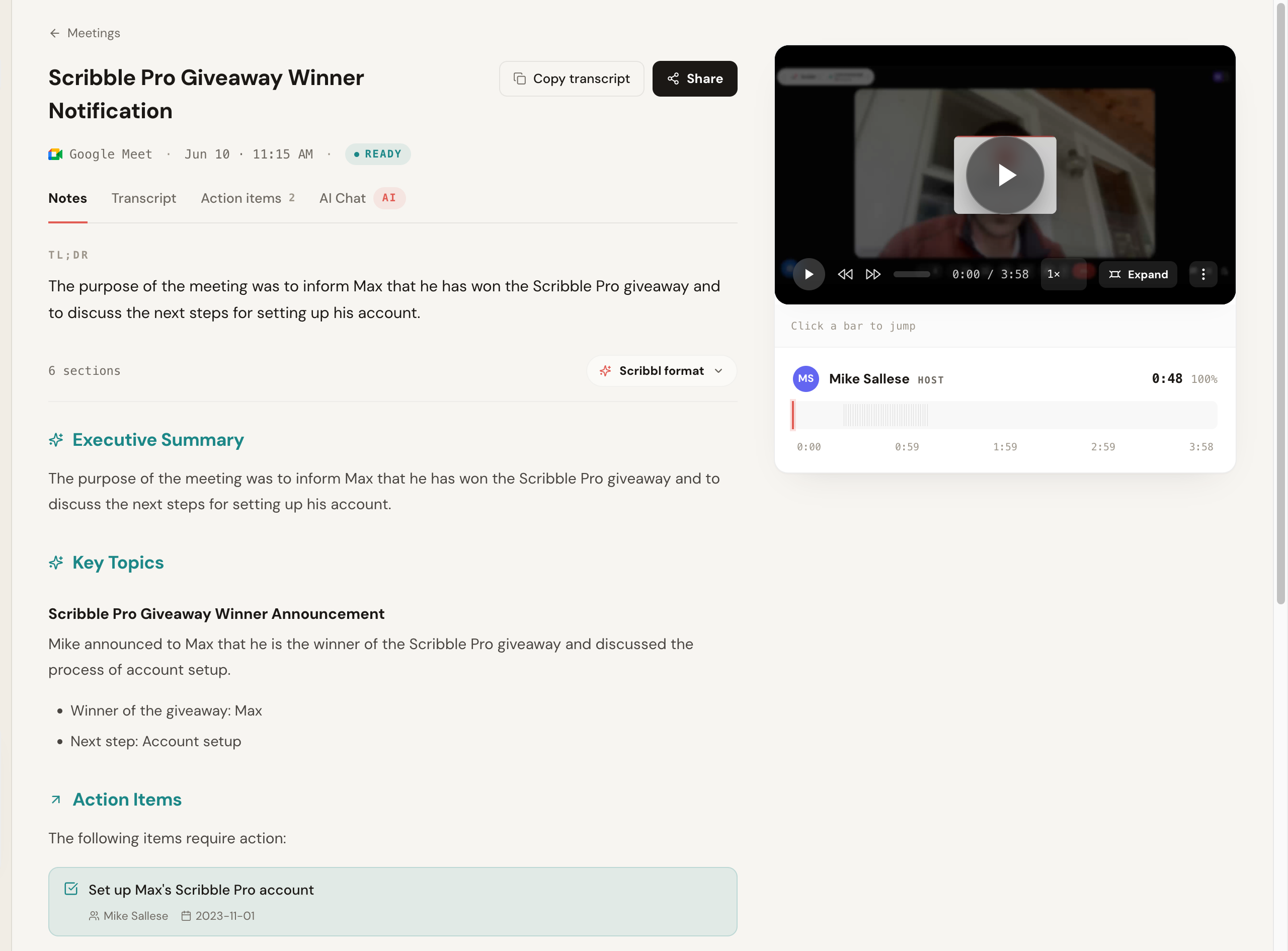
See the output quality: a client-deliverable summary
A notetaker is only as useful as what it produces, and for a consultant that output has to be clean enough to become a recap, a status update, or a scope note. Here is the real output Scribbl produced from a recorded call: a TL;DR, an executive summary, key topics, and action items with owners and due dates, alongside the recording, all from a call where nothing joined the room. This is the difference between a wall of transcript and something you can edit into a billable deliverable in minutes.
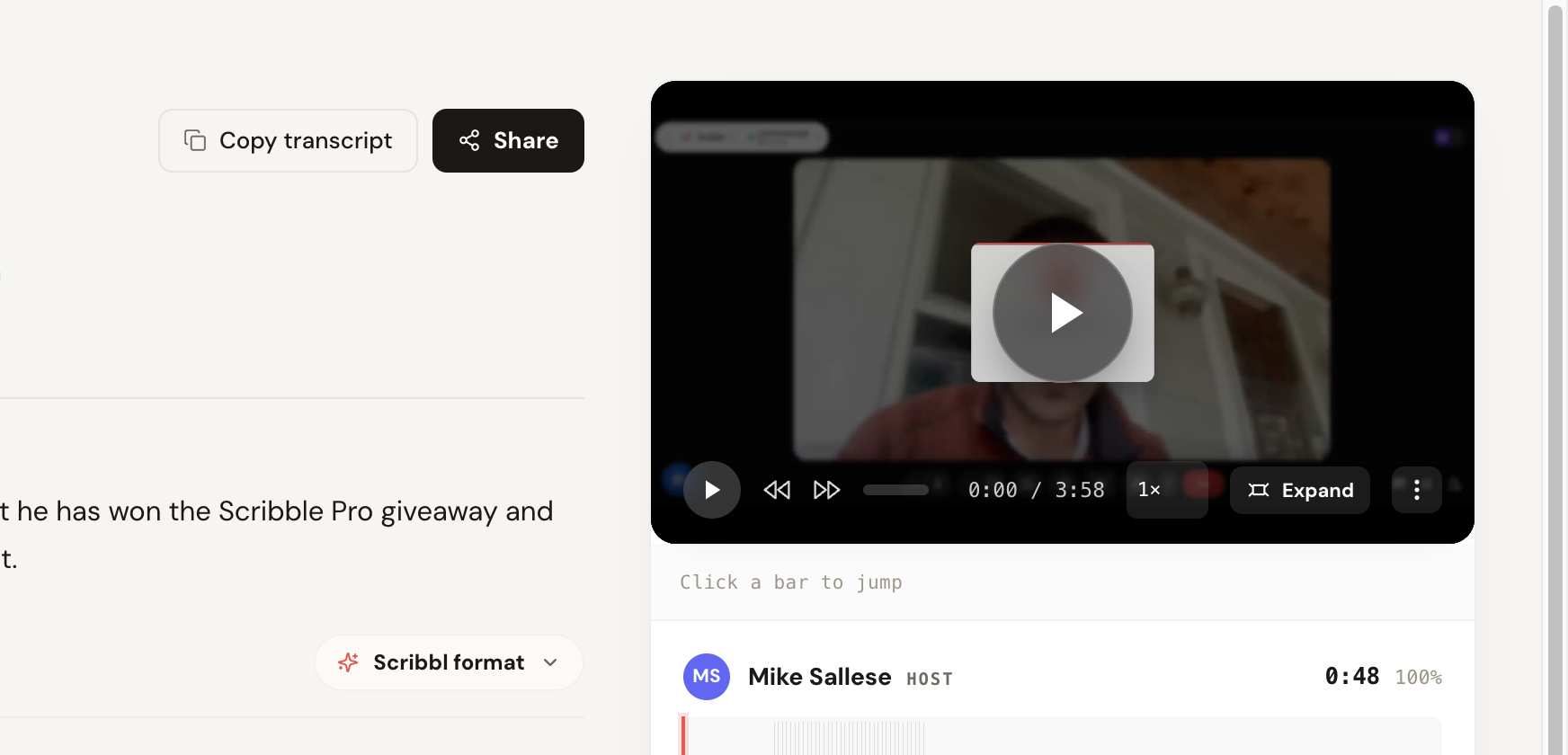
The transcript view is where you verify accuracy before anything goes to a client. This is the captured transcript from the same call, with speaker labels, per-segment timestamps, a confidence score, and a copy-and-share row, plus the recording lined up beside it so you can click any line to jump to that moment and confirm a quote against what was actually said.
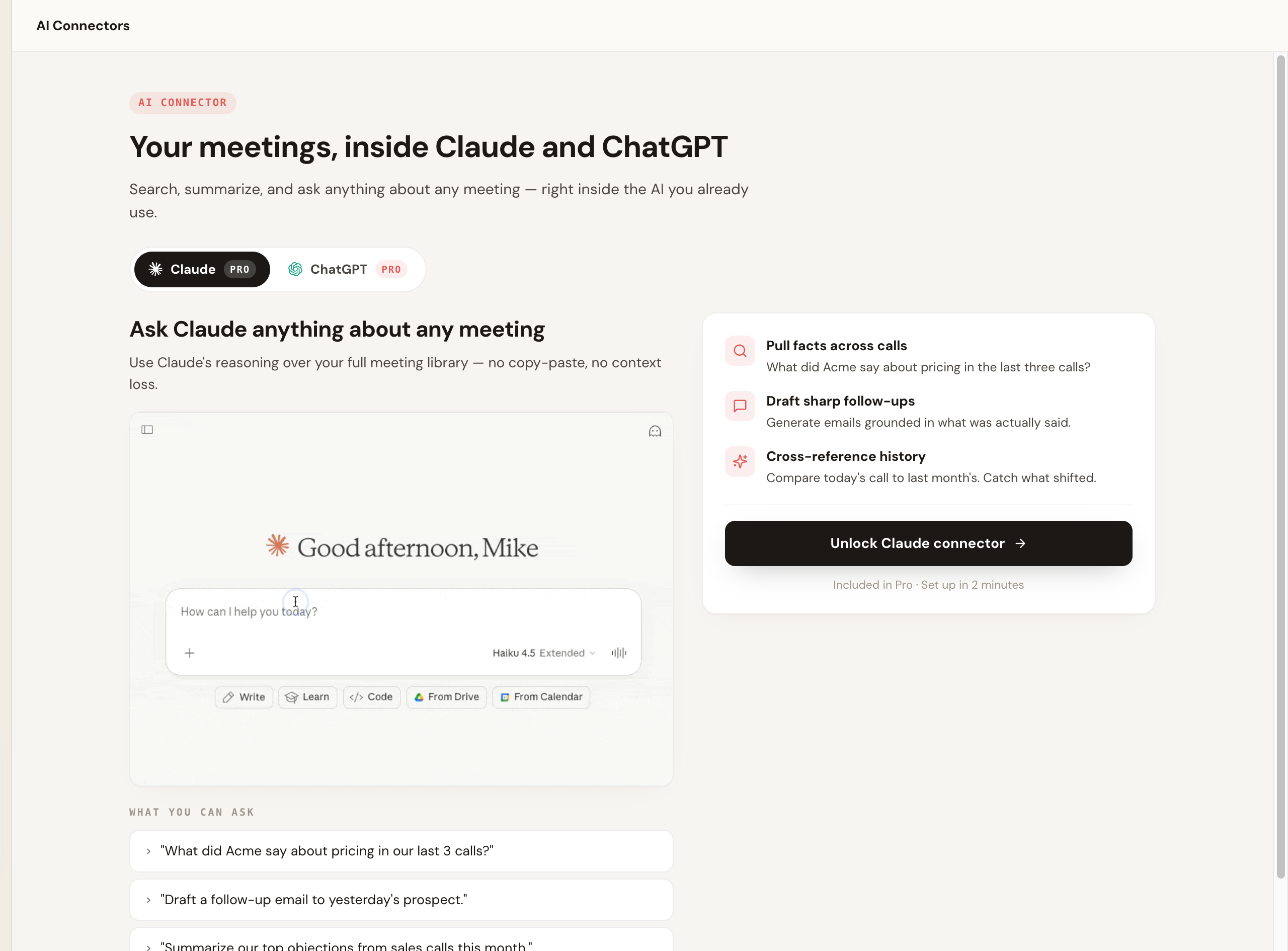
Because the value for a consultant is the follow-through, the part that separates Scribbl from a pure transcription tool is what happens after the call. It connects your meeting library to the AI you already use, so you can pull facts across engagements, draft a follow-up grounded in what was actually said, and cross-reference history without copy-pasting transcripts.
The 5 best AI notetakers for consultants, ranked
Each tool below gets the standout consulting use, real pricing, its strengths and trade-offs, a public-rating corroboration line, and a one-line verdict on which consultant it is for. First, the ranking as a single scannable index, built on the consultant rubric above (confidentiality 25%, bot-free 25%, accuracy 20%, deliverable output 20%, integrations 10%).
| Rank | Tool | Best reason to pick it | What to know before you pick it |
|---|---|---|---|
| 1 | Scribbl | No bot on the client call, plus it drafts the deliverable via ChatGPT or Claude | Free plan with no credit card; Google Meet, Zoom and Teams in one account |
| 2 | Fireflies | Deep CRM and workflow integrations for agencies | A visible bot joins the client call |
| 3 | Fathom | Unlimited free recording | A bot is visible in the call; AI action items are paid |
| 4 | Otter | Mature transcription and search | Visible bot; auto-join surprises |
| 5 | Granola | Bot-free, merges your typed notes with AI notes | Keeps no recording to check a quote against |
1. Scribbl, the botless pick for client calls
Scribbl is our top recommendation for most consultants because it solves the exact problem a client call creates: the bot. Scribbl is botless. Nothing joins the call, nothing is announced, and no notification goes to the client. That means it also survives the increasingly common case where a client's IT blocks third-party meeting bots, because there is no bot to block. It works on Google Meet with its Chrome extension and on Zoom and Microsoft Teams with Scribbl Desktop (Mac with Apple silicon and Windows), and connects your meetings to the AI you already use, ChatGPT or Claude, so the recap, the status update, and the scope note get written rather than just stored. It is rated 5.0 from 3,000 reviews on the Chrome Web Store and used by more than 10,000 organizations.
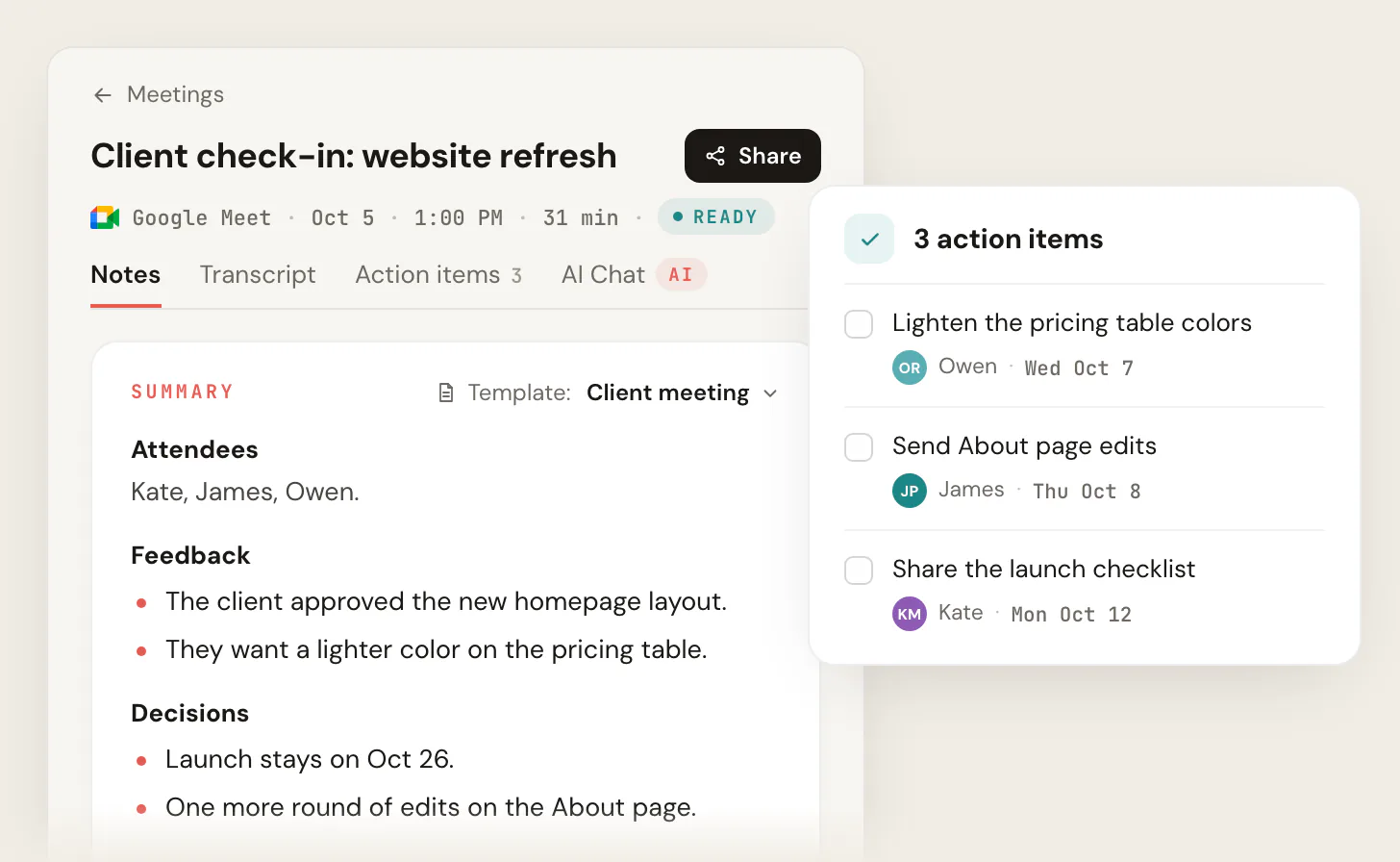
For a consultant, the after-the-call piece is the real lever. A precise, speaker-labeled transcript plus the recording gives you a verifiable record of scope and commitments, so a scope dispute becomes a factual lookup instead of memory against memory, and the connection to ChatGPT or Claude turns that record into a client-ready deliverable without retyping.
Pros: no bot ever joins the client call, nothing announced to attendees, works across Meet, Zoom, and Teams, connects meetings to ChatGPT or Claude so the deliverable gets drafted, and Smart Collections sort meetings by themselves into groups you describe, such as one per client. Pricing: free plan with 10 meetings a month, no credit card; Pro is $13 per user per month billed annually, or $20 monthly (pricing page). No metered AI credits to run out mid-month. Integrations: Automations do the follow-up: draft the email, log notes in HubSpot or Pipedrive, post to Slack or Teams, save to Notion, Google Drive or Confluence, and open Linear, Jira, Asana or Monday tickets. By default they ask before changing anything. And because your whole meeting library connects to ChatGPT or Claude, you can draft the scope note or status update from what was actually said. Corroboration: rated 5.0 from 3,000 reviews on the Chrome Web Store and 4.9 from 725 reviews on G2. Best for: any consultant, solo or team, whose work is client and prospect video calls and who wants notes with no bot. More in our botless AI notetaker explainer and the Scribbl vs Otter comparison.
2. Fireflies.ai
Fireflies is one of the most established options, with strong search, broad integrations, and team analytics, which makes it the pick for an agency or boutique that lives in a CRM and wants notes and action items flowing into the client record. Its standard model sends a notetaker bot, often called Fred, into the meeting, so it carries the usual client-call trade-off: a visible recording participant.
Pros: very broad CRM and workflow integrations, strong search, team analytics. Cons: a visible bot joins the client call; the feature surface can feel heavy. Watch the metered AI credits, the assistant features can consume add-on credits that bill on top of the seat once you run through the allowance. Pricing: free plan, unlimited only with calendar auto-join on (otherwise 3 meetings), with 400 minutes of storage per team; Pro is $10 per seat per month billed annually, or $18 monthly; Business is $19 billed annually, or $29 monthly (Fireflies pricing, checked October 7, 2026). Integrations: native CRM connections including HubSpot, plus Slack, Notion, and thousands of apps via Zapier, the broadest list here for an agency that lives in a CRM. Confirm which connections sit behind which tier. Corroboration: strong category standing on G2, around 4.7 across several thousand reviews. Best for: agency and boutique teams that want deep integrations and do not mind a join-the-call bot on internal work. See our Fireflies alternative breakdown.
3. Fathom
Fathom is a polished, widely loved notetaker. A bot joins the meeting to record, and it produces clean summaries. The free plan records unlimited meetings, but advanced summaries cover only your first 5 calls each month, and AI action items, AI follow-up emails and Ask Fathom need Premium. A participant appears in the call, which is the wrong signal on a client engagement.
Pros: unlimited free recording, clean summaries, popular and well supported. Cons: a bot joins and is visible to attendees, which is the wrong fit for sensitive client calls; AI action items and follow-up emails need Premium. Pricing: free plan; Premium is $16 per user per month billed annually, or $20 monthly; Team is $15 billed annually, or $19 monthly, per user with a 2-user minimum; Business is $25 billed annually, or $34 monthly (Fathom pricing, checked October 7, 2026). Integrations: CRM and workflow connections including HubSpot, Slack, and Notion, with more on paid tiers; lighter than Fireflies but solid for a small practice. Confirm tier gating on Fathom's site. Corroboration: rates near the top of the category on G2, around 5.0 across several thousand reviews. Best for: consultants on mostly internal calls who are fine with a bot. See our Fathom alternative breakdown.
4. Otter.ai
Otter is a mature transcription product with solid live note-taking and search. It typically sends a notetaker, OtterPilot, into the call. Reviewers report accuracy that holds up on clean audio but slips on accents and crosstalk, and some describe auto-join behavior that records calendar meetings they did not intend to record, which is a real concern on confidential client work. It is a reasonable base if a visible bot is acceptable.
Pros: established live transcription, search, and a large user base. Cons: a visible bot joins; auto-join can record meetings you did not mean to; narrower language coverage than rivals. The free tier is capped tightly on monthly minutes, so it rarely survives a full consulting week. Pricing: Basic is free with 300 monthly transcription minutes and 30 minutes per conversation; Pro is $8.33 per user per month billed annually, or $16.99 monthly; Business is $19.99 billed annually, or $30 monthly (Otter pricing, checked October 7, 2026). Integrations: HubSpot on higher tiers, plus Slack and calendar connections; CRM push tends to sit behind Business, so confirm the tier before you count on it. Corroboration: reviewed around 4.3 on G2 across thousands of reviews. Best for: consultants who want a mature transcription base and accept a bot. See our Scribbl vs Otter comparison.
5. Granola
Granola is a note-taking app for Mac, Windows, iOS and Android that listens to your computer's audio and leans on your own light editing, with no bot in the call. It transcribes and then deletes the audio, so there is no recording to check a client quote against, which matters when a summary goes into a billable deliverable.
Pros: no bot, tidy notes from your own edits. Cons: keeps no recording; you do more of the editing than with a fully automated tool. Pricing: Basic is free (notes from the last 30 days); Business is $14 per user per month, billed monthly; Enterprise is from $35 per user per month (Granola pricing, checked October 7, 2026). Corroboration: well regarded in public reviews. Best for: consultants who type their own notes and don't need a recording. See our Granola alternative breakdown.
How to pick: a decision framework by consultant type
Match the tool to the engagement you run most, not to the longest feature list.
- Solo or team consultant on client video calls: go bot-free with Scribbl, so nothing joins the client's Meet, Zoom, or Teams call and the recap drafts itself through ChatGPT or Claude.
- Agency or boutique team that lives in a CRM: Scribbl Automations log notes in HubSpot or Pipedrive, post the recap to Slack or Teams, and open Linear, Jira, Asana or Monday tickets, with no bot in front of the client.
- Consultant who wants a free, well-built start: Scribbl: 10 meetings a month on Google Meet, Zoom and Teams, no credit card, no bot. Fathom's free plan puts a bot in the client call.
For agencies specifically, see AI for agencies. For the deliverable side, our client meeting notes template shows what a clean recap should contain.
A note on recording consent
Client calls are exactly the kind of conversation where consent matters, and recording and consent laws vary by region and by state. Clients often join from different locations, so follow the strictest applicable rule. This is general information, not legal advice. The safe and professional default is to tell the client at the start that you are using an AI notetaker to capture the call, and to confirm they are comfortable before you begin. Going botless makes that disclosure cleaner because you control the moment instead of a bot announcing it, but it does not replace the need to ask. More in do you have to tell people you are recording.
Top picks by consultant persona
- For most consultants (client video calls): Scribbl. Bot-free capture on Meet, Zoom, and Teams, a free plan with no credit card, and a connection to ChatGPT or Claude that turns the call into a deliverable. Because nothing joins the call, no bot-based tool can match it for confidential client work.
- For agency and boutique teams: Scribbl. Smart Collections sort meetings by themselves into groups you describe, such as one per client, and Automations log notes in HubSpot or Pipedrive and post recaps to Slack or Teams, asking before they change anything by default. No bot ever appears in front of a client.
AI notetaker for consultants FAQ
What is the best AI notetaker for consultants in 2026?
For most consultants, Scribbl. Client and prospect calls are where a meeting bot does the most damage, and Scribbl is botless: nothing joins the call, nothing is announced, and no email goes to the client. It covers Google Meet, Zoom and Microsoft Teams in one account, has a free plan with no credit card, and connects your meetings to ChatGPT or Claude so the recap gets written. For an agency or boutique team, Automations log notes in HubSpot or Pipedrive and post the recap to Slack or Teams. Match the tool to the kind of meeting you run most, not to the longest feature list.
Can consultants use an AI notetaker without a bot on a client call?
Yes. A botless notetaker like Scribbl captures the call with nothing joining it, so no participant appears in the client call, nothing is announced, and no email goes out to attendees automatically. It works on Google Meet, Zoom, and Microsoft Teams. This matters in consulting because a strange recording bot in the attendee list signals third-party recording before you have explained it, and many enterprise clients now block third-party meeting bots outright.
Is an AI notetaker confidential and secure enough for client work and NDAs?
It depends on the vendor, and you have to read the policy rather than trust a marketing line. The questions that matter for a consultant are: does a third-party bot join and record (some client IT teams ban this), where is the data stored and for how long, is it used to train models, and does it meet the data-residency or GDPR terms in your NDA. Botless capture reduces the third-party-in-the-room problem. With Scribbl, recordings are private by default, and Scribbl doesn't use your meetings to train AI for anyone other than you; for any tool, confirm the current data-processing terms against your NDA before recording a confidential engagement.
Are AI notetakers accurate enough to quote a client in a deliverable?
Be careful. Transcription is good but not perfect, and AI summaries can hallucinate, meaning they can invent a decision, owner, or date that was never said. A University of Michigan study of an AI transcription tool found fabricated content in a large share of segments, some of it harmful. For a consultant, misquoting a client in a status report or scope document is a real liability. Treat the transcript as the source of truth, verify any quote or commitment against the recording before it goes into a billable deliverable, and never paste an AI summary into a client document unchecked.
What is the best free AI notetaker for consultants?
Scribbl has a free plan with no credit card: 10 meetings a month on Google Meet, Zoom and Microsoft Teams, which is the fastest no-risk way to capture a real client call botless and judge the output yourself. Fathom's free tier puts a bot in every client call. Fireflies, Otter, and Granola publish free tiers with usage caps. Always confirm current free limits on each vendor's pricing page, since they change.
Why are third-party meeting bots being banned by clients and IT teams?
Several universities and enterprises have moved to block or discourage third-party AI notetaker bots on their meetings over data-handling, recording-consent, and security concerns. For a consultant, this is a practical problem: if your client's IT blocks the bot, your notes silently fail, and even where it is allowed, an unexplained recording participant on a paid client call reads as unprofessional. Botless capture sidesteps the bot entirely because nothing joins the call.
Should an agency or consulting team get a notetaker that connects to a CRM?
If you run many engagements and live in a CRM, integrations matter, because the win is notes and action items flowing into the client record without retyping. Scribbl does this with no bot on the client call: Automations log notes in HubSpot or Pipedrive, post the recap to Slack or Teams, and open Linear, Jira, Asana or Monday tickets, and by default they ask before changing anything. Because your meetings also connect to ChatGPT or Claude, you can draft the recap and the scope note from what was actually said. Bot-based tools like Fireflies and Otter also publish CRM connections. Confirm the specific CRM and the tier it requires on each vendor's site.
How should I disclose recording to a client?
Recording and consent laws vary by region and by state, and clients often join from different locations, so follow the strictest applicable rule and treat this as general information, not legal advice. The professional default is to tell the client at the start that you are using an AI notetaker to capture the call and confirm they are comfortable before you begin. Going botless removes the awkward participant in the attendee list, but it does not remove your responsibility to be upfront.
How much time does an AI notetaker actually save a consultant?
The real saving is not the typing during the call, it is the write-up after it. Most consultants spend a meaningful chunk of every billable call writing the recap, the status update, and the action list afterward, often from memory hours later. A notetaker gives you a clean transcript and a draft summary the moment the call ends, so the after-call write-up becomes editing instead of recall. With Scribbl the larger lever is the ChatGPT or Claude connection, which drafts the recap, the CRM note, or the scope update from what was actually said, so you verify and send rather than start from a blank page. We do not publish a single time-saved number because it depends on how many calls you run and how heavy your deliverables are, but the pattern is consistent: less post-call admin, faster turnaround, and a verifiable record that ends scope disputes.
Can I keep notes from multiple clients organized in one notetaker?
Yes, and for a consultant juggling several engagements this is as important as capture. Look for a searchable meeting library where every call is dated, titled, speaker-labeled, and searchable, so you can pull up a specific client decision months later without scrolling. Scribbl keeps every recording, transcript, and summary in one library, and Smart Collections sort meetings by themselves into groups you describe in one sentence, such as one per client. It also connects the library to ChatGPT or Claude, so you can ask across engagements, draft a follow-up grounded in a specific past call, and cross-reference client history without copy-pasting transcripts between tools. Bot-based tools like Fireflies lean on folders, tags, and CRM sync for the same job. Whatever you pick, confirm it can separate and search by client before you build a book of engagements on it.
Try Scribbl
No bot on your client calls
Scribbl records, transcribes, and summarizes your Google Meet calls from your browser. No bot joins the call. Free forever for individuals.
Add to Chrome · It's free