Best AI Notetaker for Freelancers in 2026 (Compared and Ranked)
What AI notetaker works best for freelancers? Scribbl: free plan, no bot on the client call, the follow-up email drafted after every call. Compared and ranked.
Updated October 19, 2026
On this page11 sections
- 01What AI notetaker works best for freelancers?
- 02Is Scribbl free
- 03Do it with Scribbl
- 04Which AI notetaker drafts the follow-up email after a client call?
- 05Can a freelancer use an AI notetaker without a bot joining the client's call?
- 06How do I keep notes for each client separate?
- 07AI notetakers for freelancers compared
- 08The best AI notetakers for freelancers, ranked
- 09Tell the client you are recording
- 10FAQ
- 11Sources
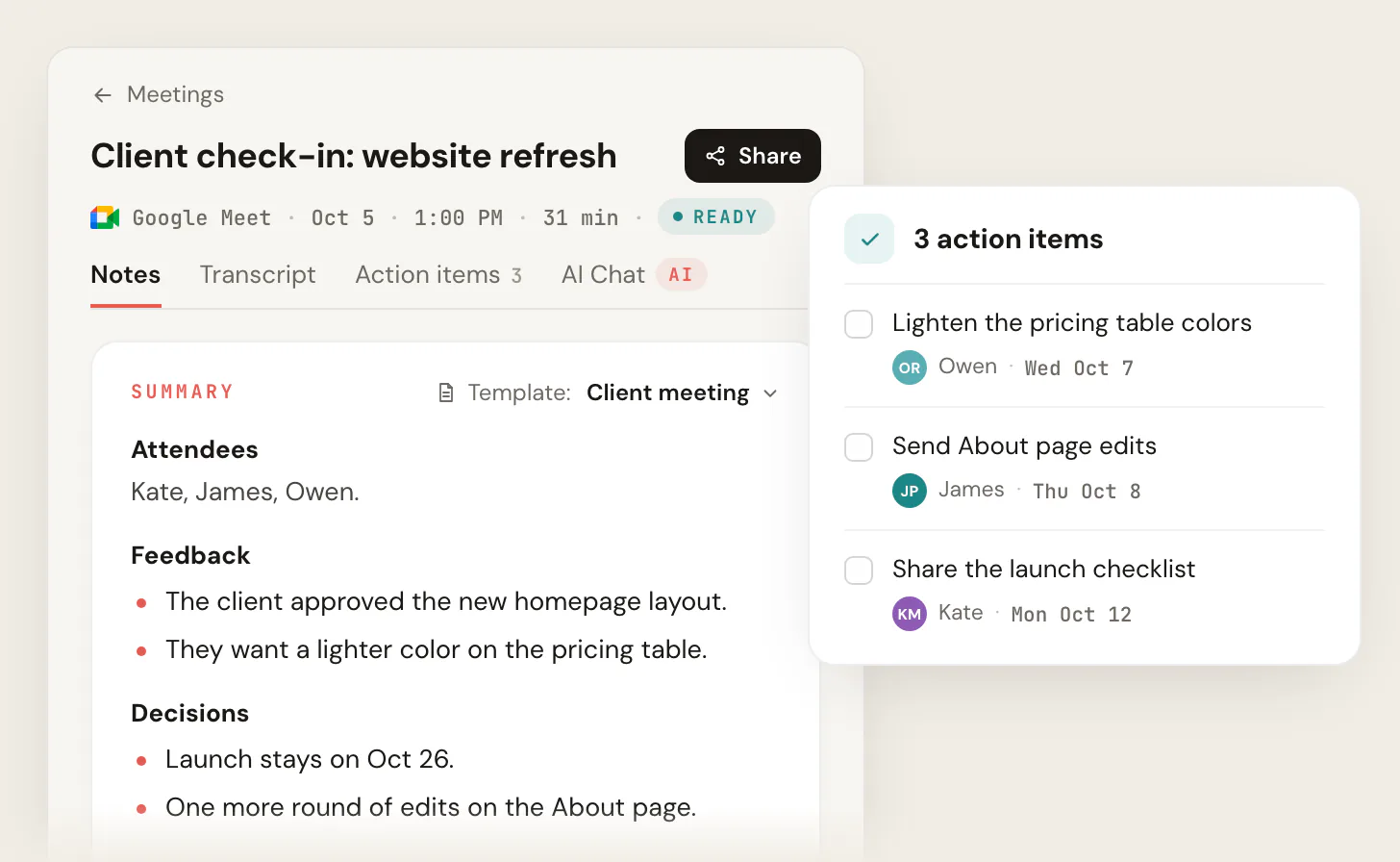
The best AI note taker for freelancers is Scribbl, because the free plan includes Google Meet, Zoom and Microsoft Teams, with 10 meetings a month and no credit card, and no bot joins the client's call, so the client sees you and only you. Every client call comes back with the video, a transcript with speaker names, AI notes and action items, and an Automation drafts the follow-up email from what was said, for you to copy or open in Gmail, which is the email you were going to write at 6pm anyway. When a client says "we never agreed to that," the transcript settles it. The questions freelancers ask are answered one at a time below, then the comparison table with prices checked today, the ranked list and the setup steps.
What AI notetaker works best for freelancers?
Scribbl works best for freelancers, because a freelancer needs three things a generic list skips: a free plan that covers a month of real client calls, no bot in front of the client, and the follow-up written. The Scribbl free plan includes Google Meet, Zoom and Microsoft Teams, with 10 meetings a month, no limit on call length and no credit card. Nothing joins the call: on Google Meet, Scribbl runs from a Chrome extension, and on Zoom and Microsoft Teams from Scribbl Desktop for Mac (Apple silicon) and Windows. After each call you get the video, a transcript with speaker names, AI notes and action items with owners and due dates, and an Automation drafts the follow-up email for you to copy or open in Gmail (it never sends by itself). Pro is $13 per user per month billed annually, or $20 monthly, and adds unlimited meetings and the connection to ChatGPT or Claude.
Is Scribbl free, and do I need to be the host of the client call?
Yes, Scribbl. The free plan includes Google Meet, Zoom and Microsoft Teams, with 10 meetings a month, and every call gets AI notes, action items, a transcript and the video, with no limit on how long the call runs. The limits on the other free plans, checked on each vendor's pricing page on October 19, 2026: Otter's free plan allows 300 transcription minutes a month and 30 minutes per conversation, so a one-hour kickoff is cut off; tl;dv's covers 10 meetings with AI notes; Read AI's covers 5 meeting transcripts a month; Fireflies' has limited AI summaries and 400 minutes of storage per team; Fathom's allows unlimited recordings, with a bot in the client's call. More in free AI note taker.
Do it with Scribbl
- Add Scribbl: the Chrome extension for Google Meet, or Scribbl Desktop for Zoom and Microsoft Teams on Mac (Apple silicon) and Windows.
- Join the client's call as usual. Nothing is added to the invite, nothing joins the call, and you do not need to be the host.
- When the call ends, open the notes: the video, a transcript with speaker names, AI notes and action items, and the follow-up email drafted.
The free plan includes Google Meet, Zoom and Microsoft Teams, with 10 meetings a month. Start free.
Which AI notetaker drafts the follow-up email after a client call?
Scribbl. When a client call lands in a collection, an Automation drafts the follow-up email from what was actually said (the decisions, the next steps, who owes what by when), for you to copy or open in Gmail. It never sends by itself, and by default it asks before it changes anything, so you read it, fix a line, and send. Other Automations log a note in HubSpot or Pipedrive, post to Slack, save to Notion or Confluence, or open an Asana, Monday, Linear or Jira ticket. tl;dv lists an email follow-up drafter on Pro and Fireflies an Email Assistant on Pro, both with a bot in the call. More in AI note takers that draft follow-up emails.
Can a freelancer use an AI notetaker without a bot joining the client's call?
Yes, with Scribbl. Scribbl has no bot, so nothing is added to the client's calendar invite, nothing joins the call, and no extra name appears in the attendee list; the client sees a normal call. On Google Meet it runs from a Chrome extension, and on Zoom and Microsoft Teams from Scribbl Desktop for Mac (Apple silicon) and Windows. Otter, Fireflies, Fathom, tl;dv and Read AI send a named bot into the call, which a new client notices before you have said a word, and which some client companies now block from joining their meetings. Tell the client at the start that you are recording for notes, in your own words.
How do I keep notes for each client separate?
Let the tool sort them. Scribbl keeps every call, transcript and recording in one searchable library, and Smart Collections sort calls by themselves into groups you describe in one sentence, such as "every call with the bakery" or "every discovery call," so one client's history stays together. On Pro you can connect Scribbl to ChatGPT or Claude and ask "what did this client agree to on scope across our calls" before you write the invoice or push back on a change request, and the answer comes from the transcripts. For the shape of a clean client recap, see the client meeting notes template.
AI notetakers for freelancers compared
Prices are from each vendor's pricing page, checked October 19, 2026, per user per month billed annually unless noted. Scribbl is first because it is the pick.
| Tool | Bot on the client's call? | Google Meet, Zoom and Teams | Free plan | Follow-up email | Entry paid price |
|---|---|---|---|---|---|
| Scribbl | No bot | Yes, one account | 10 meetings a month, no limit on length, includes Google Meet, Zoom and Microsoft Teams | Automation drafts it (copy or open in Gmail) | Pro $13 annual, $20 monthly (pricing) |
| Fathom | Bot joins | Yes | Unlimited recordings | On paid plans | Premium $16 annual, $20 monthly |
| Fireflies | Bot (Fred) joins | Yes | Limited AI summaries, 400 minutes of storage per team | Email Assistant on Pro | Pro $10 annual, $18 monthly |
| Otter | Bot (OtterPilot) joins | Yes | 300 minutes a month, 30 minutes per conversation | No drafter listed | Pro $8.33 annual, $16.99 monthly |
| tl;dv | Bot joins | Yes | 10 meetings with AI notes | Email follow-up drafter on Pro | Pro $18 annual |
| Read AI | Bot joins | Yes | 5 meeting transcripts a month | Not listed on the pricing page | Pro $15 annual, $19.75 monthly |
| Granola | No bot | Mac, Windows, iOS, Android app | 30 days of meeting history; audio deleted after transcription | On Business | Business $14 |
The best AI notetakers for freelancers, ranked
1. Scribbl
Scribbl is the pick for freelancers because the free plan includes Google Meet, Zoom and Microsoft Teams, with 10 meetings a month and no limit on call length, nothing joins the client's call, and every call comes back with the video, a transcript with speaker names, AI notes and action items. An Automation drafts the follow-up email, and Smart Collections sort calls by themselves into one group per client. Recordings are private by default, and Scribbl doesn't use your meetings to train AI for anyone other than you. Rated 5.0 from 3,000 reviews on the Chrome Web Store and 4.9 from 725 reviews on G2. Pro is $13 per user per month billed annually, or $20 monthly.
2. Fathom
Fathom's bot joins the client's call and records; the free plan allows unlimited recordings, and AI-generated action items are listed under Premium, $16 per user per month billed annually or $20 monthly.
3. Fireflies
Fireflies sends Fred into the call. The free plan has limited AI summaries and 400 minutes of storage per team; Pro, with video recording, the Email Assistant and action items, is $10 per seat per month billed annually or $18 monthly.
4. Otter
Otter sends OtterPilot into the call. The free plan allows 300 minutes a month and 30 minutes per conversation; Pro is $8.33 per user per month billed annually, or $16.99 monthly.
5. tl;dv
tl;dv's bot joins the call. The free plan allows unlimited recordings but only 10 meetings with AI notes; the email follow-up drafter is on Pro, $18 per seat per month billed annually.
6. Read AI
Read AI's notetaker joins the call, and the free plan covers 5 meeting transcripts a month. Pro is $15 per user per month billed annually, or $19.75 monthly.
7. Granola
Granola has no bot but is built around notes you type during the call, and audio is deleted after transcription, so there is no recording to settle a scope dispute with. Basic is free with 30 days of history; Business is $14 per user per month.
Tell the client you are recording
Recording rules vary by country and, in the US, by state, and clients join from everywhere, so follow the strictest rule that applies and treat this as general information, not legal advice. Say at the start that you are recording for notes and confirm the client is fine with it. More in do you have to tell people you are recording.
FAQ
What is the best AI notetaker for freelancers?
Scribbl. The free plan includes Google Meet, Zoom and Microsoft Teams, with 10 meetings a month and no credit card, no bot joins the client call, and every call comes back with the video, a transcript with speaker names, AI notes and action items. An Automation then drafts the follow-up email for you to copy or open in Gmail; it never sends by itself. Pro is $13 per user per month billed annually, or $20 monthly.
Is Scribbl free, and do I need to be the host of the client call?
Yes, and no. The free plan includes Google Meet, Zoom and Microsoft Teams, with 10 meetings a month, no limit on call length, and AI notes, action items, a transcript and the video for every call. You do not need to be the host: Scribbl captures any call you are in, and nothing joins the call for the client to see. Start free. Otter's free plan is capped at 300 minutes a month and 30 minutes per conversation, tl;dv's covers 10 meetings with AI notes, Read AI's covers 5 meeting transcripts a month, and Fathom's allows unlimited recordings with a bot in the client's call, checked October 19, 2026.
Which AI notetaker drafts the follow-up email after a client call?
Scribbl. When a client call lands in a collection, an Automation drafts the follow-up email from what was said, for you to copy or open in Gmail; it never sends by itself and by default it asks before it changes anything. tl;dv and Fireflies list follow-up email features on paid plans, with a bot in the call.
Can a freelancer use an AI notetaker without a bot joining the client's call?
Yes. Scribbl has no bot: nothing is added to the client's invite, nothing joins the call, and no extra name appears in the attendee list. On Google Meet it runs from a Chrome extension, and on Zoom and Microsoft Teams from Scribbl Desktop for Mac (Apple silicon) and Windows. Tell the client at the start that you are recording for notes.
How do I keep notes for each client separate?
Scribbl keeps every call in one searchable library, and Smart Collections sort calls by themselves into groups you describe in one sentence, such as one per client. On Pro you can connect Scribbl to ChatGPT or Claude and ask what a client agreed to across every call before you write the invoice or the scope change.
Sources
- Scribbl pricing page, checked October 19, 2026: scribbl.co/pricing
- Fathom pricing page, checked October 19, 2026: fathom.ai/pricing
- Fireflies pricing page, checked October 19, 2026: fireflies.ai/pricing
- Otter pricing page, checked October 19, 2026: otter.ai/pricing
- tl;dv pricing page, checked October 19, 2026: tldv.io/pricing
- Read AI pricing page, checked October 19, 2026: read.ai/pricing
- Granola pricing page, checked October 19, 2026: granola.ai/pricing
Try Scribbl
Let your meetings take their own notes.
Scribbl records, transcribes, and summarizes your Google Meet calls from your browser. No bot joins the call. Free forever for individuals.
Add to Chrome · It's free