6 Best Laxis Alternatives in 2026 (Compared, Ranked, With a One-Row-Per-Tool Comparison Table)
We compared 6 Laxis alternatives and ranked them by use case. Compare price and free plans, platform support (especially Google Meet, which Laxis dropped), languages, CRM breadth, and bot vs botless in one one-row-per-tool table, with a botless free pick (Scribbl), plus Fireflies, Fathom, Otter, tl;dv, and Gong for sales teams.
Updated October 7, 2026

On this page7 sections
Scribbl is the best Laxis alternative for most people. If you lost Google Meet support or you want notes with nothing joining the call, Scribbl captures with no bot across Google Meet, Zoom, and Microsoft Teams in one account, has a free plan with no credit card, and connects your meetings to ChatGPT or Claude. Every meeting gets the video, a transcript with speaker names, AI notes and action items. Most of the other tools below, like Laxis itself, send a recording bot into your calls. The ranked shortlist, the one-row-per-tool comparison table, and the decision matrix below map each tool to the exact problem that sent you searching, whether it is the loss of Meet, the sales overshoot, the feature gating, the price, or where your meeting data goes. Last updated October 7, 2026.
We compared the field in June 2026 and ranked it on the things that actually change your day to day: the capture method, platform support (because Laxis narrowed Google Meet), accuracy, languages, CRM and integration breadth, price, free plans, and security. We are the makers of Scribbl, so we are upfront about it: treat us as a primary source on Scribbl and a fair-but-interested reviewer of everything else. Where we state a competitor price, accuracy, or feature, we mark it as approximate and tell you to confirm it on that vendor's site, because those details change often.
Why people leave Laxis
Laxis is a sales-oriented meeting assistant built around CRM-driven outbound, and the same handful of reasons keep sending people looking for an alternative. These themes show up repeatedly in public reviews on G2, GetApp, Capterra, and Reddit, and you should confirm current behavior on Laxis's own site, since products change.
- Google Meet support was narrowed. This is the single most common trigger we hear. Teams that built their notes workflow on Google Meet found capture stopped working the way it used to, and a notetaker that does not reliably cover the platform you actually meet on is a hard dealbreaker. If Meet is where you live, this alone is enough to switch.
- Sales, CRM, and lead-gen overshoot. Laxis is built around the sales and revenue motion, with CRM sync and lead-generation features at the center. That is great if you are an SDR, and too much product if you just want clean meeting notes for a cross-functional team. People describe paying for a sales platform when they wanted a notetaker.
- Feature gating. Useful capabilities are pushed into higher tiers, so the plan you signed up for can feel thinner than expected once you hit a wall. Hitting a gate mid-workflow is a frequent reason people start comparing.
- Pricing as you grow. The free plan is commonly cited capped around 300 minutes per month, with Pro in the roughly $13 to $16 per user per month range and Business around $24.99 per user per month. As seats and minutes add up, the bill grows, and teams reassess whether a sales-skewed tool is the right spend.
How we compared and ranked these Laxis alternatives
This is the part most listicles skip. Here is what we compared each tool on.
- Platform support. Because Laxis narrowed Google Meet, we compared Google Meet, Zoom, and Microsoft Teams support for each tool.
- Capture and visibility. We compared whether a bot joins and whether attendees see it.
- After the call. We compared what each tool gives you after the call: the summary, action items, CRM and integration fit, and how easily the output flows into the tools you already use.
- Public ratings and benchmarks. We list each tool's public rating and review count, captured June 2026, and point to published 2026 accuracy research.
The ranking weights platform support and capture method first, because for Laxis switchers the loss of Meet is often the whole reason they are here, and the capture method is what attendees notice on external calls. Then accuracy, languages, CRM and integration breadth, a real free plan, and security. A tool that joins your meetings is not bad; it is a different trade, and for client or sales calls a botless tool usually wins. Here is the exact weighting we used, so you can re-rank for your own priorities.
| Criterion | Weight | How we scored it |
|---|---|---|
| Platform support | 20% | Native Google Meet, Zoom, and Teams; Meet weighted heavily because Laxis dropped it |
| Capture method | 20% | Botless and invisible scored highest; a visible join-the-call bot scored lower, weighted for impact on external calls |
| Accuracy | 20% | How well the transcript holds up, especially on messy calls with crosstalk and a bad microphone |
| CRM and integrations | 15% | Depth of CRM, chat, and workflow connections, plus whether output flows into tools you already use |
| Languages | 10% | Breadth of supported languages and whether the tool transcribes versus translates |
| Free plan | 10% | Whether a real free tier exists and how usable it is without a credit card |
| Security and data handling | 5% | Transparency of each vendor's published security, retention, and training policies; scored as read-the-policy for every vendor |
Laxis alternatives compared at a glance
Here is the full field in one view, one row per tool, which is the thing the software directories and the category-aggregated guides do not give you. Rows are in our ranking order, with Laxis last as the baseline. The price column prints the cheapest paid tier where the vendor publishes it openly (Fireflies, Fathom, and Otter checked on their pricing pages on October 7, 2026); prices change and many tools bill annually, so the per-month figure assumes annual billing unless noted, and you should confirm the current number before you buy. Platform support, capture model, price, free plan, language breadth, and CRM depth are the columns people actually decide on.
| Tool | Platforms | Capture | Entry paid price | Free plan | Languages | CRM and integrations | Best for |
|---|---|---|---|---|---|---|---|
| Scribbl | Meet, Zoom, Teams | Botless, nothing joins | Free; Pro $13/user/mo billed annually or $20 monthly, see pricing | Yes, no credit card | Multiple; confirm on site | HubSpot, Pipedrive, Slack, Notion via Automations; ChatGPT or Claude | Google Meet and external calls, no bot |
| Fireflies | Meet, Zoom, Teams | Bot (Fred) joins | $10/user/mo (Pro, annual) or $18 monthly; Business $19 annual | Yes, with caps | 100+; broad | Deep CRM (50+) and search | CRM depth and team search |
| Fathom | Meet, Zoom, Teams | Bot joins | $16/user/mo (Premium, annual) or $20 monthly | Yes; advanced summaries on first 5 calls a month | Multiple; confirm | Common CRMs and chat; confirm | Free, polished, internal-friendly |
| Otter | Meet, Zoom, Teams | Bot (OtterPilot) joins | $8.33/user/mo (Pro, annual) or $16.99 monthly; Business $19.99 annual | Yes, 300 min/mo | Narrower; confirm | Common tools; confirm | Live captions and solo capture |
| tl;dv | Meet, Zoom, Teams | Bot joins | $18/user/mo (Pro, annual); Business higher | Yes, with caps | Broad; confirm | Common CRMs and chat; confirm | Clips and highlight sharing |
| Gong | Meet, Zoom, Teams | Bot joins | Custom; annual platform contract | No | Multiple; confirm | Deep CRM, deal and pipeline | Enterprise sales teams buying revenue intelligence |
| Laxis (baseline) | Zoom, Teams; Meet narrowed | Bot joins | ~$13 to $16/user/mo (Pro); Business ~$24.99 | Yes, ~300 min/mo | Multiple; confirm | Sales CRM and lead-gen | The sales-skewed baseline you are leaving |
The table above prices the whole field. This next view is the decision matrix: the handful of yes-or-no axes buyers actually decide on, with the leading tools side by side and the platform-and-bot rows at the top because they are what send most Laxis switchers here. The Scribbl column is highlighted because we make it; everything in it is verifiable on our site, and the competitor cells are our reading of publicly published behavior as of June 2026, which you should confirm on each vendor's site since products change.
| Feature | Scribbl | Laxis | Fireflies | Otter | Fathom |
|---|---|---|---|---|---|
| Native Google Meet capture (Laxis dropped it) | Yes | Narrowed | Yes | Yes | Yes |
| Works on Zoom + Microsoft Teams too | Yes | Yes | Yes | Yes | Yes |
| Botless (no bot ever joins) | Yes | No | No | No | No |
| Nothing announced to attendees | Yes | No | No | No | No |
| Connects to ChatGPT / Claude | Yes | Premium and up (beta) | Yes | Yes | Yes |
| AI summary + action items | Yes | Yes | Yes | Yes | Yes |
| Free plan, no credit card | Yes | ~300 min/mo | With caps | 300 min/mo | Yes |
| Not sales-only (general team fit) | Yes | No | Generalist | Yes | Yes |
| Deep CRM writeback | HubSpot, Pipedrive via Automations | Yes | Yes | Limited | Confirm |
The 6 best Laxis alternatives, ranked
Each tool below gets a deep dive with concrete pricing, a public-rating corroboration line, an explicit pros-and-cons read, and a one-line verdict on who it is for. First, the ranking: the same field as a single scannable index, with the sharpest reason to pick each tool and its main trade-off.
| Rank | Tool | Best reason to pick it | The trade-off |
|---|---|---|---|
| 1 | Scribbl | No bot ever joins, native Google Meet, Automations do the follow-up | None in the call: no bot, nothing announced, no email to attendees |
| 2 | Fireflies | Deepest CRM writeback and team search | A visible bot joins; the feature surface is heavy |
| 3 | Fathom | Polished, genuinely generous free tier | A bot is visible in the call |
| 4 | Otter | Live captions and a big, mature user base | A bot joins; narrower languages than rivals |
| 5 | tl;dv | Best clipping and highlight sharing | A bot joins; notes are secondary to clips |
| 6 | Gong | Enterprise deal and pipeline intelligence for sales teams | A bot joins; annual platform contract, no free plan |
1. Scribbl, the botless pick
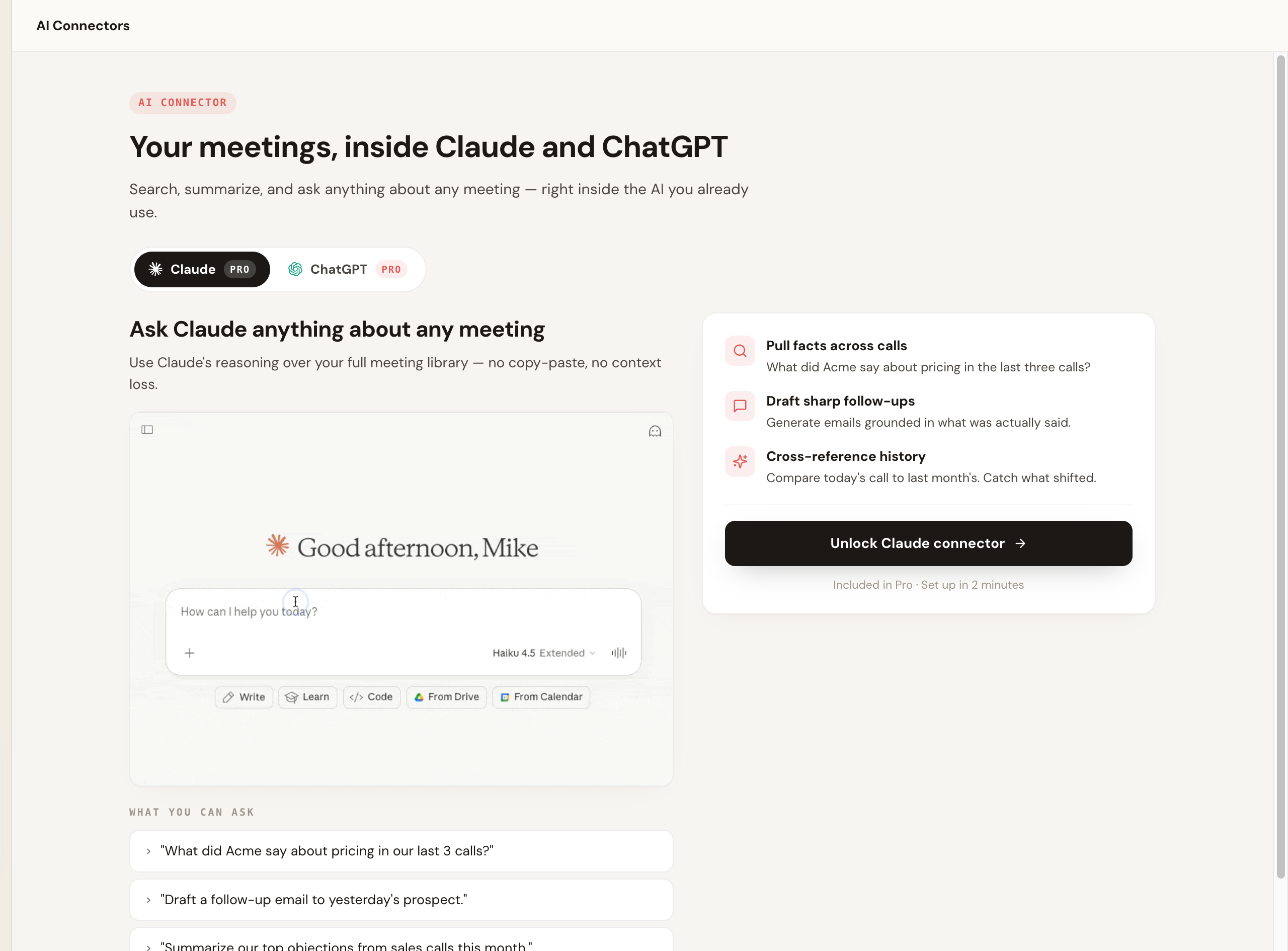
Scribbl is our top recommendation for most Laxis switchers because it fixes the two problems that send people searching: the loss of Google Meet and the sales overshoot. Scribbl is botless: nothing joins the call, nothing is announced, and no notification goes to the people you are meeting with. It works natively across Google Meet, Zoom, and Microsoft Teams, runs as a Chrome extension for Google Meet and Scribbl Desktop for Zoom and Teams, covers hybrid meetings where the room joins the call from a laptop, and connects your meetings to the AI you already use, ChatGPT or Claude, so the follow-up gets written rather than just stored. It is rated 5.0 from 3,000 reviews on the Chrome Web Store and used by more than 10,000 organizations.
Unlike a sales-only assistant, it is general-purpose: it fits a whole company, not just the SDR team.
The part that separates Scribbl is what happens after the call. Smart Collections sort meetings by themselves into groups you describe in one sentence, and Claude or ChatGPT can answer questions about just that group ("What were the main objections in my sales calls this week?"). Automations do the follow-up: draft the email, log notes in HubSpot or Pipedrive, post to Slack or Teams, and open Linear, Jira, Asana, or Monday tickets, asking before they change anything by default.
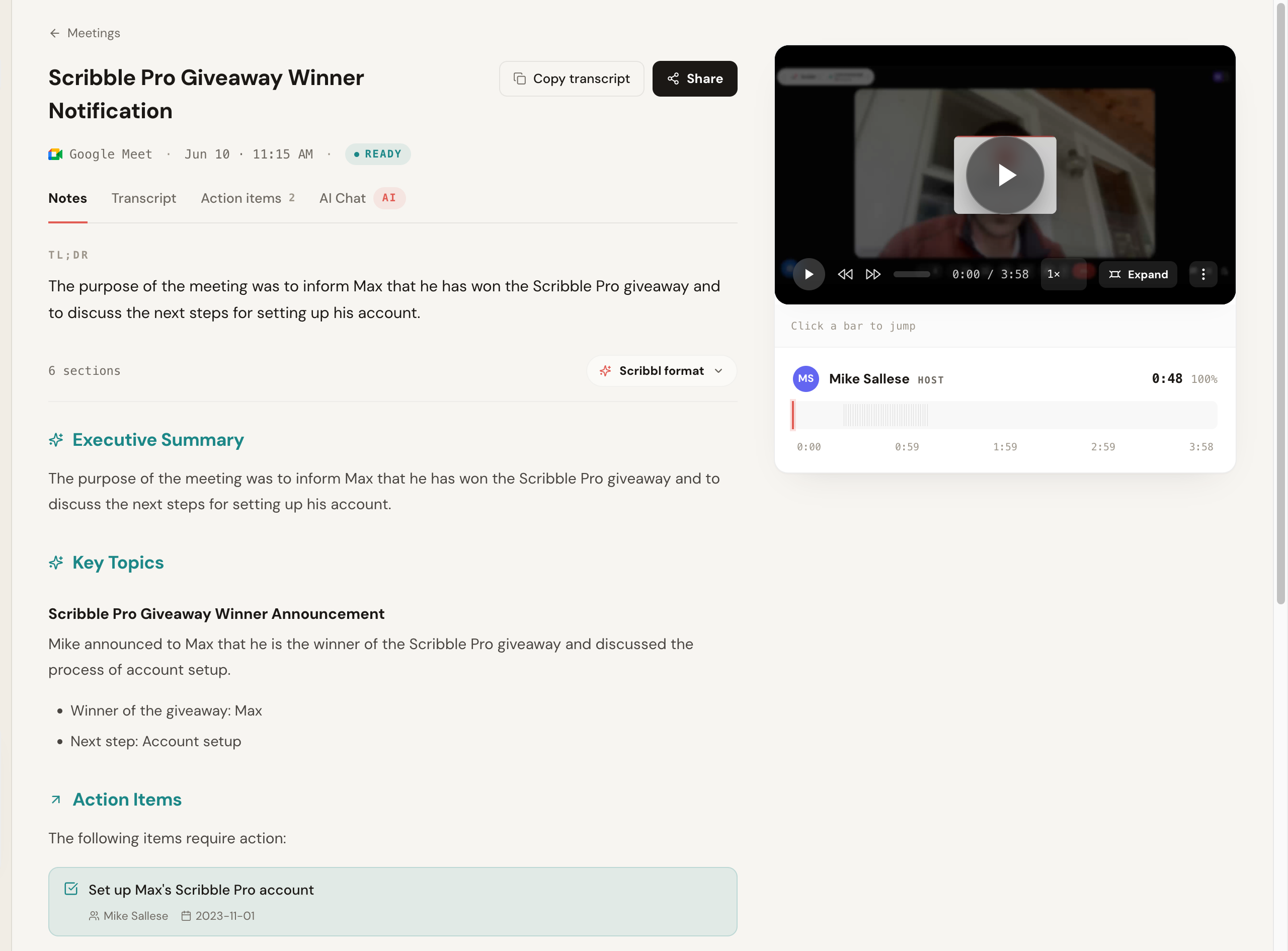
Here is the Scribbl notes view after a Google Meet call: a TL;DR, an executive summary, key topics, and action items with owners and dates. Nothing joined the call.
Pros: no bot ever joins, native Google Meet, Zoom and Teams, general-purpose rather than sales-only, and Automations that do the follow-up so the work gets done, not just stored. Pricing: free plan, no credit card (10 meetings a month, Google Meet, Zoom, and Teams included); Pro is $13 per user per month billed annually, or $20 monthly. See the pricing page. Best for: anyone leaving Laxis over Google Meet or the sales overshoot who wants notes with no bot. More in our botless AI notetaker explainer.
- Platforms: Zoom and Teams, with Google Meet support narrowed
- Capture: a bot joins the meeting as a participant
- Focus: sales, CRM, and lead generation; broad for a general team
- Pricing: free ~300 min/mo, Pro ~$13 to $16, Business ~$24.99 (confirm on Laxis)
- Platforms: native Google Meet, Zoom, and Microsoft Teams
- Capture: nothing joins the call, nothing announced
- Focus: general-purpose notes for any team, with Automations for the follow-up
- Pricing: free plan, no credit card; 5.0 from 3,000 reviews on the Chrome Web Store
Because Laxis is the baseline everyone is comparing against, here is the head-to-head feature parity, Scribbl versus Laxis. Competitor behavior changes, so confirm Laxis's current specifics on its own site.
| Feature | Scribbl | Laxis |
|---|---|---|
| Google Meet support | Native, botless on Google Meet | Narrowed; confirm current capture |
| Capture method | Botless; nothing joins the call | Joins the call as a notetaker bot |
| Visible to attendees | No bot, nothing announced, no email to attendees | A recording participant appears |
| Platforms | Google Meet, Zoom, Microsoft Teams | Zoom, Teams; Meet narrowed (confirm) |
| Focus | General-purpose notes for any team | Sales, CRM, and lead generation |
| Entry paid price | Free; Pro $13/user/mo billed annually or $20 monthly, see pricing | ~$13 to $16/user/mo Pro, Business ~$24.99 (verified June 2026; confirm on Laxis) |
| Free plan | Free plan, no credit card required | Free tier, ~300 min/mo (confirm current limits) |
| Delivery | Chrome extension (Google Meet) and Scribbl Desktop (Zoom, Teams) | Web app and mobile |
| AI summary and action items | Yes, with owners and due dates | Yes |
| Connects to ChatGPT or Claude | Yes, on Pro, and you can ask about just one Smart Collection | Yes, in beta, on Premium and up |
| Rating | 5.0 from 3,000 reviews on the Chrome Web Store; 4.9 from 725 reviews on G2 | Verify current rating on review sites |
| Used by | More than 10,000 organizations | Verify on Laxis |
2. Fireflies.ai
Fireflies is one of the more established and feature-rich options, with strong search, broad CRM integrations (commonly cited at 50-plus), and many supported languages (100-plus). Its standard model sends a notetaker bot, often called Fred, into the meeting. It suits Laxis switchers who want CRM depth without the narrow sales framing and are fine with a visible bot.
Pros: very broad CRM integrations and languages, strong search, team analytics. Cons: visible bot; the feature surface can feel heavy. Pricing: free plan; Pro $10 per seat per month billed annually, or $18 monthly; Business $19 billed annually, or $29 monthly (Fireflies pricing). Corroboration: strong category standing on G2 (around 4.7 across several thousand reviews as of June 2026). Best for: teams that want deep CRM writeback and a searchable archive. See our Fireflies alternative breakdown.
3. Fathom
Fathom is a polished, widely loved notetaker. It typically joins the meeting to record and produces clean summaries and action items, and it is well regarded for a generous free experience. The trade is the usual one: a participant appears in the call.
Pros: strong free tier, clean summaries, popular and well-supported. Cons: a bot joins and is visible to attendees; on the free plan, advanced summaries cover only your first 5 calls each month, and AI action items need Premium. Pricing: free plan with unlimited recordings; Premium $16 per user per month billed annually, or $20 monthly; Team $15 billed annually, or $19 monthly, per user, with a 2-user minimum (Fathom pricing). Corroboration: rates near the top of the category on G2 (around 5.0 across several thousand reviews as of June 2026). Best for: teams that want a clean, free notetaker and are fine with a bot. See our Fathom alternative breakdown.
4. Otter
Otter is a mature transcription product with live captions, a big user base, and a recognizable brand. Its standard model sends a notetaker (OtterPilot) into the call. Its language coverage is narrower than Fireflies, which matters if you meet in multiple languages.
Pros: strong live captions, mature product, large user base. Cons: a bot joins; narrower languages. Pricing: free Basic plan with 300 transcription minutes a month; Pro $8.33 per user per month billed annually, or $16.99 monthly; Business $19.99 billed annually, or $30 monthly (Otter pricing). Corroboration: widely reviewed on G2 (around 4.3 across thousands of reviews as of June 2026). Best for: live captioning and solo capture where a bot is acceptable. See our Otter alternative guide.
5. tl;dv
tl;dv focuses on recording and highlighting meetings, with clipping and sharing features that teams use to spread context. It generally captures by joining the call. It is a good fit if your workflow is built around sharing clips.
Pros: excellent clipping and highlight sharing, good free tier. Cons: a bot joins; notes are secondary to clips for some teams. Pricing: free tier with caps; Pro around $18 per user per month with a higher Business tier (verified June 2026, annual billing; confirm on tl;dv's site). Corroboration: well-rated on G2 (around 4.7 across several hundred reviews as of June 2026). Best for: teams that share meeting clips and want recording-first features. See our Fathom vs tl;dv comparison.
6. Gong (for enterprise sales teams)
Gong is the enterprise revenue intelligence platform for sales organizations, with deal scoring, pipeline forecasting, and coaching at scale, capturing via a notetaker that joins the call. It is the heaviest tool on this list and is sold as an annual platform contract rather than a simple per-seat price, with no free plan, so expect a sales process and a larger commitment. It is worth it if you are buying revenue intelligence for a whole sales org, and overkill if you just want notes.
Pros: deepest deal and pipeline intelligence, coaching at scale, strong CRM writeback. Cons: a bot joins; expensive annual contract, no free plan, far more than a notetaker. Pricing: custom, sold as an annual platform contract; pricing is not published openly, so request a quote. Corroboration: strong enterprise standing on G2 (in the mid-to-high 4s across thousands of reviews as of June 2026). Best for: enterprise sales orgs that need full revenue intelligence. See our Gong alternative and Scribbl vs Gong breakdowns.
Which Laxis alternative should you pick
For most people leaving Laxis, pick Scribbl. If you lost Google Meet support or your calls include clients, prospects, candidates, or partners, you want notes with nothing joining the room, the video, a transcript with speaker names, AI notes and action items for every meeting, and your meetings connected to ChatGPT or Claude. That is the lane Scribbl owns: native Meet, Zoom, and Teams in one account, no bot, and a free plan with no credit card.
The other ranked tools each suit a narrower job, and all of them send a bot into your calls the way Laxis does: Fireflies for deep CRM writeback, Fathom for mostly internal meetings, Otter for live English captions, tl;dv for clip sharing, and Gong for enterprise sales teams buying revenue intelligence.
For sales teams specifically, the bot and the platform are usually decisive; see Scribbl for sales. If you want a free, no-bot start, our free AI notetaker with no bot guide is the shortest path.
How to switch from Laxis without losing your notes
Switching is lower effort than people expect, and you do not have to do it all at once. Here is the order that avoids the two things people regret, losing old transcripts and being stuck mid-call without notes.
- Export anything you want to keep from Laxis. Transcripts and summaries typically export as text or document from the conversation menu. Confirm the current export options on Laxis, and treat this export as your archive, because transcripts do not migrate between tools.
- Install your replacement and run one real meeting through it. If Google Meet support is why you are leaving, run a real Meet call first and confirm capture works the way you need. With a botless tool like Scribbl you can do this on the free plan with no credit card, so there is no commitment to test it.
- Compare the transcript and summary against what was actually said. Check names, numbers, and the crosstalk segment specifically. If it holds up, you have your answer.
- Cancel or downgrade Laxis from your account settings once you are confident. Keep the export. Start fresh notes in the new tool.
Laxis alternatives FAQ
What is the best Laxis alternative in 2026? Scribbl is our top pick for most people leaving Laxis, especially if you lost Google Meet support or want notes with nothing joining the call. It is botless across Google Meet, Zoom, and Microsoft Teams in one account, every meeting gets the video, a transcript with speaker names, AI notes and action items, the free plan needs no credit card, and it connects your meetings to ChatGPT or Claude. Most other alternatives, including Fireflies, Fathom, and Otter, send a recording bot into your calls the way Laxis does. Disclosure: we make Scribbl, so run your own test call.
Why do people leave Laxis? The reasons that come up most are the removal of Google Meet support, which stranded teams that meet on Meet, a heavy skew toward sales, CRM, and lead generation that is more product than a general team needs, feature gating that pushes useful capabilities into higher tiers, and pricing that climbs as you add seats. If Meet is where you live or you only want clean meeting notes, those are the four things that send people searching. Confirm current behavior and pricing on Laxis's own site, because products change.
Does Laxis still support Google Meet? Laxis has narrowed its Google Meet support, and the loss of reliable Meet capture is one of the most common reasons teams go looking for an alternative. If Google Meet is where you meet, prioritize an alternative that captures Meet natively today. Scribbl is botless on Google Meet, Zoom, and Microsoft Teams and has a free plan with no credit card, so you can confirm Meet capture on a real call before you commit. Always verify current platform support on each vendor's own site, since coverage changes.
How much does Laxis cost? Laxis is commonly cited with a free plan capped around 300 transcription minutes per month, a Pro tier in the roughly 13 to 16 dollar per user per month range on annual billing, and a Business tier around 24.99 dollars per user per month. Prices and limits change and vary by billing term, so confirm the current numbers on Laxis's pricing page before you buy. Several alternatives undercut that, and some, like Scribbl, have a free plan with no credit card.
Is there a Laxis alternative that does not use a bot? Yes. Scribbl is botless: no participant joins the call, nothing is announced to attendees, and no email is sent to the room. It works across Google Meet, Zoom, and Microsoft Teams and has a free plan with no credit card. Granola also avoids the traditional join-the-call bot, but it transcribes and then deletes the audio, so there is no recording to replay. If keeping external calls normal is the priority, start with Scribbl.
Which Laxis alternative is best for sales and CRM teams? Scribbl is our pick for sales teams that want the call to stay normal: nothing joins it, nothing is announced, and no email goes to the prospect. Automations do the follow-up: they draft the follow-up email, log notes in HubSpot or Pipedrive, and post to Slack or Teams, asking before they change anything by default, and on Pro you can ask ChatGPT or Claude about every call, or just the calls in one Smart Collection. Fireflies and Gong offer deep CRM writeback, but both put a bot in the call. Confirm each tool's current CRM integrations against your stack before you buy.
Which Laxis alternative is best for Google Meet and Microsoft Teams? Because Laxis narrowed Google Meet support, this is the key axis for many switchers. Scribbl is botless on Google Meet with its Chrome extension and on Zoom and Microsoft Teams with Scribbl Desktop (Mac with Apple silicon and Windows), so it is a natural fit if Meet or Teams is your norm. Fireflies, Fathom, and tl;dv also support Meet and Teams by sending a notetaker bot into the call. If you mostly meet on Teams, verify Teams support specifically, since some tools support it on higher tiers only.
Are there free alternatives to Laxis? Yes. Scribbl has a free plan with no credit card required, it includes Google Meet, Zoom, and Microsoft Teams, and it is botless. Fathom, Otter, Fireflies, and tl;dv also publish free tiers with usage caps, and each of them sends a bot into the call. Laxis's own free plan is commonly cited around 300 minutes per month. If hitting a free cap is what sent you searching, compare the free tiers in the comparison table and confirm current limits on each vendor's pricing page, since they change often.
How accurate are these Laxis alternatives? Accuracy depends heavily on audio quality, accents, jargon, and crosstalk, so no single tool wins every call. Independent 2026 benchmarks report that real-world accuracy (roughly 60 to 65 percent on hard audio) sits well below the controlled-audio numbers vendors quote (often 80 to 92 percent), and that speaker-diarization error commonly runs around 11 to 13 percent. Treat any single number as directional and run your own worst call through your top two picks.
Does Scribbl train AI on my meetings? No. Scribbl doesn't use your meetings to train AI for anyone other than you, and recordings are private by default. Training and data policies differ across the other tools on this list and change over time, so read each vendor's current privacy policy before you record sensitive calls.
How do I switch from Laxis without losing anything? Export anything you want to keep from Laxis first, since transcripts and summaries usually export as text or document from the conversation menu (confirm current export options in Laxis). Then install your replacement and run one real meeting through it before you cancel. With a botless tool like Scribbl you install the Chrome extension (for Google Meet) or Scribbl Desktop (for Zoom and Teams), sign in on the free plan with no credit card, and join your next Google Meet, Zoom, or Teams call; nothing joins the meeting, so there is no setup to announce to attendees. Once you have a few meetings you are happy with, cancel or downgrade Laxis so you are not paying for both. Transcripts do not migrate between tools, so treat the export as your archive.
Is Scribbl better than Laxis? For most people leaving Laxis, yes. If you lost Google Meet support, you find Laxis too sales-heavy, the feature gating or price climb bothers you, you want a real free plan with no credit card, and you want your meetings wired into ChatGPT or Claude, Scribbl is the stronger fit because it is botless across Meet, Zoom, and Teams, Smart Collections sort meetings by themselves, and Automations do the follow-up: draft the email, log notes in HubSpot or Pipedrive, and post to Slack or Teams. Disclosure: we make Scribbl. Run one real call on each before deciding.
Try Scribbl
Let your meetings take their own notes.
Scribbl records, transcribes, and summarizes your Google Meet calls from your browser. No bot joins the call. Free forever for individuals.
Add to Chrome · It's free