Meeting management best practices: a system that ends with owned actions
Meeting management best practices that actually change outcomes: gate which meetings happen, default them to tight structure, and capture decisions and owned action items.
Updated October 29, 2026
The short answer
Manage meetings in three layers, in order: gate which ones happen, default the survivors to a tight structure, and capture the outcome as owned action items
- Gate
- No agenda, no meeting. Write the invite purpose as the decision to be made, and invite only the deciders and the people who own the work.
- Default
- A silent pre-read, a time-box on each agenda item, and one person who decides.
- Capture
- Every decision call ends with what was decided, action items with one owner and one date, and the open questions.
- Capture without typing
- Scribbl records Google Meet, Zoom and Teams with no bot in the call and gives you a transcript and AI notes with action items, so whoever runs the meeting can run it. Free for 10 meetings a month.
Most advice on meeting management is about running a better meeting. That is the wrong layer. The meetings that hurt your team are the ones that never should have been on the calendar, or that ended without a single owned next step. Better facilitation does not fix either problem. A system does.
Here is the argument this guide makes: meeting management is a decision-cost discipline, not an etiquette one. You manage meetings well by doing three things in order. Gate which meetings happen at all. Default the survivors to a tight structure they cannot drift out of. And capture the decisions and action items so the meeting ends as a record someone owns, not a memory that fades by Friday. Skip the first step and you run perfect meetings nobody needed. Skip the third and you run great discussions that change nothing.
The third layer is the one you can hand off. Scribbl records Google Meet, Zoom and Teams with nothing joining the call and gives you a transcript and AI notes with the action items, so whoever runs the meeting can run it instead of typing.
The real problem is volume and drift, not facilitation
Before you optimize a meeting, look at how many you have and where they come from. Microsoft's Work Trend Index "Breaking down the infinite workday" report (June 2025) measured the calendars of millions of Microsoft 365 users, and the picture is not subtle.
Read those numbers as one story. Meeting load is not mostly the recurring 30-minute syncs you could audit and trim. The majority of meetings are unplanned, they are colonizing the evening, and they are landing exactly when people do their best deep work. You cannot facilitate your way out of that. You have to manage the inflow.
This is why "have an agenda and start on time" advice falls flat. It addresses the 43% of scheduled meetings while the 57% ad hoc flood goes unmanaged, and it assumes the meeting should exist in the first place. The order matters: gate, then default, then capture.
Layer 1: Gate the meeting before it exists
The cheapest meeting to manage is the one that never gets booked. Most teams have no gate at all, which is how you end up with 57% ad hoc load. Put a short test between the impulse to meet and the calendar invite.
Ask three questions before you send any invite:
- Is there a decision or a real-time problem here? If the goal is to share information one direction, that is a memo, a short recorded video, or a message. Status that one person reads aloud while six people half-listen is the most common meeting that should not exist.
- Can this be answered async in one round-trip? If a written question with a 24-hour reply window would resolve it, do that instead. Reserve synchronous time for things that genuinely need back-and-forth: tradeoffs, ambiguity, conflict, alignment on something fuzzy.
- Who actually needs to be in the room? Decision-makers and the people who own the work. Everyone else gets the notes. Each extra attendee multiplies the cost and dilutes the accountability, because when everyone is responsible, no one is.
If a meeting clears the gate, it earns three things on the invite: a one-line purpose stated as the decision to be made, the named owner, and the agenda. No agenda, no meeting. That single rule is the highest-leverage gate you can install.
For recurring meetings, run a kill audit once a quarter. Cancel every recurring meeting for two weeks and only reinstate the ones people actively ask to bring back. The ones nobody misses were meeting debt you were paying weekly. For standing project syncs, a written project status report often replaces the meeting entirely.
Layer 2: Default the survivors to a tight structure
Once a meeting earns its slot, the goal is to make good structure the path of least resistance. Default beats discipline. If the right shape is automatic, no one has to remember to facilitate well.
- 1
State the decision in the first minute
The owner reads the purpose line out loud. Everyone hears the finish line before anyone talks.
- 2
Read the pre-read in silence (5 min)
Put context in a doc and read it together at the start. It beats a live presentation and it includes people who skim better than they listen.
- 3
Work the agenda by time-box
Each item gets a fixed number of minutes and a named owner. When the box closes, you move on or explicitly decide to extend.
- 4
Name the decision and the owner before you leave
For every agenda item: what did we decide, who owns the follow-up, by when. Say it out loud so it is unambiguous.
- 5
Confirm the action items in the last 3 minutes
Read every action item back to the room. One person, one verb, one date. If you cannot name an owner, it is not done.
A few defaults do most of the work:
- A silent pre-read. Borrowed from Amazon: instead of slides, write a short memo and read it together for the first few minutes. It forces the author to think in complete sentences and it gives quiet people the same footing as the loudest one in the room. This is the single biggest upgrade to decision quality you can make.
- Time-boxes with a visible clock. Put a duration on each agenda line and keep time honestly. A meeting that ends five minutes early teaches people that your meetings respect the clock, which makes the next one start on time.
- One decision-rights model. Decide in advance who decides. A simple model (one person is the decider, others advise) prevents the meeting that reaches a "consensus" nobody will defend on Monday. If you want a deeper toolkit here, see meeting facilitation techniques and your team's meeting norms.
Layer 3: Capture the outcome as owned action items
This is the layer almost everyone gets wrong, and it is the one that decides whether the meeting mattered. A meeting that produces no owned, dated commitment was, functionally, a conversation. Nice, but not work.
The non-negotiable shape of a captured outcome is the same every time:
- Decisions: what the group decided, stated as a closed sentence.
- Action items: one owner, one verb-led task, one specific date. Never "the team will," never "next week."
- Open questions: what is still unresolved and who is chasing the answer.
Here is a recap you can paste into Slack or an email the moment the meeting ends. Keep it this short.
RECAP: Q3 roadmap decision (Jun 13)

Decided:
- Top 3 bets: onboarding revamp, billing fix, mobile beta.
- Mobile beta ships behind a flag, not to all users.

Action items:
- Maria: write the onboarding revamp brief (due Wed Jun 18)
- Devin: scope the billing fix and size it (due Fri Jun 20)
- Priya: stand up the mobile beta flag (due Mon Jun 23)

Open:
- Pricing for the mobile tier (Priya to bring a proposal next sync).
That format is deliberately boring, and boring is the point. Anyone can scan it in fifteen seconds and know exactly what they own. If you want the full set of rules behind it, the action items template covers the four fields that make tasks stick, and how to take better meeting notes covers the live capture habit.
The hard part is that capturing well while also running the meeting is nearly impossible. If you are the facilitator typing notes, you are doing neither job fully. You either miss the nuance of the discussion or you miss the action item. This is the one place where letting software handle the rote work genuinely raises the quality of the outcome.
Where automatic capture earns its place
If your meetings are on Google Meet, an AI notetaker that records, transcribes, and summarizes the call removes the tradeoff between facilitating and capturing. Scribbl does this with no bot joining the call, which matters more than it sounds: a bot in the participant list changes how candid people are, and it is one more thing to admit or explain. Scribbl runs as a Chrome extension, records the meeting, and gives you a transcript and a summary with action items you can paste into the recap above. It is free for individuals on Google Meet, Zoom and Microsoft Teams; Pro removes the usage cap, and Team adds a shared team library and admin controls.
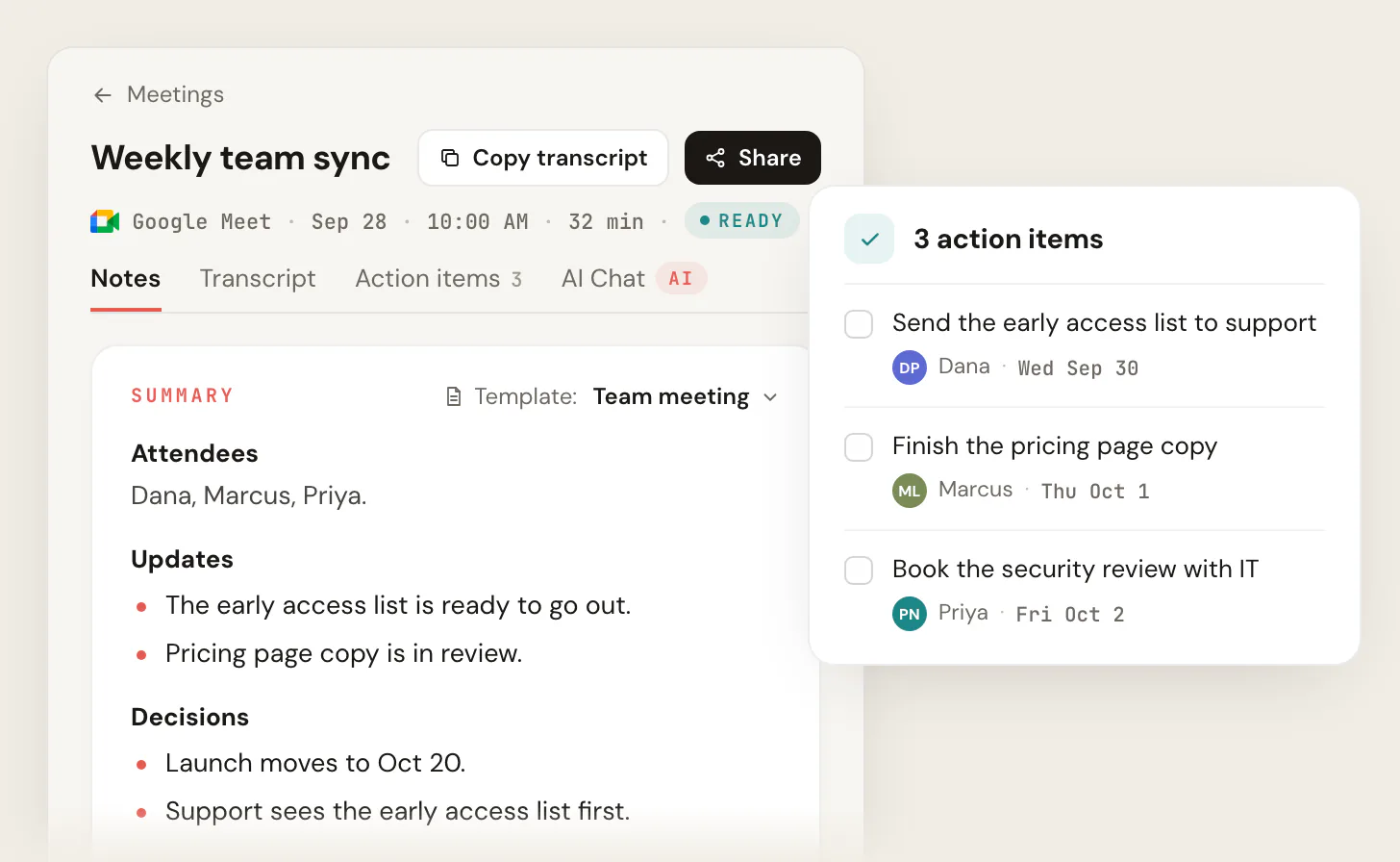
The honest caveat: software captures, it does not decide. The notetaker will write down "we should look into pricing," but only a human turns that into "Priya brings a pricing proposal by Tuesday." Use the tool to free yourself from transcription so you can do the part that requires a person: assigning the owner and the date out loud before everyone leaves.
- Best for: small, low-stakes syncs where one person isn't also running the room
- Facilitator's attention is split between leading and typing
- Action items get missed when the discussion moves fast
- No transcript to settle 'who said what' later
- Best for: decision meetings where the facilitator needs to be present
- Transcript and summary are automatic; you do zero note-taking
- You spend the last 3 minutes naming owners and dates, not typing
- Searchable record for anyone who wasn't in the room
Put the three layers together
A team that manages meetings well is not a team that runs charming meetings. It is a team where most proposed meetings die at the gate, the survivors follow the same tight shape every time, and every one of them ends with a recap that names owners and dates. The facilitation skill in the middle is real, but it is doing the least work. The leverage is on the edges: refusing the meeting, and locking down the outcome.
Start with one change this week. Add the "no agenda, no meeting" gate, default your standing meetings to the silent pre-read, and send the five-line recap after every decision call. Once those three habits hold, the volume problem and the "what did we even agree to" problem both shrink at the same time.
For role-specific playbooks, see meeting management for managers, project managers, and client-facing teams.
Meeting management FAQ
How many meetings is too many?
There is no universal number, but the Microsoft Work Trend Index (June 2025) is a useful warning sign: when 57% of your meetings are ad hoc and meetings start spilling past 8 pm, the issue is inflow, not scheduling. A practical test is focus time. If your team cannot find two uninterrupted hours on a normal day, you have too many meetings regardless of the count. Fix it by gating new meetings and running a quarterly kill audit on recurring ones, not by shortening the ones you keep.
What is the single most effective meeting management practice?
The "no agenda, no meeting" rule, paired with writing the invite purpose as a decision rather than a topic. It does two jobs at once: it kills meetings that have no real purpose (because nobody can write an agenda for them), and it gives the meetings that survive a finish line. Everything else, including time-boxes and recaps, works better once that gate is in place.
Should every meeting have a recap?
Every meeting that makes a decision or creates work, yes. A pure brainstorm or a relationship-building call may not need one. But the moment an action item exists, it needs a written owner and date, or it does not exist. The five-line recap format above takes under two minutes when an AI notetaker has already produced the transcript and summary for you.
How do I keep meetings from running long?
Time-box each agenda item, keep a visible clock, and treat the parking lot as your release valve for off-topic items. The structural cause of long meetings is almost always a missing decision-rights model: the group keeps circling because no one is empowered to call it. Decide in advance who decides, and the meeting ends when that person decides.
Do I need software to manage meetings well?
No. The gating and the structure are habits, not tools, and a sticky note with three questions does most of the gating work. Software earns its place in the capture layer, where trying to facilitate and take notes at the same time means doing both poorly. A tool like Scribbl handles the transcript and summary so the human can spend the last three minutes naming owners and dates, which is the part no tool can do for you.
Try Scribbl
End every meeting with owned action items
Scribbl records, transcribes, and summarizes your Google Meet calls from your browser. No bot joins the call. Free forever for individuals.
Add to Chrome · It's free