Scribbl vs Avoma (2026): The Honest Head-to-Head
Scribbl vs Avoma, compared line by line. Scribbl is botless (nothing joins the call), free to start, and works on Google Meet, Zoom, and Teams. Avoma is a bot-based conversation intelligence platform for revenue teams. Capture method, pricing, accuracy, CRM, and who each is for.
Updated October 7, 2026

On this page8 sections
Scribbl and Avoma solve the same job (turn a meeting into notes and next steps) in two very different ways. Avoma is a full conversation intelligence platform built for revenue teams, and it records by sending a bot that joins your call. Scribbl is a focused, botless notetaker: nothing joins the meeting, nothing is announced, and no email goes to attendees, and it is free to start with no credit card. Scribbl is the pick if you want clean notes with no bot in the room, a free start, and your meetings wired into ChatGPT or Claude, with Automations doing the follow-up. Avoma is a heavier platform built around call scoring and coaching dashboards, and it needs a recorder in the call to get there. The decision really comes down to two questions: how much platform do you actually need, and do you want a bot to join your meetings or not.
We make Scribbl, so we are upfront about it: treat us as a primary source on Scribbl. Where we state an Avoma price or feature, we mark it approximate and tell you to confirm it on Avoma's site, because those details change often.
Scribbl vs Avoma at a glance
Here is the line-by-line comparison on the things that actually change your week, so you can decide on facts, not vibes. Where a row depends on plan or changes often, we say confirm. Prices are approximate June 2026 figures; check each vendor's pricing page before you buy.
| Feature | Scribbl | Avoma |
|---|---|---|
| Bot joins the call | No | Yes |
| Announced to attendees (visible recorder, email) | No | Yes |
| Recording method | Nothing joins the call | Joining bot |
| Google Meet / Zoom / Teams | All three | All three |
| Plan tier / footprint | Lightweight notetaker | Full platform |
| Free plan, no credit card | Yes | Caps; confirm |
| Pricing pattern (approx, confirm) | Free; Pro $13/user/mo billed annually | ~$19 to ~$80+/seat |
| AI summary, topics, action items | Yes | Yes |
| CRM notes | Automations log notes in HubSpot or Pipedrive | Native Salesforce, HubSpot; confirm |
| Connects to ChatGPT or Claude | Yes | Yes, on paid plans |
| Resilient to meeting bot-blocking | Yes | No |
| Best for | Botless notes, external calls | Revenue team analytics |
| Third-party rating reference | 5.0 from 3,000 reviews on the Chrome Web Store; 4.9 from 725 reviews on G2 | G2, Capterra |
Scribbl's botless behavior, rating, and organization count are our own verifiable facts. Everything in the Avoma column reflects commonly documented behavior and pricing that you should confirm on Avoma's site, because plans and features change.
The deciding factor: their bot vs Scribbl botless
The single biggest difference between these two tools is how each one gets into your meeting, so it is worth seeing side by side.
- Capture: a notetaker bot joins the meeting as a participant
- Attendees see it: yes, a recorder appears in the room
- Failure mode: the bot can fail to join, be denied, or be removed
- Payoff: feeds coaching, call scoring, and revenue analytics
- Best when: internal revenue calls where a recorder is expected
- Capture: botless, nothing joins the call
- Attendees see it: no bot, nothing announced, no email
- Failure mode: nothing tries to join, so nothing to block
- Payoff: the call stays exactly normal on external meetings
- Best when: clients, prospects, candidates, or partners are in the room
Avoma's model is to send a recorder that joins the meeting and captures it from the inside. That works, and it feeds the analytics and coaching Avoma is built around. The tradeoff is that a participant shows up in the call. On internal team syncs that is usually fine. On external calls (a sales demo, an interview, a first client meeting) the calculus changes: prospects, clients, and partners all see the bot join, and some react to it or block it. A bot is also a participant, which means it can fail to join or be denied admission, and you only find out when the recording is missing.
Scribbl is botless. Nothing joins the call, so the attendee list looks exactly the way it would if you were not taking notes at all. Nothing is announced, no admission prompt appears, and there is no participant to explain. For anyone whose meetings regularly include people outside their own company, that is the feature that decides it. Our full write-up on the botless AI notetaker walks through why this matters more than any feature checklist.
With Scribbl, that last row simply is not there. The roster shows the people, and nothing else.
Platform vs focus: how much do you actually need
This is the real fork in the road. Avoma is a platform. It bundles meeting capture with agenda templates, conversation intelligence, call scoring, talk-time analytics, coaching, deal insight, and native CRM automation, and its per-seat price climbs as those tiers unlock.
Scribbl is deliberately focused. It does not try to be your revenue operating system. It captures the meeting without a bot, then connects it to the AI you already use, ChatGPT or Claude, so you can hand the transcript to your own assistant and have it draft the recap, update the tracker, pull facts across several past calls, or write coaching notes. Automations do the follow-up for you: draft the email, log notes in HubSpot or Pipedrive, post to Slack or Teams, or open a Linear, Jira, Asana or Monday ticket, and by default they ask before changing anything. Instead of learning a new platform and migrating your process into it, the meeting becomes context your existing AI can act on.
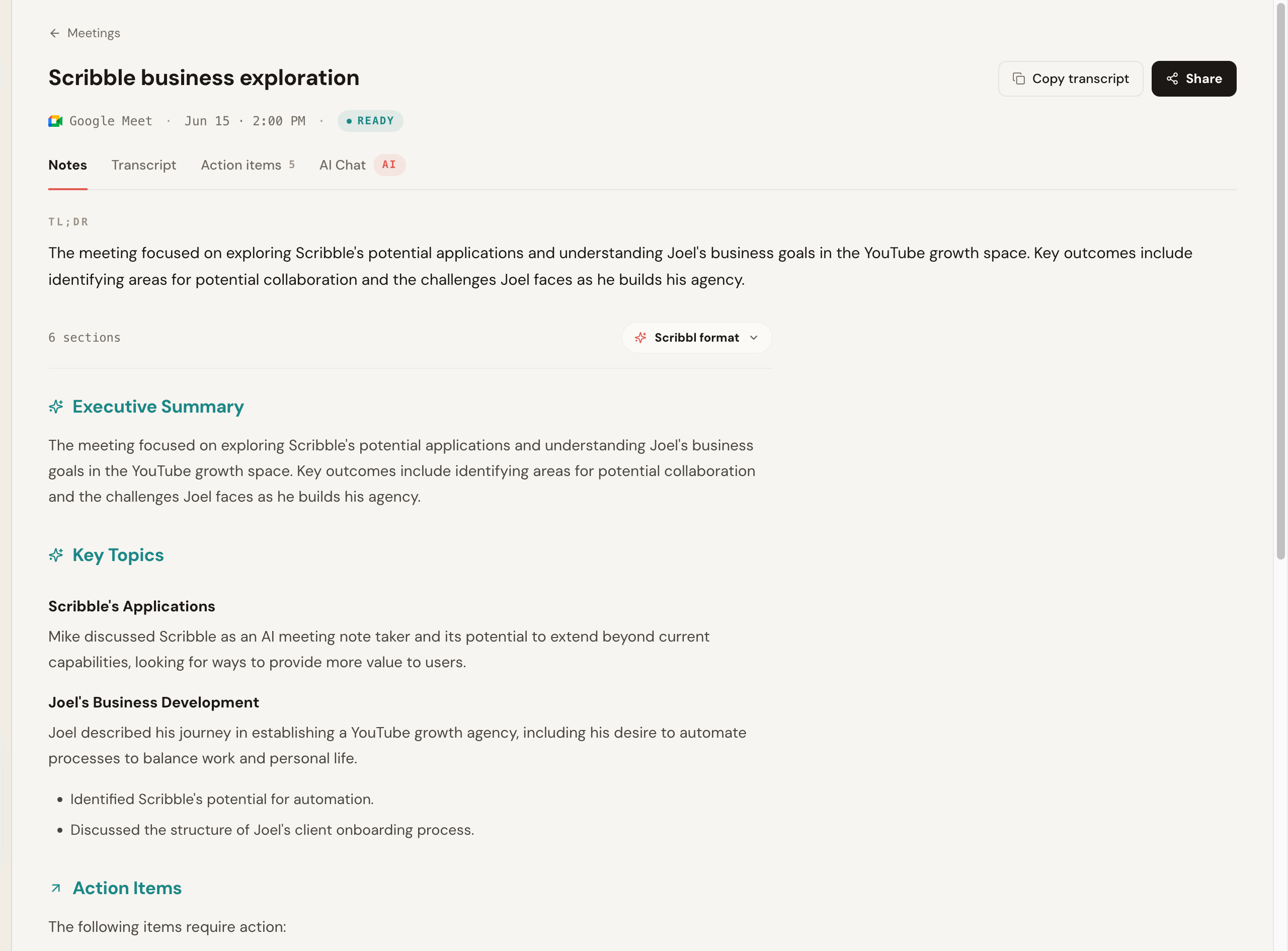
Here is the actual notes output from a real Scribbl call: a TL;DR, an executive summary, key topics, and action items, all from a recording where nothing joined the room.
The part that separates Scribbl from a heavy conversation intelligence platform is what happens after the call. Connect Scribbl once and Claude or ChatGPT can search the transcript and notes of every meeting, and Smart Collections narrow that search to one group of meetings, so you can ask "What were the main objections in my sales calls this week?" and get an answer from just those calls. You can pull facts across calls, draft a follow-up grounded in what was actually said, and prep CRM notes without copy-pasting transcripts, and you can tell Scribbl the job in plain words and it runs with your own Claude.
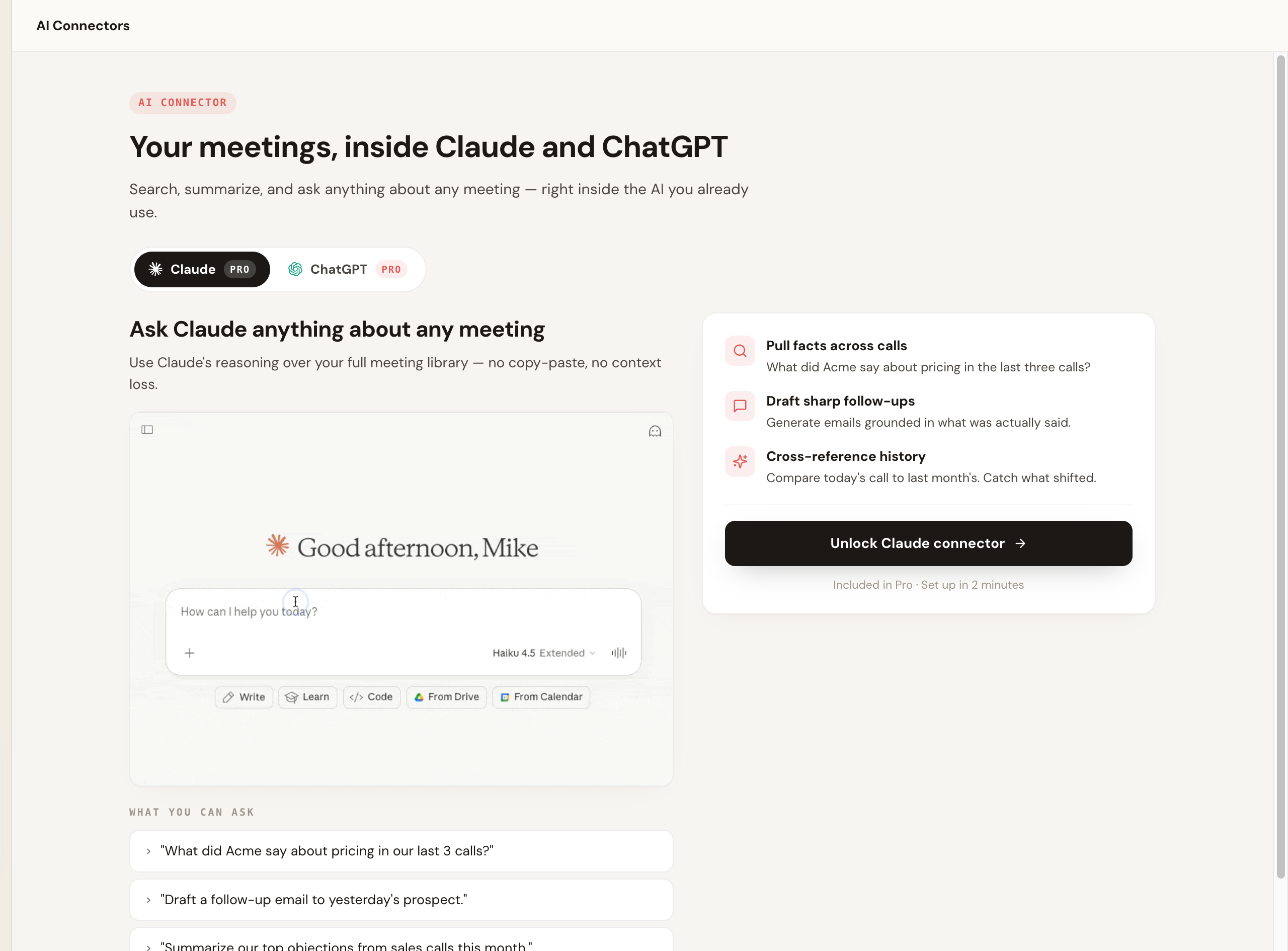
That is the difference between a tool you adopt as infrastructure (Avoma) and one that just slots into how you already work (Scribbl).
Conversation intelligence: dashboards vs your own AI
Conversation intelligence is what Avoma is built around: scored calls, talk-time ratios, topic trackers, coaching workflows, and deal insight that rolls up across a team, all fed by a recorder that joins every call.
Scribbl's answer is different in kind, not a smaller version of the same thing. Rather than a built-in analytics suite to administer, Scribbl hands the raw material (the video, a transcript with speaker names, AI notes and action items) to ChatGPT or Claude, where your own AI can do the analysis on demand: "summarize objections across my last ten discovery calls," "draft coaching feedback on this call," "what did the customer say about pricing." Smart Collections sort your meetings by themselves into groups you describe in one sentence, so every discovery call or every renewal lands in one place for that kind of question. You get the analysis you actually ask for, with no bot in the room and no platform to set up.
Pricing: free to start vs a platform that scales
Both tools are easy to start without paying. Scribbl has a free plan with no credit card. Avoma offers a free way to try it, with caps. We will not over-specify Avoma's prices, because they change and you should check the source, but the pattern people cite most is a low base that climbs as features unlock: an entry plan commonly cited around $19 per seat per month, with conversation intelligence, coaching, and revenue tiers reported pushing the effective cost toward $80 to $90 per seat once add-ons are on. Confirm current numbers on Avoma's pricing page.
The durable point: a platform like Avoma scales in price as you add seats and tiers. Scribbl's free plan covers 10 meetings a month on Google Meet, Zoom and Teams with no credit card, and Pro is $13 per user per month billed annually, or $20 monthly. You can review Scribbl's plans on the pricing page.
Who should pick Scribbl over Avoma
Pick Scribbl if you want clean botless notes without standing up a full platform, you regularly meet with clients, prospects, candidates, or partners where adding a recording bot changes the room, you want to start free with no credit card, and you want your notes connected to ChatGPT or Claude so follow-ups get drafted instead of just stored. Sales teams especially gravitate here when external calls dominate their day; see Scribbl for sales. For a wider field of options, see our Avoma alternative roundup.
Avoma suits larger revenue teams that want call scoring dashboards in one platform and are fine with a recorder joining every call.
Scribbl is rated 5.0 from 3,000 reviews on the Chrome Web Store and 4.9 from 725 reviews on G2, and is used by more than 10,000 organizations. People who move from a heavier platform almost always say the same thing: the analytics were nice, but they wanted notes without a bot in every external call and without a tool to administer. If that is you, Scribbl is the better fit.
How to switch from Avoma to Scribbl without losing anything
Switching is lower-stakes than it feels, because you can run both at once first. Export any transcripts or summaries you want to keep out of Avoma, install Scribbl's Chrome extension (for Google Meet) or desktop app (for Zoom and Teams), sign in on the free plan, and run it on your next Google Meet, Zoom, or Teams call. Because Scribbl is botless, nothing joins the meeting, so there is no recorder to announce and no setup the other side has to approve. Once you have a few meetings you are happy with, cancel Avoma so you are not paying for both. The only step that is not reversible is canceling Avoma, so do that last.
Scribbl vs Avoma FAQ
What is the main difference between Scribbl and Avoma?
Capture method and scope. Avoma is a broad conversation intelligence and revenue platform that records by sending a bot that joins your meeting as a participant. Scribbl is a focused, botless notetaker: nothing joins the call, nothing is announced, and no email goes to attendees. Avoma adds coaching, call scoring, and CRM analytics on top; Scribbl keeps it simple and connects your meetings to the AI you already use, ChatGPT or Claude, so the follow-up work gets done. Disclosure: we make Scribbl, so weigh our pick accordingly and run one real call on each.
Does Avoma put a bot in the meeting and does Scribbl?
Avoma generally joins the meeting as a notetaker to record, transcribe, and analyze the call, so attendees see a participant in the room. Scribbl is botless: no bot ever joins the call, no participant named after the tool appears in the attendee list, and no email is sent to other attendees. That keeps external calls feeling normal.
How much does Avoma cost compared to Scribbl?
Avoma's entry plan is commonly cited starting around $19 per seat per month, with conversation intelligence, coaching, and revenue tiers reported pushing the effective cost toward $80 to $90 per seat once add-ons unlock. Confirm current numbers on Avoma's pricing page, because plans change often. Scribbl has a free plan with no credit card that covers 10 meetings a month on Google Meet, Zoom and Teams, and Pro is $13 per user per month billed annually, or $20 monthly, on the Scribbl pricing page.
Is Scribbl or Avoma better for a small team or solo user?
Scribbl fits solo users and small or cross-functional teams who want clean, botless notes without standing up a full platform, and it is free to start with no credit card. Avoma fits larger revenue teams that want built-in coaching, deal analytics, call scoring, and CRM workflows and accept the per-seat cost and the bot in the call. If you mostly want notes and follow-up rather than a revenue operating system, Scribbl is the lighter fit.
Does Scribbl have conversation intelligence like Avoma?
Not as a built-in analytics suite, and that is by design. Avoma's conversation intelligence (call scoring, talk-time analytics, coaching, and deal insight) is fed by a recorder that joins every call. Scribbl connects your meetings to ChatGPT or Claude instead, so you can ask your own AI to analyze a call, compare several calls, or draft coaching notes, and Smart Collections sort your meetings by themselves into groups you describe in one sentence. You get the analysis you ask for, with no bot in the room and no platform to administer.
Do Scribbl and Avoma work with Zoom, Google Meet, and Microsoft Teams?
Yes, both cover the major platforms. Scribbl supports Google Meet with its Chrome extension, and Zoom and Microsoft Teams with Scribbl Desktop (Mac with Apple silicon and Windows). Avoma covers the major platforms too, so platform coverage is rarely what decides between the two. The deciding factors are usually botless capture, how much platform you actually need, and total cost as you add seats.
Does Scribbl connect to a CRM like Avoma?
Yes. Scribbl's Automations log notes from each meeting in HubSpot or Pipedrive, draft the follow-up email, and post to Slack or Teams, and by default they ask before changing anything. Avoma offers native CRM writeback as part of its platform, through a bot that joins the call. With Scribbl, the notes come from meetings where nothing joined the call, and you can also ask Claude or ChatGPT to draft from what was actually said.
Which is more accurate, Scribbl or Avoma?
Accuracy depends heavily on audio quality, accents, jargon, and crosstalk, so no single tool wins every call. Accuracy on technical and product terms is a common Avoma complaint, which matters because its analytics are built on top of the transcript. The honest move is to run one real call with your own product names on each and judge for yourself.
Is Scribbl free?
Yes. Scribbl has a free plan with no credit card required: 10 meetings a month, including Google Meet, Zoom and Teams. You can start taking botless meeting notes right away and upgrade to Pro later if you want more. Avoma is a paid conversation intelligence platform, so the simplest comparison is to run one real meeting on Scribbl's free plan first and see whether you actually need the heavier platform.
Should I choose Scribbl or Avoma?
For most people who want notes and follow-up, Scribbl. Nothing joins the call, every meeting gets the video, a transcript with speaker names, AI notes and action items, Automations do the follow-up, and it is free to start with no credit card. Avoma suits larger revenue teams that want call scoring dashboards in one platform and are fine with a recorder joining every call.
Can I switch from Avoma to Scribbl without losing anything?
Yes, and you can run both at once first. Export any transcripts or summaries you want to keep out of Avoma, install Scribbl's Chrome extension (for Google Meet) or desktop app (for Zoom and Teams), sign in on the free plan with no credit card, and run it on your next Google Meet, Zoom, or Teams call. Because Scribbl is botless, nothing joins the meeting, so there is no recorder to announce. Once you have a few meetings you are happy with, cancel Avoma so you are not paying for both.
Try Scribbl
Let your meetings take their own notes.
Scribbl records, transcribes, and summarizes your Google Meet calls from your browser. No bot joins the call. Free forever for individuals.
Add to Chrome · It's free