6 Best Avoma Alternatives in 2026 (Compared, With Real Pricing, an Honest vs-Avoma Matrix, and a Free Botless Pick)
We compared 6 Avoma alternatives in June 2026. Compare capture method, real per-seat pricing, accuracy on sales terms, CRM autofill, and free tiers, with a 12-row vs-Avoma feature matrix and a botless free pick (Scribbl), plus Fathom, Fireflies, Gong, Otter and Granola.
Updated October 7, 2026

On this page10 sections
- 01Why people switch from Avoma
- 02How we compared these Avoma alternatives
- 03Best Avoma alternative by use case
- 04Comparison table: Avoma alternatives at a glance
- 05The 6 best Avoma alternatives
- 06Bot vs botless
- 07Scribbl vs Avoma
- 08How to choose your Avoma alternative
- 09How to switch from Avoma without losing anything
- 10Avoma alternatives FAQ
Scribbl is the pick if the price climb or the recording bot is why you are leaving Avoma. Nothing joins the call, the free plan (no credit card) works across Google Meet, Zoom, and Microsoft Teams, and Automations do the follow-up: draft the email, log notes in HubSpot or Pipedrive, post to Slack or Teams. Avoma itself is a conversation intelligence platform for revenue teams that sends a notetaker into every call. Below we compared six alternatives in June 2026 on capture method, real per-seat pricing, accuracy on technical and sales terms, CRM integration, and free tiers, with a 12-row feature matrix straight against Avoma.
We are the makers of Scribbl, and we are upfront about it: treat us as a primary source on Scribbl and a fair-but-interested reviewer of everything else. Where we state a competitor price, accuracy, or feature, we mark it as approximate and tell you to confirm it on that vendor's site, because those details change often.
Here is the quick version of how the most-compared picks stack up on the features that send people off Avoma in the first place. Competitor cells reflect commonly documented behavior and entry pricing as of June 2026; confirm each on the vendor's own site, because plans change.
| Feature | Scribbl | Avoma | Fathom | Fireflies | Otter |
|---|---|---|---|---|---|
| No bot joins the call | Yes | No | No | No | No |
| Nothing announced to attendees | Yes | No | No | No | No |
| Works with Google Meet | Yes | Yes | Yes | Yes | Yes |
| Works with Zoom | Yes | Yes | Yes | Yes | Yes |
| Works with Microsoft Teams | Yes | Yes | Yes | Yes | Yes |
| Connects to ChatGPT or Claude | Yes | Organization or Enterprise plan | Yes | Yes | Yes |
| Free plan, no credit card | Yes | With caps | Advanced summaries on 5 calls a month | With caps | With caps |
| Video recording and playback | Yes | Yes | Yes | Yes | Limited |
| Searchable transcript archive | Yes | Yes | Yes | Yes | Yes |
| Native CRM writeback | HubSpot or Pipedrive | Yes | Paid | Yes | Limited |
| Pricing approach | Free, then $13 billed annually or $20 monthly | Climbs with add-ons | Paid tiers | Paid tiers | Paid tiers |
Why people switch from Avoma
Avoma is a mature platform, but the same handful of reasons keep sending people looking for an alternative. None of these are knocks on Avoma; they are normal trade-offs that simply do not fit everyone.
- Price escalation as features unlock. This is the number one reason. Avoma's entry plan is commonly cited starting around $19 per seat per month, but the conversation intelligence, coaching, and revenue intelligence tiers add up fast, with the effective per-seat cost reported climbing toward $80 to $90 per seat once add-ons are unlocked. Teams sign up at the base price and feel the bill grow as they actually use the platform. Confirm current numbers on Avoma's pricing page, because plans change, but the pattern of a low base that climbs is the most cited complaint.
- The recording bot, and bot failures. Avoma generally joins the meeting as a notetaker to capture and analyze the call. On external calls, like a sales demo, an interview, or a first client meeting, a visible recording participant changes the room. Worse, a bot is a participant, which means it can fail to join, be denied admission, or get blocked by meeting controls, and users report missed recordings when that happens.
- Accuracy on technical and sales terms. Several users cite transcript errors on product names, industry jargon, and proper nouns, which matters most when the whole point is to feed clean call data into coaching and the CRM. A transcript that mangles your product names undercuts the analytics built on top of it.
- Slow transcript processing. Some users report transcripts and notes taking 60 minutes or more to appear after longer calls, which is frustrating when you want to send a follow-up while the conversation is still fresh.
- Too much platform for non-sales teams. Avoma is built around the revenue workflow. A cross-functional team, or anyone who just wants clean meeting notes, often finds the conversation intelligence, scorecards, and pipeline features are more than they need, and harder to roll out company-wide.
- ChatGPT and Claude only on the top plans. Many people now want their meetings wired into the AI they already use, ChatGPT or Claude, so the recap, the draft email, and the next steps actually get written. Avoma's connector needs its Organization or Enterprise plan, or the API Access add-on.
If two or more of these describe you, you are exactly who this list is for. The rest of this guide maps each pain point to the tools that fix it.
How we compared these Avoma alternatives
This is the part most listicles skip. Here is what we compared each tool on in June 2026.
- Accuracy. Product names, numbers, accented speech, and crosstalk, since that is where Avoma users report problems.
- Processing speed. How soon after the call the transcript and summary are ready, because slow processing is a top Avoma complaint.
- Capture and visibility. Whether a bot joins and whether attendees see it.
- After the call. The summary, the action items, the CRM and follow-up flow, and how easily the output moves into the tools you already work in.
- Price and ratings. We pulled each tool's published starting price and pointed to where its third-party reviews live (G2, Capterra, the Chrome Web Store, or the app stores), so you can sanity-check both yourself.
We weighted the read in this order, because this is the order that changes your day to day: capture method first, then total cost as you scale, then accuracy and speed, then what happens after the call, then track record. We say this openly because it explains why a botless, free, AI-connected tool scores well on our weighting. If your priorities differ, the table gives you the raw inputs to re-rank for yourself.
Best Avoma alternative by use case (quick routing)
If you only have a minute, jump to the one that matches your situation. Each links to the full write-up below.
- Best botless / no-bot alternative: Scribbl (nothing joins the call).
- Best free Avoma alternative: Scribbl (free, no credit card, 10 meetings a month on Google Meet, Zoom, and Teams).
- Best for sales teams on a budget: Scribbl, for botless external calls plus Automations that log notes in HubSpot or Pipedrive and draft the follow-up email.
- Best for non-sales / cross-functional teams: Scribbl, with Smart Collections sorting each team's meetings by themselves.
- Best for Google Meet, Zoom, and Teams in one account: Scribbl.
- Other tools on this list: Fathom, Fireflies, Gong, and Otter all send a bot into the call, and Granola keeps no recording.
Comparison table: Avoma alternatives at a glance
This table is more complete than the ones you will find elsewhere because it puts the capture method and total cost front and center and adds the things most lists omit: a concrete starting price per tool with Avoma as the baseline, CRM autofill depth, and where to check third-party ratings, alongside platform coverage and free-plan shape. Avoma and Gong prices are approximate commonly cited figures; the others are from each vendor's own pricing page, checked October 7, 2026. Prices change often, so confirm each before you buy.
| Tool | Bot joins the call? | Meet / Zoom / Teams | Free plan | Starting paid price | CRM autofill | Where to check ratings | Best for |
|---|---|---|---|---|---|---|---|
| Scribbl | No, botless | All three | Yes: 10 meetings a month, no credit card | Free to start; Pro $13/user/mo billed annually or $20 monthly (pricing page) | Automations log notes in HubSpot or Pipedrive | 5.0 from 3,000 reviews on the Chrome Web Store; 4.9 from 725 reviews on G2 | Botless external/multi-platform teams who want no bot and a free start |
| Avoma | Usually, a notetaker joins | All three | Yes, with caps | ~$19/seat base climbing to ~$80 to $90 with add-ons; confirm | Native (Salesforce, HubSpot) | G2, Capterra | Sales teams wanting built-in conversation intelligence |
| Fathom | Usually | All three | Yes; advanced summaries on your first 5 calls a month | Premium $16/user/mo billed annually or $20 monthly | Native on paid tiers; confirm | G2, Capterra | A clean, popular bot-based notetaker |
| Fireflies.ai | Usually (Fred) | All three | Yes, with caps | Pro $10/seat/mo billed annually or $18 monthly; Business $19 or $29 | Native (Salesforce, HubSpot) | G2, Capterra | Feature depth, integrations, and team analytics |
| Gong | Usually | All three | No | Annual platform contract (often $5k+); confirm | Native, deep; confirm | G2, Capterra | Enterprise revenue intelligence and forecasting |
| Otter.ai | Usually, an assistant | All three | Yes, 300 minutes a month | Pro $8.33/user/mo billed annually or $16.99 monthly | Limited; confirm | G2, Capterra | Mature live transcription and captions |
| Granola | No (notes-forward) | Audio-based | Yes; notes from the last 30 days | Business $14/user/mo, billed monthly | Limited; confirm | App stores, G2 | People who type their own rough notes |
The 6 best Avoma alternatives
A quick note on ordering: Scribbl is listed first because it is our pick for the largest group of switchers (people leaving over price and the bot), and because we can verify its details firsthand. Avoma sits at number two so you can see what you are leaving next to what replaces it.
Scribbl, the botless free pick (and yes, we make it)
Scribbl solves the two problems that send most people looking for an Avoma alternative: the bill and the bot. It has a real free plan with no credit card, so the price never escalates on you, and it is botless. Nothing joins the call, nothing is announced, and no notification goes to the people you are meeting with. It works on Google Meet with its Chrome extension and on Zoom and Microsoft Teams with Scribbl Desktop (Mac with Apple silicon and Windows), and lets you ask ChatGPT or Claude about every meeting. It is rated 5.0 from 3,000 reviews on the Chrome Web Store and 4.9 from 725 reviews on G2, and it is used by more than 10,000 organizations. Those are Scribbl's own verifiable numbers; everything we say about competitors should be confirmed on their sites. More on the approach in our botless AI notetaker explainer.
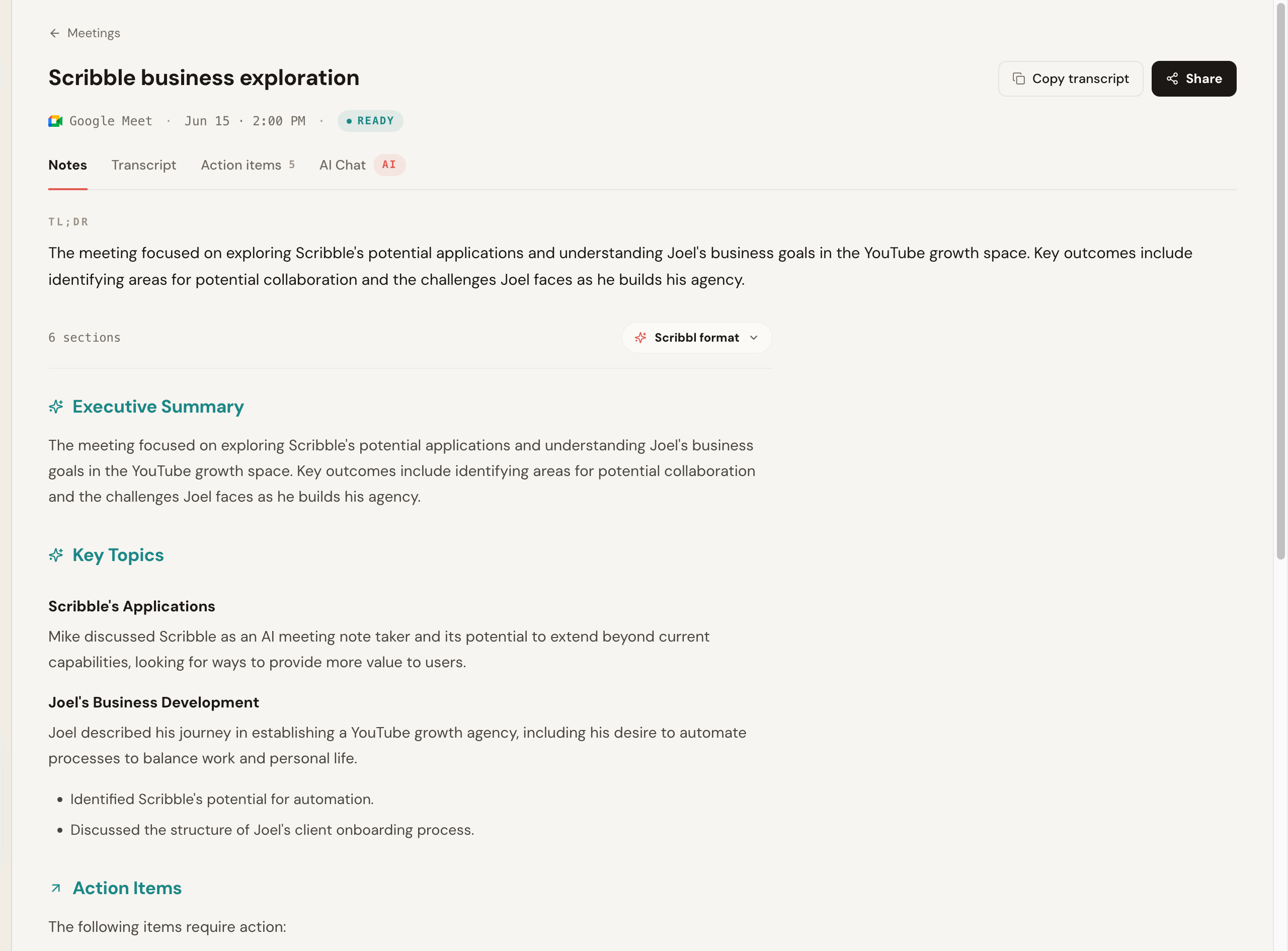
What to know: nothing appears in the attendee list and no one is prompted to admit a recorder, which is the whole point. Here is the Scribbl notes view after a Google Meet call: a TL;DR, an executive summary, key topics, and action items, all from a recording where nothing joined the room.
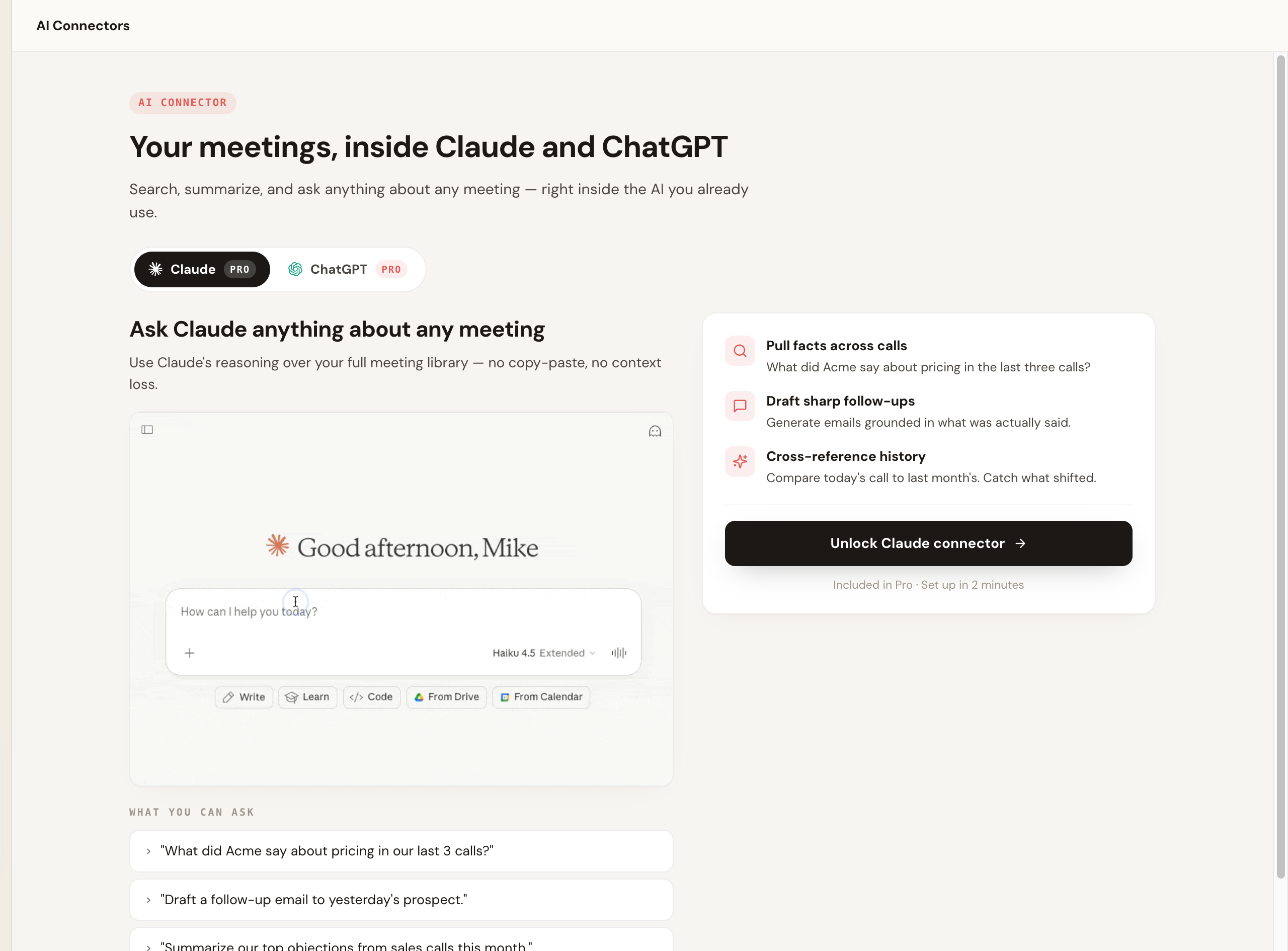
The part that separates Scribbl from a heavy conversation intelligence platform is what happens after the call. Smart Collections sort each new meeting into groups you describe in one sentence, so you can ask Claude or ChatGPT about just one group, like "What were the main objections in my sales calls this week?" Automations draft the follow-up email, log notes in HubSpot or Pipedrive, and post to Slack or Teams, and by default they ask before changing anything. You can also tell Scribbl the job in plain words, and it runs with your own Claude.
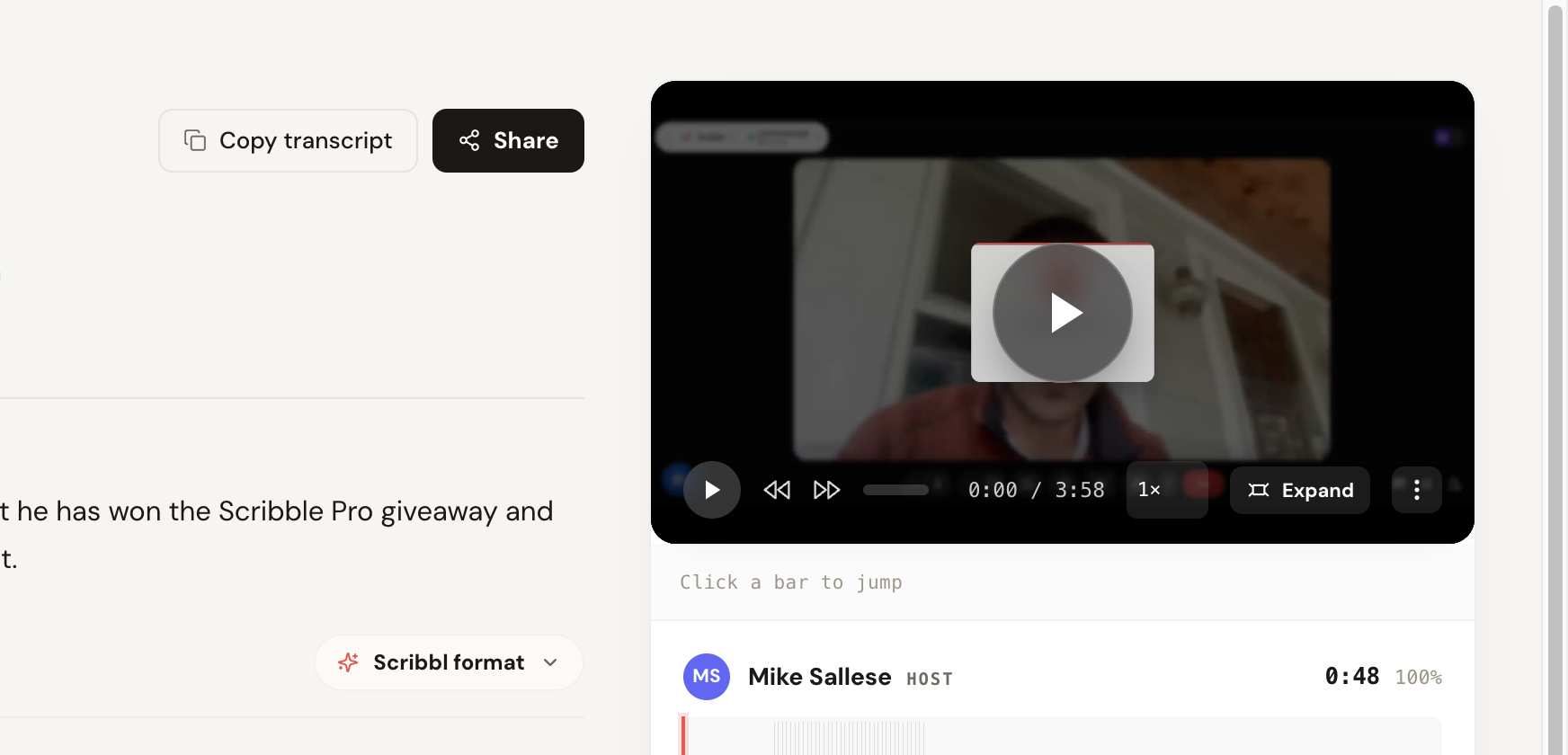
You still get the full recording and a clickable transcript when you want them, with speaker labels and a timeline you can jump around in.
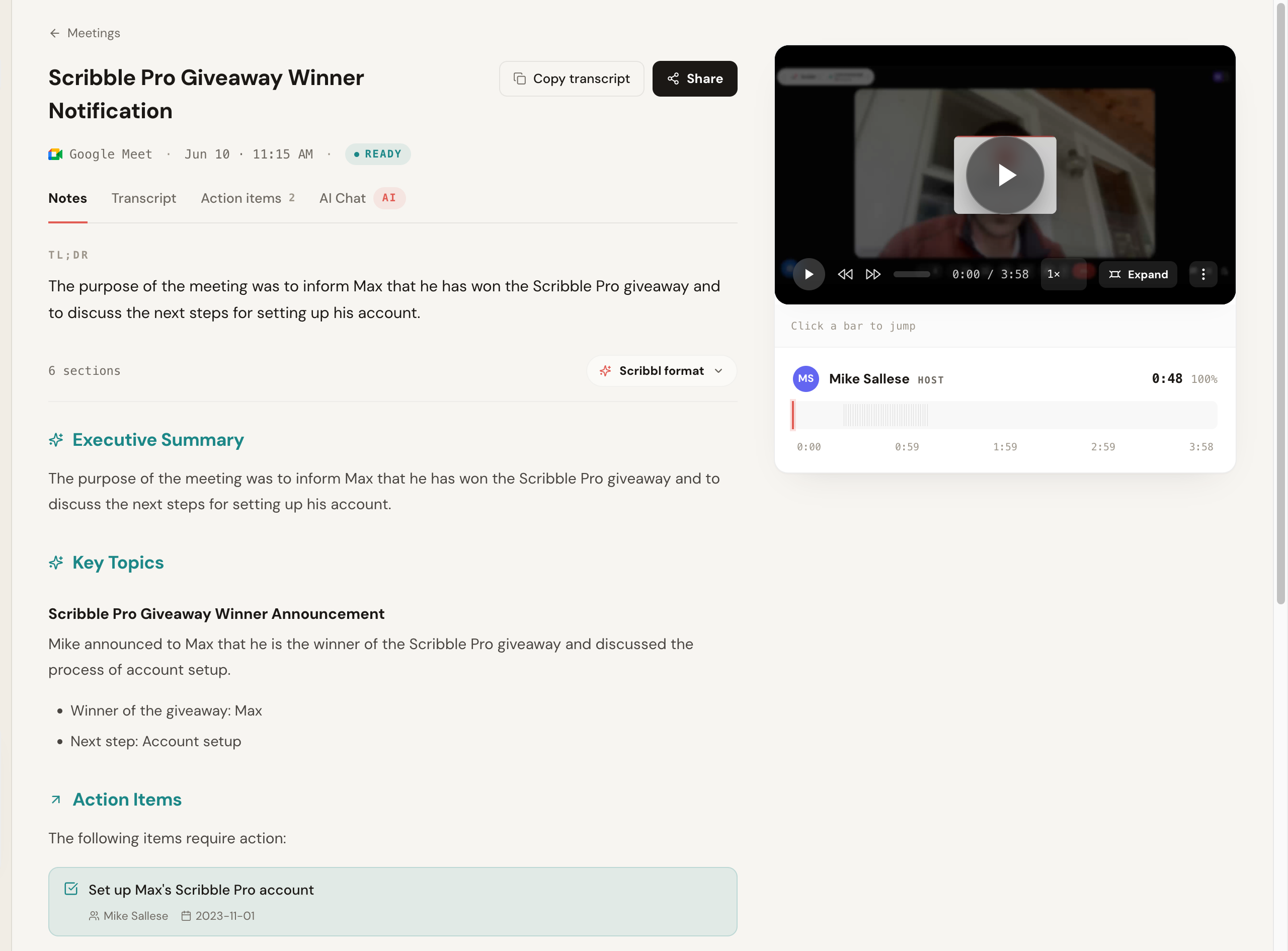
The notes and the recording live side by side, so you can read the AI summary and jump straight to the moment in the video where something was said, without leaving the page.
Pros: botless on Meet, Zoom, and Teams; real free plan, no credit card, so the price does not escalate; Chrome extension for Google Meet and Scribbl Desktop for Zoom and Teams; Automations do the follow-up, and you can ask ChatGPT or Claude about every meeting; 5.0 from 3,000 reviews on the Chrome Web Store and 4.9 from 725 reviews on G2.
Pricing: free plan with no credit card (10 meetings a month, Google Meet, Zoom, and Teams included); Pro is $13 per user per month billed annually, or $20 monthly. See the pricing page.
Best for: anyone with client, sales, or external calls who wants notes with no bot, across multiple platforms, with a free start and no escalating bill. See the head-to-head in Scribbl vs Avoma, and for sales teams specifically, Scribbl for sales.
Avoma (the tool you are leaving)
Avoma suits revenue teams that want call scoring and coaching built in and accept both the per-seat climb and a bot in every meeting.
What to know: the notetaker is visible to the room. The real differentiator is everything after the call, the analytics and coaching views, which are more than a plain notetaker offers, and more than a non-sales team usually needs.
Pros: built-in conversation intelligence, call scoring, and coaching; native CRM connectivity; strong fit for sales and customer-success workflows; mature platform.
Cons: price climbs steeply as features unlock (a low base that grows toward $80 to $90 per seat with add-ons, per common reports); a bot joins the call and can fail or be blocked; accuracy on technical terms is a cited weak spot; some users report slow transcript processing; heavier than non-sales teams need.
Pricing: entry plan commonly cited around $19 per seat per month, with conversation intelligence and revenue tiers pushing the effective cost toward $80 to $90 per seat once add-ons are unlocked. Confirm current plans, add-ons, and limits on Avoma's site.
Best for: sales and customer-success teams that want built-in coaching and revenue analytics and accept the cost and the bot. Check current G2 and Capterra reviews for the latest sentiment.
Fathom (popular bot-based notetaker)
Fathom is a popular notetaker. It typically joins the meeting to record and produces clean summaries, and it is known for its free plan, though on free, advanced summaries cover only your first 5 calls each month, and AI action items and follow-up emails need Premium. The trade is the usual one: a participant appears in the call.
What to know: the notetaker is visible in the call, which is fine for internal meetings and the reason it ranks below the botless pick for external ones.
Pros: clean, fast summaries; well-liked free plan; simple to set up; quick processing.
Cons: a bot joins the call; less of a fit for guarded external meetings; lighter on revenue analytics than Avoma; AI action items and follow-up emails need a paid plan.
Pricing: free plan; Premium is $16 per user per month billed annually, or $20 monthly (Fathom pricing). Check its current G2 and Capterra scores.
Best for: internal-heavy teams that want a clean, popular notetaker and a strong free tier, and are fine with a bot. See our Fathom alternative and Scribbl vs Fathom.
Fireflies.ai (best budget alternative with analytics)
Fireflies is one of the more established and feature-rich options, with strong search, a wide set of integrations, native CRM writeback, and team analytics, often at a lower price than Avoma's loaded tiers. Its standard model sends a notetaker bot, often named Fred, into the meeting.
What to know: the Fred bot is visible in the call.
Pros: deep feature set; broad integrations including Salesforce and HubSpot; strong search and team analytics; commonly cheaper than Avoma's revenue tiers.
Cons: a visible bot in the call; the breadth can feel heavy for simple needs; not as deep as Gong for enterprise revenue intelligence.
Pricing: free plan; Pro is $10 per seat per month billed annually or $18 monthly, and Business is $19 billed annually or $29 monthly (Fireflies pricing). Read its current G2 and Capterra reviews.
Best for: teams that want depth, integrations, and analytics at a lower price than Avoma and do not mind a join-the-call bot. See our Fireflies alternative and Scribbl vs Fireflies.
Gong (best enterprise revenue intelligence)
Gong is the heavyweight of revenue intelligence: deal scoring, pipeline forecasting, conversation analytics, and coaching at scale, with deep native CRM integration. It is a step up in scope and price from Avoma, sold as a platform rather than a simple per-seat tool, and it generally joins meetings to capture.
What to know: the point of Gong is not the notes, it is the deal and pipeline intelligence layered on top, which is more than most teams below the enterprise level will use. The bot is visible, and the buying process is an enterprise sales motion, not a self-serve signup.
Pros: deepest revenue intelligence and forecasting; strong coaching and deal analytics; deep CRM integration; built for large revenue orgs.
Cons: a bot joins the call; expensive, typically an annual platform contract often starting in the thousands; far more than a small team or non-sales team needs; not self-serve.
Pricing: annual platform contracts, commonly cited starting around $5,000 and rising substantially with seats and modules; pricing is quote-based. Confirm directly with Gong.
Best for: enterprise revenue teams that need forecasting and deal intelligence, not just notes. See our Gong AI notetaker alternative and Scribbl vs Gong.
Otter.ai (most mature live transcription)
Otter is a mature transcription tool with strong live captions and a large searchable archive. If your core need is reliable live transcription rather than Avoma's revenue analytics, and a bot in the call is fine, it is a capable, lower-cost option. It typically adds an assistant to the call to capture audio.
What to know: the OtterPilot assistant is visible to the room.
Pros: strong live transcription and captions; large searchable archive; lower cost than Avoma's loaded tiers.
Cons: typically adds a visible assistant to the call; free tier caps minutes and features; lighter on sales analytics and CRM writeback than Avoma.
Pricing: free Basic plan with 300 monthly transcription minutes; Pro is $8.33 per user per month billed annually or $16.99 monthly, and Business is $19.99 billed annually or $30 monthly (Otter pricing).
Best for: users who want mature live transcription and a searchable archive and do not need revenue analytics. See our Otter alternative and Scribbl vs Otter.
Granola (best for people who take their own notes)
Granola takes a notes-forward approach: it leans on your own typed notes and enhances them with AI, and it avoids the traditional join-the-call bot in favor of capturing on your device. People who like to take rough notes and have AI clean them up tend to enjoy it.
What to know: there is no participant in the room. It rewards you typing along, so it is less hands-off than a tool that captures everything on its own.
Pros: no traditional join-the-call bot; great for people who take their own notes; tidy AI-enhanced output.
Cons: built around you typing notes, not hands-off capture; it transcribes and then deletes the audio, so there is no recording to go back to; the free plan reaches notes from the last 30 days; lighter on sales analytics and CRM writeback.
Pricing: Basic is free (notes from the last 30 days); Business is $14 per user per month, billed monthly (Granola pricing). Read its app-store and G2 reviews.
Best for: people who take their own notes and want AI to enhance them without a bot. See our Granola alternative and Scribbl vs Granola.
Bot vs botless: the deciding factor
The single biggest difference across this whole list is how each tool gets into your meeting, so it is worth seeing it side by side.
- Capture: a bot joins the meeting as a participant
- Attendees see it: yes, and some remove or block it
- Failure mode: the bot can fail to join or be denied
- Examples: Avoma, Fathom, Fireflies, Gong, Otter
- Capture: nothing joins the call
- Attendees see it: no bot, nothing announced, no email
- External calls: the meeting stays exactly normal
- Plus: free plan, works on Meet, Zoom, and Teams, Automations do the follow-up
Being botless also makes capture more resilient. A bot is a participant, which means it can be denied, removed, or blocked by meeting controls, which is exactly the failure Avoma users report. Botless capture sidesteps that whole category of problem because nothing is trying to join in the first place.
Scribbl vs Avoma: head-to-head feature matrix
If you are specifically weighing the botless free pick against Avoma, here is the line-by-line comparison, so you can decide on facts, not vibes. Where a row depends on plan or changes often, we say confirm and link you to the source. For a fuller treatment, read Scribbl vs Avoma.
| Feature | Scribbl | Avoma |
|---|---|---|
| Bot joins the call | No, botless (nothing joins) | Usually, a notetaker joins |
| Announced to attendees | No (nothing announced, no email) | The notetaker is visible in the room |
| Capture method | Nothing joins the call (Chrome extension for Meet, Scribbl Desktop for Zoom and Teams) | Joining notetaker bot |
| Google Meet / Zoom / Teams | Yes / Yes / Yes | Yes / Yes / Yes |
| Free plan | Yes: 10 meetings a month, no credit card | Yes, with caps; confirm |
| Pricing pattern | Free to start, no escalation | Low base climbing with add-ons |
| Connects to ChatGPT or Claude | Yes, on Pro; Smart Collections let you ask about one group of meetings | Yes, on the Organization or Enterprise plan, or with the API Access add-on |
| Native CRM writeback | Automations log notes in HubSpot or Pipedrive | Yes (Salesforce, HubSpot); confirm |
| AI summary and action items | Yes | Yes |
| Resilient to meeting bot-blocking | Yes (nothing tries to join) | A bot can be denied or removed |
| Best for external / client calls | Strong (no bot in the room) | Weaker (visible notetaker) |
| Third-party rating reference | 5.0 from 3,000 reviews on the Chrome Web Store; 4.9 from 725 reviews on G2 | G2, Capterra |
Scribbl's rating, organization count, and botless behavior are our own verifiable facts. Everything in the Avoma column reflects commonly documented behavior that you should confirm on Avoma's site, because plans and features change.
How to choose your Avoma alternative
You do not need to weigh every feature. Pick based on the handful of things that actually change your week.
- Pick Scribbl if the price climb or the bot is your reason for leaving, you want a real free plan with no credit card, you meet across Meet, Zoom, and Teams, and you want your meetings wired into ChatGPT or Claude so the follow-up work happens. For sales teams this is usually decisive; see Scribbl for sales.
- Pick Scribbl if you want the follow-up done for you: Automations draft the email, log notes in HubSpot or Pipedrive, post to Slack or Teams, and open Linear, Jira, Asana, or Monday tickets, and by default they ask before changing anything.
- Pick Scribbl if non-sales teams will use it too: Smart Collections sort meetings by themselves into groups you describe in one sentence, so nobody has to file calls by hand.
Every other tool on this list except Granola usually sends a bot into the call; the write-ups above cover the narrower jobs each one suits.
The short rule: if your meetings include clients, prospects, candidates, or partners, the bot is the variable that matters, and a botless tool keeps the call normal while still getting you notes. If your reason for leaving is the bill, a free plan removes the escalation entirely. You can compare Scribbl's plans on the pricing page.
How to switch from Avoma without losing anything
Switching is lower-stakes than it feels, because you can run the new tool alongside Avoma before you cancel. Here is the clean path, using the botless free pick as the example.
- 1
Export what you want to keep from Avoma
Pull any transcripts, summaries, or CRM-synced notes you still need out of Avoma first, so nothing is trapped behind a lapsed subscription later.
- 2
Install your new tool
For Scribbl, add the Chrome extension or the desktop app and sign in with the free plan. No credit card is required to start.
- 3
Run it on one real meeting
Join your next Google Meet, Zoom, or Teams call. With a botless tool nothing joins the room, so there is no recorder to announce and no setup the other side has to approve.
- 4
Check the output
Read the transcript and summary, and if you use ChatGPT or Claude, send the meeting to it and watch the follow-up email or CRM notes get written.
- 5
Cancel Avoma once you are happy
After a few meetings you trust the new tool, turn off your Avoma subscription so you are not paying for both.
Keep both running for a week if you want a side-by-side before committing. The only step that is not reversible is canceling Avoma, so do that last.
Avoma alternatives FAQ
What is the best Avoma alternative in 2026?
For most people leaving Avoma, Scribbl is the pick. If the price climb or the recording bot is the problem, Scribbl is botless, so nothing joins the call, and it has a real free plan, no credit card, that works across Google Meet, Zoom, and Microsoft Teams. Its Automations log notes in HubSpot or Pipedrive and draft the follow-up email, and it connects your meetings to ChatGPT or Claude. Disclosure: we make Scribbl, so run your own test call.
Why do people switch from Avoma?
The four reasons that come up most are price escalation, recording-bot failures, accuracy on technical and sales terms, and slow transcript processing. Avoma's base plan is commonly cited around $19 per seat, but unlocking conversation intelligence, coaching, and revenue features can push the effective cost toward $80 to $90 per seat, which surprises teams as they grow. The notetaker bot can also fail to join or get blocked, and some users report transcript delays of an hour or more on longer calls. Confirm current pricing and limits on Avoma's site, because plans change.
How much does Avoma cost per seat?
Avoma is commonly cited starting around $19 per seat per month for its entry plan, but the conversation intelligence, coaching, and revenue intelligence tiers add up, with effective per-seat cost reported climbing toward $80 to $90 per seat once add-ons are unlocked. Prices change often and vary by billing term and add-on, so confirm the current numbers on Avoma's pricing page before you buy. Several alternatives undercut that, and some, like Scribbl, have a free plan with no credit card.
What is the cheapest Avoma alternative?
Scribbl has a genuine free plan with no credit card: 10 meetings a month across Google Meet, Zoom, and Microsoft Teams, and it is botless, so nothing joins your calls. Pro is $13 per user per month billed annually, or $20 monthly. Fireflies and Otter also start lower than Avoma's loaded tiers, and both usually send a bot into the call. Confirm current numbers on each vendor's pricing page, since free-tier caps and entry prices change often.
Does Scribbl put a bot in the meeting like Avoma?
No. Scribbl is botless, so no bot ever joins the call, no participant named after the tool appears in the attendee list, and no email is sent to other attendees. Avoma generally joins the meeting as a notetaker to record, transcribe, and analyze the call, which is what produces its coaching and revenue analytics but also what attendees see on the call.
Which Avoma alternative is best for sales teams that want CRM autofill?
Scribbl is our pick for most sales teams. Nothing joins the call, so external calls stay normal, and its Automations log the notes in HubSpot or Pipedrive and draft the follow-up email from what was actually said, asking before they change anything by default. Confirm each tool's current CRM integrations against your stack before you buy.
Which Avoma alternative is best for enterprise revenue intelligence?
Gong is the most-cited enterprise revenue intelligence platform, with deal scoring, pipeline forecasting, and coaching at scale. It is also the most expensive, typically sold as an annual platform contract rather than a simple per-seat price, so expect a sales process, a larger commitment, and a bot in every call. Avoma itself sits in the middle. If what your team actually uses is the notes and the follow-up, Scribbl covers that at a fraction of the cost with nothing joining the call: Automations log notes in HubSpot or Pipedrive and draft the follow-up email, and Smart Collections let you ask Claude or ChatGPT about just your sales calls.
Is Scribbl free?
Yes. Scribbl has a free plan with no credit card required: 10 meetings a month, including Google Meet, Zoom, and Microsoft Teams, with nothing joining the call. Pro is $13 per user per month billed annually, or $20 monthly. Avoma is a paid conversation intelligence platform, so the simplest way to compare is to run one real meeting on Scribbl's free plan first. For what each tier includes, see the Scribbl pricing page.
Which Avoma alternative is the most accurate on technical and sales terms?
Accuracy depends heavily on audio quality, accents, jargon, and crosstalk, so no single tool wins every call. Accuracy on technical terms and product names is a common Avoma complaint. Run one real call with your own product names and judge accuracy yourself.
Does Scribbl work with HubSpot like Avoma?
Scribbl's Automations log your meeting notes in HubSpot or Pipedrive, draft the follow-up email, and post the recap to Slack or Teams, and by default they ask before changing anything. You can also ask ChatGPT or Claude about every meeting. Avoma and Gong write into Salesforce and HubSpot, and both usually send a bot into the call to do it. Confirm each tool's current CRM integration on its site, because supported objects change.
Is there an Avoma alternative for non-sales or cross-functional teams?
Yes. Avoma is built around the sales and revenue workflow, which is more product than a cross-functional team usually needs. Scribbl is the simplest to roll out across a whole company: it is botless and free to start, so no recorder is announced to the room, and Google Meet, Zoom, and Microsoft Teams live in one account. Smart Collections sort meetings by themselves into groups you describe in one sentence, so each team finds its own calls.
Which Avoma alternative is best for multilingual meetings?
If your meetings are not all in English, shortlist on the published language list and on whether each tool transcribes in the spoken language or translates. Do not assume a headline language count guarantees clean output. Run a real call in your actual languages before you commit, and confirm the current supported-language list on each vendor's site.
How do I switch from Avoma without losing anything?
Export anything you want to keep from Avoma first, then install your new tool and run it on one real meeting before you cancel. With Scribbl you install the Chrome extension (for Google Meet) or the desktop app (for Zoom and Teams), sign in with the free plan, no credit card, and join your next Google Meet, Zoom, or Teams call. Nothing joins the meeting, so there is no setup to announce to attendees. Once you have a few meetings you are happy with, cancel your Avoma subscription so you are not paying for both.
Is Scribbl better than Avoma?
For most teams, yes. If the price climb, the recording bot, or slow processing on Avoma bothers you, you want a real free plan with no credit card, you meet across Google Meet, Zoom, and Microsoft Teams, and you want your meetings wired into ChatGPT or Claude, Scribbl is the stronger fit because it is botless and its Automations do the follow-up. Avoma suits revenue teams that want built-in call scoring and accept a bot in the call. Disclosure: we make Scribbl. See our Scribbl vs Avoma head-to-head and run one real call on each before deciding.
Try Scribbl
Let your meetings take their own notes.
Scribbl records, transcribes, and summarizes your Google Meet calls from your browser. No bot joins the call. Free forever for individuals.
Add to Chrome · It's free