Scribbl records your Google Meet, Zoom and Teams calls and writes the notes. No bot joins. Free for 10 meetings a month. Start free
Best Free Note Taking App for Meetings (2026): 11 Apps Compared
The best free note taking app for meetings in 2026 is Scribbl: it writes your notes on Google Meet, Zoom and Teams, free for 10 meetings a month, no bot.
Updated November 18, 2026
The short answer
Free plans checked on each vendor's pricing and help pages, October 6 and 19, 2026; Granola and Notion checked October 7, 2026; Google Docs meeting notes per Google, updated January 7, 2026
The best free note taking app for meetings is Scribbl: it writes the notes for you on Google Meet, Zoom and Teams, free for 10 meetings a month, and nothing joins the call
- 01 Two kinds of app Note apps you type in (Google Docs, Notion, OneNote, Apple Notes) and AI note takers that write the notes for you from the meeting itself.
- 02 Free apps you type in Free, but you write every word while you try to listen, and nothing records what was said.
- 03 Other free AI note takers Otter shows the first 30 minutes of each conversation. Fathom gives advanced AI summaries on your first 5 calls a month. Both send a bot into the call. Granola keeps no recording.
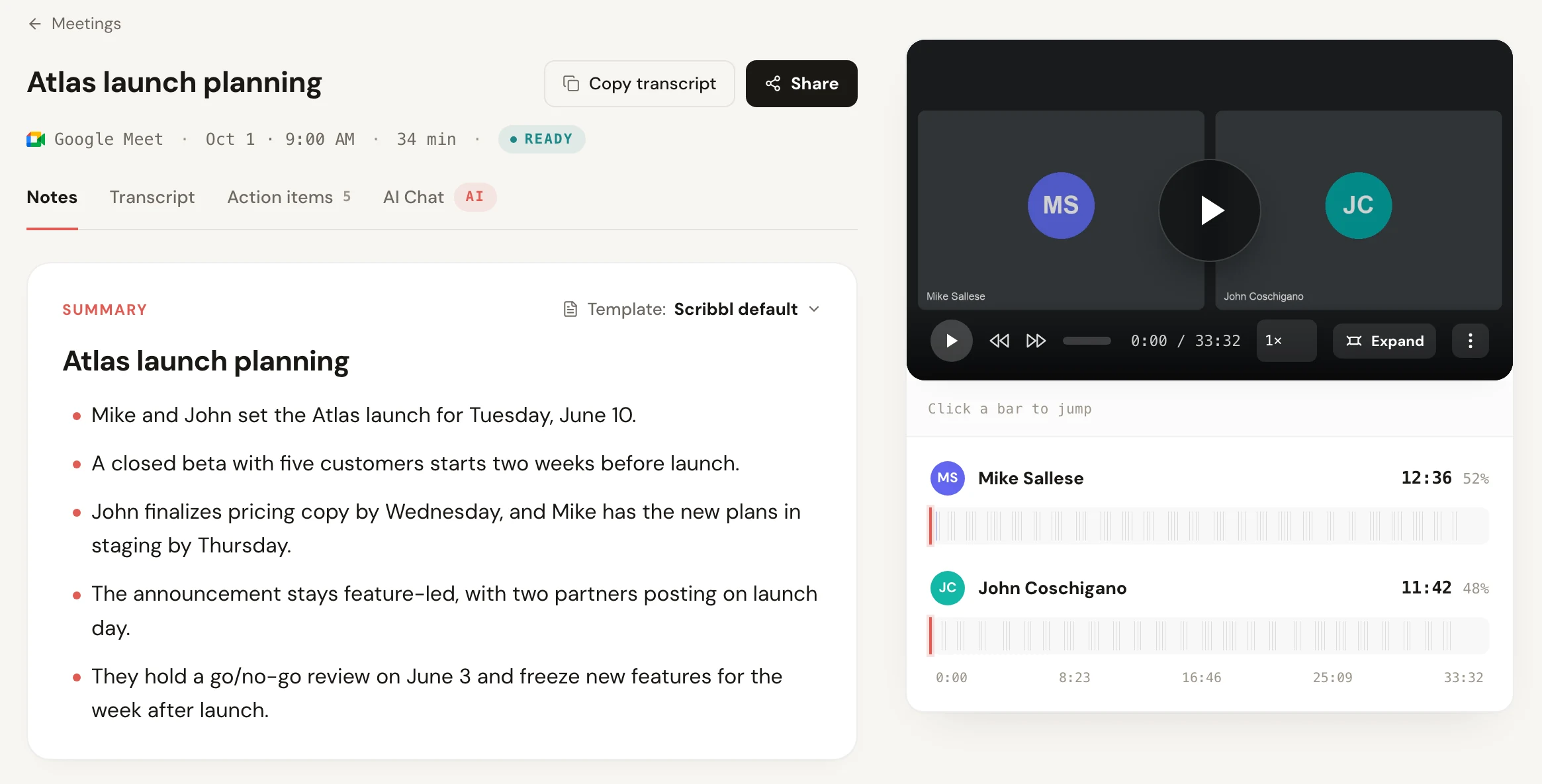
- 04 Our pick Scribbl: the video, a transcript with speaker names, AI notes and action items on every meeting, 10 meetings a month free on Google Meet, Zoom and Teams. No credit card.
Try Scribbl
Free meeting notes, written for you
Scribbl records, transcribes, and summarizes your Google Meet, Zoom and Teams calls: Google Meet in your browser, Zoom and Teams with the desktop app. No bot joins the call. Free for 10 meetings a month, no credit card.
Add to Chrome · It's freeThe best free note taking app for meetings in 2026 is Scribbl, because it writes the notes for you. Add it to Chrome for Google Meet, or install Scribbl Desktop on Mac or Windows for Zoom and Teams, and after every call you get the video, a transcript with speaker names, AI notes and action items. The free plan covers 10 meetings a month on all three, with no limit on meeting length and no credit card, and nothing joins the call. A regular note app like Google Docs, Notion, OneNote or Apple Notes is free too, but there you type every word yourself while trying to follow the conversation.
Below are 11 free note taking apps for meetings side by side: Scribbl, the six best-known AI note takers, and the four note apps most people already have. Every fact comes from each company's own pricing or help pages, with the date we checked it.
Every free note taking app for meetings, compared
Scribbl, our pick, first. AI note takers write the notes from the meeting; note apps are where you type them yourself.
| App | Who writes the notes | What the free plan gives you | Keeps a recording? | Anything joins the call? |
|---|---|---|---|---|
| Scribbl (our pick) | The app, for you | 10 meetings a month on Google Meet, Zoom and Teams, no limit on meeting length; the video, a transcript with speaker names, AI notes and action items on every meeting | Yes, the video | No |
| Otter | The app | 300 minutes a month, 30 minutes per conversation | Yes | Yes, its notetaker joins Zoom and Teams calls |
| Fathom | The app | Unlimited recordings; advanced AI summaries on your first 5 calls a month; AI action items are paid | Yes | Yes, a bot |
| Fireflies | The app | 3 meeting transcriptions, or unlimited if its bot auto-joins your calendar; 400 minutes stored in total | Yes | Yes, a bot by default |
| tl;dv | The app | Unlimited recordings; AI notes on your first 10 meetings for the life of the account | Yes | Yes, a bot |
| Read AI | The app | 5 meeting transcripts a month, up to 1 hour each | Yes | Yes, its assistant joins Zoom and Teams calls |
| Granola | The app | Notes from the last 30 days visible | No, it deletes the audio after transcribing | No |
| Google Docs | You | A free Meeting notes template that fills in the date, title and attendees from your Calendar | No | No |
| Notion | You | Free pages to type in; AI Meeting Notes needs the $20 Business plan | No | No |
| Microsoft OneNote | You | A free note app to type in | No | No |
| Apple Notes | You | A free note app to type in | No | No |
AI note takers' free plans checked October 6, 2026 on each vendor's pricing and help pages; Granola and Notion checked October 7, 2026; Google Docs per Google's meeting notes announcement, updated January 7, 2026.
Scribbl is the only free plan in this table that gives every meeting the recording and the finished notes on Google Meet, Zoom and Teams with nothing joining the call. Some of the others say "unlimited", but read the next column over: the AI notes stop after a few calls, the transcript stops at 30 minutes, or there is no recording to go back to.
Typing your own notes vs an AI note taker
Many people searching for a free note taking app for meetings picture an app they type in. That works, but it means splitting your attention: while you write down what was just said, you miss what is being said now. An AI note taker is a different kind of app. It listens to the meeting and writes the notes for you, so you can take part in the conversation and still end up with the decisions and action items.
| Note app you type in | AI note taker | |
|---|---|---|
| Examples | Google Docs, Notion, OneNote, Apple Notes | Scribbl, Otter, Fathom, Granola |
| Who writes the notes | You, during the call | The app, after the call |
| A record of what was said | Only what you managed to type | A transcript, and with Scribbl the video |
| Action items | Whatever you wrote down | Pulled out of the meeting for you |
| Good for | Your own thoughts, lists, prep | Calls on Google Meet, Zoom and Teams |
If you'd like to see what one does in more detail, read what an AI notetaker is. For tips on writing notes by hand, see how to take meeting notes.
Why Scribbl is the best free note taking app for meetings
- It writes the notes for you. Every meeting gets AI notes and action items, plus a transcript with speaker names, so you can listen instead of type.
- You get the video too. Rewatch the screen share or jump to the line someone said, which a typed note can't give you.
- Google Meet, Zoom and Teams, one free plan. The Chrome extension takes notes on Google Meet, and Scribbl Desktop takes notes on the Zoom and Teams apps on Mac and Windows. 10 meetings a month in total, and it resets every month.
- Nothing joins the call. No bot in the participant list, nothing for anyone to admit, and you don't need to be the one running the meeting. It works in calls another company runs.
- No limit on meeting length. A two-hour call gets notes for the whole two hours.
- Pro when you want more: unlimited meetings for $13 per user per month billed annually ($20 monthly), and on Pro you can ask Claude or ChatGPT about every meeting.
How to get free meeting notes with Scribbl
- For Google Meet, add the Scribbl Chrome extension to Chrome and sign in with Google. There's no credit card step.
- For Zoom or Teams, download Scribbl Desktop for Mac or Windows and sign in with the same account.
- Join your call as usual. Scribbl records it with nothing joining the call.
- When the call ends, open the meeting in Scribbl: the video, the transcript with speaker names, the AI notes and the action items are there, ready to share.
Tell people at the start that you're recording. Recording-consent rules apply whether or not anything joins the call; see do you have to tell people you're recording.
Add Scribbl to Chrome, freeThe other free AI note taking apps
Each of these has a free plan you can keep without paying. The difference is where the limit sits. Free plans checked October 6, 2026.
Otter. The free Basic plan gives 300 transcription minutes a month and 30 minutes per conversation, so a one-hour call is cut at 30 minutes. Only your 25 most recent conversations stay visible. Its notetaker joins Zoom and Teams calls as a participant.
Fathom. Records and transcribes without a cap, but advanced AI summaries cover only your first 5 calls a month, and AI action items need Premium ($16 per user per month billed annually, checked October 19, 2026). A bot joins your meeting.
Fireflies. New accounts since September 1, 2026 get unlimited transcription only with calendar auto-join turned on, which sends its bot into your meetings; otherwise it's 3 transcriptions. 400 minutes of storage in total.
tl;dv. Unlimited recordings, but AI notes on only your first 10 meetings for the life of the account. Its bot joins the call.
Read AI. 5 meeting transcripts a month, up to 1 hour each, and its assistant joins Zoom and Teams calls.
Granola. A desktop app with no bot and a $0 Basic plan, but it deletes the audio after transcribing, so there is no recording to replay, and the free plan shows only notes from the last 30 days (checked October 7, 2026).
For every free plan's limits in more detail, see the best free AI note taker. If you need the recording more than the notes, see the best free meeting recorder.
Free note apps where you type the notes yourself
These are free apps you type in. None of them listens to the meeting, so the notes are only as complete as your typing. An AI note taker writes the notes for you; a note app is where you write your own.
- Google Docs. Type @ in a Doc and pick Meeting notes from Building blocks, then choose the Calendar event. The template fills in the date, title and attendees and adds sections for notes and action items, which you can share with attendees or turn into a Gmail draft (Google, updated January 7, 2026). You still type the notes.
- Notion. Typing notes on a Notion page is free. Notion's AI Meeting Notes, which transcribes and summarizes, comes with the Business plan at $20 per member per month billed yearly ($24 monthly), and Free and Plus workspaces get only a limited trial of it (checked October 7, 2026). More in Notion AI meeting notes.
- Microsoft OneNote. A free note app where you type your own meeting notes.
- Apple Notes. A free note app on iPhone, iPad and Mac where you type your own meeting notes.
Any of these works in a window beside the call. The catch is the same for all four: you can listen or you can write, and it's hard to do both well. If you want the notes written for you on Google Meet, Zoom or Teams, Scribbl's free plan does that for 10 meetings a month, and you can paste its notes into any of these apps.
Do Google Meet, Zoom and Teams take notes for free?
Each meeting app has its own note taker, but on a free account, little or nothing is included. Checked October 2026 on Google's, Zoom's and Microsoft's own pages.
- Google Meet, Take notes for me. Included in Google Workspace Business Standard ($14 per user per month on an annual plan) and higher, and in the personal Google AI Pro and Ultra plans. Not on free Gmail, which also can't record Meet calls.
- Zoom AI Companion. Zoom's pricing page lists AI meeting summaries for 3 hosted meetings a month on the free Basic plan, where meetings end at 40 minutes. Zoom's help article lists only paid plans, so check your own account.
- Microsoft Teams. AI recaps need Teams Premium ($10 per user per month, paid yearly) or a Microsoft 365 Copilot license. Free personal Teams has no meeting recording.
So the built-in note takers mostly need a paid plan, and each works on only one meeting app. Scribbl's free plan writes notes on Google Meet, Zoom and Teams in one account. If you write formal minutes, see the best meeting minutes software.
How to pick a free note taking app for meetings
Ask four questions:
- Do you want to type, or have the notes written for you? If you want to listen and still have notes, you need an AI note taker, not a note app.
- Which meeting apps do you use? If it's more than one of Google Meet, Zoom and Teams, pick one free plan that covers all of them. Scribbl's does.
- Will a bot in the call be a problem? In client calls or calls run by another company, a notetaker joining as a participant draws questions. Scribbl never sends one.
- Where does the free plan stop? Look for limits on meeting length, on AI notes, and on how far back you can see. Scribbl's 10 meetings a month have no length limit, and each one is complete.
For students taking notes in online classes, the length limit matters most; see the AI note taker for students and online classes.
Best free note taking app FAQ
What is the best free note taking app for meetings?
Scribbl. It writes the notes for you on Google Meet, Zoom and Teams, free for 10 meetings a month with no limit on meeting length. Every meeting gets the video, a transcript with speaker names, AI notes and action items, and nothing joins the call.
What is the best free note taking app?
For meetings, Scribbl, because it writes the notes for you instead of making you type while you listen. For notes you write yourself, such as lists, ideas or class notes, a free note app like Google Docs, Microsoft OneNote, Apple Notes or Notion's free plan works well.
Is there a free app that takes notes for you in meetings?
Yes. Scribbl's free plan takes the notes for you on 10 meetings a month on Google Meet, Zoom and Teams: the video, a transcript with speaker names, AI notes and action items. Otter, Fathom, Fireflies, tl;dv, Read AI and Granola also have free plans, each with a limit, and most of them send a bot into the call.
Can Google Docs take meeting notes for free?
Google Docs gives you a free meeting notes template, but you type the notes. Type @ in a Doc, pick Meeting notes and choose the Calendar event, and it fills in the date, title and attendees with sections for notes and action items. Google Meet's Take notes for me, which writes them, needs Google Workspace Business Standard or higher, or Google AI Pro or Ultra.
Is Notion free for meeting notes?
Typing notes in Notion is free. Notion AI Meeting Notes, which transcribes and summarizes a meeting, comes with the Business plan at $20 per member per month billed yearly ($24 monthly), and Free and Plus workspaces get only a limited trial of it (checked October 7, 2026).
Which free note taking app works without a bot joining the meeting?
Scribbl. The Chrome extension takes notes on Google Meet and Scribbl Desktop takes notes on the Zoom and Teams apps on Mac and Windows, so no bot appears in the participant list. Otter, Fathom, Fireflies, tl;dv and Read AI send a bot or assistant into the call. Granola has no bot but keeps no recording.
Do Zoom, Google Meet or Teams have a free note taker built in?
Only Zoom, and only a little: Zoom's pricing page lists AI meeting summaries for 3 hosted meetings a month on the free Basic plan, where meetings end at 40 minutes. Google Meet's Take notes for me isn't on free Gmail, and Teams' AI recaps need Teams Premium or a Microsoft 365 Copilot license.
How we checked
We read each AI note taker's pricing page and help center on October 6, 2026, and checked prices again on October 19, 2026: Otter help, Fathom help, Fireflies help, tl;dv help and Read AI pricing. Granola pricing and Notion pricing were checked October 7, 2026. Google Docs meeting notes: Google's announcement, updated January 7, 2026. Built-in note takers: Take notes for me in Google Meet, Zoom's pricing page and Microsoft's recap requirements, October 2026. We compared what each company says its product does. We make Scribbl and ranked it first; its facts come from our own pricing page.
Try Scribbl
Free meeting notes, written for you
Scribbl records, transcribes, and summarizes your Google Meet, Zoom and Teams calls: Google Meet in your browser, Zoom and Teams with the desktop app. No bot joins the call. Free for 10 meetings a month, no credit card.
Add to Chrome · It's freeTry Scribbl
Free meeting notes, written for you
Scribbl records, transcribes, and summarizes your Google Meet, Zoom and Teams calls: Google Meet in your browser, Zoom and Teams with the desktop app. No bot joins the call. Free for 10 meetings a month, no credit card.
 Add to Chrome · It's free