Scribbl records your Google Meet, Zoom and Teams calls and writes the notes. No bot joins. Free for 10 meetings a month. Start free
Notta Alternatives (2026): The 7 Best Notta AI Alternatives, Free and Paid
The 7 best Notta alternatives in 2026, with prices checked on each vendor's page. Notta's free plan stops at 3 minutes per conversation; Scribbl writes up the whole meeting, free.
Updated November 24, 2026
The short answer
Notta checked on notta.ai/en/pricing (monthly and annual) November 24, 2026; every other tool on its own pricing page the same day
The best Notta alternative is Scribbl: the free plan writes up the whole meeting, not the first 3 minutes, with the video, AI notes and action items, and nothing joins the call
- 01 Why people leave Notta The free plan gives 120 minutes a month and only the first 3 minutes of each conversation, with 10 AI summaries. Export starts on Pro ($8.17 billed annually), and the video of a web meeting starts on Business ($16.67 per seat).
- 02 Free, if a bot is fine Fathom and tl;dv record without a monthly cap, with a bot in the call by default. Otter gives 300 minutes a month, 30 minutes per conversation.
- 03 No bot, but no recording Granola writes notes on your computer with nothing joining, but keeps no video, and free notes older than 30 days are hidden.
- 04 Scribbl free 10 meetings a month, no limit on meeting length, on Google Meet, Zoom and Teams. Each one gets the video, a transcript with speaker names, AI notes and action items. Start with the Chrome extension or Scribbl Desktop for Mac and Windows.
Try Scribbl
The whole meeting, not just 3 minutes, free
Scribbl records, transcribes, and summarizes your Google Meet calls from your browser. No bot joins the call. Free for 10 meetings a month, no credit card.
Add to Chrome · It's freeThe best Notta alternative for most people is Scribbl. Notta's free plan transcribes only the first 3 minutes of each conversation; Scribbl's free plan writes up the whole meeting, 10 meetings a month with no limit on meeting length, and every meeting comes back with the video, a transcript with speaker names, AI notes and action items, on Google Meet, Zoom and Microsoft Teams, with nothing joining the call. The other Notta alternatives worth a look are Otter, Fathom, Fireflies, tl;dv, Granola and Tactiq.
Below is why people leave Notta, all 7 alternatives in one table, what each one is best for, the free plans side by side, and Scribbl and Notta compared. Every price was checked on each vendor's own pricing page on November 24, 2026. We make Scribbl, and we hold it to the same standard as every tool on the list.
Why people look for a Notta alternative
Notta turns meetings, recordings and uploaded files into transcripts, in many languages, with a meeting bot and a bot-free desktop app. These limits send people looking, all from Notta's pricing page:
- 3 minutes per conversation on the free plan. The free plan gives 120 transcription minutes a month, but its "Max transcription per recording" is 3 minutes. A 30-minute call comes back as a 3-minute transcript.
- 10 AI summaries a month free, 100 on Pro. Summaries are counted, and the add-on AI, Notta Brain, runs on AI credits.
- No export on the free plan. "Export transcripts" starts on Pro, at $8.17 a month billed annually or $13.49 monthly, and Pro is 1 seat.
- No video until Business. "Record web meeting video" is a Business feature, at $16.67 per seat billed annually or $27.99 monthly.
- Canceling hides your history. Notta's FAQ says that after you cancel a paid plan you "can only view the first 3 minutes of the transcript as a Free user."
Every Notta plan and limit is in our Notta pricing guide.
What to check in a Notta alternative
- Does it write up the whole meeting on the free plan? Notta stops at 3 minutes per conversation and Otter at 30. Scribbl has no limit on meeting length.
- Does a bot join your call? Otter, Fireflies and tl;dv send one by default, and Fathom's bot-free capture is a Mac beta. On Microsoft Teams, since June 2026, third-party bots wait in the lobby until the organizer admits them, according to Microsoft.
- Do you get the video back? Notta keeps the video of web meetings only on Business. Granola keeps no recording at all.
- Are there AI notes and action items on every meeting? Many free plans count summaries or AI credits.
- Does it cover the Zoom and Teams desktop apps? Browser extensions miss meetings joined in the desktop apps unless the tool also has a desktop app.
- Does it do the follow-up? With Scribbl, Automations draft the follow-up email, log a note in HubSpot or Pipedrive, or post to Slack, and they ask before they change anything by default.
Notta alternatives compared
| Feature | Scribbl | Notta | Otter | Fathom | Fireflies | tl;dv | Granola | Tactiq |
|---|---|---|---|---|---|---|---|---|
| No bot by default | Yes | Desktop app only | No | Mac beta only | No | No | Yes | Yes |
| Whole meeting on the free plan | Yes, no length limit | 3 minutes per conversation | 30 minutes per conversation | Yes | With auto-join on | Yes | Yes | 10 transcripts a month |
| Keeps the video | Every meeting | Business plan | Enterprise plan | Yes | Paid plans | Yes | No | No |
| AI notes on the free plan | Every meeting, 10 a month | 10 summaries a month | Yes | Instant summaries; action items paid | Limited | First 10 meetings | Yes | 5 AI credits a month |
| Paid from | $13 | $8.17 | $8.33 | $16 | $10 | $18 | $14 | $8 |
| Tool | Bot joins the call? | Free plan | Paid from (annual) | Best for |
|---|---|---|---|---|
| Scribbl | No, on Meet, Zoom and Teams | 10 meetings a month, no length limit; each with the video, transcript, AI notes and action items | $13 | Best overall |
| Notta (what you're leaving) | Bot, or the desktop app with no bot | 120 minutes a month, 3 minutes per conversation, 10 AI summaries | $8.17 | Transcripts in many languages |
| Otter | Yes by default | 300 minutes a month, 30 minutes per conversation | $8.33 | Live transcripts |
| Fathom | Yes by default | Unlimited recordings and instant summaries | $16 | Unlimited free recording |
| Fireflies | Yes by default | Unlimited only with auto-join on; 400 minutes of storage | $10 | CRM integrations |
| tl;dv | Yes by default | Unlimited recordings; AI notes on 10 meetings | $18 | Sharing clips |
| Granola | No | Notes older than 30 days hidden | $14 | Your own typed notes |
| Tactiq | No | 10 transcripts and 5 AI credits a month | $8 | Text transcripts in Chrome |
The 7 best Notta alternatives
1. Scribbl: best Notta alternative overall
Scribbl records your Google Meet, Zoom and Microsoft Teams calls with nothing joining the call, and writes up the whole meeting. It's a Chrome extension for Google Meet and Scribbl Desktop for Mac (Apple silicon) and Windows for Zoom and Teams, so it covers the Zoom and Teams desktop apps too. You don't need to be the host.
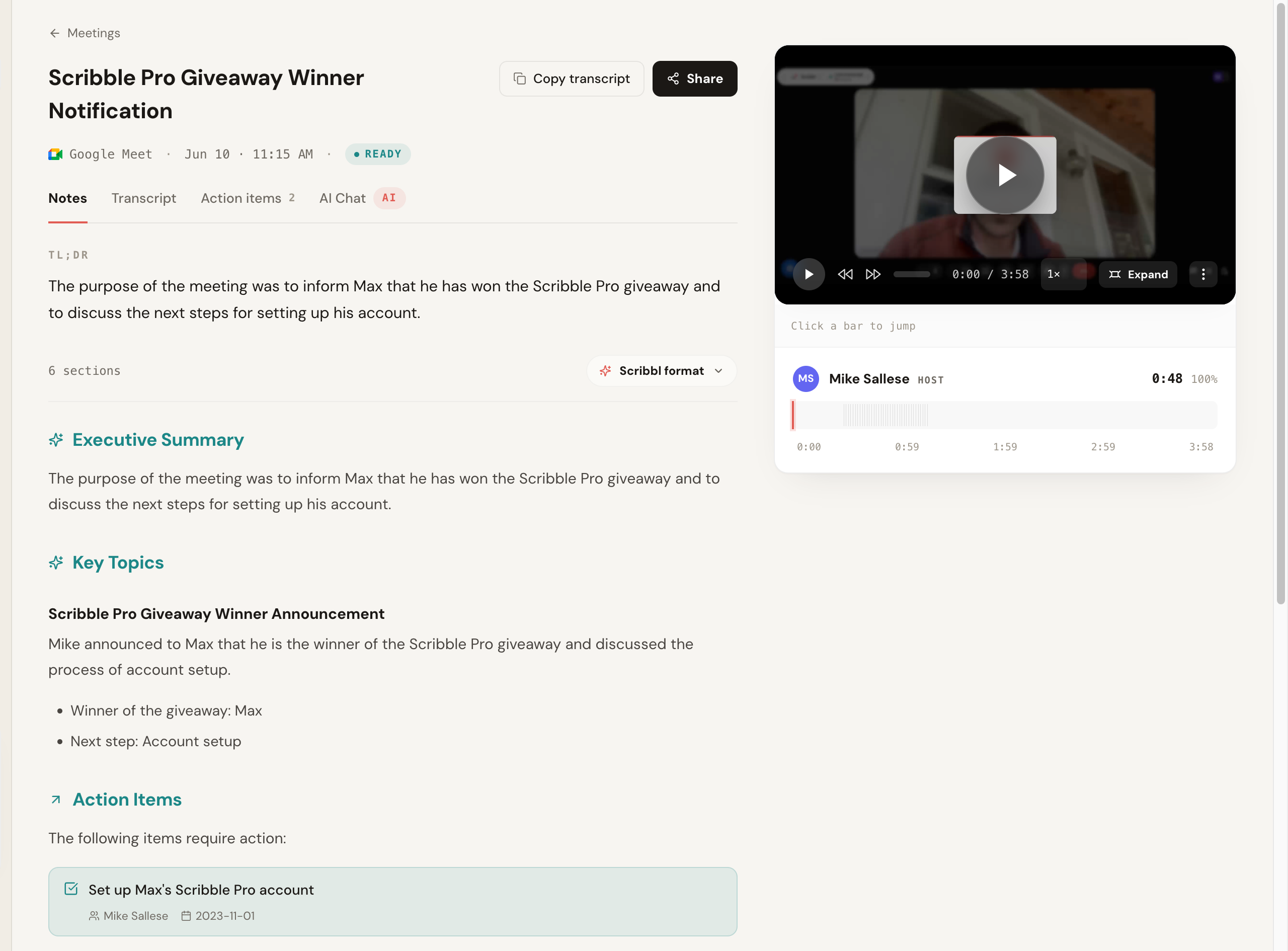
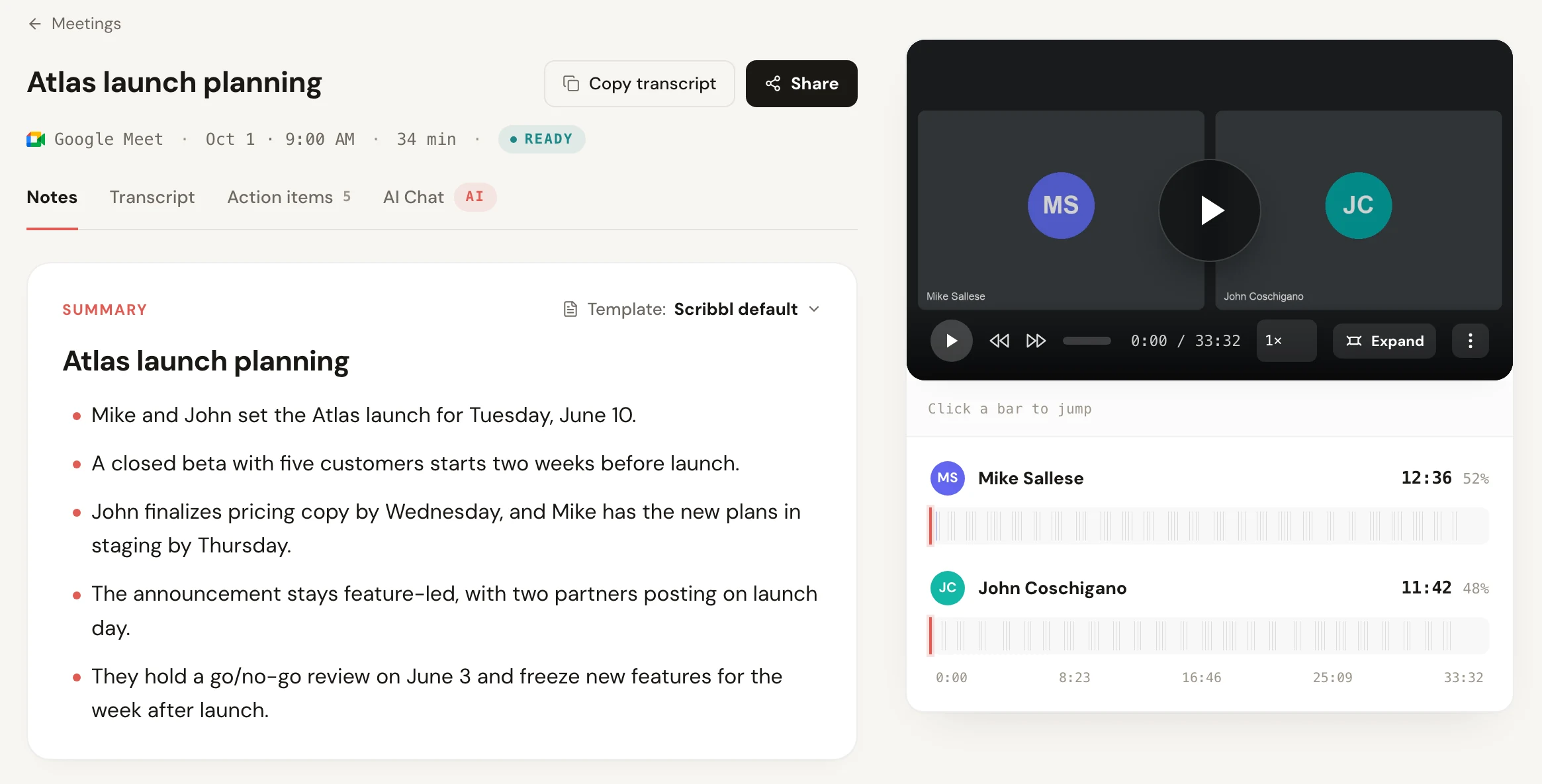
- Why it beats Notta: no 3-minute cap and no minutes to count. Every meeting, on every plan, comes back with the video, a transcript with speaker names, AI notes and action items.
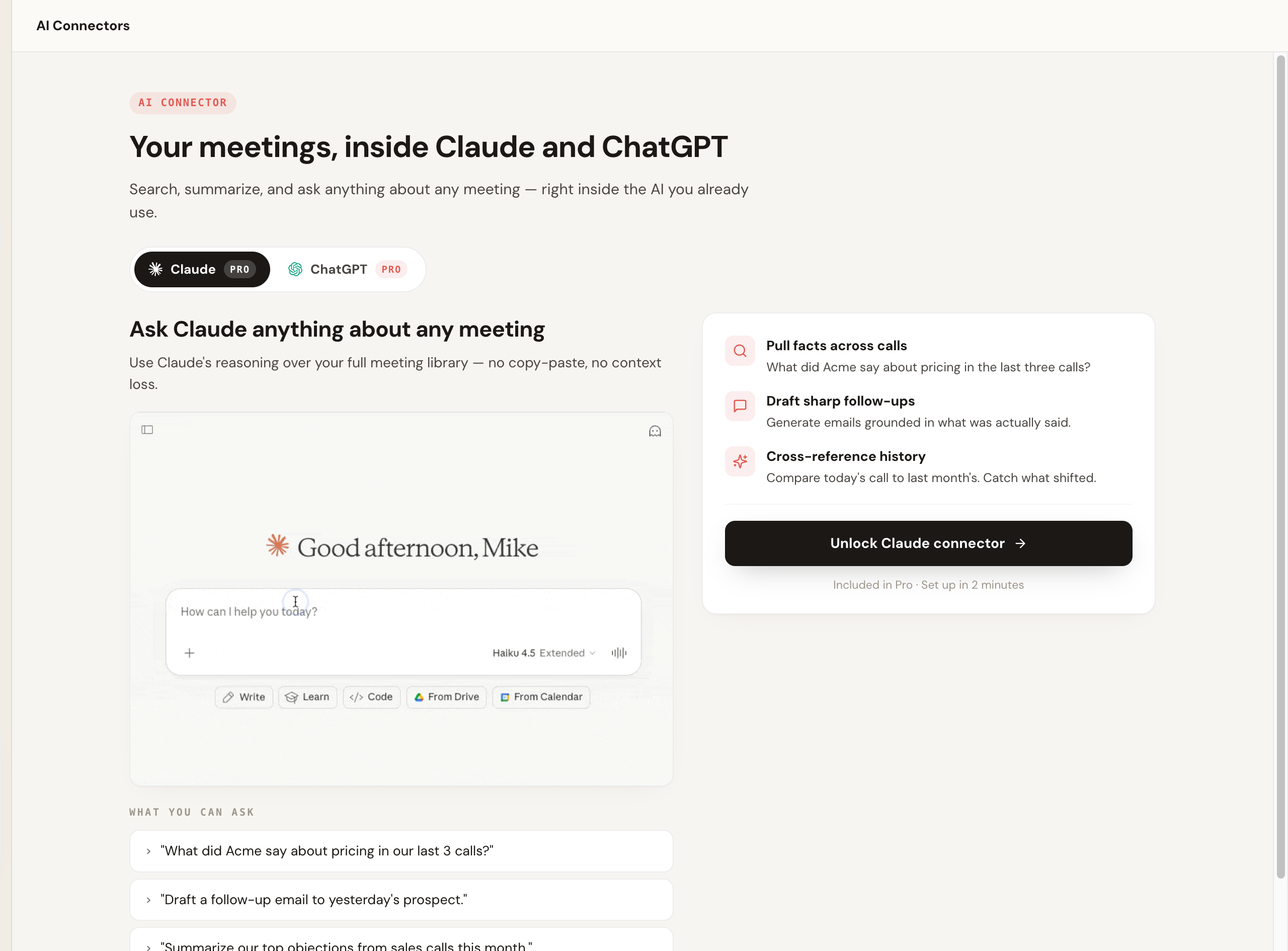
- Ask about your meetings: on Pro, connect Scribbl to Claude or ChatGPT and ask about every meeting you've recorded, or about one Smart Collection ("What did customers say about pricing this month?"). No AI credits to buy.
- The follow-up, done: Automations draft the follow-up email (it never sends by itself), log meeting notes in HubSpot or Pipedrive, post to Slack or Microsoft Teams, save to Notion or Confluence, or open an Asana, Monday, Linear or Jira ticket. They ask before they change anything by default.
- Your data: recordings are private by default, and Scribbl doesn't use your meetings to train AI for anyone other than you.
- Free plan: Google Meet, Zoom and Microsoft Teams, 10 meetings a month, no limit on meeting length, no credit card.
- Paid: Pro is $13 per user per month billed annually, or $20 monthly (pricing).
- Trust: 5.0 from 3,000 reviews on the Chrome Web Store, and 4.9 from 725 reviews on G2.
Start free with Scribbl. Whatever tool you use, let everyone in the meeting know you're recording.
2. Otter: for live transcripts
- Why people pick it: a live transcript during the call, iPhone and Android apps, and AI chat about your meetings.
- Free plan: 300 transcription minutes a month, up to 30 minutes per conversation, your 25 most recent conversations, and 3 file imports for the life of the account.
- Paid: Pro is $8.33 per user per month billed annually, with up to 90 minutes per meeting (Otter pricing).
- The catch: its notetaker joins Zoom, Teams and Google Meet as a participant, and you get audio playback; video replay for Zoom and Google Meet is an Enterprise feature.
3. Fathom: unlimited free recordings, if a bot is fine
- Why people pick it: unlimited free recordings and transcripts, with the video and instant summaries.
- Paid: Premium is $16 per user per month billed annually, or $20 monthly (Fathom pricing).
- The catch: the bot joins by default; bot-free capture is a beta for Mac. Advanced summaries and AI action items need Premium.
4. Fireflies: for CRM integrations
- Why people pick it: a long list of integrations, transcription in 100+ languages and uploads on the free plan.
- Paid: Pro is $10 per seat per month billed annually, or $18 monthly (Fireflies pricing).
- The catch: a bot joins by default. Fireflies' free plan guide says unlimited free transcription comes with auto-join (otherwise 3 credits when you sign up on the website), storage is 400 minutes, and downloading transcripts needs a paid plan. Video recording is on paid plans.
5. tl;dv: for sharing clips
- Why people pick it: free unlimited video recordings and transcription, with clips to share.
- Paid: Pro is $18 per seat per month billed annually (tl;dv pricing).
- The catch: a bot joins by default. Free AI notes cover 10 meetings, free uploads 5, and free data is kept up to 3 months.
6. Granola: for your own typed notes
- Why people pick it: no bot. You type rough notes and Granola fills them in.
- Paid: Business is $14 per user per month (Granola pricing).
- The catch: it keeps no recording, so there's no video or audio to go back to. On the free plan you see 30 days of meeting history.
7. Tactiq: for text transcripts in Chrome
- Why people pick it: a free Chrome extension for Google Meet, Zoom and Teams transcripts, with nothing joining the call.
- Paid: Pro is $8 per user per month billed annually; AI on every meeting takes Team at $16.67 (Tactiq pricing).
- The catch: text only, no video, and the free plan covers 10 transcripts and 5 AI credits a month.
Free Notta alternatives
If you were on Notta's free plan, the question is where each free plan stops.
| Free plan | Where it stops | Bot in the call |
|---|---|---|
| Scribbl | 10 meetings a month; no limit on meeting length; the video, transcript, AI notes and action items on each | No |
| Notta | 120 minutes a month, 3 minutes per conversation, 10 AI summaries | Bot, or the desktop app |
| Otter | 300 minutes a month, 30 minutes per conversation, 25 most recent conversations | Yes |
| Fathom | No recording cap; AI action items are paid | Yes, by default |
| Fireflies | Unlimited only with auto-join; 400 minutes of storage | Yes, by default |
| tl;dv | AI notes on 10 meetings; data kept up to 3 months | Yes |
| Granola | Notes older than 30 days hidden; no recording | No |
| Tactiq | 10 transcripts and 5 AI credits a month; no video | No |
Scribbl is the only free plan here with the whole meeting, the video and AI notes on every meeting, and nothing in the call.
Scribbl vs Notta
| Feature | Scribbl (our pick) | Notta |
|---|---|---|
| Free plan | 10 meetings a month, no length limit | 120 minutes a month, 3 minutes per conversation |
| Does anything join the call? | No, on Google Meet, Zoom and Teams | A bot, or Notta Desktop with no bot |
| Video of the meeting | Every meeting, free plan included | Business only, $16.67 per seat billed annually |
| Transcript with speaker names | Yes | Yes |
| AI notes and action items | Every meeting | 10 summaries a month free, 100 on Pro, 200 on Business |
| Ask questions about your meetings | Claude or ChatGPT across every meeting, or one Smart Collection (Pro) | Notta Brain, paid in AI credits |
| Follow-up after the call | Automations draft the email, log notes in HubSpot or Pipedrive, post to Slack or Teams | CRM and Zapier on Business |
| Paid | Pro $13 annual, $20 monthly | Pro $8.17 or $13.49 (1 seat); Business $16.67 or $27.99 per seat |
For a team that wants the video of its meetings, Notta's first plan with video is Business at $199.99 per person a year billed annually. Scribbl Pro is $156, and the free plan already keeps the video.
How to switch from Notta to Scribbl
- 1
Export what you want to keep
Export needs Pro or higher, so do it while you still pay. After you cancel, Notta shows only the first 3 minutes of each transcript.
- 2
Install Scribbl
Add the Chrome extension for Google Meet, or Scribbl Desktop for Zoom and Teams on Mac or Windows, and sign up on the free plan.
- 3
Run one real meeting
Check the video, the transcript with speaker names, and the AI notes. Let everyone know you are recording.
- 4
Cancel Notta
On the web, click your profile picture, then Billing, then Cancel Subscription. App store subscriptions are canceled in the App Store or Google Play.
Recording laws vary by place, and some require everyone's consent. See do you have to tell people you're recording. Moving off MeetGeek too? See our MeetGeek alternatives.
FAQ
What is the best Notta alternative?
Scribbl. Its free plan writes up the whole meeting, not just the first 3 minutes: every meeting gets the video, a transcript with speaker names, AI notes and action items, on Google Meet, Zoom and Microsoft Teams, and nothing joins the call. The free plan covers 10 meetings a month with no limit on meeting length. Pro is $13 per user per month billed annually, or $20 monthly.
What is the best free Notta alternative?
Scribbl. Notta's free plan transcribes only the first 3 minutes of each conversation, up to 120 minutes a month. Scribbl's free plan covers 10 meetings a month with no limit on meeting length, each with the video, transcript, AI notes and action items. Fathom and tl;dv record without a monthly cap on their free plans, but a bot joins the call by default, and tl;dv's free AI notes cover 10 meetings.
Is there a Notta AI alternative that doesn't join the meeting as a bot?
Yes. Scribbl doesn't join the call on Google Meet, Zoom or Teams: it's a Chrome extension for Google Meet and Scribbl Desktop for Mac and Windows for Zoom and Teams. Granola also works without a bot but keeps no recording. Otter, Fireflies and tl;dv send a bot by default, and Fathom's bot-free option is a Mac beta.
Is Notta AI free?
Notta has a free plan: $0, no credit card, 1 seat, 120 transcription minutes a month, up to 3 minutes per conversation, 50 file uploads and 10 AI summaries a month. Exporting transcripts starts on Pro, and recording the video of a web meeting starts on Business. Notta also offers a 7-day Business trial.
How much is a Notta subscription?
Pro is $8.17 a month billed annually ($97.99 a year) or $13.49 billed monthly, for 1 seat. Business is $16.67 per seat per month billed annually ($199.99 a year) or $27.99 monthly. Enterprise is custom priced from 51 seats. Prices from notta.ai/en/pricing on November 24, 2026.
Is Notta AI any good?
Notta is a capable transcription tool, with live meeting transcripts, file uploads, translation add-ons and a bot-free desktop app. The free plan is the weak spot: each conversation stops at 3 minutes, so a 30-minute call gives a 3-minute transcript. If you want whole meetings written up for free, with the video, Scribbl does that on Google Meet, Zoom and Teams.
Is Notta better than Otter?
For free use, Otter goes further: 300 minutes a month and up to 30 minutes per conversation, against Notta's 120 minutes and 3 minutes per conversation. Both send a bot into meetings by default. Scribbl beats both on the free plan: 10 whole meetings a month with the video, and nothing joins the call.
What is the best Notta alternative for Zoom and Teams on Windows?
Scribbl. Scribbl Desktop records the Zoom and Microsoft Teams desktop apps on Windows and on Mac with Apple silicon, with nothing joining the call, and the same free plan covers Google Meet through the Chrome extension.
How do I switch from Notta to Scribbl?
If you pay for Notta, export the transcripts you want to keep first: after you cancel, Notta's free plan only shows the first 3 minutes of each one. Then install the Scribbl Chrome extension for Google Meet or Scribbl Desktop for Zoom and Teams, sign up free, run one real meeting, and cancel Notta under your profile picture, Billing, Cancel Subscription.
Sources
Checked November 24, 2026.
- Notta: pricing (monthly and annual, comparison table and FAQ), features
- Scribbl: pricing, Chrome Web Store listing, G2 reviews, privacy policy
- Otter: pricing
- Fathom: pricing
- Fireflies: pricing, what's included in the free plan
- tl;dv: pricing
- Granola: pricing
- Tactiq: pricing
- Microsoft: Introducing smarter bot protection in Microsoft Teams meetings
Try Scribbl
The whole meeting, not just 3 minutes, free
Scribbl records, transcribes, and summarizes your Google Meet calls from your browser. No bot joins the call. Free for 10 meetings a month, no credit card.
Add to Chrome · It's freeTry Scribbl
The whole meeting, not just 3 minutes, free
Scribbl records, transcribes, and summarizes your Google Meet calls from your browser. No bot joins the call. Free for 10 meetings a month, no credit card.
 Add to Chrome · It's free