6 Best Circleback Alternatives in 2026 (Compared and Ranked)
We compared 6 Circleback alternatives in 2026 and ranked them by capture method, dated USD pricing, languages, integrations, and data handling. Includes a full comparison table, per-tool pros and cons, head-to-head charts versus Circleback, and a ranked shortlist by use case.
Updated October 7, 2026

On this page7 sections
- 01Why people leave Circleback
- 02How we compared and ranked these Circleback alternatives
- 03Circleback alternatives compared at a glance
- 04The 6 best Circleback alternatives, ranked
- 05Which Circleback alternative should you pick
- 06How to switch from Circleback without losing your notes
- 07Circleback alternatives FAQ
Scribbl is the pick for most people leaving Circleback. If the credit-based pricing made your bill unpredictable, Scribbl has a free plan with no credit card, then a flat per-seat price. If the lack of native recording frustrated you, every Scribbl meeting gets the video, a transcript with speaker names, AI notes and action items. And nothing joins the call, so external and client calls stay normal. It covers Google Meet, Zoom, and Microsoft Teams in one account, connects your meetings to ChatGPT or Claude, and its Automations do the follow-up: draft the email, log notes in HubSpot or Pipedrive, post to Slack or Teams. The ranked shortlist, the scoring methodology, the public star ratings, and the full comparison matrix below map each tool to the precise Circleback problem that sent you searching.
We compared the field in June 2026 and ranked it on the thing that actually changes your day to day, the capture method, then on accuracy, languages, integrations, price, free plans, and data handling. We do not invent competitor prices or feature claims; where a current price is widely published we print it with a date stamp, and where a number could drift we point you to the vendor's own page. Last updated October 7, 2026.
Why people leave Circleback
There are recurring reasons people go looking for a Circleback replacement, and they are specific. These themes show up repeatedly in public reviews on G2, Trustpilot, and Reddit. We summarize the patterns rather than quoting individuals, and you should confirm current behavior on Circleback's own site, since products change.
- Confusing credit and usage-based pricing. This is the single most cited complaint. A credit or usage model makes your monthly cost hard to predict, and heavy-meeting weeks can blow past what you expected. People who run a lot of calls often want a flat per-seat price they can budget.
- Recording limitations and no native video. Reviewers note that recording is constrained compared with tools built around capturing and storing the full video, which matters if you want to revisit the actual footage, not just the transcript.
- Speaker mix-ups and silent-start gaps. Two related accuracy complaints recur: the tool attributing words to the wrong speaker, and the first several seconds of a transcript coming through silent or blank, so the opening of the meeting is lost. It is a frequent reason people leave.
- A limited free tier. The free plan is thin enough that many people hit its ceiling quickly and feel pushed to pay before they have decided the tool is right.
- Thin conversation analytics. For sales and customer-success teams that want talk-time ratios, topic tracking, and coaching signals, the analytics layer is lighter than dedicated revenue-intelligence platforms.
- Support friction. Slow or limited support responses come up in reviews, which stings most when a billing-credit question or a missed recording needs a fast answer.
How we compared and ranked these Circleback alternatives
This is the part most listicles skip. Here is what we compared each tool on.
- Capture and visibility. We compared whether a bot joins and whether attendees see it.
- After the call. We compared what each tool gives you after the call: the summary, action items, and how easily the output flows into the tools you already use.
- Public ratings. We list each tool's public G2 or Trustpilot rating and review count, captured June 2026.
The ranking weights the capture method first, because it is what attendees notice and what decides whether you even get notes on external calls. Then accuracy, language coverage, integrations, a real free plan, and data handling. A tool that joins your meetings is not bad; it is a different trade, and for client or sales calls a botless tool usually wins. Here is the exact weighting we used, so you can re-rank for your own priorities.
| Criterion | Weight | How we scored it |
|---|---|---|
| Capture method | 30% | Botless and invisible scored highest; a visible join-the-call bot scored lower, weighted for impact on external calls |
| Accuracy and attribution | 25% | How well the transcript, speaker labels, and opening seconds hold up, especially on messy calls with crosstalk and a bad microphone |
| Languages | 15% | Breadth of supported languages and whether the tool transcribes versus translates |
| Integrations | 15% | Depth of CRM, chat, and workflow connections, plus whether output flows into tools you already use |
| Free plan and pricing clarity | 10% | Whether a real free tier exists, no credit card, and whether pricing is predictable rather than credit-metered |
| Data handling | 5% | Transparency of retention and training policy; scored as read-the-policy for every vendor |
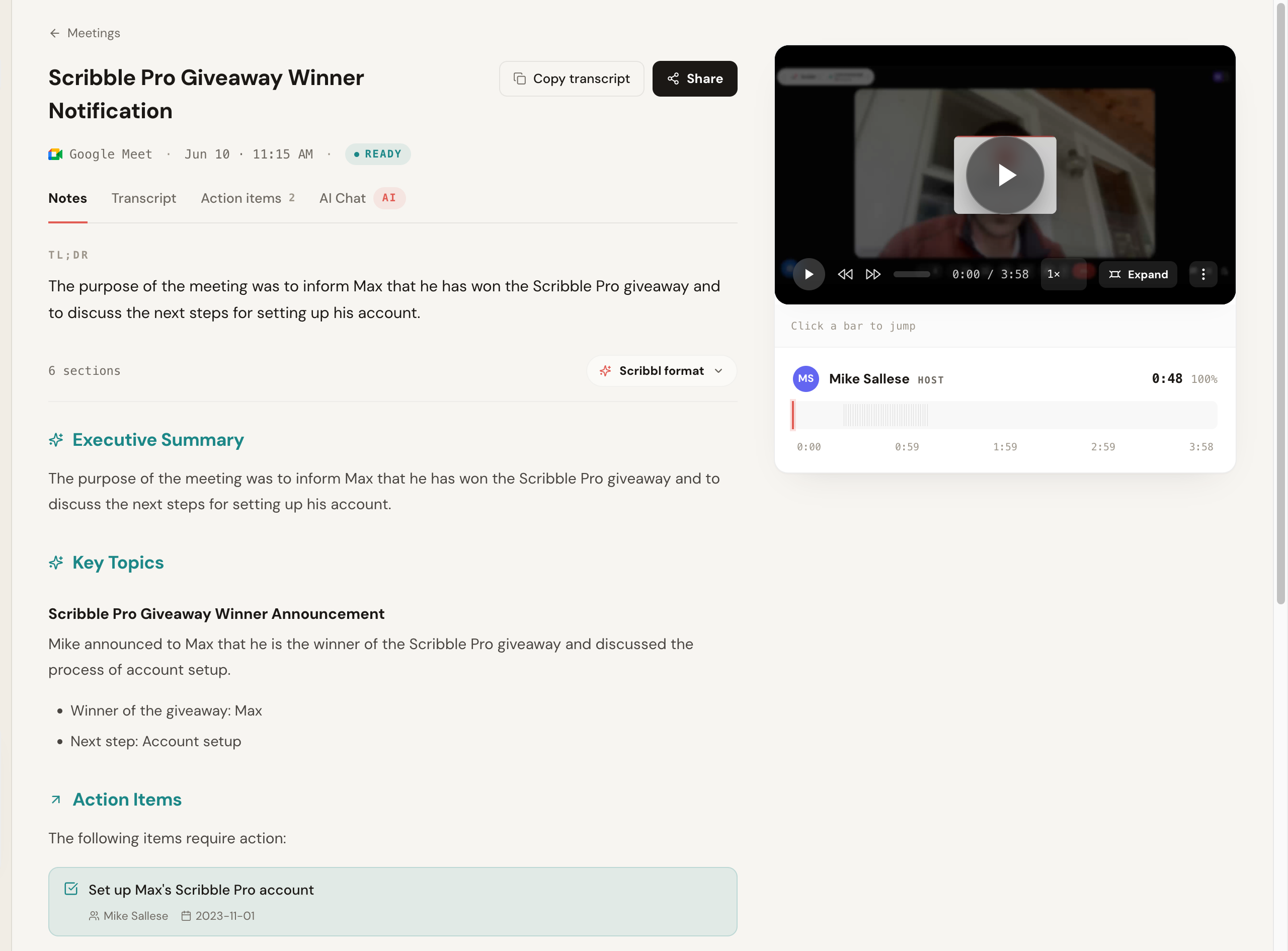
We also looked at what happens after the transcript exists, because a perfect transcript you never reuse is wasted work. Here is the Scribbl notes view after a Google Meet call: a TL;DR, an executive summary, key topics, and action items with owners and dates. Nothing joined the call.
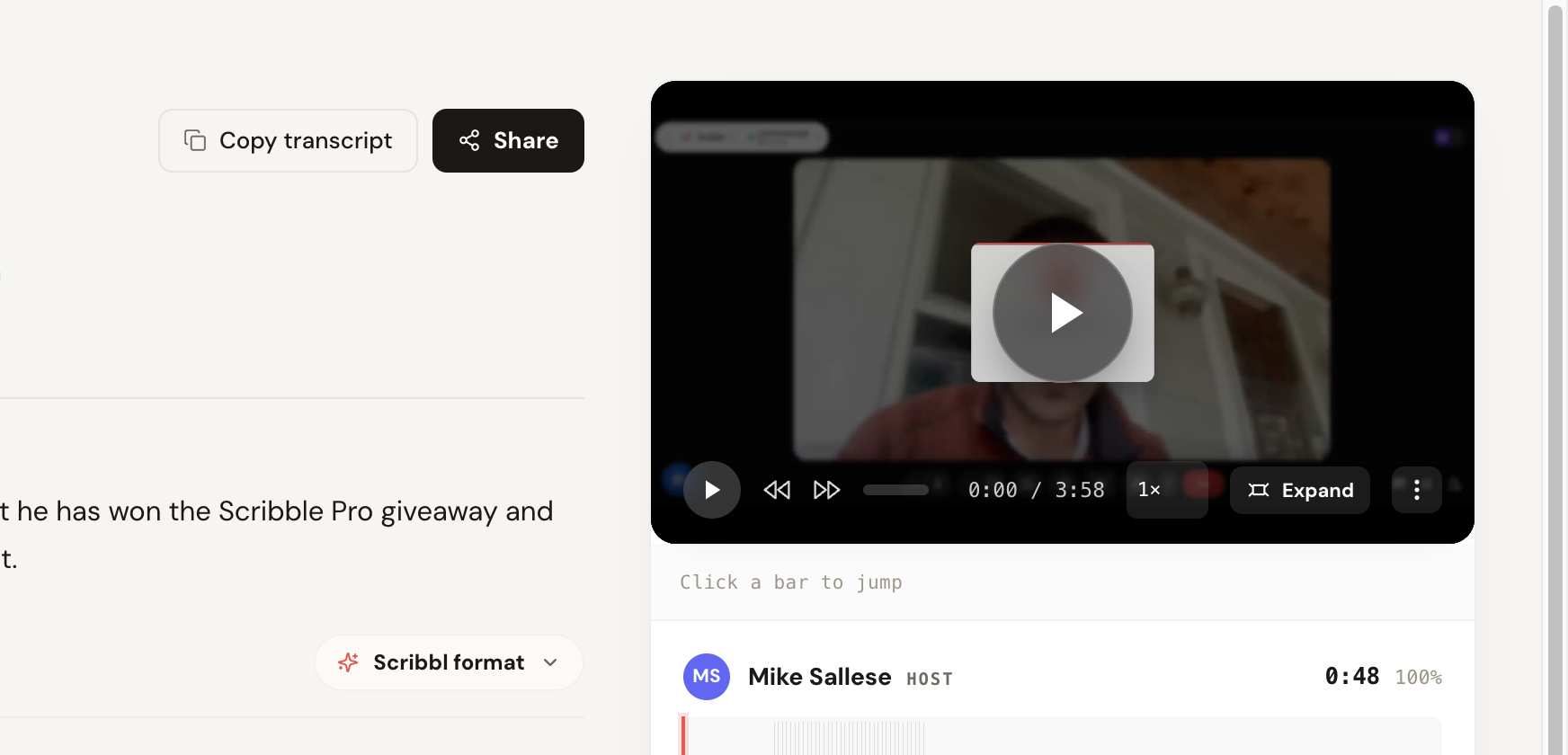
The transcript view is where you can actually judge accuracy and speaker attribution, the two things Circleback users complain about most. It shows speaker labels, per-segment timestamps, a confidence score, and a copy-and-share row, plus the recorded video lined up beside it so you can click any bar to jump to that moment.
Circleback alternatives compared at a glance
Here is the full field in one view, in our ranking order, with Circleback last as the baseline. The price column prints the cheapest paid tier where the vendor publishes it openly (Fathom, Fireflies, Otter, and Granola checked October 7, 2026); prices change and many tools bill annually, so the per-month figure assumes annual billing unless noted, and you should confirm the current number before you buy. Capture model, price, free plan, language breadth, integration depth, and data-training are the columns people actually decide on.
| Tool | Capture | Entry paid price | Free plan | Languages | Integrations | Best for |
|---|---|---|---|---|---|---|
| Scribbl | Botless, nothing joins | Free; Pro $13/user/mo billed annually or $20 monthly, see pricing | Yes: 10 meetings a month, no credit card | Multiple | Meet, Zoom, Teams; ChatGPT, Claude; Automations to HubSpot, Pipedrive, Slack, Notion | External and client calls, no bot |
| Fathom | Bot joins, native recording | $16/user/mo (Premium, annual) or $20 monthly | Yes; advanced summaries on your first 5 calls a month | Multiple; confirm on site | Common CRMs and chat; confirm | Native video with a bot in the call |
| Fireflies | Bot (Fred) joins | $10/seat/mo (Pro, annual) or $18 monthly; Business $19 annual | Yes, with caps | Broad; confirm on site | Broad; deep CRM and search | Integrations and team search |
| tl;dv | Bot joins | $18/user/mo (Pro, annual); Business higher | Yes, with caps | Broad; confirm on site | Common CRMs and chat; confirm | Clips and highlight sharing |
| Otter | Bot (OtterPilot) joins | $8.33/user/mo (Pro, annual) or $16.99 monthly; Business $19.99 annual | Yes, 300 minutes a month | Narrower; confirm on site | Common tools; confirm | Live transcription, internal use |
| Granola | Botless; keeps no recording | Business $14/user/mo, billed monthly | Yes; notes from the last 30 days | Multiple; confirm on site | Claude and ChatGPT; confirm others | Typed notes, no bot, no recording |
| Circleback (baseline) | Bot joins | Credit/usage-based; confirm current model on site | Limited free | Multiple; confirm on site | Common tools and automations | The baseline you are leaving |
The table above prices the whole field. This next view is the decision matrix: the handful of yes-or-no axes buyers actually decide on, with the leading tools side by side and the no-bot row at the top because it is the one that sends most people here. The Scribbl column is highlighted because we make it; everything in it is verifiable on our site, and the competitor cells are our reading of publicly published behavior as of June 2026, which you should confirm on each vendor's site since products change.
| Feature | Scribbl | Circleback | Fathom | Fireflies | Otter |
|---|---|---|---|---|---|
| Botless (no bot ever joins) | Yes | No | No | No | No |
| Nothing announced to attendees | Yes | No | No | No | No |
| Meet + Zoom + Teams | Yes | Yes | Yes | Yes | Yes |
| Native video recording | Yes | Limited | Yes | Yes | Limited |
| Connects to ChatGPT / Claude | Yes | Yes | Yes | Yes | Yes |
| AI summary + action items | Yes | Yes | Yes | Yes | Yes |
| Flat per-seat pricing (not credits) | Yes | No | Yes | Yes | Yes |
| Free plan, no credit card | Yes | Limited | Yes | With caps | Card varies |
| Deep CRM push | HubSpot, Pipedrive | Via automations | Confirm | Yes | Limited |
| Public rating (approx, Jun 2026) | 5.0 from 3,000 reviews (Chrome Web Store) | Verify | ~5.0 G2 | ~4.7 G2 | ~4.3 G2 |
The 6 best Circleback alternatives, ranked
Each tool below gets a deep dive with concrete pricing, a public-rating corroboration line, an explicit pros-and-cons read, and a one-line verdict on who it is for. First, the ranking: the same field as a single scannable index, with the sharpest reason to pick each tool and the one thing that would make you skip it.
| Rank | Tool | Best reason to pick it | The thing that might make you skip it |
|---|---|---|---|
| 1 | Scribbl | No bot ever joins; every meeting gets the video, and Automations do the follow-up | Nothing for most switchers; try it free on one real call |
| 2 | Fathom | Polished notetaker with native recording and a free plan | A bot is visible in the call |
| 3 | Fireflies | Deepest search and integrations for teams | Visible bot; the feature surface is heavy |
| 4 | tl;dv | Best clipping and highlight sharing | A bot joins; notes are secondary to clips |
| 5 | Otter | Mature live transcription, low entry price | A bot joins; narrower languages |
| 6 | Granola | Botless, typed-notes approach | Keeps no recording or video |
1. Scribbl, the botless pick
Scribbl is our top recommendation for most people because it solves several of the exact problems that send folks looking for a Circleback alternative at once. It is botless: nothing joins the call, nothing is announced, and no notification goes to the people you are meeting with. It records the actual call, so you get native video to revisit, not just a transcript. And it leads with a free plan and no credit card and a flat upgrade path, rather than a credit system you have to keep an eye on. It works on Google Meet with its Chrome extension and on Zoom and Microsoft Teams with Scribbl Desktop (Mac with Apple silicon and Windows), and lets you ask ChatGPT or Claude about every meeting. It is rated 5.0 from 3,000 reviews on the Chrome Web Store and 4.9 from 725 reviews on G2, and used by more than 10,000 organizations.
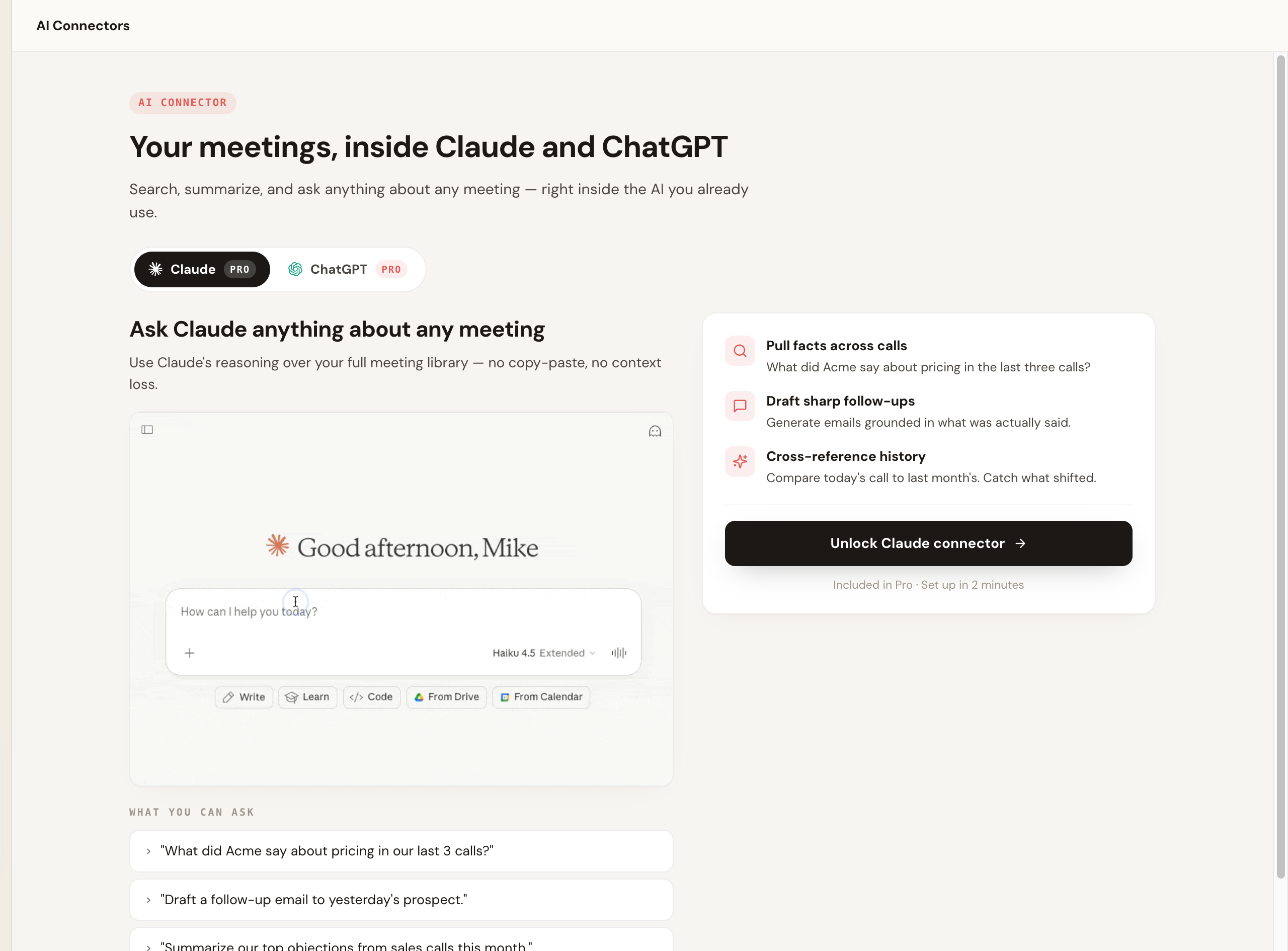
The part that separates Scribbl from a pure transcription tool is what happens after the call. Smart Collections sort each new meeting into groups you describe in one sentence, so you can ask Claude or ChatGPT about just one group, like "What were the main objections in my sales calls this week?" Automations do the follow-up: they draft the email, log notes in HubSpot or Pipedrive, post to Slack or Teams, save to Notion, Google Drive or Confluence, or open Linear, Jira, Asana or Monday tickets, and by default they ask before changing anything.
Pros: no bot ever joins, native video recording, flat free-plan-first pricing with no credit card, works across Meet, Zoom, and Teams, and Automations do the follow-up, so the work gets done, not just stored. Pricing: free plan, no credit card (10 meetings a month, Google Meet, Zoom, and Teams included); Pro is $13 per user per month billed annually, or $20 monthly. See the pricing page. Best for: anyone with client, sales, or external calls who wants notes with no bot, and anyone who left Circleback over unpredictable credit billing. More in our botless AI notetaker explainer.
- Capture: a notetaker joins the call to record and summarize
- Pricing: credit and usage-based; confirm the current model and any free option directly
- Watch-outs: reviewers cite recording limits, speaker mix-ups, and silent-start gaps
- Strengths: clean, organized notes and automated follow ups
- Capture: nothing joins the call, with native video recording
- Pricing: free plan, no credit card, flat upgrade path, no credits to track
- Attendees see it: no bot, nothing announced, no email
- Plus: Automations do the follow-up, and you can ask ChatGPT or Claude about every meeting
Because Circleback is the baseline everyone is comparing against, here is the head-to-head feature parity, alternative versus Circleback, using Scribbl as the example alternative. Competitor behavior changes, so confirm Circleback's current specifics on its own site.
| Feature | Scribbl | Circleback |
|---|---|---|
| Capture method | Botless; nothing joins the call | A notetaker joins the call to record and summarize |
| Visible to attendees | No bot, nothing announced, no email to attendees | A recording participant appears (confirm current behavior) |
| Native video recording | Yes, records the call so you can revisit the footage | Reviewers cite recording limitations; confirm on site |
| Speaker attribution and openings | Speaker-labeled with timestamps | Mix-ups and silent-start gaps cited in reviews |
| Platforms | Google Meet, Zoom, Microsoft Teams | Meet, Zoom, Teams (confirm current support) |
| Pricing model | Free plan, then $13 per user per month billed annually, or $20 monthly, see pricing | Credit and usage-based (confirm current model) |
| Free plan | 10 meetings a month, no credit card required | Limited free tier (confirm current limits) |
| Delivery | Chrome extension (Google Meet) and Scribbl Desktop (Zoom, Teams) | Web app |
| AI summary and action items | Yes, with owners and due dates | Yes |
| Connects to ChatGPT or Claude | Yes, on Pro; Smart Collections let you ask about one group of meetings | Yes; its free plan lists API, MCP, and CLI access |
| Rating | 5.0 from 3,000 reviews on the Chrome Web Store; 4.9 from 725 reviews on G2 | Verify current rating on review sites |
| Used by | More than 10,000 organizations | Verify on Circleback |
2. Fathom
Fathom is a popular notetaker. It joins the meeting to record and produces clean summaries, with native video recording and a free plan. On free, advanced summaries cover only your first 5 calls each month, and AI action items and follow-up emails need Premium. The trade is the usual one: a participant appears in the call.
Pros: strong native recording, free plan, clean summaries, popular and well-supported. Cons: a bot joins and is visible to attendees. Pricing: free plan; Premium is $16 per user per month billed annually, or $20 monthly (Fathom pricing, checked October 7, 2026). Corroboration: rates near the top of the category on G2 (around 5.0 across several thousand reviews as of June 2026). Best for: teams that want a clean, popular notetaker with reliable recording and are fine with a bot. See our Fathom alternative breakdown.
3. Fireflies.ai
Fireflies is one of the more established and feature-rich options, with strong search, broad integrations, and team analytics. Its standard model sends a notetaker bot, often called Fred, into the meeting, so it suits teams that want a lot of connected tooling and accept a visible bot.
Pros: very broad integrations, strong search, team analytics, flat per-seat pricing. Cons: visible bot; the feature surface can feel heavy. Pricing: free tier with caps; Pro is $10 per seat per month billed annually or $18 monthly, and Business is $19 billed annually or $29 monthly (Fireflies pricing, checked October 7, 2026). Corroboration: strong category standing on G2 (around 4.7 across several thousand reviews as of June 2026). Best for: teams that want a deep feature set and do not mind a join-the-call bot. See our Fireflies alternative.
4. tl;dv
tl;dv focuses on recording and highlighting meetings, with clipping and sharing features that teams use to spread context. It generally captures by joining the call. It is a good fit if your workflow is built around sharing clips.
Pros: excellent clipping and highlight sharing, good free tier. Cons: a bot joins; notes are secondary to clips for some teams. Pricing: free tier with caps; Pro around $18 per user per month with a higher Business tier (verified June 2026, annual billing; confirm on tl;dv's site). Corroboration: well-rated on G2 (around 4.7 across several hundred reviews as of June 2026), praised mostly for clips and sharing. Best for: teams that share meeting clips and want recording-first features. See our tl;dv alternative.
5. Otter
Otter is a mature transcription product with a low entry price and strong live-transcription habits, popular for internal use. It typically sends a notetaker, OtterPilot, into the meeting. Its language list has historically been narrower than multilingual-focused rivals. It is a reasonable pick for internal meetings if budget is the priority and a visible bot is fine.
Pros: mature live transcription, low entry price, large user base. Cons: a bot joins; narrower languages. Pricing: free Basic plan with 300 monthly transcription minutes; Pro is $8.33 per user per month billed annually or $16.99 monthly, and Business is $19.99 billed annually or $30 monthly (Otter pricing, checked October 7, 2026). Corroboration: large but more mixed standing on G2 (around 4.3 across thousands of reviews as of June 2026). Best for: budget-conscious internal teams that want live transcription. See our best Otter alternatives breakdown.
6. Granola
Granola is a lightweight notetaker that runs on your device and leans on your own editing, without a traditional join-the-call bot, which makes it a natural look for privacy-leaning people leaving Circleback. The trade is that it transcribes and then deletes the audio, so there is no recording to revisit, and if Circleback's lack of native video was your complaint, Granola has none either.
Pros: no traditional join-the-call bot, privacy-leaning, clean editable notes. Cons: keeps no recording or video; the free plan reaches notes from the last 30 days. Pricing: Basic is free (notes from the last 30 days); Business is $14 per user per month, billed monthly (Granola pricing, checked October 7, 2026). Corroboration: well-regarded on public sites as of June 2026. Best for: people who want a no-bot notetaker, are happy to edit, and do not need the recording.
Which Circleback alternative should you pick
Match the tool to the exact Circleback pain that sent you here, not to the longest feature list.
- Pick Scribbl if your calls include clients, prospects, candidates, or partners and you want notes with nothing joining the room. This is the lane Scribbl owns: no bot.
- Pick Scribbl if unpredictable credit billing pushed you out: a free plan with no credit card, then $13 per user per month billed annually, or $20 monthly, with no credits to track.
- Pick Scribbl if recording limits were your problem: every meeting gets the video, a transcript with speaker names, AI notes and action items.
- Pick Scribbl if you want the follow-up done: Automations draft the email, log notes in HubSpot or Pipedrive, post to Slack or Teams, and open Linear, Jira, Asana, or Monday tickets, asking before they change anything by default.
The other tools on this list suit narrower needs (tl;dv for clips, Otter for live transcription), and every one of them except Granola sends a bot into the call; Granola keeps no recording.
For sales teams specifically, the bot is usually decisive; see Scribbl for sales. If you want a free, no-bot start, our free AI notetaker with no bot guide is the shortest path.
How to switch from Circleback without losing your notes
Switching is lower effort than people expect, and you do not have to do it all at once. Here is the order that avoids the two things people regret, losing old transcripts and being stuck mid-call without notes.
- Export anything you want to keep from Circleback. Transcripts and summaries typically export as text or PDF from the meeting menu. Confirm the current export options in Circleback, and treat this export as your archive, because transcripts do not migrate between tools.
- Install your replacement and run one real meeting through it. Pick the messiest call you reasonably can, since that is where tools separate, and watch specifically for speaker attribution and a clean opening if those were your Circleback complaints. With a botless tool like Scribbl you can do this on the free plan with no credit card, so there is no commitment to test it.
- Compare the transcript and summary against what was actually said. Check names, numbers, the crosstalk segment, and the first few seconds of the recording. If it holds up, you have your answer.
- Cancel or downgrade Circleback from your account settings once you are confident. If you were on a credit plan, make sure you are not leaving prepaid credits on the table. Keep the export. Start fresh notes in the new tool.
Circleback alternatives FAQ
What is the best Circleback alternative in 2026? Scribbl is our top pick for most people leaving Circleback. Nothing joins the call, every meeting gets the video, a transcript with speaker names, AI notes and action items, and pricing is flat: a free plan with no credit card, then $13 per user per month billed annually, or $20 monthly, with no credits to track. It covers Google Meet, Zoom, and Microsoft Teams in one account, and its Automations do the follow-up, from drafting the email to logging notes in HubSpot or Pipedrive. Map the tool to the specific Circleback pain that sent you looking, rather than to the longest feature list.
Why do people leave Circleback? The most common reasons we see in G2, Trustpilot, and Reddit threads are confusing credit and usage-based pricing that makes monthly cost hard to predict, recording limitations and the lack of native video recording, speaker mix-ups and silent-start gaps where the first seconds of a transcript come through blank, a limited free tier, thin conversation analytics compared with sales-focused rivals, and support complaints. Always verify current behavior on Circleback's own site, since products change.
Is there a Circleback alternative that does not use a bot? Yes. Scribbl is botless: no participant joins the call and nothing is announced to attendees. Granola also avoids the traditional join-the-call bot, but it transcribes and then deletes the audio, so there is no recording. Scribbl works across Google Meet, Zoom, and Microsoft Teams and has a free plan with no credit card.
Are there free Circleback alternatives? Yes. Scribbl has a free plan with no credit card required: 10 meetings a month across Google Meet, Zoom, and Microsoft Teams, with nothing joining the call. Fathom, Fireflies, tl;dv, and Otter also publish free tiers, each with its own limits, and each sends a bot into the call. If Circleback's limited free tier or credit system is what sent you looking, compare the free plans in the comparison table and confirm current limits on each tool's own pricing page, since they change often.
Which Circleback alternative has clearer pricing? Circleback's credit and usage-based model is one of the most cited reasons people switch, because monthly cost is hard to predict. Flat per-seat tools are easier to budget. Scribbl leads with a free plan and no credit card, then a flat $13 per user per month billed annually, or $20 monthly, and most alternatives in this guide publish flat per-user monthly pricing rather than per-meeting credits. Confirm the current number on each vendor's pricing page, since notetaker pricing changes constantly.
Which Circleback alternative is best for sales teams? Sales teams that run external demos and discovery calls usually prefer a botless tool so nothing visible joins a prospect's call. Scribbl is our pick there because it captures without a bot, and its Automations draft the follow-up email and log notes in HubSpot or Pipedrive, asking before they change anything by default.
Which Circleback alternative is best for multiple languages? If non-English calls are your norm, shortlist on language count and on whether the tool transcribes versus translates, run one real call in your main language through your top pick, and confirm the current list on each vendor's site.
Does Scribbl train AI on my meetings? No. Scribbl doesn't use your meetings to train AI for anyone other than you, and recordings are private by default. Training and data policies differ across the other tools on this list, Circleback included, and change over time, so read each vendor's current privacy policy and data-processing terms before you record sensitive calls.
How accurate is Circleback compared to the alternatives? Accuracy swings with microphones, accents, and connection quality, so no single tool wins every call. The speaker-attribution and silent-start issues that come up in Circleback reviews are worth checking in any tool, because real meetings have crosstalk and bad microphones. Run your own worst call through your top two picks before committing.
Can I try a Circleback alternative for free before switching? Yes. Scribbl has a free plan with no credit card required, so you can capture a real call and judge accuracy and the in-call experience yourself. Fathom, Fireflies, tl;dv, and Otter also publish free tiers with usage caps. The fastest honest test is to run one real meeting, ideally a messy one, through your top one or two picks and compare the transcript and summary against what was actually said.
How do I switch from Circleback to an alternative? Switching is mostly low effort. First, export anything you want to keep from Circleback, since transcripts and summaries usually export as text or PDF from the meeting menu (confirm current export options in Circleback). Second, install your replacement and run one real meeting through it to confirm accuracy and the in-call experience. Third, once you are happy, cancel or downgrade your Circleback plan from your account settings, and check that you are not leaving prepaid credits behind. Transcripts themselves do not migrate between tools, so treat the export as your archive and start fresh notes in the new tool. With a botless tool like Scribbl you can run that first test call on the free plan with no credit card.
Is there a private or no-bot Circleback alternative for privacy-first teams? If privacy is the priority, two things matter: whether a bot joins your call and how your data is stored, retained, and used for training. Scribbl is botless, so nothing joins the call and nothing is announced to attendees, and it doesn't use your meetings to train AI for anyone other than you. Granola also avoids the traditional join-the-call bot. Whichever you pick, read the current privacy policy and data-processing terms, because retention and training policies differ across every tool and change over time.
Try Scribbl
Let your meetings take their own notes.
Scribbl records, transcribes, and summarizes your Google Meet calls from your browser. No bot joins the call. Free forever for individuals.
Add to Chrome · It's free