ClickUp AI Notetaker Review (2026): How It Works, Honest Limits, Pricing, and How It Compares to Fireflies, Fathom, Otter, and Scribbl
An honest 2026 review of the ClickUp AI Notetaker: how it works, what it does well, the real limits, pricing, plus a full comparison table against Fireflies, Fathom, Otter, and a botless free pick (Scribbl).
Updated October 7, 2026

On this page10 sections
- 01Verdict: who the ClickUp AI Notetaker is for
- 02How the ClickUp AI Notetaker works
- 03What the ClickUp AI Notetaker does well
- 04The honest limits
- 05ClickUp AI Notetaker pricing
- 06ClickUp AI Notetaker vs Fireflies, Fathom, Otter
- 07The alternatives, briefly
- 08Decision framework: pick the right tool
- 09Use both: keep ClickUp, capture the meeting better
- 10ClickUp AI Notetaker FAQ
The ClickUp AI Notetaker is worth it if you live inside ClickUp and want meeting notes to become tasks automatically. It joins your Google Meet, Zoom, or Teams call as a bot, transcribes it, summarizes it, and turns action items into ClickUp items next to your projects. Its weak spots are the same three every time: it sends a visible bot into the call, the real AI value sits behind a ClickUp Brain add-on, and transcription is one feature inside a huge platform rather than the whole product. If clean, botless capture is your priority, a dedicated tool like Scribbl is the better fit (no bot ever joins, free plan, no credit card, connects your meetings to ChatGPT or Claude), and you can keep ClickUp for tasks. Below is the verdict, how it works, the honest limits, real pricing, and a full comparison table against Fireflies, Fathom, Otter, and Scribbl that the other ranking pages do not give you.
We make Scribbl, so we are upfront about it: treat us as a primary source on Scribbl and a fair-but-interested reviewer of everything else. Where we state a competitor price or feature, we mark it approximate and tell you to confirm it on that vendor's site, because those details change often.
Verdict: who the ClickUp AI Notetaker is for
ClickUp is a project management and productivity platform first. Its core job is tasks, docs, goals, and the work that lives between meetings. The AI Notetaker is a feature added on top so meeting output can land next to the work it creates. That is exactly its strength, and exactly its limit.
- Use Scribbl for the meeting itself if you want it captured cleanly with no bot, you want a real free plan, you meet across Meet, Zoom, and Teams, and you want the follow-up wired into ChatGPT or Claude. Keep ClickUp for the project work.
- The ClickUp AI Notetaker suits teams that already run in ClickUp, want action items to become ClickUp tasks, and accept a bot in every call.
These are different jobs. The good news is you do not have to choose: keep ClickUp for tasks and let a focused tool handle the meeting itself, then push the result back into ClickUp.
- Built for: teams managing tasks, docs, projects, and goals in one platform
- Capture: a bot joins the call as a participant
- Standout: meeting action items become ClickUp tasks automatically
- Cost shape: paid ClickUp seat plus the ClickUp Brain AI add-on
- Built for: capturing the meeting itself, cleanly and reliably
- Capture: botless, nothing ever joins the call
- Standout: Automations do the follow-up, and ChatGPT or Claude can answer questions about every meeting
- Cost shape: free plan, no credit card; Pro $13 per user per month billed annually, or $20 monthly
How the ClickUp AI Notetaker works
The flow is straightforward and follows the same model as most platform-native notetakers: connect your calendar, send a bot, get notes back inside the platform. Here is the path, step by step.
- 1
Connect your calendar
You link your meeting calendar so ClickUp knows which calls are coming up and can be told which ones to record.
- 2
A bot joins the call
For the meetings you choose, ClickUp sends an AI Notetaker bot that joins the call as a participant to record and transcribe it. Other attendees can see the recorder in the room.
- 3
It transcribes and summarizes
After the call, ClickUp produces a transcript, a summary, and a list of action items, drawing on its AI features (commonly the ClickUp Brain add-on).
- 4
Notes land inside ClickUp
The recap drops into a ClickUp Doc near your project, so the meeting output sits next to the work it relates to.
- 5
Action items become tasks
This is the real edge: the AI Notetaker can turn the action items into ClickUp tasks automatically, so follow-ups enter your workflow without copy-paste.
It is commonly cited as supporting Google Meet, Zoom, and Microsoft Teams, joining each as a bot. The thing that makes it different from a standalone notetaker is the final step: because it lives inside the place you already manage work, the action items can become tasks without you moving them by hand. If your team genuinely runs in ClickUp, that is a real convenience.
What the ClickUp AI Notetaker does well
For teams that have standardized on ClickUp, these are its real strengths.
- Output becomes tasks, not just text. The single best thing about it is that action items flow into ClickUp tasks automatically. A standalone notetaker hands you a list to copy somewhere; ClickUp can put them where the work already lives.
- Notes live next to the project. The recap lands in a Doc near the relevant project, so the meeting record is one click from the tasks, sprints, or goals it touches.
- One vendor, one bill, one login. If you are already paying for ClickUp, adding the notetaker means no new tool to procure, no new login, and one place for the whole team to find things.
- Covers the major platforms. It is commonly cited as working across Google Meet, Zoom, and Microsoft Teams, so most teams' calls are covered.
Even then, the bot still joins every call, so external calls are where a botless capture tool earns its place next to ClickUp.
The honest limits
This is the part the other ranking pages soften, so it is where we put the work. None of these are knocks on ClickUp as a project management tool; they are the normal trade-offs of a notetaker that is a feature rather than the product.
- A bot joins the call. Like most platform-native notetakers, ClickUp captures by sending an AI Notetaker bot that joins as a participant. On external calls (a sales demo, an interview, a first client meeting) a visible recorder changes the room, and a bot is a participant that can fail to join, be denied admission, or get removed by meeting controls.
- The real AI value is behind an add-on. The notetaker's intelligence is tied to ClickUp's AI features, commonly the ClickUp Brain add-on layered on top of a paid plan. Free-plan AI usage is limited, so the experience people rave about is usually a paid plan plus an add-on, not the free tier.
- Accuracy is good, not best in class. When transcription is one feature inside a platform with hundreds of others, it tends to inherit a capable but not specialized engine. Hands-on reviews report usable transcripts on clean audio, with the familiar slippage on crosstalk, accents, and heavy jargon. Dedicated notetakers often edge it on transcript quality.
- ChatGPT and Claude see your ClickUp work, not your calls. ClickUp's MCP server connects ChatGPT and Claude to your tasks, Docs and chat, but ClickUp's developer docs don't say it reads AI Notetaker transcripts. If you want to pull facts across calls, draft a grounded follow-up, or prep CRM notes from what was actually said, a notetaker built around the meeting is the better fit.
- It is a lot of platform for just notes. If you do not already use ClickUp for project management, adopting the whole suite to get a notetaker is heavy. A focused tool is far lighter to roll out.
ClickUp AI Notetaker pricing
There is no separate sticker price for "the notetaker." It is part of ClickUp's AI features, so the practical cost is a paid ClickUp seat plus ClickUp's AI add-on. The pieces, all commonly cited and worth confirming on ClickUp's pricing page:
- A paid ClickUp plan. Unlimited and Business are commonly cited starting around $7 and $12 per user per month on annual billing. The free ClickUp plan exists but its AI usage is limited.
- ClickUp Brain (the AI add-on). ClickUp's AI features, which power the notetaker's summaries and action-item extraction, are commonly cited around $7 per user per month added on top of a paid plan.
So a realistic monthly cost is the paid seat plus the AI add-on, per user. ClickUp repackages and reprices its AI often, so treat these as approximate and confirm the current numbers on ClickUp's site. The contrast that matters for this query: Scribbl has a genuine free notetaker plan with no credit card, so you can capture meetings before you pay anyone, and Pro is $13 per user per month billed annually, or $20 monthly.
ClickUp AI Notetaker vs Fireflies, Fathom, Otter, and Scribbl
This is the table the other ranking pages do not give you. Searchers comparing the ClickUp AI Notetaker want to see it next to the standalone notetakers, on the features that actually decide it: whether a bot joins, platform coverage, the free plan, where the AI lives, and what each is really for. ClickUp's prices are approximate and commonly cited; Fireflies, Fathom, and Otter prices are from their pricing pages as of October 2026. Confirm each on the vendor's own pricing page.
| Feature | Scribbl | ClickUp | Fireflies | Fathom | Otter |
|---|---|---|---|---|---|
| Botless (no bot joins the call) | Yes | No | No | No | No |
| Nothing announced to attendees | Yes | No | No | No | No |
| Google Meet / Zoom / Teams | All three | All three | All three | All three | All three |
| Real free plan | Yes, no card | Limited | Yes, capped | Yes, generous | Yes, capped |
| Starting paid price | $13/seat annual, $20 monthly | ClickUp seat + Brain add-on | $10/seat annual, $18 monthly | $16/seat annual, $20 monthly | $8.33/seat annual, $16.99 monthly |
| Connects to ChatGPT or Claude | Yes | Tasks, Docs and chat | Yes | Yes | Yes |
| Turns notes into project tasks | Linear, Jira, Asana, Monday | Yes | Limited | Limited | No |
| Notetaking is the whole product | Yes | No | Yes | Yes | Yes |
| Where to check ratings | 5.0 from 3,000 reviews on the Chrome Web Store; 4.9 from 725 reviews on G2 | G2, Capterra | G2, Capterra | G2, Capterra | G2, Capterra |
| Best for | Botless capture + AI follow-up | Teams living inside ClickUp | Search + integrations | Clean free notetaking | Live transcription |
The alternatives, briefly
If the ClickUp AI Notetaker's trade-offs send you looking, here is how the standalone notetakers stack up, with links to deeper write-ups.
Scribbl, the botless free pick (and yes, we make it)
Scribbl does one thing and does it well: it captures the meeting. It is botless: nothing joins the call, nothing is announced, and no email goes to the people you are meeting with. It records Google Meet through a Chrome extension and Zoom and Microsoft Teams through Scribbl Desktop, and its free plan, with no credit card, includes all three. It is rated 5.0 from 3,000 reviews on the Chrome Web Store and 4.9 from 725 reviews on G2, and used across more than 10,000 organizations. More on the model in our botless AI notetaker explainer.
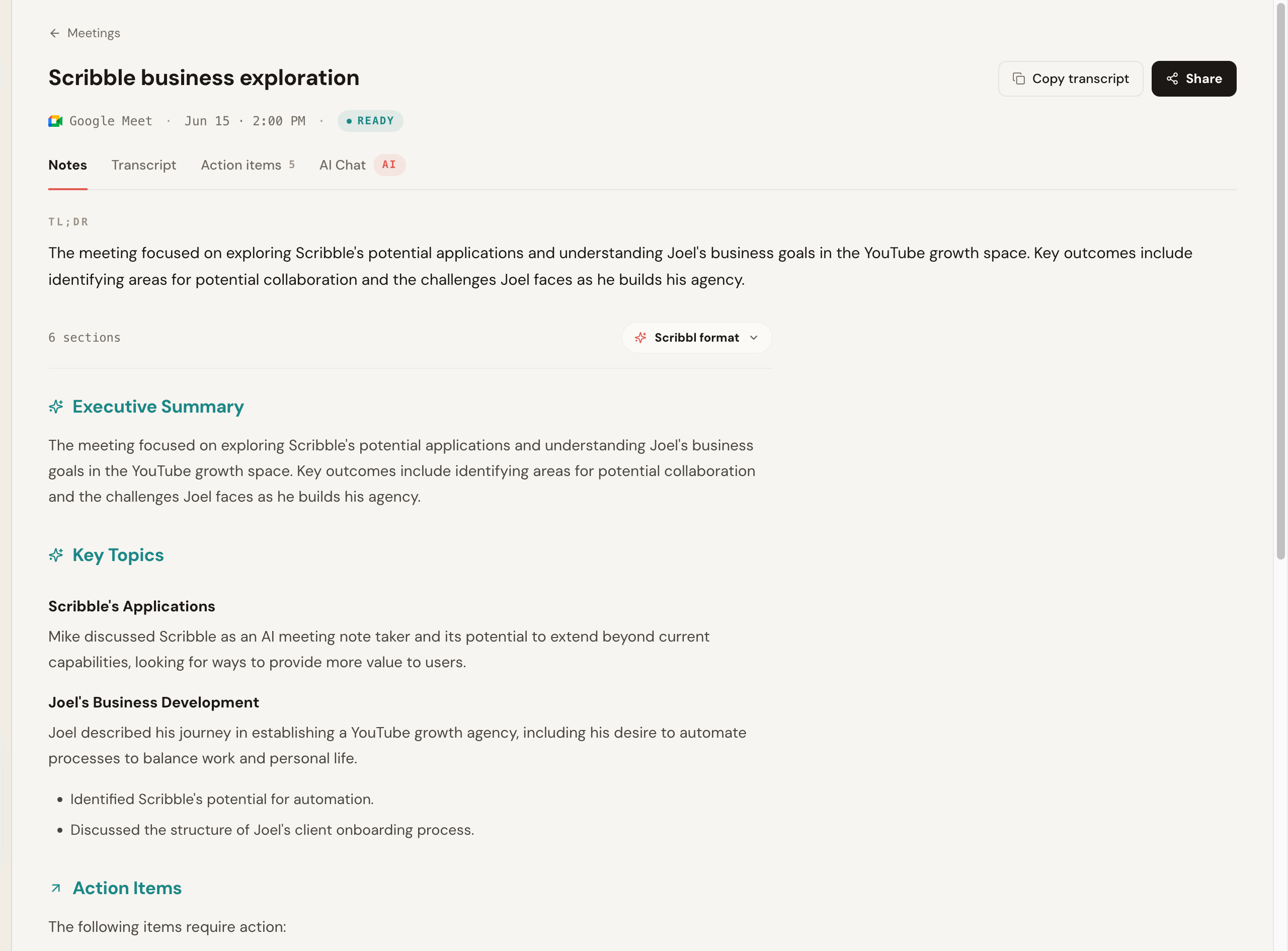
What separates it from a platform-native notetaker is what happens after the call. Automations do the follow-up: they draft the follow-up email, post a summary to Slack or Teams, and open Linear, Jira, Asana, or Monday tickets. Smart Collections sort each meeting into groups you describe in one sentence, and you can ask ChatGPT or Claude about every meeting or just one group. Here is the actual notes output from a recorded call: a TL;DR, an executive summary, key topics, and action items, with no bot in the room.
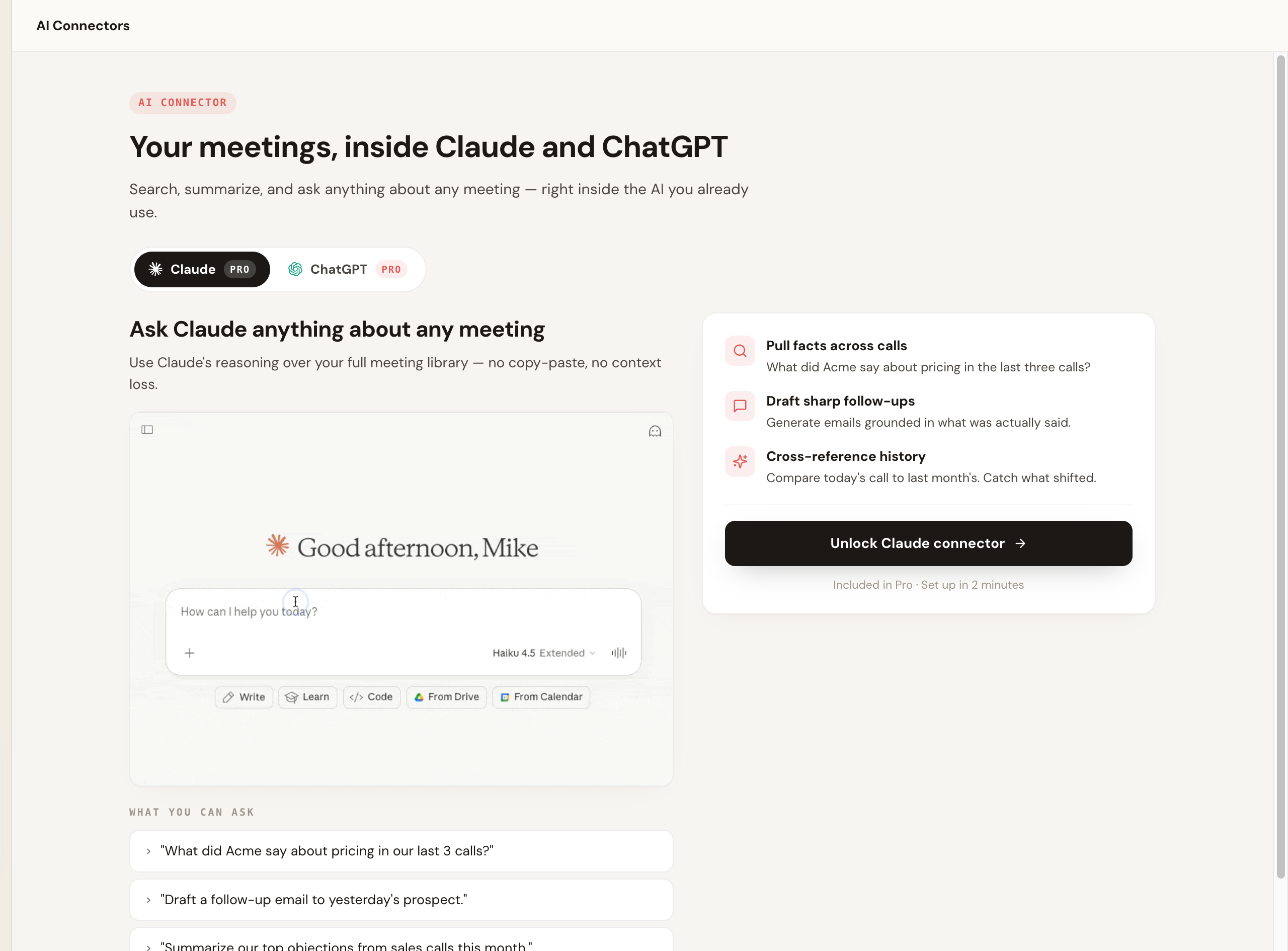
And here is the part that replaces the "notes become tasks" pitch: your meeting library is wired into Claude and ChatGPT, so you can pull facts across calls, draft a grounded follow-up, or have your AI write the ClickUp items for you. If your team tracks work in Linear, Jira, Asana, or Monday, Scribbl's Automations open the tickets themselves, and by default they ask before changing anything.
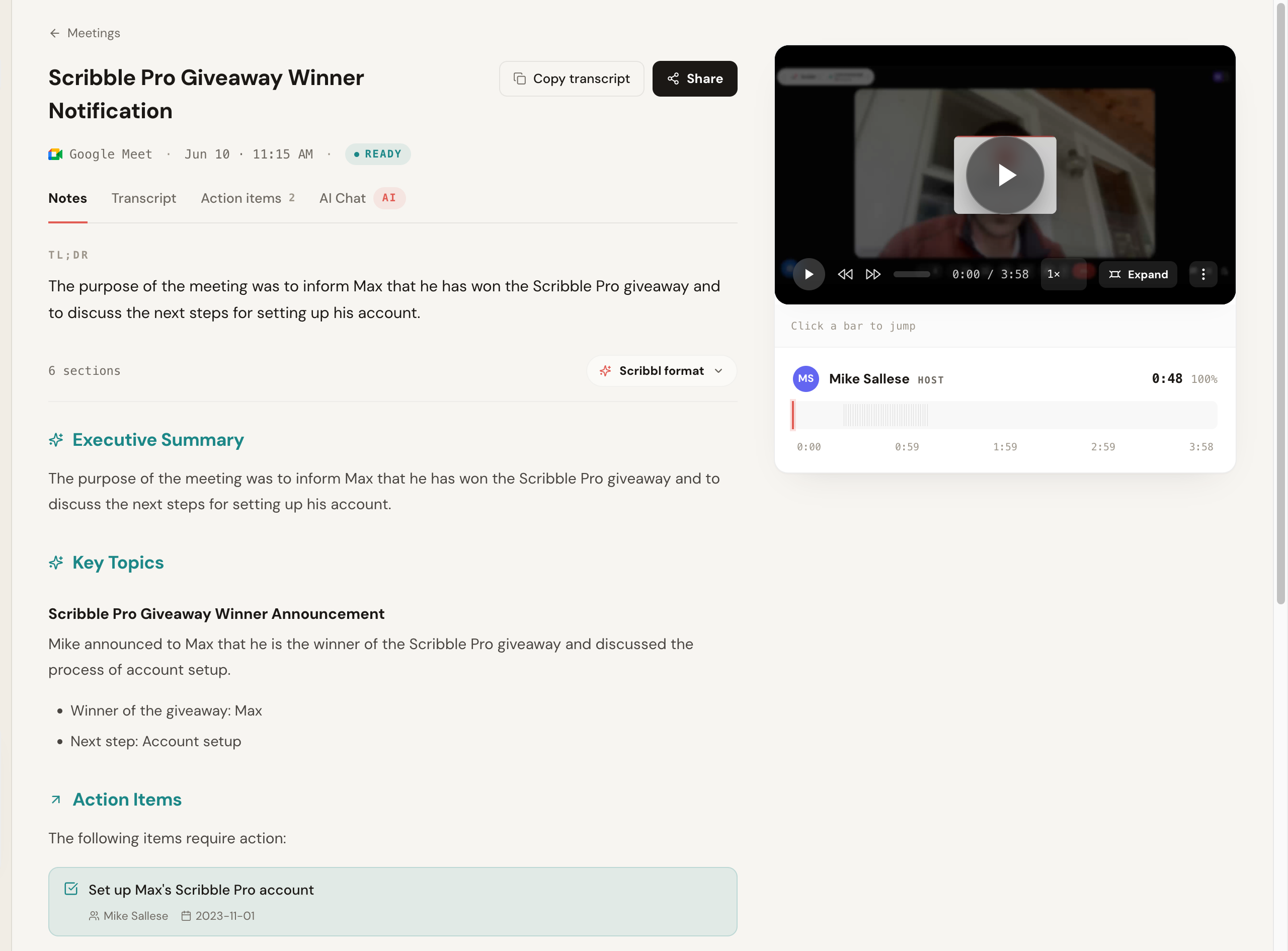
You still get the full recording and a clickable, speaker-labeled transcript side by side with the notes, so you can read the summary and jump straight to the moment it was said.
Best for: anyone who wants the meeting captured with no bot, a free start, and the follow-up handled by ChatGPT or Claude, while keeping ClickUp (or anything else) for project management. For teams, the no-bot model means every member can record their own view without an admin gate, covered on the Scribbl for teams page.
Fireflies (depth, search, and integrations)
Fireflies is an established, feature-rich notetaker with strong search, broad integrations, and team analytics, often cheaper than a loaded platform tier. Its standard model sends a notetaker bot into the call, so it suits teams that want depth and integrations and accept a visible bot. See our Fireflies alternative and Scribbl vs Fireflies.
Fathom (generous free tier)
Fathom is a popular notetaker known for its free plan and clean summaries. It typically joins the call to record, so it suits mostly internal meetings where a bot joining is no problem. See our Fathom alternative and Scribbl vs Fathom.
Otter (mature live transcription)
Otter is a mature transcription tool with strong live captions and a large searchable archive. It typically adds an assistant to the call, so it suits people whose core need is live transcription rather than project workflow. See our Otter alternative and Scribbl vs Otter.
Decision framework: pick the right tool
You do not need to weigh every feature. Pick based on the handful of things that actually change your week.
- Pick Scribbl if you want the meeting captured cleanly with no bot, a real free plan with no credit card, coverage across Meet, Zoom, and Teams, and your meetings wired into ChatGPT or Claude. Keep ClickUp for the project work.
- Pick Scribbl if you want the follow-up done for you: Automations draft the email, post to Slack or Teams, log notes in HubSpot or Pipedrive, and open Linear, Jira, Asana, or Monday tickets, asking before they change anything by default.
- Pick Scribbl if you want your meetings organized without filing them: Smart Collections sort meetings by themselves into groups you describe in one sentence.
The ClickUp AI Notetaker suits teams that already run in ClickUp and accept a bot in every call, and Fireflies, Fathom, and Otter all send a bot into the call too.
The short rule: if your meetings include clients, prospects, candidates, or partners, the bot is the variable that matters, and a botless tool keeps the call normal while still getting you notes. If your real job is managing the work, keep ClickUp for that and pair it with a botless capture tool. Compare Scribbl's plans on the pricing page.
Use both: keep ClickUp, capture the meeting better
You do not have to leave ClickUp to fix the capture. The cleanest setup for most teams is to let each tool do its job.
- 1
Keep ClickUp for the work
Tasks, docs, projects, and goals stay exactly where they are. You change nothing about how your team manages work.
- 2
Capture the meeting botless
Install Scribbl's Chrome extension or desktop app and run your next call. Nothing joins the room, so there is no recorder to announce to attendees.
- 3
Let your AI do the follow-up
Send the meeting to ChatGPT or Claude to draft the recap, pull the action items, and even write the ClickUp tasks for you.
- 4
Drop the result into ClickUp
Paste the recap and action items into the relevant ClickUp Doc or tasks, so the work still lives where your team expects it.
ClickUp AI Notetaker FAQ
Is the ClickUp AI Notetaker worth it in 2026?
It is worth it if you already run your team's work inside ClickUp and want meeting notes to land next to the tasks they create. The AI Notetaker joins your call, transcribes it, and turns the recap and action items into ClickUp items automatically, which is its real edge. It is less worth it if your priority is the meeting capture itself: it sends a bot into the call, the deepest value is locked behind a ClickUp Brain add-on, and a standalone notetaker is usually better at transcript accuracy and after-call AI. If clean, botless capture matters most, a dedicated tool like Scribbl is the better fit, and you can keep ClickUp for tasks.
How does the ClickUp AI Notetaker work?
You connect your calendar, and for meetings you choose, ClickUp sends an AI Notetaker bot that joins the call as a participant to record and transcribe it. After the call it generates a summary and pulls out action items, and because it lives inside ClickUp it can turn those action items into ClickUp tasks and drop the notes into a Doc near your project. It supports Google Meet, Zoom, and Microsoft Teams. The bot is visible to everyone on the call, which is the main trade-off.
Does the ClickUp AI Notetaker put a bot in the meeting?
Yes. Like most notetakers built into a larger platform, ClickUp captures meetings by sending an AI Notetaker bot that joins the call as a participant, so other attendees can see a recorder in the room. If you do not want a bot announced to clients, candidates, or prospects, a botless tool such as Scribbl means nothing ever joins the call, nothing is announced, and no email goes to attendees.
How much does the ClickUp AI Notetaker cost?
The AI Notetaker is part of ClickUp's AI features, which are commonly tied to the ClickUp Brain add-on layered on top of a paid ClickUp plan (Unlimited and Business are commonly cited starting around $7 and $12 per user per month on annual billing, with Brain often cited around $7 per user per month on top). So the practical cost is a paid ClickUp seat plus the AI add-on, and free-plan AI usage is limited. Pricing and AI packaging change often, so confirm the current numbers on ClickUp's pricing page. By contrast, Scribbl has a genuine free notetaker plan with no credit card.
Is the ClickUp AI Notetaker accurate?
For clean audio in common business English, hands-on reviews report it produces usable transcripts and summaries, and its standout is turning action items into ClickUp tasks rather than raw transcription quality. Like every notetaker it degrades on heavy crosstalk, thick accents, and lots of product jargon. Because transcription is one feature inside a large platform rather than the whole product, dedicated tools often edge it on transcript accuracy and the depth of the after-call AI. Run one real meeting and judge the output on your own audio before you commit.
Can I use ClickUp and a dedicated notetaker together?
Yes, and it is a common and sensible setup. Keep ClickUp for tasks, docs, projects, and goals, and use a dedicated botless notetaker like Scribbl to capture the meeting and connect it to ChatGPT or Claude so the follow-up gets written. Then paste the recap and action items into ClickUp, or have your AI draft the ClickUp items for you. You get clean botless capture plus ClickUp's project management without forcing one tool to do both jobs.
What is the best ClickUp AI Notetaker alternative?
Scribbl is our pick: nothing joins the call, it works across Google Meet, Zoom, and Microsoft Teams in one account, the free plan needs no credit card, and it connects your meetings to ChatGPT or Claude. Its Automations do the follow-up, including opening Linear, Jira, Asana, or Monday tickets, and you can keep ClickUp for the project work. Fireflies, Fathom, and Otter are the other common standalone picks, and each of them sends a bot into the call. Disclosure: we make Scribbl, so weigh our pick accordingly and run your own test call.
Does the ClickUp AI Notetaker work with Zoom and Microsoft Teams or only Google Meet?
ClickUp's AI Notetaker is commonly cited as supporting Google Meet, Zoom, and Microsoft Teams, joining each as a bot to record and transcribe. Confirm the current list of supported platforms on ClickUp's site, since coverage changes. If you want Zoom and Teams without a bot, Scribbl's free plan includes Google Meet, Zoom and Teams: the Chrome extension records Google Meet and Scribbl Desktop records Zoom and Teams, with nothing joining the call on any of them.
Is there a free ClickUp AI Notetaker alternative?
Yes. Scribbl has a free plan with no credit card required, 10 meetings a month with Google Meet, Zoom, and Teams included, and it is botless, so nothing joins your calls. You install the Chrome extension or desktop app, run your next call, and get the transcript and notes with no recorder in the room. It is rated 5.0 from 3,000 reviews on the Chrome Web Store and 4.9 from 725 reviews on G2, and used across more than 10,000 organizations.
Should I switch from the ClickUp AI Notetaker?
Switch the capture, not the whole platform. If the bot in your calls, the AI add-on cost, or transcript accuracy is the problem, move meeting capture to a dedicated botless tool and keep ClickUp for project management. With Scribbl you install the extension, run one real meeting on the free plan with no credit card, confirm the notes, then keep ClickUp for tasks and let your AI draft the ClickUp items from the meeting. You lose nothing in ClickUp and gain a normal, bot-free call.
Try Scribbl
Let your meetings take their own notes.
Scribbl records, transcribes, and summarizes your Google Meet calls from your browser. No bot joins the call. Free forever for individuals.
Add to Chrome · It's free