Motion AI Notetaker Review (2026): Is It Worth Buying the Whole Suite?
A 2026 review of Motion's AI Notetaker, the feature bundled inside Motion's paid productivity app. We cover what it actually does, its real edge (action-items auto-scheduled onto your calendar), its real weakness (no free tier, bundled, bot-based), and a full feature matrix against Otter, Fathom, Fireflies, Granola, tl;dv, and the botless free pick, Scribbl.
Updated October 7, 2026

On this page9 sections
- 01What Motion's AI Notetaker actually is
- 02The two facts that decide this for most people
- 03Motion's real edge
- 04Motion AI Notetaker vs the notetakers people cross-shop
- 05The other notetakers, in one line each
- 06Scribbl: the botless, free alternative
- 07Should you buy Motion just for the notetaker?
- 08Using Motion and a dedicated notetaker together
- 09Motion AI Notetaker FAQ
Motion's AI Notetaker is a feature, not a standalone product. It lives inside Motion's paid calendar, project, and task-management app (commonly cited around $19/user/mo monthly, or roughly $12 to $13/user/mo on annual billing), and there is no free tier and no way to buy the notetaker on its own. It joins your Google Meet or Zoom call as a recorder, transcribes it, and produces a summary in about 30 seconds. Its one real differentiator: it turns meeting action items into prioritized Motion tasks and AI-auto-schedules them onto your calendar, which no dedicated notetaker does end-to-end. The catch is you must buy the whole suite to get it. Below we review what it actually does, contextualize the "80% more accurate than human notes" claim, and put it in a full feature matrix against the notetakers people cross-shop, Otter, Fathom, Fireflies, Granola, and tl;dv, plus the botless free pick, Scribbl.
We make Scribbl, so we are upfront about it: treat us as a primary source on Scribbl and a fair-but-interested reviewer of everything else. Where we cite a Motion or competitor price, feature, or accuracy claim, we mark it approximate and tell you to confirm it on that vendor's site, because those details change often.
What Motion's AI Notetaker actually is
Motion is an AI calendar and productivity app. Its core job is your time: it takes your tasks and meetings and builds an auto-scheduled plan, reshuffling automatically as priorities change. The AI Notetaker is a feature added on top of that planning engine, and understanding that ordering explains everything about how it behaves.
When you join a Google Meet or Zoom call, Motion's notetaker joins as a recorder to capture and transcribe the conversation. After the call it generates a summary, commonly cited as ready in about 30 seconds, with timestamped notes you can scan. So far this is table stakes; every notetaker on this page does roughly the same thing.
The part that is genuinely different comes next. Motion auto-extracts the action items from the meeting, turns them into Motion tasks with priorities, deadlines, and time estimates, and then its scheduling engine places those tasks onto your calendar around your existing commitments. That task-to-calendar loop is the whole pitch, and it is the one thing no dedicated notetaker does end-to-end, because no dedicated notetaker owns your calendar.
The two facts that decide this for most people
Search for "Motion AI notetaker" and almost everyone is really asking one of two questions. Here are the answers up front.
- There is no free tier, and the notetaker is not standalone. You cannot try Motion's notetaker on a permanent free plan, and you cannot buy it without the rest of Motion. The entry price is commonly cited around $19 per user per month billed monthly, dropping to roughly $12 to $13 per user per month on annual billing, for the whole productivity suite. If meeting notes are all you want, that is a lot of product (and a recurring bill) for a feature several rivals give away.
- A bot joins your call. Motion's notetaker captures by joining the meeting as a recorder participant, so attendees can see it. There is no botless or device-audio capture option. On internal calls that is fine; on external, client, or sales calls a visible recorder changes the room, and there is no built-in way to avoid it.
Motion's notetaker suits people who want the calendar automation and accept both. If either one is a dealbreaker, read on: Scribbl solves exactly those two problems, with a free plan and nothing joining the call.
Motion's real edge, and its real weakness
Here is where Motion's notetaker wins and where it loses, before we get to the matrix.
- Action items to scheduled tasks: meeting to-dos become prioritized Motion tasks with deadlines and durations
- AI auto-scheduling: those tasks get placed onto your calendar automatically, end to end
- One surface: notes, tasks, and calendar live in the same app, no copy-paste
- Fast summaries: a post-meeting recap in roughly 30 seconds
- No free tier: the notetaker is locked behind the paid suite
- Not standalone: you must buy all of Motion to use it
- Bot-based capture: a recorder joins the call, no botless option
- Accuracy claim is marketing: the 80% figure is not an independent benchmark
On the accuracy claim. Motion markets the notetaker as trained on "10,000+ hours" of meetings and "80% more accurate than human notes." Read that carefully: it compares AI transcription to a human scribbling notes by hand, which is a low bar, not a head-to-head word-error-rate test against other AI notetakers. It tells you nothing about how Motion compares to Otter, Fathom, or anyone else. In practice the leading notetakers are broadly similar on clean audio and all of them slip on heavy crosstalk and strong accents. Treat the 80% number as a marketing line and judge accuracy by running one real call with your own product names and jargon.
Motion AI Notetaker vs the notetakers people cross-shop
This is the comparison the query is really about. The table below puts Motion against the dedicated notetakers people weigh it against, plus Scribbl as the botless free pick. The columns are the ones that actually decide this choice: whether there is a free tier, real price, how it captures the meeting, whether it connects to ChatGPT or Claude, and platform coverage. Motion and tl;dv prices are approximate and commonly cited; Otter, Fathom, Fireflies, and Granola prices come from their pricing pages as of October 2026. Prices change often, so confirm each on the vendor's own pricing page.
| Feature | Scribbl | Motion | Otter | Fathom | Fireflies | Granola | tl;dv |
|---|---|---|---|---|---|---|---|
| Free plan (no credit card) | Yes | No | Limited | Yes | Limited | Yes | Yes |
| Standalone notetaker (buy it alone) | Yes | No | Yes | Yes | Yes | Yes | Yes |
| Starting paid price | Free; Pro $13 annual, $20 monthly | ~$19/mo; ~$12-13 annual | $8.33 annual, $16.99 monthly | $16 annual, $20 monthly | $10 annual, $18 monthly | $14/mo (Business) | ~$18-29/mo |
| No bot joins the call | Yes | No | No | No | No | Yes | No |
| Speaker identification | Yes | Yes | Yes | Yes | Yes | Limited | Yes |
| Auto-extracted action items | Yes | Yes | Yes | Yes | Yes | Yes | Yes |
| Connects meetings to ChatGPT or Claude | Yes | Not stated | Yes | Yes | Yes | Yes | Yes, on Pro |
| Google Meet / Zoom / Teams | All three | Meet, Zoom (Teams confirm) | All three | All three | All three | Audio-based; confirm | All three |
| 5.0 from 3,000 reviews on the Chrome Web Store; 10,000+ orgs | Yes | No | No | No | No | No | No |
The other notetakers, in one line each
So you know who is in the table and why they belong in the conversation:
- Scribbl is the botless free pick: nothing joins the call, it works on Google Meet, Zoom, and Microsoft Teams, and its Automations do the follow-up. More below.
- Otter.ai is the mature live-transcription pick with a large searchable archive; its OtterPilot assistant joins the call. Best for people who want reliable captions and transcripts. See our Otter alternative and Scribbl vs Otter.
- Fathom is the polished, widely loved notetaker with a generous free tier and clean summaries; a bot joins the call. Best for internal-heavy teams. See our Fathom alternative and Scribbl vs Fathom.
- Fireflies.ai is the deep, integration-heavy option with strong search and team analytics; its notetaker bot joins the call. Best for teams that want feature depth. See our Fireflies alternative.
- Granola is the notes-forward tool that enhances your own typed notes and avoids a traditional join-the-call bot. Best for people who like taking rough notes. See our Granola alternative and Scribbl vs Granola.
- tl;dv is the recording-and-clips notetaker with a free tier and CRM integrations; a bot joins the call. Best for teams that share meeting moments. See our tl;dv alternative and Scribbl vs tl;dv.
Scribbl: the botless, free alternative (and yes, we make it)
If what sent you to Motion was wanting your meetings handled and the follow-up done, but the no-free-tier, must-buy-the-whole-suite, bot-in-the-call reality gives you pause, Scribbl is the inverse trade. It has a real free plan with no credit card, and it is botless: nothing joins the call, nothing is announced, and no email goes to the people you are meeting with. It works on Google Meet with its Chrome extension and on Zoom and Microsoft Teams with Scribbl Desktop (Mac with Apple silicon and Windows), and it is rated 5.0 from 3,000 reviews on the Chrome Web Store and 4.9 from 725 reviews on G2, used across more than 10,000 organizations. Those last two are Scribbl's own verifiable numbers; treat everything we say about competitors as something to confirm on their sites.
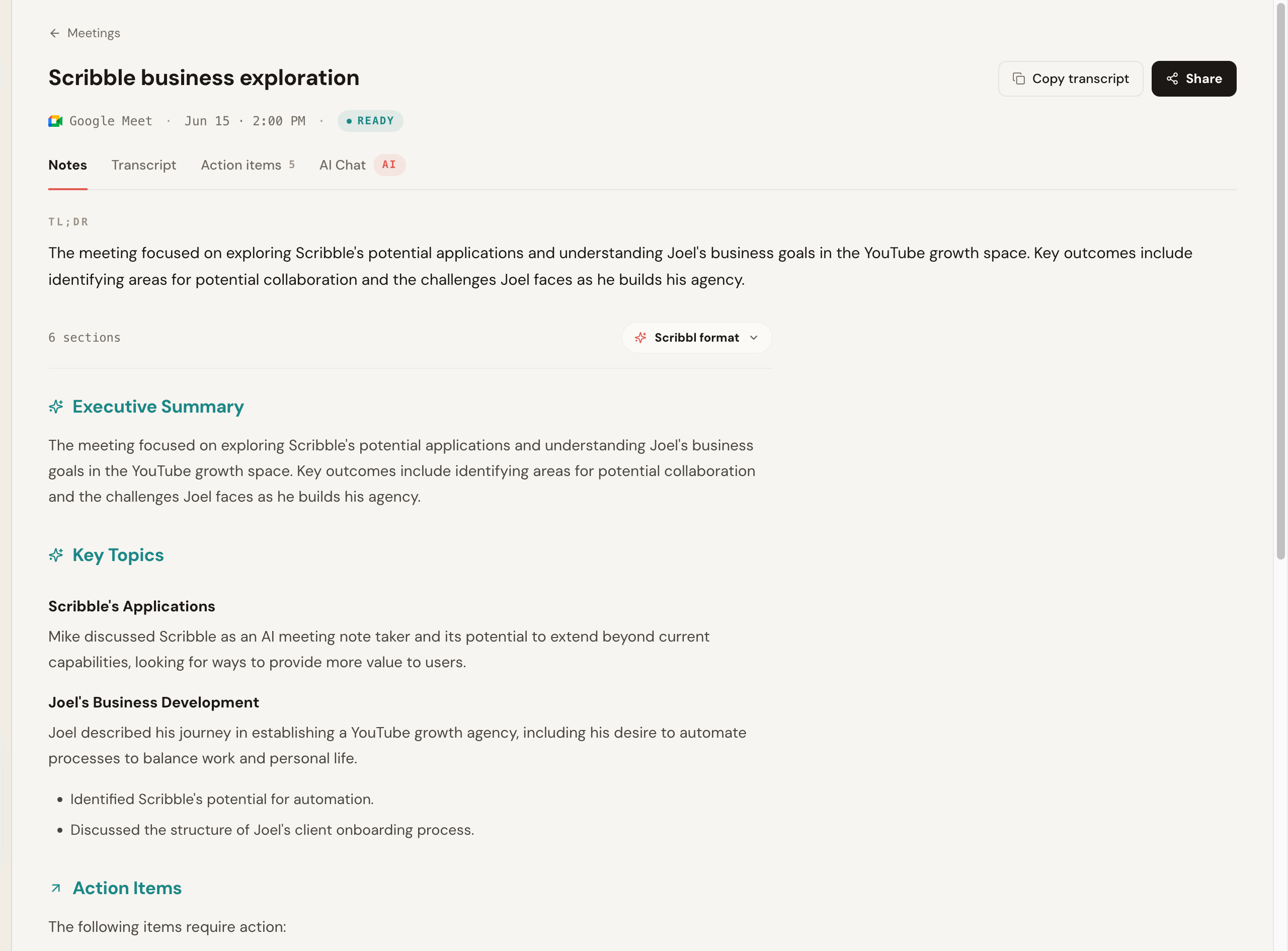
Here is the Scribbl notes view after a Google Meet call, with a TL;DR, an executive summary, key topics, and action items. Nothing joined the call.
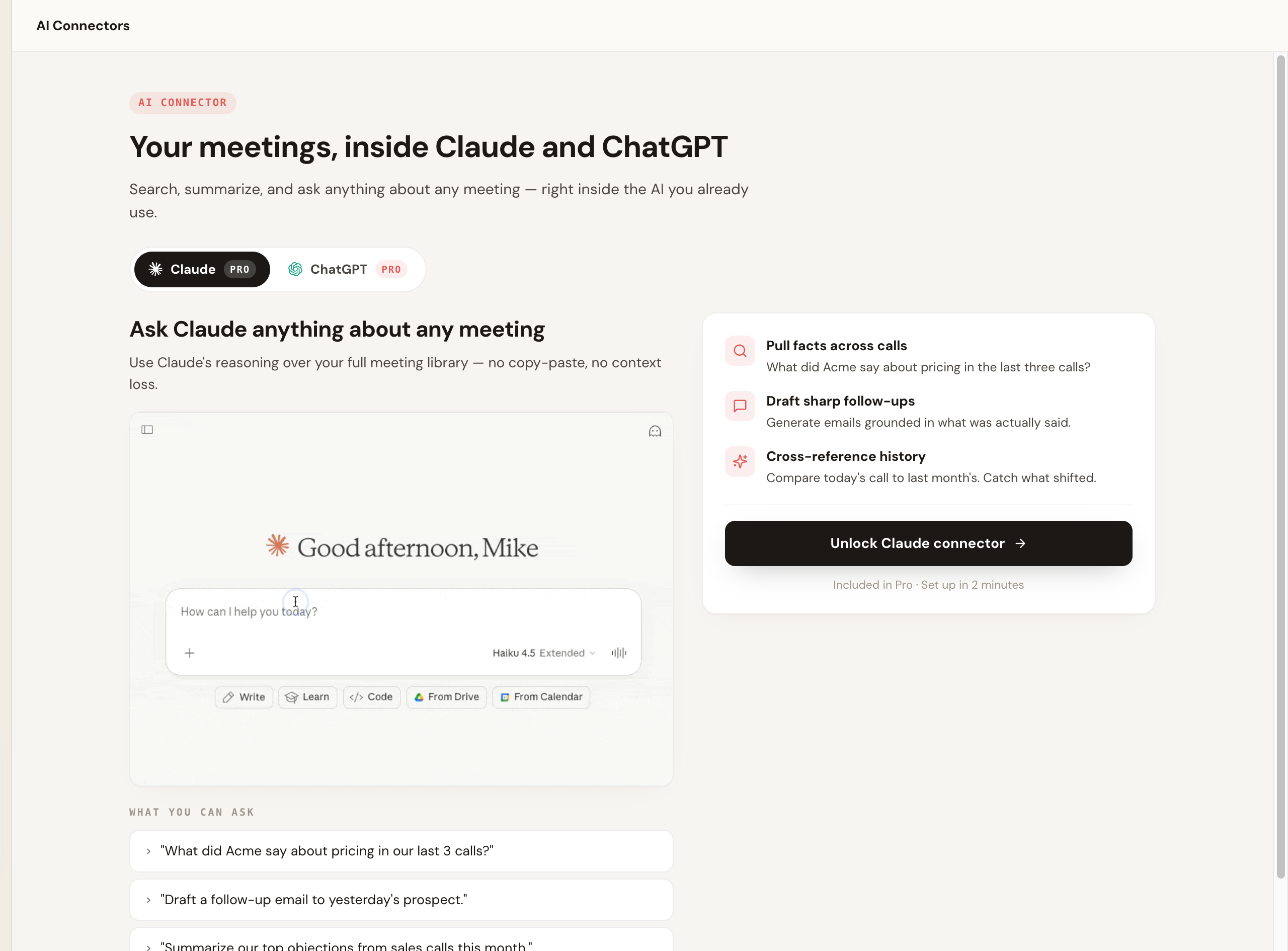
Where Motion routes action items into its own task list, Scribbl routes the whole meeting into the AI you already use. It connects your meeting library to ChatGPT or Claude, so you can pull action items across calls, draft a follow-up grounded in what was actually said, and prep next steps without copy-pasting transcripts. It is a different answer to "make the work happen": Motion schedules tasks on its calendar; Scribbl hands the meeting to your AI so the writing and the next steps get done.
Scribbl's Automations take the follow-up further, into the tools you already work in: they draft the follow-up email, open Linear, Jira, Asana, or Monday tickets, post to Slack or Teams, save notes to Notion, Google Drive, or Confluence, or add a Google Sheet row. By default they ask before changing anything.
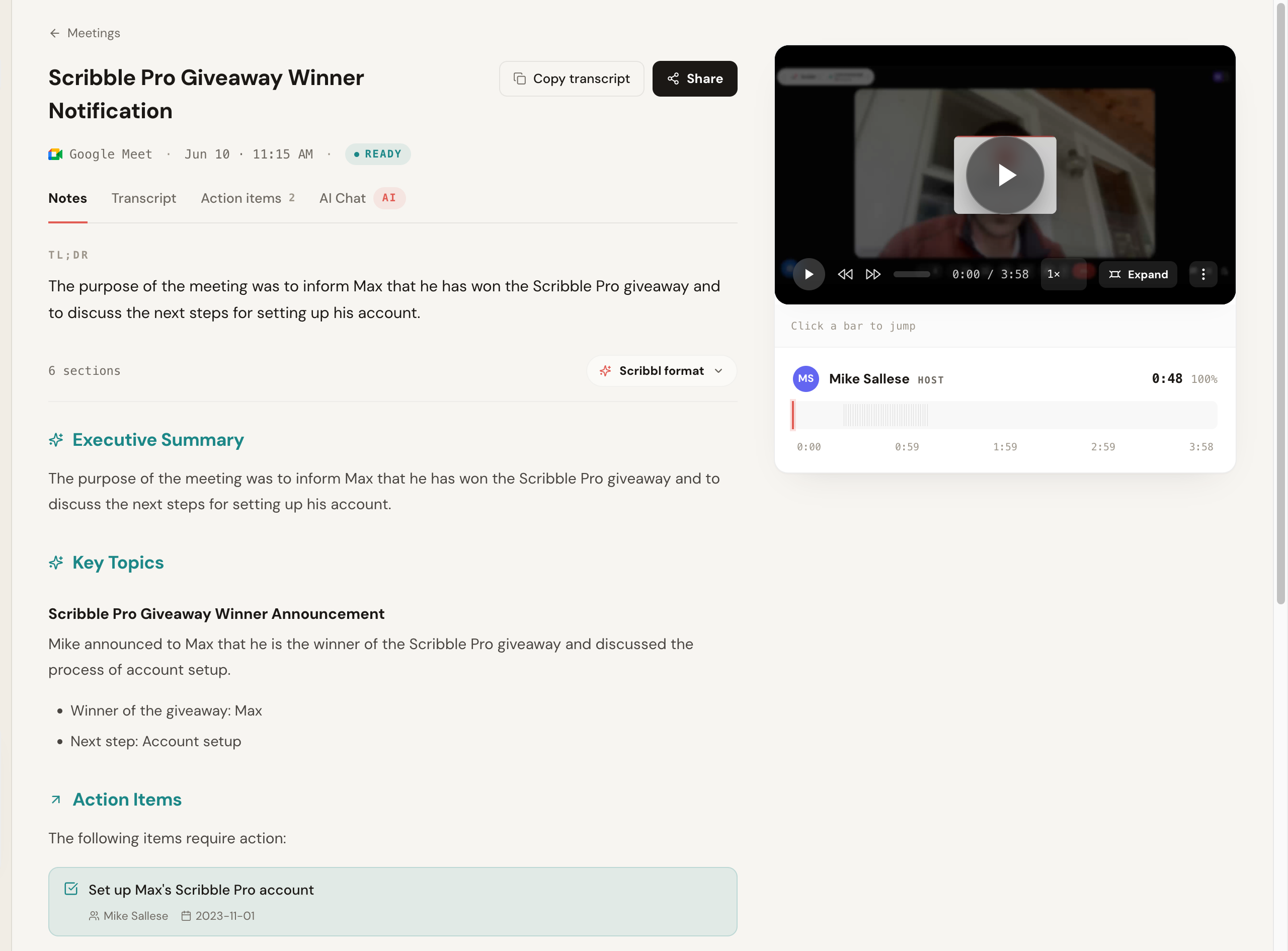
You still get the full recording and a clickable, speaker-labeled transcript side by side with the notes, so you can read the AI summary and jump straight to the moment in the video where something was said.
We explain the no-bot model in depth in the botless AI notetaker explainer, and the pricing page lays out the free and paid plans.
Should you buy Motion just for the notetaker?
Here is the decision, reduced to the few things that actually change your week.
- Choose Scribbl if you want notes without a bot in the call, a real free plan with no credit card, coverage across Meet, Zoom, and Teams, and your meetings wired into ChatGPT or Claude so the follow-up gets written. This is the pick if the no-free-tier, must-buy-the-suite reality of Motion is your sticking point.
- Motion's notetaker suits people who already use Motion's AI calendar and want meeting action items to become scheduled tasks automatically, and who accept the suite price and a bot in the call.
The rule of thumb: Motion's notetaker only earns its suite price if you use the calendar and task automation it feeds. If you would ignore that and just read the notes, you are overpaying for a planning platform, and Scribbl, free and botless, is the better buy.
Using Motion and a dedicated notetaker together
Some people keep Motion for planning and add a botless notetaker for clean capture. Here is the clean setup if you go this route, using the botless free pick as the example.
- 1
Keep Motion for your calendar and tasks
Leave Motion running for AI scheduling and project planning, the thing it is actually built for.
- 2
Install a botless notetaker for capture
Add the Scribbl Chrome extension or desktop app and sign in on the free plan. No credit card, no bot joins the call.
- 3
Run your next real meeting
Join your Google Meet, Zoom, or Teams call. Nothing joins the room, so there is no recorder to announce to attendees.
- 4
Pull the action items with your AI
Send the meeting to ChatGPT or Claude to draft the follow-up and list the next steps from what was actually said.
- 5
Move the tasks into Motion
Drop those action items into Motion so its scheduler places them on your calendar.
Every call stays bot-free, and every meeting gets the video, a transcript with speaker names, AI notes and action items.
Motion AI Notetaker FAQ
Is the Motion AI Notetaker free?
No. Motion has no free tier. The AI Notetaker is a feature inside Motion's paid productivity app, which is commonly cited starting around $19 per user per month billed monthly, or roughly $12 to $13 per user per month on annual billing. There is usually a short free trial, but you cannot use the notetaker on a permanent free plan, and you cannot buy the notetaker on its own. Confirm current pricing on Motion's site, because plans change. If you want a notetaker with a genuine free plan and no credit card, Scribbl's free plan includes Google Meet, Zoom, and Microsoft Teams, and nothing joins the call.
Is Motion's AI Notetaker a standalone product?
No, and this is the single biggest point of confusion. Motion's AI Notetaker is one feature inside Motion's larger calendar, project, and task-management app. You cannot subscribe to just the notetaker. To use it you buy the whole Motion suite. That bundling is the point: action items from your meetings flow straight into Motion's task list and get auto-scheduled onto your calendar. If you only want meeting notes, you are paying for a planning suite you may not need.
Does Motion's notetaker work with Zoom, Google Meet, and Microsoft Teams?
Motion's AI Notetaker joins Google Meet and Zoom calls as a recorder to capture and transcribe them, and Microsoft Teams support is commonly cited as well, so confirm current platform coverage on Motion's site before relying on it. Because it joins the call, attendees can see a recorder participant in the meeting. With a botless tool like Scribbl, nothing joins the call on Google Meet, Zoom, or Microsoft Teams.
How accurate is Motion's AI Notetaker?
Motion markets the notetaker as trained on 10,000 plus hours of meetings and roughly 80 percent more accurate than human notes, but that is a vendor claim comparing AI capture to a person scribbling by hand, not an independent word-error-rate benchmark against other notetakers. In practice, transcription accuracy across the leading notetakers is broadly similar on clean audio and all of them degrade on heavy crosstalk and strong accents. Treat the 80 percent figure as marketing and run one real call with your own jargon before deciding.
What does Motion's AI Notetaker actually do?
It joins your Google Meet or Zoom call as a recorder, transcribes it live, and produces a post-meeting summary in roughly 30 seconds with timestamped notes. Its real differentiator is what happens next: it auto-extracts action items and turns them into prioritized Motion tasks with deadlines and durations, then AI-auto-schedules those tasks onto your calendar alongside your existing work. No dedicated notetaker does that end-to-end task-to-calendar step, which is exactly why it lives inside Motion's planning suite.
Is Motion's notetaker worth it just for the notes?
Only if you also want, or already use, Motion's calendar and task auto-scheduling. The notetaker's whole reason to exist is that action items become scheduled tasks, so if you ignore the planning side you are paying suite pricing (no free tier) for notes you could get free elsewhere. If you mainly want clean meeting capture and summaries, a dedicated notetaker like Scribbl gives you that, free to start and with nothing joining the call, without buying a project-management platform.
What is the best alternative to Motion's AI Notetaker?
Scribbl is the pick for most people: notes without a bot in the call and a real free plan with no credit card. Nothing joins the call, every meeting gets the video, a transcript with speaker names, AI notes and action items on Google Meet, Zoom, and Microsoft Teams, and it connects your meetings to ChatGPT or Claude so the follow-up work gets done. Unlike Motion, you can use it on its own. Most other dedicated notetakers, including Fathom, Fireflies, Otter, and tl;dv, send a bot into the call the way Motion does. Disclosure: we make Scribbl, so weigh our pick accordingly and run your own test call.
Does Scribbl auto-schedule tasks like Motion?
Scribbl puts the follow-up in the tools you already use rather than on a calendar: its Automations draft the follow-up email, open Linear, Jira, Asana, or Monday tickets, post to Slack or Teams, and save notes to Notion or Confluence, asking before they change anything by default. On Pro you can also ask ChatGPT or Claude about every meeting to pull action items and prep next steps from what was actually said. If clean botless capture and follow-up that lands in your own tools matter most, Scribbl is the stronger fit, and it is free to start.
Can I use Motion and a dedicated notetaker together?
Yes, and some people do. Keep Motion for AI scheduling and task planning and use a dedicated botless notetaker like Scribbl to capture the actual meeting with nothing joining the call, then drop the action items into Motion so its scheduler places them on your calendar.
Does Motion's notetaker put a bot in the meeting?
Yes. Motion's AI Notetaker joins the call as a recorder participant to capture and transcribe it, so attendees can see it in the meeting. There is no built-in botless or device-audio capture option. If you do not want a visible recorder on external or client calls, a botless tool like Scribbl means nothing ever joins the call, nothing is announced, and no email goes to attendees.
Try Scribbl
Let your meetings take their own notes.
Scribbl records, transcribes, and summarizes your Google Meet calls from your browser. No bot joins the call. Free forever for individuals.
Add to Chrome · It's free