AI Notetaker for Standups: Per-Person Notes, Blockers, and Sync
An AI notetaker for standups transcribes your daily standup, groups updates by person, surfaces blockers, and assigns action items. Botless on Meet, Zoom, and Teams. Free plan, no bot in the call.
Updated October 7, 2026
On this page13 sections
- 01What good standup notes look like
- 02From raw standup to structured notes
- 03Why standups need a notetaker, not a bot
- 04Platforms and how it captures
- 05How it works on your standup
- 06Group by person with a saved standup prompt
- 07Send the recap to the team
- 08For scrum masters and multiple teams
- 09How standup notetakers compare
- 10Trusted by teams that run a lot of standups
- 11A note on consent
- 12FAQ
- 13Start capturing your standups
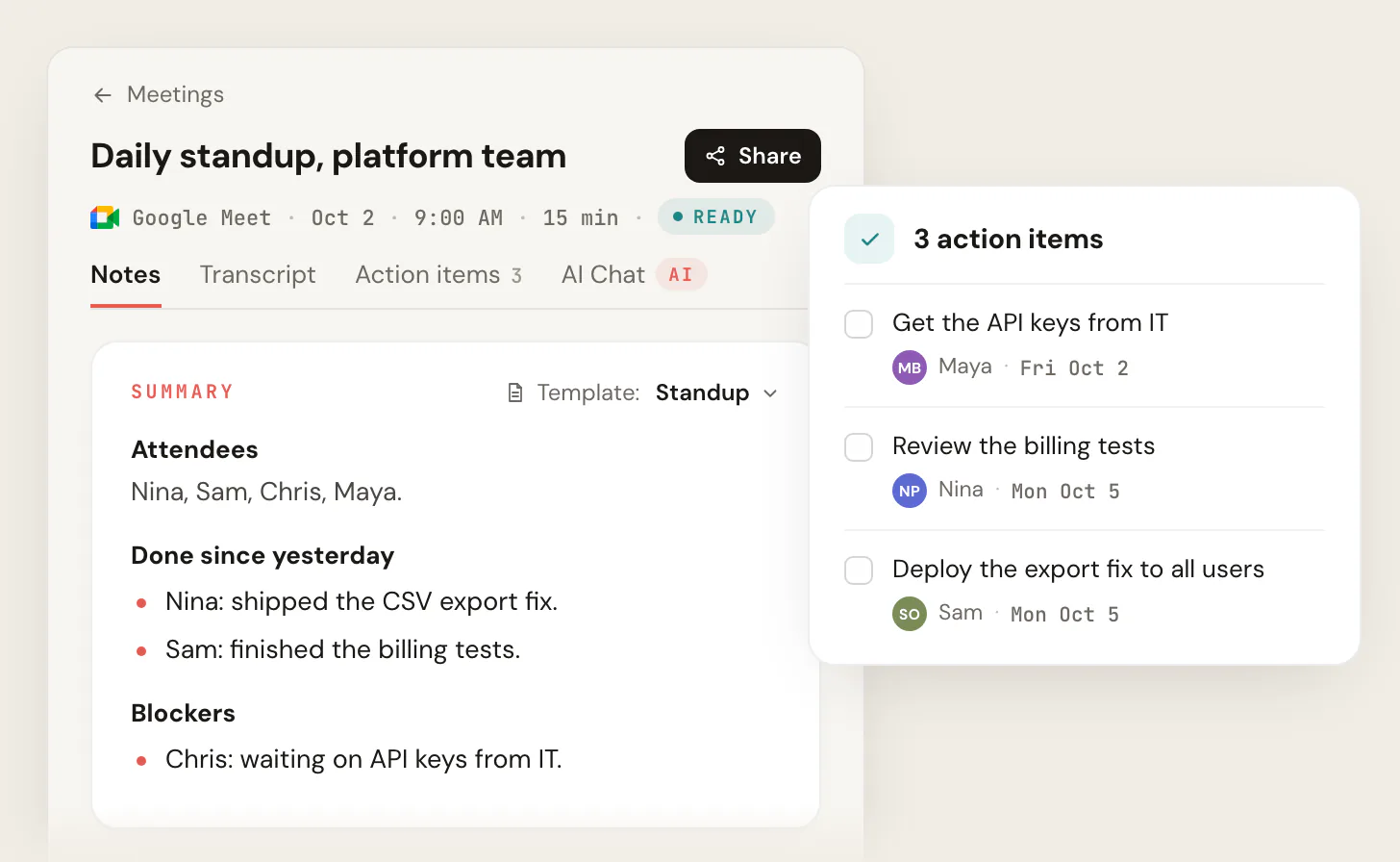
The best AI notetaker for standups is one that captures your daily sync without putting a bot in the call and returns notes in the shape a standup actually uses: each person's update grouped under their name, a blockers section that names who is stuck, and action items with owners. Scribbl does exactly that on Google Meet, Zoom, and Microsoft Teams, with no extra tile, no join announcement, and no attendee email, then connects the transcript to the AI you already use (ChatGPT or Claude) so you can push the recap into Slack, Teams, or your tickets. It is free to start with no credit card, so a 10-minute sync stays a 10-minute sync and still produces a record.
A generic meeting summarizer gives you one paragraph about the call. A standup notetaker gives you the shape your team already speaks in: yesterday, today, blockers, per person. That difference is the whole reason "for standups" is in the search box, and it is what the rest of this page is about.
What good standup notes look like
A daily standup runs on the three-question framework. Each person answers, in order:
- What did I do since the last standup?
- What am I doing today (or until the next standup)?
- What is blocking me?
The ritual is meant to be short, usually under fifteen minutes, standing up so nobody settles in. That speed is exactly what makes standups hard to document. The updates come fast, they overlap, and the one part that actually matters later, the blocker, gets said once and then buried under the next person's update. By the time the call ends, the only record is what each person happened to remember.
Good standup notes fix that. They are not a transcript and they are not a paragraph. They are structured:
- Grouped by person. Each teammate's update lives under their name, so anyone scanning the recap can find their own and their dependencies fast.
- Split into yesterday and today. The two halves of each update stay separate, because "shipped" and "starting" mean different things to whoever is reading.
- Blockers pulled out. Every blocker is lifted into its own list with the person attached, because a blocker that stays inside a paragraph is a blocker nobody chases.
- Action items with owners. Concrete next steps, each tied to a name and, where it was said, a due date.
That is the bar. An AI notetaker for standups should produce that shape automatically, not a wall of text you still have to reorganize by hand.
A standup notes template you can copy
Most guides describe the three questions but never hand you the actual format. Here is the template Scribbl fills in for you automatically, and the same one you can paste into a doc if you are still taking notes by hand today. The fields are deliberately spare, because a standup recap that takes more than ten seconds to read does not get read.
Daily standup · [date] · [team]
[Person]
Yesterday: [what shipped or moved]
Today: [what they are picking up]
Blockers
- [Person]: [what they are stuck on, and who can unblock it]
Action items
- [Owner]: [next step], [due date, if stated]
Carryover
- [Anything still open from a previous standup]
The carryover line is the one most teams forget and the one a recurring notetaker is best at, because it can compare today's blockers against the ones it captured yesterday. The next section shows that same template being filled from a real-sounding standup.
From raw standup to structured notes
Here is the part competitors only gesture at. Below is a realistic slice of a daily standup transcript on the left, three people talking fast, and the structured standup notes an AI notetaker produces from it on the right. Same call, two formats. The transcript is what was said. The notes are what you actually use.
Priya: Yesterday I finished the auth refactor and got it merged. Today I am picking up the rate-limit ticket. No blockers.
Marcus: I shipped the export endpoint. Today I am on the CSV bug, but I am blocked, I need the staging DB credentials from infra before I can repro it.
Dana: Spent yesterday on the onboarding flow QA. Today I am writing the migration, and Priya I will need your auth changes deployed to staging by Thursday or I am stuck.
Priya: Got it, I will get auth onto staging by Wednesday.
Priya
Yesterday: Finished and merged auth refactor.
Today: Rate-limit ticket.
Marcus
Yesterday: Shipped export endpoint.
Today: CSV bug.
Dana
Yesterday: Onboarding flow QA.
Today: Writing the migration.
Blockers
- Marcus: needs staging DB credentials from infra.
- Dana: needs Priya's auth changes on staging by Thu.
Action items
- Priya: deploy auth to staging by Wed.
- Infra: send Marcus staging DB credentials.
- 1 Raw transcript: speaker-labeled lines, in the order people spoke. Useful as a record, but nobody scans this to find a blocker.
- 2 The same updates, regrouped under each person with yesterday and today split apart.
- 3 Every blocker lifted into one list, with the person attached, so the scrum master can chase them in order.
- 4 Action items with named owners and, where it was said on the call, a due date.
Notice what the notes did that the transcript did not. Dana's dependency on Priya became a dated action item. Marcus's blocker got pulled out where the scrum master will actually see it. And Priya's verbal commitment to deploy by Wednesday turned into an owned task instead of a line nobody wrote down. That is the difference between a transcription tool and a notetaker built for standups.
Why standups need a notetaker, not a bot
A standup is the wrong meeting to drop a bot into. It is short, it is daily, and it is full of people who already feel like the meeting takes long enough. A recording bot that joins as a separate participant, announces itself, and sometimes emails the room adds friction to the one meeting that is meant to have none.
A botless notetaker avoids all of that. Nothing joins the call, so the standup looks and feels identical to the one you ran yesterday. Nobody waits for a bot to be admitted, nobody sees a notetaker tile, and nobody gets a surprise email. This is the botless AI notetaker approach: the recording, the transcript, and the notes all happen without anyone joining.
- What joins the standup: a named bot dials in as a participant
- Speed: the room waits while the bot is admitted
- Visible to the team: an extra tile, often a join notice
- After the sync: recording and summary live in a separate app
- Recurring setup: a bot in every daily call, forever
- What joins the standup: nothing
- Speed: no waiting for a bot to be admitted
- Visible to the team: no extra tile, no join notice
- After the sync: per-person notes, blockers, and actions
- Recurring setup: set once, runs every day
Platforms and how it captures
Remote and hybrid teams rarely run every standup in one tool, so platform coverage matters. Scribbl captures standups on all three major platforms, and the capture method is the same on each: botless.
- Google Meet. Captured through the Chrome extension, with no bot in the participant list. Full walkthrough: how to record Google Meet.
- Zoom. Captured with Scribbl Desktop on a Mac with Apple silicon or Windows, without a bot joining the meeting.
- Microsoft Teams. Captured without a bot through Scribbl Desktop on a Mac with Apple silicon or Windows.
The distinction worth understanding when you compare tools: most AI notetakers send a bot that dials into the call as a separate attendee. Scribbl is botless, which means nothing joins the call and nothing is announced to the room. For a standup, where the whole value is staying fast and frictionless, that is the deciding difference. See the botless approach for the full explanation.
Remote and hybrid standups
Plenty of standups run half in a room and half on a call. Scribbl is built for online and hybrid standups on Google Meet, Zoom, and Microsoft Teams, so both setups are covered:
- Fully remote. Everyone is on Meet, Zoom, or Teams. Scribbl captures it with nothing joining, the same as any other meeting.
- Hybrid. Some people are in the room, some are dialed in. The room joins the call from a laptop, so Scribbl captures it as usual, and the in-room voices come through the same shared mic the remote teammates already hear.
The format of the output does not change with the setting. Whether everyone was on Teams or half the team was in the room, you get the same grouped, blockers-first recap. For the in-room half, center the laptop and keep the room quiet so every voice carries to the call.
How it works on your standup
The setup takes a couple of minutes once, then it runs every day.
- 1
Add the extension or desktop app
Install the Scribbl Chrome extension for Google Meet, or Scribbl Desktop for Zoom and Teams, and sign in. Free plan, no credit card.
- 2
Join your standup as usual
Open your daily standup on Google Meet, Zoom, or Teams. Nothing joins the participant list and nothing is announced to the room.
- 3
Get structured notes
When the call ends you have a transcript, per-person notes, a blockers list, and action items with owners, no manual minute-taking.
- 4
Share and sync
Drop the recap in your Slack or Teams channel, and use the connected AI to format ticket updates for Jira or Linear.
Because the standup is recurring, this is a set-it-once thing. Every sync after the first produces a recap automatically, with no bot to admit and no failed joins when a calendar link is wrong. Over a quarter that becomes a searchable record of every blocker the team raised, without anyone ever having taken minutes by hand.
Group by person with a saved standup prompt
A generic summary collapses everyone into one paragraph. A standup needs the opposite: structure. Because Scribbl connects your meetings to the AI you already use (ChatGPT or Claude), you control the shape of the notes with a prompt you save once and reuse on every standup.
That last line matters. A standup notetaker should structure what was actually said, not fabricate owners or due dates to fill a template. The prompt above gives you the per-person, blockers-first shape every time, and it is yours to tweak: group by squad, flag anything that slipped two days running, or roll five days of standups into one weekly digest.
Send the recap to the team, and to your tickets
The point of recording a standup is not the archive, it is the recap and the follow-through. The agile and engineering buyers searching for this are really asking one question: does it reach the places our work already lives?
- Slack or Teams. Post the grouped recap into your team channel so whoever missed the live sync gets the same signal as the people who were there. See Scribbl with Slack.
- Jira or Linear. Because the AI you connect can read the structured notes, you can have it draft per-ticket updates and the comment text to paste onto each issue, so a blocker raised in standup becomes a comment on the ticket it belongs to.
Because Scribbl connects your meetings to the AI you already use, the recap is not a dead end. You ask the AI to draft the Slack message, group blockers by owner, or format the Jira updates, and the work gets done, not just filed. Automations go further: when a standup lands in a Smart Collection, they post the recap to Slack or Teams and open Linear or Jira tickets, asking before they change anything by default. Always confirm your workspace's app permissions before connecting any tool to a private channel or project. For multi-team setups and admin controls, see Scribbl for teams, and for the engineering-manager angle, Scribbl for product managers.
For scrum masters and multiple teams
The person who feels standup documentation most is the scrum master or team lead running several syncs a day. A notetaker built for the standup pattern changes that job in a few specific ways:
- Chase blockers, do not transcribe them. With every blocker pulled into its own list and tagged to a person, the lead spends the standup listening and unblocking instead of scribbling. The list is waiting in the recap the moment the call ends.
- Spot the blocker that will not die. Because each standup is recorded, you can ask the connected AI to flag any blocker that has appeared two or three days running. That is the single most useful signal a manual notetaker never surfaces, and the reason a recurring recap beats a one-off summary.
- Roll many standups into one digest. Run three teams? Point the AI at the week's standups and ask for one digest grouped by team, with a combined blockers list. You get a leadership-ready update without sitting in or re-reading five calls.
- Keep a searchable history. Over a sprint, the recaps become a record you can search: when did this dependency first come up, who owned it, what was promised. No tool that puts a bot in the room and files the summary elsewhere makes that as low-friction as a botless capture that lives with the rest of your meetings.
How standup notetakers compare
Most AI notetakers can transcribe a meeting. Fewer are built for the standup shape, and fewer still skip the bot. Here is how the standup-relevant capabilities line up. Treat competitor cells as general categories and verify the latest details on each vendor's own site, since features and plans change.
| Feature | Scribbl | Bot-based notetaker | Generic transcriber |
|---|---|---|---|
| Joins without a bot in the call | Yes | No | Varies |
| Google Meet, Zoom, and Teams | Yes | Yes | Varies |
| Per-person standup grouping | Yes | Varies | No |
| Blockers pulled into their own list | Yes | Varies | No |
| Flag a blocker repeating across days | Yes | Varies | No |
| Action items with owners | Yes | Yes | No |
| Connects to ChatGPT or Claude for custom output | Yes | Yes | Varies |
| Free plan, no credit card | Yes | Varies | Varies |
The pattern the table makes clear: a generic transcriber gives you words, a bot-based tool gives you a summary but puts a stranger in your standup, and a standup-shaped botless notetaker gives you the per-person, blockers-first output without changing how the meeting feels. For a broader field, see the best botless meeting recorders.
Trusted by teams that run a lot of standups
Scribbl is rated 5.0 from 3,000 reviews on the Chrome Web Store and 4.9 from 725 reviews on G2, and used by more than 10,000 organizations, and it is free to start with no credit card. See the full tiers on the pricing page.
A note on consent
Recording without a bot does not change your responsibilities. Recording laws vary by region, and some places require consent from everyone on the call, internal meetings included. Tell the team you are recording the standup and agree on it once, the same way you would agree on any standing practice. A botless notetaker removes the surprise of a tool appearing in the room, but it does not remove the basic duty to be upfront. Do both: record without a bot, and still tell the team.
AI notetaker for standups FAQ
What is an AI notetaker for standups?
An AI notetaker for standups is a tool that records or transcribes your daily standup and turns it into standup-shaped notes: each person's update grouped under their name (what they did, what they are doing next), a blockers section that names who is stuck and on what, and action items with owners. Scribbl does this on Google Meet, Zoom, and Microsoft Teams without any bot joining the call, then lets you push the recap into Slack, Teams, or a ticket in the AI you already use.
Can it group standup notes by person?
Yes. That is the whole point of a standup-specific notetaker. Because Scribbl connects the transcript to the AI you already use (ChatGPT or Claude), you can run a saved standup prompt that groups every update under the right speaker, splits yesterday from today, and pulls blockers into their own list. You get per-person notes instead of one undifferentiated meeting summary.
Does it work for async standups?
Two ways. If your async standup is still a quick live call (camera optional), Scribbl records it like any other Meet, Zoom, or Teams call. If teammates record short solo updates instead of meeting live, each person can capture their own and the AI rolls the individual recaps into one team digest. Either way nobody has to be online at the same time to get a single grouped standup note.
Can it take notes for an in-person or hybrid standup?
For a hybrid standup, yes. Scribbl is built for online and hybrid standups on Google Meet, Zoom, and Microsoft Teams: when the room joins the call from a laptop, Scribbl captures it like any other call, and the in-room voices come through the same shared mic the remote teammates hear. Center the laptop and keep the room quiet so every voice carries to the call.
How does a notetaker help a scrum master?
A standup notetaker lets the scrum master listen and unblock instead of scribbling, because every blocker is pulled into its own owned list the moment the call ends. Because each standup is recorded, you can ask the connected AI to flag any blocker that has repeated across days, roll several teams' standups into one digest, and search the history for when a dependency first came up and who owned it. Scribbl does this botless, so the daily sync stays fast.
Is a standup notetaker the same as a meeting summarizer?
No. A generic meeting summarizer returns one paragraph about the call. A standup notetaker returns the standup shape: each person's update under their name, yesterday split from today, blockers in their own list, and action items with owners. The difference is structure. With Scribbl you get that shape by saving a standup prompt once and reusing it on every sync through the AI you already connect (ChatGPT or Claude).
Does it post the standup recap to Slack, Teams, or Jira?
Scribbl gives you a clean, copy-ready recap the moment the standup ends, and because it connects to the AI you already use you can have that AI draft the Slack or Teams message and format the per-ticket updates for Jira or Linear. Automations can also post the recap to Slack or Teams and open Linear or Jira tickets, asking before they change anything by default. Always confirm your own workspace's app permissions before connecting any tool to a private channel or project.
Will a notetaker bot slow down or interrupt our standup?
A bot-based notetaker dials in as a separate participant, so the room waits for it to be admitted, a notetaker tile appears, and attendees sometimes get a join email. Scribbl is botless: nothing joins the standup and nothing is announced. It works through the Chrome extension on Google Meet and Scribbl Desktop on Zoom and Teams, so a 10-minute sync stays a 10-minute sync.
Is there a free AI notetaker for standups?
Yes. Scribbl's free plan covers 10 meetings a month, includes Google Meet, Zoom and Microsoft Teams, and needs no credit card. You install the Chrome extension (for Google Meet) or Scribbl Desktop (for Zoom and Teams), join your standup as usual, and get a transcript, notes, and action items after the call.
Does it support standups in other languages?
Scribbl transcribes more than 85 languages on Google Meet, Zoom and Microsoft Teams, and the AI you connect can summarize and translate. If your team runs standups in a language other than English, confirm transcription quality on a real call first, since accuracy varies by language and audio quality on any tool.
Do I have to tell my team the standup is being recorded?
Yes, you should. Recording laws vary by region and some require consent from everyone on the call. Even for an internal standup, the honest move is to tell the team you are recording and agree on it once. Removing the bot removes the surprise attendee, not your responsibility to be upfront.
Start capturing your standups
Your daily sync deserves structured notes, not a recording bot. No bot joins the call. Scribbl records your standup on Meet, Zoom, and Teams, groups updates by person, surfaces blockers, and assigns action items, with a free plan and no credit card. Start free.
Try Scribbl
Let your meetings take their own notes.
Scribbl records, transcribes, and summarizes your Google Meet calls from your browser. No bot joins the call. Free forever for individuals.
Add to Chrome · It's free