Fireflies Pricing (2026): Is Fireflies AI Free? Every Plan and What a Team Pays
Fireflies pricing, checked October 7, 2026: Free $0, 3 meetings unless Auto-join is on. Per seat a month: Pro $10 or $18, Business $19 or $29, Enterprise $39.
Updated October 29, 2026
The short answer
Checked on fireflies.ai/pricing and Fireflies' help center, October 7, 2026
Fireflies has a $0 Free plan, but new accounts get only 3 transcribed meetings unless Auto-join sends its bot to their calendar meetings; paid plans run $10 to $39 per seat a month
- Free, $0
- 3 transcribed meetings for accounts made since September 1, 2026, or no cap with Auto-join on. 400 minutes of storage in total, 2 hours per recording, no video, no downloads.
- Pro
- $10 per seat per month billed annually ($120 a year), or $18 monthly. 8,000 minutes of storage per seat, 720p video, downloads.
- Business and Enterprise
- Business is $19 per seat per month billed annually, or $29 monthly. Enterprise is $39, billed annually only, with SSO, SCIM and HIPAA.
- AI credits are extra
- Each plan comes with 20 to 50 one-time credits shared by the whole team. More cost from $5 a month for 50, and paid accounts move up automatically unless Auto-upgrade is off.
- The better pick
- Scribbl puts no bot in the call and gives you the video, AI notes and action items on every meeting, free for 10 meetings a month. Pro is $13 per user per month billed annually, with unlimited meetings.
Yes, Fireflies AI is free: its Free plan costs $0 and has no end date, but accounts made on or after September 1, 2026 get only 3 transcribed meetings unless they turn on Auto-join, which sends the Fireflies bot to their calendar meetings with no cap. The paid plans are Pro at $10 per seat per month billed annually or $18 monthly, Business at $19 or $29, and Enterprise at $39, billed annually only.
Even with Auto-join on, the Free plan holds back most of what people pay for: AI summaries run on 3 to 10 credits given at sign-up, storage stops at 400 minutes in total, each recording stops at 2 hours, and there's no video and no downloads. Below is every plan, how Fireflies' two kinds of credits work, what 1, 5 and 10 people pay, how billing, cancelling and refunds work, and where Fireflies' own pages disagree with each other.
Every Fireflies number on this page comes from fireflies.ai/pricing and Fireflies' help center, checked on October 7, 2026. Prices are per seat per month in US dollars. We make Scribbl, an AI note taker for Google Meet, Zoom and Microsoft Teams with nothing joining the call, and near the end we show why it's the better pick for most people pricing Fireflies. We compared Fireflies from its own pages; we didn't create a Fireflies account.
Is Fireflies AI free?
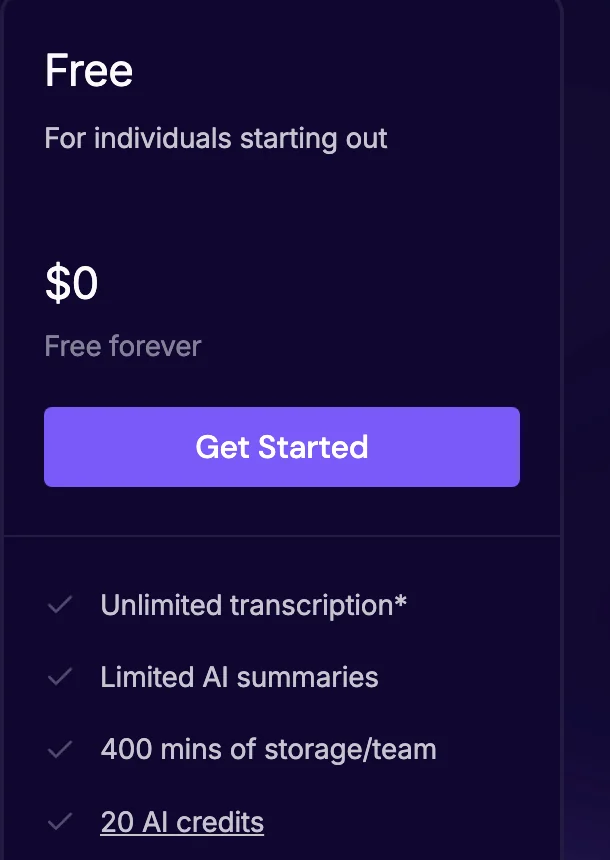
Yes. Fireflies calls its Free plan "Free forever," and it has no end date. Here is what it gives you and where it stops, as of October 7, 2026:
- Meetings: 3 transcribed meetings for accounts made on or after September 1, 2026. Turn on Auto-join calendar meetings and there's no cap on transcriptions.
- AI summaries: limited. Each summary uses a transcription credit, and you get 3 to 10 of them when you sign up, depending on where you sign up.
- AI credits: 20, for AskFred, AI Skills and AI soundbites.
- Storage: 400 minutes in total, not per month.
- Each recording: up to 2 hours.
- Not on Free: video, downloads of transcripts and recordings, and unlimited summaries. Those start on Pro, at $10 per seat per month billed annually.
Accounts made before September 1, 2026 that already had unlimited free meetings keep their earlier limits (Unlock Unlimited Transcriptions on the Fireflies Free Plan).
Fireflies plans and prices at a glance
| Feature | Free | Pro | Business | Enterprise |
|---|---|---|---|---|
| Price, billed annually | Free | $10 | $19 | $39 |
| Price, billed monthly | Free | $18 | $29 | Not offered |
| Meeting transcription | 3 meetings for new accounts; no cap with Auto-join on | Unlimited | Unlimited | Unlimited |
| AI summaries | 3 to 10, from credits given at sign-up | Unlimited | Unlimited | Unlimited |
| Storage | 400 minutes in total | 8,000 minutes per seat | Unlimited | Unlimited |
| Longest recording | 2 hours | 2 hours | 3 hours | 4 hours |
| AI credits (one-time, shared by the team) | 20 | 20 | 30 | 50 |
| Video of the meeting | No | 720p | 720p | 1080p |
| Download transcripts and recordings | No | Yes | Yes | Yes |
| Channels | 3 public | Unlimited public | Unlimited public and private | Unlimited public and private |
| Conversation intelligence and team analytics | No | No | Yes | Yes |
| Multi-language Mode (several languages in one call) | No | No | Yes | Yes |
| SSO, SCIM and HIPAA | No | No | No | Yes |
| Support | Not listed | Not listed | Priority | Dedicated |
All four plans include the Fireflies bot for Zoom, Google Meet, Microsoft Teams and 10+ other meeting apps, the Chrome extension for Google Meet without a bot, the desktop app for Mac and Windows, the iOS and Android apps, real-time notes and live transcription, transcription in 100+ languages, file uploads, transcript editing, search across meetings, API access, and SOC 2 Type II and GDPR compliance. Fireflies Talk, its dictation feature in the desktop app, is included on every plan with no word cap. (Source: Fireflies pricing and Is Fireflies Talk free?, as of October 7, 2026.)
Is Fireflies.ai for free? Every limit of the Free plan
Fireflies' Free card lists four things: "Unlimited transcription*", "Limited AI summaries", "400 mins of storage/team" and "20 AI credits." Fireflies' help center explains what each one means (What's included in the Fireflies Free plan, Learn about transcription credits, Understanding storage limits, as of October 7, 2026).
3 meetings, or no cap with Auto-join
For accounts made on or after September 1, 2026, Free transcribes 3 meetings with Auto-join calendar meetings off. Turned on, Fireflies says there's "no cap on the number of transcriptions." Auto-join means the Fireflies bot joins the meetings on your calendar that have a meeting link. You turn it on in Settings › Meeting Settings, and three of its four choices count: all meetings with a web-conference link, only meetings you own, or only meetings with teammates. The fourth, "Only when I invite fred@fireflies.ai," doesn't. Inviting the bot to one meeting by hand gets that one meeting transcribed and nothing more.
With Auto-join on, the no-cap transcription also covers Google Meet calls recorded with the Chrome extension and in-person conversations recorded in the phone app. An older Fireflies FAQ, last updated about six months ago, adds a condition the newer article doesn't mention: that you "share recaps with all invitees" (How Fireflies joins and records your meetings).
Few AI summaries
Fireflies separates the transcript from the summary. Its help center says unlimited transcripts give you "complete, raw text," while summaries, action items and analytics are limited. On Free, each summary uses one transcription credit, and you get them once, when you sign up:
| Where you sign up | Transcription credits |
|---|---|
| Fireflies website | 3 |
| Chrome extension | 5 |
| Phone app, new user | 10 |
| Phone app, existing user | 5 |
Uploading an audio or video file uses one credit too. You can get more credits by inviting teammates, through Fireflies' referral program, or by upgrading: on Pro and above, transcription credits are unlimited.
20 AI credits
AI credits are a separate balance. They run AskFred (Fireflies' chat about your meetings, marked "Limited" on Free), AI Skills and AI soundbites. Free comes with 20, given once at sign-up and shared by everyone in your workspace. When they're gone, Free accounts see a paywall: buying more credits needs a paid plan (AI credits).
400 minutes of storage, in total
Storage counts the minutes of every meeting you keep, including uploads and dialer calls, and it "does not reset monthly." 400 minutes is about six and a half hours: thirteen 30-minute meetings, or six hour-long ones. When it's full, Fireflies still captures new meetings, but you have to delete older ones to open the new ones. Once Auto-join removes the meeting cap, this is the cap that's left.
2 hours per recording
Free and Pro record up to 2 hours of each meeting. Business goes to 3 hours and Enterprise to 4.
No video and no downloads
Video capture starts on Pro. "Downloading transcripts requires a paid plan," and the same goes for downloading summaries, audio and video (video capture, downloads).
What the Free plan does include
Transcription in 100+ languages with language detection, live transcription and real-time notes, the Chrome extension, the phone and desktop apps, file uploads (MP3, MP4, WAV or M4A, up to 100MB and 150 minutes each), transcript editing, playback at up to 3x, search, comments and bookmarks, soundbite clips, 3 public channels, team workspaces and API access. Fireflies' help center says all integrations work on Free; the pricing page's comparison table leaves Integrations empty for Free (see below).
How Fireflies AI credits work
Fireflies has two kinds of credits. Transcription credits only matter on Free, as above. AI credits pay for the extra AI features: AskFred, AI Skills (custom notes from templates), Personal Assistant (Daily Digest and Meeting Prep), AI soundbites, custom summary sections, questions in Live Assist during a call, and Autofill CRM. Fireflies' Billing Terms say transcription, summaries and recap emails are never charged in AI credits.
How many credits each plan includes, and four rules from Fireflies' AI credits article and Billing Terms, as of October 7, 2026:
- Free: 20. Pro: 20. Business: 30. Enterprise: 50.
- They're given once. Plan credits come at sign-up, not every month, and don't expire.
- The team shares them. Credits are pooled across the workspace and "do not scale with the number of seats." A 10-person Business team shares 30.
- Upgrading replaces them. Moving from Free to Business gives you 30 credits, not 50.
- Bigger questions cost more. Fireflies charges credits per query, more for complex ones.
Buying more. Only paid plans can buy AI credits, as a monthly or annual subscription:
| AI credits a month | Billed monthly | Billed annually (per month) |
|---|---|---|
| 50 | $5 | $4 |
| 200 | $20 | $16 |
| 1,000 | $90 | $72 |
| 2,500 | $200 | $160 |
| 5,000 | $375 | $300 |
| 7,500 | $450 | $360 |
| 10,000 | $600 | $480 |
Fireflies Pro: $10 or $18 per seat per month
Fireflies describes Pro as "For professional individuals and small teams." It costs $10 per seat per month billed annually ($120 a year) or $18 billed monthly, so annual billing is 44% cheaper. Over Free, Pro adds (Pro tier features, as of October 7, 2026):
- Unlimited transcription and unlimited AI summaries
- 8,000 minutes of storage per seat, pooled across the team (3 Pro seats share 24,000 minutes)
- Video recording at 720p, through the bot
- Downloads: transcripts as PDF, DOCX, SRT, CSV, JSON or MD, summaries, MP4 video and MP3 audio
- Smart search, topic trackers, sentiment and question detection, and speaker talk-time
- Feed, Tasks and Contacts, Email Assistant, and AI Skills and Personal Assistant (these two use AI credits)
- Unlimited integrations, unlimited public channels and bulk delete
- 20 AI credits, one-time and shared
What Pro doesn't change: recordings still stop at 2 hours. Uploads, imports and integrations can transcribe up to 3,000 minutes per source per month per seat, then cost $0.01 a minute (rate limits). Fireflies' pricing page lists no seat limit for Pro. Renaming the bot is a paid add-on on Pro and Business: $5 a month or $60 a year for one person, per a help article last updated over a year ago (custom bot name).
Fireflies Business: $19 or $29 per seat per month
Business is marked "MOST POPULAR" and described as "For fast growing businesses." It costs $19 per seat per month billed annually ($228 a year) or $29 monthly, so annual billing is 34% cheaper. Over Pro, Business adds (Business tier, as of October 7, 2026):
- Unlimited storage
- 3-hour recordings, against 2 on Pro
- 30 AI credits, one-time and shared
- Multi-language Mode, for calls where several languages are spoken
- Conversation intelligence and team analytics for admins
- Sharing controls: public meeting access, user groups, unlimited private channels and password-protected meeting links
- Autofill CRM, which fills in CRM records from meetings (it uses AI credits)
- Priority support
Business free trial. Fireflies' 7-day free trial is of Business. You enter a card, "Today's charge" shows $0.00, and when the trial ends Fireflies charges for Business unless you cancel in Settings › Billing › Cancel Trial. You can downgrade the trial to Pro before it ends, teammates who accepted an invite are billed as seats afterward, and each account gets one trial. If you cancel, you're moved to Free right away and keep your meetings. If you also started the AI credits trial, cancel it separately (Manage your Fireflies free trial).
Fireflies Enterprise: $39 per seat per month, billed annually
Enterprise is "For large scale enterprises," marked "ANNUAL ONLY," with a Contact Us button. At $39 per seat per month it costs $468 per seat a year. Over Business, it adds (Enterprise plan, as of October 7, 2026):
- 4-hour recordings and 1080p video
- 50 AI credits, one-time and shared
- SSO and SCIM, audit logs through the API, a super admin role, and a rules engine that sorts meetings into channels
- HIPAA compliance with a signed BAA, and FERPA compliance with a signed Data Sharing Agreement, both on request
- Private storage, custom data retention, and a transcript and summary only mode that deletes the audio and video after transcription
- Payment by invoice or bank transfer (the pricing page says for invoices above $10,000), an onboarding program and dedicated support
- A custom bot name at no extra cost, per the custom bot name article
A help article last updated over a year ago says you can also upgrade to Enterprise from the Fireflies dashboard with a card (upgrade to Enterprise).
What Fireflies costs for 1, 5 and 10 people
Fireflies shows every price per seat per month. These totals multiply that out. Fireflies bills the whole period up front, so an annual plan is one charge a year (unused time).
| Who | Plan and billing | Per month | Per year |
|---|---|---|---|
| 1 person | Pro, annual | $10 | $120 |
| 1 person | Pro, monthly | $18 | $216 |
| 1 person | Business, annual | $19 | $228 |
| 1 person | Business, monthly | $29 | $348 |
| 1 person | Enterprise (annual only) | $39 | $468 |
| 5 people | Pro, annual | $50 | $600 |
| 5 people | Pro, monthly | $90 | $1,080 |
| 5 people | Business, annual | $95 | $1,140 |
| 5 people | Business, monthly | $145 | $1,740 |
| 5 people | Enterprise | $195 | $2,340 |
| 10 people | Pro, annual | $100 | $1,200 |
| 10 people | Pro, monthly | $180 | $2,160 |
| 10 people | Business, annual | $190 | $2,280 |
| 10 people | Business, monthly | $290 | $3,480 |
| 10 people | Enterprise | $390 | $4,680 |
Five things decide which row is yours:
- Billing cycle. Annual billing is 44% cheaper on Pro and 34% cheaper on Business.
- Meeting length. If regular meetings run past 2 hours, Pro won't cover them, even for one person. Business covers 3 hours and Enterprise 4.
- Storage. Pro's 8,000 minutes per seat is about 133 hours of meetings per person, pooled. Business has no cap.
- AI credits. The included credits don't grow with your team. A team that uses AskFred or AI Skills every day should budget for a credit package, from $4 a month for 50 credits on annual billing.
- Team size. Every admin and member is a paid seat. For more than 50 members, Fireflies' pricing page says to contact it for a volume discount.
For comparison, Scribbl Pro is $13 per user per month billed annually, or $20 monthly (Scribbl pricing): $156 a year for one person, $780 for 5 and $1,560 for 10. For that you get unlimited meetings with no 2-hour limit and the video with nothing joining the call. Against Fireflies Business, the plan that removes Fireflies' storage cap and raises its 2-hour limit to 3 hours, Scribbl Pro costs $72 a year less per person.
Student, nonprofit and volume discounts
- Students, NGOs and nonprofits: 10% off Pro, Business or Enterprise, on monthly or annual billing. You sign up with your school or organization's email domain and email support@fireflies.ai for a discounted invoice, or upgrade first and ask for the discount as a refund afterward. That help article was last updated over a year ago, so confirm the discount with Fireflies first (discounts).
- Volume: "If you're buying a plan for more than 50 members," Fireflies' pricing page says to contact it.
How Fireflies billing, cancelling and refunds work
From Fireflies' help center (Billing Terms, Billing FAQs, cancel, downgrade, refund policy, unused time), as of October 7, 2026:
- Seats. A seat is created the moment a teammate is added, and every admin or member is one paid seat. Teammates join on the same plan as the workspace. Sharing a meeting recap link with someone outside the workspace is free.
- Adding people from your domain automatically. An admin setting adds new users with your company's email domain to the workspace. It's off by default, and each person it adds is a paid seat, prorated.
- Adding people mid-cycle. You pay only for the days left. Fireflies' example: a Business seat added on March 1 to a $228 annual plan costs $190.52 for the rest of the year.
- Removing people. It frees the seat from the next billing cycle. The Billing Terms say removing a teammate "doesn't refund anything for the current cycle"; another article gives credit for the unused time only if you remove the seat within 7 days of adding it. You can't lower the seat count in billing directly; you remove a teammate.
- Upgrading. Takes effect right away, and you pay the prorated difference.
- Downgrading. Takes effect at the next billing cycle, and the unused amount becomes account credit. Enterprise can go to Business or Pro; Business can go to Pro. Only the Billing Admin can change plans.
- Cancelling. In Settings › Account › Subscriptions, click Cancel next to your plan. You keep paid features until the end of the billing period, then the account moves to Free, and your meetings stay "within the Free plan limits." An AI credits subscription is cancelled separately.
- Refunds. The refund policy, updated October 5, 2026, gives a full refund if your subscription is 7 days old or less and you've logged 3 meetings or fewer on a monthly plan, or 20 or fewer on an annual plan. Monthly plans can otherwise get a prorated refund: Fireflies' example returns $19.40 of a $29 month after 10 days. Annual plans get no prorated refunds, and AI credits are non-refundable. You ask through the chat button in the Fireflies app, your card must be saved, and refunds take 5 to 10 business days.
- Payment. Through Stripe, by credit or debit card (Visa, Mastercard, American Express, Discover). Invoice payment is an Enterprise feature.
- Uploads over the limit. On paid plans, uploads, imports and integrations can transcribe 3,000 minutes per source per month per seat, up to 150,000 minutes per source for a whole team, then $0.01 a minute. Bot meetings, Chrome extension recordings and phone app recordings don't count.
How Fireflies joins your meetings
Fireflies records in four ways, and what you get depends on which one (How to invite Fireflies to meetings, How Fireflies joins and records your meetings, Chrome extension, recording without a bot, as of October 7, 2026):
- The bot. Fireflies.ai Notetaker (invite address fred@fireflies.ai) joins Zoom, Google Meet, Microsoft Teams, Webex and other meetings as a participant, and Fireflies says it is "always visible in the participant list." It joins through Auto-join from your Google or Outlook calendar, when you invite it, or when you add it to a live meeting. It waits up to 10 minutes for someone to join. Video and speaker names come with the bot.
- The Chrome extension. Records Google Meet audio with no bot. It doesn't work on Zoom or Teams and doesn't record video.
- The desktop app for Mac and Windows. Records your computer's audio from Zoom, Google Meet, Teams, phone calls and other apps with no bot. It "does not save audio or video files," and speakers show as Speaker 1 and Speaker 2.
- The phone app. Records in-person conversations.
So on the Free plan, the no-cap transcription comes from letting the bot join your calendar meetings, from the Chrome extension on Google Meet, or from the phone app. And on any plan, the video comes only through the bot.
Whichever way you record, tell everyone first. Fireflies' desktop app can play a spoken consent message, post a message in the meeting chat on a Mac, or show a notice on your camera. Some places require everyone's consent; see do you have to tell people you're recording.
Where Fireflies' own pages disagree
We found nine places where Fireflies' pages don't match each other on October 7, 2026. When they differ, the pricing page and the most recently updated help article are the safer guide.
- Free transcription. The Free card says "Unlimited transcription*." The comparison table on the same page says "Limited." The help center says 3 meetings for new accounts unless Auto-join is on.
- Free storage. The pricing page says "400 mins of storage/team." The Free plan article says "400 minutes of storage per seat." The storage article says storage is given per user and pooled across the team.
- Free AI credits. The Free plan article says "20 AI credits per month." The AI credits article says Free gets "20 AI credits on sign-up," one time. Another help page says "20 free one-time AI credits per seat," while the AI credits article says credits don't increase with added teammates.
- Video. The pricing page and the video help article (updated October 5, 2026) put 720p video on Pro. The FAQ on the pricing page says "The business tier gets ... video recording," and the trial article says moving from Business to Pro loses "video recording."
- Integrations on Free. The Free plan article says "All integrations are available on the Free plan." The pricing page's comparison table leaves the Integrations row empty for Free.
- What pays for free summaries. The transcription credits article says summaries on Free use transcription credits. The Unlimited Transcriptions article says summaries depend on "your AI credit balance." The Billing Terms say summaries are "never charged in credits."
- Refunds. The refund policy (updated October 5, 2026) gives full refunds within 7 days. The account and billing article (updated about three weeks ago) says "We don't offer refunds on subscriptions or AI credit purchases."
- Upload overage. Three articles charge $0.01 a minute past 3,000 minutes per source. An older rate limits article says "We don't impose any overage charges," then charges $0.01 a minute in its own example.
- Dedicated account manager. The pricing page says Enterprise gets one "For teams above 10 seats." The Enterprise help article says 20 or more seats.
Some third-party pricing guides that rank for this search are further off. One says the free plan has 800 minutes of storage and that Pro costs $18 billed annually with 3,000 minutes of storage. None of that matches Fireflies' pricing page today.
Is Fireflies worth paying for? Who each plan is for
- Free is worth it if you mostly need raw transcripts and you're fine with the bot joining your calendar meetings, or you record Google Meet with the Chrome extension. Expect few summaries and 400 minutes of storage, and no video.
- Pro is the best value in Fireflies' lineup for one person or a small team that wants unlimited summaries, video and downloads, with meetings under 2 hours. Pay annually: $120 a year against $216.
- Business is for teams that need unlimited storage, 3-hour meetings, conversation intelligence, team analytics or Multi-language Mode. Expect $228 per person per year on annual billing.
- Enterprise is for companies that need SSO, SCIM, HIPAA or FERPA, 4-hour meetings, private storage or custom data retention.
Before you pay, compare Scribbl. Fireflies keeps the video only through its bot and only on paid plans, its free AI summaries run out after a handful of meetings, and its AI credits are one-time and shared by the whole team. Scribbl, which we make, keeps the video with nothing joining the call, puts AI notes and action items on every meeting on the free plan, and costs $13 per user per month on Pro, billed annually. See the side-by-side below, Scribbl vs Fireflies and Fireflies vs Otter.
Fireflies vs Scribbl: the better pick
Scribbl is an AI note taker for Google Meet, Zoom and Microsoft Teams, and for most people pricing Fireflies it's the better pick. Nothing joins the call: it uses a Chrome extension for Google Meet and Scribbl Desktop for Mac (Apple silicon) and Windows for Zoom and Teams, so no bot shows up in your clients' participant list, and the Microsoft Teams AI note taker needs no Teams Premium or Copilot license. Every meeting comes back with the video recording, a transcript with speaker names, AI notes and action items, in one account for all three meeting apps.
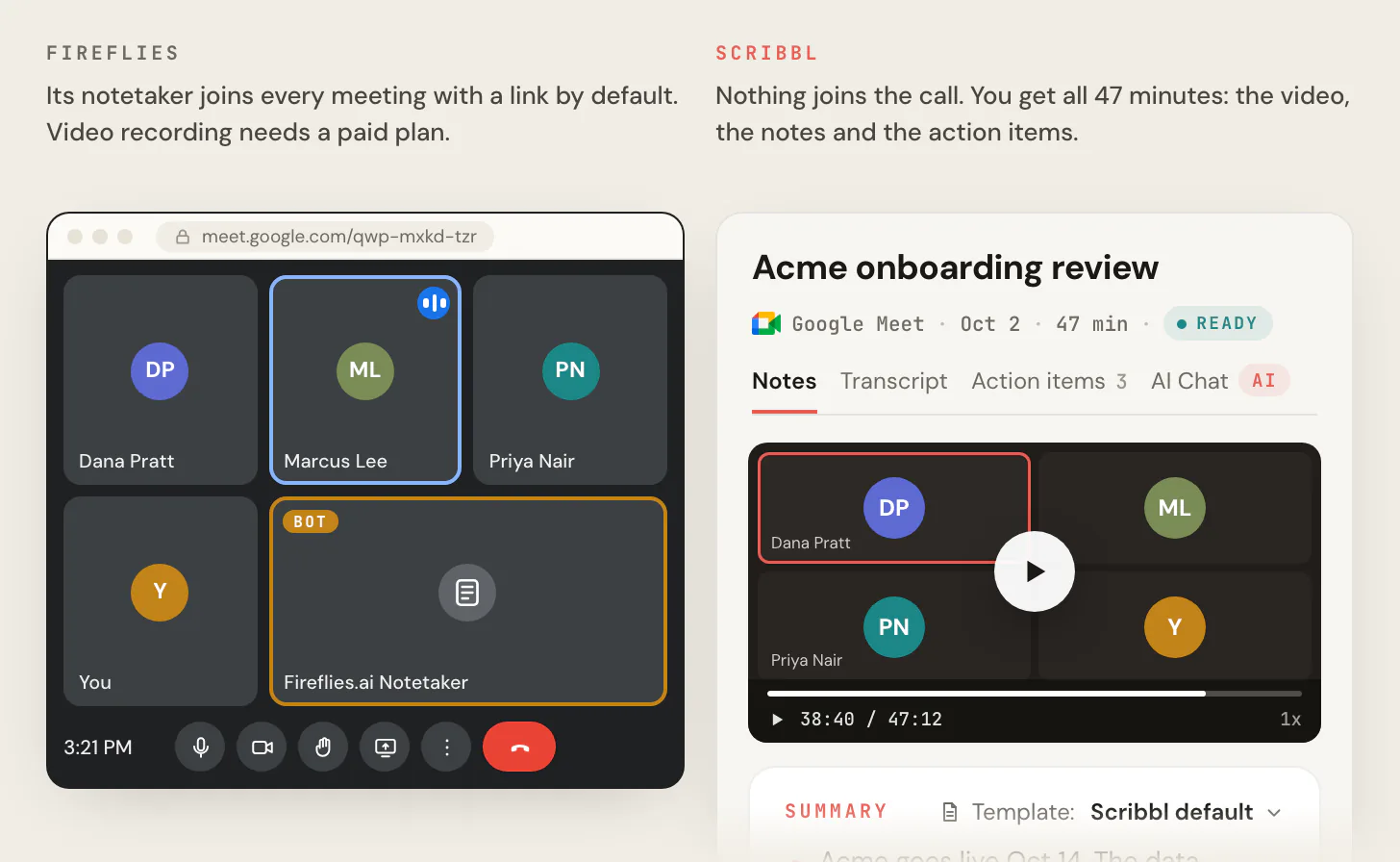
It also does the work after the call. Smart Collections sort your meetings by themselves. Automations do the follow-up: they draft the follow-up email for you to send, log notes in HubSpot or Pipedrive, post a summary to Slack or Teams, or open a ticket in Linear, Jira or Asana, and they ask before changing anything by default. On Pro you can ask Claude or ChatGPT about every meeting you've recorded, or about just one Smart Collection ("What were the main objections in my sales calls this week?"). Recordings are private by default, and Scribbl doesn't use your meetings to train AI for anyone other than you.
| Feature | Scribbl | Fireflies |
|---|---|---|
| Does anything join the call? | No, on Google Meet, Zoom and Teams | The bot joins as a visible participant; the Chrome extension (Google Meet audio) and desktop app record without it |
| Video of the meeting | Every meeting, free plan included | Paid plans only, through the bot |
| AI notes and action items on the free plan | Every meeting | 3 to 10 summaries, from credits given at sign-up |
| Transcript with speaker names | Yes | Yes with the bot; Speaker 1 and Speaker 2 in the desktop app |
| Free plan | 10 meetings a month on Google Meet, Zoom and Teams | 3 meetings for new accounts, or no cap with Auto-join on; 400 minutes of storage in total |
| Longest meeting | No limit | 2 hours on Free and Pro |
| Ask questions about your meetings | Claude or ChatGPT across every meeting, or just one Smart Collection (Pro); unlimited AI chat on Pro | AskFred, paid in shared AI credits; Claude and ChatGPT through the Fireflies MCP server |
| Follow-up after the call | Automations draft the email, log notes in HubSpot or Pipedrive, post to Slack or Teams | AI Skills and Personal Assistant, paid in shared AI credits |
| Your meetings used to train AI | Not for anyone other than you | Fireflies says never |
| Paid plan | Pro, $13 per user billed annually, or $20 monthly | Pro, $10 per seat billed annually, or $18 monthly; Business, $19 or $29, for unlimited storage and 3-hour meetings |

The short version. On Fireflies' free plan you get raw transcripts, a handful of summaries and 400 minutes of storage, with no video, and the no-cap version needs its bot in your calendar meetings. On Scribbl's free plan, every meeting gets the video, the transcript, AI notes and action items, with nothing joining the call. The free plan includes Google Meet, Zoom and Microsoft Teams, with 10 meetings a month. Whichever tool you use, tell everyone in the meeting you're recording.
FAQ
Is Fireflies AI free?
Yes. Fireflies' Free plan costs $0 and has no end date. For accounts made on or after September 1, 2026, it transcribes 3 meetings unless you turn on Auto-join, which lets the Fireflies bot join your calendar meetings with no cap on transcriptions. AI summaries are limited to 3 to 10 credits given at sign-up, storage is 400 minutes in total, each recording stops at 2 hours, and video and downloads need a paid plan.
Is Fireflies.ai for free?
Yes, Fireflies.ai has a Free plan that it calls Free forever. For free you get meeting transcripts (3 for new accounts, or no cap with Auto-join on), transcription in 100+ languages, the Chrome extension for Google Meet, the phone app, 20 AI credits and 400 minutes of storage. Unlimited AI summaries, video, downloads and more storage start on Pro, at $10 per seat per month billed annually or $18 monthly.
How much does Fireflies cost?
Fireflies has four plans. Free is $0. Pro is $10 per seat per month billed annually, or $18 billed monthly. Business is $19 per seat per month billed annually, or $29 monthly. Enterprise is $39 per seat per month and is billed annually only. Extra AI credits cost more, from $5 a month for 50.
How many meetings can I transcribe on the Fireflies free plan?
For accounts made on or after September 1, 2026, 3 meetings with Auto-join off. Turn on Auto-join calendar meetings in Settings and Fireflies says there is no cap on transcriptions; the setting Only when I invite fred@fireflies.ai doesn't count. The limits that remain are summaries, which use the 3 to 10 transcription credits you get at sign-up, and 400 minutes of storage.
What are Fireflies AI credits?
AI credits pay for Fireflies' extra AI features, such as AskFred, AI Skills, Personal Assistant and AI soundbites. Free and Pro come with 20, Business with 30 and Enterprise with 50. They are given once, not every month, and the whole team shares them. On paid plans you can buy more, from 50 credits for $5 a month to 10,000 for $600, and Fireflies moves you to a bigger package automatically when you run out unless you turn Auto-upgrade off.
What happens when Fireflies free storage runs out?
Fireflies keeps capturing new meetings, but you have to delete older meetings to open the new ones. The 400 minutes is a total, not a monthly amount, and uploads count toward it. That's about thirteen 30-minute meetings. Pro raises it to 8,000 minutes per seat, and Business and Enterprise have unlimited storage.
Does the Fireflies free plan record video?
No. Video capture starts on Pro, at 720p, and Enterprise records at 1080p. Fireflies records video only through its bot: the Chrome extension records audio only, and the desktop app's no-bot mode saves no audio or video files. Downloading transcripts or recordings also needs a paid plan.
Does Fireflies have a free trial?
Yes, a 7-day free trial of the Business plan. It needs a credit or debit card, and Fireflies charges for Business when the trial ends unless you cancel in Settings, then Billing. You can switch the trial to Pro before it ends, teammates who joined are billed as seats, and each account gets one trial. The Free plan itself has no end date.
How much does Fireflies cost for a team?
On annual billing, Pro costs $600 a year for 5 people and $1,200 for 10, and Business costs $1,140 for 5 and $2,280 for 10. On monthly billing, Pro is $90 a month for 5 people and $180 for 10. Enterprise is $39 per seat per month, billed annually. Every admin and member is a paid seat, the team shares one pool of AI credits, and teams of more than 50 can ask for a volume discount.
Can you get a refund from Fireflies?
Sometimes. Fireflies' refund policy gives a full refund if your subscription is 7 days old or less and you've logged 3 meetings or fewer on a monthly plan, or 20 or fewer on an annual plan. Monthly plans can otherwise get a prorated refund; annual plans can't. AI credits are non-refundable. You ask through the chat button in the Fireflies app.
How do I cancel Fireflies?
Go to Settings, then Account, and under Subscriptions click Cancel next to your plan. Paid features last until the end of the billing period, then the account moves to the Free plan, and your meetings stay within the Free plan's limits. An AI credits subscription is cancelled separately, from Settings, then Billing.
Does Fireflies have a student or nonprofit discount?
Fireflies' help center offers 10% off Pro, Business or Enterprise for students, NGOs and nonprofits, on monthly or annual billing. You sign up with your school or organization email and ask support@fireflies.ai for a discounted invoice. That article was last updated over a year ago, so confirm with Fireflies. Teams buying for more than 50 members can ask for a volume discount.
Is Fireflies worth paying for?
Pro, at $10 per seat per month billed annually, is worth it only if a bot in the call is fine and your meetings stay under 2 hours: it's the cheapest Fireflies plan with unlimited AI summaries, video and downloads. Business is for teams that need unlimited storage, 3-hour meetings or team analytics. Budget for AI credits if your team uses AskFred or AI Skills a lot, because the included credits are one-time and shared. If you'd rather have no bot and the video, Scribbl, which we make, gives you both on its free plan, with AI notes and action items on every meeting.
What is the best free alternative to Fireflies?
Scribbl, which we make, if your meetings are on Google Meet, Zoom or Microsoft Teams. Nothing joins the call, and every meeting comes back with the video recording, a transcript with speaker names, AI notes and action items. The free plan includes Google Meet, Zoom and Microsoft Teams, with 10 meetings a month. Fireflies' free plan has no video, limits AI summaries to credits given at sign-up, and stops at 400 minutes of storage.
Sources
Every Fireflies price, limit and rule above was checked on these pages on October 7, 2026.
- Fireflies: pricing (monthly and annual cards, comparison table, card tooltips and FAQ)
- Fireflies help center, plans: Learn about the Fireflies' pricing plans, What's included in the Fireflies Free plan, Free plan features, Unlock Unlimited Transcriptions on the Fireflies Free Plan, Pro tier features, Business tier, Enterprise plan, upgrade to Enterprise, Is Fireflies Talk free?
- Fireflies help center, credits and limits: AI credits, How to purchase AI credits, Pause or cancel AI credits, Learn about transcription credits, Understanding storage limits, Upload and integration rate limits, Learn about rate limits
- Fireflies help center, billing: Billing Terms, Billing FAQs, Manage your account, subscription, billing and refunds, refund policy, cancel, downgrade, upgrade, unused time, free trial, discounts, Team settings, Invite teammates
- Fireflies help center, Claude and ChatGPT: Learn about the Fireflies MCP server
- Fireflies help center, recording: How to invite Fireflies to meetings, How Fireflies joins and records your meetings, Chrome extension, Recording without a bot, video capture, downloads, custom bot name
- Scribbl: pricing
Try Scribbl
Get AI notes with no bot in the call
Scribbl records, transcribes, and summarizes your Google Meet calls from your browser. No bot joins the call. Free forever for individuals.
Add to Chrome · It's free