Meeting preparation checklist: the 8 steps that decide the outcome
A meeting preparation checklist that changes outcomes, not etiquette. Define the decision, gate the invite list, prep materials, test tech, and assign capture upfront.
Updated October 29, 2026
The short answer
Name the decision the meeting must produce and the one person who owns it. If you can't, cancel the meeting
- Before the invite
- Invite only the people who decide or own the work, and write each agenda item as a decision to make, with a time box.
- The day before
- Send pre-reads 24 to 48 hours ahead, and test your camera, mic, screen share and recorder.
- Capture
- Decide before the meeting who or what records the decisions and action items.
- The close
- Read back each decision and each action item, with a named owner and a due date.
- Skip the notes
- Scribbl records, transcribes and summarizes Google Meet, Zoom and Teams calls and pulls out the decisions and action items, so nobody takes notes. Nothing joins the call.
Most meeting preparation checklists are a chore list: book a room, send the invite, test the mic. Those steps matter, but they do not decide whether the meeting was worth holding. One thing does. Before the invite goes out, can you name the decision you are making and the person who owns the outcome? If you cannot, no amount of room booking saves the meeting.
So here is the argument this checklist makes. Preparation is not about politeness or logistics. It is a forcing function. Each step exists to protect a single question (what are we deciding, and who owns it) and to make sure the meeting ends as a record someone owns rather than a conversation that fades by Friday. Run the eight steps below in order, and most of your weak meetings will not survive step one. That is the point.
Why preparation pays off more than facilitation
Look at where meeting time actually goes before you try to fix a single meeting. Microsoft's Work Trend Index report "Breaking down the infinite workday" (June 2025) measured the calendars of millions of Microsoft 365 users, and the picture is blunt.
Read those numbers as one story. The majority of meetings are unplanned, they spill into the evening, and they land right when people do their best deep work. A separate, older estimate from Doodle's 2019 State of Meetings report (which surveyed over 6,500 professionals across the US, UK, and Germany) put the annual cost of poorly organized meetings at $399 billion in the US alone. The exact figure is dated, but the direction has not changed: unprepared meetings are expensive, and preparation is the cheapest place to claw that cost back.
The good news is that preparation works because it happens before the costly part. A 30-minute meeting with eight people is four hours of paid attention. Ten minutes of prep that cuts the meeting to 20 minutes, or cancels it outright, pays for itself many times over.
The 8-step meeting preparation checklist
Here is the full sequence. The order is deliberate: the early steps decide whether the meeting should exist, and the later steps make it run and stick.
- 1
Name the decision and the owner
Write the one decision or outcome this meeting must produce, and the single person accountable for it.
- 2
Gate the invite list
Invite decision-makers and the people who own the work. Everyone else gets the notes.
- 3
Write an outcome-based agenda
Frame each item as a decision to make, not a topic to discuss. Put a time box on each.
- 4
Send pre-reads 24 to 48 hours ahead
Anything that can be read should be read before, not narrated live.
- 5
Pick the time and channel on purpose
Protect deep-work hours. Confirm the meeting link and any dial-in details.
- 6
Test the tech the day before
Camera, mic, screen share, and your recorder or notetaker. Do not test live.
- 7
Assign the capture role upfront
Decide before the meeting who (or what) is recording decisions and action items.
- 8
Prep the open and the close
Know your first sentence and how you will end: restate decisions and owned next steps.
The sections below go deep on the steps that people get wrong most often.
Step 1: Name the decision and the owner
This is the only step that is not optional. Write one sentence that states what the meeting must produce and who is accountable for it. If you cannot write that sentence, you have found a meeting that should be an email, a recorded message, or a single async question.
Status updates that one person reads aloud while six people half-listen are the most common meeting that should not exist. Around 57% of meetings are now ad hoc calls with no invite at all, which usually means no one paused to ask whether the call was needed. Step one is that pause.
Step 2: Gate the invite list
Every extra attendee multiplies the cost and dilutes accountability, because when everyone is responsible, no one is. Amazon's "two-pizza" guideline (a team small enough to be fed by two pizzas) is a useful gut check for a working meeting. Invite the people who will decide and the people who own the work. Everyone who only needs to know the outcome gets the notes instead.
This is also where a good capture habit pays off. When people trust that they will get clear notes and action items afterward, they stop attending meetings defensively just to stay in the loop. A reliable meeting recap format does more to shrink invite lists than any policy.
Step 3: Write an outcome-based agenda
The single biggest upgrade you can make to any agenda is to stop listing topics and start listing decisions. The difference is concrete.
WEAK (topic-based)              STRONG (outcome-based)
- Q3 campaign                   - Decide the top 3 creative concepts for Q3 (15 min)
- Budget                        - Approve or cut the $12k paid-media line (10 min)
- Hiring                        - Agree who owns the contractor JD and a due date (5 min)
Each item names a verb (decide, approve, agree), a clear object, and a time box. The time boxes are not decoration; they are a budget that keeps the meeting from drifting. Send this agenda inside the invite so attendees know what they are walking into.
Here is a clean template you can copy and adapt.
Meeting: [Name]
Date / time: [Date, start-end, time zone]
Owner: [Single accountable person]
Decision this meeting must produce: [One sentence]

Pre-reads (please read before): [Link 1], [Link 2]

Agenda
1. [Decide X]            [owner]   [10 min]
2. [Approve / cut Y]     [owner]   [10 min]
3. [Agree owner + date for Z]      [5 min]

Out of scope (parking lot): [Topics we will not cover today]
If the meeting is a recurring one or a client session, lean on a purpose-built starting point instead of a blank page. We keep copy-ready versions in our client meeting agenda template and our project kick-off meeting agenda.
Step 4: Send pre-reads 24 to 48 hours ahead
Anything that can be read should be read before the meeting, not narrated during it. Live narration of a document is the slowest possible way to share information, and it crowds out the discussion the meeting actually exists for.
Attach the pre-reads to the invite and call them out explicitly: state that the meeting assumes everyone has read them. Twenty-four to forty-eight hours is the sweet spot. Earlier and people forget; later and they will not get to it. If the pre-read is long, add a two-line summary of the decision it supports so a busy reader knows where to focus.
Step 5: Pick the time and channel on purpose
Half of all meetings land in the two windows (9 to 11 am and 1 to 3 pm) when people do their sharpest work. Defaulting to those slots taxes everyone's focus. When the meeting does not need peak energy, push it to the edges of the day and protect the middle for deep work.
Then nail the logistics. Confirm the video link, paste any dial-in or room details into the invite, and make sure external guests can actually join. For a client or external call, send the link with the agenda, not five minutes before.
Step 6: Test the tech the day before
Do not test live. The cost of testing is a few minutes the day before; the cost of not testing is the first ten minutes of the meeting, multiplied by every attendee, while you fight an audio setting.
Run this short check the day before any meeting that matters.
- 1
Camera and mic
Join a test call or use your platform's device settings. Confirm the right mic and camera are selected.
- 2
Screen share
Share the exact window or tab you plan to present. On macOS, grant screen-recording permission ahead of time.
- 3
Your recorder or notetaker
Confirm it is installed, signed in, and set to capture this meeting. Test it on a throwaway call if it is new.
- 4
Links and access
Open the meeting link yourself. Make sure external guests are not stuck in a waiting room or blocked by a setting.
Step 7: Assign the capture role upfront
This is the step that decides whether the meeting changes anything. The classic failure mode is a great discussion that ends with no record, so the decisions live in people's memories and the action items evaporate. Decide before the meeting starts who is responsible for capturing decisions and action items.
You have two real options, and they are not equal for most teams.
- Best for: tiny meetings, or when no recording is allowed
- Someone you assign types decisions and action items live
- Cost: that person is half-listening, half-typing, and misses the discussion
- Notes are only as good as the typist and their attention
- Best for: most meetings, especially recurring and client calls
- Records, transcribes, and summarizes automatically; everyone stays present
- Produces a searchable transcript plus decisions and action items
- Frees you to facilitate instead of scribe
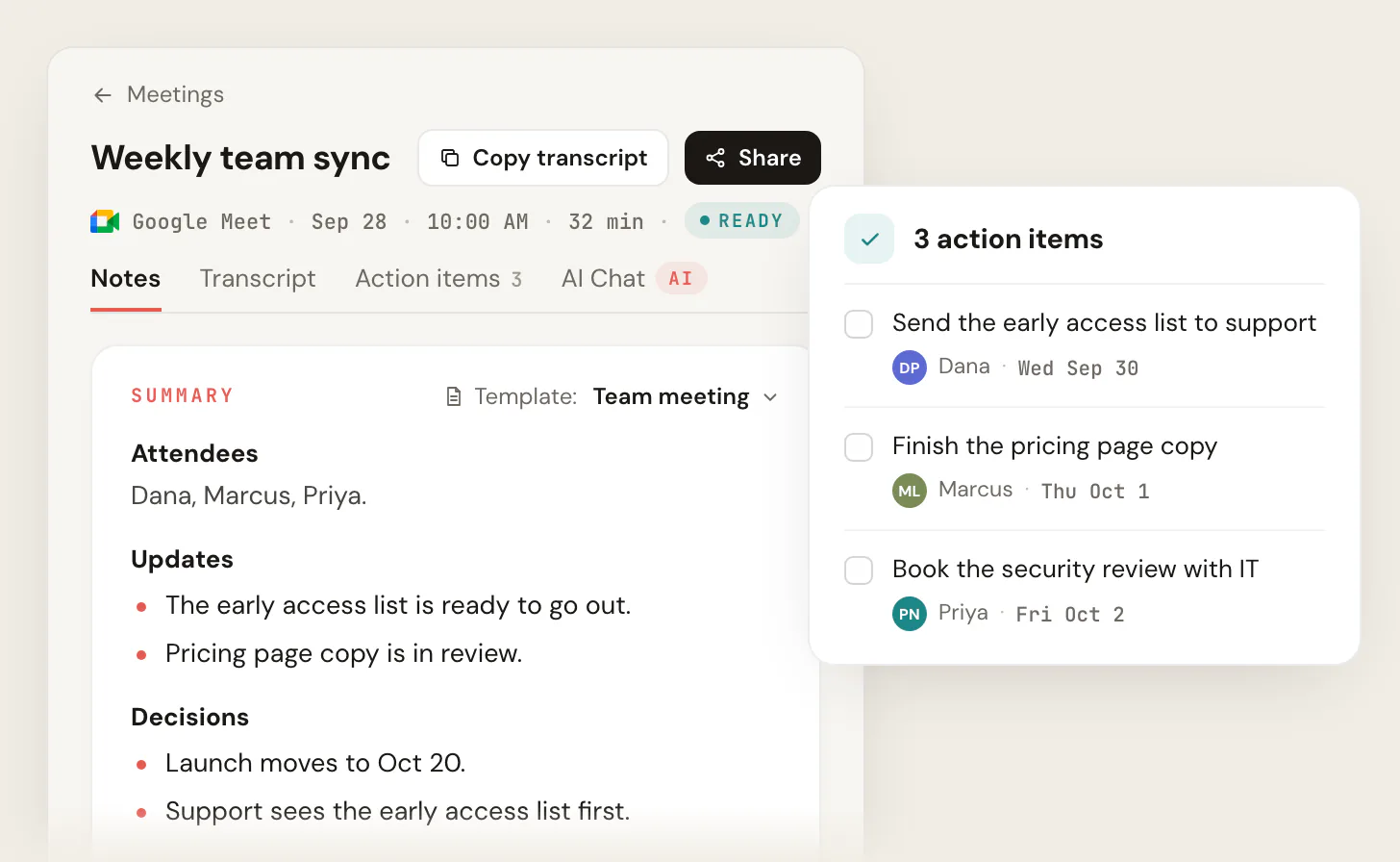
If you use AI note taking on Google Meet, Scribbl records, transcribes, and summarizes the meeting and pulls out action items, with no bot joining the call. The free plan includes Google Meet, Zoom and Microsoft Teams, and the desktop app covers Zoom and Microsoft Teams. Whatever you use, assign the role in the agenda so it is not an afterthought. For the structure of good notes themselves, see how to take better meeting notes and our action items template.
Step 8: Prep the open and the close
Two sentences are worth rehearsing. The first is your open: restate the decision the meeting must produce, so everyone is anchored in the first 30 seconds. The second is your close: read back the decisions made and the action items, each with a named owner and a due date.
The close is where preparation turns into follow-through. A meeting that ends with "great chat, talk soon" produces nothing. A meeting that ends with "so, three decisions and four action items, here is who owns each" produces a plan. If you recorded the meeting, the summary and action items are already drafted for you; your job is just to confirm them out loud and send the recap. A good meeting summary template makes that recap fast to write.
Meeting preparation checklist FAQ
How far in advance should I send a meeting agenda?
Send the agenda with the invite, ideally at least 24 to 48 hours before the meeting. That gives attendees time to read any pre-reads and come prepared to decide rather than to react. For recurring meetings, keep the agenda in the same place every time (the calendar invite or a shared doc) so no one has to hunt for it.
What is the difference between a topic-based and an outcome-based agenda?
A topic-based agenda lists subjects ("Q3 campaign," "budget"). An outcome-based agenda lists decisions ("decide the top 3 creative concepts for Q3"). The outcome-based version tells everyone what the meeting must produce, which keeps discussion from wandering and makes it obvious when an item is done. Always write the verb: decide, approve, agree, assign.
Do I really need a checklist for a quick 15-minute meeting?
You need the first three steps for every meeting, even short ones: name the decision, invite the right people, and frame the agenda as outcomes. The logistics steps (tech check, room) scale down for a quick call. The point of the checklist is not ceremony; it is making sure the meeting has a reason to exist before it does.
Who should take notes during the meeting?
Decide before the meeting, not during it. For most teams an AI notetaker is the better answer because it records, transcribes, and summarizes without pulling anyone out of the conversation. If you assign a human, rotate the role so the same person is not stuck scribing every time, and give them the agenda so they capture decisions against each item.
How do I prepare for a client meeting specifically?
Do everything above, plus three things. Send the agenda and pre-reads earlier (clients have less context than your team). Confirm the meeting link works for external guests and that your notetaker will not get stuck in their waiting room. And plan to send a recap the same day. Our client meeting agenda template and client meeting notes template are built for exactly this.
Meeting preparation checklist: the bottom line
A meeting preparation checklist is not about looking organized. It is a set of forcing functions that protect one question: what are we deciding, and who owns it. Run the first three steps and your weakest meetings will not survive the planning. Run the last few and the survivors will end as records someone owns. The room booking and the mic test matter, but they are the easy part. The decision and the owner are the whole game.
Try Scribbl
Let the meeting write its own notes
Scribbl records, transcribes, and summarizes your Google Meet, Zoom and Teams calls: Google Meet in your browser, Zoom and Teams with the desktop app. No bot joins the call. Free for 10 meetings a month, no credit card.
Add to Chrome · It's free