Otter AI vs ChatGPT (2026): Which Is Better for Meeting Notes and Transcription?
Otter AI vs ChatGPT, from each company's own pages on October 7, 2026: what each records, where it works, prices, limits, privacy, and which to pick.
Updated October 7, 2026

Otter AI is better for meeting notes: it joins or records Zoom, Google Meet and Microsoft Teams calls from any computer, records in person on iPhone and Android, keeps the audio with the transcript, and has a free plan. ChatGPT is better for everything you do with the notes afterward, but it takes meeting notes only in its Mac app on a paid plan (Plus at $20 a month or higher), and it deletes the audio once the notes are written.
They're different kinds of product. Otter is a note taker: recording and transcribing conversations is its whole job. ChatGPT is a general AI assistant, and meeting notes are one feature of its Mac app. You also don't have to choose: Otter is an app inside ChatGPT, so ChatGPT can search your Otter transcripts.
Every fact below comes from Otter's and OpenAI's own pricing pages and help centers, checked on October 7, 2026, and is linked to that page. We make Scribbl, an AI note taker for online meetings, and for meetings on Google Meet, Zoom and Teams it beats both: nothing joins the call, it works on Mac and Windows, and you keep the video.
Otter AI vs ChatGPT at a glance
| Feature | Otter | ChatGPT |
|---|---|---|
| What it is | An AI note taker for meetings and conversations | A general AI assistant, with meeting notes in its Mac app |
| How it records Zoom, Google Meet and Teams | Otter Notetaker joins the call, or the desktop app records without joining | Record mode or the Meetings plugin listens through your Mac's audio |
| Computers that record meetings | Mac, Windows, web | Mac only |
| Phones | iPhone and Android apps record in person | No meeting recording; Meetings plugin for iOS and Android "coming soon" |
| Joins meetings from your calendar | Zoom, Google Meet and Teams links | Google Meet links only (Record mode) |
| Live transcript | Yes | Yes, in Record mode |
| Speaker names | Yes, by name | Speakers told apart; unknown ones show as "Speaker 1" until renamed |
| Recording you can play back | Audio on every plan; video on Enterprise only | No. The audio is deleted |
| Longest meeting | 30 minutes (free), 90 (Pro), 4 hours (Business) | 4 hours per session |
| Upload a recording | Audio or video: 3 for life (free), 10 a month (Pro), unlimited (Business) | Audio up to 512 MB on paid plans; no video files |
| Free plan, for meetings | 300 minutes a month | No meeting recording; paste a transcript |
| Cheapest plan that records meetings | $8.33 (Pro, billed annually); $16.99 monthly | $20 (Plus, billed monthly) |
| Ask about past meetings | AI Chat: 20 questions a month free, 50 Pro, 200 Business | Yes, with Reference record history on |
| Transcription languages | 6 | "Works best in English today" |
| Trains its AI on your meetings | Yes, de-identified | Plus and Pro: notes and transcripts, unless you opt out. Business and up: no |
| Connects to the other | Otter.ai app in ChatGPT | Searches Otter meetings through that app |
Two rows decide most choices. ChatGPT records meetings only on a Mac, and only on a paid plan. And ChatGPT keeps no recording, so there's nothing to replay when a note looks wrong. The sections below explain each row and link to the page each fact came from.
Which is better, Otter AI or ChatGPT?
For meeting notes, Otter is better; for nearly everything else, ChatGPT is. Three questions settle it for your meetings:
- Are you on a Mac with a paid ChatGPT plan? If not, ChatGPT can't record your meeting at all. OpenAI says Record mode is "only available for the macOS desktop app," and ChatGPT's pricing page doesn't include it on the Free or Go plans. Otter records on Mac, Windows, the web and phones, and its free plan records meetings.
- Do you need the recording afterward? ChatGPT deletes the audio once it has the transcript, and OpenAI's own Record page says ChatGPT "may make mistakes, including in its transcriptions." With no audio left, you can't check a line. Otter keeps the audio on every plan, synced to the transcript.
- Who starts the recording? Otter's Notetaker can join every Zoom, Google Meet and Teams meeting on your calendar, and you can send it to meetings you can't attend. ChatGPT's Record mode joins on schedule only for Google Meet events on a connected Google Calendar; for any other meeting, you click Record on your Mac.
If you answered "a Mac, paid ChatGPT, and text notes are enough," Record mode saves you a second subscription. Otherwise, let a note taker do the recording, and use ChatGPT to turn the notes into minutes, emails or plans. If your meetings are on Google Meet, Zoom or Teams and you want the video with no bot in the call, that note taker is Scribbl.
What Otter does
Otter is built to record and transcribe conversations. (Otter pricing, Otter Notetaker overview, Otter Desktop App, as of October 7, 2026.)
- Meetings, with or without a bot. Once you connect a Google or Microsoft calendar, Otter Notetaker "automatically joins your Zoom, Google Meet, and Microsoft Teams meetings." It shows as "[Your Name]'s Notetaker (Otter.ai)" and can't join without being seen. To record without it, use Otter's desktop app for Mac (macOS 12.3 or later) or Windows (Windows 10 or later). It records your computer's audio and can spot calls in Zoom, Teams, a browser (such as Google Meet), Slack huddles and WhatsApp.
- In person. The iPhone and Android apps record from your phone's microphone, Bluetooth headsets or AirPods.
- Live transcript with speaker names on every plan, plus automated summaries with action items.
- The recording. Audio playback on every plan. Video replay for Zoom and Google Meet is Enterprise only.
- AI Chat answers questions within one meeting or across many: 20 a month on the free plan (3 per conversation), 50 on Pro and 200 on Business. It works from your meetings; it isn't a general assistant.
- Languages: English, Spanish, French, German, Japanese and Chinese.
Where Otter falls short: the free plan shows only 30 minutes of each conversation's transcript and your 25 most recent conversations. Pro stops at 90 minutes a meeting and 5 billed users. Notetaker is a visible guest in the call, so your meeting settings must allow guests.
Best for: anyone who records meetings or in-person conversations often, on any computer or phone, and wants the audio and a searchable transcript. Every Otter plan and limit: Otter.ai pricing.
What ChatGPT does for meetings
ChatGPT runs on the web, iPhone, Android, Mac and Windows. For meetings it gives you four ways in, and only the first two record:
- Record mode (Mac app; Plus, Pro, Business, Enterprise and Edu). Click Record at the bottom of a chat. ChatGPT "live-transcribes as you talk," then writes notes saved as a canvas in your chat. Sessions stop at 4 hours (240 minutes). It tells speakers apart and labels anyone it can't identify "Speaker 1" until you rename them. It "works best in English today," and "audio files delete automatically after transcription." In Enterprise and Edu workspaces it's off until an owner turns it on. With Reference record history on, ChatGPT can draw on notes and transcripts from past recordings in new chats, to answer questions like "What did we decide in Monday's roadmap sync?" (ChatGPT Record, updated about October 1, 2026.)
- The Meetings plugin (Mac app; Pro and Business; beta). OpenAI's Record page now opens by pointing Pro and Business users to it. You install it from Plugins, click Take notes, and it writes a summary with suggested action items on a private page, using context from apps you've connected. OpenAI says it works "for online calls or in-person conversations, without a bot joining the call." The audio is deleted once the notes are ready and "can't be replayed," and note taking stops at four hours. iOS, Android and Windows are "coming soon," and Enterprise has it only in a limited alpha. (The Meetings plugin in ChatGPT, updated about October 4, 2026.)
- Audio uploads (paid plans). Attach an audio file of up to 512 MB and ask for a transcript, notes or a follow-up email. Audio uploads "are not available on the Free plan at this time," video files aren't accepted, and OpenAI warns that "speaker identification may be unreliable." (Uploading files and audio to ChatGPT, updated October 6, 2026.)
- A transcript you paste or upload (every plan, including Free). Paste a transcript from Otter, Zoom, Teams or any other recorder and ask for minutes or action items. Free accounts can upload 3 files a day; pasting text doesn't count as an upload.
Where ChatGPT falls short for meetings: no meeting recording on Windows, the web or phones; nothing to replay; and no recording on the Free or Go plans. The consent reminder in the Meetings plugin is shown only to you: OpenAI says "It does not notify other participants or obtain their consent for you."
Best for: turning notes into minutes, emails and plans, and recording meetings on a Mac if you already pay for Plus or higher and text notes are enough. Step by step, with prompts to copy: ChatGPT meeting notes.
Where each works: computers, phones and meeting apps
| Otter | ChatGPT | |
|---|---|---|
| Mac | Desktop app records without a bot (macOS 12.3 or later) | Record mode and the Meetings plugin |
| Windows | Desktop app records without a bot (Windows 10 or later) | ChatGPT app, but no meeting recording; Meetings plugin "coming soon" |
| Web browser | Recording, Notetaker and playback on otter.ai | Chats, pasted transcripts and file uploads; no meeting recording |
| iPhone and Android | Apps record in person | Chat apps; no meeting recording; Meetings plugin "coming soon" |
| Zoom, Google Meet, Teams | Notetaker joins all three; the desktop app records all three without joining | Hears any meeting app through your Mac's audio |
| In-person conversations | Phone apps, web and desktop | Record mode (meetings, brainstorms, voice notes) and the Meetings plugin, on a Mac |
| Joins from your calendar | Google or Microsoft calendar; Zoom, Meet and Teams links | Record mode with Google Calendar; Google Meet links only |
Sources: Otter pricing, Otter Desktop App, Download ChatGPT, ChatGPT Record, The Meetings plugin, as of October 7, 2026.
Prices: what Otter and ChatGPT cost
| Plan | Price per month | For meetings |
|---|---|---|
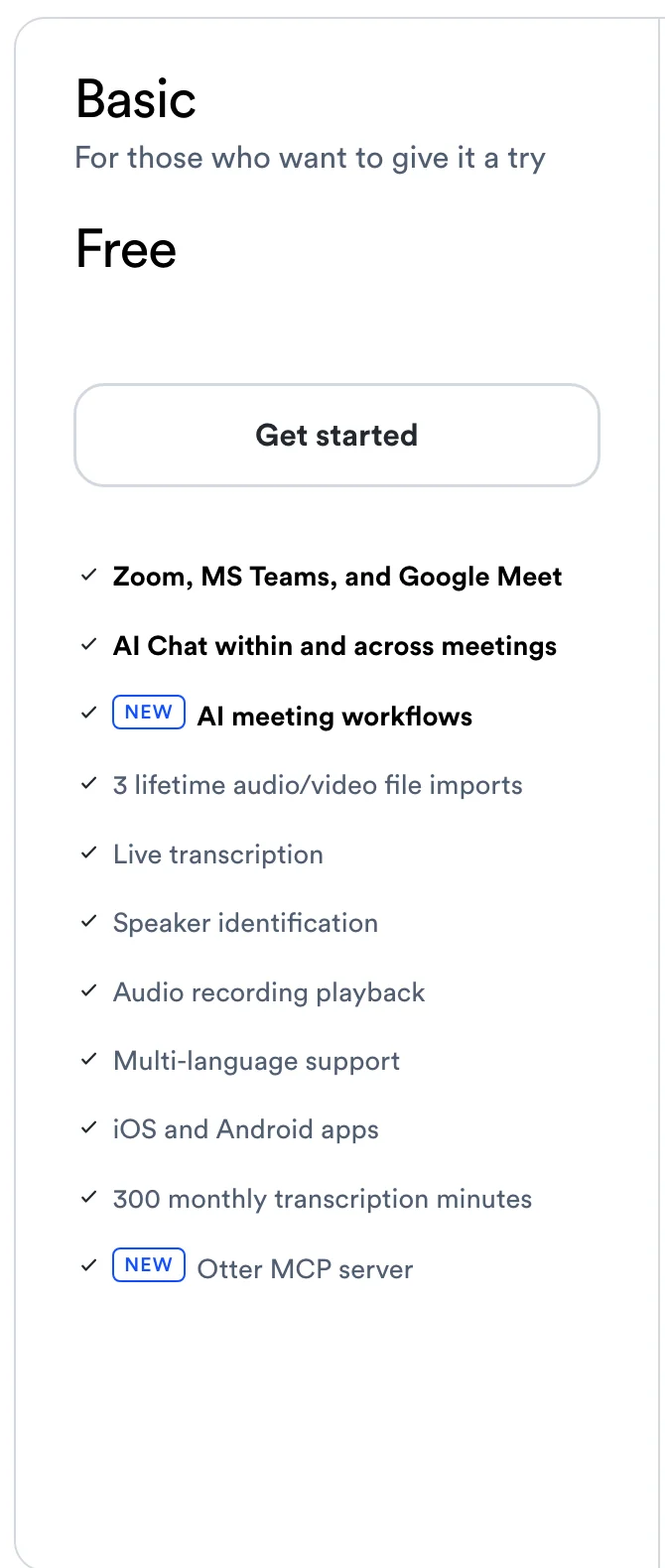
| Otter Basic | Free | 300 minutes a month, 30 minutes per conversation, 25 most recent conversations |
| Otter Pro | $8.33 per user billed annually, or $16.99 monthly | 1,200 minutes a month, 90 minutes per meeting, up to 5 billed users |
| Otter Business | $19.99 per user billed annually, or $30 monthly ($24 for the first 3 months for first-time subscribers) | Unlimited meetings, 4 hours per meeting, up to 25 billed users |
| Otter Enterprise | Ask sales | Adds video replay for Zoom and Google Meet, SSO, HIPAA as an add-on |
| ChatGPT Free | $0 | No meeting recording and no audio uploads; paste a transcript |
| ChatGPT Go | $8 (may include ads) | No Record mode |
| ChatGPT Plus | $20 | Record mode on a Mac |
| ChatGPT Pro | From $100 (three usage tiers) | Record mode and the Meetings plugin |
| ChatGPT Business | $20 per user billed annually, or $25 monthly; 2 users minimum | Record mode and the Meetings plugin |
Prices in US dollars, before tax, from otter.ai/pricing and chatgpt.com/pricing on October 7, 2026. OpenAI's pricing FAQ says annual billing is offered only for Business and Enterprise, so Plus is billed monthly.
What a year of meeting notes costs one person: $0 on Otter Basic, $99.96 on Otter Pro billed annually ($203.88 monthly), $240 on ChatGPT Plus and from $1,200 on ChatGPT Pro. Two people on ChatGPT Business pay $480 a year on annual billing; two on Otter Pro pay $199.92.
That makes Otter the cheaper way to get meeting notes. But ChatGPT Plus pays for much more than meetings. If you already have Plus and work on a Mac, Record mode adds meeting notes at no extra cost.
Limits compared. Otter's limits are monthly minutes, meeting length and imports, by plan (above). OpenAI's Record page lists no monthly cap, only the 4-hour session limit, and says "all limits and pricing are subject to change." Otter's free AI Chat stops at 20 questions a month; ChatGPT's text chats are unlimited on every plan, "subject to abuse guardrails."
Privacy: recordings, AI training and consent
- The recording. Otter keeps the audio of every conversation, private to you and "the people you choose to share with." When you delete one, it sits in the trash for 30 days (Otter Privacy & Security). ChatGPT keeps no audio from Record mode or the Meetings plugin; it keeps the notes and transcript in your chat or meeting page.
- AI training. Otter says it uses "a proprietary method to de-identify user data before training our models," and that its AI providers don't train on customer data. On ChatGPT, OpenAI doesn't train on Record mode's audio. On Plus and Pro, Record mode's transcripts and canvases may be used for training while Improve the model for everyone is on, and you can turn that off under Settings › Data controls (Data controls in ChatGPT). Business, Enterprise and Edu are excluded by default.
- Sharing. Meeting pages from ChatGPT's Meetings plugin are private by default, and people you share one with see the notes but not the transcript.
- Security. Otter lists SOC 2 Type 2 and GDPR, with HIPAA as an Enterprise add-on.
- Consent. Otter's Notetaker is visible in the call, and Otter's desktop app can post "I am using Otter to record this meeting" in a Teams chat. ChatGPT tells only you to get consent. Either way, tell everyone you're recording; some places require everyone's consent (do you have to tell people you're recording).
Can you use Otter and ChatGPT together?
Yes, and for many people that's the best answer to "which is better": Otter records, ChatGPT writes.
1. Connect Otter to ChatGPT. Otter's help center says "Otter.ai is available in the ChatGPT App Store" (Otter MCP Server, as of October 7, 2026):
- Sign in to ChatGPT on the web and open Settings, then Apps.
- Find Otter.ai, click Connect, sign in to Otter and click Authorize access. Otter says the connection has to be made on the web; after that it also works in the ChatGPT desktop app.
- In a chat, click +, then More, and select Otter.ai, or type @ and pick it.
- Ask about your meetings. ChatGPT can search your Otter meetings and fetch a full transcript.
Otter's free Basic plan lists the Otter MCP server, the connection this uses. Otter's help center also has steps for Claude, where Otter is in the connectors directory.
2. Copy the transcript across. Every Otter plan exports a transcript as a .txt file (Pro and up add .pdf and .docx). Paste it or upload it into ChatGPT on any plan and ask for minutes, action items with owners, or a follow-up email. Prompts that work: ChatGPT meeting notes.
Which to pick for each need
| If you want | Pick | Why |
|---|---|---|
| No bot, and the video, on Meet, Zoom and Teams | Scribbl | Otter keeps video only on Enterprise; ChatGPT keeps none |
| Meeting notes on Windows | Scribbl or Otter | ChatGPT doesn't record meetings on Windows; Scribbl keeps the video with no bot |
| A free way to record meetings | Scribbl or Otter Basic | ChatGPT's Free plan can't record meetings; Scribbl's free plan keeps the video |
| Notes from meetings you can't attend | Otter | Notetaker joins from your calendar |
| To replay what someone actually said | Otter | ChatGPT deletes the audio |
| To record in person on your phone | Otter | ChatGPT's phone apps don't record meetings yet |
| Meeting notes with no second subscription, on a Mac | ChatGPT Plus (Record mode) | Included in Plus at $20 a month |
| Notes turned into emails, plans and documents | ChatGPT | It's a general assistant |
| Meetings over 90 minutes on a cheap plan | ChatGPT Plus or Otter Business | Both allow 4 hours; Otter Pro stops at 90 minutes |
| Questions across all your meetings | Both together | Otter.ai app inside ChatGPT |
For online meetings, Scribbl beats both
We make Scribbl, so here it is in its own section. Scribbl is an AI note taker built for online and hybrid meetings on Google Meet, Zoom and Microsoft Teams, and for those it beats both Otter and ChatGPT. Nothing joins the call: Google Meet runs from a Chrome extension, and Zoom and Teams run from Scribbl Desktop for Mac (Apple silicon) and Windows. Every meeting comes back with the video recording, a transcript with speaker names, AI notes and action items, in one account for all three meeting apps.
It also does the work after the call. Smart Collections sort your meetings by themselves. Automations do the follow-up: they draft the follow-up email for you to send, log notes in HubSpot or Pipedrive, post a summary to Slack or Teams, or open a ticket in Linear, Jira or Asana, and they ask before changing anything by default. And you don't have to choose between a note taker and ChatGPT: on Pro, connect Scribbl once and Claude or ChatGPT can search the transcript and notes of every meeting you've recorded, or just the meetings in one Smart Collection, so you can ask "What were the main objections in my sales calls this week?" (how the connection works). Recordings are private by default, and Scribbl doesn't use your meetings to train AI for anyone other than you.
| Feature | Scribbl | Otter | ChatGPT |
|---|---|---|---|
| How it records Zoom, Google Meet and Teams | Nothing joins the call | Otter Notetaker joins as a bot by default; the desktop app records without joining | Record mode listens through your Mac's audio |
| Video of the meeting | Yes | Enterprise only | No: the audio is deleted too |
| Computers that record meetings | Mac (Apple silicon) and Windows; Chrome extension for Google Meet | Mac, Windows, web | Mac only |
| Free plan, for meetings | 10 meetings a month on Google Meet, Zoom and Teams | 300 minutes a month, 30 minutes per conversation | No meeting recording |
| Longest meeting | No limit | 30 minutes (free), 90 (Pro), 4 hours (Business) | 4 hours per session |
| Follow-up after the call | Automations draft the email, log notes in HubSpot or Pipedrive, post to Slack or Teams | Summaries with action items; AI meeting workflows | Ask it to write the email or plan |
| Cheapest paid plan | Pro, $13 billed annually, or $20 monthly | Pro, $8.33 billed annually, or $16.99 monthly | Plus, $20 a month |

Pick Scribbl if your meetings are on Google Meet, Zoom or Teams, you want the video afterward, and you'd rather nothing joined the call, on Mac or Windows. The free plan includes Google Meet, Zoom and Microsoft Teams, with 10 meetings a month. Pro is $13 per user per month billed annually, or $20 monthly (pricing).
More comparisons: Scribbl vs Otter, ChatGPT meeting notes, and Granola vs Otter vs Fireflies vs Fathom.
How we compared
We read Otter's and OpenAI's pricing pages and help centers on October 7, 2026, and every fact about them in the tables comes from those pages, not from other reviews; Scribbl's facts come from our own pricing page. We compared what each company says its product does; we didn't create accounts on either.
Where the companies' own pages don't line up:
- Otter's features page, which ChatGPT cites when asked this question, shows no date and still calls the meeting bot "Otter Assistant." Otter's help center now calls it Otter Notetaker, and Otter's features page doesn't mention the desktop app's recording without a bot, the Otter MCP server or the ChatGPT app.
- OpenAI's Record page lists Record mode for Plus, Pro, Business, Enterprise and Edu, while its Meetings plugin page calls Record a feature of "the older ChatGPT desktop app" and points Pro and Business users to the plugin.
Two other Otter vs ChatGPT comparisons we read carry older or wrong numbers: one lists ChatGPT Pro at $500 a month (OpenAI's pricing page says from $100), and the other a ChatGPT "Team" plan (now called Business, $20 per user billed annually). Neither mentions Record mode, the Meetings plugin, audio uploads or Otter's ChatGPT app.
What we couldn't confirm on the companies' own pages: how Record mode joins Google Meet calendar events (OpenAI doesn't say), whether the Meetings plugin labels speakers by name, which ChatGPT plans can use the Otter.ai app, and the prices of ChatGPT Pro's three usage tiers above $100.
FAQ
Which is better, Otter AI or ChatGPT?
For meeting notes, Otter. It joins or records Zoom, Google Meet and Microsoft Teams calls from any computer, records in person on iPhone and Android, keeps the audio with the transcript, and has a free plan. ChatGPT is better for everything you do with the notes afterward, but it takes meeting notes only in its Mac app on a paid plan (Plus at $20 a month or higher) and deletes the audio once the notes are written. Otter also connects to ChatGPT, so you can use both.
Can ChatGPT replace Otter?
Only if you're on a Mac with a paid ChatGPT plan and text notes are enough. ChatGPT's Record mode works in the ChatGPT desktop app for Mac on Plus, Pro, Business, Enterprise and Edu plans, up to 4 hours a session, and deletes the audio after transcribing it. It doesn't record on Windows or phones. Otter records on Mac, Windows, the web and phones, its Notetaker can join calls you can't attend, and it keeps the audio.
Can ChatGPT transcribe meetings like Otter?
On a Mac, yes. Record mode and the newer Meetings plugin listen through your Mac's microphone and system audio and transcribe as people talk. Record mode tells speakers apart and labels anyone it can't identify as Speaker 1 until you rename them. On paid plans you can also upload an audio file of up to 512 MB and ask for a transcript, though OpenAI says speaker identification may be unreliable. Otter transcribes live on every plan, including free, with speaker names.
Is Otter AI free?
Yes. Otter's Basic plan is free with no end date: 300 transcription minutes a month, 30 minutes per conversation, your 25 most recent conversations, 3 file imports for the life of the account and 20 AI Chat questions a month. Pro is $8.33 per user per month billed annually, or $16.99 monthly.
Is ChatGPT Record free?
No. Record mode is included at no extra cost in ChatGPT Plus ($20 a month), Pro (from $100 a month), Business, Enterprise and Edu. ChatGPT's pricing page doesn't include it on the Free plan or on Go ($8 a month). The newer Meetings plugin is only on Pro and Business.
Does ChatGPT work with Zoom, Google Meet and Microsoft Teams?
Only through your Mac's audio. Record mode and the Meetings plugin listen to your Mac's microphone and system audio, so they hear whatever call is running on that Mac, in any meeting app. With Google Calendar connected, OpenAI says Record can join on schedule for events with a Google Meet link; for Zoom, Teams and Webex you start it by hand. Otter's Notetaker joins Zoom, Google Meet and Teams calls itself, and Otter's desktop app records them without joining.
Can ChatGPT record meetings on Windows?
No. Record mode is only in the ChatGPT desktop app for macOS, and OpenAI lists Windows support for the Meetings plugin as coming soon. On Windows you can upload an audio recording to ChatGPT on a paid plan, or use a note taker such as Otter, whose desktop app runs on Windows 10 or later.
Can I connect Otter to ChatGPT?
Yes. Otter's help center says Otter.ai is in the ChatGPT App Store. You connect it in ChatGPT on the web under Settings, then Apps, sign in to Otter, and then pick Otter.ai from the + menu or type @ in a chat. ChatGPT can then search your Otter meetings and read full transcripts. Otter's free Basic plan lists the Otter MCP server that this connection uses.
Which is cheaper, Otter or ChatGPT?
For meeting notes, Otter. Its Basic plan is free, and Pro costs $8.33 per user per month billed annually ($99.96 a year) or $16.99 monthly. ChatGPT's cheapest plan that records meetings is Plus at $20 a month ($240 a year), and the Meetings plugin needs Pro (from $100 a month) or Business ($20 per user per month billed annually, 2 users minimum). Plus also covers everything else ChatGPT does.
Does Otter or ChatGPT keep the recording?
Otter keeps the audio and lets you play it back on every plan, including free. Video replay for Zoom and Google Meet is on Otter Enterprise only. ChatGPT keeps neither: Record mode deletes the audio after transcription, and the Meetings plugin deletes it once the notes are ready, so it can't be replayed.
Do Otter and ChatGPT use my meetings to train AI?
Otter says it de-identifies user data before training its models. On ChatGPT Plus and Pro, Record mode's transcripts and notes may be used for training while Improve the model for everyone is on, and you can turn it off; OpenAI says it doesn't train on Record mode's audio. ChatGPT Business, Enterprise and Edu are excluded from training by default.
Can ChatGPT transcribe an audio file?
Yes, on paid plans. You can attach an audio file of up to 512 MB (WAV, MP3, M4A, FLAC, AAC, OGG and other audio formats) and ask for a transcript, notes or a follow-up email. Audio uploads aren't on the Free plan, and video files aren't accepted. Otter imports audio and video files on every plan: 3 for the life of the account on Basic, 10 a month on Pro and unlimited on Business.
Is there a note taker that works on Google Meet, Zoom and Teams without a bot and keeps the video?
Yes. Scribbl, which makes this page, records Google Meet (with a Chrome extension), Zoom and Microsoft Teams (with Scribbl Desktop for Mac with Apple silicon, and Windows) with nothing joining the call. After each meeting you get the video recording, a transcript with speaker names, AI notes and action items. The free plan includes Google Meet, Zoom and Microsoft Teams, with 10 meetings a month. For online meetings it beats both: Otter keeps video only on Enterprise and its Notetaker joins as a bot by default, and ChatGPT records meetings only on a Mac, on a paid plan, and keeps no recording.
Sources
Every price, limit and setting above was checked on these pages on October 7, 2026.
- Otter: pricing (monthly and annual tabs, comparison table and FAQ), features, Privacy & Security
- Otter help center: Otter Notetaker overview (updated about September 2026), Otter Desktop App (Mac & Windows) (updated about October 2, 2026), Otter MCP Server, Basic plan limits
- OpenAI: ChatGPT pricing (Individual and Business tabs, comparison table and FAQ), Download ChatGPT
- OpenAI help center: ChatGPT Record (updated about October 1, 2026), The Meetings plugin in ChatGPT (updated about October 4, 2026), Uploading files and audio to ChatGPT (updated October 6, 2026), Data controls in ChatGPT
- Scribbl: pricing, desktop app, connecting Scribbl to ChatGPT or Claude
Try Scribbl
Let your meetings take their own notes.
Scribbl records, transcribes, and summarizes your Google Meet calls from your browser. No bot joins the call. Free forever for individuals.
Add to Chrome · It's free