Scribbl vs MeetGeek (2026): The Honest Head-to-Head
Scribbl vs MeetGeek compared feature by feature: pricing, platforms, bot vs botless recording, transcription accuracy, languages, integrations, and a clear verdict on which to pick.
Updated October 7, 2026

On this page9 sections
If you want meeting notes with no participant added to the call, a free plan with no credit card, and your meetings wired into the AI you already use so the follow-up work actually gets done, Scribbl is the pick. MeetGeek is an automated recorder that joins your meetings by default, files transcripts, and emails recaps. The decision comes down to two questions: do you want a bot in your meeting, and do you want notes that just sit there or notes your AI can act on.
The full comparison table
This is the side-by-side most "scribbl vs meetgeek" searches are missing. Figures are current as of June 2026. MeetGeek pricing and limits change over time, so confirm the specifics on their site before you buy; we hedge anything that is not a verified Scribbl fact.
| Feature | Scribbl | MeetGeek |
|---|---|---|
| Recording method | Botless (nothing joins) | Bot joins, bot-free option |
| Bot appears in the call | No | Yes (default) |
| Announced / notifies attendees | No | Bot is visible |
| Free plan, no credit card | 10 meetings a month | Free tier, monthly hour limits |
| Paid plans (per user / mo) | $13 annual, $20 monthly | ~$9.99-$19.99 |
| Google Meet | Yes | Yes |
| Zoom | Yes | Yes |
| Microsoft Teams | Yes | Yes |
| Chrome extension + desktop app | Yes | Web app / bot |
| Transcription + summaries | Yes | Yes |
| Action items / decisions | Yes | Yes |
| Video recording + storage | Yes | Yes |
| CRM / integrations (HubSpot, Slack, Notion) | Automations: HubSpot, Pipedrive, Slack, Notion and more | Yes |
| Connects meetings to ChatGPT / Claude | Yes | Yes |
| Rating | 5.0 from 3,000 reviews on the Chrome Web Store; 4.9 from 725 reviews on G2 | Varies by source |
The read on this table: Scribbl wins on capture that never adds a participant, a free plan with no card, and Automations that act on each meeting so the work gets done instead of just stored.
Scribbl vs MeetGeek at a glance
- Capture method: automated bot joins the call (bot-free option exists)
- Visible to attendees: yes, a participant is added by default
- Platforms: Google Meet, Zoom, Microsoft Teams
- Free plan: free tier with monthly limits on recorded hours
- Best at: automated recording, transcripts, and emailed recaps
- Capture method: botless, nothing joins the call
- Visible to attendees: no bot, nothing announced
- Platforms: Google Meet, Zoom, and Microsoft Teams
- Free plan: 10 meetings a month, no credit card required
- Best at: notes with no bot, and the follow-up done for you
Pricing: free tiers and paid plans
Both tools let you start without paying, but the shape of the free plan differs.
Scribbl has a free plan with no credit card required: 10 meetings a month, including Google Meet, Zoom and Teams. You get botless AI notes and summaries from the moment you sign up, and Pro is $13 per user per month billed annually, or $20 monthly. You can review current plans on the pricing page.
MeetGeek offers a free tier with monthly limits on recorded hours, then paid tiers commonly cited around $9.99 per user per month (Pro) and roughly $19.99 per user per month (Business) on annual billing, with higher language and integration limits at the top. Because MeetGeek occasionally revises these, treat those numbers as a guide and confirm on their pricing page.
Capture method: their bot vs Scribbl botless
This is the line that decides most "scribbl vs meetgeek" evaluations.
MeetGeek's core model sends a recorder that joins the meeting and captures it from the inside. That powers the automated transcripts and recap emails MeetGeek is known for, and MeetGeek does offer a bot-free path as well. The default tradeoff is that a participant shows up in the call. On external calls the calculus changes: prospects, clients, candidates, and partners all see the bot join, and some react to it. When a room is sensitive about being recorded, a visible extra attendee can shift the conversation before it starts.
Scribbl is botless by default. Nothing joins the call, so the attendee list looks exactly as it would if you were not taking notes at all. Nothing is announced, no admission prompt appears, and there is no participant to explain. For anyone whose meetings regularly include people outside their own company, that is the feature that decides it. Our full write-up on the botless AI notetaker walks through why this matters more than any feature checklist.
Transcription accuracy and languages
Both tools produce accurate, speaker-labeled transcripts for clear English audio on the major platforms, and both handle action items and structured summaries well. Real-world accuracy depends far more on audio quality, accents, and crosstalk than on the brand, so treat any single accuracy percentage with skepticism unless it comes from a test on your own calls.
On languages, MeetGeek advertises transcription across a wide set, commonly cited as 50-plus, plus translation features. If your language list is long, check it against their support page.
Scribbl transcribes more than 85 languages on Google Meet, Zoom and Microsoft Teams, and focuses on making the captured meeting useful afterward. If your calls are primarily in English or another widely supported language, you will not feel the difference here.
After the call: connect to the AI you already use
A transcript and an emailed recap are useful. The work actually getting done is better.
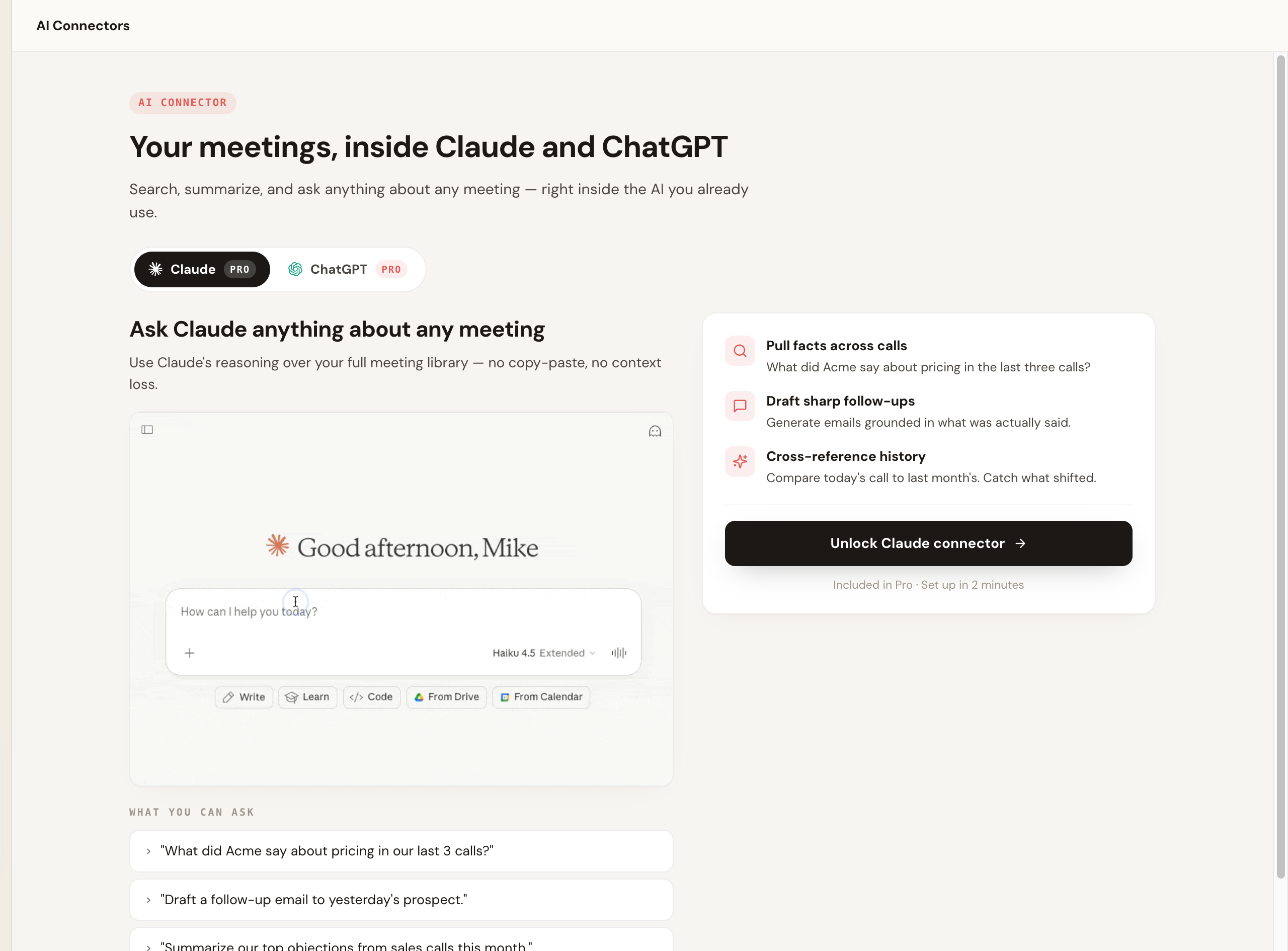
Scribbl connects your meetings to the AI you already use, ChatGPT or Claude (MeetGeek connects to both too), and Smart Collections narrow that search to one group of meetings, so you can ask "What were the main objections in my sales calls this week?" and get an answer from just those calls. You can also hand the transcript to your own assistant and have it draft the recap, update the tracker, or reason across several past calls at once. Instead of reading a recap in another inbox and then redoing the work by hand, the meeting becomes context your existing AI can act on. Automations do the follow-up for you: draft the email, log notes in HubSpot or Pipedrive, post to Slack or Teams, save to Notion, Google Drive or Confluence, or open a Linear, Jira, Asana or Monday ticket, and by default they ask before changing anything. You can also tell Scribbl the job in plain words and it runs with your own Claude.
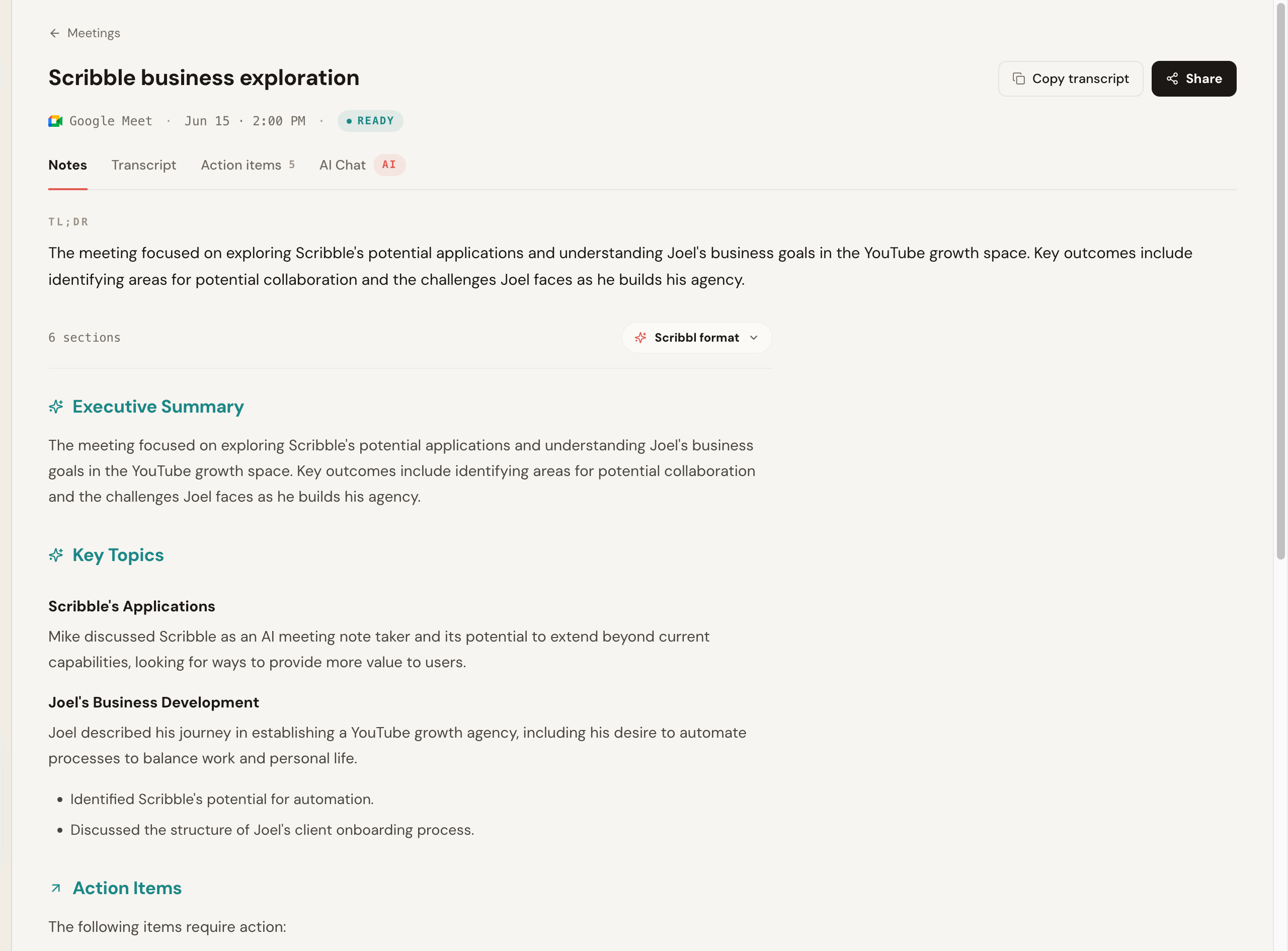
Here is the Scribbl notes view after a Google Meet call, with a TL;DR, executive summary, key topics and action items. The transcript and structured summary were generated with no participant ever joining the call. The "Google Meet" badge is the only sign a meeting was captured at all.
After the call, instead of opening yet another summary, you ask Claude or ChatGPT to pull facts across calls or draft the follow-up, grounded in what was actually said.
If you are weighing more than two tools, our Read AI vs Otter.ai breakdown maps another common pairing.
Scribbl strengths and MeetGeek tradeoffs
- Botless on Meet, Zoom, and Teams, all in one account
- Free plan, 10 meetings a month, no credit card to start
- Smart Collections narrow what ChatGPT or Claude searches
- Automations do the follow-up and ask before changing anything
- Chrome extension for Google Meet plus Scribbl Desktop for Zoom and Teams
- Default bot joins and is visible on the call
- Bot-free capture is an option, not the default
- Free tier has monthly limits on recorded hours
Who should pick Scribbl over MeetGeek
Pick Scribbl if you regularly meet with clients, prospects, or candidates where adding a recording bot changes the room, you want to start free with no credit card, and you want your notes connected to ChatGPT or Claude so follow-ups get drafted instead of just stored. Sales teams especially gravitate here; see Scribbl for sales.
MeetGeek suits people whose meetings are mostly internal and who want emailed recaps from a recorder that attends every call.
Scribbl is rated 5.0 from 3,000 reviews on the Chrome Web Store and 4.9 from 725 reviews on G2, and is used by more than 10,000 organizations. People who switch almost always say the same thing: they liked the automated recaps fine, but they were tired of a bot joining every external call.
Scribbl vs MeetGeek FAQ
What is the main difference between Scribbl and MeetGeek? Capture method and what happens after the call. MeetGeek is built around an automated recorder that joins your meeting and emails recaps, and it also offers a bot-free option. Scribbl is botless by default, so nothing joins the call and nothing is announced to attendees, and its Automations act on each meeting (draft the follow-up email, log notes in HubSpot or Pipedrive, post to Slack or Teams) so the follow-up work actually gets done.
Is Scribbl free? Yes. Scribbl has a free plan with no credit card required: 10 meetings a month, including Google Meet, Zoom and Teams. You get botless AI notes and summaries from the moment you sign up, and Pro is $13 per user per month billed annually, or $20 monthly, when you need more.
Does MeetGeek work on Google Meet? Yes. MeetGeek supports Google Meet along with Zoom and Microsoft Teams, and is generally multi-platform. Scribbl also supports all three in one account, so platform coverage is rarely the deciding factor between the two. The decision usually comes down to whether you want a bot in the call or not, and whether you want the follow-up done for you.
Are Scribbl and MeetGeek free to start? Both offer a way to start without paying. Scribbl has a free plan with no credit card required that covers 10 meetings a month on Google Meet, Zoom and Teams. MeetGeek offers a free tier with monthly limits on recorded hours. Confirm current MeetGeek limits on their pricing page, since tiers change over time.
How many languages does MeetGeek support? MeetGeek advertises transcription in a wide set of languages, commonly cited as 50-plus, plus translation features. If your language list is long, check it against MeetGeek's support page.
Does Scribbl work with Zoom, Google Meet, and Microsoft Teams? Yes. Scribbl supports Google Meet with its Chrome extension, and Zoom and Microsoft Teams with Scribbl Desktop (Mac with Apple silicon and Windows), all botless and all in one account. MeetGeek covers the same major platforms, so coverage is comparable. The deciding factor is usually botless capture and what happens to your notes afterward.
Which is better for sales and external client calls? Scribbl, in most cases. On external calls with prospects, clients, or candidates, a visible recording bot can change the room before the conversation starts. Scribbl adds no participant and announces nothing, and its Automations draft the follow-up email and log the notes in HubSpot or Pipedrive, so follow-ups get done instead of just stored.
Try Scribbl
Let your meetings take their own notes.
Scribbl records, transcribes, and summarizes your Google Meet calls from your browser. No bot joins the call. Free forever for individuals.
Add to Chrome · It's free